LeadRocks vs Kitt AI: Contact Database or Verified Email Finder?
LeadRocks gives you a 100M+ contact database to search. Kitt AI finds and verifies emails you already have names for, at a fraction of a cent. Here is which one fits your outbound workflow.
TL;DR
- LeadRocks is a prospecting database. It has 100M+ B2B contacts, filters for job title, industry and company size, a LinkedIn Chrome extension, and credit plans from $29/mo.
- Kitt AI (trykitt.ai) is an email finder and verifier. It doesn't give you a database to browse. It finds and checks the email for a name and domain you already have, and it's built for catch-all domains and pipelines like Clay.
- Cost per result is very different. LeadRocks works out to roughly $0.029 per credit on every paid plan. Kitt charges about $0.005 per email found and $0.0015 per verification, and individuals can use it free.
- Pick LeadRocks if you don't have a list yet and need to build one. Pick Kitt AI if you already have names from LinkedIn, Clay or a CRM and need deliverable emails for them.
- If you want both jobs in one tool (search, finding, verification and catch-all checks), Tomba covers them starting with a 25-search free tier.
What is LeadRocks?#
LeadRocks is a B2B contact database with data enrichment on top. Its main job is helping you find people you don't know yet. You filter by job title, location, company name, industry and team size, and you get back contacts with emails, phone numbers and LinkedIn profile URLs. The company says the database holds more than 100 million records.
You'll mostly use it in two places:
- The web app. This is where you build lists: filter, select, export to CSV or push to your outreach tool.
- The Chrome extension. It sits on LinkedIn and LinkedIn search pages and pulls contact data for the profiles you're viewing.
LeadRocks also has an email verifier that works on emails you found outside the platform, bulk list verification, and an API. The official LeadRocks site sells it as "better leads, less work," and that's a fair description. It's a list-building tool first and a verification tool second.
Where LeadRocks is strong: discovery. If your brief is "find 500 heads of RevOps at US SaaS companies with 50-200 employees," you can do it inside LeadRocks without scraping, buying another database, or stitching three tools together. Every plan includes unlimited users, which helps small teams that share one pool of credits.
What is Kitt AI?#
Kitt AI, which runs at trykitt.ai, works the other way around. It doesn't ask who you want to reach. It asks for the person's name and company domain and returns their working email address.
Kitt describes itself as an email finder and verifier. Its main technical claim is that it goes past a standard SMTP check. It cross-references addresses against enterprise identity servers so it can confirm emails on catch-all domains (servers that accept every address, so a normal SMTP ping tells you nothing) and spot people who have changed jobs. The vendor says it finds and verifies around 80% of B2B addresses and claims a bounce rate under 0.1%. Treat those as vendor numbers until you test them on your own data.
Kitt is built for automated pipelines. It has native integrations with Salesforce, HubSpot and Clay, plus a Chrome extension, CSV upload and an API. It's also listed as an MCP server, so AI agents can call it directly.
Where Kitt AI is strong: cheap, high-volume verification, especially on catch-all domains, where most finders give up and label the address "risky."
How do LeadRocks and Kitt AI compare side by side?#
The key point is that these tools solve neighbouring problems, not the same one. LeadRocks answers "who should I contact?" Kitt AI answers "what is this person's real, deliverable email?"
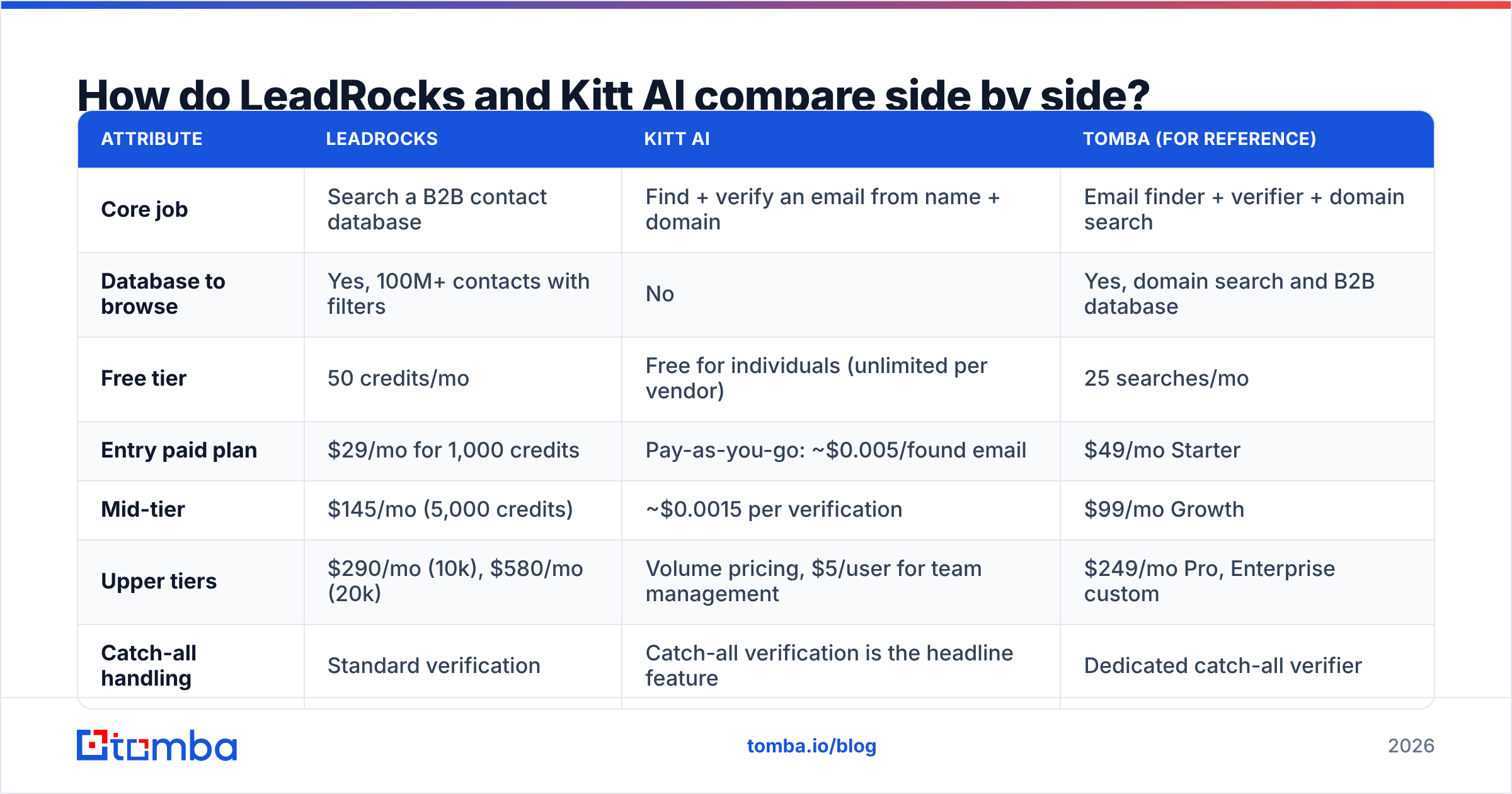
| Attribute | LeadRocks | Kitt AI | Tomba (for reference) |
|---|---|---|---|
| Core job | Search a B2B contact database | Find + verify an email from name + domain | Email finder + verifier + domain search |
| Database to browse | Yes, 100M+ contacts with filters | No | Yes, domain search and B2B database |
| Free tier | 50 credits/mo | Free for individuals (unlimited per vendor) | 25 searches/mo |
| Entry paid plan | $29/mo for 1,000 credits | Pay-as-you-go: ~$0.005/found email | $49/mo Starter |
| Mid-tier | $145/mo (5,000 credits) | ~$0.0015 per verification | $99/mo Growth |
| Upper tiers | $290/mo (10k), $580/mo (20k) | Volume pricing, $5/user for team management | $249/mo Pro, Enterprise custom |
| Catch-all handling | Standard verification | Catch-all verification is the headline feature | Dedicated catch-all verifier |
| Phone numbers | Yes | No (email focused) | Yes, phone finder + validator |
| Chrome extension | Yes, LinkedIn-focused | Yes | Yes |
| API | Yes | Yes, plus MCP listing | Yes, plus CLI and MCP |
| Native integrations | CSV / outreach tool exports | Salesforce, HubSpot, Clay | HubSpot, Salesforce, Zapier, Sheets and more |
| Best for | Building net-new lists | Verifying lists you already have at scale | Teams that want search and verification in one tool |
Pricing is based on each vendor's public pricing at the time of writing. Check Kitt's pricing page and LeadRocks' site before you buy, because credit-based plans change often.

Which is cheaper: LeadRocks or Kitt AI?#
Kitt AI is much cheaper per email. But you're paying for different things, so a straight price comparison can mislead you.
Here's the math:
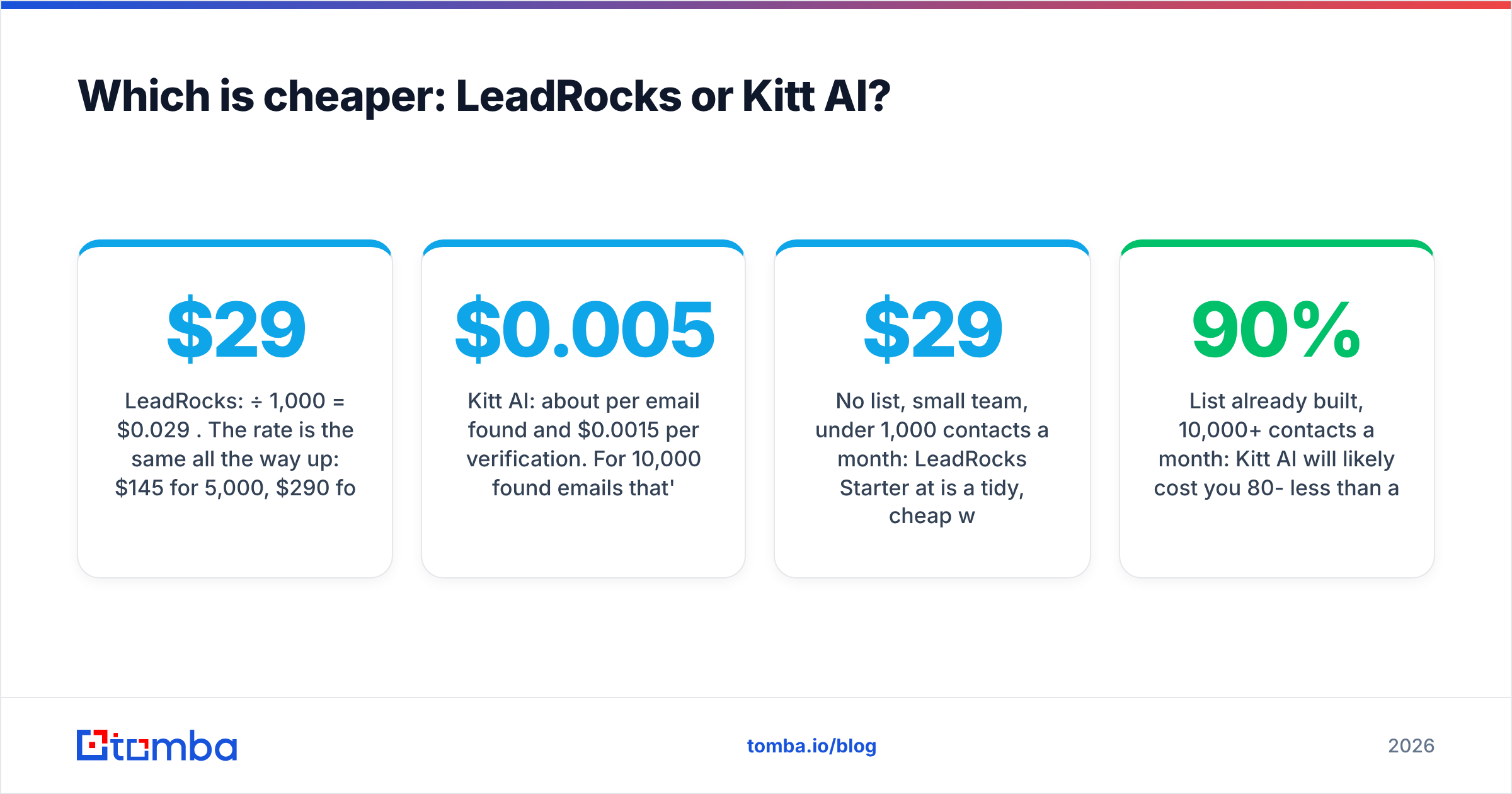
- LeadRocks: $29 ÷ 1,000 = $0.029 per credit. The rate is the same all the way up: $145 for 5,000, $290 for 10,000 and $580 for 20,000 all come to $0.029. Unusually, you get no volume discount by moving to a bigger plan. The bigger plans just give you more monthly headroom.
- Kitt AI: about $0.005 per email found and $0.0015 per verification. For 10,000 found emails that's around $50, compared with $290 on LeadRocks.
The catch is that a LeadRocks credit gets you a contact you didn't have before: a name, title, company, email and often a phone number, pulled from a searchable database. A Kitt credit gets you the email for a contact you already sourced somewhere else. If you're paying for Sales Navigator, Clay or another list source anyway, Kitt's pricing is very hard to beat. If you have no list at all, Kitt's low price doesn't help, because you have nothing to give it.
Use this rule of thumb:
- No list, small team, under 1,000 contacts a month: LeadRocks Starter at $29 is a tidy, cheap way to prospect.
- List already built, 10,000+ contacts a month: Kitt AI will likely cost you 80-90% less than any per-credit database.
- You need both: budget for two tools, or pick one platform that does both, like Tomba's domain search plus finder.

Which is more accurate: LeadRocks or Kitt AI?#
Kitt AI puts more effort into accuracy, particularly on catch-all domains. LeadRocks puts more into coverage. Neither vendor publishes an independent third-party audit, so here's how the difference plays out in practice.

Why catch-all domains matter. A large share of mid-market and enterprise companies run mail servers set to catch-all. A normal SMTP verifier sends a handshake, the server says "yes, that mailbox exists," and it says that for every address. So most tools label these emails "accept-all" or "risky." You then choose between skipping them (losing a big chunk of your best accounts) or sending anyway (and taking bounces that damage your domain).
Kitt's selling point is that it resolves these cases by checking identity signals instead of trusting the SMTP reply. If the method works as described, you get a large number of usable contacts back from your "risky" pile. That's where the vendor's under-0.1% bounce claim comes from.
LeadRocks runs verification on its database records and offers a standalone verifier, but it doesn't market a special catch-all method. Its accuracy depends on how fresh the database is. Any static B2B database decays as people change jobs, and industry estimates usually put B2B contact decay at around 20-30% a year. LeadRocks re-verifies records, but you should still check any export before a large send.
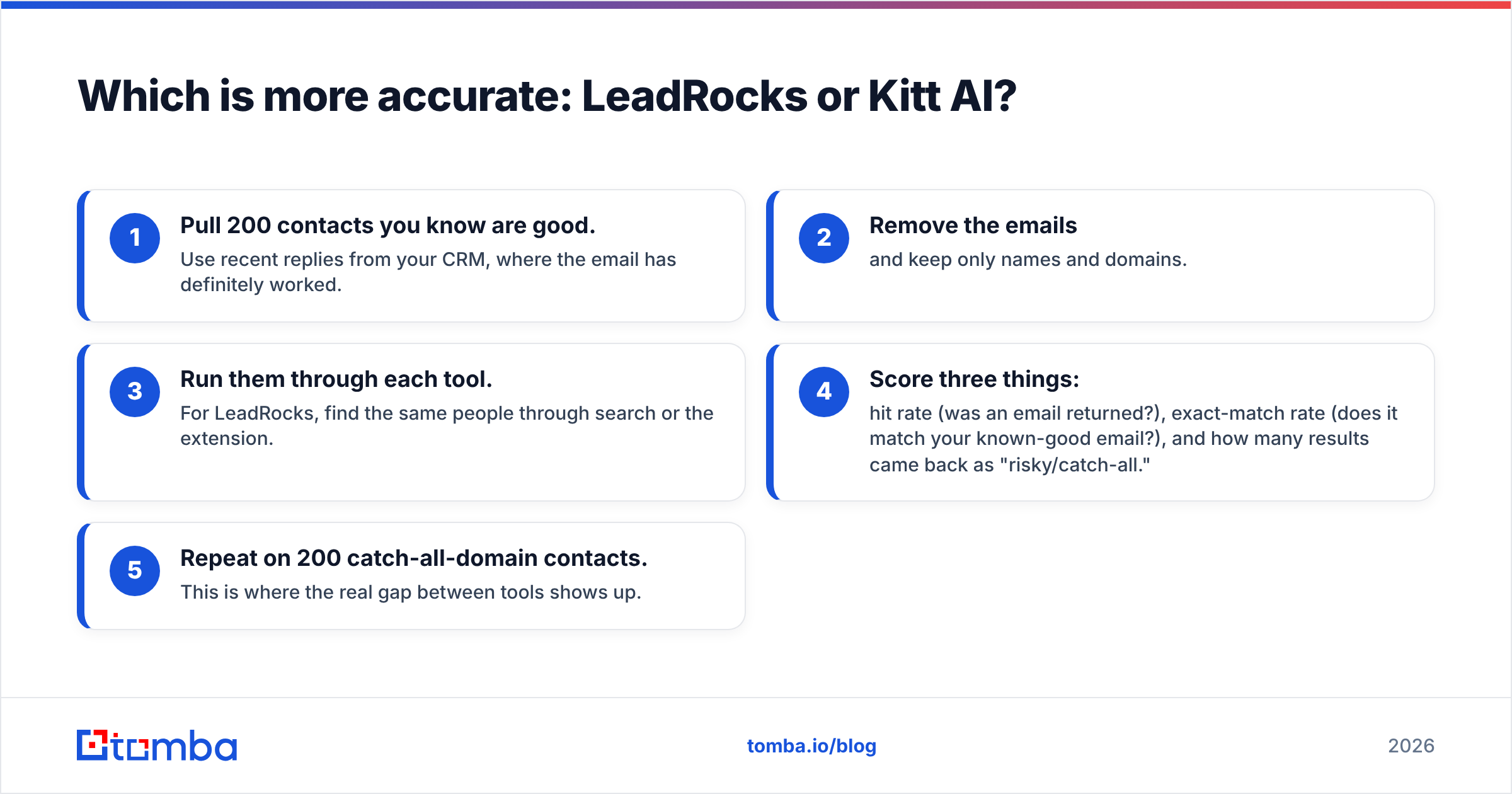
How to test either tool yourself (about 30 minutes):
- Pull 200 contacts you know are good. Use recent replies from your CRM, where the email has definitely worked.
- Remove the emails and keep only names and domains.
- Run them through each tool. For LeadRocks, find the same people through search or the extension.
- Score three things: hit rate (was an email returned?), exact-match rate (does it match your known-good email?), and how many results came back as "risky/catch-all."
- Repeat on 200 catch-all-domain contacts. This is where the real gap between tools shows up.
Whatever you use to find emails, run the final list through an email verifier before it goes into a sequence. It's the cheapest protection your sending domain has.
What does the day-to-day workflow look like?#
LeadRocks workflow (manual prospecting):
- Open the database. Set filters for title, seniority, industry, geography and headcount.
- Review and pick contacts. Spend credits to reveal emails and phones.
- Or use the extension on LinkedIn. Scroll a Sales Navigator or LinkedIn search and pull contacts page by page.
- Export to CSV or your outreach tool.
That suits an SDR or founder doing their own prospecting. It's visual and fast, and you don't need technical skills.
Kitt AI workflow (pipeline enrichment):
- Source names somewhere else. That could be a Clay table, a CRM, a scraped event list or Sales Navigator.
- Send the rows to Kitt. Use the Clay integration, the API, a CSV upload, or the Salesforce/HubSpot integrations.
- Get emails back with verification status, including resolved catch-alls.
- Push to sequencing.
That suits RevOps and growth engineers running waterfall enrichment, where Kitt is one step among several providers. Its MCP listing also makes it a natural fit for AI-agent prospecting workflows.
If you're a solo seller without a Clay subscription, Kitt will feel a bit bare, because there's nothing to browse. If you're a RevOps lead, LeadRocks can feel like a manual detour away from the pipeline you already built.
What are the pros and cons of each?#
LeadRocks pros
- Built-in discovery. Search and filter 100M+ contacts without another data source.
- Emails and phones together. Useful if you mix cold calls with email.
- Unlimited users on every plan. Good for small teams that share credits.
- Low starting price. $29/mo is cheap for a database with an extension.
LeadRocks cons
- No volume discount. Every paid tier costs the same $0.029 per credit.
- No dedicated catch-all method is advertised. Expect "risky" results on enterprise domains.
- Accuracy depends on data freshness. Verify before sending.
Kitt AI pros
- Very low unit cost. Fractions of a cent per email and per verification.
- Catch-all verification is its core feature, not an add-on.
- Built for automation. Clay, Salesforce and HubSpot integrations, an API and MCP.
- Free for individual users, according to the vendor.
Kitt AI cons
- No database. You need a separate lead source.
- No phone numbers. It's strictly an email tool.
- The strongest accuracy claims come from the vendor. Test them against your own ICP.

Is LeadRocks or Kitt AI better for your team?#
Choose LeadRocks if:
- You're starting from zero and need to build lists
- You prospect by hand from LinkedIn and want one extension that gives you both email and phone
- Your volume is modest (hundreds to a few thousand contacts a month)
- Your target market is SMB-heavy, where catch-all domains are less common
Choose Kitt AI if:
- You already source contacts through Clay, Sales Navigator or your CRM
- You're enriching tens of thousands of rows a month and unit cost matters
- Your ICP is mid-market or enterprise, where catch-all domains are common
- You run waterfall enrichment and want a cheap, accurate verification step
Use both if you have the budget and a clean handoff: LeadRocks for discovery, Kitt to re-verify anything flagged risky. Plenty of teams run this kind of two-tool setup. The downside is two bills, two logins, and one more place for data to drift apart.
For extra context, G2's email finder category collects user reviews of these kinds of tools and is a good sanity check against vendor claims, including ours.
Is there an alternative that does both jobs?#
If you don't want to choose between a database and a verifier, look for a platform that does both natively. That's the case for Tomba. It's worth being clear about what it does and doesn't do:
- Discovery: domain search returns every email Tomba has found for a company, and the B2B database lets you filter by role and company. It's closer to LeadRocks than to Kitt here.
- Finding: the core email finder returns an address from a name and domain, through the web app, Chrome extension, Google Sheets, API or CLI.
- Verification: there's a standalone verifier plus a dedicated catch-all verifier, so accept-all domains get a real answer instead of a "risky" label.
- Phones: a phone finder and phone validator, if you need calling data.
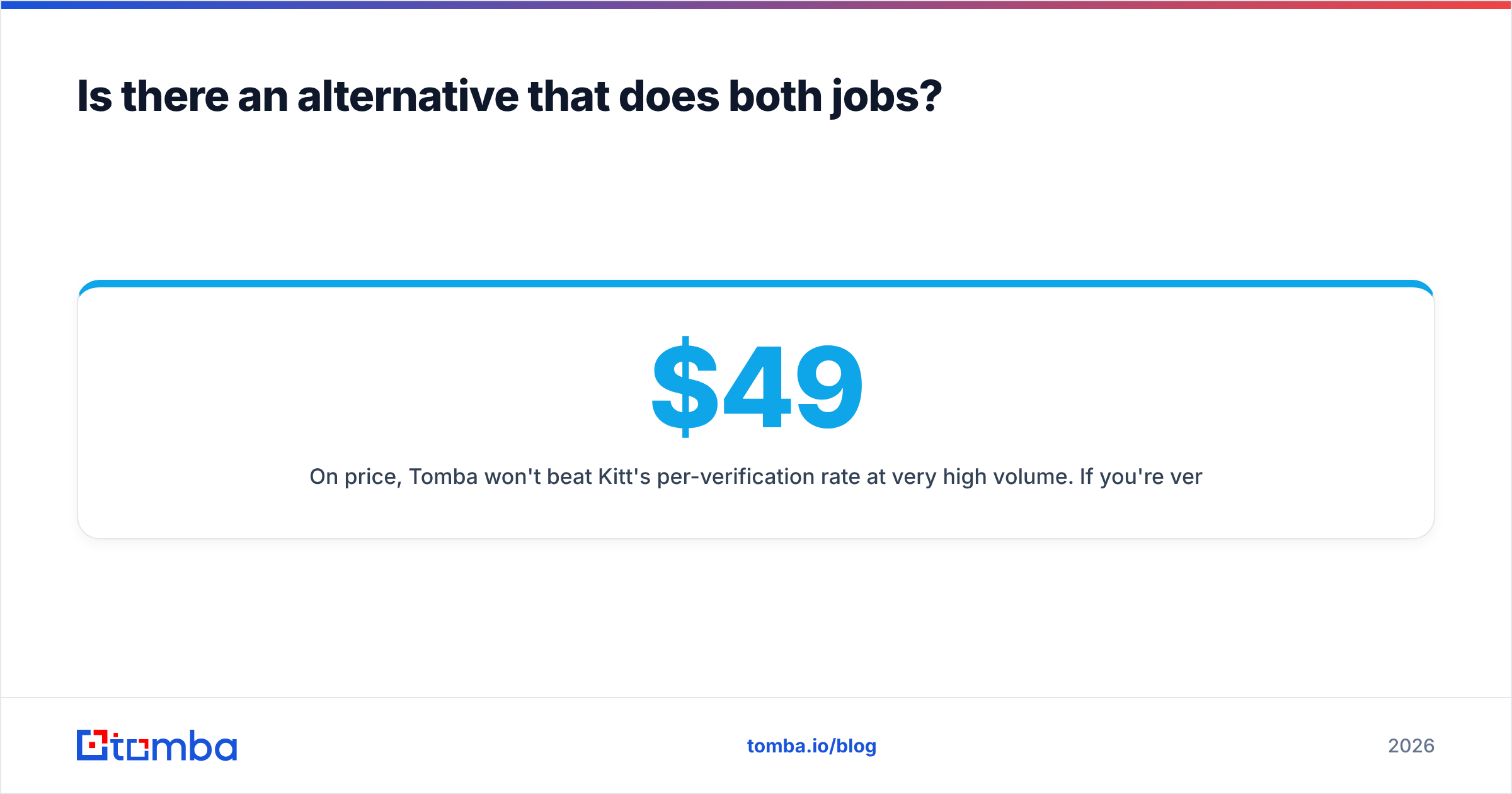
On price, Tomba won't beat Kitt's per-verification rate at very high volume. If you're verifying millions of rows through Clay, Kitt's pricing model is built for exactly that. Where Tomba fits is a team that wants search, finding and catch-all verification under one login and one bill, starting with a free tier and moving up through fixed monthly plans. Full Tomba pricing: Free (25 searches/mo), Starter $49/mo, Growth $99/mo, Pro $249/mo, Enterprise custom.
Final verdict: LeadRocks vs Kitt AI#
LeadRocks wins on discovery, and Kitt AI wins on verified cost per email. They aren't really substitutes:
- If you need to find who to contact, LeadRocks is the cheaper, simpler starting point.
- If you need deliverable emails for contacts you already have, particularly on catch-all domains and at high volume, Kitt AI is the stronger and cheaper option.
- Whichever you choose, run a 200-contact test on your own ICP before committing. Vendor accuracy claims from either company are a starting point, not a guarantee.
If you'd rather not run two tools, try Tomba Email Finder. Enter a name and company domain, get a verified professional email back, and use the same account for domain search and catch-all verification when you need to build lists or clean up risky results. The free plan gives you 25 searches a month, which is enough to run the test above on your own contacts before you pay anything.
Related guides#
// get started
Find, verify and enrich your first contacts today
Start on the free plan with 25 searches a month, then scale when your team is ready.
Free plan · No credit card required · GDPR & CCPA
// about the author