Leadrocks vs Leadsrush (2026): Which Email Finder Should You Pick?
Leadrocks sells a 100M+ contact database with a LinkedIn extension. Leadsrush sells a budget email finder with separate verification credits. Here is how they compare on data, pricing, and credit rules, and which one fits your outbound workflow.
TL;DR
- Leadrocks is mainly a B2B contact database. It lists 100M+ records with emails, phone numbers, and LinkedIn profiles, and adds a LinkedIn scraping extension. Pick it if you build lists by filtering on title, industry, and company size.
- Leadsrush is mainly a low-cost email finder and verifier. It offers domain search, technology-based company lookup, and separate verification credits. Pick it if you already know which companies you want and just need their emails.
- On price, Leadsrush's published paid tiers ($29 and $59/mo) cost less than a typical Leadrocks paid plan. Leadrocks gives you more data per record, including phone numbers.
- Both tools use credit systems with catches. Leadrocks charges for lookups that come back blank or invalid. Leadsrush credits reset every month with no rollover.
- If you need to find emails reliably by name plus domain and verify them in the same place, a dedicated email finder like Tomba is the third option to test.
What are Leadrocks and Leadsrush?#
These two tools look alike on a feature list but solve different problems, so it's worth separating them first.
Leadrocks calls itself a data enrichment platform and B2B contact database. You open a searchable database, filter by job title, location, company name, industry, and team size, and export contacts that come with emails, direct phone numbers where available, and LinkedIn URLs. A Chrome extension pulls contact data while you browse LinkedIn profiles. It's built for people who start with an ideal customer profile and need a list.
Leadsrush calls itself an all-in-one lead generation tool, but at its core it's an email finder. You enter a domain and get the employees it knows about with their email addresses. You can also look up one person's address, verify emails singly or in bulk, and find companies by the technology they run (Shopify, WooCommerce, Stripe, PayPal, and so on). It's built for people who already know which companies to target and need the right inbox at each one.
In short, Leadrocks is closer to an Apollo-style list builder, and Leadsrush is closer to a Hunter-style domain search tool.
How do Leadrocks and Leadsrush compare at a glance?#
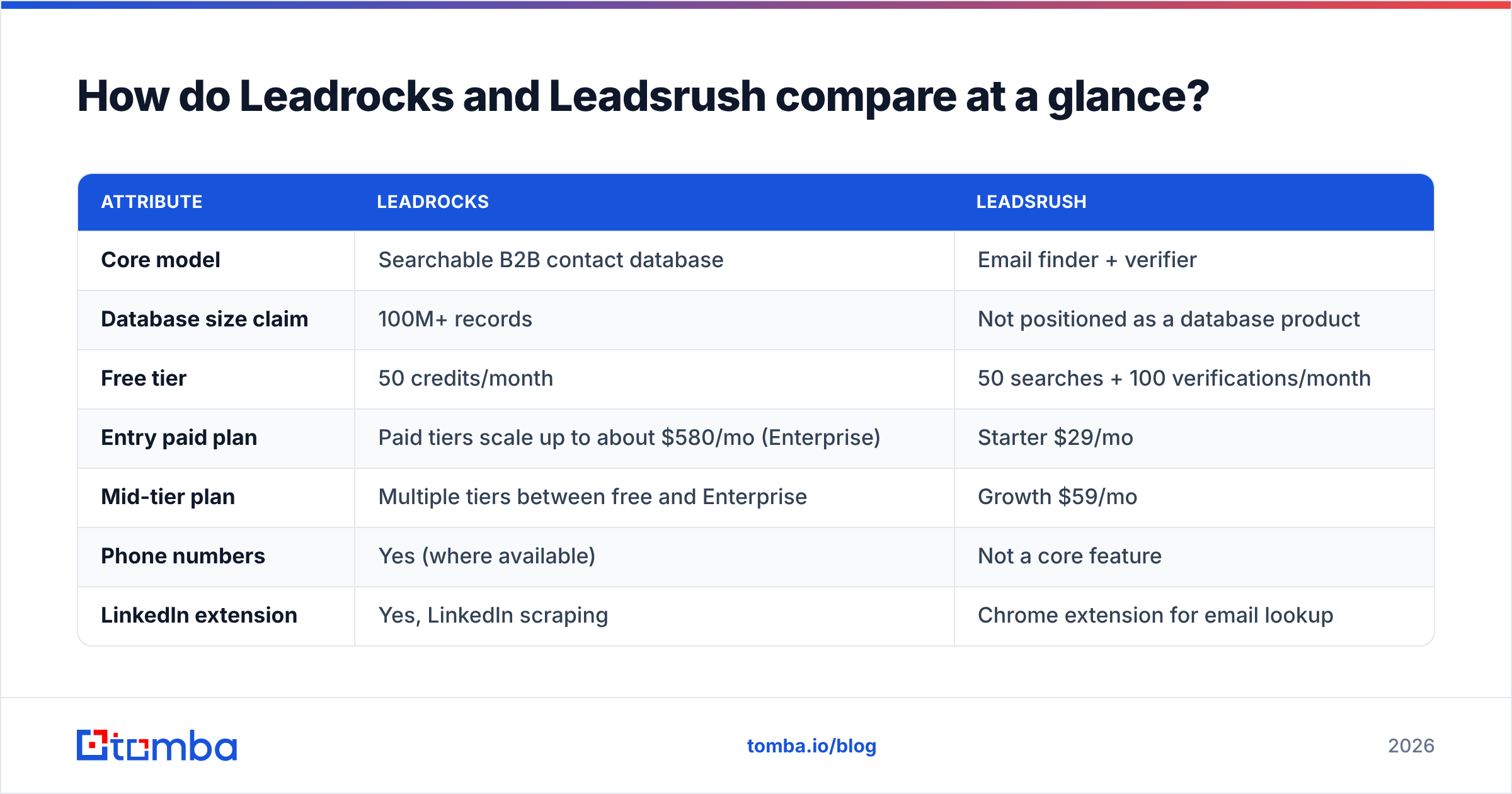
This is the core comparison. Figures come from each vendor's public pages and third-party listings at the time of writing. Credit rules change, so check the vendors' own pages before you buy.
| Attribute | Leadrocks | Leadsrush |
|---|---|---|
| Core model | Searchable B2B contact database | Email finder + verifier |
| Database size claim | 100M+ records | Not positioned as a database product |
| Free tier | 50 credits/month | 50 searches + 100 verifications/month |
| Entry paid plan | Paid tiers scale up to about $580/mo (Enterprise) | Starter $29/mo |
| Mid-tier plan | Multiple tiers between free and Enterprise | Growth $59/mo |
| Phone numbers | Yes (where available) | Not a core feature |
| LinkedIn extension | Yes, LinkedIn scraping | Chrome extension for email lookup |
| Domain search | Via company filters | Yes, a core feature |
| Technology-based lookup | No | Yes (Shopify, Stripe, WooCommerce, etc.) |
| Built-in verification | Emails come with validity status | Separate verification credit pool |
| Users | Unlimited users | Unlimited users, shared credit pool |
| Credit catch | Credits spent on blank/invalid results | Credits reset monthly, no rollover |
| Lifetime deal history | Yes (AppSumo) | Yes (RocketHub) |

How does each tool actually find contacts?#
The main difference is where the data comes from and when it's checked, and that affects every result you get.
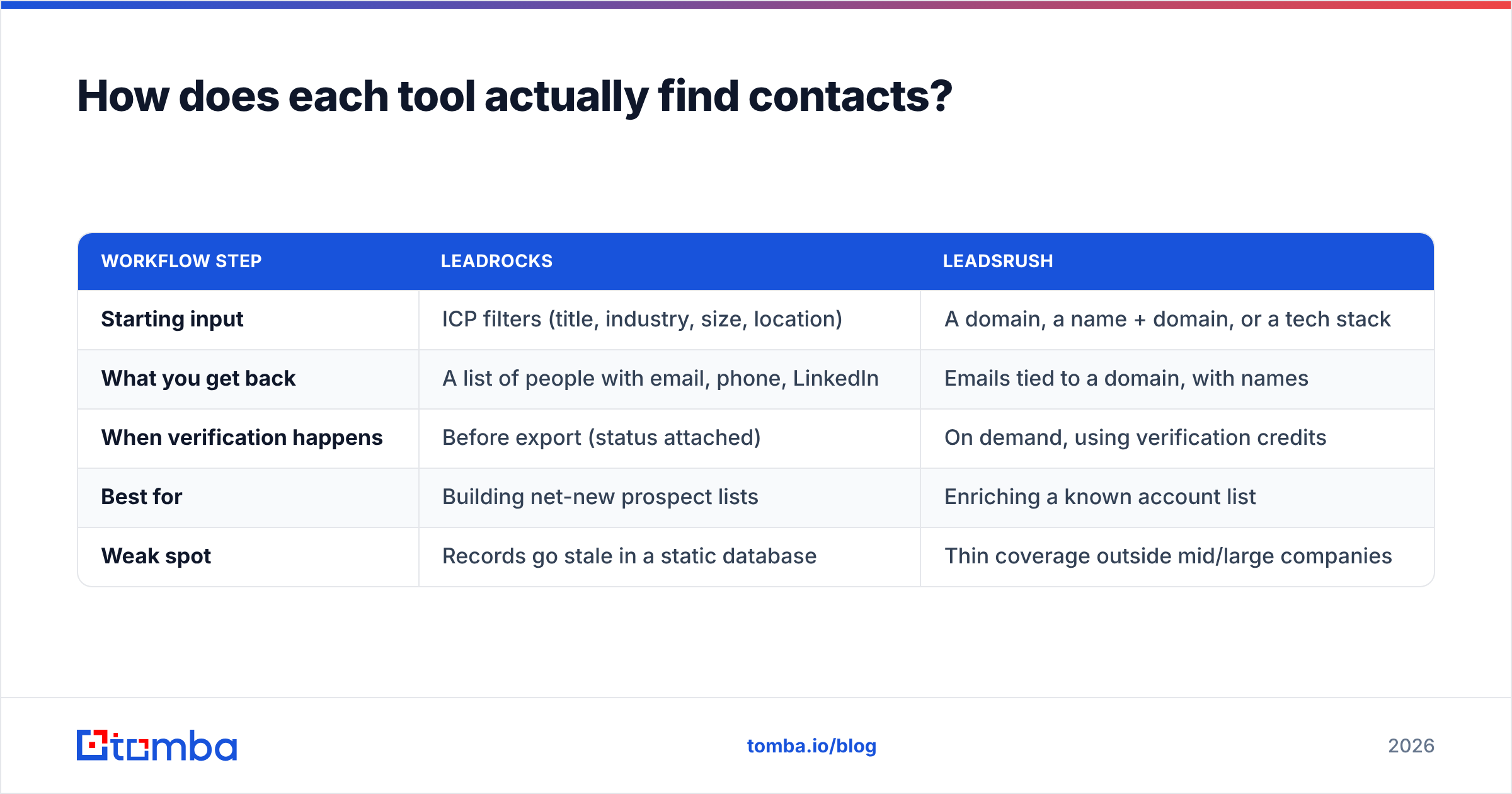
| Workflow step | Leadrocks | Leadsrush |
|---|---|---|
| Starting input | ICP filters (title, industry, size, location) | A domain, a name + domain, or a tech stack |
| What you get back | A list of people with email, phone, LinkedIn | Emails tied to a domain, with names |
| When verification happens | Before export (status attached) | On demand, using verification credits |
| Best for | Building net-new prospect lists | Enriching a known account list |
| Weak spot | Records go stale in a static database | Thin coverage outside mid/large companies |
Think of Leadrocks as a phone book you search through, and Leadsrush as asking reception for someone's email. The phone book covers more people, but some pages are out of date. Reception gives you a more current answer, but only for the building you name.
That matters for bounce rates. With a database product, a contact might have been checked months ago. With an on-demand finder, the pattern and mailbox check happen closer to when you send. In practice you want both: a source of candidates and a fresh check right before sending. That's why many teams add a standalone email verifier between any data vendor and their sequencer, whichever vendor they use.
Is Leadrocks better than Leadsrush for building prospect lists?#
Yes, if list building is the job. Leadrocks is the better fit for most outbound teams that start from an ICP.
What works:
- Filtering depth. You can combine job title, seniority, industry, headcount, and geography in one search and get a usable list without leaving the tool.
- Multi-channel data. A record with an email, a direct dial, and a LinkedIn URL supports a three-touch sequence (email, call, LinkedIn) from one export.
- Unlimited seats. A small SDR team can share one account without paying per user.
- LinkedIn extension. If your reps already prospect on LinkedIn or Sales Navigator, the extension turns profile views into contacts without copy-pasting.
What to watch:
- Blank-result billing. Third-party reviews report that Leadrocks spends a credit on each lookup, including ones that return invalid or empty contacts. Your real cost per usable lead can be well above the headline price per credit.
- Price jump. The free tier is generous for testing, but paid tiers scale toward roughly $580/mo at Enterprise level. That's a lot for a solo founder.
- Database freshness. Any static database decays. People change jobs and domains change their mail setup. Verify before you send, especially if the export is more than a few weeks old.

Is Leadsrush better than Leadrocks for finding emails at known companies?#
Often, yes, and it usually costs less. If your account list is already set (for example, 200 target accounts from your ABM plan), Leadsrush fits the job more directly.
What works:
- Domain search. Enter a domain and see who's there. This is the fastest way to map an account when you only know the company. If this workflow is new to you, here's what domain search is and how it differs from searching a database.
- Technology lookup. Finding every store running Shopify with Stripe is a real targeting advantage for agencies, app developers, and payments vendors. Leadrocks doesn't offer an equivalent.
- Separate verification pool. A free-tier allowance of 100 verifications a month, on top of 50 searches, means you can check addresses from other sources too.
- Low entry price. Starter at $29/mo and Growth at $59/mo, per its pricing page, is inexpensive for this category.
What to watch:
- One credit per search, up to ten results. That's efficient for domain search, but single-person lookups use a credit each. Work out your mix before you pick a tier.
- No rollover. Unused credits expire at the end of each billing cycle, so buying a bigger plan "for later" is wasted money.
- Shared pool. Unlimited users share one credit balance, so one rep running a bulk job can drain the month for everyone.
- Coverage gaps. Like most domain-first finders, results are strongest at mid-size and larger companies with public-facing staff. Very small businesses and privacy-conscious industries return less.
How accurate are Leadrocks and Leadsrush?#
Neither vendor publishes an independent, audited accuracy benchmark, so treat any "95%+ accurate" claim (from anyone, including us) as marketing until you test it on your own data.

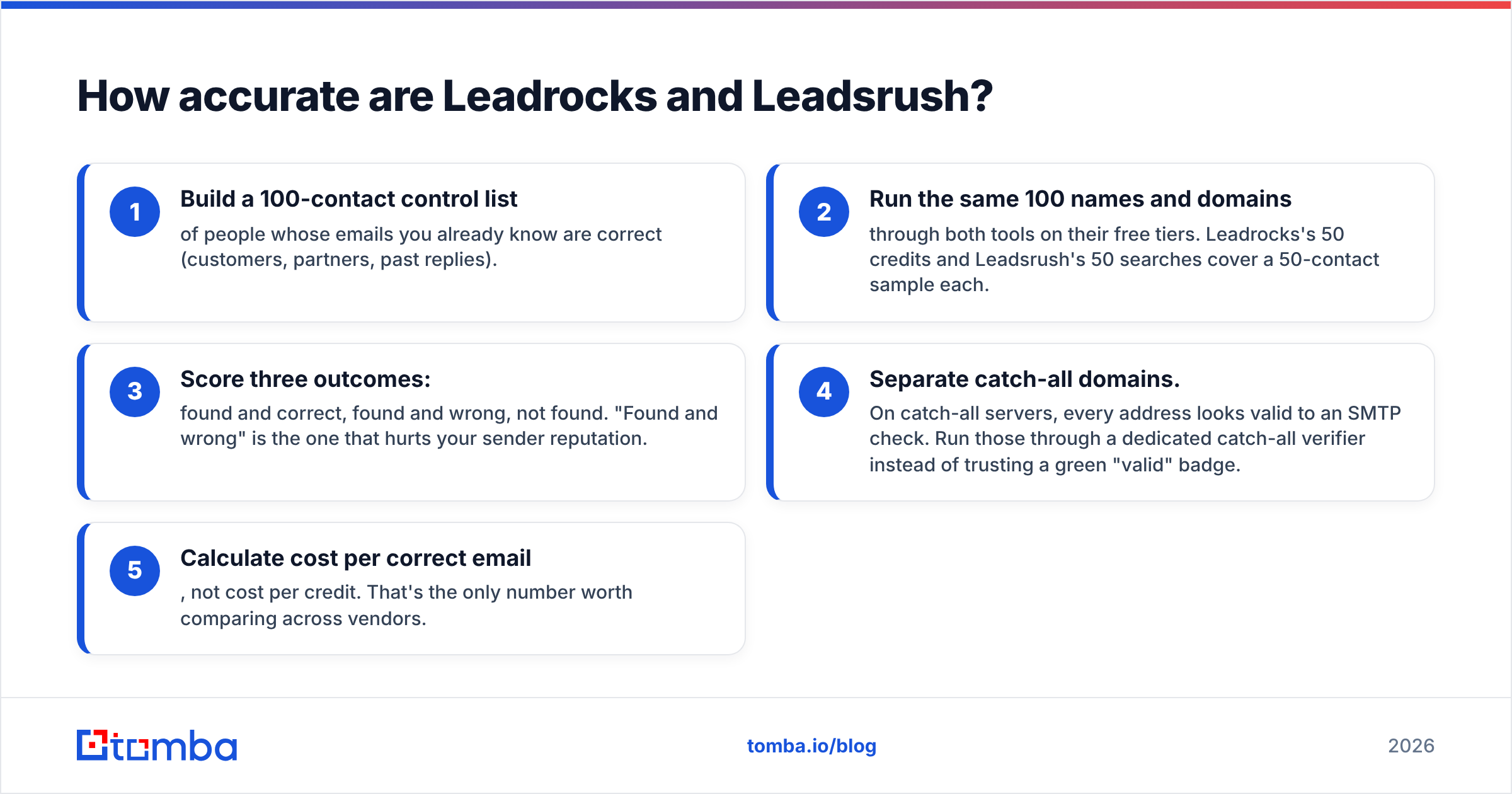
Here's a test you can run in an afternoon:
- Build a 100-contact control list of people whose emails you already know are correct (customers, partners, past replies).
- Run the same 100 names and domains through both tools on their free tiers. Leadrocks's 50 credits and Leadsrush's 50 searches cover a 50-contact sample each.
- Score three outcomes: found and correct, found and wrong, not found. "Found and wrong" is the one that hurts your sender reputation.
- Separate catch-all domains. On catch-all servers, every address looks valid to an SMTP check. Run those through a dedicated catch-all verifier instead of trusting a green "valid" badge.
- Calculate cost per correct email, not cost per credit. That's the only number worth comparing across vendors.
Also check how each tool labels uncertainty. A tool that marks an address "risky" when it isn't sure is more useful than one that marks everything "valid". Aggregated user reviews on G2 help you spot patterns like frequent bounces, but they won't replace your own test.
Which one costs less in practice?#
On sticker price, Leadsrush. Starter at $29/mo is cheaper than most paid Leadrocks tiers, and the separate verification credits add to its value.
Sticker price isn't the whole cost, though. Three factors change it:
- Data per credit. A Leadrocks credit can return an email plus a phone number plus a LinkedIn URL. If you'd otherwise pay a separate phone vendor, a Leadrocks credit covers more than a Leadsrush search.
- Wasted credits. Leadrocks charging for blank results and Leadsrush's no-rollover rule both lower your effective yield. Whichever tool matches your monthly volume more closely wastes less.
- Downstream bounce cost. A cheap email that bounces damages your domain reputation, and fixing that costs far more than any credit. Paying for verification is almost always worth it.

A rough rule of thumb:
- Under 200 new contacts a month, known accounts: Leadsrush Starter.
- 200–1,000 contacts a month, ICP-based list building, phone numbers needed: a mid-tier Leadrocks plan.
- Bulk enrichment of an existing CRM: neither is ideal. Look at tools built for bulk finding plus verification with an API.
Who should choose Leadrocks, and who should choose Leadsrush?#
Match the tool to how you prospect today, not how you plan to prospect someday.
- Choose Leadrocks if you prospect from an ICP, need phone numbers, work heavily on LinkedIn, and want a searchable list builder for a small team.
- Choose Leadsrush if you have a fixed account list, target by technology stack, want cheap verification credits, and send moderate volume.
- Choose both if you use Leadrocks to find who to contact and Leadsrush to double-check emails at priority accounts. Plenty of lean teams layer two cheap tools rather than buy one expensive platform.
- Choose neither if you need an API-first workflow, high-volume bulk finding, or deep CRM integrations. Both are built mainly for manual, browser-based use.
What alternative should you test alongside them?#
If your main job is turning a name plus a company into a verified inbox, a dedicated email finder is worth adding to your trial. Tomba sits between the two: it isn't a list-building database like Leadrocks, but it covers more than a single-lookup tool. It combines name-and-domain finding, domain search, verification, catch-all checks, phone finding, and enrichment behind one API and one set of browser and spreadsheet integrations.
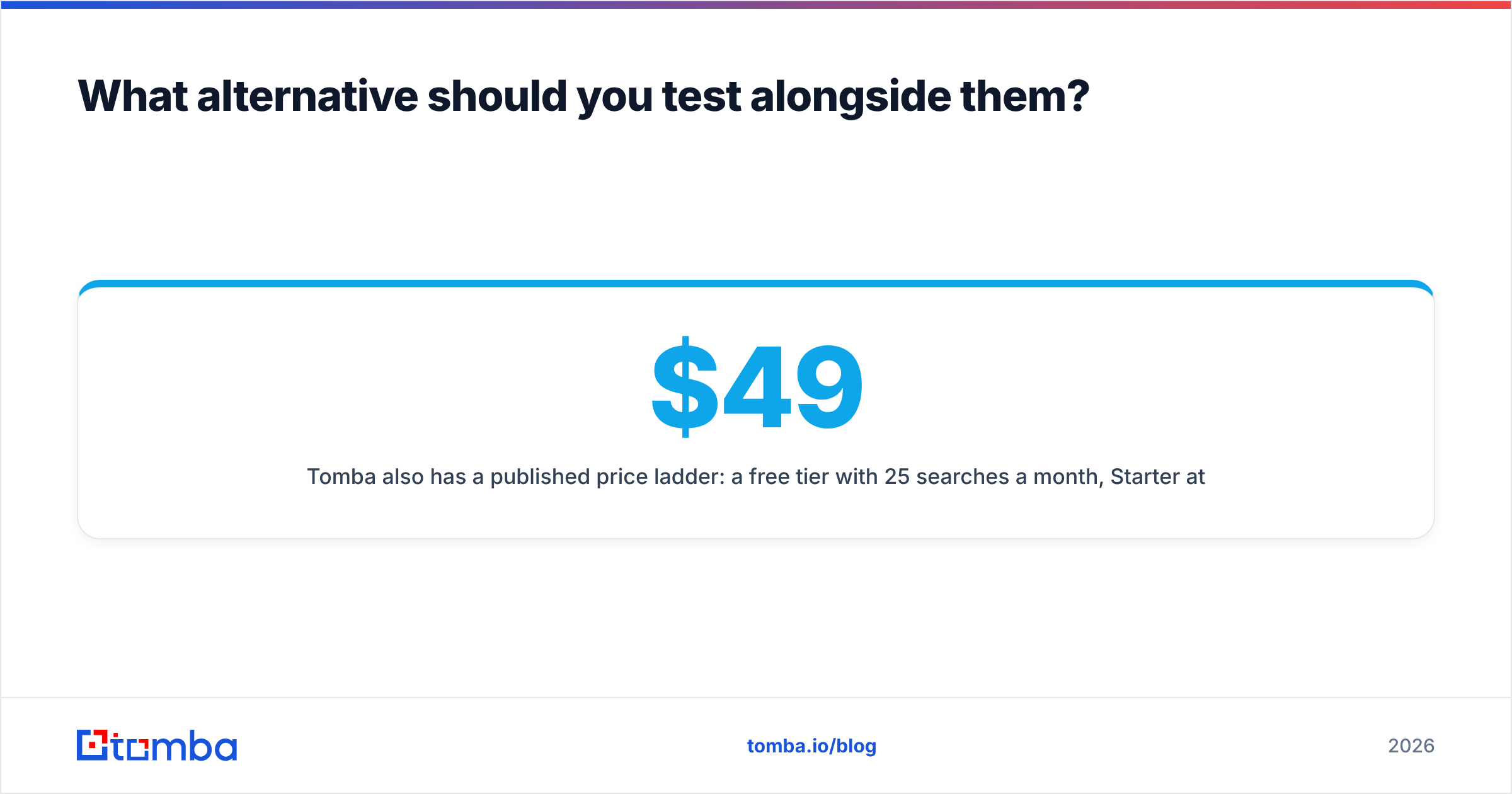
Tomba also has a published price ladder: a free tier with 25 searches a month, Starter at $49/mo, Growth at $99/mo, Pro at $249/mo, and custom Enterprise. See Tomba pricing for what each tier includes. It's not the cheapest option on this page. Leadsrush Starter costs less. The case for Tomba is fewer tools to connect when finding and verifying need to happen in the same step.
Run it through the same 100-contact test above. If it gives a lower cost per correct email for your market, keep it. If it doesn't, you've lost nothing but an afternoon.
So, Leadrocks vs Leadsrush: what's the verdict?#
For list building from scratch, Leadrocks wins. Its filters, phone data, and LinkedIn extension make it a practical prospecting database for small teams, as long as you verify exports and account for blank-result billing.
For finding emails at companies you already chose, Leadsrush wins on price and focus. Domain search, tech-stack targeting, and separate verification credits cover a lot at $29–$59/mo, as long as you size your plan so credits don't expire unused.
Neither is clearly better overall. They cover different stages of the same funnel. Pick by input: if you start with a persona, choose Leadrocks. If you start with a company, choose Leadsrush.
If your workflow starts with a name and a company and has to end with an address you can safely send to, try Tomba Email Finder. Enter a name and domain, get a verified professional email with its confidence status, and run it on the free tier against the same control list you used for Leadrocks and Leadsrush. Keep whichever tool gives the most correct emails per dollar.
Related guides#
// get started
Find, verify and enrich your first contacts today
Start on the free plan with 25 searches a month, then scale when your team is ready.
Free plan · No credit card required · GDPR & CCPA
// about the author