LeadRocks vs LFBBD (Lead For Business): Honest 2026 Comparison
LeadRocks lets you search and pull contacts yourself. LFBBD (Lead For Business) sells verified lead lists built to order. Here's which model fits your outbound motion, budget, and data-freshness needs in 2026.
TL;DR
- LeadRocks is a self-serve B2B contact database. You search, filter, and export contacts yourself with credits. It has a free tier of 50 credits a month, and third-party listings put paid plans at about $29/mo up to about $580/mo for enterprise.
- LFBBD (Lead For Business) is a data vendor. It sells verified lead lists, with ready-made packs for B2B, SaaS, eCommerce, and Amazon sellers. It offers pay-per-lead and subscription pricing, and most deals are quoted.
- Pick LeadRocks if your reps need to prospect every day and change their filters often. Pick LFBBD if you want one large, segmented list delivered to you without doing the research yourself.
- Neither tool gets you out of verifying. Run every export through an email verifier before you send, or your bounce rate will damage your domain.
- If you need contacts on demand by domain or name, with verification included, a pay-as-you-go email finder is often cheaper than either option.
What is the real difference between LeadRocks and LFBBD?#
These two products are built on different business models, so compare the models before you compare features.
LeadRocks is a search tool. You log in, set filters for job title, location, company, industry, and headcount, and reveal contacts one at a time or in batches. It also has a Chrome extension that pulls data from LinkedIn profiles. Each lookup costs a credit. Credits are charged even when a lookup returns a blank or invalid contact, so budget for that.
LFBBD – Lead For Business is a data provider. It describes its database as 500M+ professionals across 30M+ companies in 200+ countries, verified by a mix of AI and human checks, with monthly refreshes. You tell it which segment you need, such as SaaS founders in DACH, Shopify brands above a revenue threshold, or Amazon sellers in a given category, and it delivers a file. It also sells vertical datasets, including a SaaS database of 50K+ companies and 1M+ contacts and an eCommerce dataset covering 5M+ brands.
Put simply, LeadRocks gives you a search tool and does the lookups when you run them. LFBBD does the research for you and hands over a finished list.
The distinction matters for your team as well as your budget. A search tool depends on reps who know what to look for. A list vendor depends on someone who can write a precise brief and then work the list quickly, before the data ages.
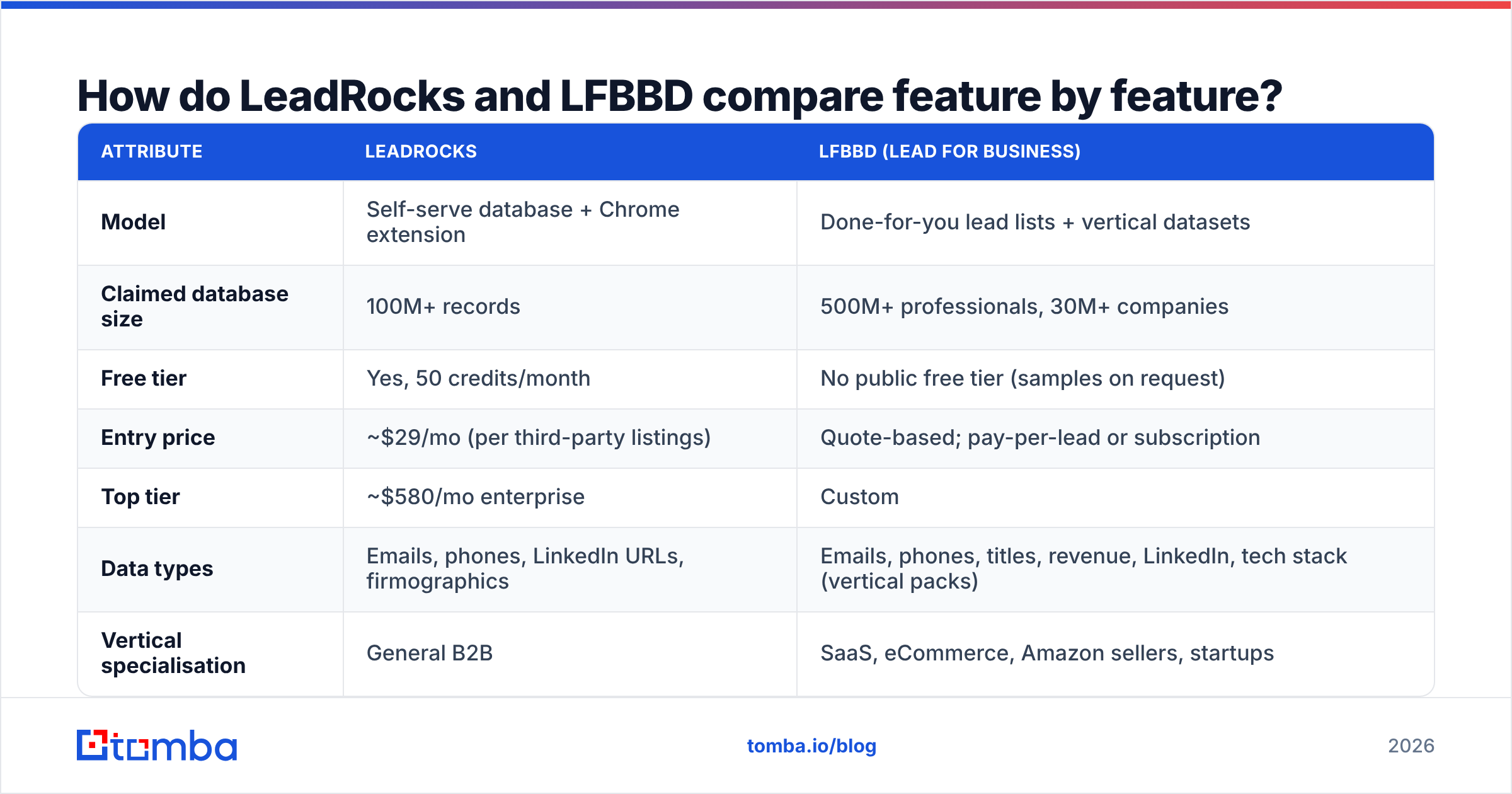
How do LeadRocks and LFBBD compare feature by feature?#
The numbers below come from each vendor's public pages and third-party software directories as of 2026. Vendors change plans often, so check current pricing on their sites before you commit.
| Attribute | LeadRocks | LFBBD (Lead For Business) |
|---|---|---|
| Model | Self-serve database + Chrome extension | Done-for-you lead lists + vertical datasets |
| Claimed database size | 100M+ records | 500M+ professionals, 30M+ companies |
| Free tier | Yes, 50 credits/month | No public free tier (samples on request) |
| Entry price | ~$29/mo (per third-party listings) | Quote-based; pay-per-lead or subscription |
| Top tier | ~$580/mo enterprise | Custom |
| Data types | Emails, phones, LinkedIn URLs, firmographics | Emails, phones, titles, revenue, LinkedIn, tech stack (vertical packs) |
| Vertical specialisation | General B2B | SaaS, eCommerce, Amazon sellers, startups |
| Refresh cadence | Continuous as you search | Vendor states monthly |
| Users | Unlimited users on plans | Account-based, per order |
| Best for | SDR teams prospecting daily | One-off campaigns, market mapping, agencies |
Some rows need context:
- Database size claims are not comparable. "100M records" and "500M professionals" are counted differently. One number may include historical rows. The other may count people who have no email attached. Judge each vendor by how many usable contacts it returns for your ICP, not by its headline total.
- A credit is not the same as a lead. LeadRocks charges per lookup whether or not a contact is returned. LFBBD's pay-per-lead pricing charges per delivered record. To compare them, work out the cost per verified, deliverable email in each case.
- Accuracy numbers come from the vendors. LFBBD advertises 97% accuracy. Treat any accuracy figure a vendor publishes about itself as a claim you haven't tested yet.
Which buying model fits your team?#
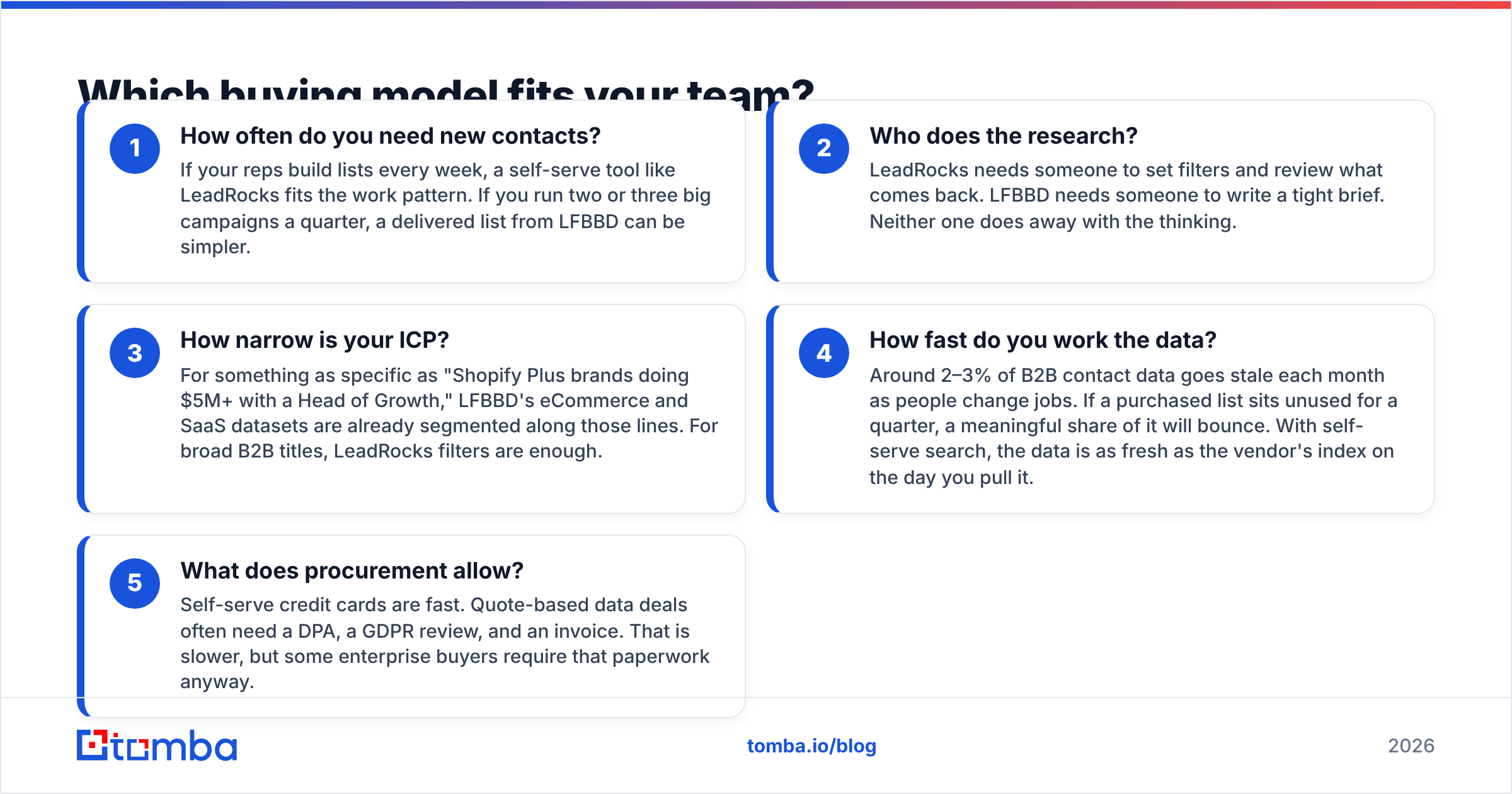
Four questions will usually settle it. Answer these first:
- How often do you need new contacts? If your reps build lists every week, a self-serve tool like LeadRocks fits the work pattern. If you run two or three big campaigns a quarter, a delivered list from LFBBD can be simpler.
- Who does the research? LeadRocks needs someone to set filters and review what comes back. LFBBD needs someone to write a tight brief. Neither one does away with the thinking.
- How narrow is your ICP? For something as specific as "Shopify Plus brands doing $5M+ with a Head of Growth," LFBBD's eCommerce and SaaS datasets are already segmented along those lines. For broad B2B titles, LeadRocks filters are enough.
- How fast do you work the data? Around 2–3% of B2B contact data goes stale each month as people change jobs. If a purchased list sits unused for a quarter, a meaningful share of it will bounce. With self-serve search, the data is as fresh as the vendor's index on the day you pull it.
- What does procurement allow? Self-serve credit cards are fast. Quote-based data deals often need a DPA, a GDPR review, and an invoice. That is slower, but some enterprise buyers require that paperwork anyway.

Is LeadRocks better than LFBBD for SDR prospecting?#
For day-to-day SDR work, LeadRocks usually fits better, and the reason is the workflow rather than the data.
SDRs work in short loops. They find an account, check who owns the problem, pull two or three contacts, write a note, and move to the next account. A search tool with a LinkedIn extension keeps that loop fast. The rep sees the profile, reveals the email, and moves on. Unlimited users on paid plans also mean the whole team can prospect without paying for extra seats.
LeadRocks has weaknesses to plan for:
- Credits charged on misses. If your ICP is niche and coverage is thin, you will spend credits on lookups that return nothing. Test it on a free-tier sample of your real targets before you upgrade.
- Verification is on you. LeadRocks says verifying its own contacts doesn't cost credits, and you should still run a second pass before loading contacts into a sequencer, especially on catch-all domains.
- General-purpose database. Coverage is strongest for mid-market and enterprise tech roles. Coverage of small eCommerce brands, local services, and non-English markets varies more.
LFBBD can support SDRs in a different way. Ops orders a segmented list once, loads it into the CRM, and assigns accounts to reps. That works if you have RevOps capacity and a campaign calendar. It works less well when reps want to follow a trigger event today, such as a new funding round or a new VP hire.
Is LFBBD better than LeadRocks for niche or vertical lists?#
Yes, often, and this is LFBBD's clearest advantage.
LFBBD's catalogue is organised around verticals that are hard to prospect with generic filters:
- SaaS companies with funding stage, revenue band, and tech stack attached. Those attributes are hard to reconstruct from standard firmographic filters.
- eCommerce brands, including store platform and mobile numbers. Many general B2B databases underweight DTC brands because their founders don't list detailed titles on LinkedIn.
- Amazon sellers, a segment most self-serve B2B tools barely index.
If you sell to Shopify merchants, marketplace sellers, or early-stage SaaS, a pre-built vertical dataset can save weeks of manual list building. Agencies that run campaigns for several clients also like the delivered-file model, because each client gets a separate, auditable list.
Watch for these risks:
- Get a sample first. Ask for 100–200 records from your exact segment and verify them yourself before paying for 10,000.
- Ask about sourcing and compliance. For EU contacts, you need to know the lawful basis for processing under GDPR. Any reputable data vendor should be able to explain where its data comes from.
- Check the date of the last refresh. "Updated monthly" should mean the records you receive were checked recently, not that the master file gets touched once a month.
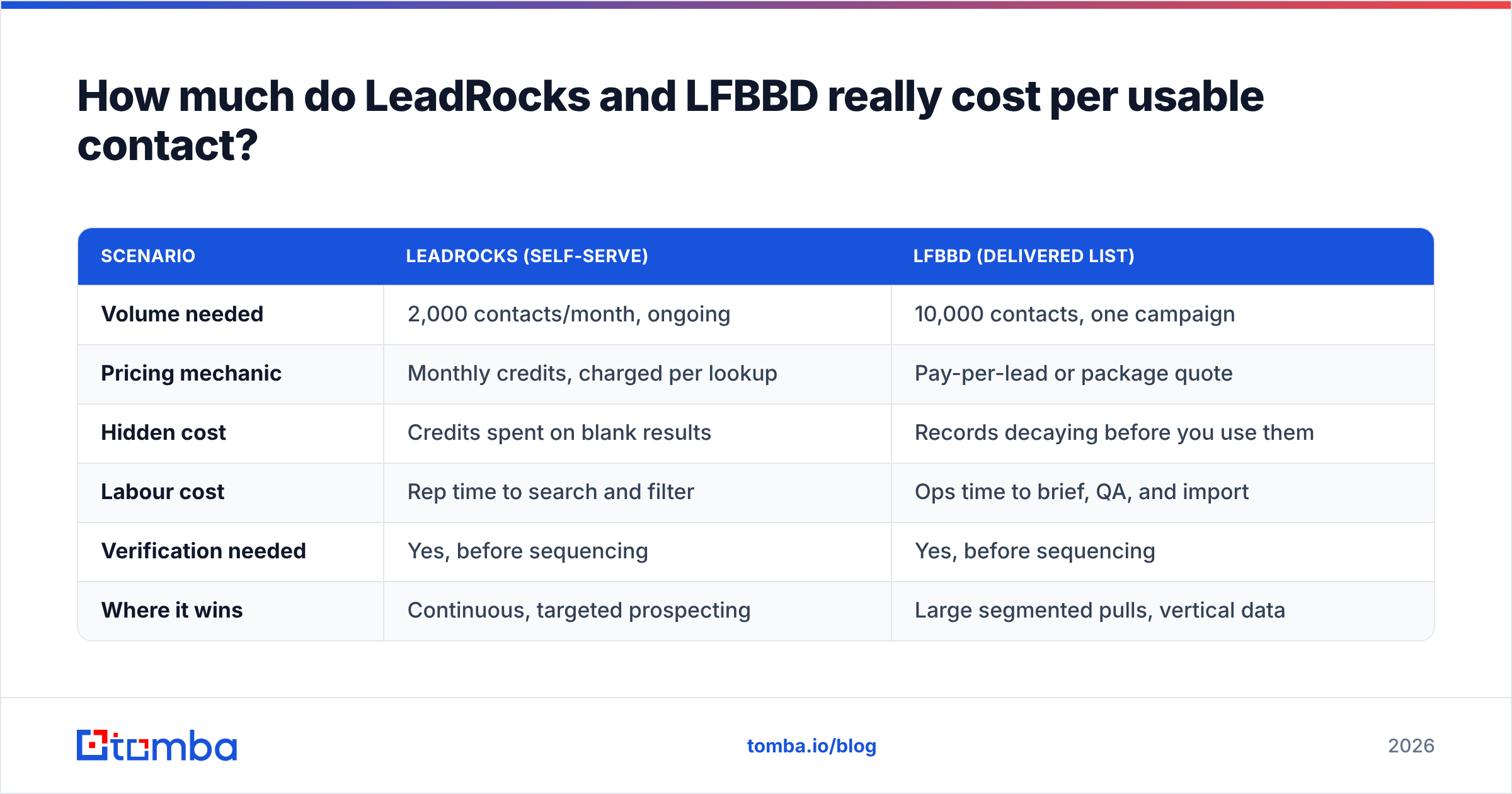
How much do LeadRocks and LFBBD really cost per usable contact?#
The price per credit or per lead doesn't tell you much. What you actually pay for is a contact who receives your email. Here is a rough way to model it.
| Scenario | LeadRocks (self-serve) | LFBBD (delivered list) |
|---|---|---|
| Volume needed | 2,000 contacts/month, ongoing | 10,000 contacts, one campaign |
| Pricing mechanic | Monthly credits, charged per lookup | Pay-per-lead or package quote |
| Hidden cost | Credits spent on blank results | Records decaying before you use them |
| Labour cost | Rep time to search and filter | Ops time to brief, QA, and import |
| Verification needed | Yes, before sequencing | Yes, before sequencing |
| Where it wins | Continuous, targeted prospecting | Large segmented pulls, vertical data |
Use this formula:
Effective cost per contact = (subscription or list price + verification cost + labour) ÷ contacts that pass verification.
Run it on a pilot for both vendors. The cheaper headline price often loses once you account for blanks, bounces, and the hours your team spends fixing the data.
What should you check before buying from either vendor?#
Use the same checklist for both tools:
- Coverage test. Pick 50 real target accounts from your pipeline. Check how many contacts each vendor returns and how many of those match the right person in the right role.
- Bounce test. Run the returned emails through an independent email verifier. Anything above 3–5% invalid should concern you for cold outreach.
- Catch-all handling. Ask how each vendor labels catch-all domains. A "verified" tag on a catch-all address means little unless it has been tested further.
- Export and integrations. Confirm CSV export at minimum, plus whatever CRM you run. LeadRocks is built for self-serve export. LFBBD delivers files, so plan the import step.
- Terms and refunds. Find out what happens to unused credits and whether LFBBD replaces bounced records. Get the answer in writing.
- Reviews from real buyers. Look for recent reviews on directories like G2 and read the complaints as well as the praise.

Where does an email finder fit next to LeadRocks and LFBBD?#
A lot of teams end up using a mix. They buy a vertical list from a vendor like LFBBD for market mapping, then fill gaps and refresh records with an on-demand lookup tool.
That is where a dedicated email finder helps:
- Filling gaps. A purchased list covers a company but is missing the VP you need. You run a domain search on the company domain and find that person.
- Refreshing aging lists. Before a campaign, you re-find emails for people who changed jobs rather than buying the whole segment again.
- Enriching thin records. You add title, company size, and social profiles to bare email lists with data enrichment.
Tomba is built for this kind of on-demand work. The free tier covers 25 searches a month. Paid plans are Starter at $49/mo, Growth at $99/mo, and Pro at $249/mo, with custom Enterprise pricing. The full breakdown is on the Tomba pricing page. Tomba won't replace a curated Amazon-seller dataset, and it isn't meant to. It works well as a verification and gap-filling layer next to whichever list source you choose.
So which should you choose: LeadRocks or LFBBD?#
Here is the decision:
- Choose LeadRocks if you run a steady SDR motion, want reps self-sufficient, need a LinkedIn extension, and want to start free before paying. Run it on a sample of your ICP to confirm coverage before you upgrade.
- Choose LFBBD if you sell into SaaS, eCommerce, or Amazon-seller segments, run campaign-based outbound, or are an agency that needs clean, separate lists per client. Insist on a verified sample and a refresh date.
- Choose both, or add a finder if you want vertical depth from a list vendor and daily flexibility from a lookup tool. For most teams above five reps, that combination works out best.
Whichever you choose, verify every record before it reaches a sequencer. Sending unverified purchased data is a common way for outbound teams to damage their sending domain.
If you want to fill the gaps left by either tool without committing to a large data contract, try the Tomba Email Finder. You can look up a professional email by name and company domain, verify it at the same time, and start on the free tier with 25 searches a month.
Related guides#
// get started
Find, verify and enrich your first contacts today
Start on the free plan with 25 searches a month, then scale when your team is ready.
Free plan · No credit card required · GDPR & CCPA
// about the author