LeadRocks vs Mailead: Contact Data or Cold Email Sending in 2026?
LeadRocks and Mailead often show up on the same shortlist, but they do different jobs. LeadRocks finds contacts and Mailead sends cold email. Here is how to tell which one your outbound stack is missing, and where each one's pricing catches people out.
TL;DR
- LeadRocks and Mailead do different jobs. LeadRocks is a B2B contact database with enrichment: you use it to find people. Mailead is a cold email platform: you use it to send sequences, warm up inboxes, and rotate mailboxes.
- If you already have a sending tool and need contacts, pick LeadRocks. If you have a list and need something to send from, pick Mailead.
- Mailead's paid plans start at $19/mo and go to $159/mo, plus a custom tier. LeadRocks has a free plan with 50 monthly credits, and its paid plans go up to about $580/mo for Enterprise.
- The main catch with LeadRocks: credits are used up on every lookup, including ones that come back blank or invalid. The main catch with Mailead: its LinkedIn scraping credits are small (500 to 1,000 per month), so it can't be your main data source.
- Whatever you pick, verify the list before you send. Pulling contacts from a database and blasting them unverified is the quickest way to damage a new sending domain.
What is the real difference between LeadRocks and Mailead?#
These two get compared a lot because they appear side by side on "outbound tools" listicles. But they sit at opposite ends of the prospecting workflow.
LeadRocks (leadrocks.io) is a data product. It is a searchable B2B database that the vendor says holds more than 100 million records, with emails, phone numbers, and LinkedIn profiles. You can filter by job title, location, company name, industry, and team size. It also has a Chrome extension that pulls contacts from LinkedIn, and a bulk enrichment feature for filling in lists you already have.
Mailead (mailead.io) is a sending product. It connects your mailboxes, warms them up, rotates sends across inboxes, runs A/B tests, and manages multi-step cold email sequences. It includes a small LinkedIn scraping allowance on higher plans, but that is a convenience feature. The core of the product is getting email delivered and replied to.
So the honest answer to "which is better" is: it depends which half of the pipeline you're missing. Comparing them directly is a bit like comparing a fuel supplier with a car.
How does each tool fit into an outbound workflow?#
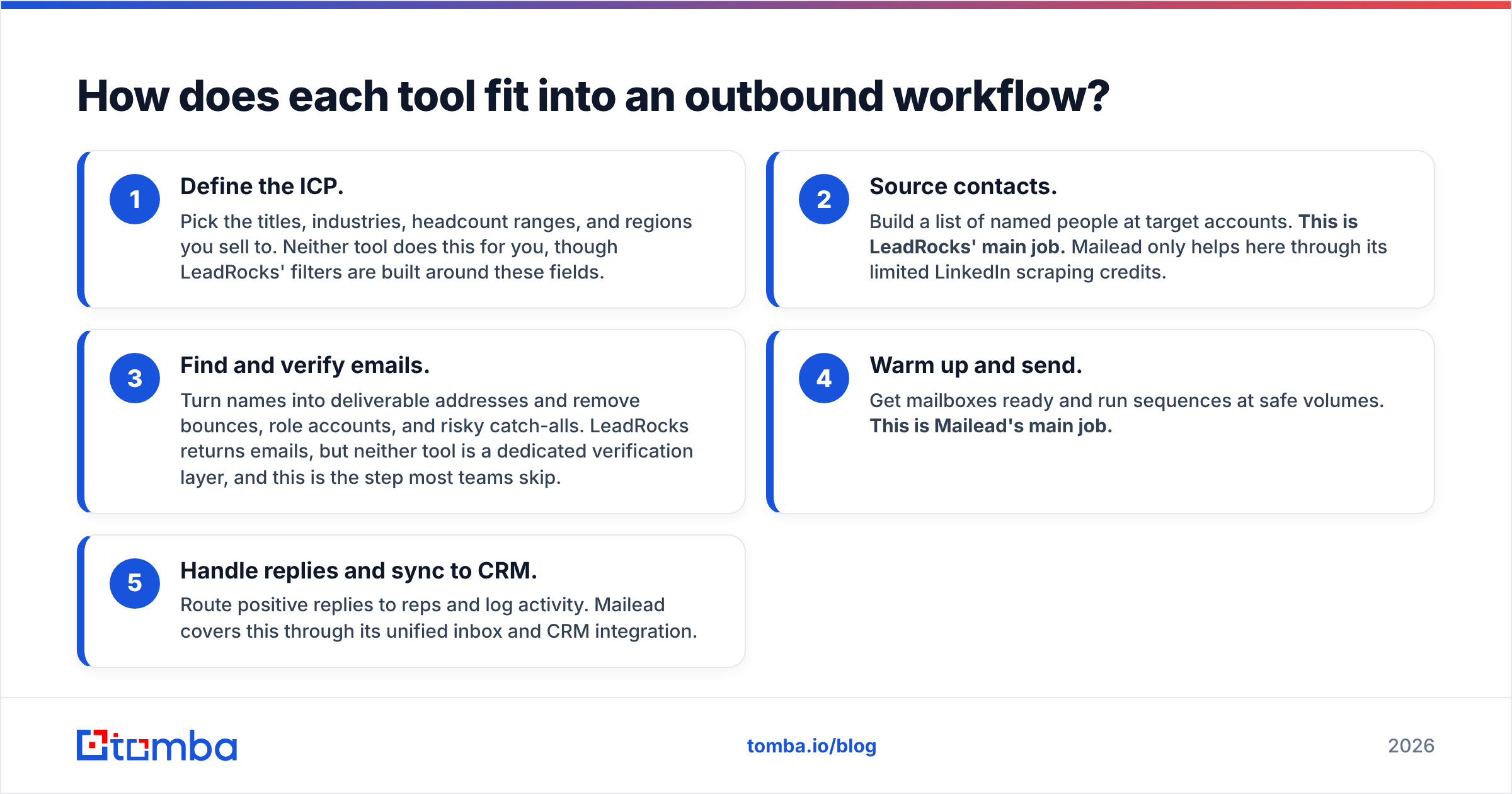
Break outbound into its stages and it becomes clear where each tool sits. Most teams run some version of this five-step loop:
- Define the ICP. Pick the titles, industries, headcount ranges, and regions you sell to. Neither tool does this for you, though LeadRocks' filters are built around these fields.
- Source contacts. Build a list of named people at target accounts. This is LeadRocks' main job. Mailead only helps here through its limited LinkedIn scraping credits.
- Find and verify emails. Turn names into deliverable addresses and remove bounces, role accounts, and risky catch-alls. LeadRocks returns emails, but neither tool is a dedicated verification layer, and this is the step most teams skip.
- Warm up and send. Get mailboxes ready and run sequences at safe volumes. This is Mailead's main job.
- Handle replies and sync to CRM. Route positive replies to reps and log activity. Mailead covers this through its unified inbox and CRM integration.
LeadRocks covers steps 2 and 3 in part. Mailead covers steps 4 and 5. If you only buy one, you still need a plan for the other half.
How do LeadRocks and Mailead compare feature by feature?#
The table below uses published plan information at the time of writing (September 2026). Both vendors change their packaging often, so check their pricing pages before you buy.
| Attribute | LeadRocks | Mailead |
|---|---|---|
| Product category | B2B contact database + enrichment | Cold email sending + deliverability |
| Primary job | Find people and their contact data | Send, warm up, and track cold email |
| Free tier | Yes, 50 credits/mo | Yes, $0 plan (limited) |
| Entry paid plan | Tiered credit plans (check current pricing) | Starter, $19/mo |
| Mid-tier | Growth plans | Pro, $69/mo |
| Top published tier | ~$580/mo Enterprise | Growth, $159/mo, then Custom |
| Contact data | 100M+ records claimed; emails, phones, LinkedIn URLs | Only via LinkedIn scraping (500 credits on Pro, 1,000 on Growth) |
| Email sending | No | Yes: 2K/mo (Starter), 10K/mo (Pro), 100K/mo (Growth) |
| Mailbox warmup | No | Unlimited on all plans |
| Inbox rotation | No | Yes (Smart Inbox Rotation) |
| A/B testing | No | Yes |
| Seats | Unlimited users, even on free | 1 teammate (Starter), 10 (Pro) |
| Chrome extension | Yes, LinkedIn contact extraction | LinkedIn scraping on Pro and above |
| CRM connection | Export and enrichment workflows | CRM integration included |
| Biggest caveat | Credits used even on blank/invalid results | Data features too small to be your only source |
Two rows matter most for your decision.
Seats. LeadRocks allows unlimited users even on the free plan, which is unusual. It suits agencies or small teams where several people need occasional access. Mailead's Starter plan caps you at one teammate, so a team of three SDRs will need Pro at $69/mo.
Volume. Mailead's sending caps are the real limit to plan around. 2,000 sends a month on Starter is roughly 100 new prospects a day on a single-step sequence, and far fewer once you add follow-ups. Most teams running proper sequences end up on Pro.
Is LeadRocks worth it for finding B2B contacts?#
LeadRocks is a reasonable pick if your main problem is list building and you don't want to pay Apollo or ZoomInfo prices.
Where it works well:
- Filter-based prospecting. Search by title, industry, headcount, and location, then export. For SMB and mid-market targeting, that covers most of what you need.
- Free plan with unlimited seats. 50 credits a month won't run a campaign, but it's enough to test data quality on your own ICP before you pay. Do that test. Coverage varies a lot by region and industry.
- LinkedIn extension. Handy if your reps already prospect in LinkedIn or Sales Navigator and want contact data without switching tabs.
- Lifetime deal history. LeadRocks has run lifetime deals on AppSumo in the past. If one is live when you read this, it can be cheap for low-volume users. Just read the credit limits closely.
Where to be careful:
- Credits used on misses. Review sites point out that LeadRocks deducts credits on every lookup, including ones that return blank or invalid contacts. Many email finders only charge for successful finds. If LeadRocks' coverage is thin in your niche, your real cost per usable contact can be much higher than the sticker price suggests.
- Database decay. Any static B2B database goes stale. Industry estimates usually put B2B contact decay at around 20–30% a year as people change jobs. A 100M-record database is not 100M deliverable addresses.
- No sending. You will still need a sequencer, whether that's Mailead, Instantly, Lemlist, or your CRM's built-in tool.
If you're weighing LeadRocks against other data tools rather than against a sender, you'll get more out of a like-for-like comparison. Our Apollo alternative breakdown covers how database-style tools differ from on-demand email finders.
Is Mailead worth it for cold email sending?#
Mailead is aimed squarely at price-sensitive outbound teams, and its pricing reflects that.
Where it works well:
- Unlimited mailboxes and warmup on every plan. Many senders charge per inbox or bill warmup separately. Unlimited mailboxes at $19/mo is a strong offer if you're spreading volume across several secondary domains, which you should be.
- Smart Inbox Rotation. Spreading sends across mailboxes keeps each inbox's daily volume low, which protects your sender reputation.
- All-in-one for small teams. Sending, warmup, A/B tests, a unified inbox, and CRM sync in one place means one less tool to connect.
Where to be careful:
- Monthly send caps. Starter's 2,000 sends go quickly once you run a 3–4 step sequence. Work out your real volume first: prospects per month × steps per sequence.
- Contact caps. Starter also limits uploaded contacts to 2,000. Growth removes the contact cap.
- LinkedIn credits are not a data strategy. 500 scraping credits a month on Pro covers a handful of targeted campaigns, not a full pipeline. And scraped LinkedIn data still needs an email found and verified before you send.
- Warmup doesn't fix bad data. This is the most common mistake with sending tools. Warmup builds reputation slowly, and one campaign to an unverified list can undo it in an afternoon. Google's and Yahoo's bulk sender rules, in force since 2024, expect spam complaint rates to stay under 0.3%, and hard bounces are one of the fastest ways to trip their filters.
Which one should you choose?#
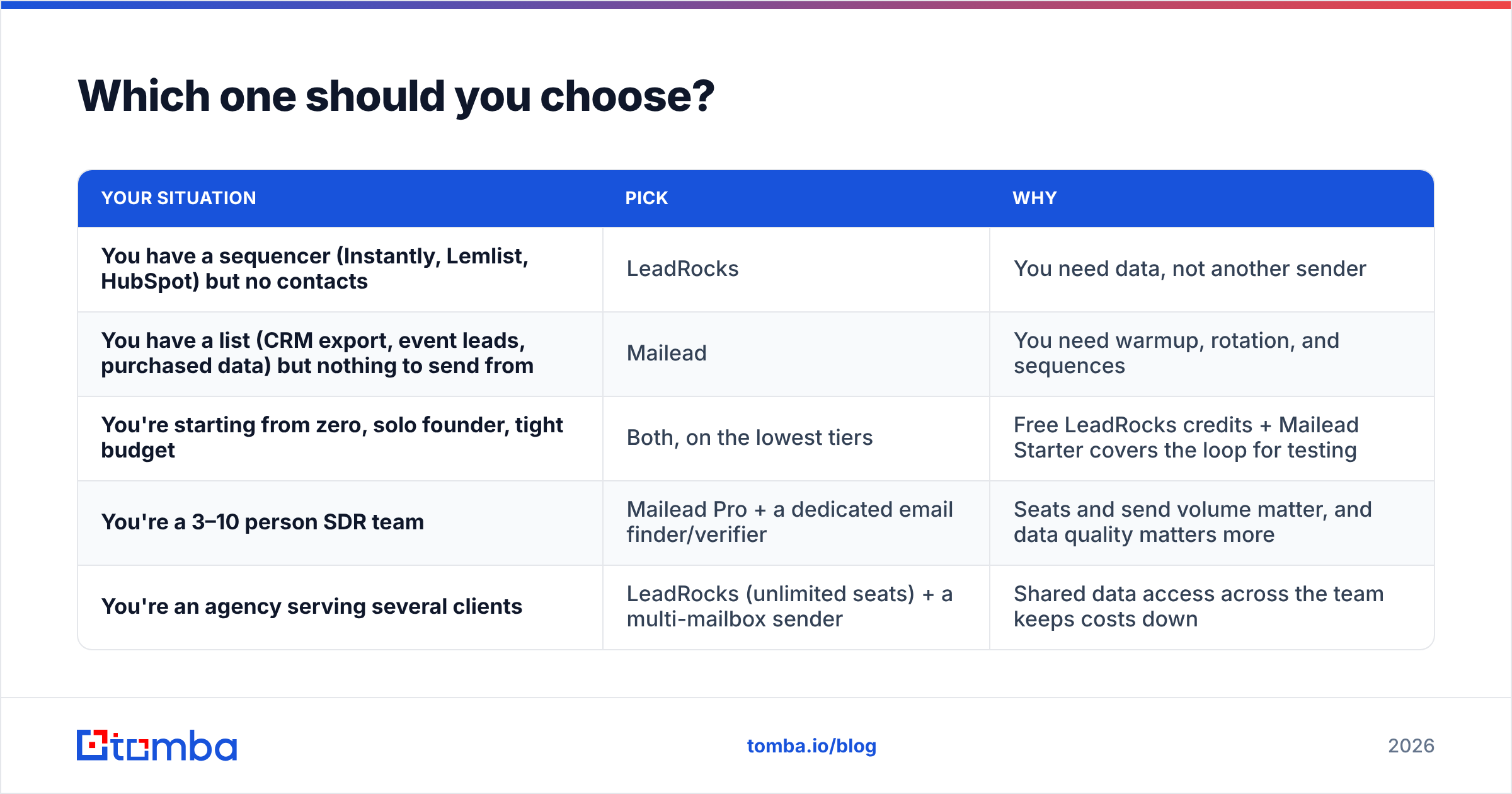
Use your current stack to decide:
| Your situation | Pick | Why |
|---|---|---|
| You have a sequencer (Instantly, Lemlist, HubSpot) but no contacts | LeadRocks | You need data, not another sender |
| You have a list (CRM export, event leads, purchased data) but nothing to send from | Mailead | You need warmup, rotation, and sequences |
| You're starting from zero, solo founder, tight budget | Both, on the lowest tiers | Free LeadRocks credits + Mailead Starter covers the loop for testing |
| You're a 3–10 person SDR team | Mailead Pro + a dedicated email finder/verifier | Seats and send volume matter, and data quality matters more |
| You're an agency serving several clients | LeadRocks (unlimited seats) + a multi-mailbox sender | Shared data access across the team keeps costs down |
Neither tool beats the other outright, because they aren't competing for the same budget line. The better question is: what sits between them? That's the verification step.
What is the step most teams skip between LeadRocks and Mailead?#
Here's the failure pattern we see most often. A team exports 5,000 contacts from a database tool, uploads them straight into a sender, and launches. Bounce rate lands at 8–12%. Mailboxes get flagged. The warmup they paid for is gone within a week.
Database emails are a snapshot. By the time you send, some of those people have left, some domains have changed mail servers, and some addresses were pattern guesses in the first place. You need to add three checks before sending:
- Verify every address. Run the list through an email verifier that does real SMTP-level checks, not just syntax validation. Remove anything that comes back invalid.
- Handle catch-all domains separately. Catch-all servers accept any address, so standard verification can't confirm them. A catch-all verifier lets you decide whether to send to those contacts, put them in a lower-volume segment, or drop them.
- Re-find stale contacts. If someone has changed companies, verifying their old address won't help. Look up their current address by name and new company domain with an email finder.
This takes a few minutes per list and protects the domain reputation that Mailead's warmup spent weeks building. It also makes LeadRocks' credit model less painful, because you only put verified, deliverable contacts into your sequences.
How do the costs add up for a real team?#
Here's a rough monthly budget for a two-person outbound team targeting 1,500 new prospects a month on a 3-step sequence. That's about 4,500 sends.
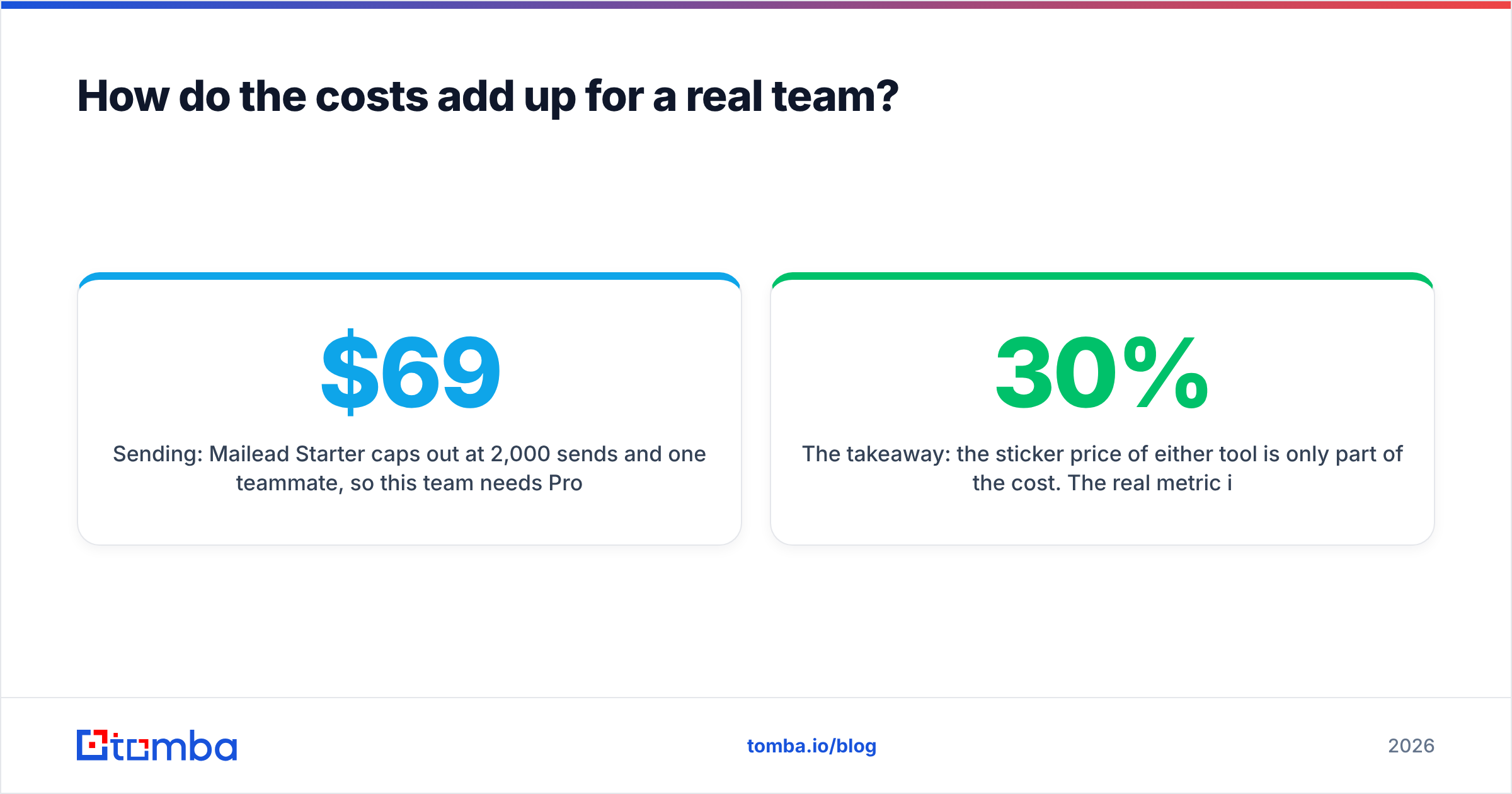
- Sending: Mailead Starter caps out at 2,000 sends and one teammate, so this team needs Pro at $69/mo (10,000 sends, 10 seats).
- Data: LeadRocks free credits (50/mo) won't cover 1,500 contacts, so budget for a paid LeadRocks tier. Remember that misses also use credits, so buy more than you think you need.
- Verification: Budget for verifying the full 1,500 plus a buffer. Many teams handle this with an email finder plan that includes verification, rather than paying for a separate tool.
The takeaway: the sticker price of either tool is only part of the cost. The real metric is cost per delivered, reply-eligible email. A cheap database with a 30% miss rate plus a cheap sender with a 10% bounce rate can end up costing more per conversation than a pricier, cleaner setup.
What do reviewers say about each tool?#
Neither tool has the review volume of Apollo or Instantly, so treat any single rating carefully. Look at review aggregators like G2 for the latest user feedback. The patterns worth checking:
- For LeadRocks: reviewers tend to praise the value for money and the free tier's unlimited seats. The common complaints are data accuracy in specific regions and the credit model that charges for misses.
- For Mailead: reviewers tend to like the unlimited mailboxes and warmup at a low price. Watch for comments on send caps and on how mature the reporting and CRM integrations are compared with larger sequencers.
The best test costs nothing: run your own ICP through LeadRocks' free credits, send a small warmed-up campaign through Mailead's free or Starter plan, and measure bounce and reply rates yourself.
Frequently asked questions#
Is LeadRocks a competitor to Mailead? Not directly. LeadRocks is a contact database and Mailead is a cold email sender. They overlap only a little: Mailead's LinkedIn scraping credits and LeadRocks' LinkedIn extension both pull contacts from LinkedIn.
Can Mailead find email addresses? Only in a limited way, through LinkedIn scraping credits on the Pro (500/mo) and Growth (1,000/mo) plans. For steady list building you'll want a dedicated email finder or database.
Does LeadRocks send emails? No. You export contacts from LeadRocks and send them from a separate tool.
Do I need to verify LeadRocks emails before sending through Mailead? Yes. Any database export should be verified before it goes into a sender. Unverified lists are the most common reason new sending domains get burned.
Which is cheaper, LeadRocks or Mailead? Mailead's entry price ($19/mo) is lower than most paid database plans, but you're paying for different things. Compare each against tools in its own category, not against each other.
Where does Tomba fit into this stack?#
If you're choosing LeadRocks for the data half of your workflow, it's worth checking whether an on-demand email finder fits better. Instead of paying for database lookups that may come back empty, you look up specific people by name and company domain, verify the result in the same step, and export clean contacts straight into Mailead or any other sender.
Tomba Email Finder finds professional email addresses by name, domain, or company, and comes with built-in verification, catch-all handling, and a Chrome extension for LinkedIn. The free plan includes 25 searches a month so you can test it on your own ICP, and paid plans start at $49/mo. Compare the tiers on the Tomba pricing page, then run your next list through Tomba before it goes into your sequencer.
Related guides#
// get started
Find, verify and enrich your first contacts today
Start on the free plan with 25 searches a month, then scale when your team is ready.
Free plan · No credit card required · GDPR & CCPA
// about the author