Leadrocks vs Mailfloss: Email Finder or List Cleaner in 2026?
Leadrocks finds B2B contacts and Mailfloss keeps your email list clean. They solve different problems, so the right question is which job you need done first. Here's how to decide.
TL;DR
- Leadrocks is a B2B contact database and email finder. You use it to build prospect lists from scratch: search by job title, company, industry, or location, then export verified emails.
- Mailfloss is an automated email verification and list-hygiene tool. It connects to your email service provider (ESP) and removes invalid, risky, and mistyped addresses from lists you already have.
- They don't really compete. Leadrocks fills the top of your funnel, and Mailfloss protects your sender reputation once those contacts sit in a marketing list.
- Pick Leadrocks if you do outbound prospecting and need new contacts. Pick Mailfloss if you run newsletters or ESP-based marketing and want lists cleaned without manual CSV uploads.
- If you need finding and verification in one place, look at a combined tool such as Tomba, which pairs an email finder with a verifier on the same credits.
What is the real difference between Leadrocks and Mailfloss?#
Searches for "leadrocks vs mailfloss" usually come from people who have heard both names in the email space and assume they compete. They mostly don't, because each tool works at a different stage of the email lifecycle.
Leadrocks is a prospecting tool. You start with nothing and end with a list of decision-makers and their business emails. It is built for SDRs, founders doing their own outbound, recruiters, and agencies that need contacts at specific companies.
Mailfloss is a list-hygiene tool. You start with a list you already have, such as newsletter subscribers, customer records, or old leads, and it keeps that list clean. It is built for marketers, ecommerce teams, and anyone whose deliverability depends on a healthy ESP audience.
In short: Leadrocks gives you emails, and Mailfloss checks the emails you already have. Choosing between them depends on which of those problems you actually have right now.
How does Leadrocks work?#
Leadrocks is a searchable B2B contact database with a Chrome extension. The workflow looks like this:
- Search the database with filters: job title, seniority, company name, industry, headcount, and geography.
- Reveal contact details for the people who match. Each reveal uses credits.
- Use the Chrome extension on LinkedIn profiles and company pages to pull emails while you browse.
- Export to CSV or push contacts into your CRM or sequencing tool.
Leadrocks says its emails are verified before delivery, so you get some protection against bounces without running a separate check. That matters, because a prospecting database with no verification step will sink your domain quickly.
Where Leadrocks is strong:
- List building from zero. You can go from "VP of Finance at mid-market SaaS in Germany" to a working list in one session.
- LinkedIn-adjacent workflow. The extension fits the way most SDRs already research accounts.
- Simple, credit-based model. You pay for contacts you reveal, not for seats you don't use.
Where it's weaker:
- Not a list-hygiene tool. It won't watch your Mailchimp audience or clean old leads on a schedule.
- Coverage varies by region and niche. Like every database, it performs best on well-indexed industries and English-speaking markets. Test your own ICP before you commit.
How does Mailfloss work?#
Mailfloss is built around one idea: automated verification that runs inside your ESP. You don't upload CSVs. You connect your email platform once, and Mailfloss checks new and existing subscribers on a recurring schedule.
The core workflow:
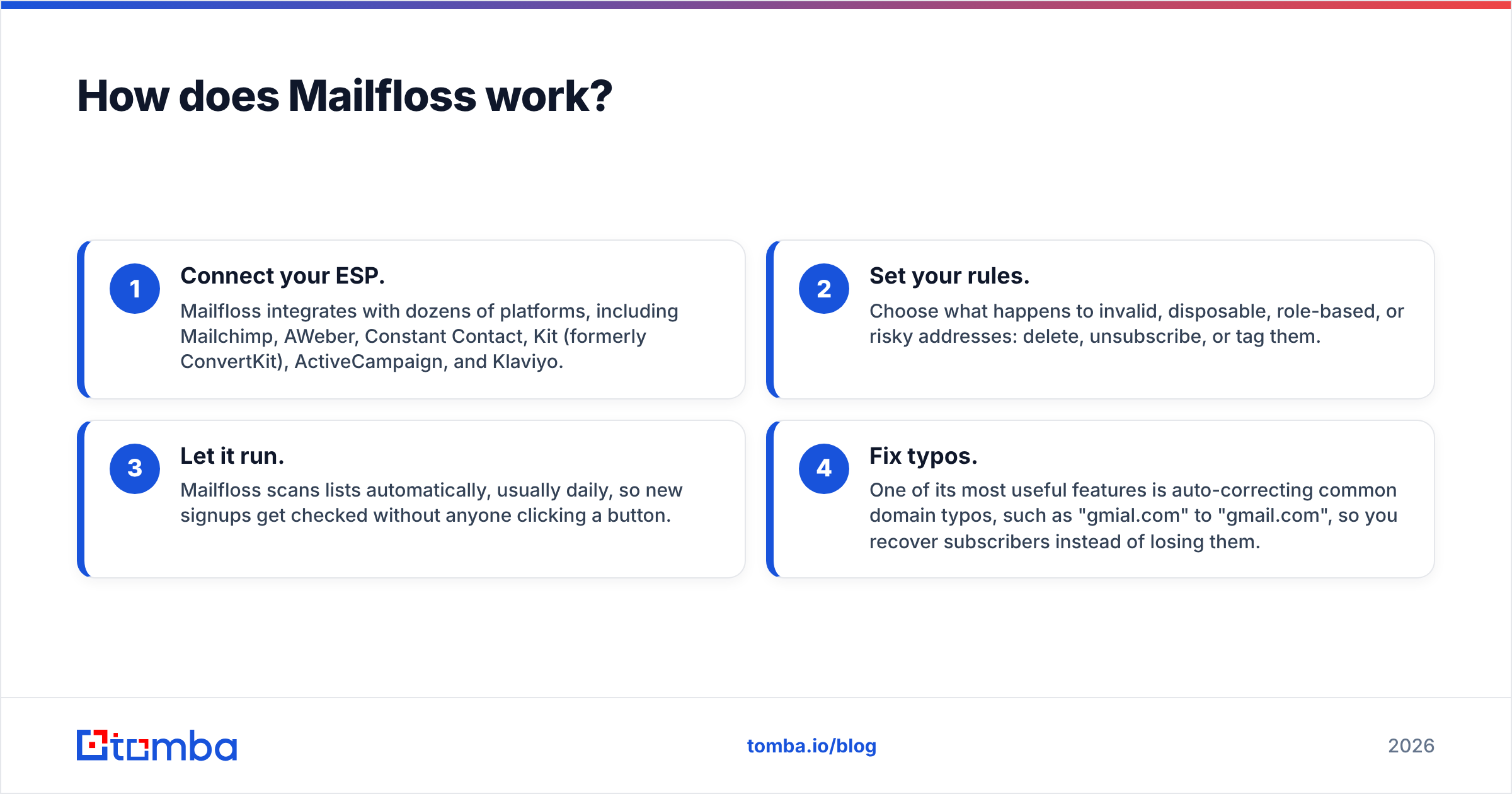
- Connect your ESP. Mailfloss integrates with dozens of platforms, including Mailchimp, AWeber, Constant Contact, Kit (formerly ConvertKit), ActiveCampaign, and Klaviyo.
- Set your rules. Choose what happens to invalid, disposable, role-based, or risky addresses: delete, unsubscribe, or tag them.
- Let it run. Mailfloss scans lists automatically, usually daily, so new signups get checked without anyone clicking a button.
- Fix typos. One of its most useful features is auto-correcting common domain typos, such as "gmial.com" to "gmail.com", so you recover subscribers instead of losing them.
Where Mailfloss is strong:
- Set-and-forget hygiene. For newsletter-driven businesses, this saves real time.
- Typo correction. Most bulk verifiers only flag bad addresses. Mailfloss repairs some of them.
- ESP-native. Cleaned lists stay where your campaigns run.
Where it's weaker:
- It doesn't find anyone. There is no database and no prospecting. If your list is empty, Mailfloss can't help.
- Mostly built for marketing lists. Outbound teams sending from Instantly, Smartlead, or a CRM sequencer usually verify at the point of export, not inside an ESP.
Leadrocks vs Mailfloss: how do they compare side by side?#
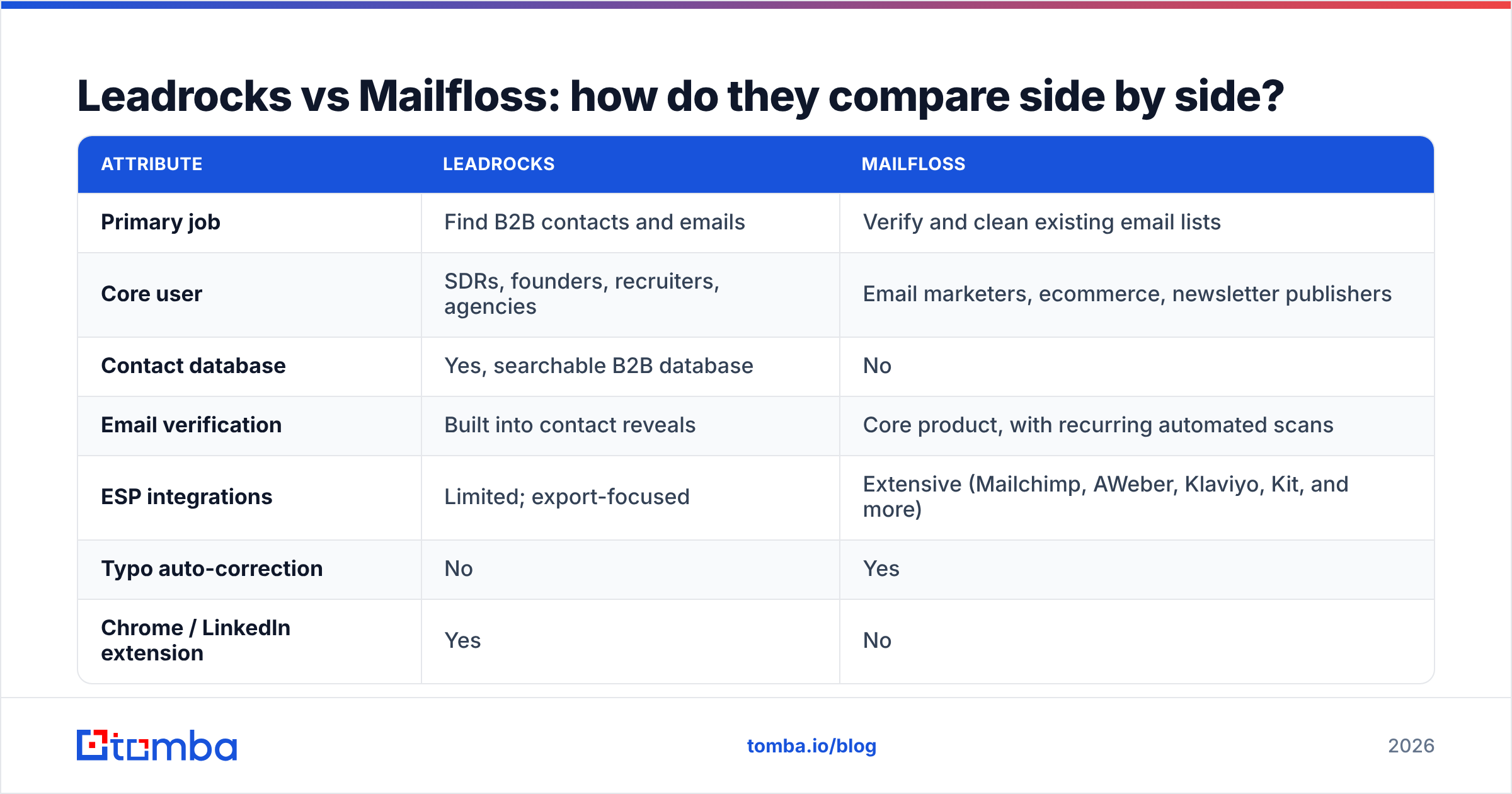
This table covers the attributes buyers usually weigh. Pricing changes often, so check each vendor's pricing page before you buy.
| Attribute | Leadrocks | Mailfloss |
|---|---|---|
| Primary job | Find B2B contacts and emails | Verify and clean existing email lists |
| Core user | SDRs, founders, recruiters, agencies | Email marketers, ecommerce, newsletter publishers |
| Contact database | Yes, searchable B2B database | No |
| Email verification | Built into contact reveals | Core product, with recurring automated scans |
| ESP integrations | Limited; export-focused | Extensive (Mailchimp, AWeber, Klaviyo, Kit, and more) |
| Typo auto-correction | No | Yes |
| Chrome / LinkedIn extension | Yes | No |
| Pricing model | Credit-based subscriptions | Tiered by list size / verification volume |
| Free option | Trial credits (check current offer) | Free trial (check current offer) |
| Best for | Building net-new prospect lists | Protecting deliverability on owned lists |
Here's what the table means in practice: if your problem is "I don't have enough people to email," Leadrocks is the answer. If your problem is "my open rates are falling and bounces are rising," Mailfloss is the answer.
Which tool should you choose for your use case?#
Use this decision guide. Find the scenario that fits you and you'll have your answer.
- You run cold outbound and need fresh leads every week. Choose Leadrocks. You need a database, and Mailfloss doesn't have one. Verify at export and you're covered.
- You run a newsletter or ecommerce list on Mailchimp or Klaviyo. Choose Mailfloss. Automatic cleaning inside your ESP is exactly what you're paying for, and a prospecting database adds nothing here.
- You bought or inherited an old list of 20,000+ contacts. Choose Mailfloss, or any bulk verifier, before you send anything. Old lists decay fast. Industry estimates put B2B data decay at roughly 20-30% a year as people change jobs.
- You do both outbound and inbound marketing. You probably need both functions. Before you buy two subscriptions, check whether a single platform covers finding and verifying (more on that below).
- You're an agency building lists for clients. Leadrocks for sourcing, plus a verification step before handoff. Clients judge you by bounce rates.
- You only need occasional lookups. Neither tool may justify a subscription. A free tier on a combined finder and verifier is often enough.
How do Leadrocks and Mailfloss handle deliverability?#
Both tools exist to protect your sender reputation, but at different points.
Leadrocks protects you at acquisition. When it verifies emails before you export them, fewer bad addresses get into your sequences in the first place. For cold email that matters a lot: Google and Yahoo's bulk-sender rules push senders to keep spam complaints and bounces low, and a campaign with a 5-10% hard bounce rate can damage a new sending domain within days.
Mailfloss protects you over time. Addresses that were valid last year aren't necessarily valid today. People leave companies, domains expire, and inboxes get abandoned. Recurring scans catch that decay before it shows up as bounces in your campaign reports.
The gap to know about: catch-all domains. Many companies set up their mail servers to accept every address, which makes standard SMTP verification return "unknown" or "accept-all." Neither a database-verified export nor a basic list cleaner fully solves this. If much of your target market sits on catch-all domains (common in enterprise and some European markets), you need a tool with dedicated catch-all handling, or you need to send to those contacts in smaller, carefully monitored batches.
What do real users say about each tool?#
Review platforms like G2 show a pattern you'd expect given how different these two tools are:
- Leadrocks reviewers usually praise speed of list building and the LinkedIn extension, and mention that data quality varies by region and seniority level. Common advice: test a sample of your ICP before buying a large credit pack.
- Mailfloss reviewers usually praise the hands-off automation and the typo fixing, and note that it's a niche tool. It does one job well but doesn't replace a full data platform.
Neither tool has a reputation problem. They're focused products that do what they claim. Most frustration comes from buyers who expected one to do the other's job, such as a marketer hoping Leadrocks would clean their Mailchimp list, or an SDR hoping Mailfloss would find them leads.
Is there a tool that does both finding and verifying?#
Yes, and for many teams it's the practical answer to "Leadrocks vs Mailfloss." If you need to source new contacts and keep them clean, running two subscriptions means two logins, two billing cycles, and a CSV hand-off in between.
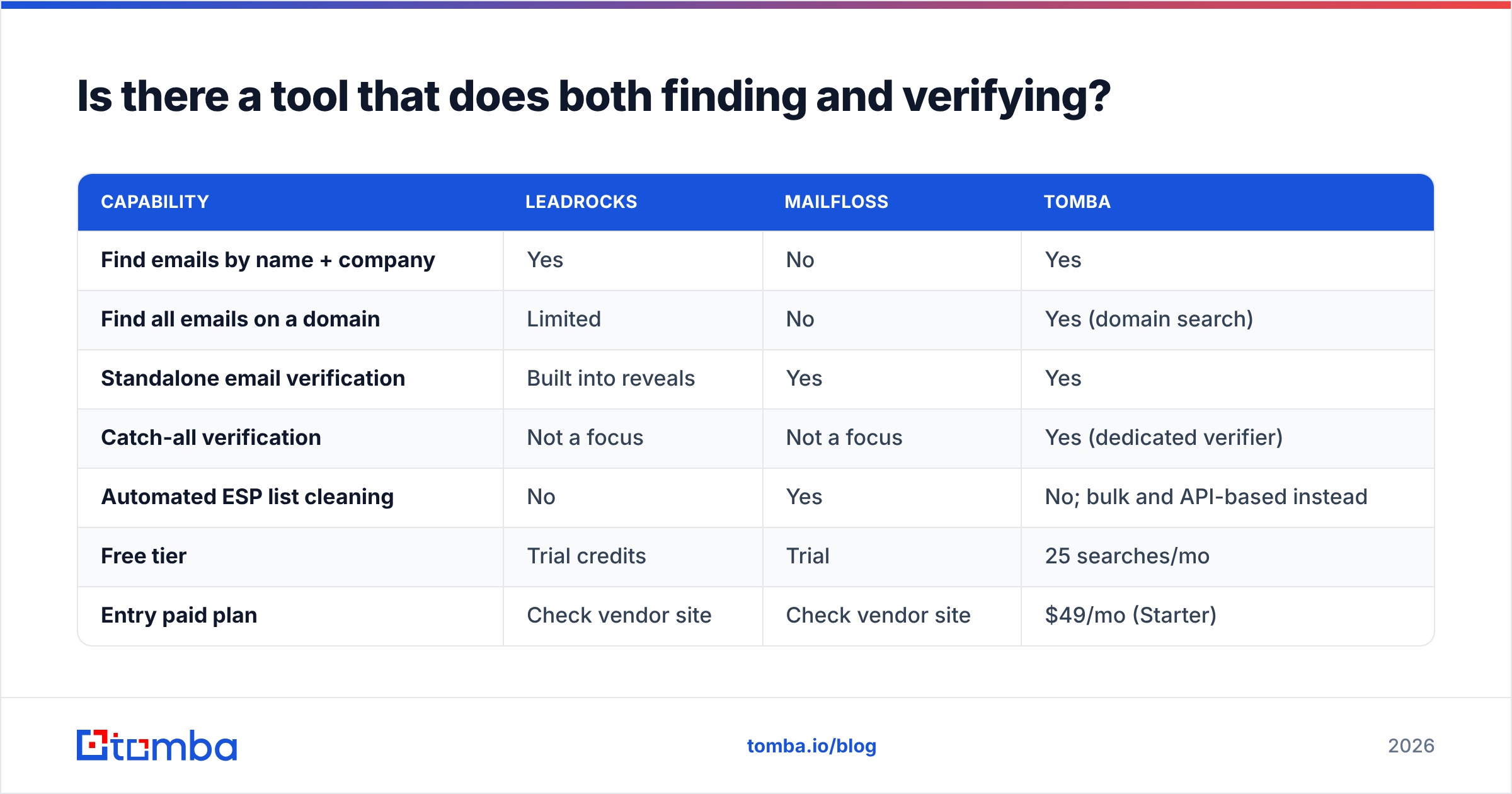
Combined platforms merge those steps. Here's how the three approaches compare:
| Capability | Leadrocks | Mailfloss | Tomba |
|---|---|---|---|
| Find emails by name + company | Yes | No | Yes |
| Find all emails on a domain | Limited | No | Yes (domain search) |
| Standalone email verification | Built into reveals | Yes | Yes |
| Catch-all verification | Not a focus | Not a focus | Yes (dedicated verifier) |
| Automated ESP list cleaning | No | Yes | No; bulk and API-based instead |
| Free tier | Trial credits | Trial | 25 searches/mo |
| Entry paid plan | Check vendor site | Check vendor site | $49/mo (Starter) |
Be clear about the trade-off. Tomba doesn't replicate Mailfloss's always-on ESP cleaning. If your whole business runs on a Mailchimp newsletter and you want zero manual work, Mailfloss's automation is the better fit. What Tomba does offer is a Tomba Email Finder for sourcing contacts by name, company, or domain, plus an email verifier you can run in bulk, from Google Sheets, or through the API. That covers the outbound workflow from start to finish.
Tomba also connects to ESPs. If you do want verified contacts flowing into your marketing stack, there's a Mailchimp integration, so you can find and verify contacts before they reach your audience, not after.
How should you think about pricing?#
The pricing models differ as much as the products do, so don't compare sticker prices directly:
- Leadrocks charges for contacts revealed. Your cost grows with how many new people you prospect. Work out your monthly lead target, then find the plan whose credits cover it with about 20% headroom.
- Mailfloss charges for list size or verification volume. Your cost grows with your audience. A 5,000-subscriber newsletter and a 200,000-subscriber ecommerce list will sit on very different tiers.
- Combined tools charge per search or verification. On Tomba, the free tier covers 25 searches a month, Starter is $49/mo, Growth is $99/mo, Pro is $249/mo, and Enterprise is custom. Full pricing details are on the site.
One simple test: work out your cost per usable contact. That means a contact that's verified, deliverable, and matches your ICP. A cheap database with 30% bad data costs more per usable contact than a pricier one with 5% bad data, once you count the bounces and the reputation damage.
What's our verdict on Leadrocks vs Mailfloss?#
There's no single winner here, because these tools aren't rivals. Your workflow decides it:
- Choose Leadrocks if you're an outbound seller, recruiter, or agency that needs new B2B contacts regularly and likes working from LinkedIn.
- Choose Mailfloss if you're a marketer whose revenue depends on an ESP list, and you want hygiene handled automatically, typos included.
- Choose a combined finder and verifier if you prospect and verify in the same workflow and would rather not connect two tools with CSV exports.
The costly mistake is buying the wrong category: a database when your problem is list decay, or a list cleaner when your problem is an empty pipeline. Diagnose first, then buy.
Ready to find and verify emails in one workflow?#
If your pain is outbound, meaning you need the right decision-maker's address and need to know it won't bounce, the Tomba Email Finder covers both steps. Search by name and company or by domain, verify on the spot, and push clean contacts into your CRM or sequencer. You can start on the free plan with 25 searches a month and move to Starter at $49/mo when your volume grows. Test it on 20 accounts from your own ICP, compare the bounce rate with your current source, and let those numbers decide.
Related guides#
// get started
Find, verify and enrich your first contacts today
Start on the free plan with 25 searches a month, then scale when your team is ready.
Free plan · No credit card required · GDPR & CCPA
// about the author