LeadRocks vs Mailmerge365: Lead Data or Outlook Mail Merge?
LeadRocks finds the contacts. Mailmerge365 emails them from Outlook. Here's what each tool does, where they overlap, and which one your team needs first.
TL;DR
- LeadRocks and Mailmerge365 do different jobs. LeadRocks is a B2B contact database and enrichment tool. Mailmerge365 is a mail merge add-in that sends personalized bulk email through your own Microsoft 365 mailbox.
- Pick LeadRocks if you don't have contacts yet. Its free plan gives you 50 credits a month, and paid plans start around $29/mo for 1,000 credits.
- Pick Mailmerge365 if you already have a clean list and your team works in Outlook. It costs about €160 per mailbox per year and caps sending at 5,000 emails per 24 hours.
- Most outbound teams end up needing both kinds of tool: one to find and verify contacts, and one to send to them. Skipping verification is how Outlook-based campaigns get domains burned.
- Our pick: LeadRocks for pipeline building, Mailmerge365 for Outlook-native sending. Run your list through an email verifier before either one touches a send button.
What is the real difference between LeadRocks and Mailmerge365?#
Most "vs" posts compare two tools that compete for the same budget line. This one doesn't, and that's why people search for it. Both tools show up when you look for "cold email tools" or "B2B outreach software," but they sit at opposite ends of the outbound workflow.
- LeadRocks is a data tool. It answers the question "who should I email, and what's their address?" You search a B2B database or enrich a LinkedIn profile, spend a credit, and get an email address (sometimes a phone number too).
- Mailmerge365 is a sending tool. It answers "how do I send 800 personalized emails from Outlook without copy-pasting all afternoon?" You bring the list and the template, and it merges the fields and sends from your Microsoft 365 mailbox, with open, click, bounce and unsubscribe tracking.
So the honest answer to "LeadRocks vs Mailmerge365" is usually "which part of your process is broken?" If your problem is an empty spreadsheet, a mail merge tool won't help. If your problem is a full spreadsheet and no efficient way to email it from Outlook, a contact database won't help either.
How do LeadRocks and Mailmerge365 compare feature by feature?#
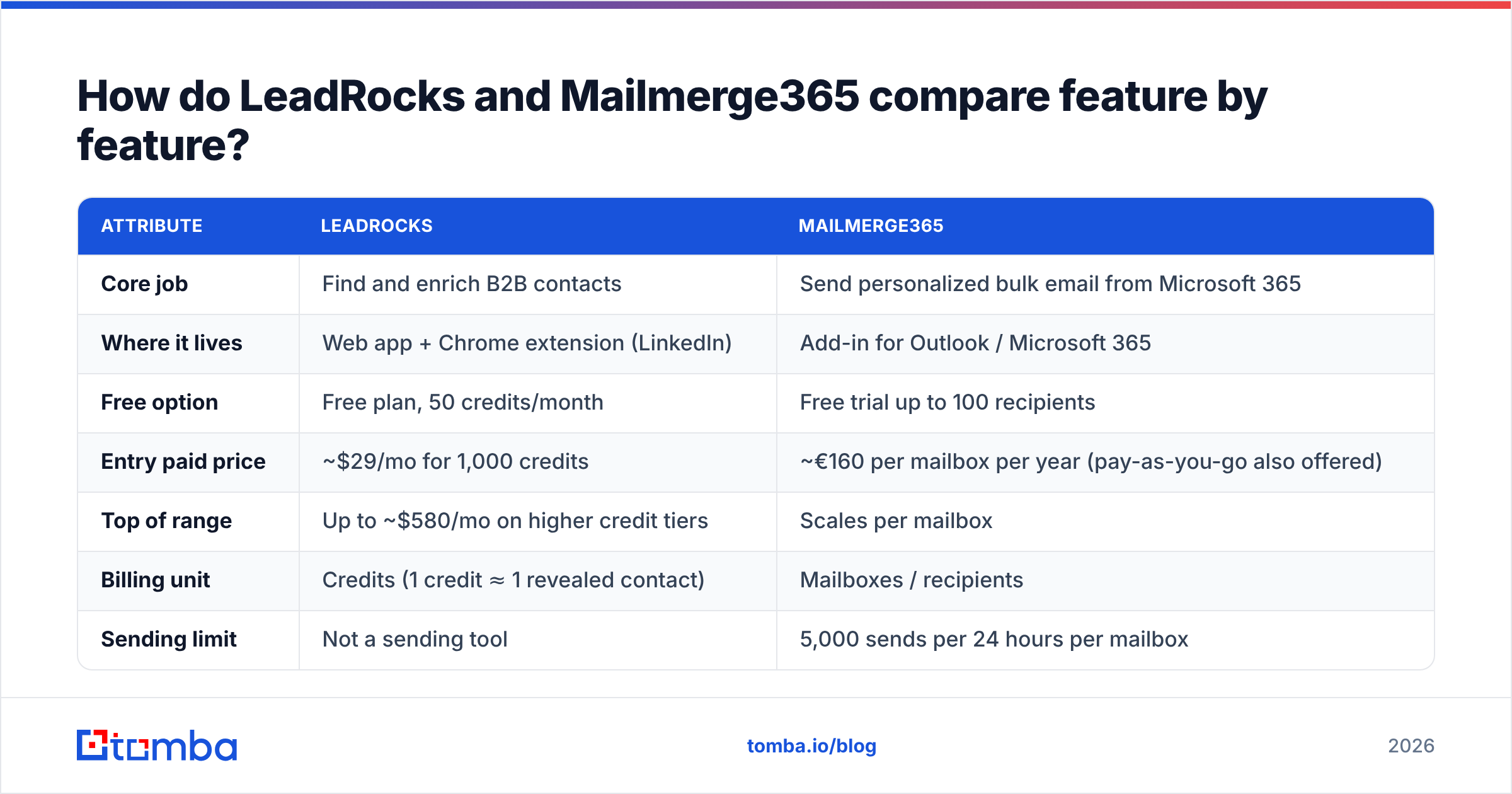
Here's the side-by-side. Pricing reflects publicly listed plans at the time of writing. Both vendors change tiers, so check leadrocks.io and mailmerge365.com before you buy.
| Attribute | LeadRocks | Mailmerge365 |
|---|---|---|
| Core job | Find and enrich B2B contacts | Send personalized bulk email from Microsoft 365 |
| Where it lives | Web app + Chrome extension (LinkedIn) | Add-in for Outlook / Microsoft 365 |
| Free option | Free plan, 50 credits/month | Free trial up to 100 recipients |
| Entry paid price | ~$29/mo for 1,000 credits | ~€160 per mailbox per year (pay-as-you-go also offered) |
| Top of range | Up to ~$580/mo on higher credit tiers | Scales per mailbox |
| Billing unit | Credits (1 credit ≈ 1 revealed contact) | Mailboxes / recipients |
| Sending limit | Not a sending tool | 5,000 sends per 24 hours per mailbox |
| Tracking | Not applicable | Opens, clicks, bounces, unsubscribes |
| Email verification | Included on contact reveals | Detects bounces after sending |
| Best for | SDRs, founders, and agencies building lists | Teams standardized on Outlook sending to existing lists |
Two rows are worth a closer look.
Billing unit. LeadRocks charges for data, so your cost grows with how many new people you look up. Mailmerge365 charges for sending capacity, so your cost grows with how many mailboxes send. Those are different budget shapes. A two-person team prospecting hard will burn LeadRocks credits fast and barely notice the Mailmerge365 bill.
Verification vs bounce detection. LeadRocks tries to hand you a deliverable address before you send. Mailmerge365 tells you an address bounced after you sent to it. The first protects your domain and the second reports on the damage. Both are useful, but they aren't the same thing.

What does LeadRocks do well?#
LeadRocks is built for the "I need 200 VP-level contacts at logistics companies by Friday" job.
Database search plus LinkedIn enrichment. You can search the database directly, or use the Chrome extension to pull contact data while you browse LinkedIn profiles and search results. For reps who already live on LinkedIn, the extension is the main draw.
Generous entry pricing. A permanent free tier with 50 monthly credits and unlimited users is uncommon in this category. It's enough to test data quality on your own ICP before you pay anything. The ~$29/mo entry plan for 1,000 credits undercuts many better-known data vendors on price per contact.
Credits that map to outcomes. One credit reveals one contact, so budgeting is simple. Before you commit, ask whether credits roll over and whether failed or unverified lookups get charged.
Where to be careful:
- Coverage varies by region and seniority. Every B2B database is strongest in certain markets. Test with 50 contacts from your target list, not a generic US tech sample.
- The data isn't the send. LeadRocks gets you the address. You still need a sending tool, a warmed domain, and a plan for email deliverability.
- Data decays. B2B contact data goes stale as people change jobs. An address that was valid when you revealed it may bounce three months later, so re-verify older exports before you reuse them.
What does Mailmerge365 do well?#
Mailmerge365 targets a specific, underserved user: someone whose company runs on Microsoft 365, who isn't allowed (or doesn't want) to connect a third-party sequencer, and who needs to send personalized bulk email today.
It sends from your real mailbox. Emails go out through your Microsoft 365 account, so they show up in your Sent folder, replies land in your normal inbox, and IT doesn't have to approve a new sending domain or SMTP relay. In regulated or IT-locked environments, that alone can decide it.
Tracking without a separate platform. Open and click tracking, automatic bounce detection, and unsubscribe management come built in. That covers the basics you'd otherwise need a marketing tool for.
Predictable pricing. At roughly €160 per mailbox per year (under €14 a month), it costs less than most cold email platforms. The pay-as-you-go option works if you only run a campaign once a quarter.
Where to be careful:
- The 5,000-per-day ceiling is real. Mailmerge365 sends through your mailbox, so Microsoft's own Exchange Online sending limits still apply. Plan big campaigns across days or mailboxes.
- It's mail merge, not a sequencer. If you need multi-step follow-ups with automatic reply detection, A/B testing across steps, and inbox rotation, a dedicated cold email platform is a better fit.
- Your list quality is your problem. Mailmerge365 will faithfully send to every row you give it. If 8% of those rows are dead addresses, your primary work mailbox takes the bounce hit, and so does your company's sender reputation.
Which tool fits which team?#
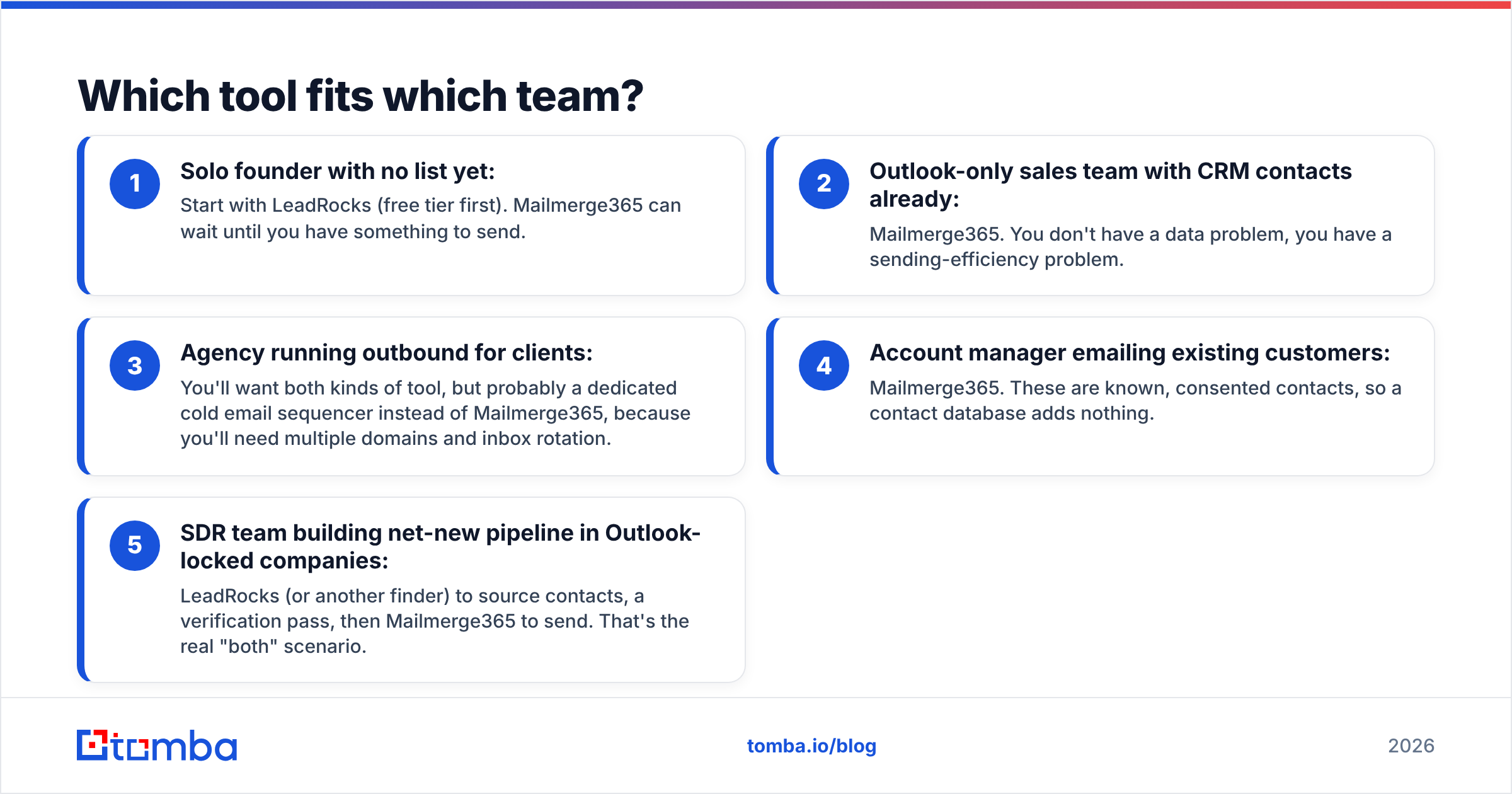
Here's a quick way to decide based on where your team is today:
- Solo founder with no list yet: Start with LeadRocks (free tier first). Mailmerge365 can wait until you have something to send.
- Outlook-only sales team with CRM contacts already: Mailmerge365. You don't have a data problem, you have a sending-efficiency problem.
- Agency running outbound for clients: You'll want both kinds of tool, but probably a dedicated cold email sequencer instead of Mailmerge365, because you'll need multiple domains and inbox rotation.
- Account manager emailing existing customers: Mailmerge365. These are known, consented contacts, so a contact database adds nothing.
- SDR team building net-new pipeline in Outlook-locked companies: LeadRocks (or another finder) to source contacts, a verification pass, then Mailmerge365 to send. That's the real "both" scenario.
Can you use LeadRocks and Mailmerge365 together?#
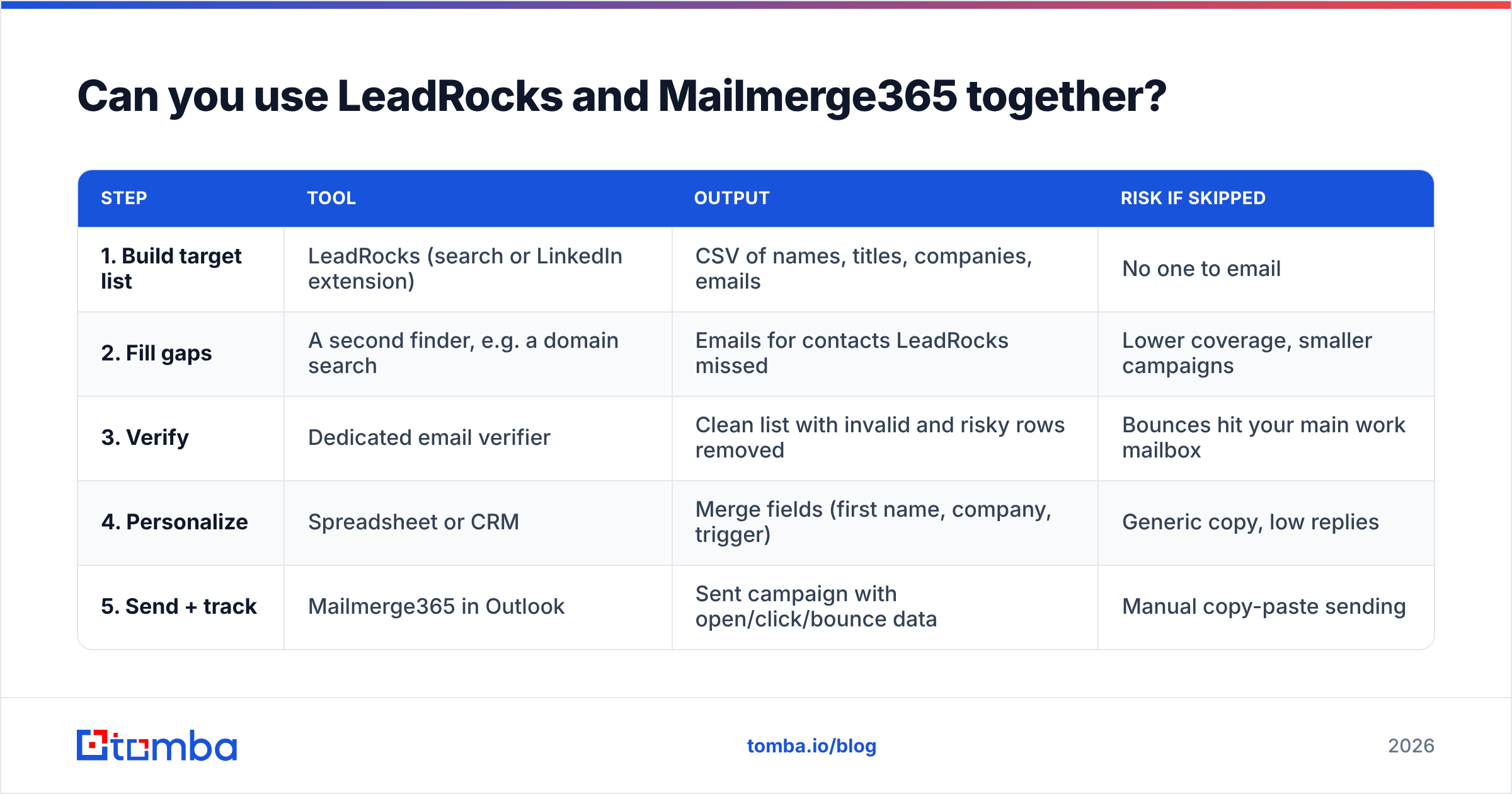
Yes, and for Outlook-centric outbound teams it's a reasonable low-cost stack. The workflow looks like this:
| Step | Tool | Output | Risk if skipped |
|---|---|---|---|
| 1. Build target list | LeadRocks (search or LinkedIn extension) | CSV of names, titles, companies, emails | No one to email |
| 2. Fill gaps | A second finder, e.g. a domain search | Emails for contacts LeadRocks missed | Lower coverage, smaller campaigns |
| 3. Verify | Dedicated email verifier | Clean list with invalid and risky rows removed | Bounces hit your main work mailbox |
| 4. Personalize | Spreadsheet or CRM | Merge fields (first name, company, trigger) | Generic copy, low replies |
| 5. Send + track | Mailmerge365 in Outlook | Sent campaign with open/click/bounce data | Manual copy-paste sending |
Step 3 is the one people skip, and it's the one that matters most when you send from your primary Microsoft 365 mailbox. A cold email platform usually sends from secondary domains you can afford to damage. Mailmerge365 sends from you. A bounce rate that a throwaway domain could absorb can get your real work inbox throttled.
Even if LeadRocks flagged an address as valid at reveal time, re-check it if the export is more than a few weeks old. Running the list through an email verifier right before the send takes a few minutes and costs far less than recovering a flagged mailbox.

Is LeadRocks better than Mailmerge365?#
Neither is better, because they don't do the same thing. But you can still pick a winner for each scenario.
LeadRocks wins if your bottleneck is finding people. Its free tier and low entry price make it one of the cheaper ways to test a contact database against your ICP. Its weak spot is the same as every single-source database: coverage gaps in some regions and industries, and data that decays after export.
Mailmerge365 wins if your bottleneck is sending from Outlook. It's cheap and it keeps IT comfortable, and sending from your real mailbox is a genuine advantage for relationship-based outreach where replies need to feel personal. Its weak spot is that it assumes your list is already clean, and it isn't built for multi-step cold sequences.
Neither tool fully covers the middle of the workflow: filling coverage gaps, verifying catch-all domains, and re-checking stale data before a send. That's where a dedicated email finder and verifier earns its place.
How does cost stack up for a typical team?#
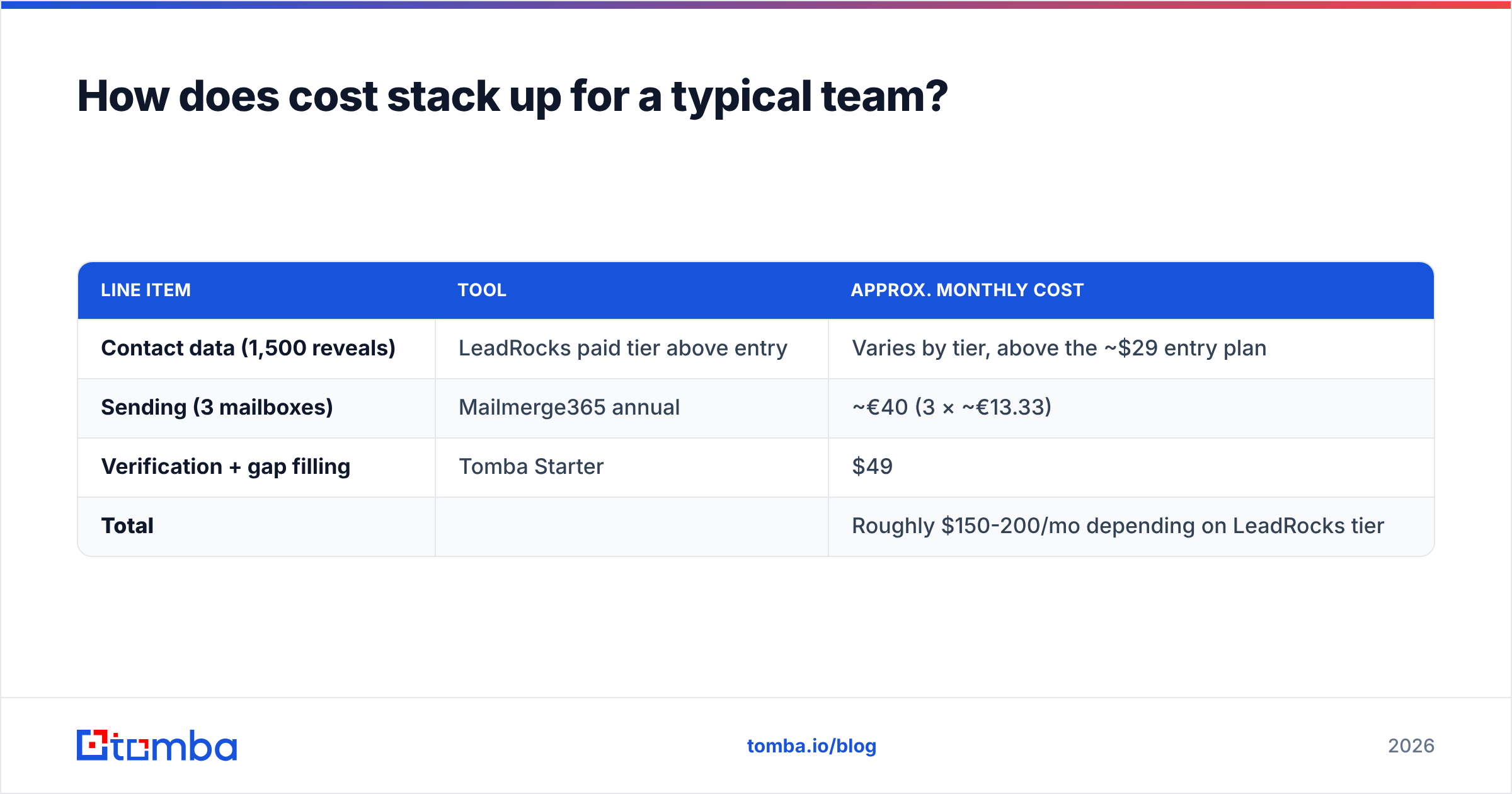
Say you're a three-person team sending around 1,500 net-new prospects a month from Outlook.
| Line item | Tool | Approx. monthly cost |
|---|---|---|
| Contact data (1,500 reveals) | LeadRocks paid tier above entry | Varies by tier, above the ~$29 entry plan |
| Sending (3 mailboxes) | Mailmerge365 annual | ~€40 (3 × ~€13.33) |
| Verification + gap filling | Tomba Starter | $49 |
| Total | Roughly $150-200/mo depending on LeadRocks tier |
That's far below a typical all-in-one sales engagement platform per seat. The trade-off is that you manage three tools instead of one. For small teams that's usually worth it. For 20+ reps, the admin overhead starts to favor a consolidated platform.
If you want to compare what verification and gap-filling cost at different volumes, see the Tomba pricing page. Plans run from a free tier (25 searches/mo) through Starter at $49/mo, Growth at $99/mo, and Pro at $249/mo.
What should you check before buying either tool?#
For LeadRocks:
- Run a 50-contact pilot on your exact ICP using the free tier. Record the reveal rate and bounce rate separately.
- Ask about credit rollover and whether unverified results consume credits.
- Check data sourcing and GDPR posture if you prospect into the EU.
For Mailmerge365:
- Confirm your tenant allows the add-in. Some Microsoft 365 admins block third-party add-ins by default.
- Map your volume against the 5,000/day cap and your tenant's own limits.
- Test unsubscribe handling end to end, since that's a compliance requirement in most markets.
For both:
- Decide who owns list hygiene. If nobody owns verification, it won't happen, and your Outlook mailbox pays for it.
The bottom line#
LeadRocks vs Mailmerge365 isn't a head-to-head. It's a "which gap do you fill first" decision. Choose LeadRocks when you need contacts, and choose Mailmerge365 when you need to send from Outlook. If you're running net-new outbound from a Microsoft 365 mailbox, put a verification step between the two.
If you want a second data source that fills LeadRocks' coverage gaps and verifies addresses before they reach your Outlook send queue, try the Tomba Email Finder. You can look up professional emails by name, domain, or company, verify them in the same place, and export a clean CSV that goes straight into Mailmerge365. The free tier gives you 25 searches a month to test it on your own target accounts before paying anything.
Related guides#
// get started
Find, verify and enrich your first contacts today
Start on the free plan with 25 searches a month, then scale when your team is ready.
Free plan · No credit card required · GDPR & CCPA
// about the author