Leadrocks vs Noparam: Finder vs Verifier Compared for 2026
Leadrocks finds B2B contacts. Noparam checks whether an email address is valid. Here's what each tool does, where each one falls short, and when you need both or a single tool that covers the whole job.
TL;DR
- Leadrocks and Noparam do different jobs. Leadrocks is a B2B contact database and email finder. Noparam is an email validation service with a real-time API.
- Pick Leadrocks if you need to build lead lists from scratch: filtering by job title, industry, company size, and location, plus a LinkedIn extension.
- Pick Noparam if you already have emails (from signups, forms, or bought lists) and need to clean them before sending or storing them.
- Both have free tiers. Leadrocks gives 50 credits a month. Noparam gives 100 validations a month. Neither free tier is enough for a real outbound program.
- If you want finding and verifying under one login, an all-in-one tool like Tomba saves you from stitching two vendors together.
People search "Leadrocks vs Noparam" because both tools come up in the same "email tools" lists. That makes them look like direct rivals, but they aren't. One helps you get contacts and the other helps you trust them. Choosing well starts with knowing which of those two problems is actually costing you pipeline.
This guide covers what each tool does, how the free tiers and pricing models compare, where each one falls short, and which setups make sense for different teams.
What is Leadrocks?#
Leadrocks is a B2B contact database and data-enrichment platform. According to its own listings, it holds more than 100 million business records with emails, phone numbers, and LinkedIn profile links. You search it like a prospecting database: filter by job title, location, company name, industry, and team size, then export contacts that match your ideal customer profile.
The main parts of the product are:
- Contact search: filter-based prospecting across the database.
- LinkedIn extension: pull contact details while you browse LinkedIn profiles and search results.
- Enrichment: upload a list of LinkedIn URLs or emails and get back business details.
- Built-in email verifier: check emails found inside Leadrocks or brought in from elsewhere, in bulk or through the API.
- Team access: the free plan allows unlimited users, which is unusual for this category.
Leadrocks is aimed at SDRs, founders, and small agencies who need list-building and some enrichment without paying ZoomInfo-level contracts.
What is Noparam?#
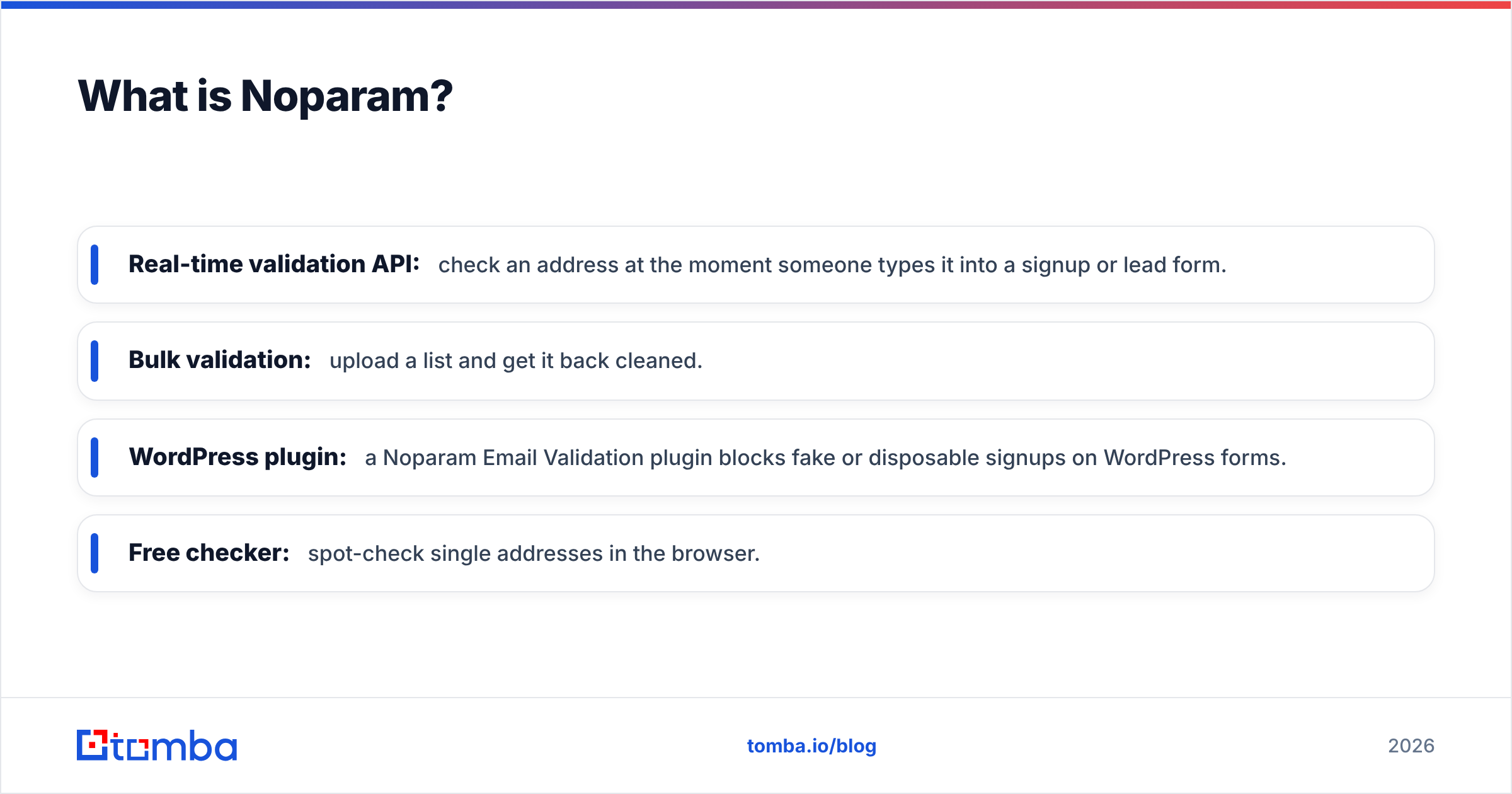
Noparam is an email validation service. It has no database of prospects to search. You give it email addresses and it tells you whether they're likely to deliver. It checks syntax, domain and MX records, flags disposable and role-based addresses, and handles the usual deliverability risks before you send.
Its main entry points are:
- Real-time validation API: check an address at the moment someone types it into a signup or lead form.
- Bulk validation: upload a list and get it back cleaned.
- WordPress plugin: a Noparam Email Validation plugin blocks fake or disposable signups on WordPress forms.
- Free checker: spot-check single addresses in the browser.
Noparam is aimed at product teams, marketers, and developers who want to keep bad data out of their CRM and mailing lists. It's less about outbound prospecting and more about protecting email deliverability and data quality at the point of entry.

How do Leadrocks and Noparam compare side by side?#
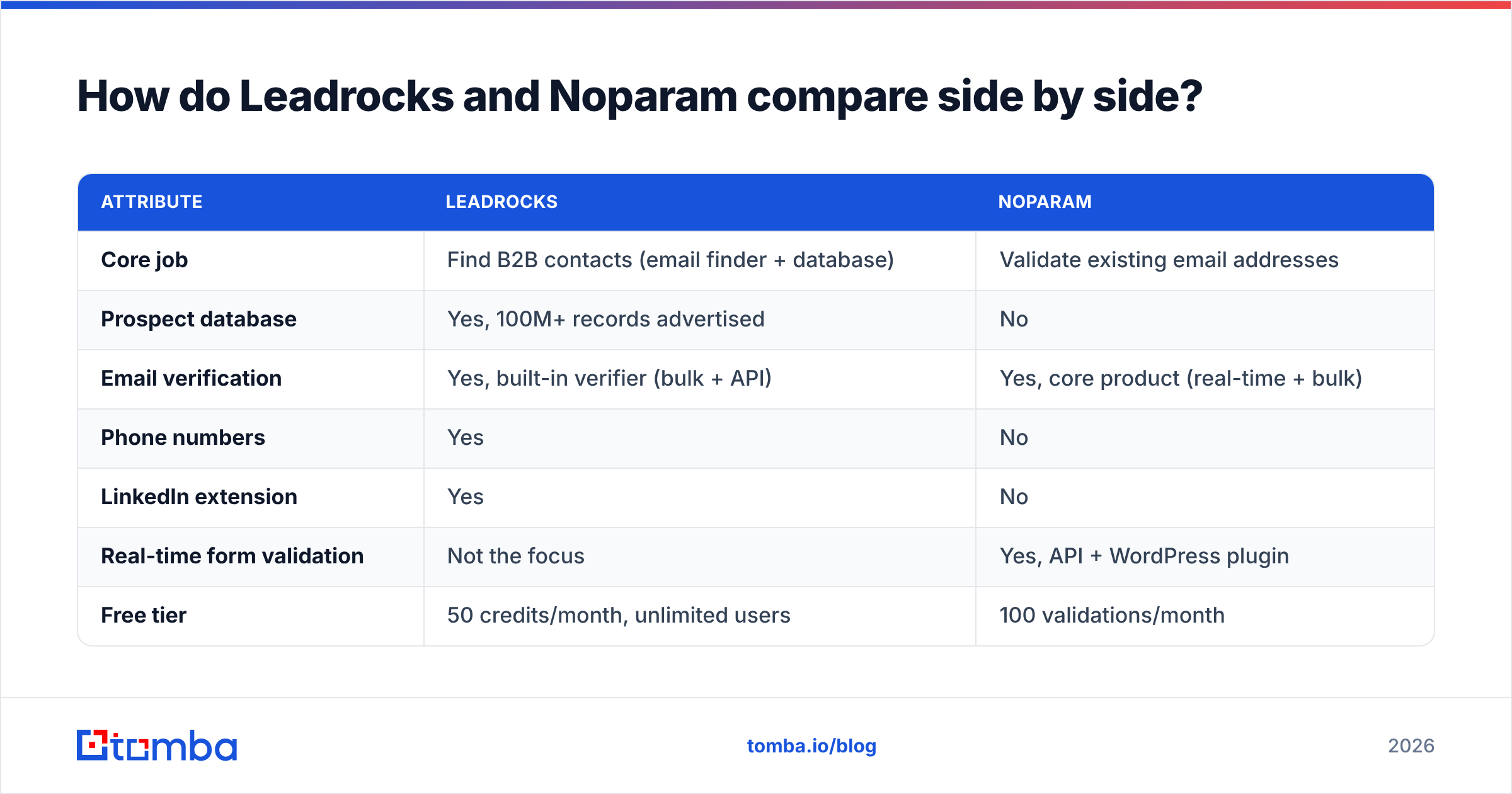
The table below compares the two on the things that matter when you're deciding what to buy. Pricing on both sites changes often, so check the live pages before committing. The free-tier figures below come from each vendor's published plan information.
| Attribute | Leadrocks | Noparam |
|---|---|---|
| Core job | Find B2B contacts (email finder + database) | Validate existing email addresses |
| Prospect database | Yes, 100M+ records advertised | No |
| Email verification | Yes, built-in verifier (bulk + API) | Yes, core product (real-time + bulk) |
| Phone numbers | Yes | No |
| LinkedIn extension | Yes | No |
| Real-time form validation | Not the focus | Yes, API + WordPress plugin |
| Free tier | 50 credits/month, unlimited users | 100 validations/month |
| Paid model | Monthly credit plans | Volume-based tiers + custom Enterprise |
| Best for | Outbound list-building, SDR teams | Signup hygiene, list cleaning, developers |
| Main limitation | Verification is a side feature, not the specialty | You still need a separate source of contacts |
The key difference is that Leadrocks has both halves of the workflow, with verification as a bonus. Noparam does one half, and it's built for that job.
Is Leadrocks better than Noparam for outbound prospecting?#
Yes, because Noparam can't prospect at all. If your bottleneck is "we don't have enough of the right people to email," Noparam doesn't solve it. It has no search, no filters, and no LinkedIn capture.
Leadrocks covers the top of the outbound funnel: define your persona, pull matching contacts, enrich them, and export them to your sequencer. The bundled verifier means you can run a basic check before sending without paying a second vendor.
The caveat is that any database tool is only as good as how recently its records were updated. People change jobs, companies change email patterns, and some domains accept all mail (catch-all), which makes simple verification unreliable. Before any large campaign, check a sample of exported contacts with a dedicated email verifier. This applies to Leadrocks and to every other database on the market.
Is Noparam better than Leadrocks for email verification?#
For pure verification workflows, Noparam is the more focused choice. Three reasons:
- Real-time is the core use case. Noparam is designed to sit inside a signup form or backend and reject bad addresses before they reach your database. Leadrocks's verifier is built for checking prospect lists, not guarding forms.
- The WordPress plugin removes the need for a developer. If your lead forms run on WordPress, you can block disposable and mistyped emails without writing API code.
- Its focus is data hygiene, not data acquisition. Marketing teams cleaning newsletter lists or event-registration exports don't need a prospect database. They need a fast, cheap yes/no on each address.
Where Noparam stops is where finding begins. If a verified list comes back 30% invalid, Noparam tells you which addresses to drop. It doesn't find the correct address for those contacts. You'd need a finder for that.
What does each free tier actually get you?#
Both free tiers are useful for testing and not much else.
- Leadrocks free (50 credits/month): enough to test data quality on your own ICP. Pull 50 contacts from a niche you know well and check how many are still in the role and reachable. The unlimited-users policy lets a whole team try it without seat fees.
- Noparam free (100 validations/month): enough to test the API on a staging form or spot-check a small list. For comparison, one mid-sized webinar export can easily exceed that.
Run a simple test during the trial: take the same 50 contacts, find them in Leadrocks, validate them in Noparam, and compare the verdicts. If the two tools disagree on a lot of addresses, you've learned something about catch-all domains in your market. Neither vendor's marketing page will tell you that.
Where does each tool fall short?#
A neutral comparison should cover the weak spots, not just the feature lists.
Leadrocks limitations
- Verification is secondary. It works for basic hygiene, but teams sending high volumes usually add a dedicated verifier or a catch-all check on top.
- Database coverage varies by region and industry. 100M+ records is a lot, but coverage of niche verticals or non-US markets may be thinner. Test your own segment before buying a larger plan.
- Little public benchmark data. Independent accuracy tests are rare, so your own trial matters more than review scores.
Noparam limitations
- No contact discovery. You still need a finder, a database, or inbound traffic to supply addresses.
- Catch-all domains stay uncertain. Like every SMTP-based verifier, Noparam can only go so far on servers that accept every address. For those, a specialized catch-all verifier or engagement-based checks give more confidence.
- Pricing past the free tier is less visible. Paid tier amounts aren't always shown clearly in third-party listings. Check Noparam's pricing on G2 and the vendor's own page before you budget.
Which one should you choose for your use case?#
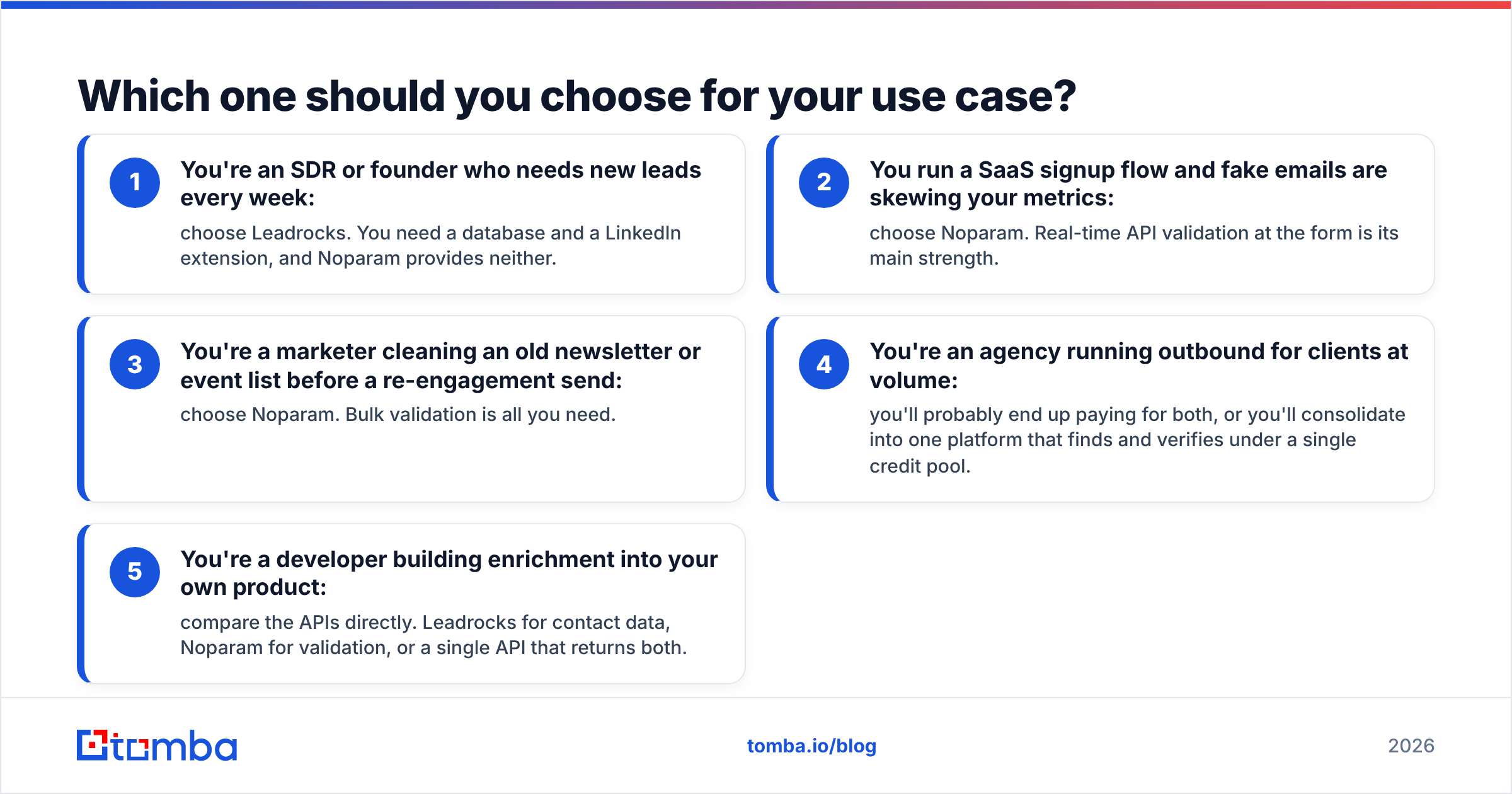
Use this decision list to match the tool to your job:
- You're an SDR or founder who needs new leads every week: choose Leadrocks. You need a database and a LinkedIn extension, and Noparam provides neither.
- You run a SaaS signup flow and fake emails are skewing your metrics: choose Noparam. Real-time API validation at the form is its main strength.
- You're a marketer cleaning an old newsletter or event list before a re-engagement send: choose Noparam. Bulk validation is all you need.
- You're an agency running outbound for clients at volume: you'll probably end up paying for both, or you'll consolidate into one platform that finds and verifies under a single credit pool.
- You're a developer building enrichment into your own product: compare the APIs directly. Leadrocks for contact data, Noparam for validation, or a single API that returns both.

Do you need both Leadrocks and Noparam?#
Many outbound teams end up with this setup without planning it: a finder for list-building and a separate verifier because the finder's built-in checks weren't strict enough. It works, but it has real costs:
- Two credit pools that deplete at different rates and renew on different dates.
- Two exports and imports per campaign, with CSV cleanup in between.
- Two sets of verdict labels ("risky" vs "accept-all" vs "unknown") that your ops person has to map to one CRM field.
- Two vendor reviews for security, GDPR, and procurement.
If you only verify inbound signups, the combination is unnecessary. Noparam alone covers it. If you only prospect a few hundred contacts a month, Leadrocks's built-in verifier is probably enough. The two-tool setup only makes sense at volume, and at volume it's worth pricing out a consolidated alternative.
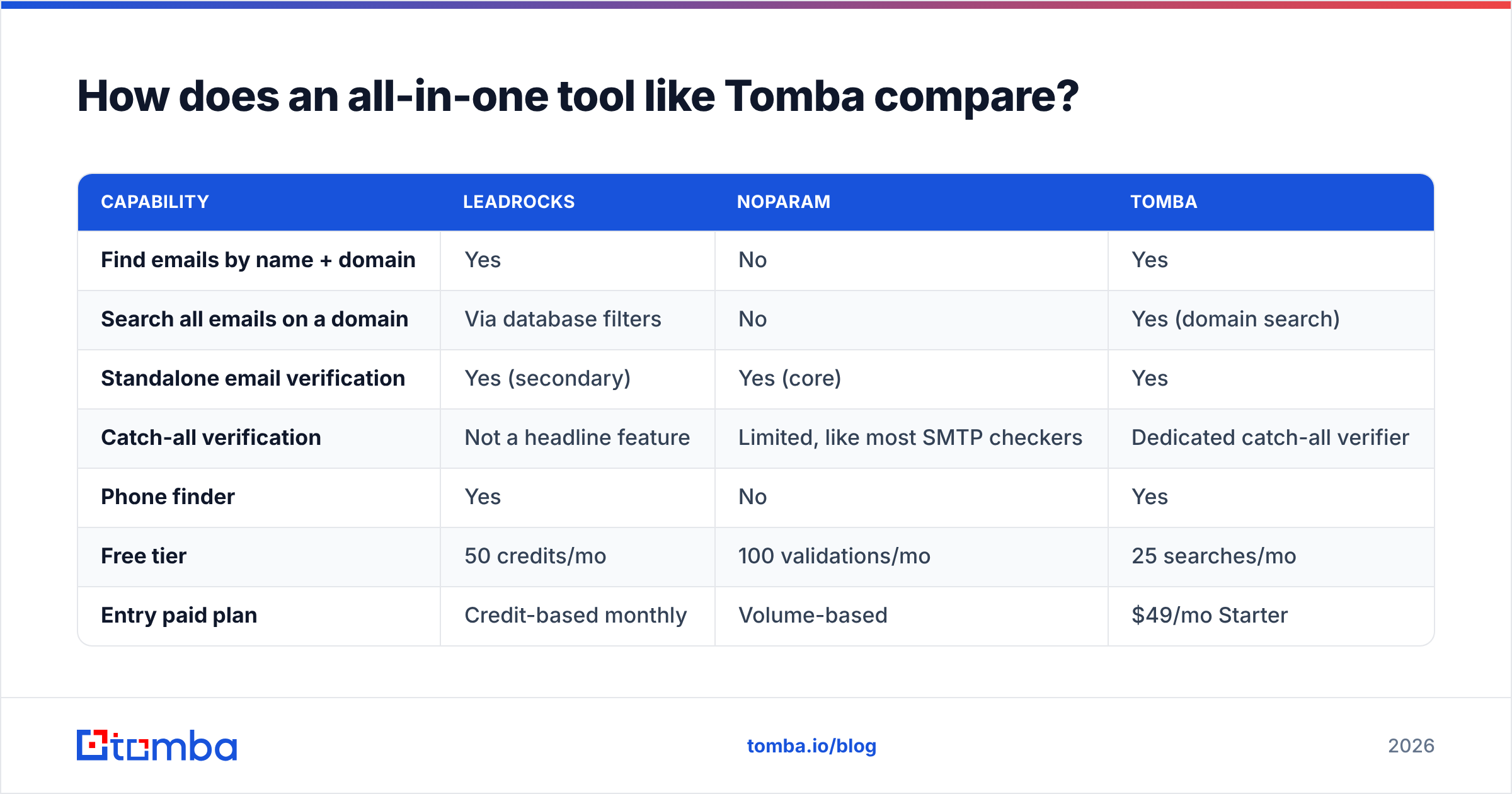
How does an all-in-one tool like Tomba compare?#
For an honest benchmark, here's where Tomba sits next to both tools. It isn't the only option, but it's a useful reference because it combines the finder and verifier jobs.
| Capability | Leadrocks | Noparam | Tomba |
|---|---|---|---|
| Find emails by name + domain | Yes | No | Yes |
| Search all emails on a domain | Via database filters | No | Yes (domain search) |
| Standalone email verification | Yes (secondary) | Yes (core) | Yes |
| Catch-all verification | Not a headline feature | Limited, like most SMTP checkers | Dedicated catch-all verifier |
| Phone finder | Yes | No | Yes |
| Free tier | 50 credits/mo | 100 validations/mo | 25 searches/mo |
| Entry paid plan | Credit-based monthly | Volume-based | $49/mo Starter |
Tomba's paid plans run Starter $49/mo, Growth $99/mo, Pro $249/mo, and custom Enterprise (see Tomba pricing). The trade-off: Tomba's free tier is smaller than either competitor's, so it suits teams who already know they'll pay for volume. Noparam remains the lighter option for pure form validation. Leadrocks's unlimited-seat free plan is hard to beat for small teams just starting to experiment.
What's the verdict on Leadrocks vs Noparam?#
There's no single winner, because the two tools aren't competing for the same job.
- Leadrocks wins on prospecting. It has a searchable database, LinkedIn capture, enrichment, phone numbers, and a verifier included.
- Noparam wins on focused validation. It offers real-time API checks, a WordPress plugin, and a simple bulk cleaner for teams that already have the emails.
- Neither covers the full find-then-verify workflow at outbound volume as well as a platform built for both.
Before you choose, work out whether your problem is "not enough contacts" or "untrustworthy contacts." That answer tells you which tool to test first. Run both free tiers against the same 50 real prospects in your market, and let those results decide.
If you'd rather not juggle two vendors, the Tomba Email Finder finds professional emails by name, domain, or company and verifies them in the same workflow, including catch-all checks. Start on the free plan with 25 searches a month, test it against your own ICP, and upgrade to the $49/mo Starter plan when your outbound volume justifies it.
Related guides#
// get started
Find, verify and enrich your first contacts today
Start on the free plan with 25 searches a month, then scale when your team is ready.
Free plan · No credit card required · GDPR & CCPA
// about the author