Leadrocks vs Salesbot (2026): Contact Database or AI SDR? Our Verdict
Leadrocks sells cheap, filterable B2B contact data. Salesbot sells an AI copilot that builds lists and writes outreach for you. They solve different problems, so here's how to pick the right one before you pay for either.
TL;DR
- Leadrocks is a low-cost B2B contact database with a LinkedIn extension. It has a free plan (about 50 credits a month), paid tiers start around $29/month, and it has run an AppSumo lifetime deal. Buy it when you need lists, not automation.
- Salesbot is an AI prospecting and outreach platform. You describe your ICP in plain English and it builds the list, writes the emails, and runs follow-ups. Listed pricing starts at $49/month (Basic) and $99/user/month (Professional).
- These two tools aren't really rivals. Leadrocks replaces manual list-building. Salesbot is trying to replace a good part of an SDR's day.
- Whichever you pick, verify every address before you send. Independent tests of low-cost databases often find validity rates well below the marketing claims.
- For most small teams, the setup that holds up best is a cheap data source, a separate verification step, and whatever sequencer you already use.
What is the real difference between Leadrocks and Salesbot?#
A Leadrocks vs Salesbot comparison is a bit like comparing a fish market to a restaurant. One sells you raw material at a good price and you do the cooking. The other hands you a finished plate, and you give up some control over the ingredients.
Leadrocks is a B2B contact database. According to its listings, it holds over 100 million records with emails, phone numbers, and LinkedIn profile links. You filter by job title, location, company, industry, and headcount, reveal contacts with credits, and export. It also includes an email verifier, bulk verification, an API, and a Chrome extension that pulls contacts while you browse LinkedIn.
Salesbot (salesbot.io) is an AI-first prospecting platform. Some of its pages are now branded Bowtie. Salesbot says it searches a pool of 650M+ contacts, but its main pitch is the workflow around that data. You describe your ideal customer in natural language, point it at your marketing page, and it returns a scored lead list plus a draft outreach campaign with automated follow-ups. It also connects to CRMs such as Salesforce.
So the choice comes down to one question: is your bottleneck finding contacts, or working them?
How do Leadrocks and Salesbot compare feature by feature?#
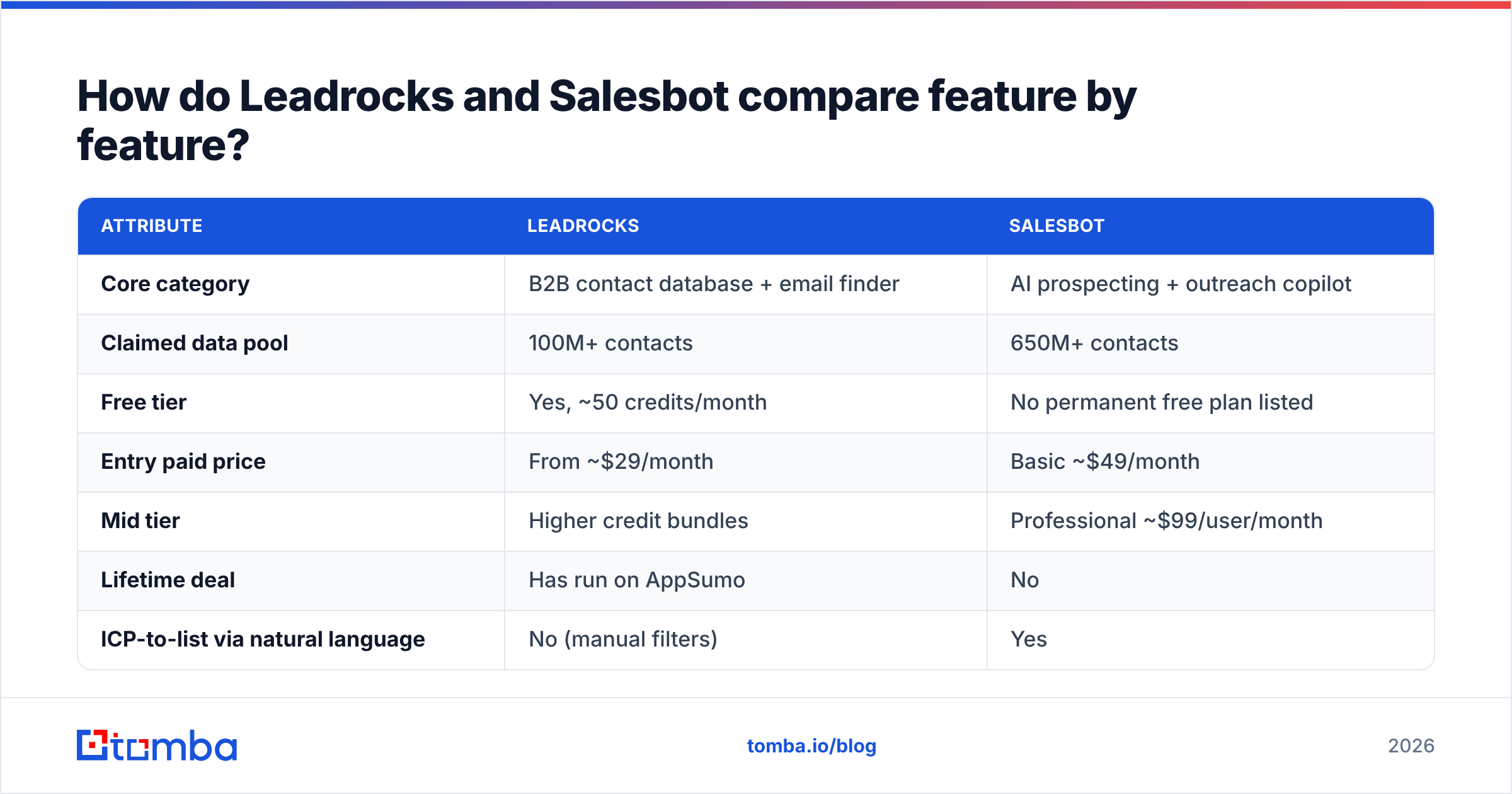
Here's the side-by-side view, based on public listings as of 2026. Pricing in this category changes often, so check each vendor's page before you commit.
| Attribute | Leadrocks | Salesbot |
|---|---|---|
| Core category | B2B contact database + email finder | AI prospecting + outreach copilot |
| Claimed data pool | 100M+ contacts | 650M+ contacts |
| Free tier | Yes, ~50 credits/month | No permanent free plan listed |
| Entry paid price | From ~$29/month | Basic ~$49/month |
| Mid tier | Higher credit bundles | Professional ~$99/user/month |
| Lifetime deal | Has run on AppSumo | No |
| ICP-to-list via natural language | No (manual filters) | Yes |
| AI email writing | No | Yes, editable drafts |
| Automated follow-up sequences | No | Yes |
| Lead scoring | Basic filters only | AI-driven scoring |
| Built-in email verifier | Yes | Verified contact data claimed |
| Chrome / LinkedIn extension | Yes | Web app focus |
| CRM integration | Export + API | Native (e.g., Salesforce) |
| Best for | Budget list-building, agencies, founders | Lean teams that want AI to run top-of-funnel |
Look at the second half of that table. From "AI email writing" down, Salesbot answers "yes" and Leadrocks answers "no". That isn't a flaw in Leadrocks. It was never trying to be a sequencer.
Which workflow does each tool actually replace?#
Before you compare prices, map each tool to the job it takes off your plate. Here are the five steps of a typical outbound motion and where each tool fits:
- Defining the ICP. Salesbot lets you type "Series A fintech companies in the UK, 50–200 staff, targeting heads of finance" and get a list back. With Leadrocks you build that ICP yourself from dropdown filters.
- Building the list. Both do this. Leadrocks gives you finer manual control and cheaper per-contact costs. Salesbot is faster when you'd rather not fiddle with filters.
- Finding and checking emails. Leadrocks reveals emails and includes a verifier. Salesbot says it provides verified contact data. Either way, a second independent check before sending is cheap insurance.
- Writing outreach. This is Salesbot only. It drafts personalized emails from your ICP and website, and you can edit or re-steer them.
- Running follow-ups and syncing to the CRM. Salesbot automates follow-ups and pushes to the CRM. With Leadrocks you export to a separate sequencer like Instantly, lemlist, or Apollo, then sync to your CRM.
If you already pay for a sequencer and have a rep who writes good copy, you only need steps 2 and 3, and Leadrocks (or any solid email finder) covers them. If you're a founder doing sales at night with nothing set up yet, Salesbot covering steps 1–5 in one place is worth a lot.
How accurate is Leadrocks' and Salesbot's contact data?#
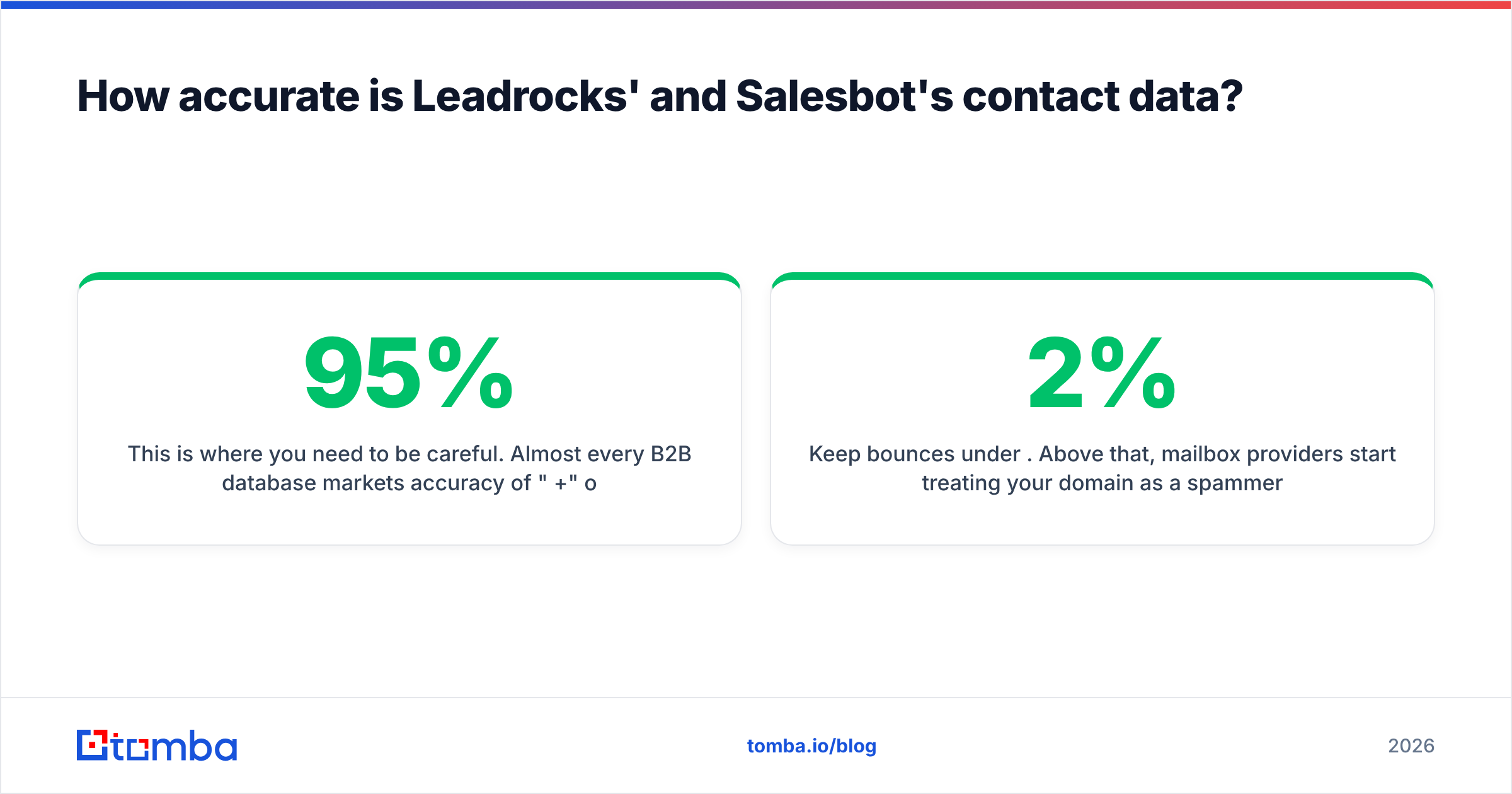
This is where you need to be careful. Almost every B2B database markets accuracy of "95%+" or "98%+". Independent tests often don't back that up. Some published reviews of Leadrocks, for example, report measured validity far below the marketed figure. Your results will vary by industry and region, but the gap is real enough to plan around.
Salesbot's 650M+ contact pool is also large, and large pools almost always contain more stale records. People change jobs roughly every two to three years. A database that doesn't re-verify continuously decays by a double-digit percentage every year.
What this means for you in practice:
- Treat any exported email as unverified until you check it. Run the list through an independent email verifier before it reaches your sending domain.
- Handle catch-all domains separately. Many mid-market and enterprise companies accept mail for any address, so a basic SMTP check returns "valid" for addresses that don't exist. A dedicated catch-all verifier tells you which of those are safe to send to.
- Keep bounces under 2%. Above that, mailbox providers start treating your domain as a spammer. This applies whether Leadrocks or Salesbot supplied the data.
A bad list hurts you twice. You waste credits on contacts you can't reach, and you damage the domain you depend on for the next six months.
Is Leadrocks or Salesbot cheaper?#
On sticker price, Leadrocks is clearly cheaper. A free plan with around 50 monthly credits and paid tiers starting near $29/month make it one of the more affordable data sources available. If you bought the AppSumo lifetime deal when it was offered, your ongoing data costs are close to zero.
Salesbot's listed Basic plan is about $49/month, and Professional is about $99 per user per month, with Enterprise on custom pricing (details are on its Capterra listing). A three-rep team on Professional pays roughly $3,600 a year.
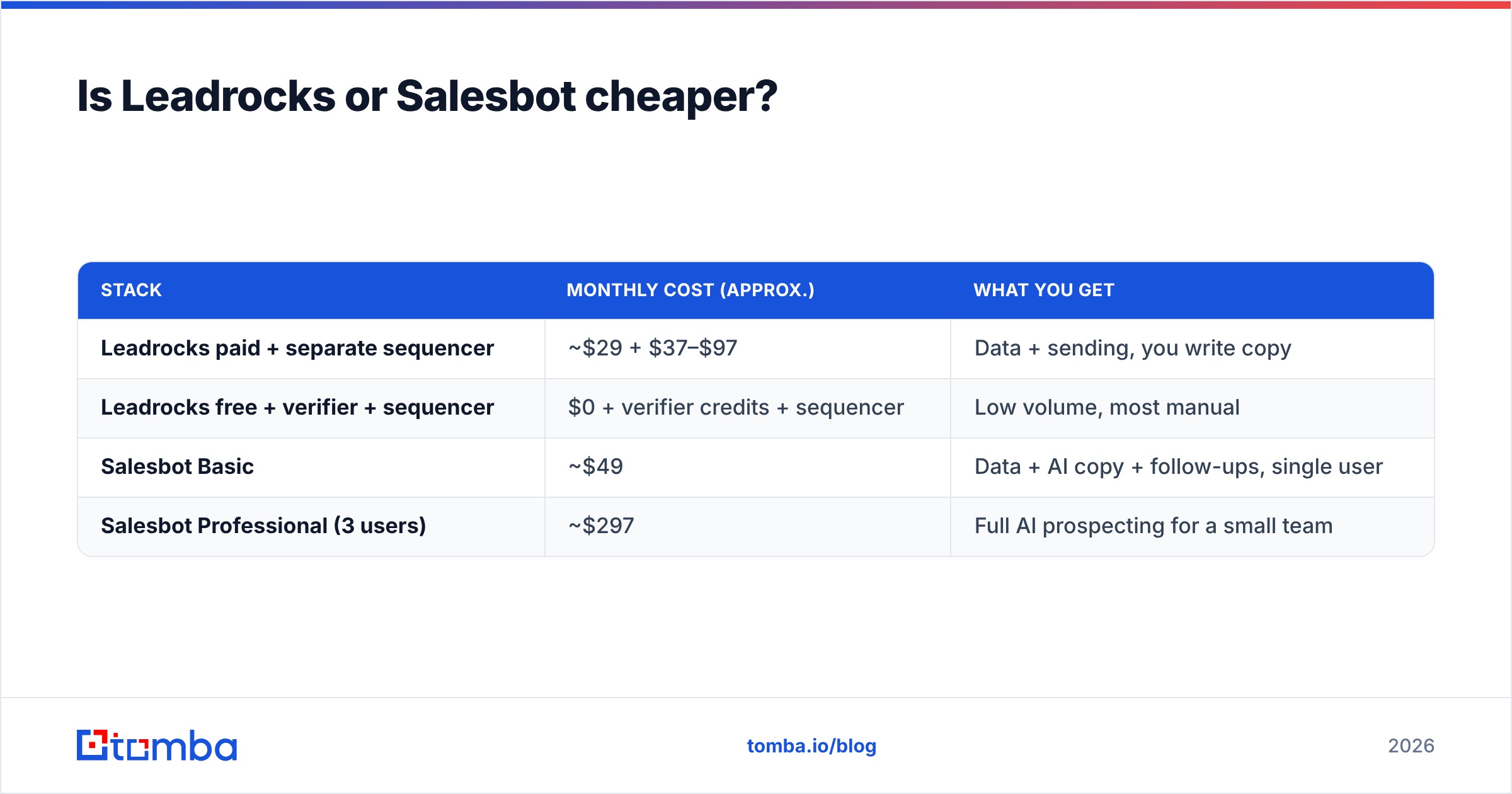
But you're not paying for the same thing. A fairer comparison is total cost for the complete workflow:
| Stack | Monthly cost (approx.) | What you get |
|---|---|---|
| Leadrocks paid + separate sequencer | ~$29 + $37–$97 | Data + sending, you write copy |
| Leadrocks free + verifier + sequencer | $0 + verifier credits + sequencer | Low volume, most manual |
| Salesbot Basic | ~$49 | Data + AI copy + follow-ups, single user |
| Salesbot Professional (3 users) | ~$297 | Full AI prospecting for a small team |
Once you add a sequencer, the Leadrocks stack costs about the same as Salesbot Basic. What still differs is control versus convenience. The Leadrocks stack lets you swap each piece independently. Salesbot bundles everything, so it's faster to set up but harder to rearrange later.
Who should choose Leadrocks?#
Pick Leadrocks if most of these describe you:
- You already run a sequencer and like it.
- You or your team write your own cold emails and don't want AI drafts.
- You work in bulk: agencies building lists for clients, recruiters, or growth teams testing many small segments.
- Your budget is tight and the free tier or a lifetime deal matters.
- You want a LinkedIn extension to grab contacts while you browse profiles.
The trade-off is that you do more of the work yourself, and you should budget time and credits for verification. Leadrocks includes its own verifier, but using a second, independent check on high-value campaigns is a sensible habit.
Who should choose Salesbot?#
Pick Salesbot if most of these describe you:
- You're a founder or a one-to-three person sales team with no SDR.
- You'd rather describe your ICP in one sentence than learn a filter UI.
- You want list-building, first-draft copy, and follow-ups in one tool.
- You use Salesforce or another supported CRM and want leads to sync without CSV shuffling.
- You'll pay more per seat to get hours back each week.
The trade-off is lock-in and less control over each step. If you later decide the AI copy isn't good enough, or you want a different sending tool, you're effectively paying for a bundle you only partly use. Test the AI output against your best hand-written emails for two weeks before rolling it out.

What are the pros and cons of each tool?#
Leadrocks
- Pros: generous free tier, low paid pricing, fine-grained filters, built-in verifier, API, LinkedIn extension, unlimited users on some plans.
- Cons: no outreach or sequencing, and independent accuracy tests vary widely, so verification is non-negotiable. You also still need other tools to finish the workflow.
Salesbot
- Pros: natural-language ICP search, AI lead scoring, AI-written and editable outreach, automated follow-ups, native CRM integration, large claimed data pool.
- Cons: no permanent free plan, per-seat pricing grows quickly, less control over each step, and AI copy still needs a human review before it goes out under your name.
Are there alternatives worth considering?#
If neither tool fits exactly, the usual reason is one of these:
- You want stronger data accuracy than a budget database but don't need AI outreach. A dedicated email finder that finds emails by name + domain and verifies them in the same step is usually more accurate than bulk database exports, because it looks up each contact individually.
- You want an all-in-one platform with a bigger ecosystem. Apollo and similar platforms combine a database with sequencing. You'll find neutral user reviews of most of them on G2.
- You want data plus automation without per-seat pricing. In that case, combine a flat-priced data tool with a sequencer that charges by mailbox instead of by user.
So, Leadrocks vs Salesbot: which should you buy?#
Here's our verdict:
- Choose Leadrocks if you're cost-sensitive, already own a sequencer, and want raw lists you can shape yourself. It's one of the cheapest ways to get started, especially on the free tier.
- Choose Salesbot if you're a small team with no SDR capacity and the biggest cost is your time. Paying $49–$99 a month for AI that builds lists and writes first drafts can easily pay for itself.
- In both cases, don't send to unverified addresses. The data source matters less than the step between export and send.
Many teams end up with a hybrid: a lower-cost data source for volume, an AI or template layer for copy, and a strict verification gate in between. That setup survives vendor changes, price increases, and database decay better than committing everything to one tool.
Where does Tomba fit into this stack?#
If what you really need is accurate emails for specific people at specific companies, rather than a huge list or an AI copilot, try the Tomba Email Finder. You enter a name and a domain, and Tomba returns the professional address with a confidence score and verification status. It works for single lookups or bulk files, and it runs alongside a domain search, a catch-all verifier, and a phone finder, so the verification step is already included. You can start on the free plan with 25 searches a month. Paid plans run from Starter at $49/month through Growth at $99/month and Pro at $249/month; see Tomba pricing for full details. Use it next to Leadrocks, Salesbot, or your current sequencer, and stop sending to addresses you haven't checked.
Related guides#
// get started
Find, verify and enrich your first contacts today
Start on the free plan with 25 searches a month, then scale when your team is ready.
Free plan · No credit card required · GDPR & CCPA
// about the author