Leadrocks vs Skyp: Which B2B Contact Finder Wins in 2026?
Leadrocks gives you a searchable 100M+ contact database. Skyp enriches the LinkedIn profiles you already have open. Here's which one fits your workflow, what each really costs, and when neither is the right tool.
TL;DR
- Leadrocks is a database you search: filter 100M+ B2B records by title, industry, location and headcount, then export. It suits list-building from zero.
- Skyp is a LinkedIn-first Chrome extension: you open a profile or a Sales Navigator list and it adds emails and phone numbers. It suits reps who already know who they want to reach.
- Leadrocks publishes clear tiers, from a free plan with 50 credits/month up to $580/month. Skyp sells credit bundles, so check its current pricing page before you commit.
- Accuracy is the main question for both. Independent tests have found big gaps between Leadrocks' advertised accuracy and real results. Verify any export before it goes into a sequence.
- If you need domain-based finding, verification and an API in one place, a dedicated email finder such as Tomba is the cleaner fit.
What are Leadrocks and Skyp, really?#
People put these two tools side by side, but they are built on different ideas.
A simple way to picture it: Leadrocks is a phone book and Skyp is a caller ID. With a phone book you browse until you find people who match your criteria. Caller ID tells you the number of someone who's already in front of you. Both give you contact details. They start from opposite ends of the prospecting workflow.
Leadrocks (leadrocks.io) is a B2B contact database with a searchable index of 100M+ records. It also has a LinkedIn Chrome extension, a bulk email verifier and basic email sequencing. You build a filter (for example "VP Marketing, SaaS, 50-200 employees, DACH"), preview the results and spend credits to reveal contacts.
Skyp is a Chrome extension built for LinkedIn and Sales Navigator. You work inside LinkedIn, and Skyp adds professional emails and mobile numbers to the profiles and lists you're looking at, then pushes them to your CRM or outreach tool. Its Capterra listing shows integrations with Airtable, Apollo.io, Notion, Pipedrive, RB2B and Seamless. Those integrations tell you who it's for: reps who live in LinkedIn and want the data in their existing stack without switching tabs.
This one difference drives the rest of the comparison. Leadrocks helps you find who to contact. Skyp helps you reach people you've already picked.
How do Leadrocks and Skyp compare feature by feature?#
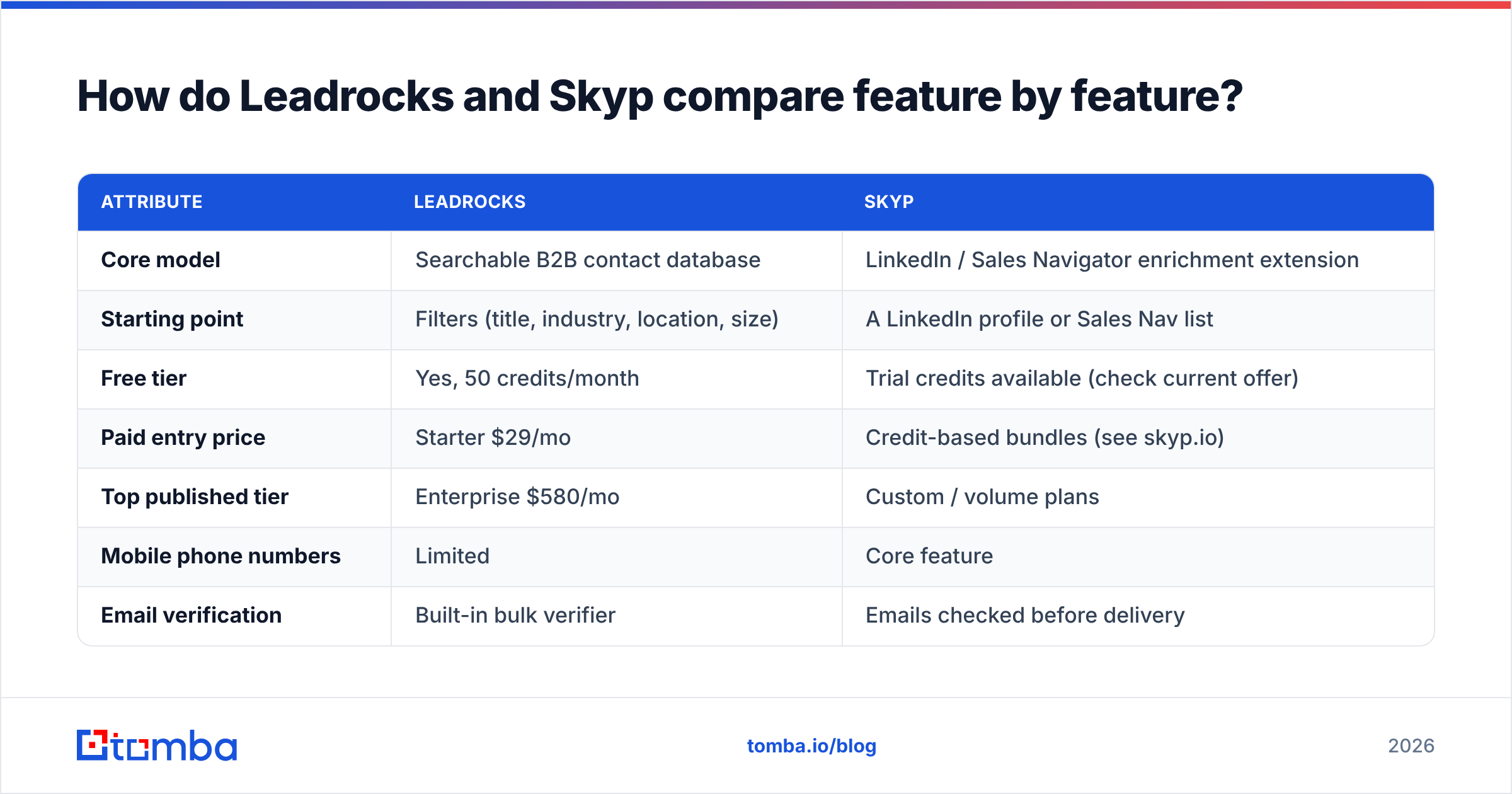
Here is a side-by-side view of the attributes that matter when you're choosing. Pricing changes often, so treat the numbers as a snapshot and confirm them on each vendor's site.
| Attribute | Leadrocks | Skyp |
|---|---|---|
| Core model | Searchable B2B contact database | LinkedIn / Sales Navigator enrichment extension |
| Starting point | Filters (title, industry, location, size) | A LinkedIn profile or Sales Nav list |
| Free tier | Yes, 50 credits/month | Trial credits available (check current offer) |
| Paid entry price | Starter $29/mo | Credit-based bundles (see skyp.io) |
| Top published tier | Enterprise $580/mo | Custom / volume plans |
| Mobile phone numbers | Limited | Core feature |
| Email verification | Built-in bulk verifier | Emails checked before delivery |
| Sequencing | Basic email sequences | No, pushes to your outreach tool |
| CRM / tool sync | CSV, API, standard CRMs | Pipedrive, Airtable, Notion, Apollo, Seamless and more |
| Best for | Building net-new lists at low cost | Enriching hand-picked LinkedIn prospects |
| Main weakness | Accuracy varies by segment | Depends on LinkedIn; no list-building from scratch |

The table shows the trade-off clearly. Leadrocks covers more of the funnel (search, verify, send), but less deeply. Skyp covers one step, enrichment, and focuses on the data teams most often lack, especially mobile numbers.
What do Leadrocks and Skyp actually cost?#
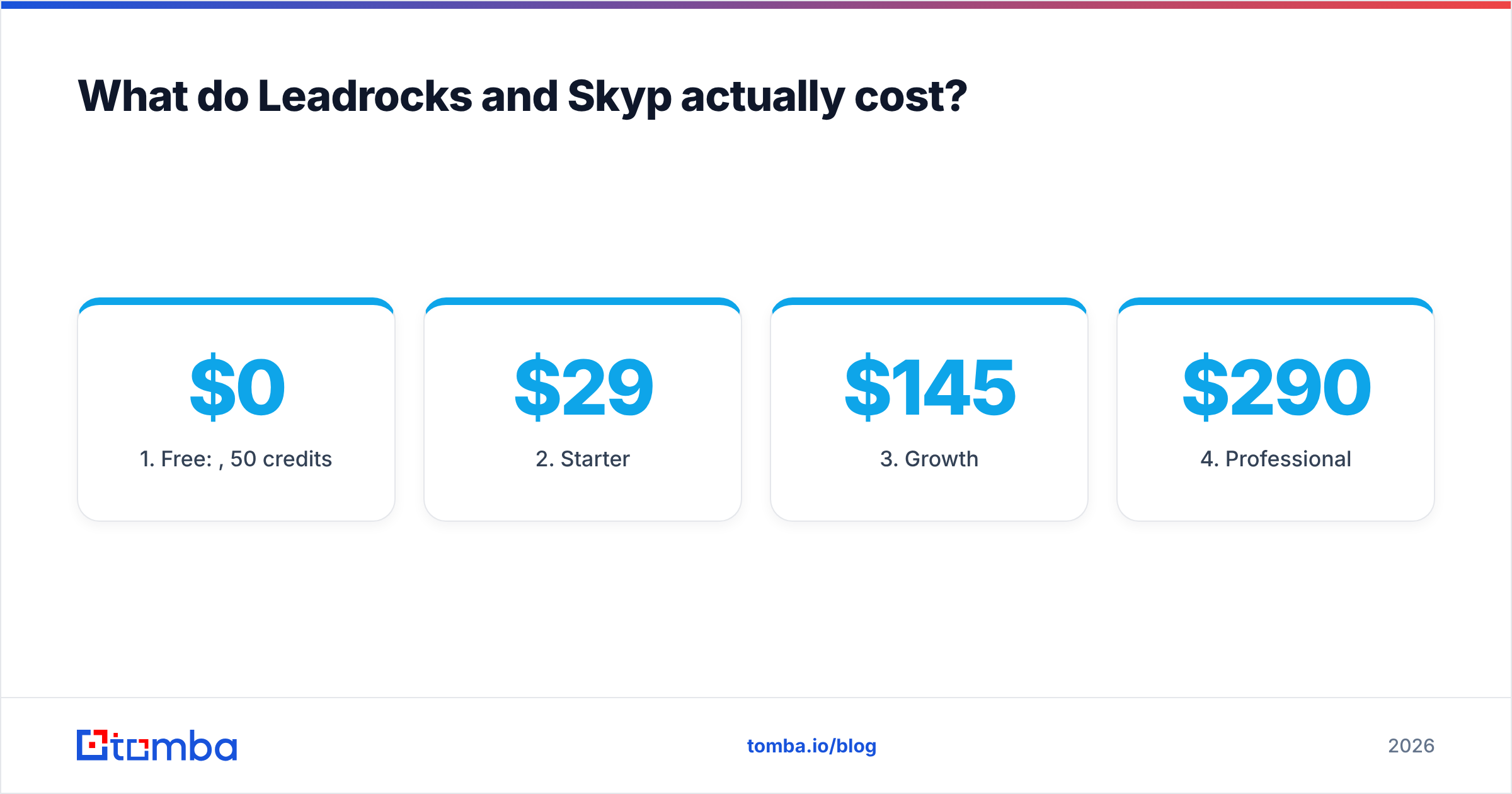
Leadrocks' published pricing is simple:
- Free: $0/month, 50 credits
- Starter: $29/month
- Growth: $145/month
- Professional: $290/month
- Enterprise: $580/month
Leadrocks has also sold a lifetime deal on AppSumo in the past, which is why many small teams and agencies have it in their stack.
Skyp uses a credit model. Emails and phone numbers usually cost different amounts of credits, and mobile numbers are the expensive part. Look at two things on its pricing page:
- Do you pay per lookup or per result? Pay-per-result is much safer. You don't burn credits on profiles that return nothing.
- What does one phone reveal cost compared with one email? If phones cost 5-10x as much, your real spend depends on how many calls you plan to make, not on the headline plan price.
What's the real cost per usable lead?#
The sticker price is the wrong number to compare. What matters is cost per verified, deliverable contact.
If a tool charges a credit for every lookup and a third of the returned emails bounce, your effective cost per good lead is about 1.5x the listed price. At worse hit rates it can reach 2-5x. That's why accuracy and billing rules matter more than whether the plan is $29 or $49.

Which is more accurate, Leadrocks or Skyp?#
Leadrocks markets itself as highly accurate (98% is the figure it often cites). Third-party reviewers have reported far lower valid-email rates in their own tests, with some samples in the 18-53% range. A sample of a few hundred contacts doesn't prove anything about the whole database, but the gap is large enough that you should run your own test before you buy a bigger plan.
Skyp works differently. It enriches profiles you choose, and it checks emails before returning them. On a narrow, well-targeted list, that usually means fewer bad records per credit spent. Its coverage still depends on how well its sources cover your segment. Mid-market US SaaS is well covered by almost everyone. Manufacturing companies in Eastern Europe are not.

How should you test accuracy yourself?#
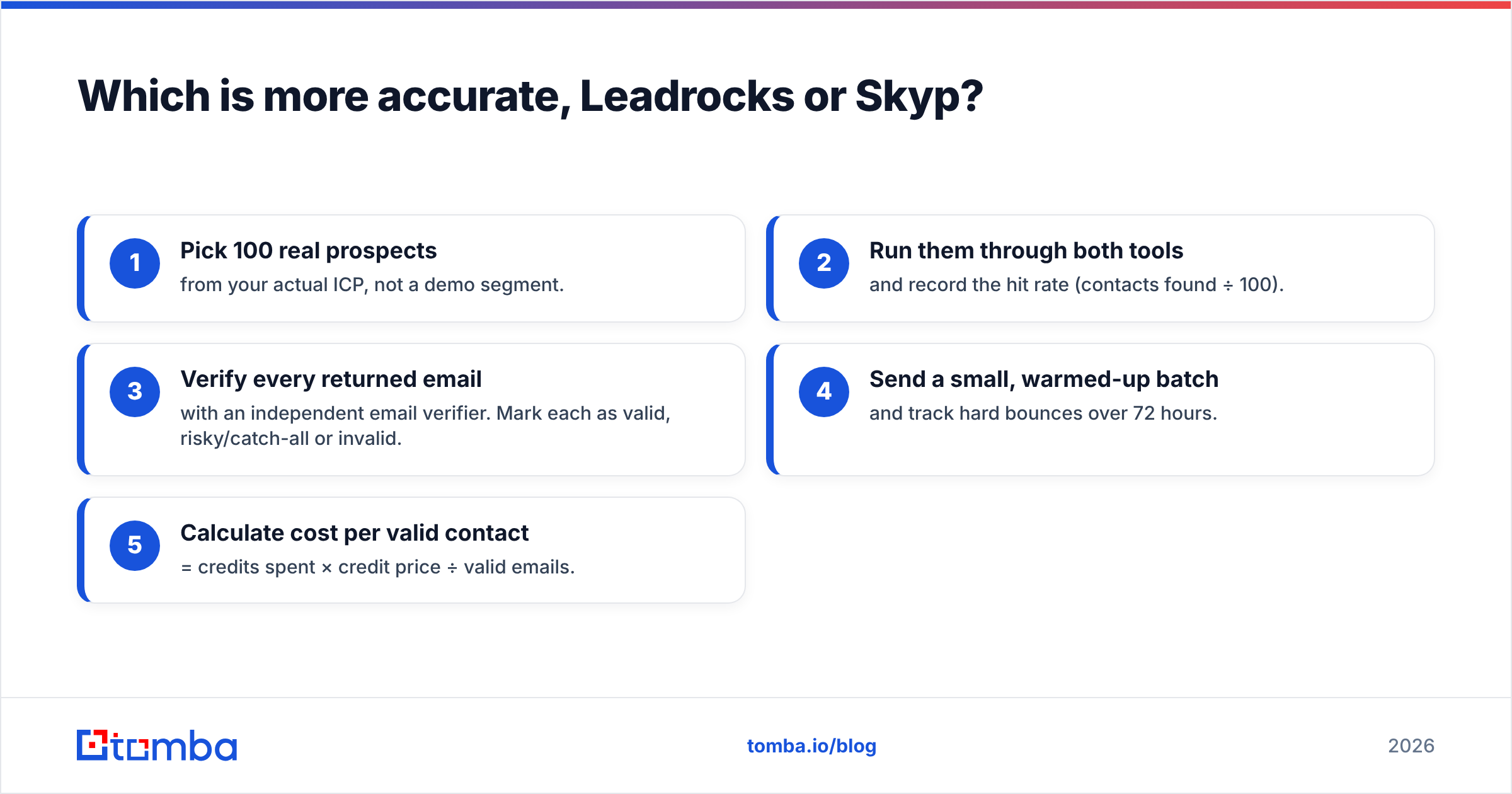
Don't rely on either vendor's claim, or on ours. Run a controlled test:
- Pick 100 real prospects from your actual ICP, not a demo segment.
- Run them through both tools and record the hit rate (contacts found ÷ 100).
- Verify every returned email with an independent email verifier. Mark each as valid, risky/catch-all or invalid.
- Send a small, warmed-up batch and track hard bounces over 72 hours.
- Calculate cost per valid contact = credits spent × credit price ÷ valid emails.
The tool with the lowest cost per valid contact for your segment is the one to use. The winner often changes between regions and job levels.
Which workflow fits your team?#
This is usually what settles the choice. Neither tool is better in general. Each one matches a particular way of working.
Choose Leadrocks if:
- You start from an ICP definition, not from names. You need to build lists of 500-5,000 contacts by filter.
- You're an agency or solo founder who wants search, verification and simple sequences in one inexpensive subscription.
- Budget matters more than precision, and you'll clean the list before sending anyway.
- You don't rely on LinkedIn Sales Navigator.
Choose Skyp if:
- Your reps already build lists in Sales Navigator and only need the contact layer.
- You need mobile numbers for cold calling or multichannel cadences.
- You want the data pushed straight into Pipedrive, Airtable, Notion or your outreach tool without handling CSVs.
- You prospect account by account (ABM-style) and each contact matters.
Consider neither if:
- Your prospects aren't active on LinkedIn (trades, public sector, many non-English markets).
- You mostly work from a list of company domains, such as trade-show exhibitors, a scraped directory or website visitors, and need every relevant person at each company.
- You need a documented API to enrich records automatically inside your own product or data pipeline.
Is the LinkedIn dependency a risk?#
For Skyp, yes, and you should understand it before building a process around it.
A LinkedIn-first extension works only while LinkedIn allows the pages it reads to render normally. LinkedIn's User Agreement restricts automated data collection, and LinkedIn has a history of tightening limits on extensions and automation tools. Well-built enrichment extensions reduce this risk by reading only the profile you're already viewing and fetching contact details from their own data sources. They don't scrape at scale. Still, any tool that sits on top of another platform is exposed to that platform's policy changes.
Leadrocks has its own LinkedIn extension, but its core value is the database, so a LinkedIn change affects it less.
Diversify either way. Keep at least one way of finding emails that starts from a company domain rather than a social profile. A domain search returns the public professional addresses tied to a company website, so your pipeline still works if LinkedIn changes something overnight.

What are the pros and cons of each?#
Leadrocks#
Pros
- Low entry price ($29/month) and a free tier to test with
- Search by filter, so you can build lists without Sales Navigator
- Bulk verifier and simple sequencing included
- Transparent, published pricing tiers
Cons
- Independent tests report accuracy well below the marketing claim
- Credits spent per lookup make bad data expensive
- Phone coverage is thin compared with dedicated phone tools
- Sequencing is basic; serious senders will still need a dedicated outreach tool
Skyp#
Pros
- Works where many B2B reps already spend their day (LinkedIn and Sales Navigator)
- Strong focus on mobile numbers, which many email-only tools lack
- Native pushes to Pipedrive, Airtable, Notion, Apollo and others
- Well suited to targeted, high-value account lists
Cons
- Can't build lists from scratch; you need to find prospects first
- Tied to LinkedIn's rules and page structure
- Credit-based pricing is harder to forecast when you mix phones and emails
- No outreach layer built in
Where does a dedicated email finder fit in?#
Both tools treat email as one output among several. Leadrocks bundles it with a database and sequencing, and Skyp bundles it with phone enrichment. That works until email becomes your main channel. Then you need three specific things:
- Multiple inputs: find emails from a name + domain, from a whole domain, from a LinkedIn URL, or from an article's author.
- Verification in the same pass, including catch-all detection. Catch-all domains quietly inflate "valid" rates on most tools.
- Programmatic access through a Tomba API, Sheets add-on or CRM integration, so enrichment runs without anyone clicking an extension.
This is where a specialized finder earns its place in the stack. Many teams run a database or LinkedIn tool for discovery and a dedicated finder plus verifier for the contact layer. G2's email finder category is a useful place to compare user reviews across that segment if you want more than two options.
For reference, Tomba's pricing sits in the same range as the tools above: a free tier with 25 searches/month, Starter at $49/month, Growth at $99/month, Pro at $249/month and custom Enterprise plans. Full details are on the Tomba pricing page.
Leadrocks vs Skyp: what's the final verdict?#
Leadrocks wins on list-building value. If you're a founder, agency or small SDR team building lists from filters on a tight budget, its $29 entry price and all-in-one feature set are hard to beat. Plan to verify every export and to measure cost per valid contact, not cost per credit.
Skyp wins on LinkedIn-native enrichment. If your team already prospects in Sales Navigator and needs mobile numbers and emails pushed straight into its CRM, Skyp fits that workflow with less friction. Budget carefully for phone credits and accept the platform risk that comes with LinkedIn.
Neither is a full replacement for a dedicated email finder when email is your primary channel, your prospects aren't on LinkedIn, or you need API-driven enrichment at scale.
The best decision method is the one described above: 100 real prospects, both tools, independent verification, and cost per valid contact. It takes an afternoon and prevents a year of bounced sends.
Ready to find emails without depending on LinkedIn?#
If you need professional email addresses from a name, a company domain or a LinkedIn URL, verified in the same step and available through an extension, Sheets or an API, try the Tomba Email Finder. Start on the free plan with 25 searches, run the 100-prospect test above against Leadrocks or Skyp, and keep the tool that gives you the lowest cost per valid contact.
Related guides#
// get started
Find, verify and enrich your first contacts today
Start on the free plan with 25 searches a month, then scale when your team is ready.
Free plan · No credit card required · GDPR & CCPA
// about the author