Leadrocks vs Stirista: B2B Data Tools Compared for 2026
Leadrocks is a self-serve prospecting database. Stirista is a managed data and marketing services firm. Here is how to tell which one your team actually needs before you sign anything.
TL;DR
- Leadrocks is a self-serve B2B prospecting database with a browser extension. It suits SDRs and founders who want to pull contacts themselves and pay by credit.
- Stirista is a data-driven marketing services company. It sells B2B and B2C data, identity resolution, email campaigns, and connected-TV advertising, usually through quotes and account managers.
- These tools barely compete with each other. Leadrocks helps you find individual contacts. Stirista helps you reach audiences at scale.
- For cold outbound run by a small team, Leadrocks (or another self-serve email finder) is the better fit. For multi-channel campaigns with a media budget, look at Stirista.
- Whichever you choose, verify every address before you send. Neither database removes the need to check for bounces.
What is the real difference between Leadrocks and Stirista?#
The short version: Leadrocks is a tool you operate. Stirista is a vendor you hire.
People search "Leadrocks vs Stirista" because both show up when you look for "B2B contact data." But they are different kinds of businesses, and if you compare them feature by feature you will end up buying the wrong one.
Leadrocks is a B2B contact database for sales prospecting. You log in, filter by job title, industry, company size, and location, and export contacts with business emails. It also has a browser extension that pulls contact data while you browse LinkedIn profiles. You pay for credits, and your own reps do the work.
Stirista is a marketing technology and data company based in San Antonio, Texas. Its catalog covers B2B and consumer data, an identity graph for matching people across devices and channels, data append services, managed email campaigns, and programmatic and CTV advertising. You usually start with a sales conversation and a scoped quote, not a free signup.
A comparison that helps: Leadrocks is like renting a well-stocked workshop where you build the thing yourself. Stirista is like hiring a contractor who brings materials, crew, and a delivery plan. Both can end with a finished campaign, but the effort, cost, and control are very different.
How do Leadrocks and Stirista compare side by side?#
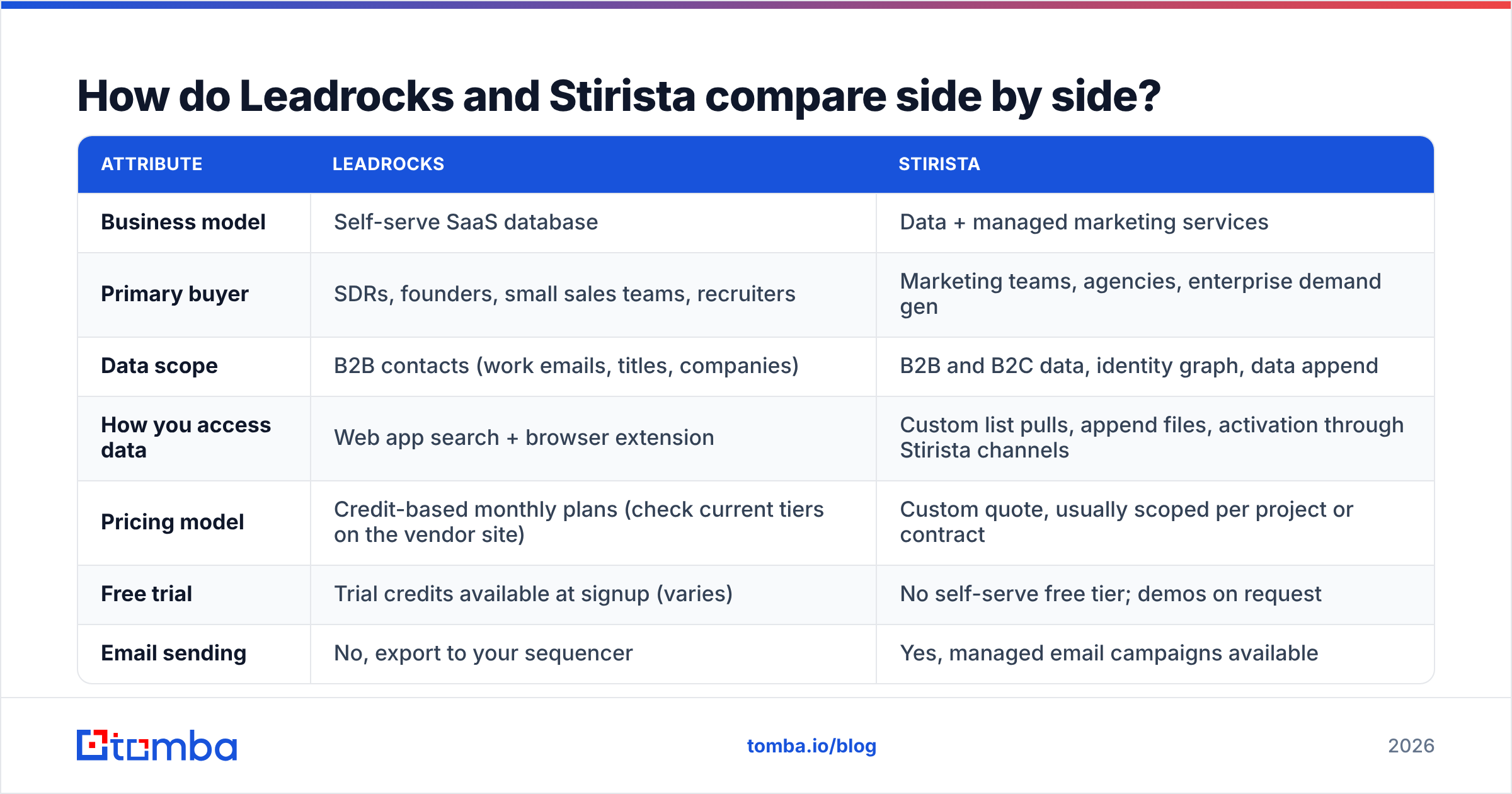
Here is how the two stack up on the attributes that matter when you are choosing a data source for outbound or demand generation.
| Attribute | Leadrocks | Stirista |
|---|---|---|
| Business model | Self-serve SaaS database | Data + managed marketing services |
| Primary buyer | SDRs, founders, small sales teams, recruiters | Marketing teams, agencies, enterprise demand gen |
| Data scope | B2B contacts (work emails, titles, companies) | B2B and B2C data, identity graph, data append |
| How you access data | Web app search + browser extension | Custom list pulls, append files, activation through Stirista channels |
| Pricing model | Credit-based monthly plans (check current tiers on the vendor site) | Custom quote, usually scoped per project or contract |
| Free trial | Trial credits available at signup (varies) | No self-serve free tier; demos on request |
| Email sending | No, export to your sequencer | Yes, managed email campaigns available |
| Paid media / CTV | No | Yes, programmatic and connected-TV advertising |
| Time to first list | Minutes | Days to weeks, depending on scope |
| Best for | 1:1 cold outreach and account-based prospecting | Large-audience, multi-channel campaigns |
Pricing on both sides changes often, so check each vendor's current pricing page or ask for a quote before you budget. Aggregated user reviews on G2 are a good sanity check on support quality and data freshness, since neither company publishes independent accuracy audits.
What do you actually get with Leadrocks?#
Leadrocks is built around one job: getting a named person's work email into your outreach tool quickly.
The main parts:
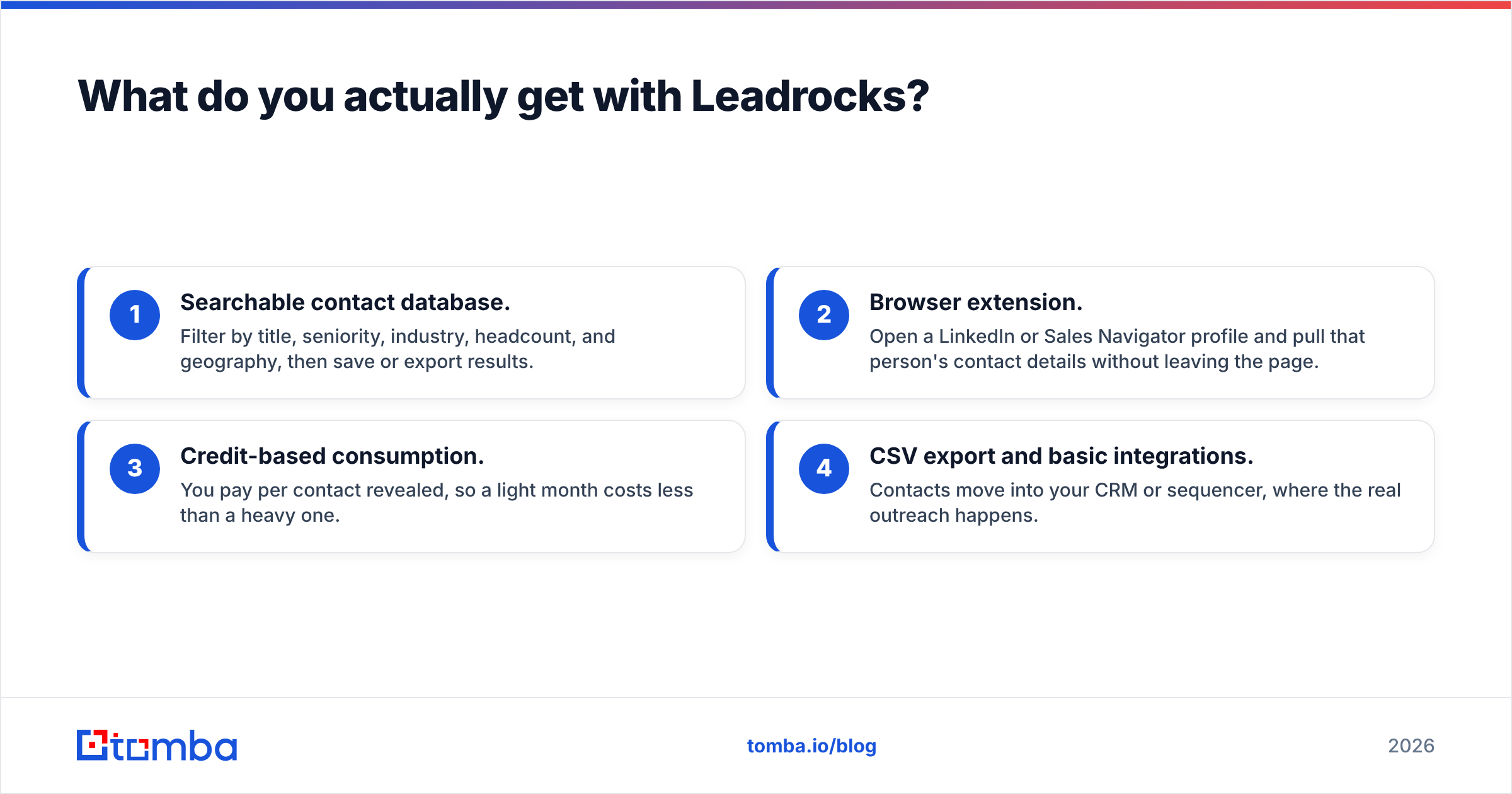
- Searchable contact database. Filter by title, seniority, industry, headcount, and geography, then save or export results.
- Browser extension. Open a LinkedIn or Sales Navigator profile and pull that person's contact details without leaving the page.
- Credit-based consumption. You pay per contact revealed, so a light month costs less than a heavy one.
- CSV export and basic integrations. Contacts move into your CRM or sequencer, where the real outreach happens.
Where it works well: a two-person sales team targeting "VP of Operations at 50-500 employee logistics companies in the US" can build a list of a few hundred contacts in an afternoon and start sequencing the next day. No procurement cycle and no minimum contract.
Where it falls short: Leadrocks is a data source, not a campaign engine. It won't send emails, run ads, or match consumer identities. Like every static database, some records will be stale. People change jobs all the time, and a record that was accurate last quarter may bounce today. Treat the export as a starting point that still needs checking.
What do you actually get with Stirista?#
Stirista is closer to a data-driven marketing agency with its own proprietary data assets. Its offering usually covers:
- B2B data lists segmented by firmographics and job function, sold for campaigns rather than rep-by-rep lookups.
- Consumer data and identity graph. Stirista markets an identity graph that links people across email, postal, device, and digital IDs. This matters a lot for B2C and hybrid marketers.
- Data append. Send your existing CRM file and get it back with missing emails, postal addresses, or demographic fields filled in.
- Managed email marketing. Stirista can deploy campaigns for you instead of just handing over a list.
- Programmatic and CTV advertising. Target the same audience on connected TV and display, not only in the inbox.
Where it works well: a mid-market or enterprise marketing team launching a product to a defined audience of, say, IT decision-makers across North America. They want email, display, and CTV coordinated around the same segment and don't have the staff to stitch that together.
Where it falls short: if your SDRs need to look up one specific contact at one specific account right now, a managed-services model is too slow and too heavy for the job. Pricing is opaque until you are in a sales conversation, which makes quick comparisons hard.
(Placeholder above is swapped by the orchestrator — see embed below.)

Which one should you choose for your use case?#
The answer depends almost entirely on your motion. Match your situation to the rows below.
- You run cold email outbound with a small team. Pick Leadrocks or a similar self-serve finder. You need speed, per-contact pricing, and control over targeting.
- You run account-based prospecting on a named account list. Pick a self-serve tool. Stirista's strength is audiences, not individuals at 40 specific accounts.
- You need to enrich a large existing CRM file. Both can work. Stirista's data append is built for bulk files. Self-serve tools with bulk and API enrichment are faster to test.
- You want email + display + CTV aimed at one audience. Stirista, clearly. Leadrocks doesn't do paid media.
- You sell to consumers or to a mix of consumers and businesses. Stirista. Leadrocks is B2B-only.
- You have no budget for a contract and need results this week. Self-serve. There is nothing to negotiate.
A quick test: if the person who will use the data is an SDR, you want a tool. If it's a demand-gen manager with a media budget, you may want a vendor.
How accurate is the data from each?#
Neither Leadrocks nor Stirista publishes an independent, third-party accuracy benchmark, and you should be skeptical of any vendor's self-reported "95%+ accuracy" claim, including the ones you'll see across this category.
What you can do is run your own test:
- Pull a sample of 200 to 500 contacts that match your real ICP, not a vendor-picked demo set.
- Run every address through an independent email verifier and record valid, invalid, catch-all, and unknown rates.
- Spot-check job titles against LinkedIn for 30 to 50 records. Job-change decay is where most B2B databases lose accuracy.
- Send a small, warmed-up test campaign and track hard bounces. Anything above about 2 to 3% is a warning sign for your sender reputation.
Accuracy for static lists usually drops over time. B2B data decays fast because people switch roles, get promoted, and change companies. A list bought in January and used in September will perform worse than the same list pulled fresh. That favors tools that look up or re-verify data on demand over bulk files that sit in a folder.
What does each cost in practice?#
Price is where the "tool vs vendor" split matters most.
Leadrocks uses credit-based plans. You pick a monthly tier, get an allocation of contact reveals, and pay more for higher volume. The upside is predictability at small scale. The catch is that credits are spent on reveals, whether or not the contact turns out to be deliverable. Check the current tiers on the Leadrocks site, since plan names and credit counts change.
Stirista quotes per engagement. A data-append job, a one-off list purchase, and a quarterly multi-channel campaign are priced very differently. Expect minimums that reflect a services business. For an enterprise marketing team, the cost is often competitive against assembling the same capabilities in-house. For a three-person startup, the minimums alone will usually rule it out.
To compare costs fairly, calculate cost per verified, reachable contact rather than cost per record. A cheap record that bounces isn't cheap.
For reference, self-serve email finders in this space usually start with a free tier and a paid tier between roughly $30 and $100 a month. Tomba, for example, has a free plan with 25 searches a month, Starter at $49/mo, Growth at $99/mo, Pro at $249/mo, and custom Enterprise. The full breakdown is on the Tomba pricing page.
What are the pros and cons of each?#
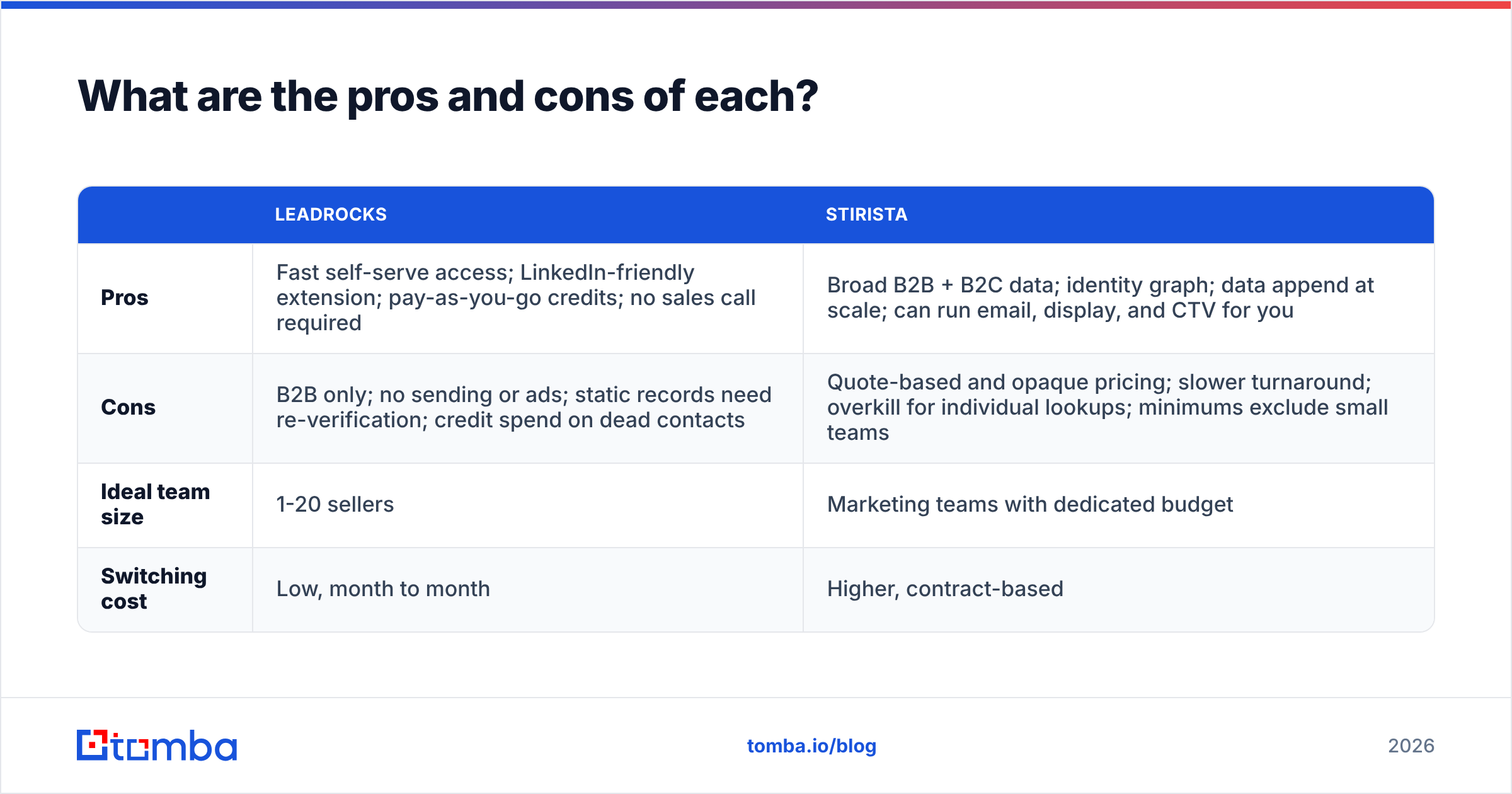
| Leadrocks | Stirista | |
|---|---|---|
| Pros | Fast self-serve access; LinkedIn-friendly extension; pay-as-you-go credits; no sales call required | Broad B2B + B2C data; identity graph; data append at scale; can run email, display, and CTV for you |
| Cons | B2B only; no sending or ads; static records need re-verification; credit spend on dead contacts | Quote-based and opaque pricing; slower turnaround; overkill for individual lookups; minimums exclude small teams |
| Ideal team size | 1-20 sellers | Marketing teams with dedicated budget |
| Switching cost | Low, month to month | Higher, contract-based |
Are there alternatives worth considering?#
Yes, and which one fits depends on which side of the split you are on.
If you're on the self-serve prospecting side, the market is crowded with email finders, database tools, and LinkedIn extensions. When you evaluate them, look for:
- Real-time lookup instead of only static exports. Finding emails by name + domain at request time reduces decay.
- Built-in verification, including catch-all handling, so you don't pay for dead addresses.
- An API and spreadsheet add-ons so enrichment runs inside your existing workflow instead of through manual CSV uploads.
- Transparent pricing you can see before a demo.
If you're on the managed data and media side, Stirista competes with other data brokers, list vendors, and identity-resolution providers. List providers such as BookYourData are a middle ground: pre-built B2B lists you can buy directly without a full services engagement. They're worth a look if you want list-scale data without agency-style scope.
Many teams end up using both kinds: a managed vendor for quarterly campaigns and a self-serve finder that SDRs use daily. That works fine, as long as both feed into one CRM with deduplication and a single verification step.

How do you avoid wasting money on either?#
Whichever direction you go, the same mistakes cost teams the most:
- Buying volume before testing quality. Always run a paid pilot with your real ICP before an annual commitment.
- Skipping verification. Even a good database has decayed records. Bouncing at scale damages the sending domain your whole team depends on.
- Ignoring catch-all domains. Many B2B domains accept all mail at the server level, so a simple SMTP check can't confirm the mailbox exists. Handle these separately.
- Not enriching what you already own. Before buying a new list, run your existing CRM through data enrichment. You may already have 30 to 50% of the accounts you need, just with missing emails or titles.
- Measuring cost per record instead of cost per reply. The metric that matters is how much it costs to start a real conversation.
HubSpot's guidance on email list hygiene and bounce management is a useful baseline if your team hasn't set bounce thresholds yet.
So, Leadrocks vs Stirista: which wins?#
It depends on the job, and they aren't competing for the same one.
- Pick Leadrocks if you're a founder, SDR, or small sales team that needs individual B2B contacts quickly, pays per use, and runs outreach through its own sequencer.
- Pick Stirista if you're a marketing team that needs B2B or consumer audiences, identity resolution, and coordinated email plus CTV campaigns run for you under one contract.
- Pick neither yet if you haven't defined your ICP clearly. No database fixes a vague target list.
For most outbound teams reading this, the decision isn't really "Leadrocks or Stirista." It's whether you need a self-serve finder at all, and which one gives you the freshest, verified data for the least money.
If you're on the self-serve side and want real-time lookups instead of stale exports, try the Tomba Email Finder. Search by name and company or by domain, get a verification status on every result, and push contacts straight into your CRM, Google Sheets, or the API. The free plan gives you 25 searches a month, so you can check accuracy against your own ICP before paying for Starter at $49/mo.
Related guides#
// get started
Find, verify and enrich your first contacts today
Start on the free plan with 25 searches a month, then scale when your team is ready.
Free plan · No credit card required · GDPR & CCPA
// about the author