Leadrocks vs The Org: Contact Data vs Org Charts Compared (2026)
Leadrocks sells you contacts. The Org shows you who reports to whom. Most comparisons skip that difference. Here's what each tool does, where each one falls short, and how to combine them without paying twice.
TL;DR
- Leadrocks is a B2B contact database with a LinkedIn-connected Chrome extension. You use it to get names, titles, and business emails you can export into a sequence.
- The Org is a public org-chart platform. You use it to see how a company is structured and who reports to whom. It doesn't sell verified email lists.
- Asking which one is "better" misses the point. Leadrocks answers "how do I reach this person?" The Org answers "who should I be reaching?"
- Most outbound teams get the best results from The Org's hierarchy data plus a dedicated email finder and verifier. Leadrocks is a reasonable choice if you want one contact tool instead.
- Verify everything before you send. Neither an org chart nor any database stays accurate forever, because people change jobs all the time.
What is Leadrocks?#
Leadrocks is a B2B lead database for sales and recruiting teams. You search by company, job title, industry, seniority, and location. You get back professional profiles with business emails where Leadrocks has them, and you export the list to CSV or send it to your outreach tool.
It has two main parts:
- The web app. This is where you filter the database, save lists, and export.
- The Chrome extension. It sits on top of LinkedIn and Sales Navigator and adds contact details to the profiles you're viewing.
Leadrocks markets itself mostly to smaller teams: SDRs, founders doing their own outbound, and agencies building lists for clients. The pitch is simple. You find the person, grab the email, and move on. It has historically offered a free tier with a small monthly export allowance, with paid plans unlocking more exports. Plans change, so check the Leadrocks pricing page before you budget around a specific number.
What Leadrocks doesn't try to do is tell you how a company is organised. You can filter by "VP of Sales," but you won't see that the VP reports to a CRO who joined three months ago and is re-evaluating the whole tech stack.
What is The Org?#
The Org is a public platform for company org charts. Each company page shows leadership, departments, and reporting lines. Employees and companies keep the pages updated, and The Org adds its own research. You'll also find team pages, recent position changes, and job listings.
People use The Org for three things:
- Account research. Before a sales call, you check who sits above and next to your contact.
- Recruiting. You find hiring managers and see how big a team is.
- Market intelligence. You track leadership moves at target accounts or competitors.
Browsing is free, which is the main reason sellers keep it open in a tab. What The Org doesn't do is give you a verified, exportable email for each person on the chart. It's a map. You still need another way to actually contact people.
Leadrocks vs The Org: how do they compare side by side?#
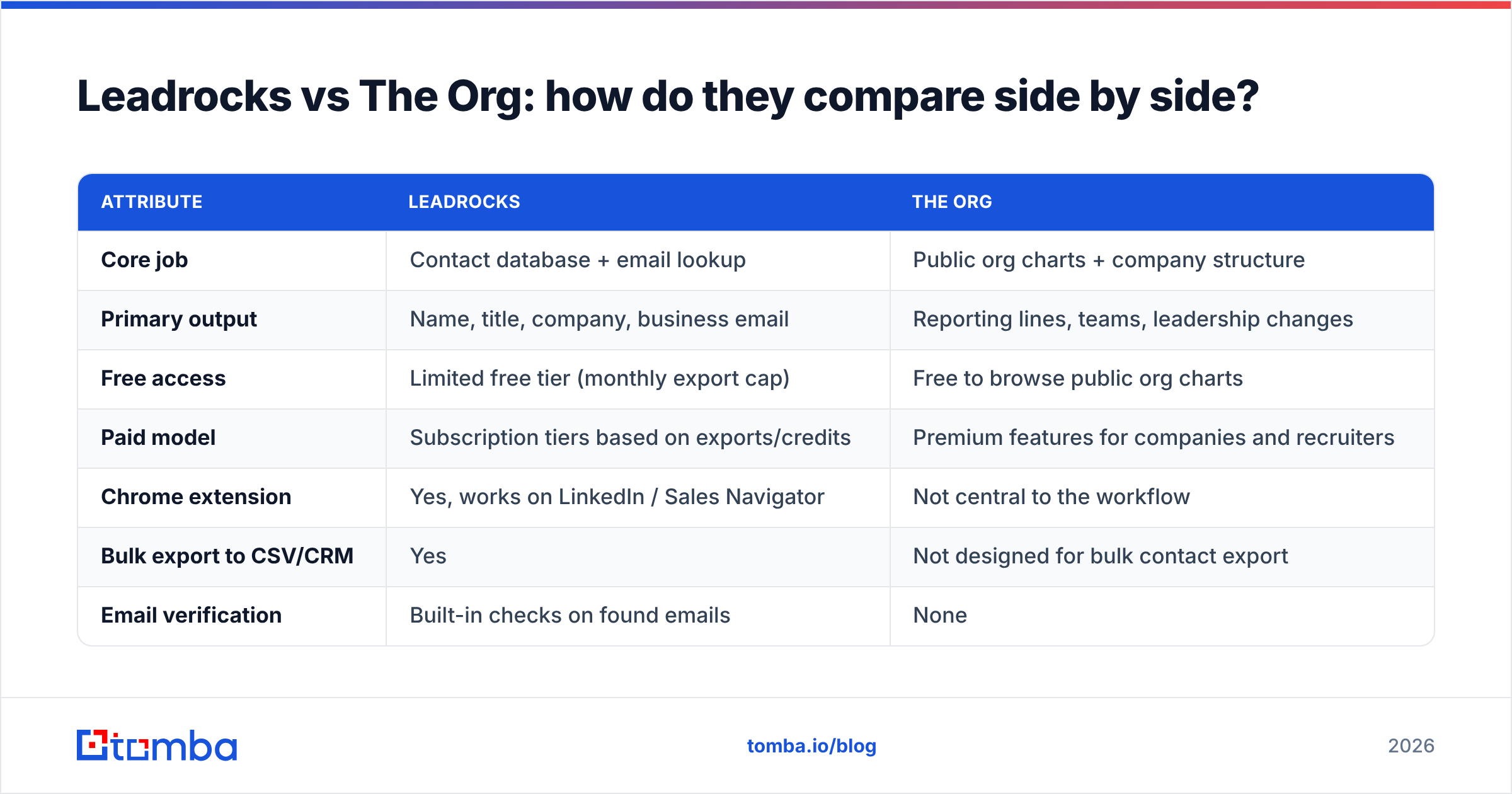
The table below compares the attributes that matter for outbound prospecting. When a vendor changes something often, like credit limits, we describe the model instead of quoting a number that could be stale next month.
| Attribute | Leadrocks | The Org |
|---|---|---|
| Core job | Contact database + email lookup | Public org charts + company structure |
| Primary output | Name, title, company, business email | Reporting lines, teams, leadership changes |
| Free access | Limited free tier (monthly export cap) | Free to browse public org charts |
| Paid model | Subscription tiers based on exports/credits | Premium features for companies and recruiters |
| Chrome extension | Yes, works on LinkedIn / Sales Navigator | Not central to the workflow |
| Bulk export to CSV/CRM | Yes | Not designed for bulk contact export |
| Email verification | Built-in checks on found emails | None |
| Org hierarchy / reporting lines | No | Yes, the core feature |
| Leadership change signals | Indirect (title updates) | Yes, position changes surface on profiles |
| Best for | Building send-ready lists fast | Mapping buying committees and multi-threading |
| Biggest gap | No account-structure context | No reliable contact channel |
The last two rows explain most of this comparison. Each tool is strong exactly where the other one has nothing to offer.
Which one should you pick for your workflow?#
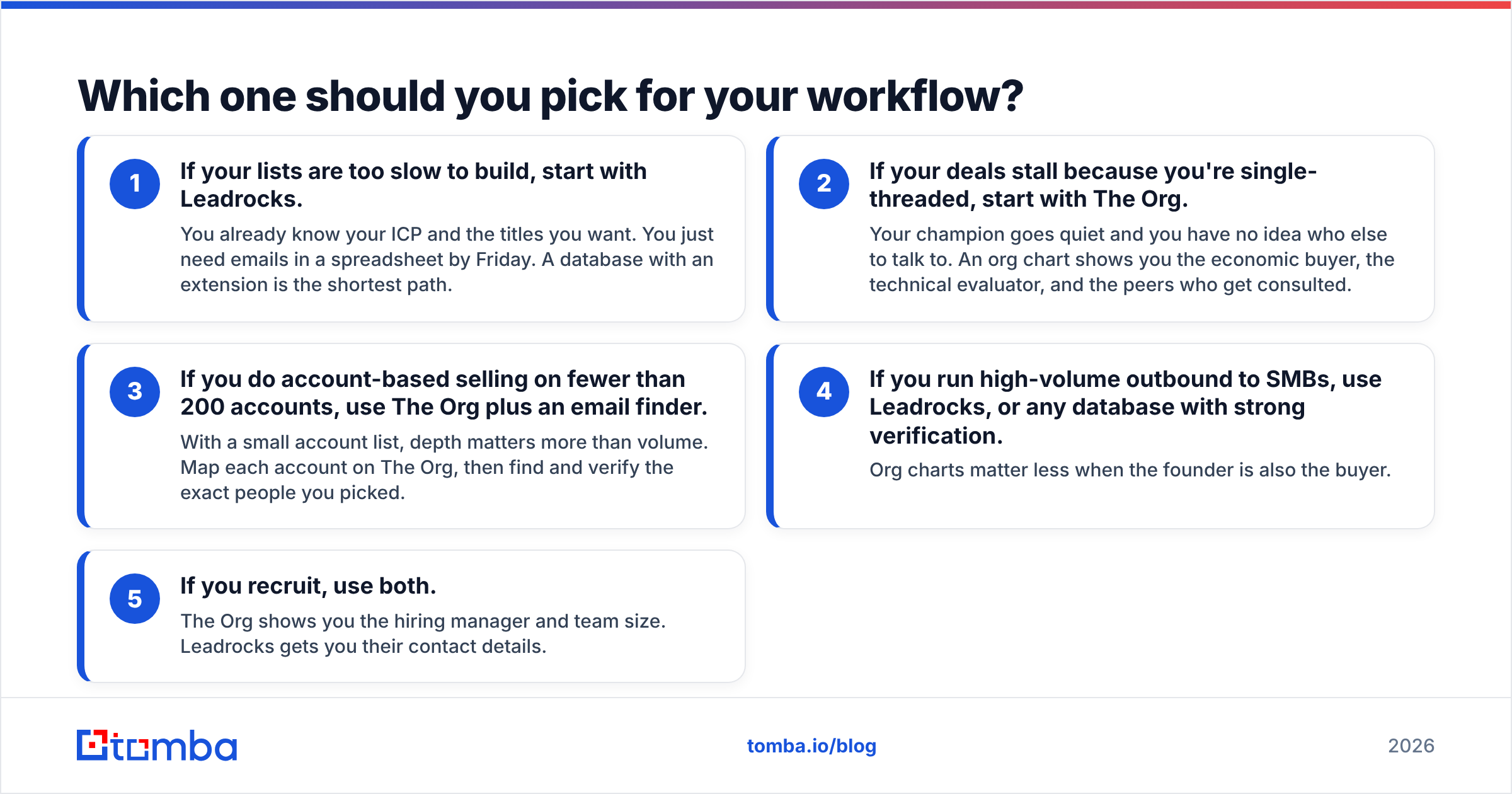
The right tool depends on where your pipeline stalls. Here's a quick way to decide:
- If your lists are too slow to build, start with Leadrocks. You already know your ICP and the titles you want. You just need emails in a spreadsheet by Friday. A database with an extension is the shortest path.
- If your deals stall because you're single-threaded, start with The Org. Your champion goes quiet and you have no idea who else to talk to. An org chart shows you the economic buyer, the technical evaluator, and the peers who get consulted.
- If you do account-based selling on fewer than 200 accounts, use The Org plus an email finder. With a small account list, depth matters more than volume. Map each account on The Org, then find and verify the exact people you picked.
- If you run high-volume outbound to SMBs, use Leadrocks, or any database with strong verification. Org charts matter less when the founder is also the buyer.
- If you recruit, use both. The Org shows you the hiring manager and team size. Leadrocks gets you their contact details.

Is Leadrocks accurate enough for cold email?#
Leadrocks is accurate enough to be useful, as long as you verify its output before sending. That's true of every contact database, not just this one.
Any B2B dataset decays. People change jobs, companies rebrand domains, and mail servers switch configurations. A database that was 95% accurate when a record was captured won't still be 95% accurate six months later. Leadrocks checks emails when it finds them. Sending to an unverified export is still how new domains get their sender reputation damaged in the first week.
Three things to watch for:
- Catch-all domains. Many companies accept all mail at the server level. A "valid" result on a catch-all domain only tells you the server answered, not that a mailbox exists. You need a separate catch-all check to judge those addresses.
- Stale titles. If the extension shows a title that no longer matches LinkedIn, trust LinkedIn.
- Role inflation. Databases often tag people as "Head of" or "Director" when their real scope is smaller. Check against the org chart before you send your top-tier sequence.
The fix is cheap. Run every export through an email verifier before it goes into your sequencer. Plan on removing some addresses every time.
Is The Org reliable for org-chart data?#
The Org is reliable for leadership and well-known roles. It gets less reliable as you go further down the hierarchy.
The executive layer (C-suite, VPs, department heads) is usually well maintained, especially at venture-backed companies that claim their pages. Middle management and individual contributors are patchier. Many companies have only partial charts, and reporting lines two levels below the VP are often inferred or out of date.
How to use it without getting burned:
- Treat it as a starting hypothesis. "The org chart says Priya runs RevOps under the CRO" is something to confirm on a discovery call, not a fact to put in your email opener.
- Cross-check big moves. If The Org shows a new CRO, confirm it on LinkedIn or in a press release before you build a "congrats on the new role" sequence.
- Use it for multi-threading. Even an imperfect chart makes it clear that you need to reach more than one person, which fixes the most common reason mid-market deals stall.
Buying committees keep getting bigger. Gartner's research on the B2B buying journey has shown for years that complex purchases involve several stakeholders, each with different concerns. That's the problem The Org solves, and a contact database can't solve it for you.
How much do Leadrocks and The Org cost?#
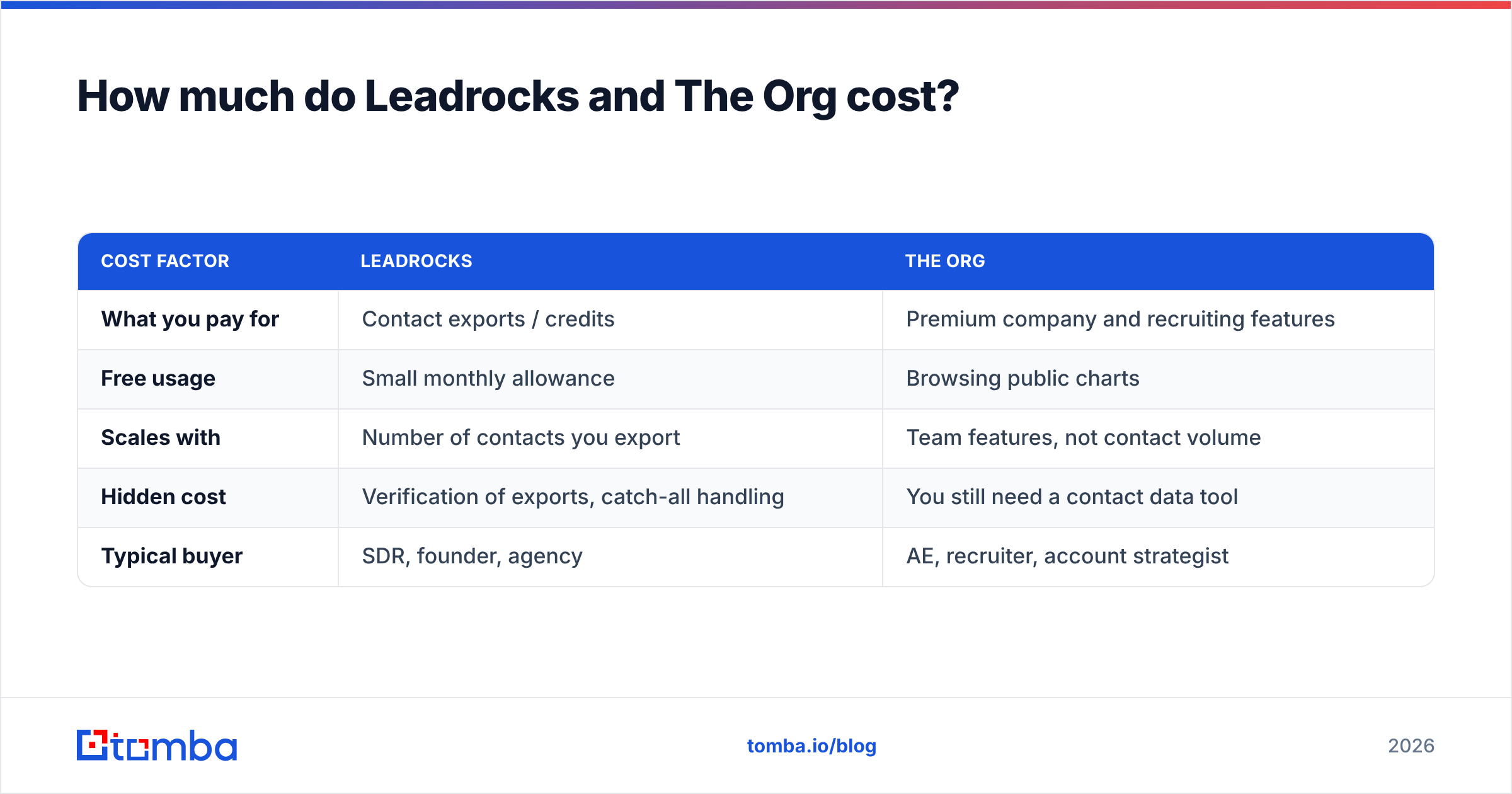
The two tools charge for different things, so comparing prices directly doesn't tell you much. Here's how each pricing model works:
| Cost factor | Leadrocks | The Org |
|---|---|---|
| What you pay for | Contact exports / credits | Premium company and recruiting features |
| Free usage | Small monthly allowance | Browsing public charts |
| Scales with | Number of contacts you export | Team features, not contact volume |
| Hidden cost | Verification of exports, catch-all handling | You still need a contact data tool |
| Typical buyer | SDR, founder, agency | AE, recruiter, account strategist |
The hidden-cost row matters most. If you pick The Org, you've only covered half of your prospecting stack, and you still need a way to get emails. If you pick Leadrocks, you'll probably want a stricter verification step and some way to understand account structure for bigger deals.
For comparison, dedicated email-finder platforms usually charge by search or credit. Tomba pricing, for example, starts with a free tier of 25 searches per month, then Starter at $49/mo, Growth at $99/mo, Pro at $249/mo, and custom Enterprise plans. Look at how many verified contacts you actually need each month, not the headline database size. Most teams overbuy.
What do users say about each tool?#
Look at recent reviews on G2 and the same themes come up for each tool:
Leadrocks, what people like:
- The Chrome extension is quick to set up and fits into a LinkedIn-heavy workflow
- The free tier is enough to test the data before paying
- Simple interface with little onboarding needed
Leadrocks, common complaints:
- Email coverage varies by region and company size
- Some records show outdated titles
- Fewer workflow automations than the larger all-in-one platforms
The Org, what people like:
- Free, fast org-chart visibility you can't easily get elsewhere
- Useful for pre-call research and finding hiring managers
- Leadership change data makes good trigger events
The Org, common complaints:
- Coverage gets thin below the leadership layer
- Not a contact data tool, so you still need emails from somewhere else
- Charts for smaller or private companies can be incomplete
None of these are dealbreakers. They're what you'd expect from tools built for two different jobs.
How do you combine The Org with an email finder?#
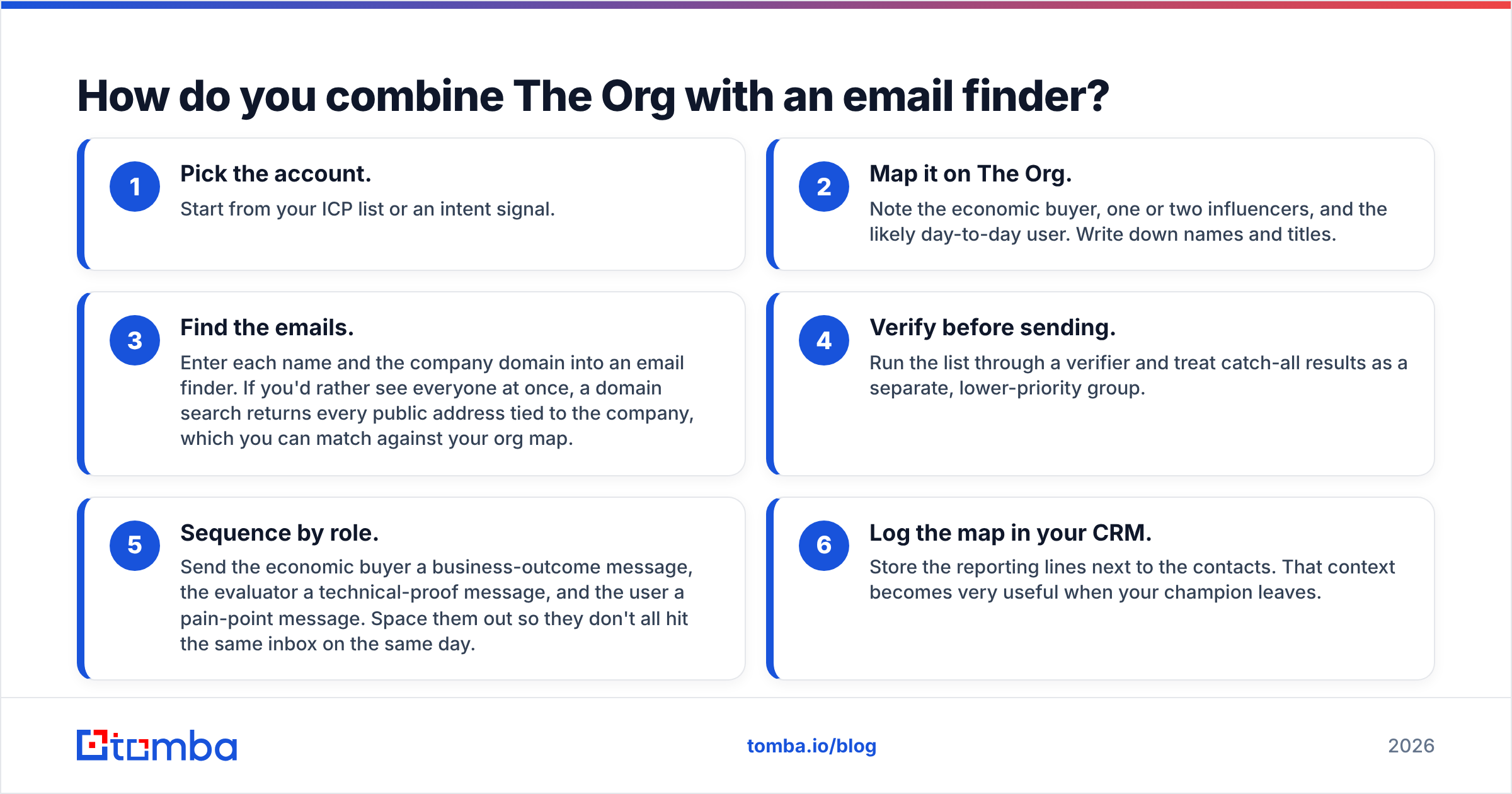
The workflow that works for most outbound teams uses The Org to decide who to contact and a dedicated finder to reach them. Here's a repeatable version:
- Pick the account. Start from your ICP list or an intent signal.
- Map it on The Org. Note the economic buyer, one or two influencers, and the likely day-to-day user. Write down names and titles.
- Find the emails. Enter each name and the company domain into an email finder. If you'd rather see everyone at once, a domain search returns every public address tied to the company, which you can match against your org map.
- Verify before sending. Run the list through a verifier and treat catch-all results as a separate, lower-priority group.
- Sequence by role. Send the economic buyer a business-outcome message, the evaluator a technical-proof message, and the user a pain-point message. Space them out so they don't all hit the same inbox on the same day.
- Log the map in your CRM. Store the reporting lines next to the contacts. That context becomes very useful when your champion leaves.
This is also where Leadrocks fits if you want to skip a step. Its extension combines steps 3 and 4 for people you're already viewing on LinkedIn. The trade-off is that you depend on one vendor's coverage. You also still don't get the hierarchy view from step 2.
For CRM hygiene, HubSpot's guide to multi-threading deals explains how to record multiple stakeholders against one deal so the context doesn't disappear when a rep changes territories.
Leadrocks vs The Org: which one wins?#
For raw list-building speed, Leadrocks wins. It's built to turn a search into exportable contacts, and The Org isn't trying to compete on that.
For account intelligence and multi-threading, The Org wins. No contact database gives you a free, visual map of reporting lines and leadership changes.
For the full outbound workflow, neither one is enough alone. The Org gives you the "who" without the "how to reach them." Leadrocks gives you the "how to reach them" without the "why this person." The teams with the best reply rates use an org-chart source for targeting and a finder-plus-verifier for delivery, then keep both in sync in the CRM.
Some practical rules:
- Solo founder or SDR doing high-volume SMB outbound: Leadrocks (or a similar database) plus verification.
- AE working 50–200 named accounts: The Org for mapping plus a dedicated email finder.
- Recruiter: The Org for hiring-manager discovery, then any reliable contact tool.
- RevOps building a repeatable process: standardise on the combined workflow above and measure bounce rate and reply rate by source.
What's the best next step?#
If you already have The Org open in one tab and you're copying names into a spreadsheet by hand, the missing piece is a fast, verified way to turn those names into inboxes you can reach. Tomba Email Finder does that. Enter a name and domain, or pull every public address for a company in one search, and each result comes back with a confidence score and verification status. Start with the free 25 searches a month, run your next account map through it, and see how many more people on the buying committee you can reach before you pay for anything.
Related guides#
// get started
Find, verify and enrich your first contacts today
Start on the free plan with 25 searches a month, then scale when your team is ready.
Free plan · No credit card required · GDPR & CCPA
// about the author