Leads and Prospects: What's the Difference and Why It Matters
Treating every lead like a prospect burns rep hours and ruins forecasts. Here are the 7 differences between leads and prospects, how to qualify one into the other, and a handoff model you can use this week.
TL;DR
- A lead is anyone who might buy, whether they raised their hand or landed on a list. A prospect is a lead you've qualified: they fit your ICP, have a real problem, and there's a path to a conversation.
- The difference matters because leads and prospects need different motions. Leads get nurtured and filtered. Prospects get personal outreach from a rep.
- Most pipeline problems come from mixing the two: reps calling unqualified leads, or marketing counting prospects as "leads" and inflating the funnel.
- Qualification turns a lead into a prospect. You need fit data (firmographics, role) and intent or engagement signals, plus a verified way to reach the person.
- Write down a shared definition, a scoring threshold, and a handoff SLA between marketing and sales. Start there before you buy another tool.
What is the difference between leads and prospects?#
A lead is an unqualified contact who could become a customer. Maybe they downloaded an ebook, visited your pricing page, or showed up in a list you built from a domain search. You know they exist. You don't yet know whether they fit or care.
A prospect is a lead that has passed qualification. You've confirmed they match your ideal customer profile (ICP), they plausibly have the problem you solve, and they can influence or make a buying decision. Once someone is a prospect, a rep invests real time in them.
Here's an analogy. Leads are the résumés that land in a hiring inbox. Prospects are the candidates you've shortlisted for interviews. You wouldn't fly all 400 applicants in for an onsite, and you shouldn't put all 400 leads into a rep's call queue either.
The confusion comes from two places:
- Vocabulary differs by company. Some teams call everyone in the CRM a "prospect." Others say "lead" for anyone who hasn't signed. Industry sources like the Wikipedia entry on lead generation describe a lead as initial interest, and qualification is what comes after. Your internal definitions still matter more than any textbook's.
- CRMs bake in their own objects. In Salesforce, a Lead is a separate record type that gets "converted" into a Contact, Account, and Opportunity. That conversion step is effectively the lead-to-prospect transition, but plenty of teams skip it or use it inconsistently.
What are the 7 key differences between leads and prospects?#
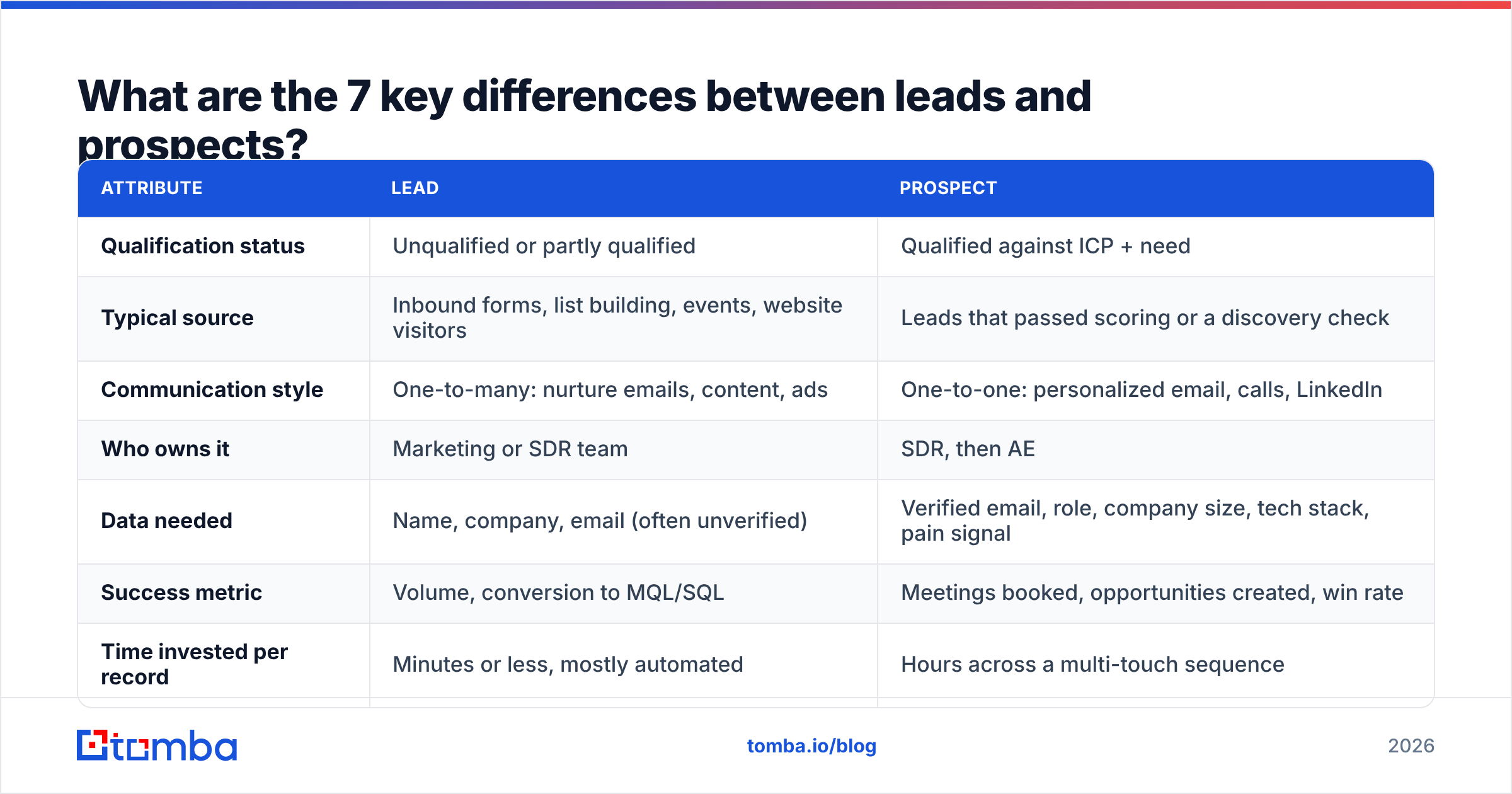
This table covers the attributes that actually change how you work each group.
| Attribute | Lead | Prospect |
|---|---|---|
| Qualification status | Unqualified or partly qualified | Qualified against ICP + need |
| Typical source | Inbound forms, list building, events, website visitors | Leads that passed scoring or a discovery check |
| Communication style | One-to-many: nurture emails, content, ads | One-to-one: personalized email, calls, LinkedIn |
| Who owns it | Marketing or SDR team | SDR, then AE |
| Data needed | Name, company, email (often unverified) | Verified email, role, company size, tech stack, pain signal |
| Success metric | Volume, conversion to MQL/SQL | Meetings booked, opportunities created, win rate |
| Time invested per record | Minutes or less, mostly automated | Hours across a multi-touch sequence |
The takeaway: a lead is judged in aggregate, a prospect one at a time. If your reps spend "prospect time" on "lead-quality" records, pipeline stalls even when top-of-funnel numbers look healthy.

How does a lead become a prospect?#
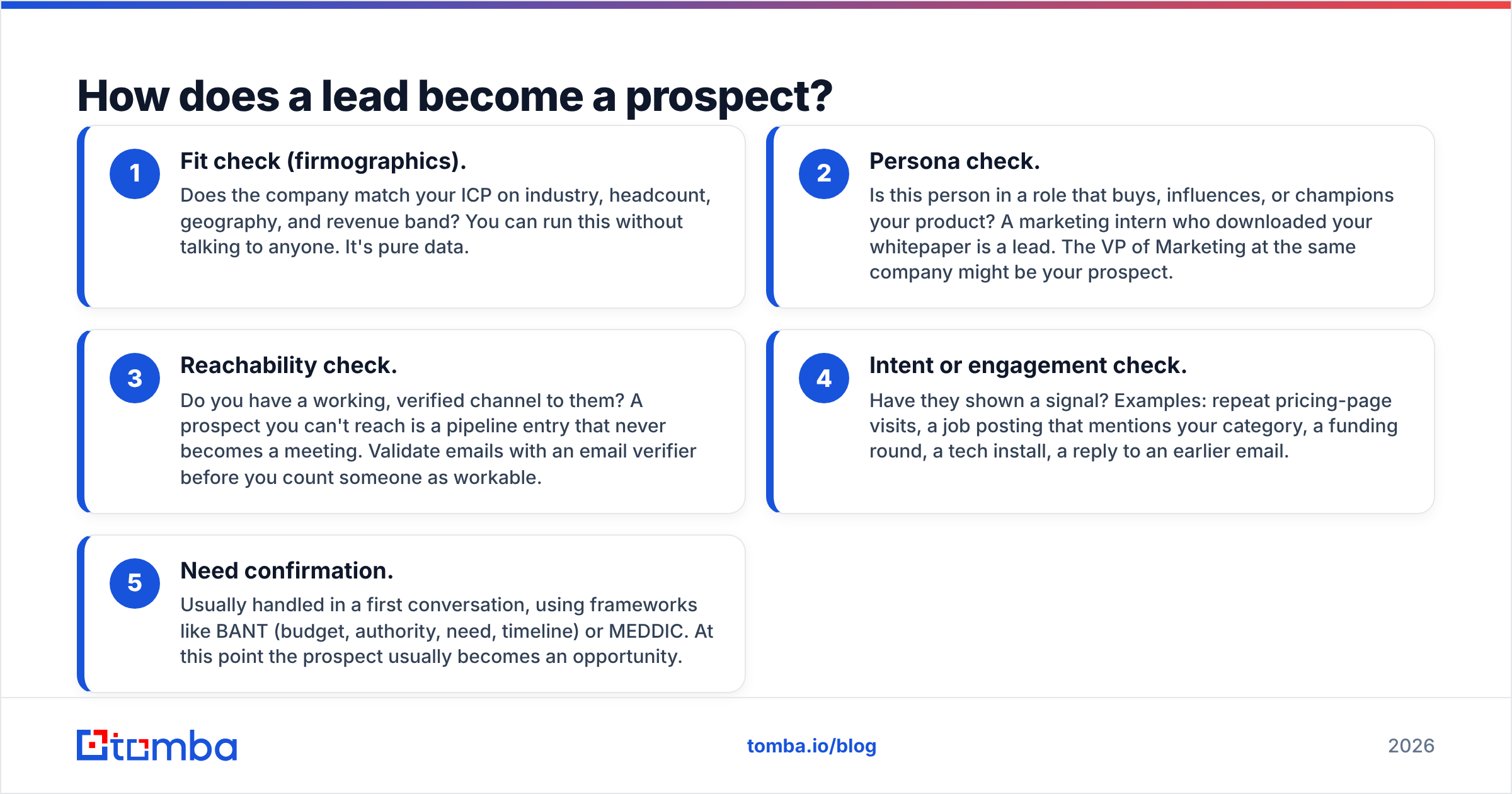
Qualification is the bridge. Most teams use some mix of these five checks. Run them in order, because each one is cheaper than the next.
- Fit check (firmographics). Does the company match your ICP on industry, headcount, geography, and revenue band? You can run this without talking to anyone. It's pure data.
- Persona check. Is this person in a role that buys, influences, or champions your product? A marketing intern who downloaded your whitepaper is a lead. The VP of Marketing at the same company might be your prospect.
- Reachability check. Do you have a working, verified channel to them? A prospect you can't reach is a pipeline entry that never becomes a meeting. Validate emails with an email verifier before you count someone as workable.
- Intent or engagement check. Have they shown a signal? Examples: repeat pricing-page visits, a job posting that mentions your category, a funding round, a tech install, a reply to an earlier email.
- Need confirmation. Usually handled in a first conversation, using frameworks like BANT (budget, authority, need, timeline) or MEDDIC. At this point the prospect usually becomes an opportunity.
Steps 1 through 4 can be mostly automated with lead scoring. Step 5 needs a human.
Where MQLs and SQLs fit in#
Many teams use the MQL and SQL stages instead of the lead/prospect vocabulary, or on top of it:
- A marketing qualified lead (MQL) is a lead that crossed a scoring threshold based on fit and engagement. It's still a lead, just a better one.
- A sales qualified lead (SQL) is an MQL that a salesperson accepted as worth pursuing. Functionally, that's a prospect.
- An opportunity is a prospect with confirmed need and an active buying process.
If you already run MQL/SQL stages, you don't need to rename anything. Just make sure everyone agrees that "prospect" means "SQL or later," so the terms don't drift.
Why does separating leads and prospects actually matter?#
Because each group needs a different motion, and mixing them up costs you in four specific ways.
Rep time gets wasted. An AE's hour is expensive. If they spend it researching companies that fail your ICP, you're paying senior rates for list cleanup.
Deliverability takes a hit. Blasting personalized-style sequences at raw, unverified leads raises bounce rates and spam complaints. Your sending domain's reputation drops, and then even your real prospects stop seeing your emails. Prospects deserve your best inbox placement, so protect it by only sequencing verified contacts.
Forecasts lie. When "prospects" includes anyone with an email address, pipeline coverage ratios look great on paper and fall apart at quarter end. Clean stage definitions give you honest conversion rates you can plan on.
Marketing and sales stop trusting each other. Marketing says "we sent you 2,000 leads." Sales says "none of them were real." Both are right, because they're using different definitions. A shared lead-to-prospect standard ends that argument.
How should you treat leads vs prospects differently?#
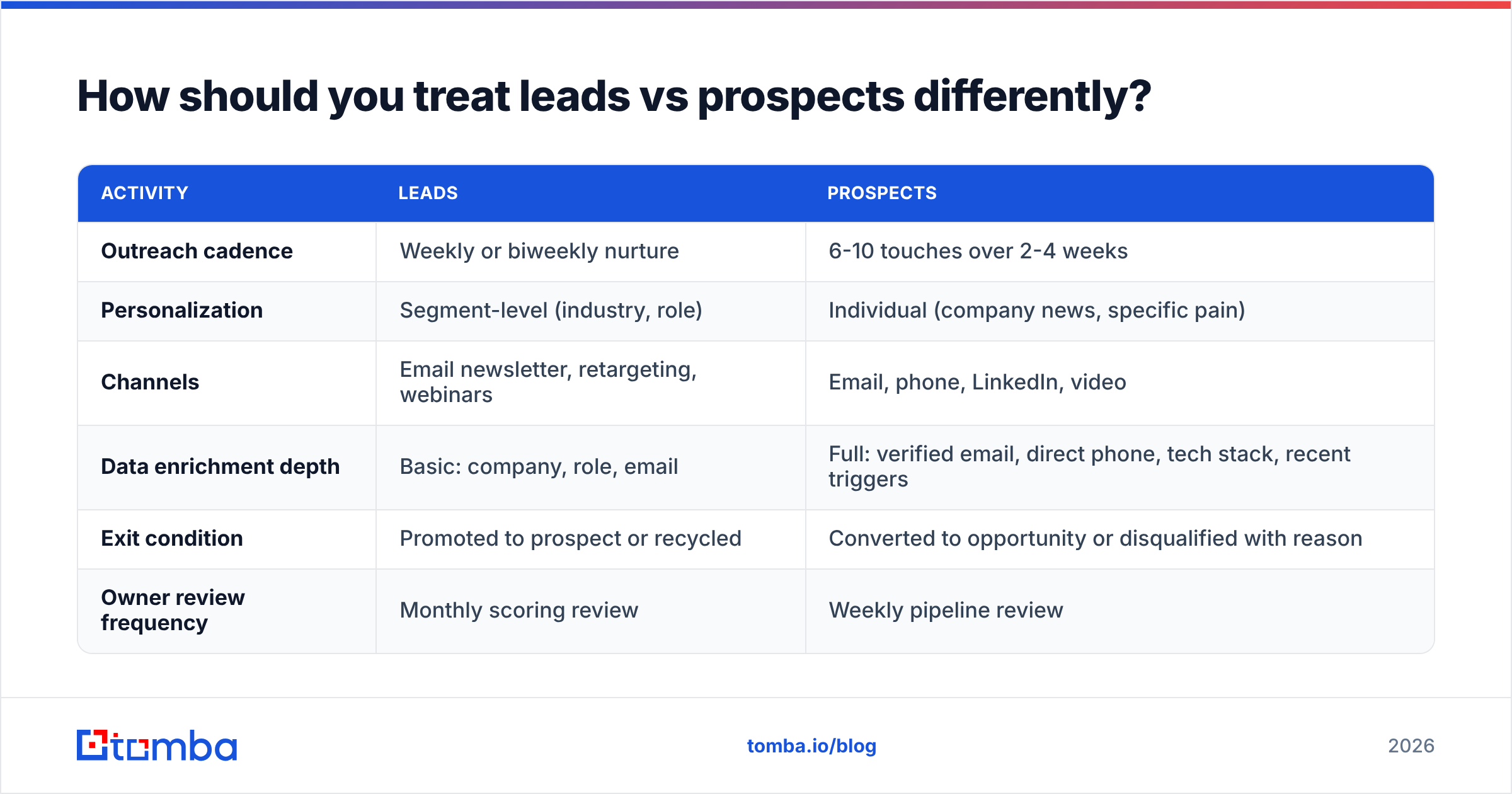
Here's a practical side-by-side for the actual day-to-day motion.
| Activity | Leads | Prospects |
|---|---|---|
| Outreach cadence | Weekly or biweekly nurture | 6-10 touches over 2-4 weeks |
| Personalization | Segment-level (industry, role) | Individual (company news, specific pain) |
| Channels | Email newsletter, retargeting, webinars | Email, phone, LinkedIn, video |
| Data enrichment depth | Basic: company, role, email | Full: verified email, direct phone, tech stack, recent triggers |
| Exit condition | Promoted to prospect or recycled | Converted to opportunity or disqualified with reason |
| Owner review frequency | Monthly scoring review | Weekly pipeline review |
A few notes on running this well:
- Enrich in layers. Don't pay to fully enrich 10,000 leads. Do cheap fit enrichment on everyone, then deep data enrichment only once a lead passes your score threshold. That's where the cost-per-prospect math starts to work.
- Recycle, don't delete. A lead that isn't a prospect today may become one after a funding round or leadership change. Tag disqualification reasons ("too small," "wrong persona," "no budget until Q3") so you can resurface them later.
- Give prospects a named owner. Leads can sit in a shared queue. Prospects need one accountable rep with a follow-up date.
What data do you need to qualify leads into prospects?#
Qualification is only as good as the data behind it. At minimum, collect these for each record before promoting it:
- Company fit fields: domain, industry, headcount, HQ location, and ideally revenue range.
- Person fields: full name, job title, seniority, department.
- A verified contact channel: a work email that passes SMTP verification, plus a direct phone number if your motion includes calls.
- At least one signal: engagement (form fill, reply, site visit) or trigger (hiring, funding, tech change).
The common failure point is the third item. Teams build a list of the right companies and the right titles, then discover a large chunk of the guessed emails bounce. You can pull a person's professional address with an email finder by name and domain, verify it, and only then move them into the prospect stage.
Your CRM should enforce this. Make "email verified = true" a required field for stage promotion, and bad data stops leaking into sequences.
How do you set up a lead scoring model that separates leads from prospects?#
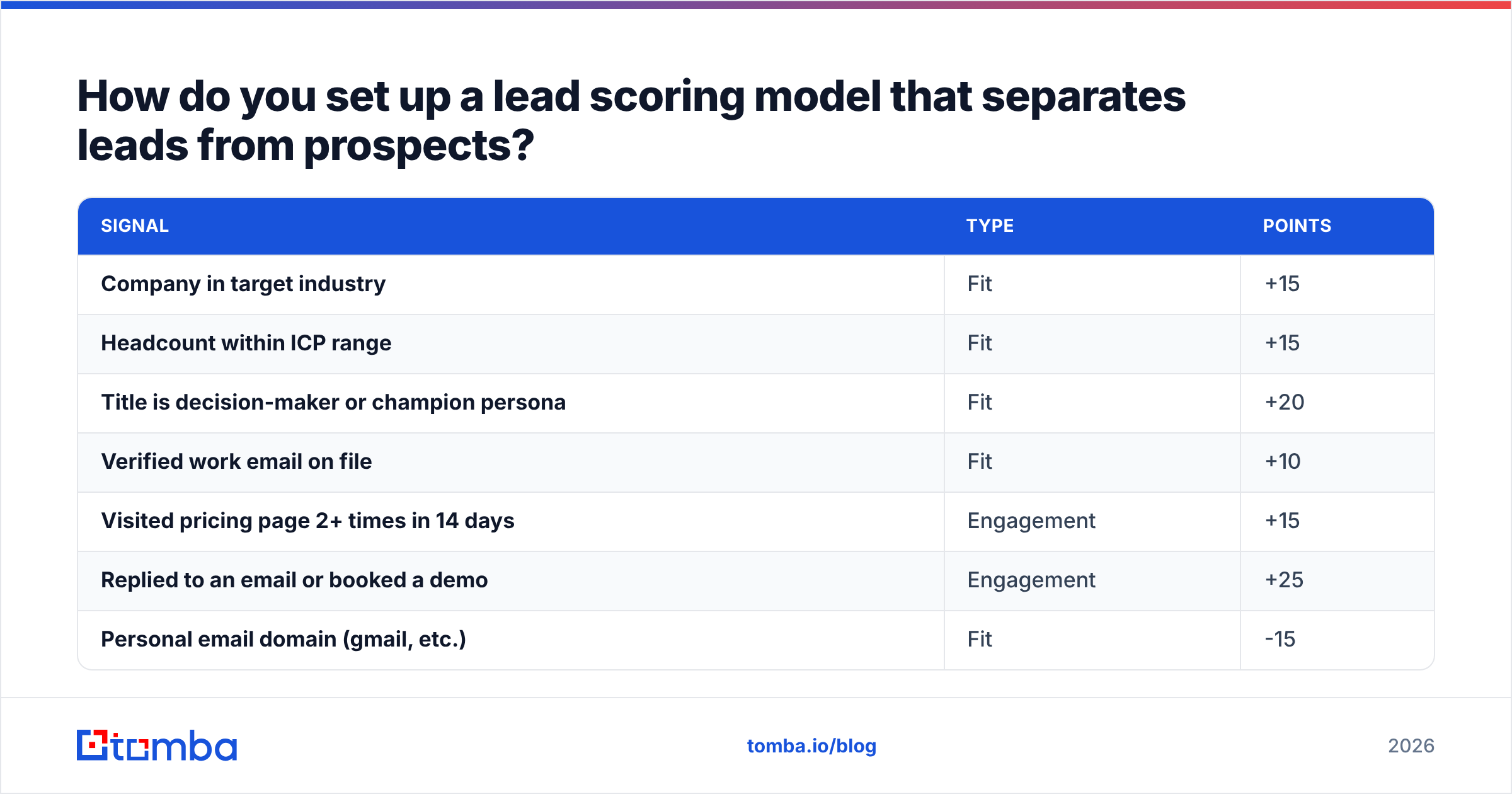
You don't need a machine-learning model to start. A points-based score that splits fit and engagement will get you most of the way. HubSpot and most modern CRMs support this natively.
A simple starting model:
| Signal | Type | Points |
|---|---|---|
| Company in target industry | Fit | +15 |
| Headcount within ICP range | Fit | +15 |
| Title is decision-maker or champion persona | Fit | +20 |
| Verified work email on file | Fit | +10 |
| Visited pricing page 2+ times in 14 days | Engagement | +15 |
| Replied to an email or booked a demo | Engagement | +25 |
| Personal email domain (gmail, etc.) | Fit | -15 |
| Competitor or student | Fit | -50 |
Set a threshold, for example 60 points, where a lead becomes a prospect and routes to an SDR. Then check it every month:
- If SDRs reject most promoted records, the threshold is too low or the fit weights are off.
- If SDRs are starving for work while good-looking leads sit in nurture, the threshold is too high.
- If a signal never correlates with meetings booked, drop it.
Keep fit and engagement as separate sub-scores. A perfect-fit company with zero engagement is a good target for outbound prospecting. A highly engaged contact at a bad-fit company is a support ticket, not a deal.
Should outbound lists count as leads or prospects?#
This is the gray zone, and it's where most teams argue.
When you build an outbound list, you've already applied fit filters, since you picked the industry, size, and titles up front. So some teams call every record a prospect immediately. The problem is that fit alone doesn't confirm reachability or timing.
A cleaner approach:
- Built list, unverified = lead. It fits on paper but you haven't confirmed the contact works.
- Built list, verified, researched = prospect. The email checks out, the person still holds the role, and you have at least one reason to reach out now.
That extra step costs a little time per record and saves a lot of bounced emails and irrelevant calls. It also keeps outbound and inbound pipeline measured on the same standard, which makes channel comparisons honest.
What mistakes do teams make with leads and prospects?#
These come up again and again in pipeline reviews:
- One definition in marketing, another in sales. Write the definitions down, get both leaders to sign off, and put them in the CRM field descriptions.
- Counting raw list size as pipeline. 5,000 scraped contacts is a lead list, not pipeline. Report it separately.
- Skipping verification. Promoting unverified contacts to prospect status inflates the stage and damages sender reputation when sequences bounce.
- No disqualification reasons. "Closed-lost: no reason" teaches you nothing. Require a reason code when a prospect exits.
- Never recycling. Leads that didn't qualify six months ago may qualify now. Schedule a quarterly re-score.
- Over-personalizing leads. Hand-writing emails to unqualified contacts is effort in the wrong place. Save deep personalization for prospects, where the response rate payoff is real.
How do you build a lead-to-prospect handoff that works?#
Pull everything above into a one-page agreement between marketing and sales. It should cover:
- Definitions. What counts as a lead, a prospect (SQL), and an opportunity. Use the exact field values from your CRM.
- Promotion criteria. Score threshold plus hard requirements such as a verified email and an ICP-fit company.
- Routing rules. Who gets which prospects, by territory, segment, or round-robin.
- SLA. How fast a rep must act on a new prospect. Hot inbound usually warrants same-day follow-up. Outbound-sourced prospects can be sequenced within a few days.
- Feedback loop. Reps can reject a prospect back to nurture with a reason, and marketing reviews rejection reasons monthly.
- Reporting. Lead volume, lead-to-prospect rate, prospect-to-opportunity rate, and time-in-stage, all by source.
Review it every quarter. Your ICP will shift, your channels will change, and the definitions should keep up.
The bottom line on leads and prospects#
Leads are potential. Prospects are potential you've checked. The difference is qualification, and qualification depends on accurate data: the right company, the right person, and a contact channel that actually works. Get the definitions agreed, score leads on fit and engagement separately, and require verified contact data before anyone moves into a rep's queue.
If the step that keeps breaking for you is reachability, meaning good-fit leads without a working email, Tomba Email Finder closes that gap. Enter a name and company domain to get the professional email address, verify it in the same workflow, and promote only reachable contacts to prospect status. The free tier includes 25 searches a month so you can test it on your current lead list, and paid plans start at $49/mo when you're ready to scale.
Related guides#
// get started
Find, verify and enrich your first contacts today
Start on the free plan with 25 searches a month, then scale when your team is ready.
Free plan · No credit card required · GDPR & CCPA
// about the author