LeadsBridge Pricing, Reviews, Pros and Cons: The 2026 Verdict
LeadsBridge syncs ad-platform leads into your CRM, but its lead caps and jumps between plans decide whether it pays off. Here are the real costs, what reviewers say, and when a simpler setup is enough.
TL;DR
- LeadsBridge is a lead-sync and audience-sync platform. It moves leads from ad forms (Facebook Lead Ads, LinkedIn Lead Gen Forms, Google Ads, TikTok) into your CRM or email tool, and it pushes CRM segments back to ad platforms as custom audiences.
- Public pricing at the time of writing: a Free plan (about 100 leads/month, 1 bridge), Starter at about $29/mo ($22/mo billed annually), Pro at about $79/mo ($60/mo billed annually), and a sales-led Business tier for custom integrations and higher volume.
- Reviewers mostly praise the integration catalog and the support team. The complaints come back to lead caps, big price jumps between tiers, and a setup that can get fiddly for multi-step bridges.
- It's worth paying for if paid social is your main lead source and speed-to-lead matters. If you only need a handful of simple syncs, Zapier or a native CRM connector may cost less.
- LeadsBridge moves data. It doesn't clean it. Plan on a separate verification and enrichment step before those leads reach your sales sequences.
What is LeadsBridge and what does it actually do?#
LeadsBridge is an integration platform built for paid-acquisition teams. Its core unit is the bridge: a live connection between a source (usually an ad platform's lead form) and a destination (a CRM, email marketing tool, or spreadsheet). When someone submits a Facebook Lead Ad, the bridge maps the fields and pushes the record to HubSpot, Salesforce, Pipedrive, Mailchimp, or wherever you work, usually within seconds.
It also runs the other direction. Audience sync takes segments from your CRM (for example "open opportunities" or "churned customers") and keeps them updated as custom audiences on Meta, Google, and LinkedIn. That's the feature most general automation tools don't handle well, and it's the main reason performance marketers pick LeadsBridge over a general-purpose connector.
Here's where it sits in a typical inbound stack:
- Capture: an ad platform lead form collects name, email, phone, and qualifying answers.
- Sync: a LeadsBridge bridge maps those fields and sends the lead to your CRM in near real time.
- Clean: a verification step flags invalid, disposable, or catch-all emails. LeadsBridge doesn't do this for you.
- Enrich: company, role, and phone data get added so sales can prioritize.
- Retarget: CRM segments sync back to ad platforms as audiences to exclude customers or re-engage stalled deals.
LeadsBridge covers steps 2 and 5 well. Steps 3 and 4 need other tools, and teams often forget that until bounce rates start climbing.
How much does LeadsBridge cost in 2026?#
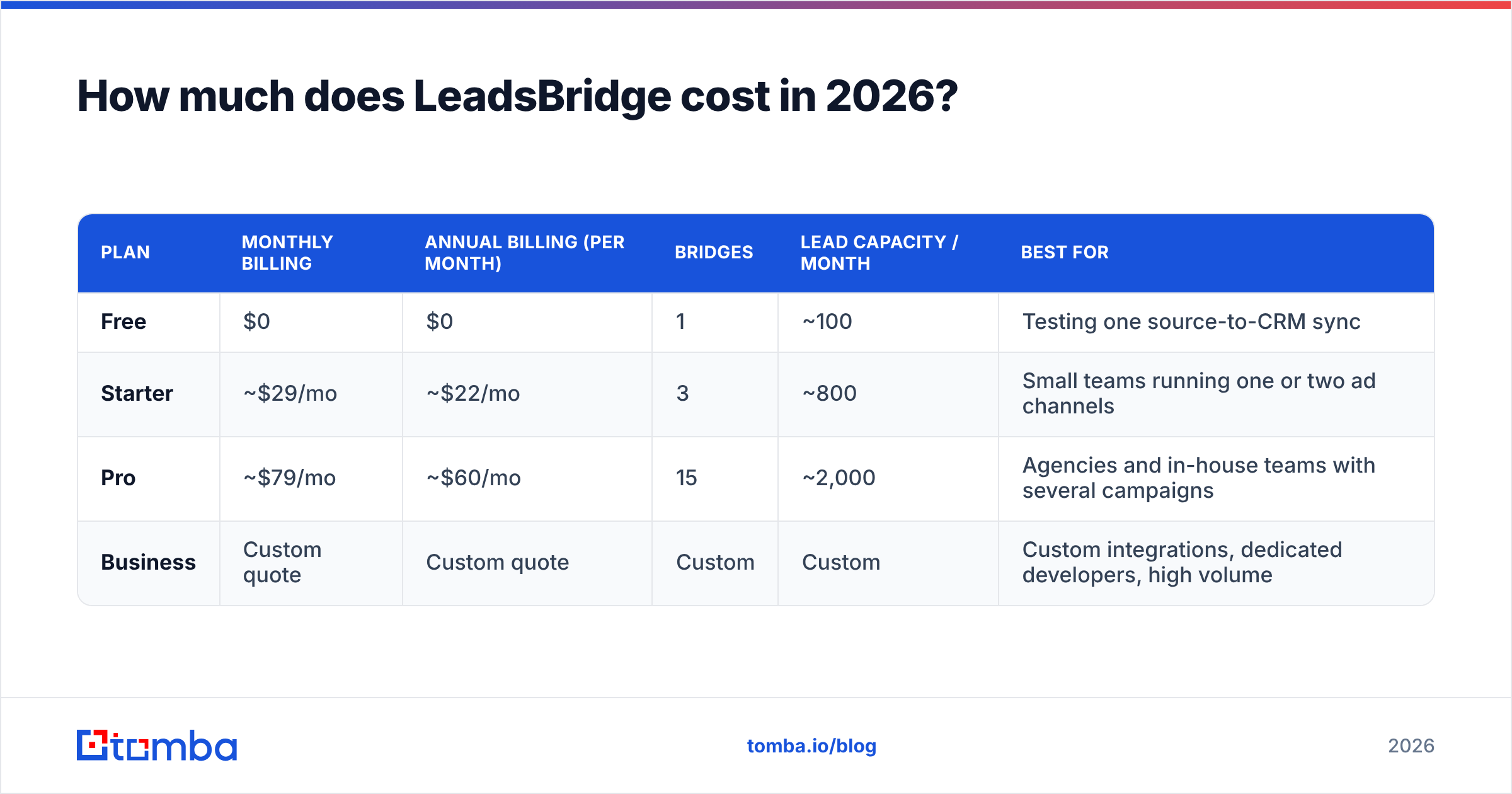
LeadsBridge pricing is tiered by number of bridges, monthly lead volume, and feature access. The figures below come from LeadsBridge's official pricing page and third-party listings at the time of writing. LeadsBridge has changed its plan structure several times, so confirm current numbers before you buy.
| Plan | Monthly billing | Annual billing (per month) | Bridges | Lead capacity / month | Best for |
|---|---|---|---|---|---|
| Free | $0 | $0 | 1 | ~100 | Testing one source-to-CRM sync |
| Starter | ~$29/mo | ~$22/mo | 3 | ~800 | Small teams running one or two ad channels |
| Pro | ~$79/mo | ~$60/mo | 15 | ~2,000 | Agencies and in-house teams with several campaigns |
| Business | Custom quote | Custom quote | Custom | Custom | Custom integrations, dedicated developers, high volume |
A few things matter more than the headline number:
- The annual discount is real. Annual billing saves roughly 25%. If you know you'll run lead ads all year, monthly billing costs you a lot for the flexibility.
- Lead capacity is the actual constraint. Three bridges on Starter sounds like plenty until a successful campaign produces 1,200 leads in a month. Check what your plan does when you go over the cap before you scale spend.
- Field mapping limits differ by tier. Pro allows more synced fields per bridge. If your lead form asks five qualifying questions plus UTM data, the lower tier can force you to drop fields.
- Business is sales-led. There's no public price. Expect a significant step up from Pro, sized to your volume and the custom integrations you need.

What do LeadsBridge reviews say?#
Reviews on Capterra and TrustRadius are broadly positive. The same themes come up across platforms.
What reviewers like:
- Support that actually helps. This is the most repeated praise. Users describe support staff building or fixing bridges for them, which matters because ad-platform APIs change often.
- Breadth of integrations. Hundreds of connectors, including niche CRMs and regional email tools that general automation platforms skip or only partly support.
- Speed-to-lead. Leads arrive in the CRM in near real time, so SDRs can call within minutes instead of pulling CSVs the next morning.
- Audience sync. Performance marketers value keeping CRM segments in sync with Meta and Google audiences without manual uploads.
- Official partner status. LeadsBridge has held official partner badges with major ad platforms, which reviewers read as a sign of reliability.
What reviewers complain about:
- Price jumps between tiers. Going from Starter to Pro nearly triples the monthly bill. Teams that only need a few more bridges or a bit more lead capacity feel squeezed.
- Lead caps. Several reviewers mention hitting monthly limits during campaign spikes.
- Setup friction on complex bridges. Simple one-to-one syncs are quick to set up. Conditional routing, multiple destinations, or custom field logic takes longer, and some users needed support to finish the job.
- Dated interface. Some reviewers find the dashboard less polished than newer automation tools.
- No data quality layer. LeadsBridge passes along whatever the lead typed. Fake emails, typos, and personal addresses go straight into the CRM.
What are the pros and cons of LeadsBridge?#
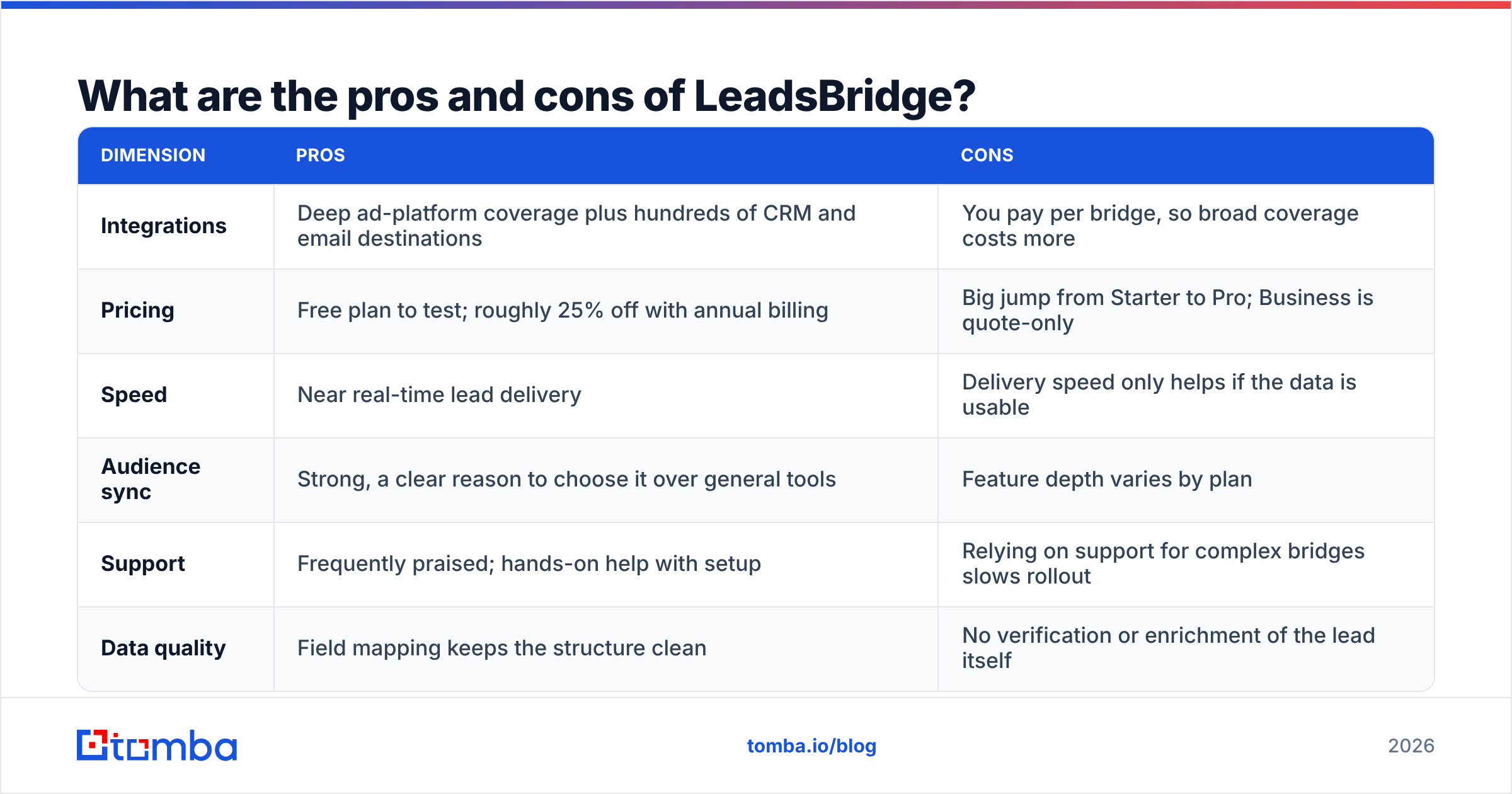
Here's the short version in one place.
| Dimension | Pros | Cons |
|---|---|---|
| Integrations | Deep ad-platform coverage plus hundreds of CRM and email destinations | You pay per bridge, so broad coverage costs more |
| Pricing | Free plan to test; roughly 25% off with annual billing | Big jump from Starter to Pro; Business is quote-only |
| Speed | Near real-time lead delivery | Delivery speed only helps if the data is usable |
| Audience sync | Strong, a clear reason to choose it over general tools | Feature depth varies by plan |
| Support | Frequently praised; hands-on help with setup | Relying on support for complex bridges slows rollout |
| Data quality | Field mapping keeps the structure clean | No verification or enrichment of the lead itself |
Is LeadsBridge worth the money?#
It depends on how much of your pipeline comes from ad forms.
It's usually worth it if:
- Paid social or search lead forms are your main source of inbound leads.
- You run campaigns on two or more ad platforms and send leads to one CRM.
- You want audience sync without building it yourself.
- You're an agency managing lead flows for several clients. The Pro plan's bridge count is aimed at you.
It's usually not worth it if:
- You run one Facebook campaign and your CRM already has a native Lead Ads connector. HubSpot, for example, connects Facebook and LinkedIn lead forms natively on many plans.
- You already pay for Zapier or Make for other workflows and only need two or three simple syncs.
- Your volume is low and steady. The Free or Starter plan may cover you, and a paid upgrade buys you little.
A simple test: take your monthly ad spend on lead-form campaigns and ask what a one-day delay in lead follow-up costs you. If you spend thousands a month and speed-to-lead drives your conversion rate, $60 to $79 a month is a small line item. If lead forms are a side channel, it's harder to justify.
How does LeadsBridge compare to the alternatives?#
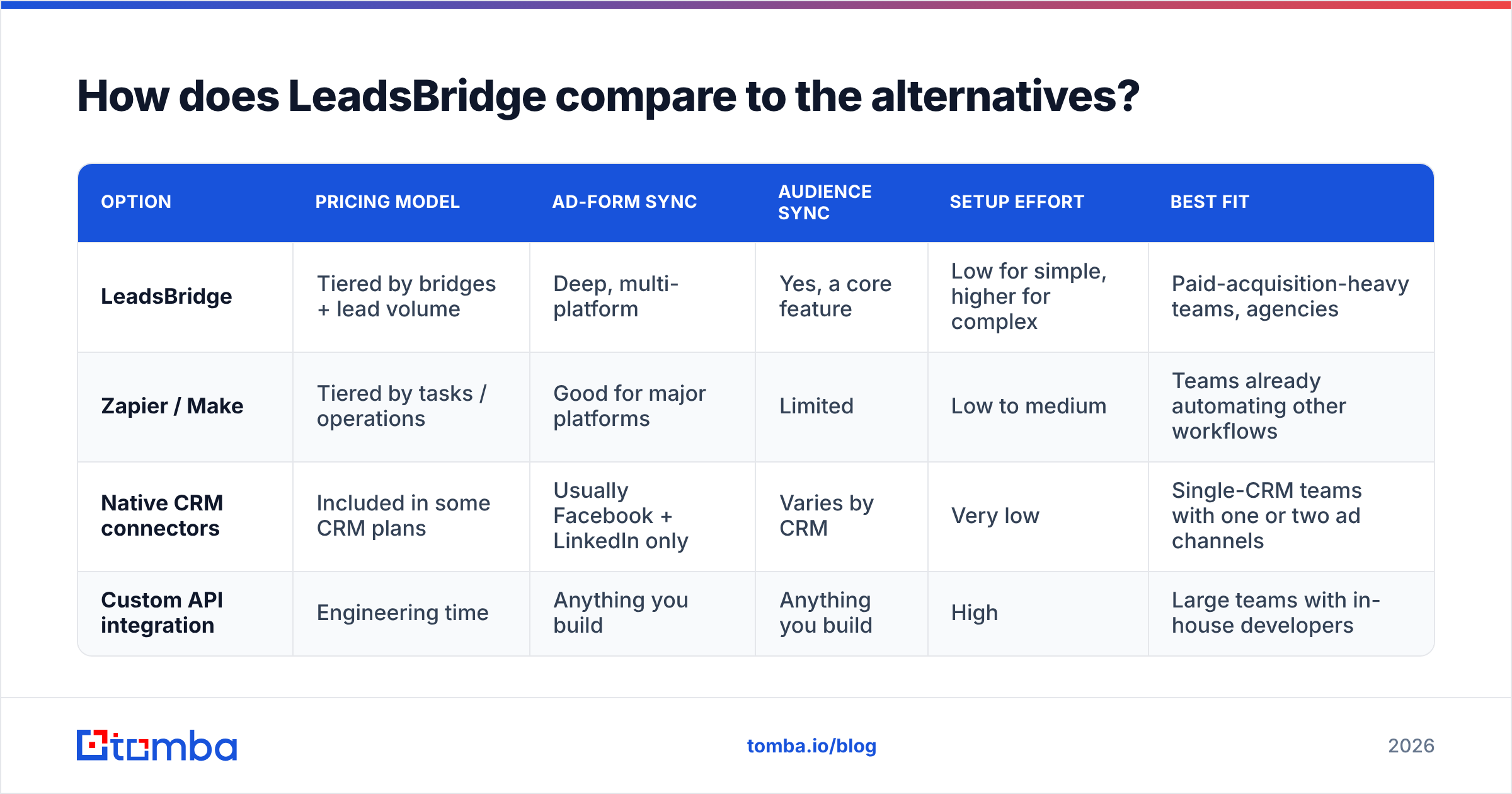
LeadsBridge mostly competes on specialization. Here's how the common options compare for ad-lead sync:
| Option | Pricing model | Ad-form sync | Audience sync | Setup effort | Best fit |
|---|---|---|---|---|---|
| LeadsBridge | Tiered by bridges + lead volume | Deep, multi-platform | Yes, a core feature | Low for simple, higher for complex | Paid-acquisition-heavy teams, agencies |
| Zapier / Make | Tiered by tasks / operations | Good for major platforms | Limited | Low to medium | Teams already automating other workflows |
| Native CRM connectors | Included in some CRM plans | Usually Facebook + LinkedIn only | Varies by CRM | Very low | Single-CRM teams with one or two ad channels |
| Custom API integration | Engineering time | Anything you build | Anything you build | High | Large teams with in-house developers |
LeadsBridge's advantage is that it keeps up with ad-platform API changes so you don't have to. General tools are more flexible across your whole stack but usually go less deep on audience sync and ad-specific field handling.
What does LeadsBridge not solve?#
This is the part most LeadsBridge pricing reviews skip. Moving a lead fast is only useful if the lead is real and reachable.
Ad-platform lead forms are known for producing:
- Personal addresses instead of work emails. Meta pre-fills forms with the email on the user's account, which is usually a Gmail or Outlook address, not their work inbox.
- Typos and fake entries. People type "test@test.com" or mistype a domain.
- Missing context. You get a name and an email, but no company, role, or direct phone.
LeadsBridge passes all of this into your CRM exactly as submitted. When your SDRs or automated sequences start emailing, invalid addresses bounce, your sender reputation drops, and later campaigns land in spam.
The fix is a quality step between sync and outreach:
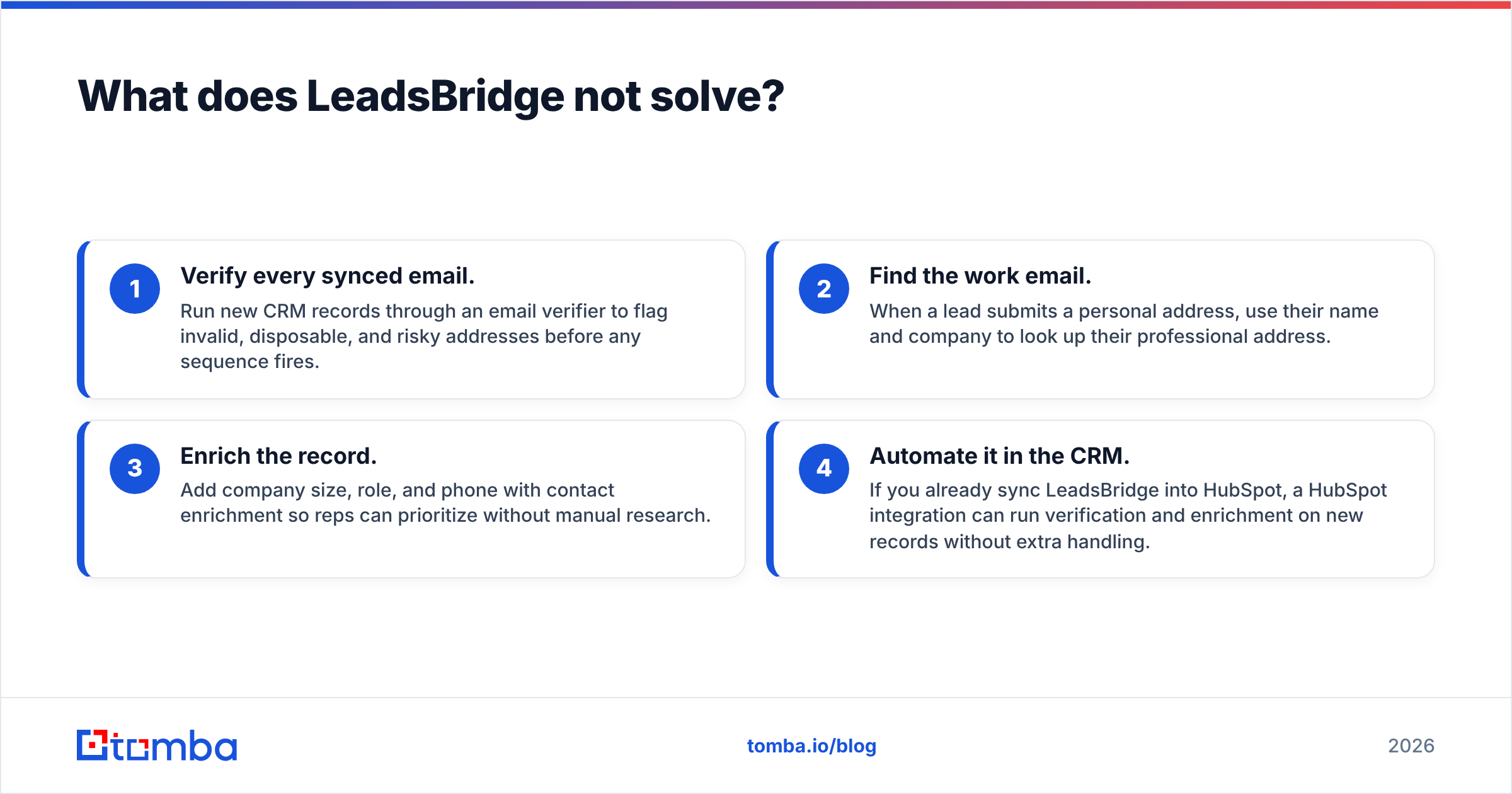
- Verify every synced email. Run new CRM records through an email verifier to flag invalid, disposable, and risky addresses before any sequence fires.
- Find the work email. When a lead submits a personal address, use their name and company to look up their professional address.
- Enrich the record. Add company size, role, and phone with contact enrichment so reps can prioritize without manual research.
- Automate it in the CRM. If you already sync LeadsBridge into HubSpot, a HubSpot integration can run verification and enrichment on new records without extra handling.

How should you choose a LeadsBridge plan?#
If you've decided LeadsBridge fits, pick a plan with this checklist:
- Count your sources and destinations. Each source-to-destination pair is usually one bridge. Three ad platforms feeding one CRM plus one email tool can mean six bridges, which is already more than Starter allows.
- Estimate peak monthly leads, not average. Size for your best campaign month, not a typical one.
- List the fields you need. Qualifying questions, UTM parameters, and campaign IDs all count toward field limits.
- Decide whether you need audience sync now. If not, start lower and upgrade when you do.
- Start on the Free plan. Build one real bridge, confirm field mapping and delivery speed, then commit to annual billing on the tier that fits.
What's the final verdict on LeadsBridge pricing?#
LeadsBridge is a well-supported specialist tool. For teams where ad-platform lead forms drive pipeline, the Pro plan at about $60/mo billed annually is fair value for multi-platform sync, audience sync, and responsive support. The main drawbacks are how pricing scales with bridges and lead volume, and the fact that the tool does nothing to check whether the leads it moves are any good.
Judge it on what it does, which is moving data from ad platforms to your CRM. Then budget for the data quality step separately. Teams that do both get the speed-to-lead LeadsBridge promises without the bounce rates that usually follow.
Where does Tomba fit next to LeadsBridge?#
LeadsBridge gets leads into your CRM fast. Tomba Email Finder makes sure your reps can actually reach them. When a Facebook or LinkedIn lead form gives you a personal Gmail address, Tomba can find the prospect's professional email from their name and company domain. Pair it with verification so every synced lead is usable before your first sequence goes out. You can start on the free tier (25 searches/month) and move to Starter at $49/mo when volume grows. See Tomba pricing for the full plan breakdown.
Related guides#
// get started
Find, verify and enrich your first contacts today
Start on the free plan with 25 searches a month, then scale when your team is ready.
Free plan · No credit card required · GDPR & CCPA
// about the author