Leadsforge Pros and Cons (2026): An Honest Review for Outbound Teams
Leadsforge turns a plain-English ICP description into a lead list in minutes. This review covers where that works, where it breaks, and which teams should buy something else.
TL;DR
- Leadsforge is an AI lead-generation tool from the Forge ecosystem (Salesforge, Warmforge, Mailforge). You describe your ideal customer in plain English and it builds a contact list for you.
- Biggest pros: you can search without learning filters, lists come out fast, emails are verified before export, and it hands off cleanly to Salesforge sequences.
- Biggest cons: credits run out quickly at volume, it gives you less precise control than filter-first databases, coverage drops outside English-speaking tech markets, and it works best when you already use the rest of the Forge stack.
- Best fit: small outbound teams and agencies that want a finished list fast. Poor fit: teams that already have target accounts and just need the right email address at each one.
- Whatever you pick, verify the list again before a large send. How good the data is depends on how clearly you define your ICP, not only on which tool you use.
What is Leadsforge?#
Leadsforge is an AI-assisted B2B lead database. Most databases hand you a wall of filters: industry, headcount, seniority, geography, technology. Leadsforge replaces that with a chat box. You type something like "Heads of RevOps at US-based B2B SaaS companies with 50–500 employees that recently raised a Series A or B." The tool turns that sentence into a search, shows you matching companies and contacts, and lets you refine the results by talking to it.
It belongs to the same family as Salesforge, the multi-mailbox cold email sequencer, and its sister infrastructure products for warmup and mailbox provisioning. That matters for this review. Many of Leadsforge's strengths are strongest when you already send through Salesforge, and some of its weaknesses matter less there too.
Leadsforge's pitch is not "the biggest database." It is "the fastest route from a vague idea of who to target to a verified CSV you can sequence today." Judge it against that promise.
How does Leadsforge actually work?#
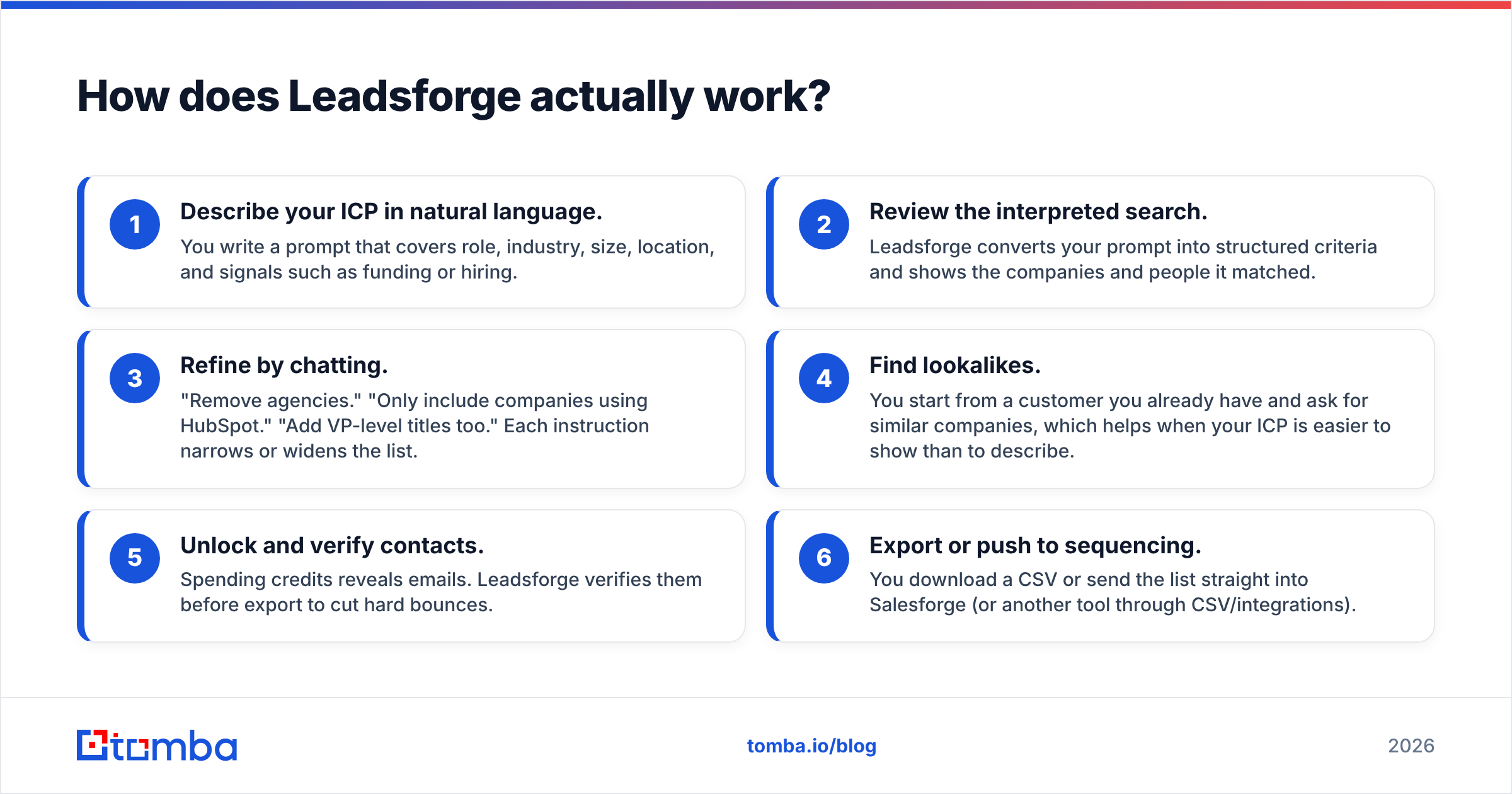
Before the pros and cons, it helps to see the workflow, because nearly every strength and weakness comes from how it is built.
- Describe your ICP in natural language. You write a prompt that covers role, industry, size, location, and signals such as funding or hiring.
- Review the interpreted search. Leadsforge converts your prompt into structured criteria and shows the companies and people it matched.
- Refine by chatting. "Remove agencies." "Only include companies using HubSpot." "Add VP-level titles too." Each instruction narrows or widens the list.
- Find lookalikes. You start from a customer you already have and ask for similar companies, which helps when your ICP is easier to show than to describe.
- Unlock and verify contacts. Spending credits reveals emails. Leadsforge verifies them before export to cut hard bounces.
- Export or push to sequencing. You download a CSV or send the list straight into Salesforge (or another tool through CSV/integrations).
The chat layer sits on top of a structured database. That is why search feels easy, and it is also why you have less control than you do by setting filters yourself.
What are the main pros of Leadsforge?#
Is the natural-language search genuinely faster?#
Yes, particularly for people who do not live inside prospecting tools. A founder, an agency account manager, or a marketer new to outbound can build a reasonable first list in minutes. They do not need to know that "Head of Revenue Operations," "RevOps Lead," and "Director, Sales Ops" all have to be tagged separately. Leadsforge's interpretation step handles that title expansion.
On a filter-first platform, a new user often spends the first hour learning the UI. Here, that hour becomes a few refinement prompts.
Does it help when your ICP is fuzzy?#
This is the most underrated advantage. Many early-stage teams do not have a crisp ICP. They have a few good customers and a hunch. Lookalike search plus conversational refinement lets you work from examples ("companies like these three") instead of forcing you to write criteria you have not figured out yet.
Is the data verified before export?#
Leadsforge runs email verification before you export, so you are not paying credits for addresses that are obviously dead. That lowers your hard bounce rate on the first send, which protects your sender reputation. This matters a lot for new domains, where a few bad sends can hurt inbox placement for weeks.
How well does it integrate with Salesforge?#
This is where the ecosystem helps. If you already send through Salesforge, lists move over without CSV cleanup, column mapping, or deduplication headaches. Leads flow directly into sequences, and your warmup and mailbox setup sit in the same product family. For agencies running many client campaigns, removing that friction saves real hours every week.
Is it easy to onboard a team?#
Because the interface is a chat, there is almost no training. You can give a junior SDR or a new client seat access, and they will produce a usable list on day one. Tools with dense filter panels usually need a walkthrough before anyone trusts the output.
What are the main cons of Leadsforge?#
Do credits run out quickly?#
For high-volume outbound, yes. Leadsforge prices on credits: revealing contacts uses them, and plans cap how many you get each month. For a team sending a few hundred personalised emails a week, that is fine. For a team pushing thousands of contacts a week across multiple ICPs, credits become the limit, and the cost per usable lead can exceed a filter-first database or a pay-per-lookup email finder. Check the live pricing on the Leadsforge site before you commit. Plans and credit allowances in this category change often.
Do you lose precision compared with manual filters?#
Sometimes. Natural language is flexible, but it can be ambiguous. "Mid-market fintech companies" can be read several ways. The AI might include payments processors you would exclude, or leave out embedded-finance startups you consider core. You can refine with more prompts, but experienced SDRs who know exactly which filters they want often find it slower than setting them directly. For very narrow searches, such as specific tech-stack combinations, exact headcount bands, or particular sub-industries, filter-first tools usually hit the target faster.
How good is coverage outside core markets?#
Like most AI-first lead tools, Leadsforge is strongest where public B2B data is densest: North America, the UK, and tech-heavy verticals. If you prospect into DACH manufacturing, LATAM logistics, or Southeast Asian SMBs, expect thinner results and more contacts without a verified email. That is a problem for the whole category, not something unique to Leadsforge. Test your actual target geographies during a trial before you assume coverage.
Is it less useful outside the Forge stack?#
Leadsforge works fine on its own through CSV export. But the frictionless handoff, which is one of its strongest selling points, depends on Salesforge. If you sequence in Instantly, Smartlead, Apollo, Outreach, or your CRM, you are back to exporting, mapping, and importing. Part of the value is lost.
Can it replace a dedicated email finder?#
Not quite. Leadsforge is built around discovery: finding who to target. It is not built around lookup: finding the correct address for a person you have already chosen. If you have a target account list from your CRM, from event attendees, or from an ABM platform, you need to go account by account, domain by domain. A purpose-built email finder or domain search tool is the better instrument for that job, and it usually costs less per result.
How does Leadsforge compare with other lead-generation options?#
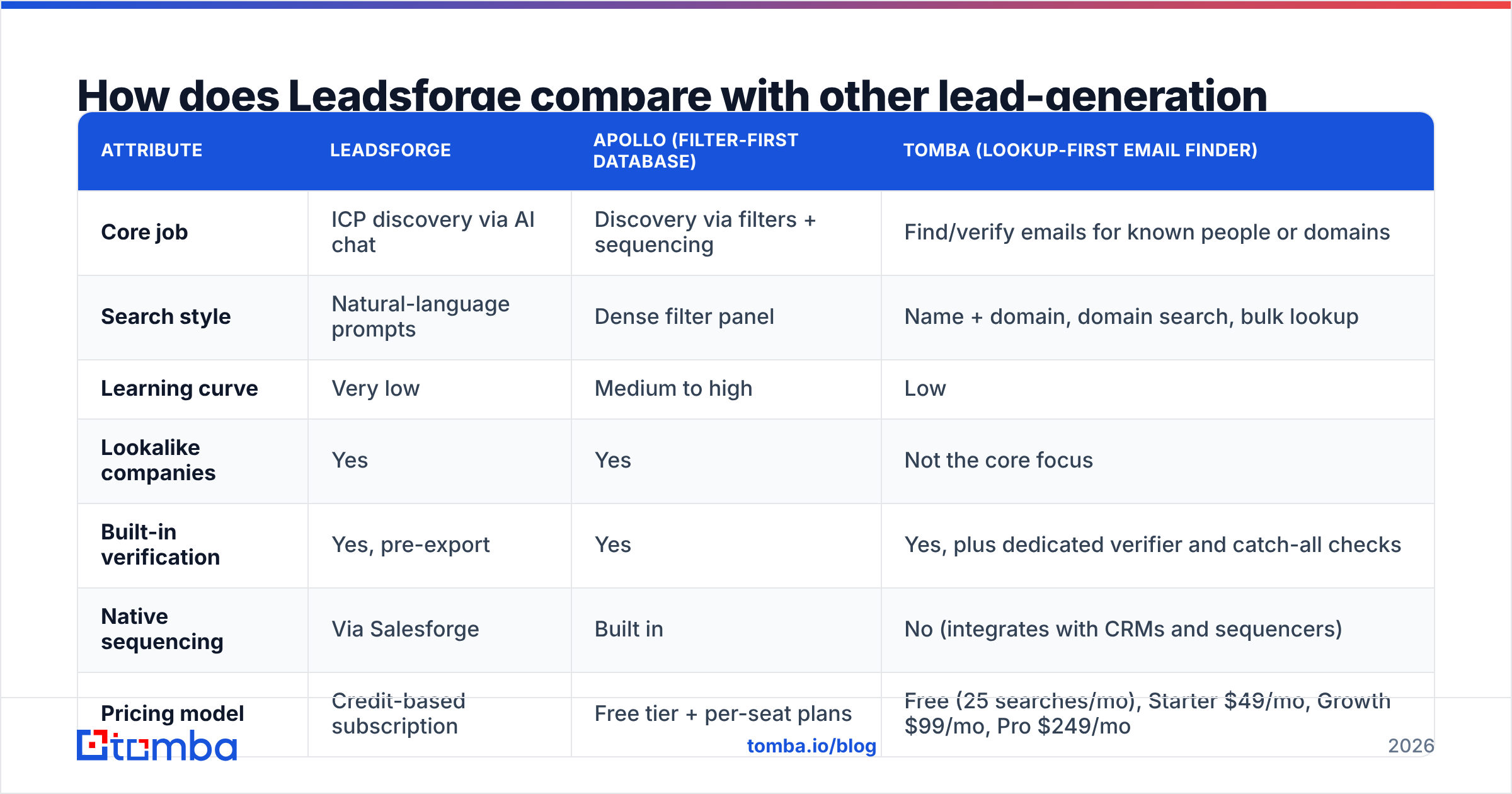
The table below compares Leadsforge with two common alternatives: a filter-first all-in-one database (Apollo, as the category benchmark) and a lookup-first email finder (Tomba). Prices change often. Treat pricing rows as structural (how you pay), and confirm current numbers on each vendor's site.
| Attribute | Leadsforge | Apollo (filter-first database) | Tomba (lookup-first email finder) |
|---|---|---|---|
| Core job | ICP discovery via AI chat | Discovery via filters + sequencing | Find/verify emails for known people or domains |
| Search style | Natural-language prompts | Dense filter panel | Name + domain, domain search, bulk lookup |
| Learning curve | Very low | Medium to high | Low |
| Lookalike companies | Yes | Yes | Not the core focus |
| Built-in verification | Yes, pre-export | Yes | Yes, plus dedicated verifier and catch-all checks |
| Native sequencing | Via Salesforge | Built in | No (integrates with CRMs and sequencers) |
| Pricing model | Credit-based subscription | Free tier + per-seat plans | Free (25 searches/mo), Starter $49/mo, Growth $99/mo, Pro $249/mo |
| Best for | Fast lists from a fuzzy ICP | Power users who want one platform | Teams with target accounts who need accurate emails |
| Main weakness | Credits and precision at scale | Complexity, data freshness varies by segment | You bring the target list |
The takeaway: these tools are not direct substitutes. Many teams use a discovery tool to decide who to target and a lookup tool to make sure they reach them.
Who should use Leadsforge, and who should skip it?#
These are the patterns we see across outbound teams:
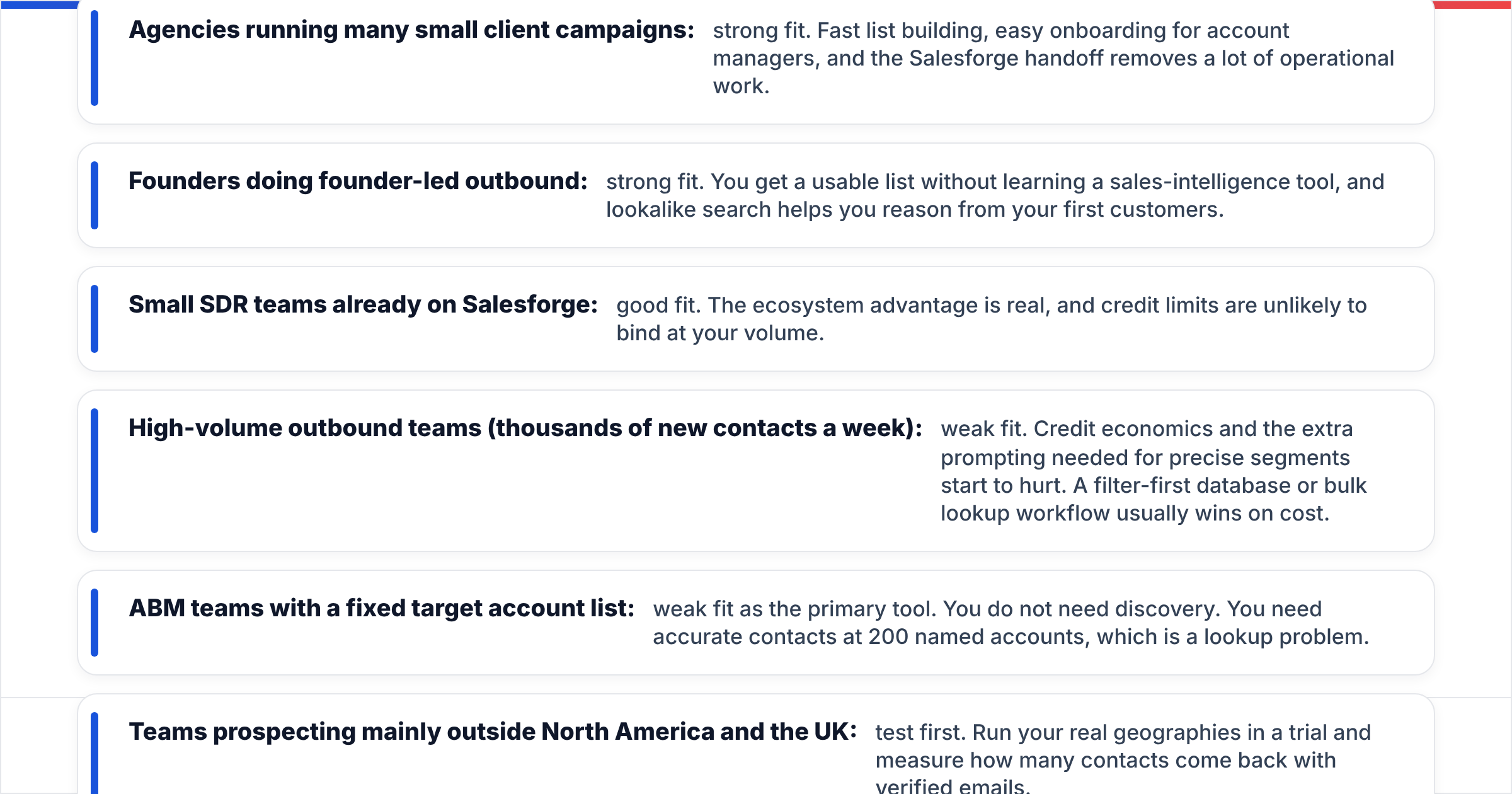
- Agencies running many small client campaigns: strong fit. Fast list building, easy onboarding for account managers, and the Salesforge handoff removes a lot of operational work.
- Founders doing founder-led outbound: strong fit. You get a usable list without learning a sales-intelligence tool, and lookalike search helps you reason from your first customers.
- Small SDR teams already on Salesforge: good fit. The ecosystem advantage is real, and credit limits are unlikely to bind at your volume.
- High-volume outbound teams (thousands of new contacts a week): weak fit. Credit economics and the extra prompting needed for precise segments start to hurt. A filter-first database or bulk lookup workflow usually wins on cost.
- ABM teams with a fixed target account list: weak fit as the primary tool. You do not need discovery. You need accurate contacts at 200 named accounts, which is a lookup problem.
- Teams prospecting mainly outside North America and the UK: test first. Run your real geographies in a trial and measure how many contacts come back with verified emails.
For independent user feedback, the reviews on G2 are useful for checking how Leadsforge performs in segments like yours. Filter reviews by company size and region rather than reading the top-line score.
What should you check during a Leadsforge trial?#
A trial is only useful if you test the things that could break your use case. A demo prompt that happens to work well does not tell you much. Run this checklist:
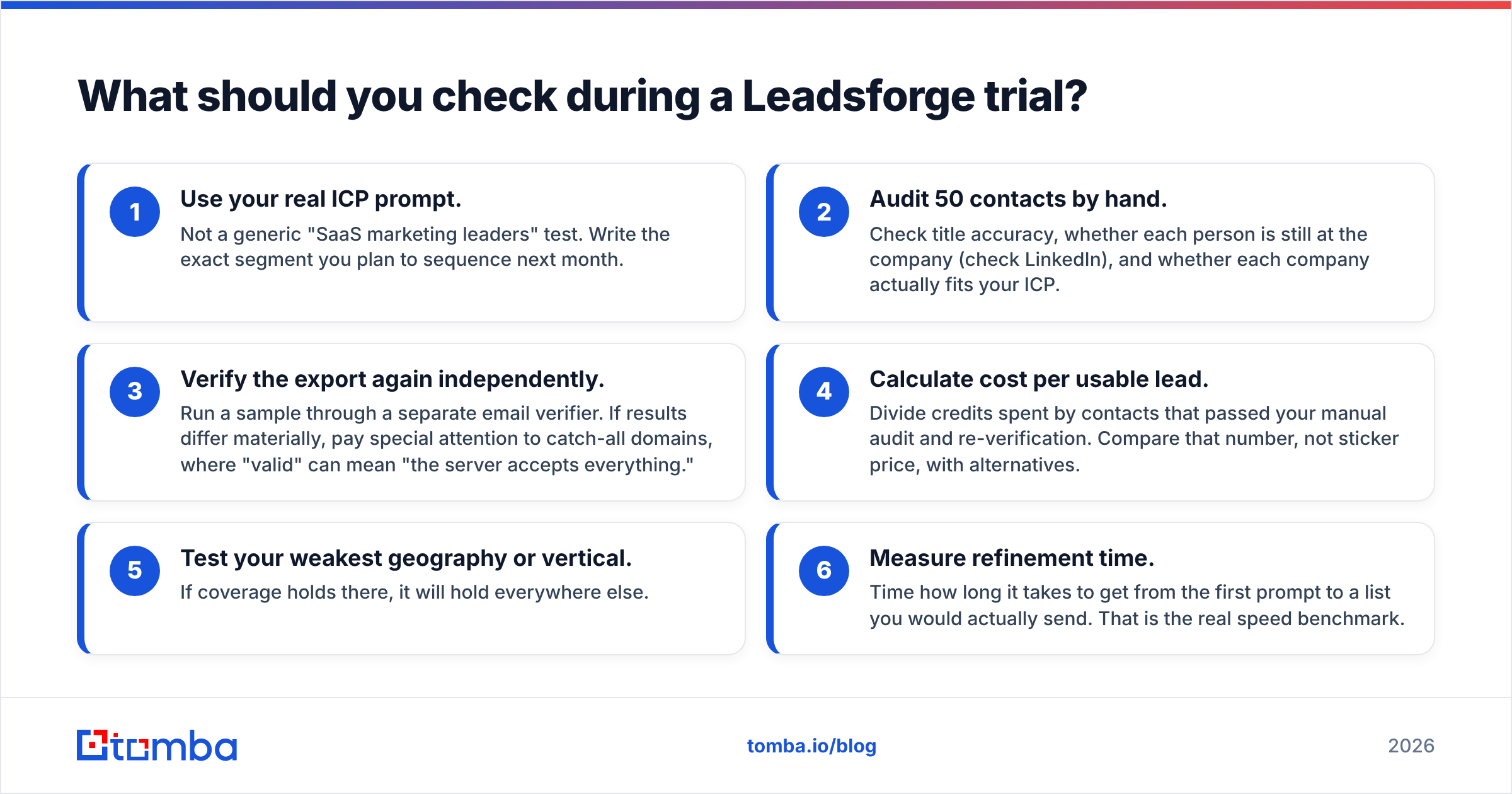
- Use your real ICP prompt. Not a generic "SaaS marketing leaders" test. Write the exact segment you plan to sequence next month.
- Audit 50 contacts by hand. Check title accuracy, whether each person is still at the company (check LinkedIn), and whether each company actually fits your ICP.
- Verify the export again independently. Run a sample through a separate email verifier. If results differ materially, pay special attention to catch-all domains, where "valid" can mean "the server accepts everything."
- Calculate cost per usable lead. Divide credits spent by contacts that passed your manual audit and re-verification. Compare that number, not sticker price, with alternatives.
- Test your weakest geography or vertical. If coverage holds there, it will hold everywhere else.
- Measure refinement time. Time how long it takes to get from the first prompt to a list you would actually send. That is the real speed benchmark.

Is Leadsforge's data accurate enough for cold email?#
For most mainstream segments, the pre-export verification brings deliverability risk down to a manageable level. That is the minimum any modern lead tool should offer. Three caveats apply to Leadsforge and to every tool in this category:
- Data decays. B2B contact data goes stale continuously as people change roles and companies. Even a list verified at export time should be re-verified if it sits for weeks before you send.
- Catch-all domains are grey zones. Many companies configure their mail servers to accept every address, so standard SMTP checks cannot confirm whether a specific mailbox exists. Treat catch-all results as risky, send to them at lower volume, or run them through a dedicated catch-all verifier.
- ICP accuracy matters as much as email accuracy. A perfectly valid email for someone who does not fit your ICP still produces zero replies and hurts your response rate. The AI's reading of your prompt is the variable to watch most closely.
In short, Leadsforge's data is good enough to start with. It is not good enough to skip your own QA, and no tool is.
So, is Leadsforge worth it in 2026?#
It depends on which problem you have.
If your bottleneck is deciding who to target and producing a list quickly, Leadsforge is one of the most approachable tools available. The natural-language search removes real friction, lookalike search helps teams with fuzzy ICPs, and the Salesforge handoff is excellent if you already work in that ecosystem.
If your bottleneck is reaching specific people at accounts you have already chosen, or you run outbound at volumes where credit economics decide the outcome, Leadsforge is not the most efficient primary tool. There you want lookup-first infrastructure: domain search, name-plus-company lookup, bulk enrichment, and strong verification, priced per result.
Many mature outbound stacks use both: a discovery layer to define the audience and a lookup layer to make sure every address is correct before it reaches a sequencer.
Frequently asked questions#
Is Leadsforge free?#
Leadsforge has historically offered trial access so you can test searches before paying. Ongoing use is credit-based on paid plans. Check the current pricing page on leadsforge.ai for up-to-date allowances.
Can I use Leadsforge without Salesforge?#
Yes. You can export lists as CSV and import them into any sequencer or CRM. You lose the native one-click handoff, which is one of its strongest advantages.
Is Leadsforge better than Apollo?#
Neither is better for every team. Leadsforge is faster to learn and better when your ICP is loosely defined. Apollo gives power users more filter control and a built-in sequencer in one platform. Pick based on your team's skill level and volume.
Do I still need an email verifier if I use Leadsforge?#
For large sends or lists that sit for more than a few weeks, yes. Re-verifying just before sending protects your domain from decay-driven bounces, and catch-all addresses in particular benefit from a second check.
Where does Tomba fit alongside Leadsforge?#
If your pipeline starts with named accounts rather than a fuzzy ICP, a lookup-first tool will do more for you than another discovery layer. Tomba Email Finder finds professional email addresses from a name and company, or pulls every public contact for a domain. It also includes built-in verification and catch-all checks, and you can move from single lookups to bulk jobs as you scale. You can start on the free tier with 25 searches a month and compare cost per verified contact against your current tool. The full breakdown is on the Tomba pricing page. Use Leadsforge or any discovery tool to decide who to target, and use Tomba to make sure each email reaches them.
Related guides#
// get started
Find, verify and enrich your first contacts today
Start on the free plan with 25 searches a month, then scale when your team is ready.
Free plan · No credit card required · GDPR & CCPA
// about the author