Leadsforge vs Kitt AI (2026): Lead Search or Email Finder?
Leadsforge builds lead lists from a plain-English prompt. Kitt AI finds and verifies emails, including catch-alls, and is free for individuals. They solve different problems, and picking the wrong one wastes budget.
TL;DR
- Leadsforge is an AI lead search engine. You describe your ideal customer in plain English and it builds a list of contacts with emails and optional phone numbers. It costs $49/mo for 2,000 credits, and those credits don't expire.
- Kitt AI is an email finder and verifier. Its main strength is checking catch-all addresses and detecting job changes against enterprise identity servers. It's free for individual users, and high-volume usage is billed per result.
- They sit at different points in the funnel. Leadsforge answers "who should I contact?" Kitt AI answers "is this email real and deliverable?"
- Pick Leadsforge if you don't have a list yet. Pick Kitt AI if you already have names and domains and need clean, verified emails at low cost.
- Many teams end up running both, or they swap one side for an all-in-one email finder and verifier like Tomba.
What are Leadsforge and Kitt AI, in one sentence each?#
People compare these two tools a lot, but they don't do the same job.
Leadsforge (leadsforge.ai) belongs to the Forge family of outbound tools, alongside Salesforge, Mailforge and Warmforge. It works as a lead database with a chat-style search box on top. You type something like "Heads of RevOps at US SaaS companies, 50–200 employees, using HubSpot," and it returns a list you can enrich and export.
Kitt AI (trykitt.ai) is a B2B email finder and verifier. You give it a name and a company domain and it returns a verified work email. You can also give it an existing email and it tells you whether that address will actually receive mail. Kitt says it goes beyond standard SMTP checks by querying enterprise identity servers. That lets it confirm addresses on catch-all domains and flag people who have left the company.
So the real comparison is whether your bottleneck is finding the right people or reaching them without bouncing.
How do Leadsforge and Kitt AI compare side by side?#
These figures come from each vendor's public pricing and product pages at the time of writing. Check the vendor sites before you buy, because credit-based pricing changes often.

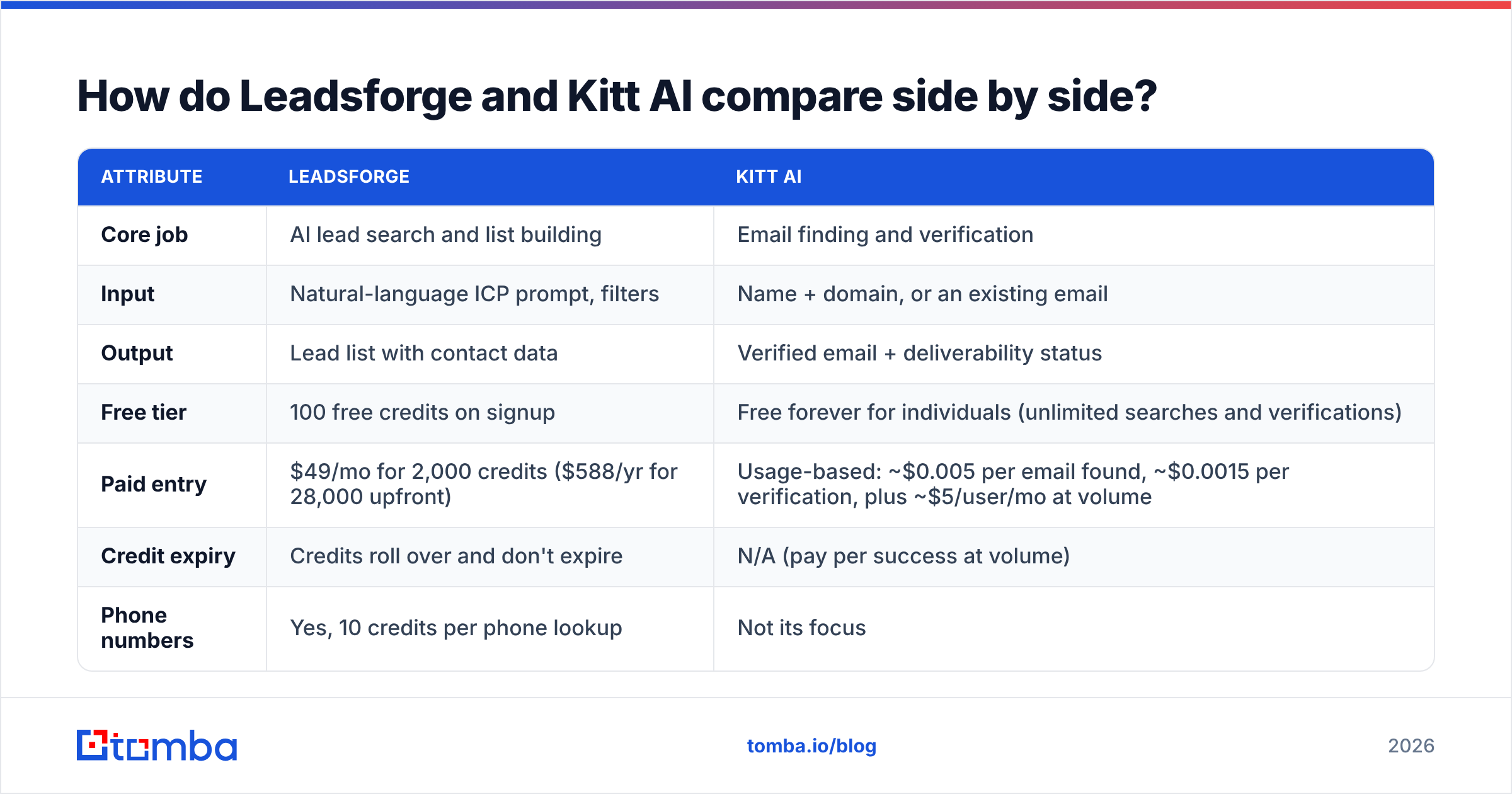
| Attribute | Leadsforge | Kitt AI |
|---|---|---|
| Core job | AI lead search and list building | Email finding and verification |
| Input | Natural-language ICP prompt, filters | Name + domain, or an existing email |
| Output | Lead list with contact data | Verified email + deliverability status |
| Free tier | 100 free credits on signup | Free forever for individuals (unlimited searches and verifications) |
| Paid entry | $49/mo for 2,000 credits ($588/yr for 28,000 upfront) | Usage-based: ~$0.005 per email found, ~$0.0015 per verification, plus ~$5/user/mo at volume |
| Credit expiry | Credits roll over and don't expire | N/A (pay per success at volume) |
| Phone numbers | Yes, 10 credits per phone lookup | Not its focus |
| Catch-all handling | Standard verification on export | Core differentiator (identity-server checks) |
| Job-change detection | Relies on database freshness | Checked live during verification |
| Integrations | Native to the Salesforge ecosystem, CSV export | Clay, HubSpot, Salesforce, Outreach, Salesloft, Google Sheets, Chrome extension, API |
| Best for | Founders and SDRs starting from zero | RevOps and Clay users cleaning or completing existing lists |
How does Leadsforge actually work?#
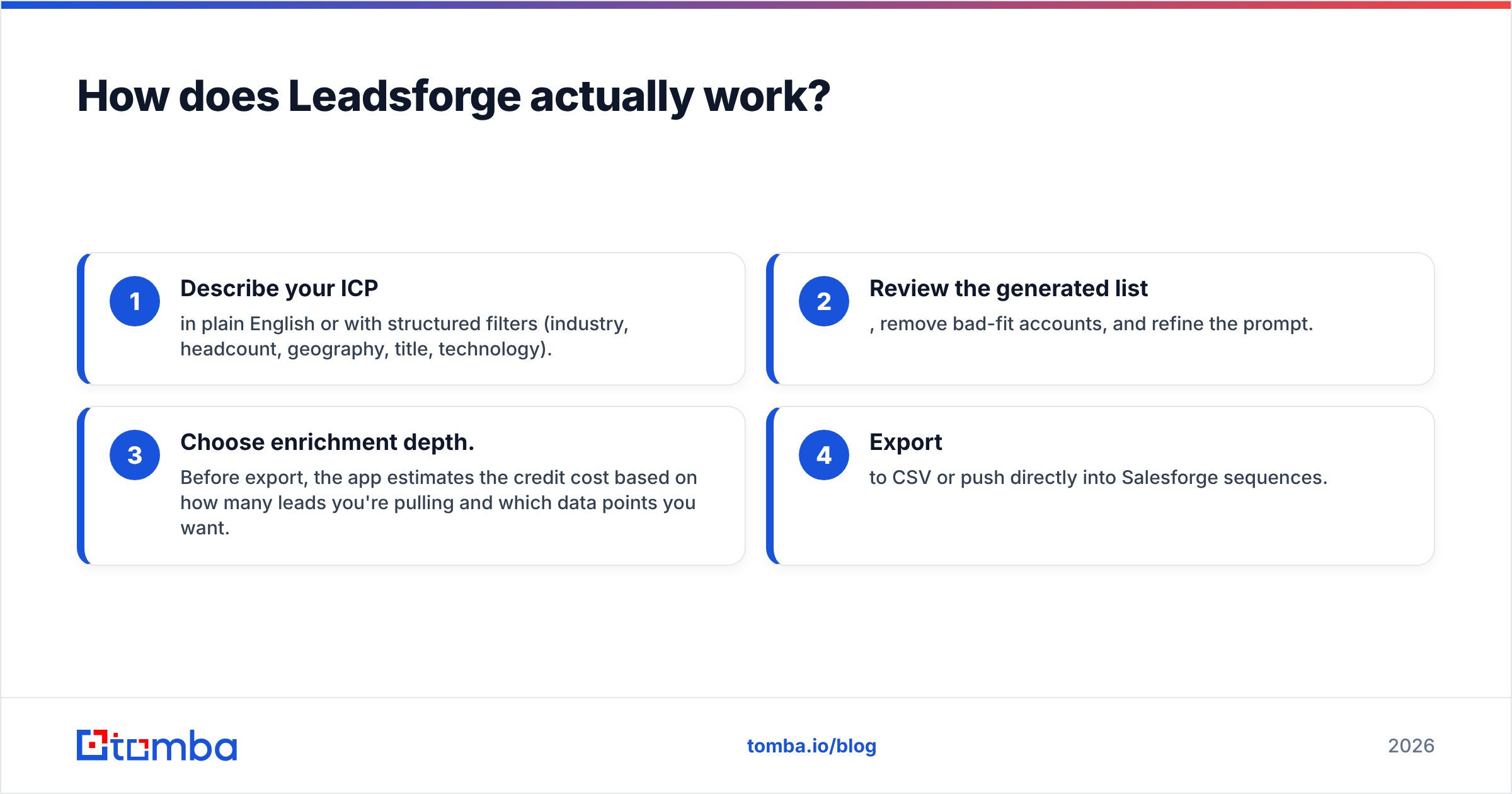
Leadsforge is built around search, not lookup. The workflow looks like this:
- Describe your ICP in plain English or with structured filters (industry, headcount, geography, title, technology).
- Review the generated list, remove bad-fit accounts, and refine the prompt.
- Choose enrichment depth. Before export, the app estimates the credit cost based on how many leads you're pulling and which data points you want.
- Export to CSV or push directly into Salesforge sequences.
The credit math is simple: 1 credit per email, 10 credits per phone number. On the $49 plan you get 2,000 credits, which works out to about 2,000 emails, 200 phone numbers, or some mix of the two. Unused credits carry over, which helps if your outbound volume goes up and down month to month.
Where Leadsforge is strong:
- Speed to first list. You don't have to build a boolean query, learn a filter UI, or scrape LinkedIn.
- No seat charge. A three-person team pays the same as a solo founder.
- Ecosystem fit. If you already send through Salesforge and warm up with Warmforge, the handoff takes a couple of clicks.
Where it's weaker:
- You're limited to its database. If your target accounts are niche, very small, or outside its strongest regions, coverage gets thin.
- Verification is a general-purpose step, not a specialty. For catch-all-heavy markets such as enterprise, finance, or healthcare, you may still want a second verification pass.
- Phone data is expensive in credits. A 10x multiplier adds up quickly if calling is a big part of your motion.
How does Kitt AI actually work?#
Kitt AI takes the opposite approach. It doesn't help you decide who to contact. It helps you make sure the email you have, or the one you need, is correct.
The workflow:
- Input a name + company domain (finder) or an email list (verifier), one at a time, via CSV, via the Chrome extension, or through the API.
- Kitt resolves the address and checks it. Instead of stopping at an SMTP handshake, which catch-all servers answer with "yes" to everything, it checks against enterprise identity providers to confirm that a real mailbox exists for that person.
- Get a status back (valid, invalid, catch-all-verified, and so on) and push it to your CRM or Clay table.
The catch-all piece is the main reason people choose Kitt. A large share of B2B domains, especially at mid-market and enterprise companies, are configured as catch-all. Traditional verifiers mark those addresses "risky" or "unknown," so you either throw away good leads or send and hope. Kitt's pitch is that it can turn many of those unknowns into confident valids or invalids. That's also why it shows up in Clay's integration marketplace and in Clay's own catch-all verifier benchmarks.

Where Kitt AI is strong:
- Price. Individuals get unlimited finds and verifications for free. At volume, fractions of a cent per result is very cheap compared with most verifiers.
- Catch-all resolution. This is its main differentiator and the reason Clay power users rate it highly.
- Job-change detection. Flagging people who have left the company before you email them protects your bounce rate and saves you from awkward messages.
- Integrations. HubSpot, Salesforce, Outreach, Salesloft, Clay and a public API mean it fits into most existing stacks.
Where it's weaker:
- No prospecting layer. If you don't already have names and domains, Kitt has nothing to work with.
- Minimal enrichment. You get the email and its status, not firmographics, tech stack, or phone numbers.
- Opaque volume pricing. "Guaranteed capacity" tiers are sales-assisted, so budgeting at scale takes a conversation.
Is Leadsforge better than Kitt AI?#
Only if you need a list. Leadsforge is the better product when your problem is "I don't know who to email." Kitt AI is the better product when your problem is "I know who to email, but my bounce rate is killing my domain." Comparing them head-to-head is a bit like comparing a fishing map with a net quality tester.
Here's a quick decision framework:
- You have no list and need 500 qualified leads this week. Choose Leadsforge. Its prompt-based search is the fastest path from an ICP to exportable contacts.
- You have a CRM full of contacts and a 6%+ bounce rate. Choose Kitt AI. Run the database through its verifier and catch-all checks before your next campaign.
- You sell into enterprise or regulated industries. Choose Kitt AI, or at least add it as a verification layer. Catch-all domains are common there, and standard verification leaves too many "unknowns."
- You're a solo founder on a tight budget. Start with Kitt AI's free tier for verification and Leadsforge's 100 free credits for a test list, then pay for whichever becomes the bottleneck.
- You run a Clay-centric RevOps stack. Kitt AI plugs in natively. Leadsforge is more of a standalone destination.
- You're already on Salesforge. Leadsforge is the natural fit, and you can add a stricter verifier on top if bounces creep up.
Can you use Leadsforge and Kitt AI together?#
Yes, and for many outbound teams the combination works well:
- Leadsforge builds the list from an ICP prompt.
- You export only the fields you need, to save credits.
- Kitt AI re-verifies the emails, paying particular attention to anything marked catch-all or risky.
- Clean contacts go into your sequencer. Bounced or left-the-company records get suppressed.
The downside is operational. That's two vendors, two billing models, and a CSV handoff in the middle. If you're doing this weekly, the manual step becomes a real time cost, and each export/import round trip is another chance to lose data.
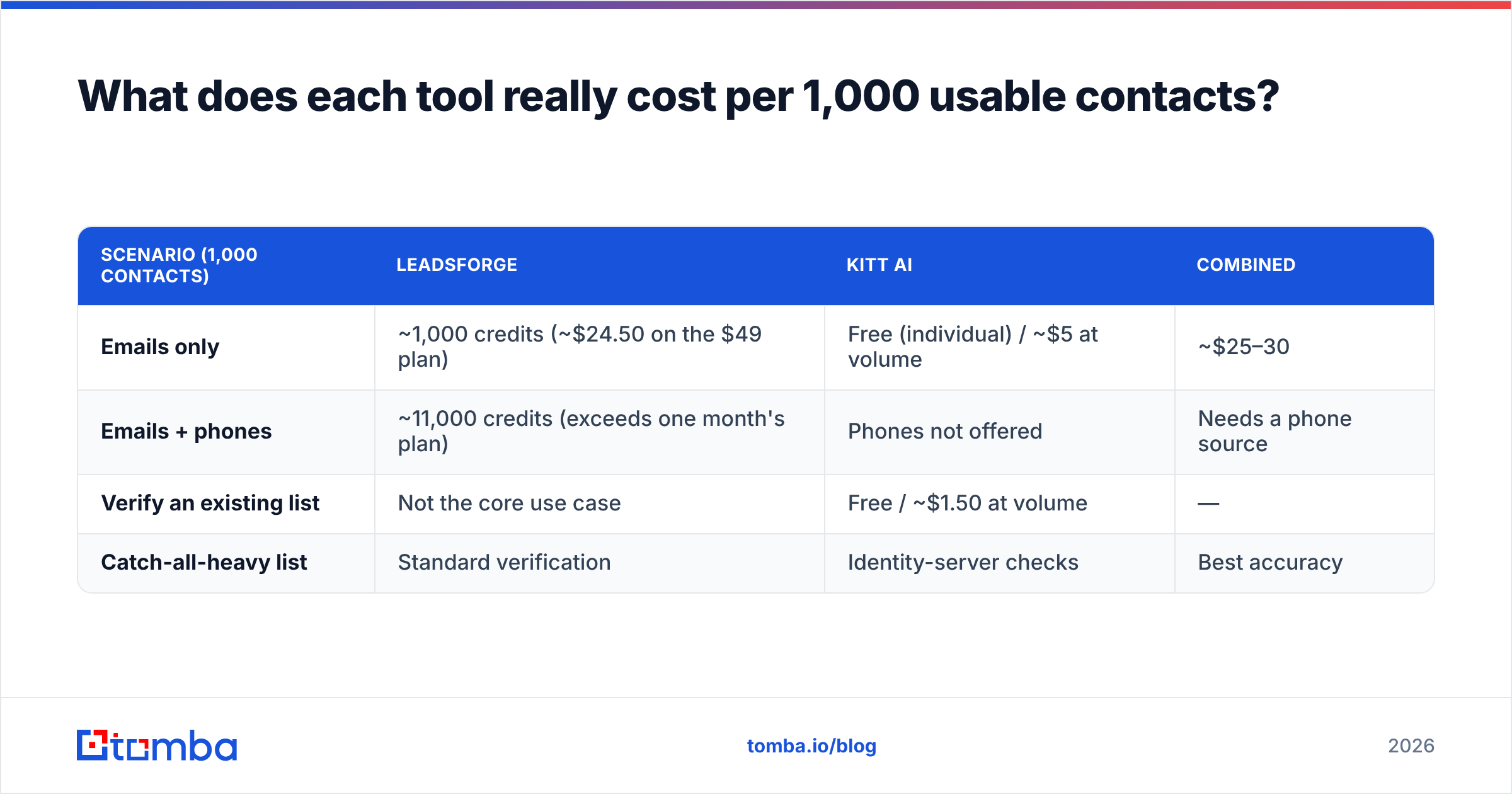
What does each tool really cost per 1,000 usable contacts?#
"Usable" is the number that counts. A cheap lead that bounces costs you sender reputation, and that's much harder to win back than a few dollars.
| Scenario (1,000 contacts) | Leadsforge | Kitt AI | Combined |
|---|---|---|---|
| Emails only | Free (individual) / ~$5 at volume | ~$25–30 | |
| Emails + phones | ~11,000 credits (exceeds one month's plan) | Phones not offered | Needs a phone source |
| Verify an existing list | Not the core use case | Free / ~$1.50 at volume | — |
| Catch-all-heavy list | Standard verification | Identity-server checks | Best accuracy |
These are rough estimates from list prices, so run your own test. Still, the pattern is clear. Kitt AI is very cheap for verification. Leadsforge is fairly priced for discovery but gets expensive for phone-heavy motions.
What should you watch out for with either tool?#
A few points that don't make it onto either vendor's homepage:
- Database freshness vs live checks. Any lead database, Leadsforge included, ages. People change jobs all the time. A live verifier catches drift that a stored record can't. Keep this in mind before you send to a list that was exported months ago.
- "Free unlimited" has a scope. Kitt's free plan targets individual users. Team-scale usage moves to paid, sales-assisted capacity, so read the terms before you design a workflow around it.
- Credit estimates change with enrichment. Leadsforge shows the export cost upfront, which is good, but ticking "phone" on a large list can use up a month's credits in one click.
- Verification is only half of deliverability. Even a perfectly verified list will land in spam if your domain authentication, warmup and sending volume aren't right. Verification lowers bounces. It doesn't fix a burned domain.
Where does Tomba fit in a Leadsforge vs Kitt AI decision?#
If you look at the combined workflow above and think "I'd rather not manage two tools," that's the gap an all-in-one email platform fills. Tomba doesn't try to be a natural-language lead search engine the way Leadsforge does, and it isn't a pure catch-all verification specialist like Kitt. What it does is put the finder, the email verifier and a dedicated catch-all verifier in one account, together with domain search, phone finder and enrichment.
In practice, that means:
- Start from a company domain and pull every public email plus the company's email pattern.
- Find a specific person's email from name + domain, then verify it in the same step.
- Run catch-all checks on risky addresses without exporting to a second vendor.
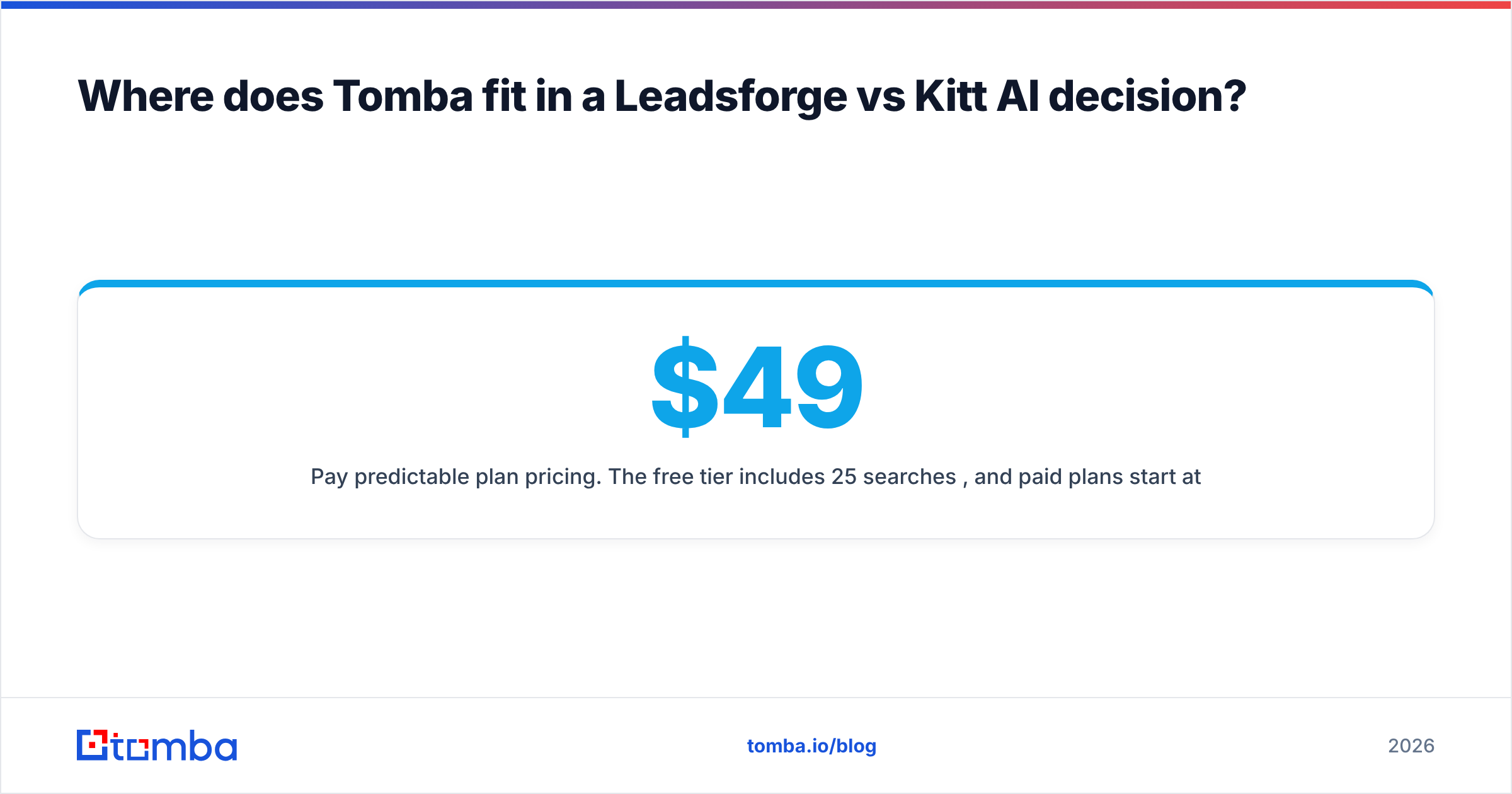
- Pay predictable plan pricing. The free tier includes 25 searches/mo, and paid plans start at $49/mo (Starter), then $99/mo (Growth) and $249/mo (Pro). See Tomba pricing for credit breakdowns.
Tomba is a good fit for teams that already know their target accounts and want finding plus verification in a single step. It fits less well if you want an AI to invent your target list from a paragraph of ICP text. In that case, Leadsforge, or a similar lead search engine, is still the right tool for the discovery stage.
So which should you choose?#
- Choose Leadsforge if list building is your bottleneck, you like prompt-driven search, and you value credits that roll over with no seat fees.
- Choose Kitt AI if bounce rate is your bottleneck, you sell into catch-all-heavy markets, or you run a Clay-based stack and want very cheap verification.
- Choose both if you have the ops capacity to manage the handoff and want the best discovery plus the strictest verification.
- Choose a consolidated finder + verifier if you'd rather have one tool, one bill, and no CSV shuffling between discovery and send.
Whatever you pick, test it on 200 contacts from your real ICP before committing. Measure hard bounces, catch-all resolution rate, and how many contacts were still at the company. Those three numbers will tell you more than any comparison post, this one included.
If your team already knows which accounts it wants and just needs accurate, verified work emails without juggling vendors, try the Tomba Email Finder. Enter a name and a domain, get a verified address back, run catch-all checks in the same workspace, and start on the free tier before moving to the $49/mo Starter plan.
Related guides#
// get started
Find, verify and enrich your first contacts today
Start on the free plan with 25 searches a month, then scale when your team is ready.
Free plan · No credit card required · GDPR & CCPA
// about the author