Leadsforge vs LetsExtract: Which Lead Tool Fits Your Team in 2026?
One builds B2B lead lists from an AI prompt. The other scrapes emails from websites on your desktop. Here's how Leadsforge and LetsExtract compare on data, pricing, accuracy and compliance, and which one fits your outbound motion.
TL;DR
- Leadsforge is a cloud B2B lead database. You describe your ideal customer in plain language and it returns a filtered contact list. It runs on subscription credits (third-party pricing reviews list an Essential plan at $49/mo for about 2,000 credits).
- LetsExtract is Windows desktop software that scrapes email addresses from websites, search results and files. You pay once for a perpetual or 1-year license, with listings putting it at roughly $39–$79.
- Pick Leadsforge for ICP-targeted outbound to named decision-makers. Pick LetsExtract for high-volume harvesting of public addresses from sites you already know about.
- Neither one removes the need for a separate verification step before you send. Scraped lists especially carry generic inboxes, stale addresses and catch-all domains.
- If what you really need is "the right person's work email at a specific company," a dedicated email finder with built-in verification usually beats both.
What is the real difference between Leadsforge and LetsExtract?#
These two tools come up in the same searches, but they solve different problems. Comparing them feature by feature can mislead you if you skip that point.
Leadsforge belongs to the Forge ecosystem (Salesforge, Warmforge, Agent Frank). It works as a prospect database with a conversational search layer. You type something like "Heads of RevOps at US SaaS companies with 50–200 employees that raised a Series A in the last 12 months." Leadsforge turns that prompt into filters, returns matching people, and lets you enrich and export them, often straight into a Salesforge sequence.
LetsExtract is extraction software. You give it seed URLs, search-engine queries, keyword lists or local files, and it crawls them to pull out every email address it finds (plus phone numbers and social links in some modes). The desktop "Email Studio" bundle adds a basic verifier and a bulk sender. It runs on your own machine, and your IP makes the requests.
In short, Leadsforge answers "who should I contact?" LetsExtract answers "what email addresses are published on these pages?" Those questions overlap far less than the marketing pages suggest.
How do Leadsforge and LetsExtract actually work?#
The mechanics decide most of what you'll experience, from data quality to legal risk. Here's how each one works in practice.
- Input model. Leadsforge takes a natural-language ICP prompt, or lookalike input from an existing customer. LetsExtract takes URLs, keywords, search-engine queries or files to crawl.
- Data source. Leadsforge queries a pre-built, aggregated B2B contact database. LetsExtract collects whatever is publicly visible on the pages it crawls at the moment you run it.
- Output type. Leadsforge returns named people with title, company, seniority and (when found) a work email or phone. LetsExtract returns a raw list of addresses, heavy on
info@,sales@,support@and whatever personal addresses happen to be published. - Where it runs. Leadsforge is a browser-based SaaS. LetsExtract is a Windows desktop app (it can also run on Windows Server), and there's a separate Chrome extension for page-level extraction.
- What happens next. Leadsforge exports to CSV or pushes into Salesforge for sequencing. LetsExtract exports to CSV/Excel or hands off to its built-in sender.

How do Leadsforge and LetsExtract compare feature by feature?#
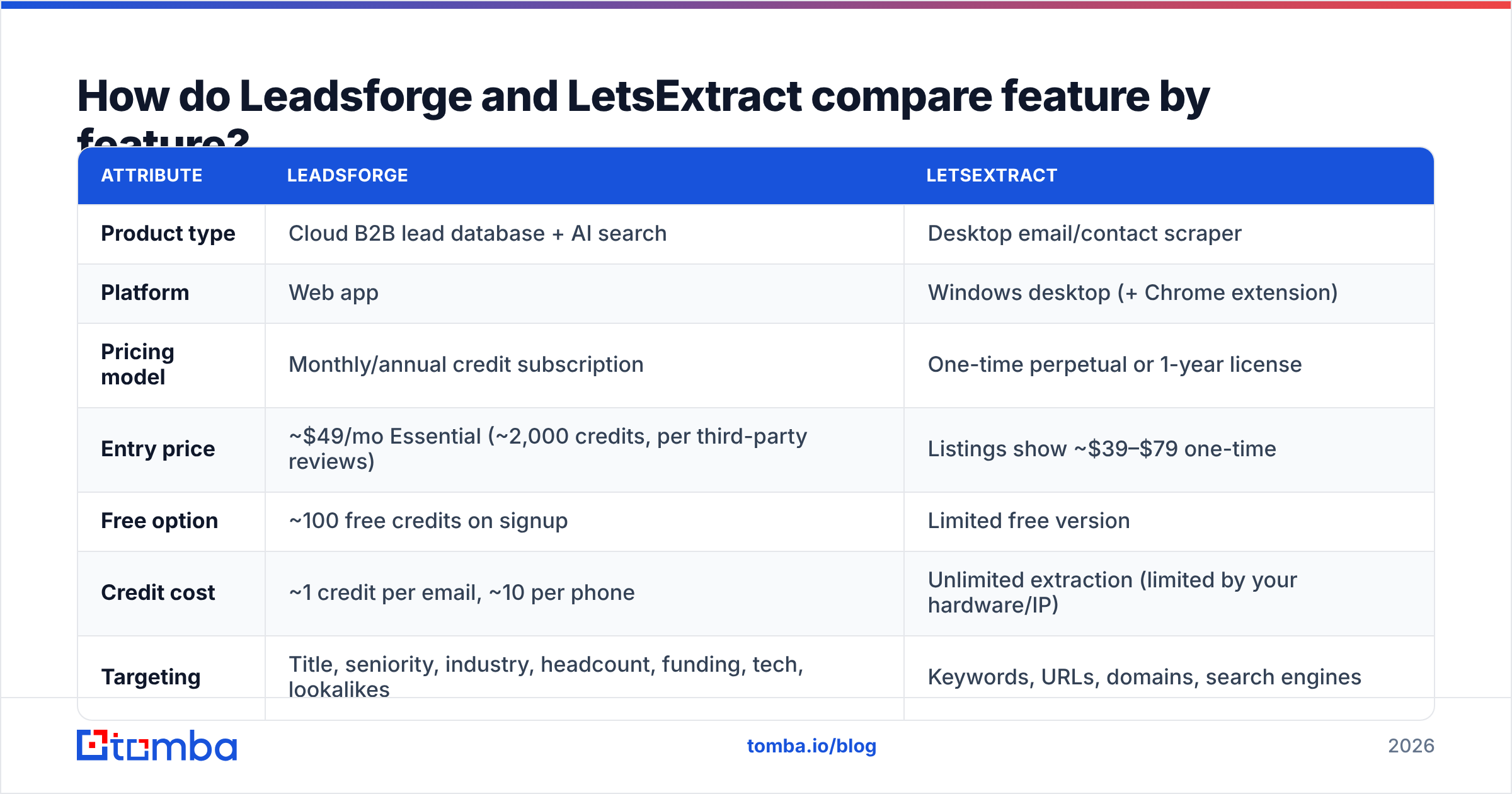
The table below reflects publicly listed information as of 2026. Pricing on both sides changes often, so treat the numbers as a starting point and confirm on each vendor's pricing page before you buy.
| Attribute | Leadsforge | LetsExtract |
|---|---|---|
| Product type | Cloud B2B lead database + AI search | Desktop email/contact scraper |
| Platform | Web app | Windows desktop (+ Chrome extension) |
| Pricing model | Monthly/annual credit subscription | One-time perpetual or 1-year license |
| Entry price | ~$49/mo Essential (~2,000 credits, per third-party reviews) | Listings show ~$39–$79 one-time |
| Free option | ~100 free credits on signup | Limited free version |
| Credit cost | ~1 credit per email, ~10 per phone | Unlimited extraction (limited by your hardware/IP) |
| Targeting | Title, seniority, industry, headcount, funding, tech, lookalikes | Keywords, URLs, domains, search engines |
| Contact type | Named decision-makers | Whatever addresses are published (mostly generic) |
| Verification | Extra credits for validation | Built-in basic verifier in Email Studio bundle |
| Sequencing | Native push to Salesforge | Built-in bulk sender (Email Studio) |
| Best for | ICP-driven outbound, SDR teams | Local-business, directory, and niche-site list building |
| Main risk | Database coverage gaps in niche regions/verticals | Low-relevance lists, deliverability and compliance risk |

Which one gives you more accurate emails?#
Accuracy means different things for each tool, and that's why head-to-head "accuracy %" claims for these two are mostly meaningless.
Leadsforge accuracy depends on how fresh and complete the underlying database is for your segment. Like every aggregated B2B database, it's strongest on well-documented segments (US/UK tech, SaaS, agencies) and thinner on SMBs, non-English markets and deep verticals. People change jobs constantly, so some share of any exported list will be stale. Reviews also point out that validation costs extra credits, which pushes your real cost per usable contact above the headline rate.
LetsExtract accuracy is technically very high in one narrow sense: if an address is published on a page, the scraper will find it. The problem is relevance, not syntax. A crawl of 500 agency websites might return 2,000 addresses, but most will be role inboxes, old addresses left in footers, or addresses that belong to someone who isn't your buyer. The built-in verifier catches hard bounces, but it can't tell you whether hello@ reaches a decision-maker.

Whichever tool you use, run the list through a dedicated email verifier before it touches your sending domain. Pay particular attention to catch-all domains. Both tools will hand you addresses on servers that accept everything at the SMTP level and then silently drop or bounce later.
How does pricing compare over a year?#
The two pricing models reward very different usage patterns.
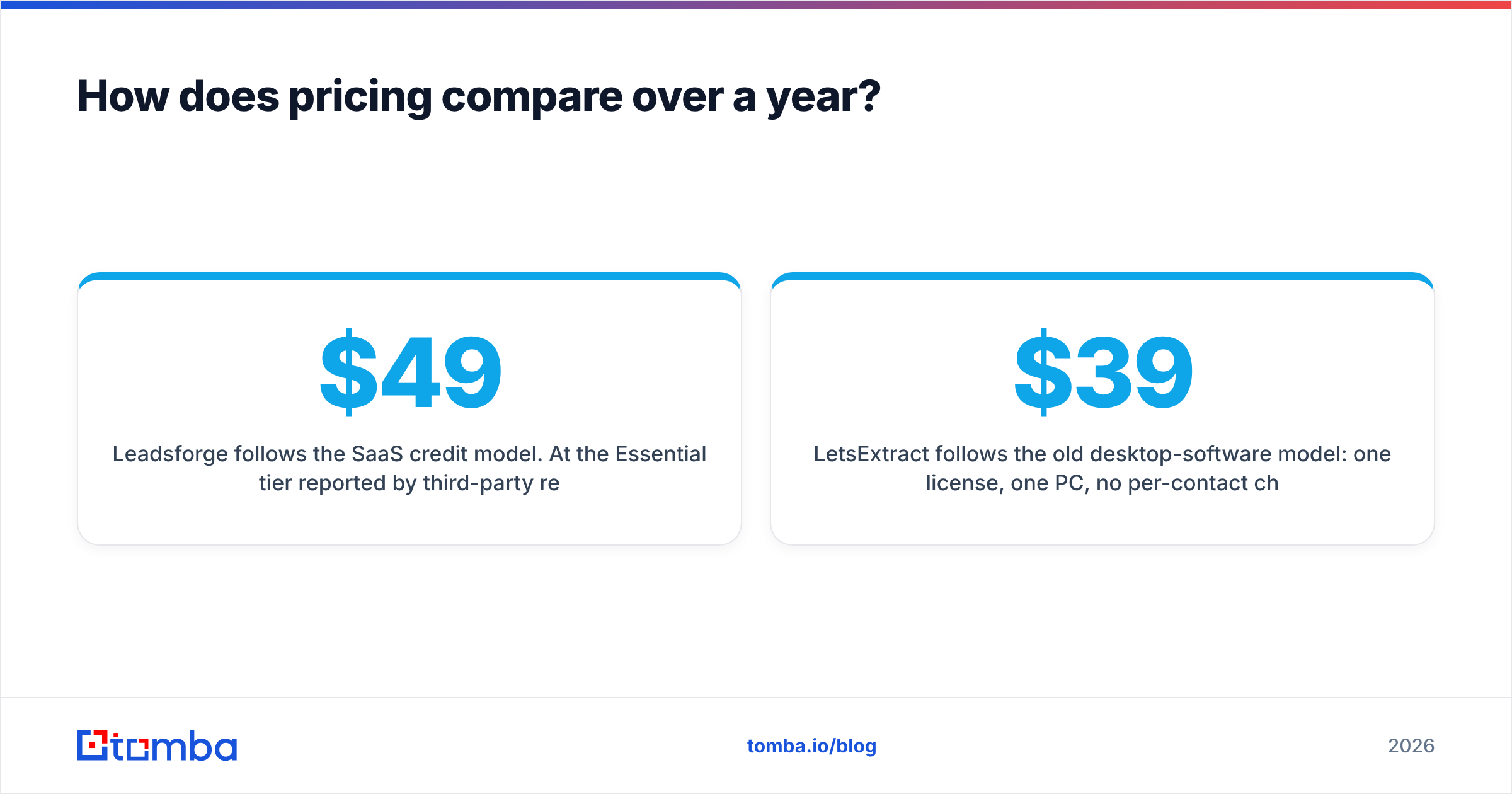
Leadsforge follows the SaaS credit model. At the Essential tier reported by third-party reviewers ($49/mo, ~2,000 credits), you're paying roughly $0.02–$0.025 per credit. Emails at 1 credit each look cheap. Phones at 10 credits each, plus validation charges, add up quickly. Reviews note that credits roll over rather than expiring, which helps if your outbound comes in bursts. Over 12 months, the entry plan runs roughly $590 before any upgrades.
LetsExtract follows the old desktop-software model: one license, one PC, no per-contact charge. Third-party listings put licenses in the ~$39–$79 range, with a 1-year or lifetime option and volume discounts for multiple seats. On paper it wins on cost by a wide margin.
The catch is that LetsExtract's hidden costs aren't on the invoice:
- Your time building seed lists, tuning crawls and cleaning junk results.
- Proxies or IP rotation if you crawl at scale and start hitting rate limits or blocks.
- Verification credits from a third-party verifier, since the bundled one is basic.
- Deliverability damage if unfiltered scraped lists go straight into a sequence. A burned domain costs more than any license.
So compare cost per qualified, deliverable contact, not cost per address. On that measure the gap narrows a lot, and for classic B2B outbound to specific roles it often reverses.
Is Leadsforge better than LetsExtract for cold outreach?#
For cold outreach to specific buyer personas, yes, in most cases. Cold email works when you reach the person who owns the problem with a message written for their role. Leadsforge is built around that: filter by title and company attributes, export named contacts, sequence them. LetsExtract gives you addresses without knowing who's behind them, and that works against personalization and hurts your email response rate.
There are real exceptions where LetsExtract is the better tool:
- Local and SMB markets (restaurants, clinics, trades, small agencies), where the owner often is the
info@inbox and databases have poor coverage. - Niche directories and associations whose member sites publish contact emails but never make it into commercial databases.
- Non-English or emerging markets where aggregated B2B databases are thin.
- Research and link-building, where you want every published contact on a set of sites rather than a specific persona.
If your ICP is "VP of Sales at 200-person SaaS companies," Leadsforge (or a similar database) fits. If your ICP is "every independent dental practice in Ohio," a scraper may genuinely do better.
What about compliance and deliverability risk?#
This section often gets skipped, and it shouldn't.
Scraping publicly posted emails is not automatically legal to use for marketing. Under the EU's General Data Protection Regulation, a business email tied to an identifiable person is personal data. You need a lawful basis (usually legitimate interest), a clear opt-out and a way to tell people where you got their data. Scraped lists make that last part awkward. Some sites' terms of service also forbid automated harvesting. LetsExtract gives you the capability. How you use it, and the responsibility for that, is yours.
Leadsforge moves some of that burden onto the vendor, which sources and maintains its data. You still need your own lawful-basis assessment and opt-out handling for outreach, and the vendor doesn't insure your sending domain.
On deliverability, the pattern is predictable. Scraped lists carry more spam traps, role accounts and dead addresses. Mailbox providers count all of those against your sender reputation. Database exports are cleaner on average but not clean enough to skip verification. The rule is the same for both:

Verify every list, suppress catch-alls you can't confirm, warm up new domains, and keep daily volumes per inbox low.
Which tool fits which team?#
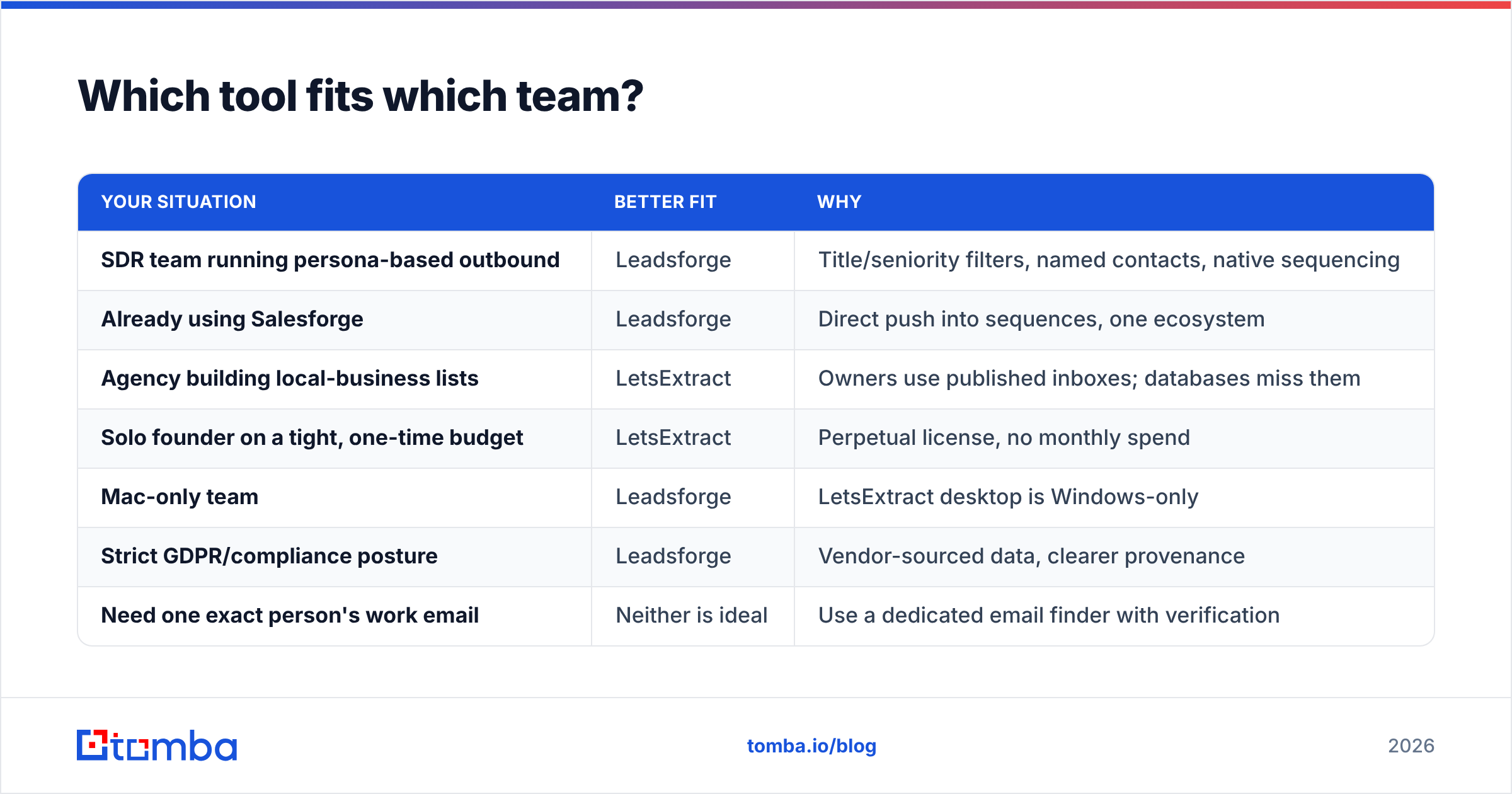
Here's a quick way to decide without overthinking it.
| Your situation | Better fit | Why |
|---|---|---|
| SDR team running persona-based outbound | Leadsforge | Title/seniority filters, named contacts, native sequencing |
| Already using Salesforge | Leadsforge | Direct push into sequences, one ecosystem |
| Agency building local-business lists | LetsExtract | Owners use published inboxes; databases miss them |
| Solo founder on a tight, one-time budget | LetsExtract | Perpetual license, no monthly spend |
| Mac-only team | Leadsforge | LetsExtract desktop is Windows-only |
| Strict GDPR/compliance posture | Leadsforge | Vendor-sourced data, clearer provenance |
| Need one exact person's work email | Neither is ideal | Use a dedicated email finder with verification |
Are there better alternatives to both?#
It depends on the job. If your workflow is "I know the company, I know the person (or the role), I need their verified work email," then a prospect database and a scraper are both the wrong shape. You'd be paying for a full list when you need a precise lookup.
That's the gap a dedicated email finder fills. Tomba, for example, lets you:
- Find a specific person's address from name + company domain, with a confidence score and the public sources behind it.
- Run a domain search to see every known address and the company's email pattern at once. This is closer to what people want from a scraper, minus the crawling and the junk.
- Verify addresses in the same flow, including catch-all detection, so there's no second tool to wire in.
- Work in bulk, from the Chrome extension, Google Sheets or via API when you need to plug it into existing tooling.
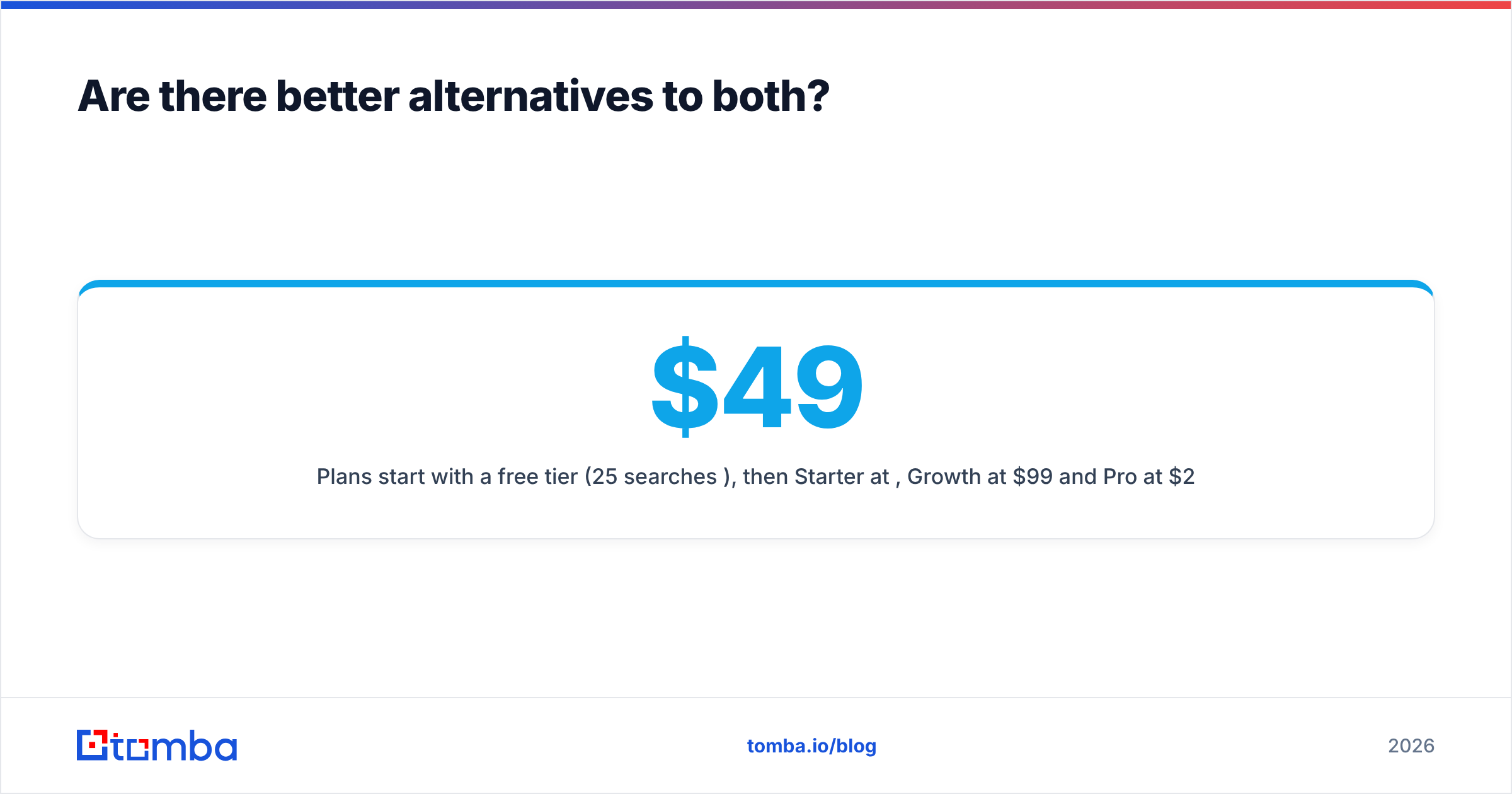
Plans start with a free tier (25 searches/mo), then Starter at $49/mo, Growth at $99/mo and Pro at $249/mo. See Tomba pricing for current limits. Many teams run Tomba alongside a database like Leadsforge: the database builds the account and persona list, and the finder fills and verifies the emails the database missed.
Independent review sites such as G2 are worth a look before you commit to any of these. Filter reviews by company size and region, because coverage varies a lot by segment.
So, Leadsforge vs LetsExtract: which should you choose?#
- Choose Leadsforge if you run structured B2B outbound to defined personas, want AI-assisted list building, and are fine with a monthly credit subscription. It's the stronger choice for SDR teams, especially inside the Salesforge ecosystem.
- Choose LetsExtract if your targets publish their own inboxes (local businesses, niche directories, member sites), you're on Windows, and you'd rather pay once than pay every month, as long as you commit to verifying and filtering every list yourself.
- Choose neither when your real task is finding and verifying specific people's work emails. A purpose-built finder does that faster and with less risk.
If that last case sounds like your pipeline, try the Tomba Email Finder. Enter a name and a company domain, get a verified work email with its sources, and move on to writing the message. The free plan gives you 25 searches a month to test it against your own ICP before you spend anything on Leadsforge, LetsExtract or anything else.
Related guides#
// get started
Find, verify and enrich your first contacts today
Start on the free plan with 25 searches a month, then scale when your team is ready.
Free plan · No credit card required · GDPR & CCPA
// about the author