Leadsforge vs Lusha: Honest 2026 Comparison for B2B Sales Teams
Leadsforge builds lead lists from a chat prompt. Lusha reveals contact details on profiles you already found. Here is which one fits your outbound motion in 2026, and where each one falls short.

TL;DR
- Leadsforge is an AI list builder. You describe your ideal customer in plain English and get back a list of companies and contacts with emails. It works best for founders and small outbound teams who want volume quickly, especially if they already use Salesforge.
- Lusha is a contact data platform with a strong Chrome extension, good phone coverage, and native CRM integrations. It works best for SDRs and AEs who prospect one account at a time and need direct dials.
- Leadsforge charges per account, not per seat. Lusha charges per seat, and a phone reveal costs far more credits than an email reveal, so the two get expensive in different ways.
- Neither tool removes the need to verify emails before you send. Run every exported list through a verifier, whichever tool you pick.
- Quick pick: choose Leadsforge for fast list building by ICP, Lusha for calling and account-based prospecting, and a dedicated email finder if you mostly need work emails at a low cost per contact.
What is the real difference between Leadsforge and Lusha?#
These tools solve different parts of prospecting, and that matters more than any line-by-line feature comparison.
Leadsforge belongs to the Forge product family, alongside Salesforge, Warmforge, and Infraforge. Its main feature is a chat-style search box. You type something like "Heads of RevOps at US B2B SaaS companies with 50 to 200 employees that raised a Series B" and it returns a list of matching companies and people with contact data attached. Instead of setting twenty filters, you write a prompt and then refine the results.
Lusha has been around much longer and started as a contact-reveal tool. You open a LinkedIn profile, a company website, or a record in Salesforce or HubSpot, click the extension, and Lusha shows the person's email and phone number. It has since added a prospecting database with filters, intent signals, and job-change alerts. Its core strength is still accurate contact details on people you have already found.
A simple way to picture it: Leadsforge is a research assistant you hand a brief to. Lusha is a lookup tool you use while you browse.
How do Leadsforge and Lusha compare feature by feature?#
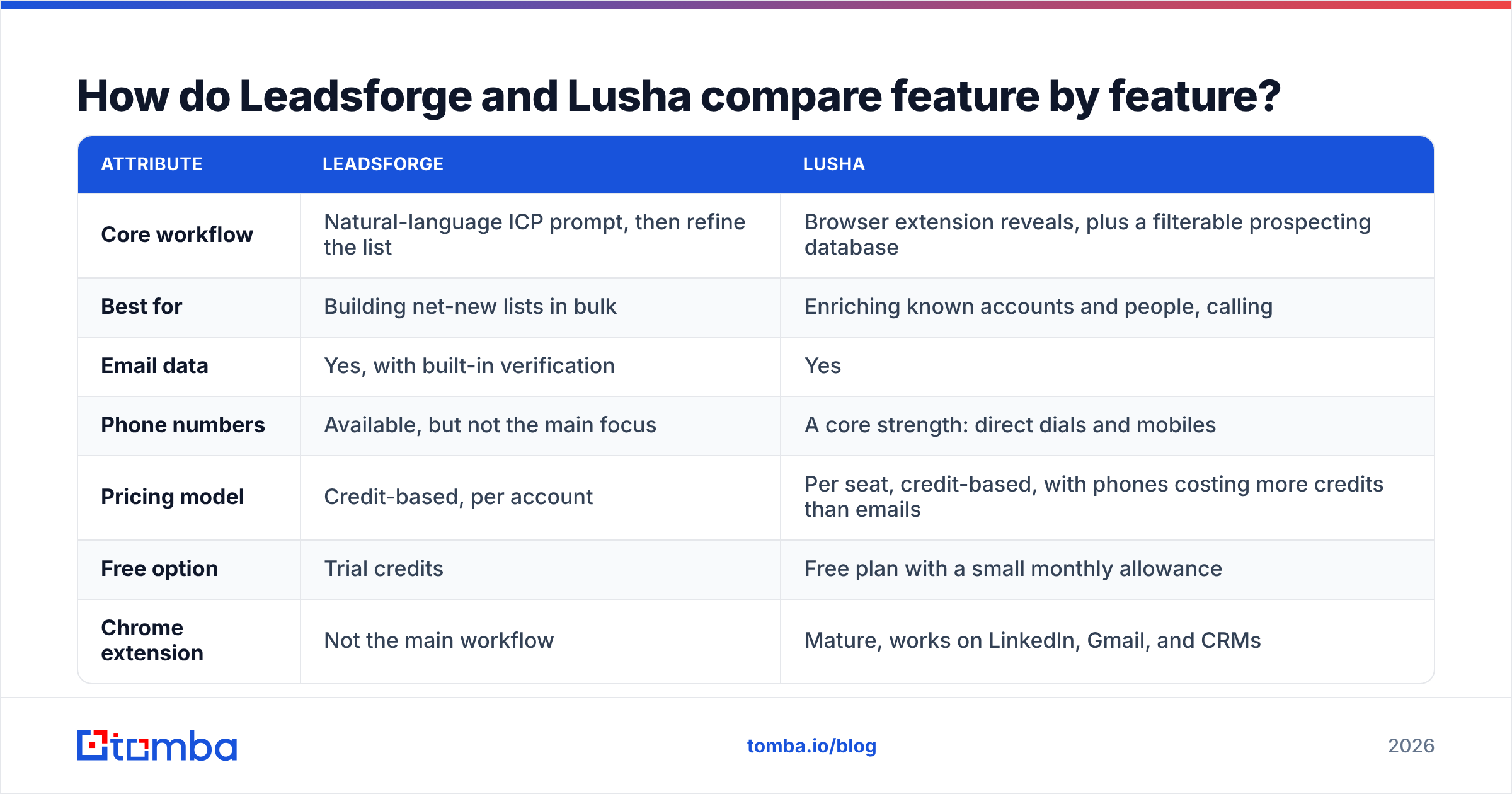
The table below summarizes the attributes buyers ask about most. Pricing changes often in this category, so treat the numbers as directional and check each vendor's pricing page before you buy.
| Attribute | Leadsforge | Lusha |
|---|---|---|
| Core workflow | Natural-language ICP prompt, then refine the list | Browser extension reveals, plus a filterable prospecting database |
| Best for | Building net-new lists in bulk | Enriching known accounts and people, calling |
| Email data | Yes, with built-in verification | Yes |
| Phone numbers | Available, but not the main focus | A core strength: direct dials and mobiles |
| Pricing model | Credit-based, per account | Per seat, credit-based, with phones costing more credits than emails |
| Free option | Trial credits | Free plan with a small monthly allowance |
| Chrome extension | Not the main workflow | Mature, works on LinkedIn, Gmail, and CRMs |
| CRM integrations | Export plus the Salesforge ecosystem; CSV into your CRM | Native Salesforce, HubSpot, Pipedrive, and more |
| Lookalike search | Yes, from a seed company | Available through prospecting filters and signals |
| Compliance posture | GDPR-aware, EU-friendly vendor | Publicly documents GDPR, CCPA, ISO 27001, SOC 2 |
| Learning curve | Very low: type a sentence | Low for the extension, moderate for the full platform |
In practice, the right choice depends on whether you start with a list you need to fill or with a person you need to reach.
How does each tool actually find contacts?#
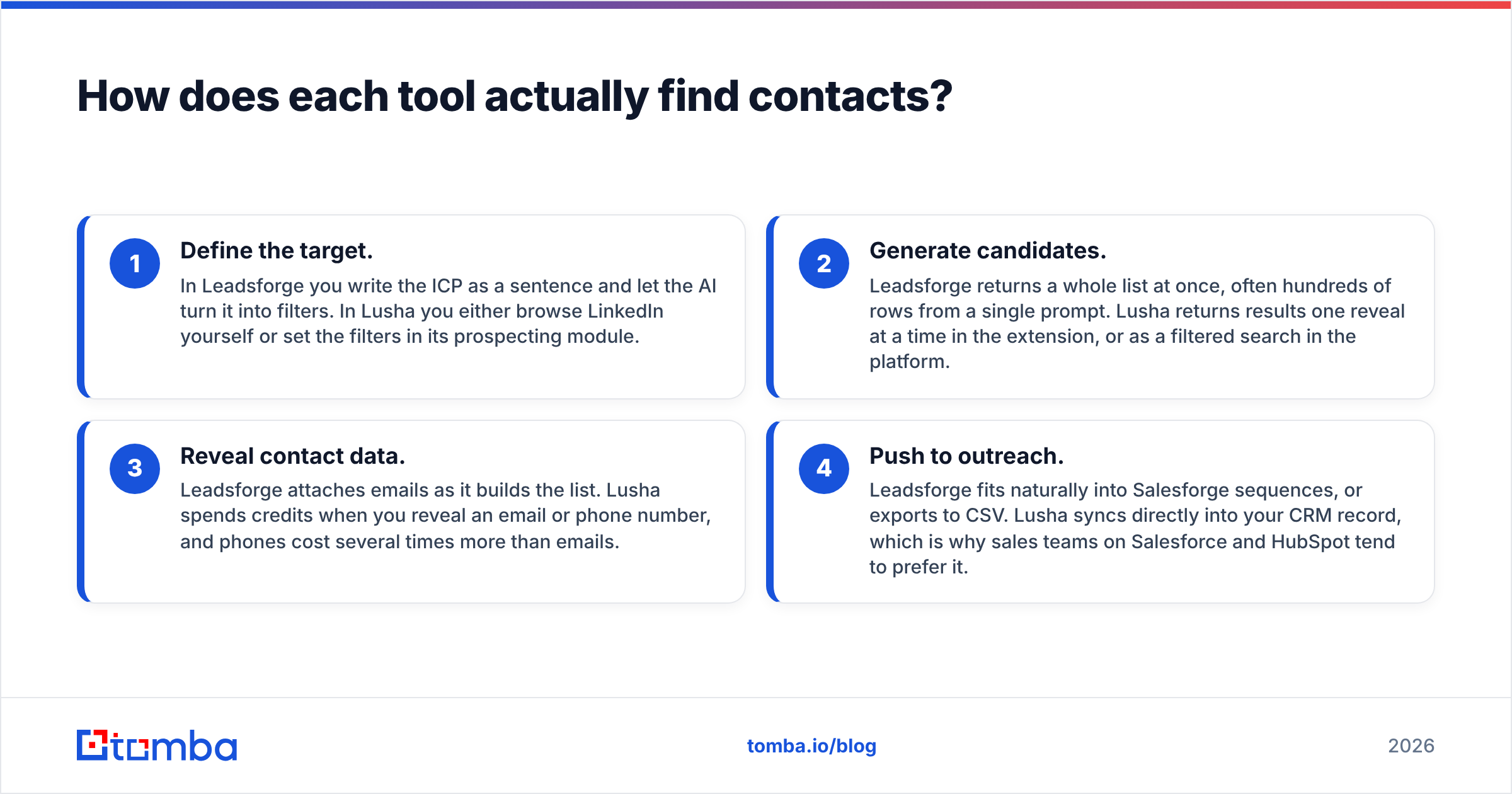
These four steps describe how most teams end up using each tool, and they show where each one saves you time:
- Define the target. In Leadsforge you write the ICP as a sentence and let the AI turn it into filters. In Lusha you either browse LinkedIn yourself or set the filters in its prospecting module.
- Generate candidates. Leadsforge returns a whole list at once, often hundreds of rows from a single prompt. Lusha returns results one reveal at a time in the extension, or as a filtered search in the platform.
- Reveal contact data. Leadsforge attaches emails as it builds the list. Lusha spends credits when you reveal an email or phone number, and phones cost several times more than emails.
- Push to outreach. Leadsforge fits naturally into Salesforge sequences, or exports to CSV. Lusha syncs directly into your CRM record, which is why sales teams on Salesforce and HubSpot tend to prefer it.

The practical difference shows up in step 1. If you have ever spent 40 minutes setting industry, headcount, geography, tech-stack, and seniority filters, only for a typo in one field to return nothing, Leadsforge's prompt approach will feel like a real improvement. If your reps already know exactly which 30 accounts they are working this quarter, a list builder adds little, and Lusha's one-click reveal inside Salesforce is the faster path.
Is Leadsforge better than Lusha for building lists?#
For net-new list building, yes, in most cases.
Leadsforge is designed for the question "who should I be emailing?" Its strengths:
- Fast from idea to list. One prompt replaces a stack of filters, and you can refine in follow-ups ("remove agencies", "only companies hiring SDRs").
- Lookalike search. Give it a best customer and it finds similar companies. This is one of the most useful features for early-stage outbound.
- Account-level credits. A three-person founding team does not pay three seat licenses to share one list.
- Built for cold email. It is part of a product family built around sending, warmup, and inbox infrastructure, so the handoff to outreach is short.
Its weaknesses are the usual ones for AI-first list builders:
- Prompt interpretation varies. "Mid-market" or "fast-growing" can mean something different to the model than to you. Check the first 20 rows before you export 2,000.
- Phone data is secondary. If calling is a big part of your motion, you will probably add another source.
- The ecosystem pulls toward Salesforge. That is fine if you use it. It adds friction if your sequencer is Outreach, Apollo, or Instantly.
Lusha can build lists too. Its prospecting database has solid filters and intent data. But it is priced and designed around the person using it, not the list, so large list pulls get expensive quickly on per-seat plans.
Is Lusha better than Leadsforge for phone numbers and CRM work?#
Yes, and by a clear margin.
Phone data is what Lusha is best known for. Direct dials and mobile numbers are its main selling point, and reviewers on G2 often point to phone accuracy as the reason they stay. If your SDRs make 60 calls a day, Lusha is built for that.
Lusha's other advantages:
- The extension goes where you work. LinkedIn, Sales Navigator, Gmail, Salesforce, HubSpot. You reveal the contact without switching tabs.
- Native CRM sync. Revealed contacts land on the right record with the right fields, without CSV cleanup.
- Signals. Job-change and intent alerts help account-based sellers time their outreach.
- Compliance documentation. Enterprise procurement teams ask for GDPR, CCPA, and security certifications, and Lusha publishes them.
The weaknesses:
- Credit cost for phones. On current plans, a phone reveal costs many more credits than an email reveal. Teams that call heavily burn through allowances faster than expected.
- Per-seat pricing grows with headcount. Adding five SDRs means five more licenses.
- Coverage outside North America is weaker. Many users report stronger US data than data for smaller EMEA or APAC markets, so test your own geographies.
How much do Leadsforge and Lusha cost in 2026?#
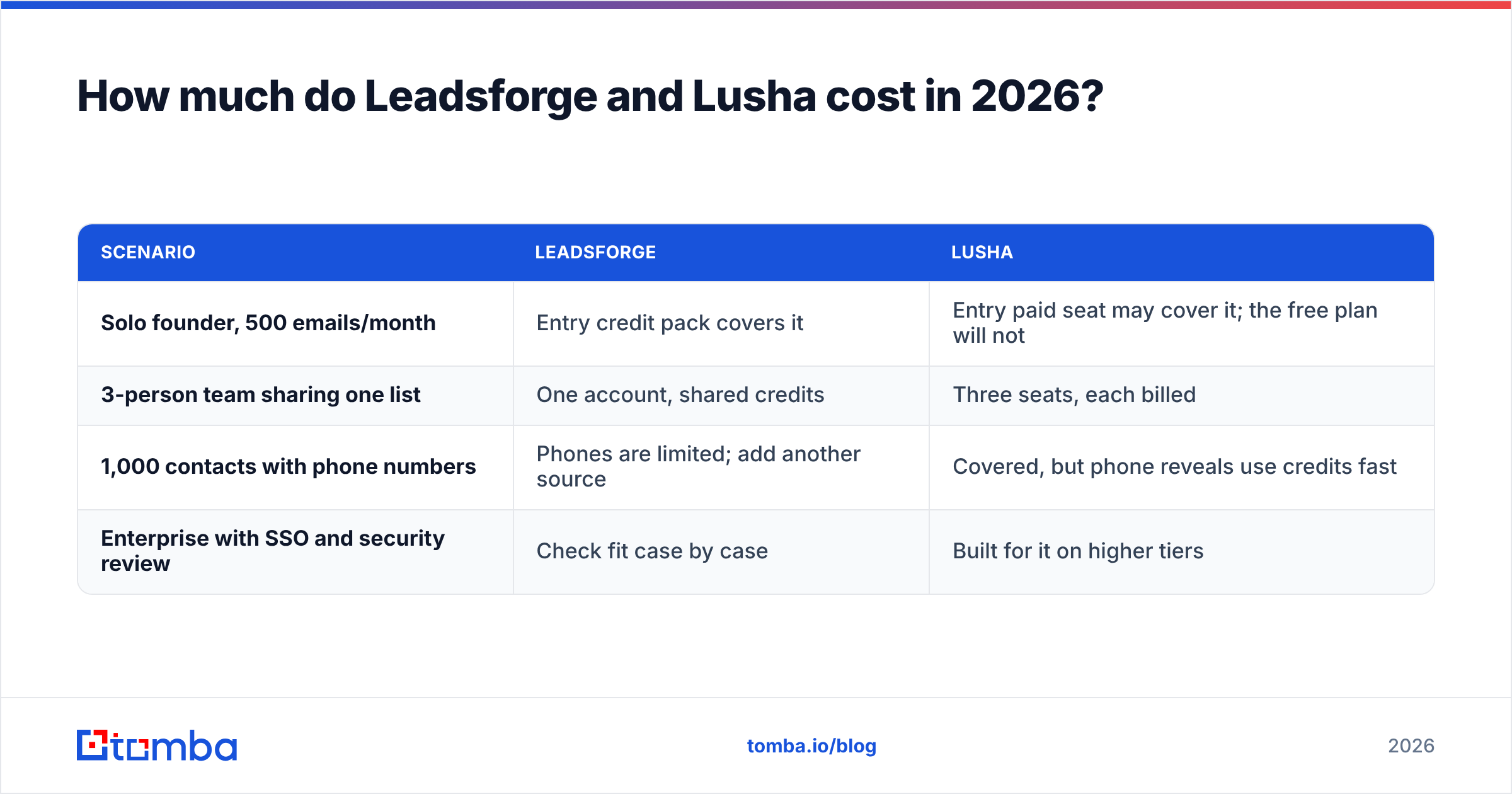
Both use credits, but they count them differently, so compare real scenarios rather than sticker prices.
| Scenario | Leadsforge | Lusha |
|---|---|---|
| Solo founder, 500 emails/month | Entry credit pack covers it | Entry paid seat may cover it; the free plan will not |
| 3-person team sharing one list | One account, shared credits | Three seats, each billed |
| 1,000 contacts with phone numbers | Phones are limited; add another source | Covered, but phone reveals use credits fast |
| Enterprise with SSO and security review | Check fit case by case | Built for it on higher tiers |
Rules of thumb:
- If your cost driver is number of contacts, Leadsforge's account-level credits usually cost less per row.
- If your cost driver is phone reveals, Lusha is the stronger product, but budget for the credit multiplier on phones.
- If your cost driver is number of reps, per-seat pricing (Lusha) grows faster than account pricing (Leadsforge).
Before you commit to either, run the same 100-person test list through both free or trial allowances and compare how many results come back and how many emails actually verify.
Which data is more accurate, Leadsforge or Lusha?#
No vendor's accuracy claims hold up across every segment, so you need to test them yourself.
Accuracy depends on three things neither vendor controls completely:
- Your segment. US tech companies are well covered by almost everyone. German manufacturing or Brazilian logistics is not.
- Data freshness. People change jobs constantly, and any database starts going stale the day it is refreshed.
- Catch-all domains. Many companies accept mail for any address, so a "valid" result can still bounce later or go unread.
That is why the most important step in either workflow is the one after export. Run every list through an email verifier before it goes into a sequence. Pay particular attention to catch-all results, which need a separate check rather than a simple pass/fail. Bounces hurt your sender reputation regardless of which tool supplied the address, and Gmail's and Microsoft's bulk-sender rules have made that penalty harder to recover from.

Who should choose Leadsforge, and who should choose Lusha?#
Match the tool to how your team actually works.
Choose Leadsforge if:
- You are a founder, agency, or small SDR team running cold email at volume.
- You start from an ICP, not from a list of named accounts.
- You already use, or plan to use, Salesforge for sending.
- You want to pay per account, not per rep.
Choose Lusha if:
- Your reps call as much as they email.
- You sell into named accounts and prospect one person at a time.
- Your team lives in Salesforce or HubSpot and needs clean, direct sync.
- Procurement needs security and compliance documentation.
Consider neither (or add a third tool) if:
- You mostly need verified work emails at the lowest cost per contact.
- You want to find everyone at a given company domain, not an AI-picked subset.
- You need API or spreadsheet access for enrichment inside your own workflows.
For that last group, a focused email finder with domain search, bulk lookups, and built-in verification often covers the job at a lower cost per contact than either platform. Many teams run a hybrid setup: Leadsforge or Lusha for discovery, and a dedicated finder and verifier for filling in gaps and cleaning lists.
What are the biggest pros and cons of each tool?#
| Leadsforge | Lusha | |
|---|---|---|
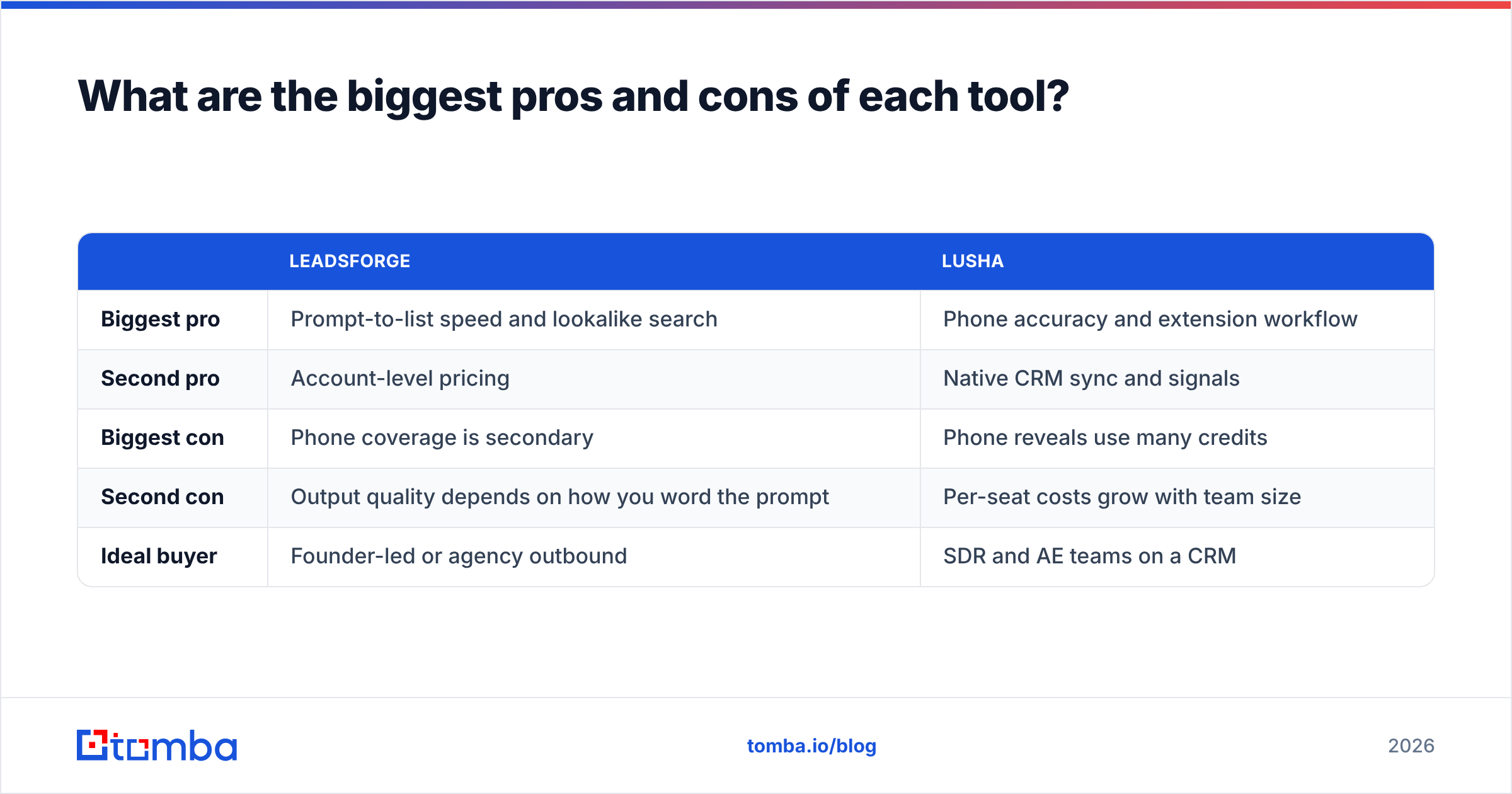
| Biggest pro | Prompt-to-list speed and lookalike search | Phone accuracy and extension workflow |
| Second pro | Account-level pricing | Native CRM sync and signals |
| Biggest con | Phone coverage is secondary | Phone reveals use many credits |
| Second con | Output quality depends on how you word the prompt | Per-seat costs grow with team size |
| Ideal buyer | Founder-led or agency outbound | SDR and AE teams on a CRM |
Frequently asked questions#
Is Leadsforge a Lusha alternative?#
In part. Leadsforge can replace Lusha's list-building role for email-first outbound. It does not replace Lusha's extension-based lookups or its phone data, so teams that call a lot usually keep a phone source.
Does Lusha have an AI prospecting feature like Leadsforge?#
Lusha has added AI-assisted recommendations and signals to its prospecting platform, but its main workflow is still filters and reveals rather than a conversational ICP prompt.
Can I use Leadsforge and Lusha together?#
Yes. A common setup is to build the list in Leadsforge, then use Lusha only on the highest-priority accounts where a direct dial is worth the extra credits. Deduplicate before you sync to your CRM.
Do I still need an email verifier with these tools?#
Yes. Both tools verify to some degree, but lists go stale between export and send. A final verification pass, including catch-all handling, protects your domain.
Which is cheaper for a small team?#
Usually Leadsforge, because credits are shared across the account rather than billed per seat. Lusha's costs rise faster as you add reps and phone reveals.
What is the final verdict on Leadsforge vs Lusha?#
In the Leadsforge vs Lusha matchup, the answer depends on your workflow. Leadsforge wins for list building: it is faster from ICP to list, cheaper per row at volume, and fits email-first outbound well. Lusha wins for reaching specific people: better phone data, a stronger extension, and cleaner CRM sync for account-based teams. If you pick one without matching it to how your reps work, you will end up paying for features they rarely use.
If your outbound runs mainly on email and you want accurate work addresses without paying for AI list generation or per-seat phone credits, take a look at the Tomba Email Finder. You can find professional emails by name, domain, or company, verify them in the same step, and scale up with bulk lookups and the API. The free tier includes 25 searches a month, and paid plans start at $49/month. See Tomba pricing for full plan details, and test it against your current list before your next campaign.
Related guides#
// get started
Find, verify and enrich your first contacts today
Start on the free plan with 25 searches a month, then scale when your team is ready.
Free plan · No credit card required · GDPR & CCPA
// about the author