Leadsforge vs Mailcheck: Lead Builder or Email Verifier in 2026?
Leadsforge builds lead lists from a plain-English prompt. Mailcheck cleans the lists you already have. We compare pricing, per-email costs, workflow fit and when you need both, or neither.
TL;DR
- Leadsforge and Mailcheck do different jobs. Leadsforge builds B2B lead lists from a natural-language description of your ICP. Mailcheck verifies email addresses you already have.
- Pricing models differ too. Leadsforge starts at $49/month for 2,000 credits that roll over. Mailcheck starts at $10/month for 1,000 verifications, with overage billed per email.
- Pick Leadsforge if you have no list yet and want to skip manual prospect research. Pick Mailcheck if you already have a CRM export, event list or scraped file and need to cut bounces before sending.
- Many outbound teams end up paying for both, one tool to source and one to clean. That's two subscriptions, two dashboards and two CSV handoffs.
- If you want finding and verifying in one tool, an email finder with built-in verification, like Tomba, removes the handoff.
What is the real difference between Leadsforge and Mailcheck?#
"Leadsforge vs Mailcheck" gets searched as if the two were direct rivals. They aren't. The comparison still matters, because both tools are pitched at the same outbound buyer and both promise the same result: emails that land in real inboxes.
Here's the one-line version:
- Leadsforge answers "Who should I email?"
- Mailcheck answers "Will this email bounce?"
Leadsforge is part of the Forge stack (Salesforge, Warmforge, Mailforge and others). Its main feature is a chat-style search. You describe your ideal customer in plain English ("Series A SaaS companies in Germany with a Head of RevOps") and it returns a list of contacts with emails. You can find details on the official Leadsforge site.
Mailcheck is a dedicated email verification service. You upload a list, it checks each address (syntax, domain, mailbox response, risk signals) and hands back a cleaned file with a status for every row. It doesn't find new people.
So the question you're really answering is: what does your pipeline need more right now, new contacts or clean data?
How do Leadsforge and Mailcheck compare feature by feature?#
The table below compares the two tools on the attributes that affect an outbound team's workflow and budget.
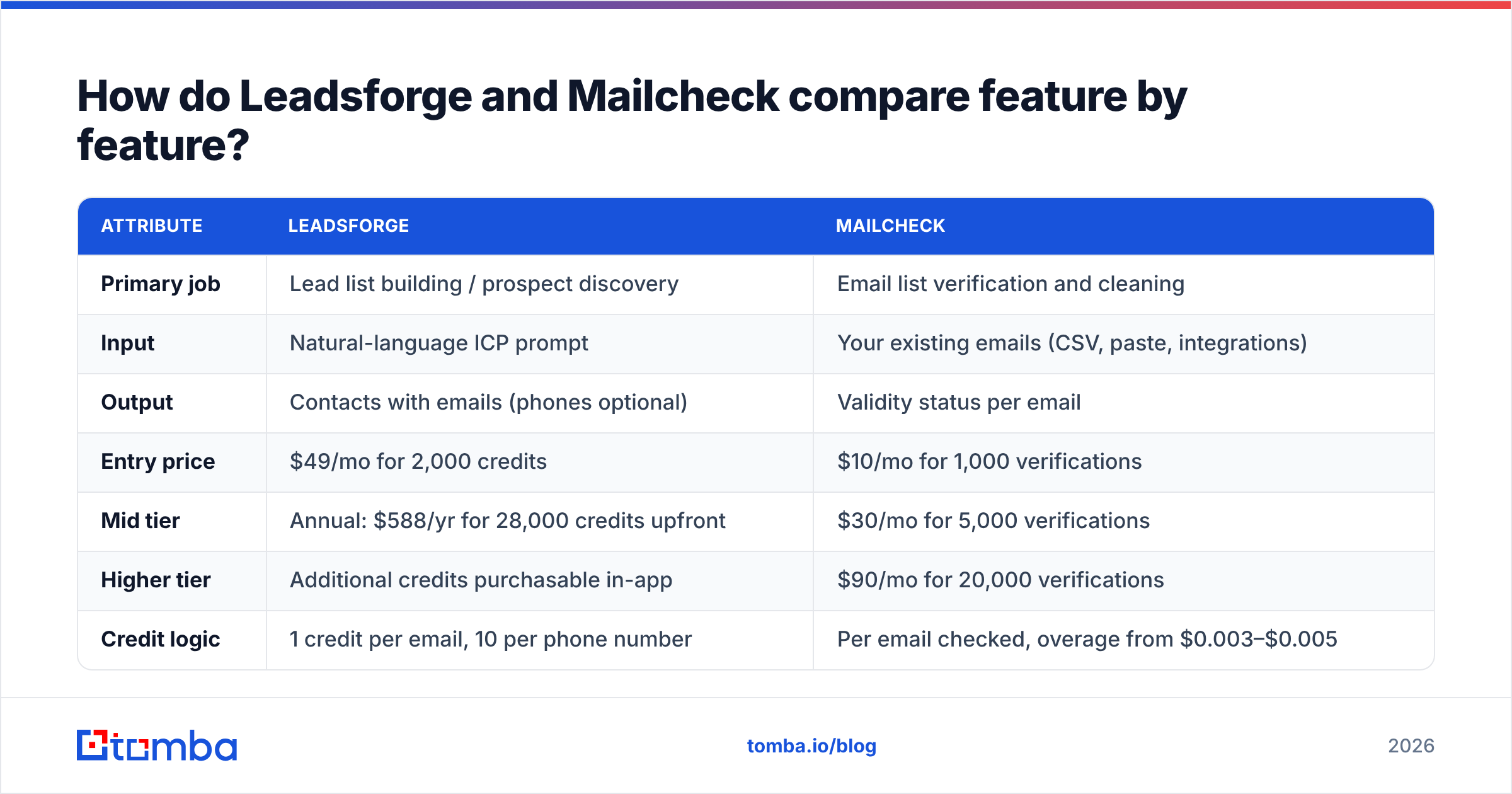
| Attribute | Leadsforge | Mailcheck |
|---|---|---|
| Primary job | Lead list building / prospect discovery | Email list verification and cleaning |
| Input | Natural-language ICP prompt | Your existing emails (CSV, paste, integrations) |
| Output | Contacts with emails (phones optional) | Validity status per email |
| Entry price | $49/mo for 2,000 credits | $10/mo for 1,000 verifications |
| Mid tier | Annual: $588/yr for 28,000 credits upfront | $30/mo for 5,000 verifications |
| Higher tier | Additional credits purchasable in-app | $90/mo for 20,000 verifications |
| Credit logic | 1 credit per email, 10 per phone number | Per email checked, overage from $0.003–$0.005 |
| Credit rollover | Yes, credits don't expire | Monthly allowance plus overage |
| Free trial | 100 free credits | 10 free checks (100 with verified billing) |
| Seat charges | None | None |
| Best for | Teams with no list who need volume fast | Teams with lists who need lower bounce rates |
| Native ecosystem | Salesforge sequencing, Warmforge warmup | Standalone, plus CRM/tool integrations |
Pricing reflects public plan pages at the time of writing. Check both vendors before you buy, because credit bundles change often. Third-party reviews on Capterra are useful for recent user feedback on Mailcheck's accuracy and support.

How does Leadsforge work in practice?#
Leadsforge replaces the filter panel you'd see in Apollo or ZoomInfo with a conversation. You type a description, the tool turns it into a search, and you refine it with follow-up prompts ("only companies with 50–200 employees", "exclude agencies").
The workflow looks like this:
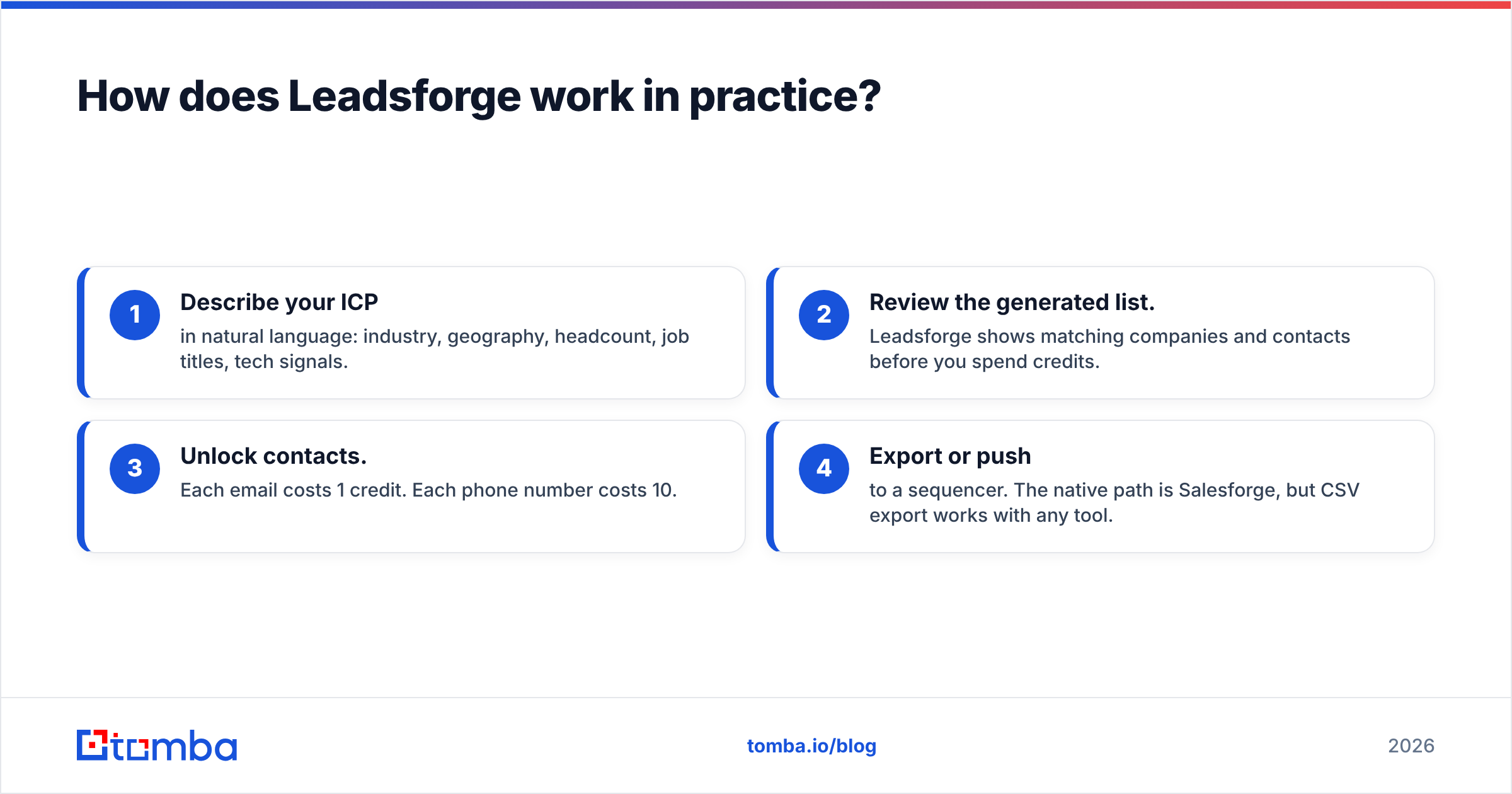
- Describe your ICP in natural language: industry, geography, headcount, job titles, tech signals.
- Review the generated list. Leadsforge shows matching companies and contacts before you spend credits.
- Unlock contacts. Each email costs 1 credit. Each phone number costs 10.
- Export or push to a sequencer. The native path is Salesforge, but CSV export works with any tool.
Where Leadsforge is strong:
- Speed to first list. Going from "we should target X" to 500 contacts takes minutes instead of an afternoon of filter tuning.
- No seat pricing. A five-person SDR team shares one credit pool.
- Rollover credits. Unused credits carry over, which helps if your outbound volume is uneven.
- Tight Forge-stack fit. If you already use Salesforge for sequences and Warmforge for warmup, the handoff is seamless.
Where you should be careful:
- Natural-language search can drift. Vague prompts return vague lists. You still need a sharp ICP definition.
- Phone data is expensive in credits. At 10 credits per number, a phone-heavy workflow burns the 2,000-credit plan in 200 lookups.
- Verification before sending is still your responsibility. Leadsforge returns verified emails, but data ages quickly. B2B contact data decays by an estimated 20–30% a year as people change jobs. If you export a list and send three months later, re-check it.
How does Mailcheck work in practice?#
Mailcheck is the simpler of the two tools, which is a compliment. You bring a list, it tells you which addresses are safe to email.
A typical run:
- Upload a CSV or connect a source.
- Mailcheck runs its checks: syntax, MX records, mailbox existence, disposable and role-based detection, and risk scoring.
- Download results with each email tagged (valid, invalid, risky/unknown).
- Suppress the bad rows before they reach your sending tool.
Where Mailcheck is strong:
- Low entry cost. $10/month is one of the cheapest ways to get consistent, recurring verification.
- Transparent overage. You know what the 1,001st email costs before you upload it.
- Tool-agnostic. Mailcheck doesn't care where your list came from: Leadsforge, Apollo, a trade-show badge scan or a five-year-old CRM.
- Focused product. There's no lead database to upsell you on, so the interface stays simple.
Where you should be careful:
- It can't fill an empty pipeline. If you have no list, Mailcheck has nothing to check.
- Catch-all domains are the hard part for every verifier. Many B2B domains accept all mail at the server level, so "risky/unknown" results are unavoidable. How you handle that bucket decides your real bounce rate. A dedicated catch-all verifier pass helps here.
- Overage adds up at scale. On the $10 plan, a 10,000-email cleanup costs far more than the headline price suggests. Size your plan to your real monthly volume.
Which is cheaper per usable email?#
Headline prices hide the real comparison, because the two tools charge for different things. Here's the rough math.
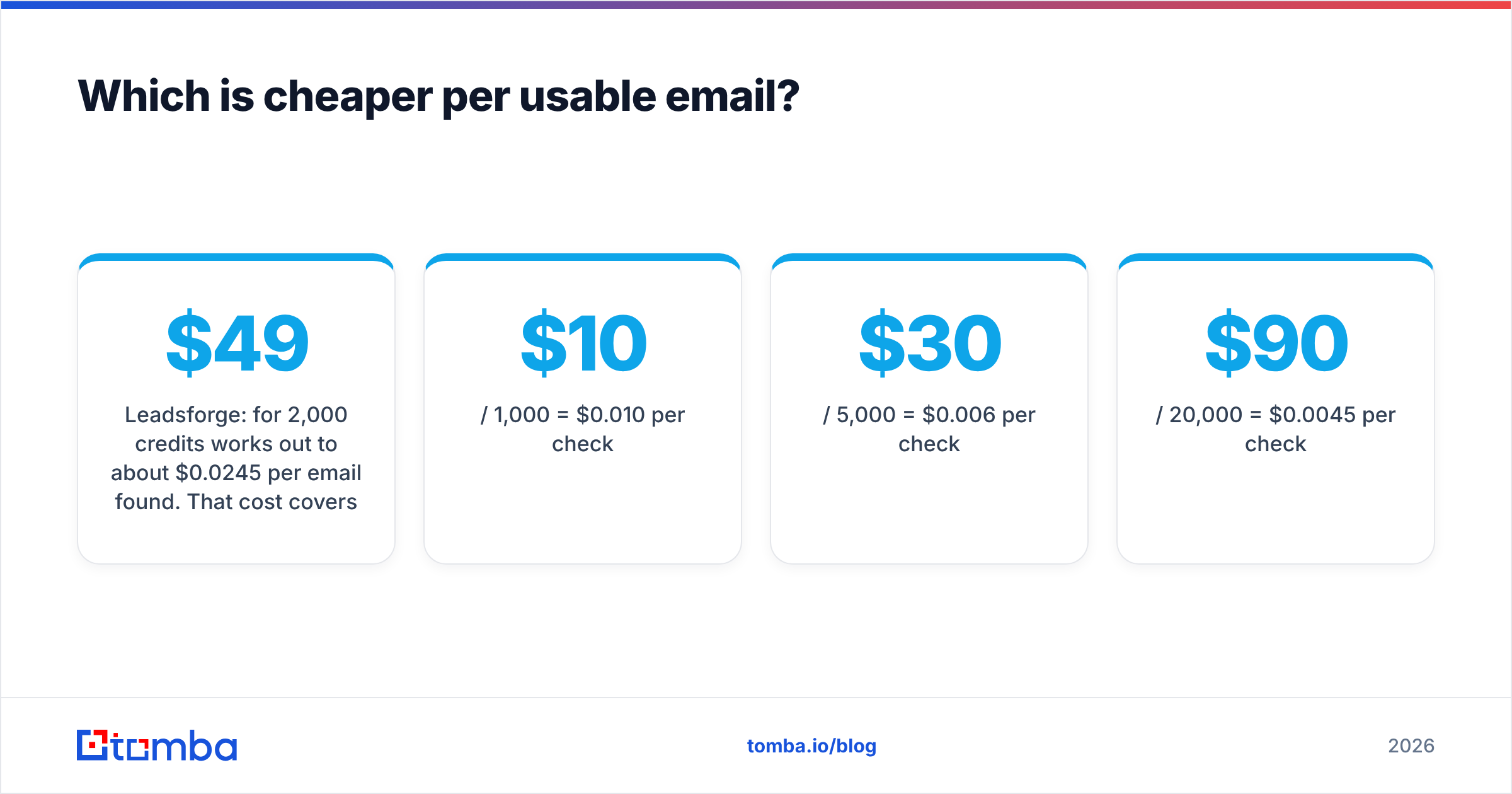
Leadsforge: $49 for 2,000 credits works out to about $0.0245 per email found. That cost covers discovery and the email.
Mailcheck: per-verification cost falls as you move up plans:
- $10 / 1,000 = $0.010 per check
- $30 / 5,000 = $0.006 per check
- $90 / 20,000 = $0.0045 per check
Mailcheck is cheaper per email because checking an address is less work than finding one. The fair comparison isn't "which costs less", it's "what does a clean, sendable contact cost end to end?"
If you source 2,000 contacts in Leadsforge and re-verify them in Mailcheck before a campaign, you're paying roughly $49 plus about $10–20, depending on overage. So around $0.03 per contact across two tools. That's reasonable, but it's two bills, two logins and a CSV export/import cycle each time.
When should you choose Leadsforge?#
Choose Leadsforge when list building is your bottleneck. That typically means:
- You're launching a new segment or market and have no existing contacts there.
- Your SDRs spend hours on manual research in LinkedIn and spreadsheets, and you want that time back.
- You already run the Forge stack. Salesforge sequences and Warmforge warmup make Leadsforge the obvious data layer.
- Your volume fluctuates. Rollover credits mean you don't lose budget in a slow month.
- You don't need many phone numbers. Email-first outbound gets the most out of the credit model.
When should you choose Mailcheck?#
Choose Mailcheck when data quality is your bottleneck. Signs include:
- Your bounce rate is above 2–3% and your sender reputation is slipping.
- You have a large legacy CRM that nobody has cleaned in a year or more.
- You buy or import lists from events, partners or data vendors and need a neutral quality gate.
- You pull contacts from several sources and want one consistent verification standard across all of them.
- Budget is tight. $10/month is an easy expense to approve.

Do you actually need both tools?#
For many outbound teams, yes, and that's the hidden cost of this comparison. The typical stack looks like this:
- Source in Leadsforge (or Apollo, or LinkedIn)
- Export to CSV
- Verify in Mailcheck
- Re-import into your sequencer
- Repeat every campaign, because data decays
Each step is a place where rows get dropped, columns get mismatched or someone forgets to verify at all. Deliverability problems often come from process gaps like these rather than from tool quality.
There are three ways to handle it:
- Accept the two-tool stack. It works, especially if you're committed to the Forge ecosystem. Build a checklist so verification never gets skipped.
- Verify inside your sourcing tool. Rely on Leadsforge's built-in verification and only re-check older lists. This works for fresh, fast-moving campaigns.
- Consolidate into one platform that finds and verifies emails in the same workflow, with the same credit pool.
The third option is where email-finder platforms like Tomba fit. Instead of building a list from an AI prompt, you look up emails by domain, name or company, and verification happens in the same product. For teams that already know which accounts they're targeting (ABM lists, named accounts, inbound leads to enrich), that model is often simpler than prompt-based discovery.
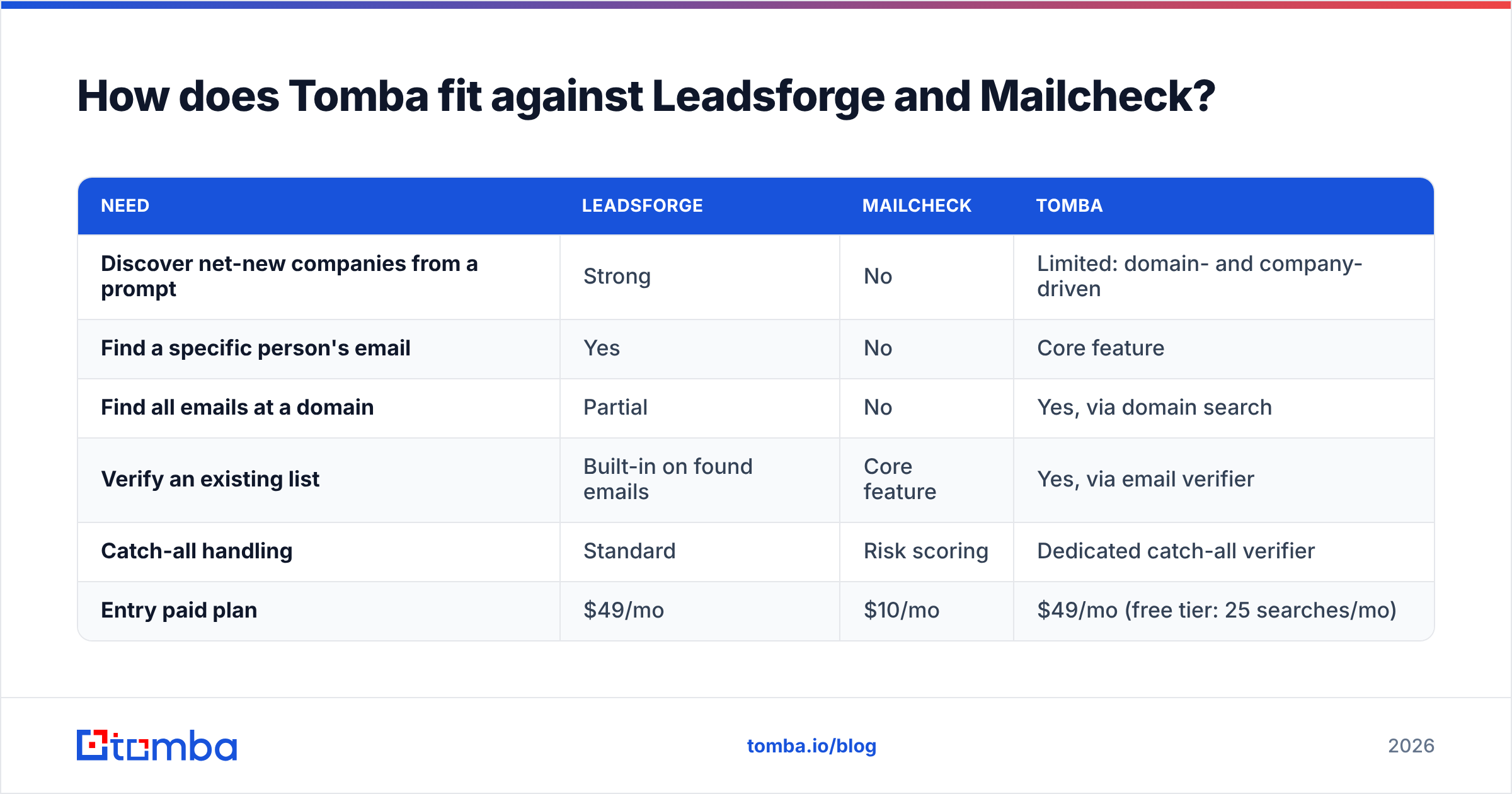
How does Tomba fit against Leadsforge and Mailcheck?#
Tomba isn't a clone of either tool, so here's an honest positioning:
| Need | Leadsforge | Mailcheck | Tomba |
|---|---|---|---|
| Discover net-new companies from a prompt | Strong | No | Limited: domain- and company-driven |
| Find a specific person's email | Yes | No | Core feature |
| Find all emails at a domain | Partial | No | Yes, via domain search |
| Verify an existing list | Built-in on found emails | Core feature | Yes, via email verifier |
| Catch-all handling | Standard | Risk scoring | Dedicated catch-all verifier |
| Entry paid plan | $49/mo | $10/mo | $49/mo (free tier: 25 searches/mo) |
The key trade-off:
- Leadsforge wins on AI-driven discovery. If you don't know who to target, its prompt search is a genuinely different experience.
- Mailcheck wins on low-cost, focused verification. If you only need to clean lists, it's cheap and does the job.
- Tomba wins when you want finding and verifying in one place, especially for account-based prospecting where you already know your target domains. Plans run from a free tier through Starter ($49/mo), Growth ($99/mo) and Pro ($249/mo). Full breakdown on the Tomba pricing page.
What should you check before you commit?#
Whichever tool you choose, run this five-point test during the trial:
- Bring a known list. Take 100 contacts you've already emailed and whose bounce status you know. Run them through the tool and compare its verdicts with reality.
- Count the "unknown" bucket. A verifier that marks 30% of your list as risky hasn't saved you much work.
- Test your ICP, not the demo's. Leadsforge's demo prompts look great. Try your hardest niche segment.
- Price your real volume. Model a normal month and a busy month, including overage or extra credits.
- Time the full workflow. Measure from "I need a list" to "emails are in my sequencer." Handoffs cost more hours than most teams expect.
So, Leadsforge or Mailcheck?#
- No list, need contacts fast → Leadsforge.
- Have lists, need fewer bounces → Mailcheck.
- Running both every campaign → consider whether one finder-plus-verifier platform would save you the handoff.
Both are credible tools with clear, honest scopes. Most bad buying decisions here come from comparing them as if they solved the same problem.
If your team already knows which companies it wants to reach and you're tired of moving CSVs between a sourcing tool and a verifier, try the Tomba Email Finder. Enter a name and company, or a whole domain, and get professional email addresses with verification included in the same step. The free tier covers 25 searches a month, enough to test it on your own target accounts before paying.
Related guides#
// get started
Find, verify and enrich your first contacts today
Start on the free plan with 25 searches a month, then scale when your team is ready.
Free plan · No credit card required · GDPR & CCPA
// about the author