Leadsforge vs MailCleanup: Lead Finder or List Cleaner in 2026?
Leadsforge builds lead lists from a plain-English prompt. MailCleanup cleans the lists you already have. Here is how they differ on job, pricing and fit, and when you need one, the other, or both.
TL;DR
- These two tools do different jobs. Leadsforge is an AI lead search engine that builds contact lists from a plain-English description of your ideal customer. MailCleanup is a pay-as-you-go email verification and list-cleaning service.
- Pricing models differ. At the time of writing, Leadsforge charges $49/month for 2,000 credits (email = 1 credit, phone = 10 credits). MailCleanup sells one-off credit packs, starting at $5 for 1,000 verifications and going up to $500 for 1 million.
- Pick Leadsforge if your problem is "I don't have enough leads." Pick MailCleanup if your problem is "I have a big list and don't trust it."
- Many outbound teams end up using both, or a single platform that covers finding and verifying so they aren't juggling two tools.
- Check both vendors' pricing pages before you buy. Credit rules change often.
Why is "Leadsforge vs MailCleanup" a confusing comparison?#
People search "Leadsforge vs MailCleanup" because both tools show up when you research cold email data. They sit at different stages of the pipeline, though, so the question usually isn't which one is better. It's which stage your problem is in.
Think of an outbound list like a restaurant kitchen. Leadsforge is the supplier that delivers the ingredients. MailCleanup is the prep cook who throws out anything spoiled before it reaches a plate. You need both jobs done, but they aren't interchangeable.
In practice:
- Leadsforge answers "Who should I email?" You describe your target ("Series A SaaS companies in Germany, VP of Sales, 50-200 employees") and it returns matching contacts with emails you can export.
- MailCleanup answers "Which of these emails will bounce?" You upload a CSV, and it flags invalid, risky, disposable and duplicate addresses so your bounce rate stays low.
If you choose one expecting it to do the other's job, you'll be disappointed. Most of this post is about matching the tool to the problem.
What is Leadsforge?#
Leadsforge is a B2B lead generation tool from the Salesforge ecosystem. Its main feature is a chat-style search interface. Instead of stacking 15 filters in a sidebar, you type a description of your ideal customer profile and the tool turns it into a search.
What you get:
- Natural-language ICP search. You describe who you want and refine it in conversation.
- Contact export with emails and phones. Emails cost 1 credit each. Phone numbers cost 10 credits each.
- Verification before export. Leadsforge positions its data as verified at the point of export, so you shouldn't be buying obviously dead addresses.
- Outreach integrations. It connects to sending tools, most naturally Salesforge, so lists can go straight into sequences.
Pricing (as published at the time of writing): $49/month for 2,000 credits, or $588/year with 28,000 credits granted upfront. There's no per-seat charge. New accounts get 100 free credits, and Leadsforge says unused credits roll over instead of expiring. That rollover matters if your prospecting comes in bursts.
Where it fits: founders and SDR teams who need net-new lists quickly and don't want to learn a complex filter UI.
Where it falls short: it's a lead source, not a hygiene tool for lists you already own. If you bring it a 40,000-row CSV from an old CRM export, it isn't built to clean that for you.
What is MailCleanup?#
MailCleanup is an email verification and list-cleaning service. You give it addresses, and it checks each one for syntax errors, whether the domain and mail server exist, disposable providers, role-based addresses and similar risk signals. You get back a labelled list.
What you get:
- Bulk list cleaning through CSV upload.
- Real-time verification for checking addresses as they come in, for example at signup forms.
- Pay-as-you-go credits. There's no subscription or renewal. You buy a pack and use it.
- A free trial that doesn't require a credit card.
Pricing (per its listing on Capterra and its own site): packs start at $5 for 1,000 credits and scale up to $500 for 1,000,000 credits. At high volume that works out to fractions of a cent per address, which is cheap for list hygiene.
Where it fits: marketers and ops teams sitting on existing lists, such as newsletter subscribers, event attendees, old CRM exports or purchased data, who need to cut bounces before a send.
Where it falls short: it won't find you a single new contact. Before you commit a large list, ask how it reports catch-all domains. Every verifier handles those differently, and "accept-all" addresses are where most B2B bounces hide.
How do Leadsforge and MailCleanup compare side by side?#
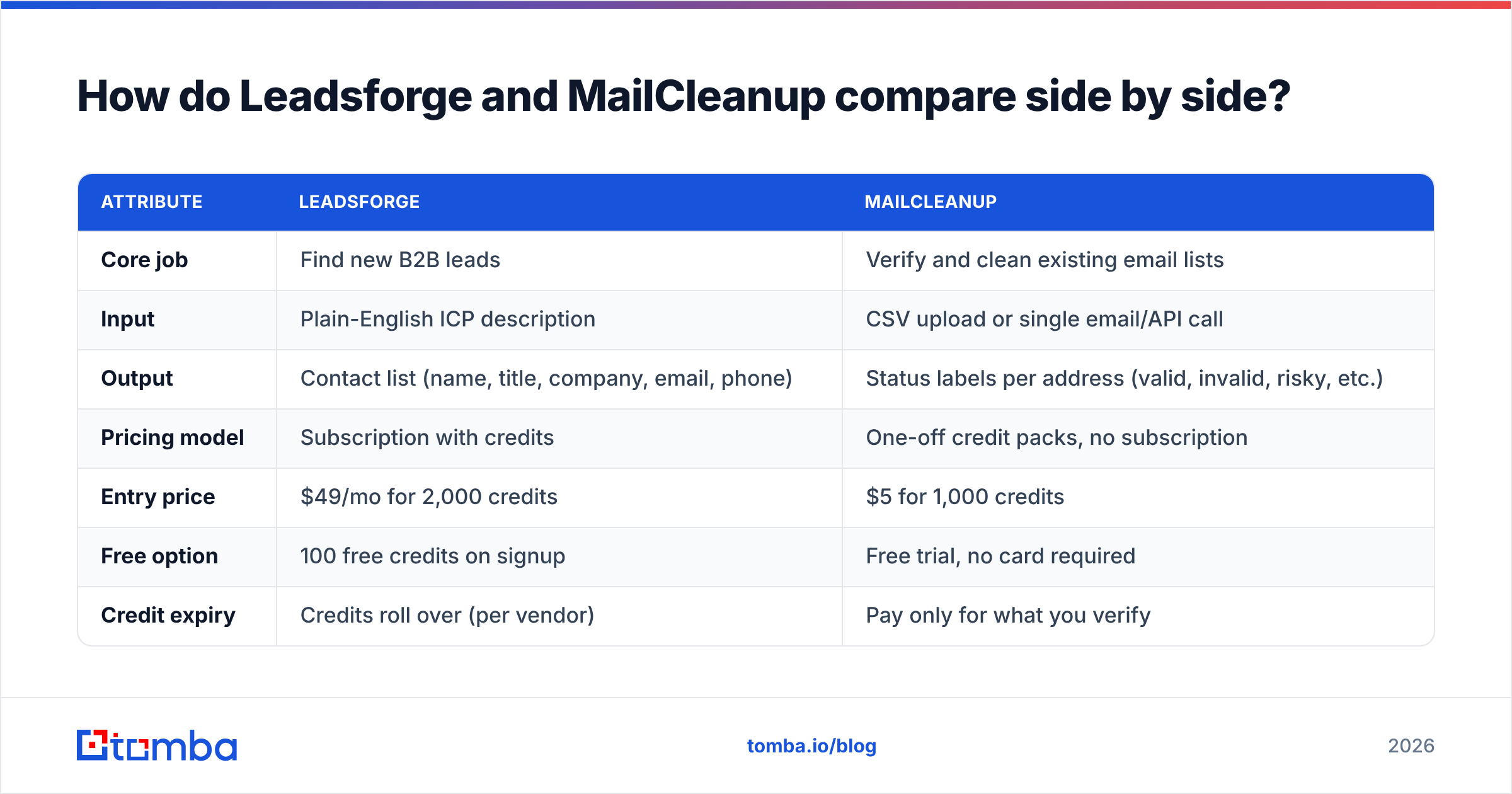
| Attribute | Leadsforge | MailCleanup |
|---|---|---|
| Core job | Find new B2B leads | Verify and clean existing email lists |
| Input | Plain-English ICP description | CSV upload or single email/API call |
| Output | Contact list (name, title, company, email, phone) | Status labels per address (valid, invalid, risky, etc.) |
| Pricing model | Subscription with credits | One-off credit packs, no subscription |
| Entry price | $49/mo for 2,000 credits | $5 for 1,000 credits |
| Free option | 100 free credits on signup | Free trial, no card required |
| Credit expiry | Credits roll over (per vendor) | Pay only for what you verify |
| Phone numbers | Yes (10 credits each) | No |
| Best for | Building net-new outbound lists | Cutting bounces on lists you already own |
| Main limitation | Not a list-hygiene tool | Doesn't find new contacts |
The table makes the split obvious. The only place they overlap is that both involve checking whether an email is deliverable. Leadsforge does it as part of export. MailCleanup does it as the whole product.

Which tool should you choose for your situation?#
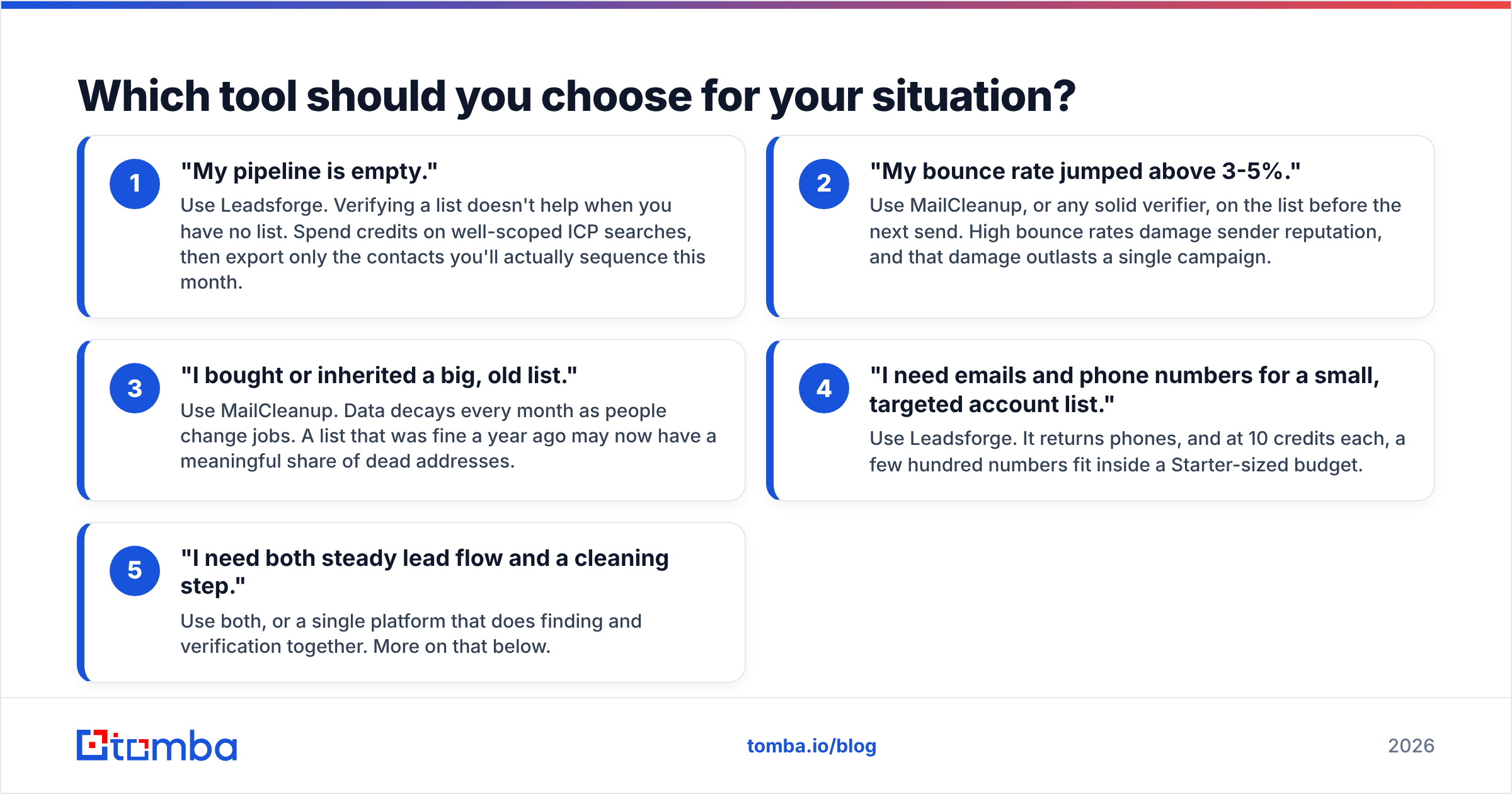
Match the tool to the symptom you actually have:
- "My pipeline is empty." Use Leadsforge. Verifying a list doesn't help when you have no list. Spend credits on well-scoped ICP searches, then export only the contacts you'll actually sequence this month.
- "My bounce rate jumped above 3-5%." Use MailCleanup, or any solid verifier, on the list before the next send. High bounce rates damage sender reputation, and that damage outlasts a single campaign.
- "I bought or inherited a big, old list." Use MailCleanup. Data decays every month as people change jobs. A list that was fine a year ago may now have a meaningful share of dead addresses.
- "I need emails and phone numbers for a small, targeted account list." Use Leadsforge. It returns phones, and at 10 credits each, a few hundred numbers fit inside a Starter-sized budget.
- "I need both steady lead flow and a cleaning step." Use both, or a single platform that does finding and verification together. More on that below.
How much does each tool really cost at common volumes?#
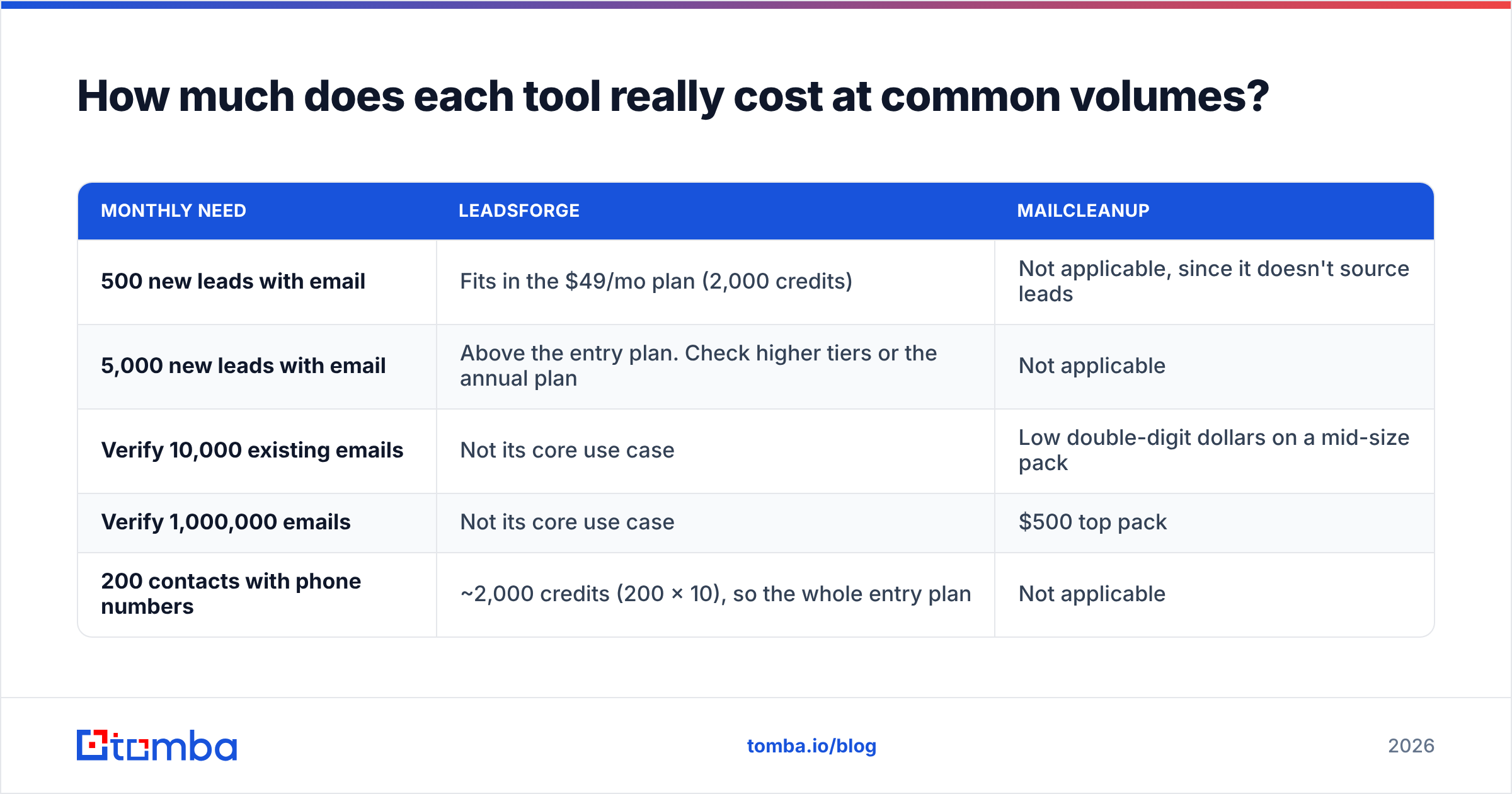
Credit prices look simple until you model your actual volume. Here's a rough view based on the published prices above. Plug in your own numbers before buying.
| Monthly need | Leadsforge | MailCleanup |
|---|---|---|
| 500 new leads with email | Fits in the $49/mo plan (2,000 credits) | Not applicable, since it doesn't source leads |
| 5,000 new leads with email | Above the entry plan. Check higher tiers or the annual plan | Not applicable |
| Verify 10,000 existing emails | Not its core use case | Low double-digit dollars on a mid-size pack |
| Verify 1,000,000 emails | Not its core use case | $500 top pack |
| 200 contacts with phone numbers | ~2,000 credits (200 x 10), so the whole entry plan | Not applicable |
Two things stand out:
- Phones are expensive in Leadsforge's credit math. One phone costs the same as ten emails. If your motion is call-heavy, budget for that explicitly.
- MailCleanup is cheap per address but only covers one job. Its low per-verification price is attractive for bulk hygiene. It still doesn't replace a lead source, so add your sourcing cost on top.
Can you use Leadsforge and MailCleanup together?#
Yes, and plenty of teams do something like this:
- Source leads in Leadsforge.
- Merge them with older lists from the CRM, events and inbound.
- Run the combined file through MailCleanup (or another verifier) before the first send.
- Push only valid addresses into the sequencer.
The logic holds up. Leadsforge verifies what it exports, but once you merge in older data, you need one final hygiene pass on the full file. The costs are that you manage two logins, two credit balances and one extra CSV round-trip, and each handoff is a chance to drop a column or re-import a stale file.
You can reduce that friction with a platform that handles both finding and verifying in one place. For example, Tomba pairs an email finder with a built-in email verifier and a bulk email finder for large CSVs. The point isn't that single-platform is always better. If you're a small team, fewer handoffs usually means fewer mistakes.
What are the pros and cons of each?#
Leadsforge
Pros:
- Fast list building from a plain-language prompt, with a short learning curve
- Emails and phones in one export
- Credits roll over, which suits bursty prospecting
- No seat fees, so adding teammates doesn't add cost
- Fits naturally with Salesforge-based sending
Cons:
- Not built for cleaning lists you already own
- Phone lookups use credits quickly
- Subscription-based, so low-volume months still cost you
MailCleanup
Pros:
- Very low cost per verification at volume
- No subscription, so you pay only when you clean
- Free trial with no card required
- Handles both bulk lists and real-time checks
Cons:
- Doesn't find new contacts
- Behaviour on catch-all domains should be tested on a sample before you trust it at scale
- Adds another tool and another CSV step to your workflow
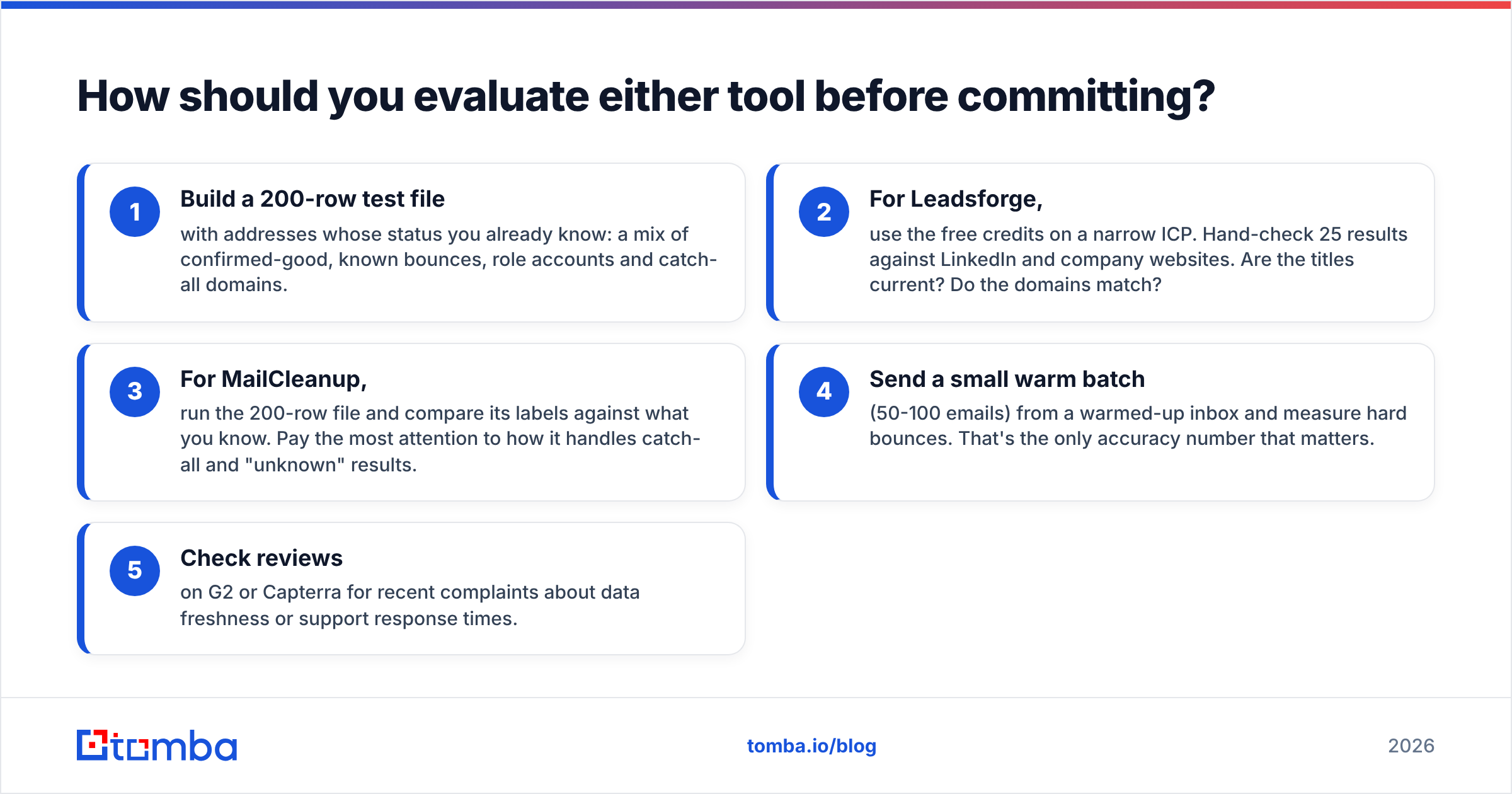
How should you evaluate either tool before committing?#
Don't buy on the pricing page alone. Run a small, controlled test:
- Build a 200-row test file with addresses whose status you already know: a mix of confirmed-good, known bounces, role accounts and catch-all domains.
- For Leadsforge, use the free credits on a narrow ICP. Hand-check 25 results against LinkedIn and company websites. Are the titles current? Do the domains match?
- For MailCleanup, run the 200-row file and compare its labels against what you know. Pay the most attention to how it handles catch-all and "unknown" results.
- Send a small warm batch (50-100 emails) from a warmed-up inbox and measure hard bounces. That's the only accuracy number that matters.
- Check reviews on G2 or Capterra for recent complaints about data freshness or support response times.
This takes an afternoon and will tell you more than any vendor comparison chart, this one included.
What is the verdict on Leadsforge vs MailCleanup?#
Neither tool beats the other, because they don't compete on the same job.
- Choose Leadsforge if your bottleneck is finding the right people. Its conversational search is a real time-saver for lean teams, and the credit rollover is fair.
- Choose MailCleanup if your bottleneck is list quality. Pay-as-you-go pricing and a low per-address cost make it an easy, low-risk way to protect deliverability before big sends.
- Choose both, or a combined platform, if you run steady outbound and keep merging old and new data.
The expensive mistake is buying a lead finder to fix bounces, or a verifier to fill an empty pipeline. Work out which problem you have first, then buy the tool for it.
Want finding and verification in one place?#
If you'd rather not juggle a lead tool, a separate verifier and CSV exports between them, try Tomba Email Finder. You can find professional emails by name, domain or company, verify them in the same account, and scale to bulk files when needed. There's a free tier with 25 searches a month so you can test it on your own ICP, and paid plans start at $49/month. See the Tomba pricing page for the full breakdown.
Related guides#
// get started
Find, verify and enrich your first contacts today
Start on the free plan with 25 searches a month, then scale when your team is ready.
Free plan · No credit card required · GDPR & CCPA
// about the author