Leadsforge vs MailerCheck (2026): Lead Gen or List Hygiene?
Leadsforge builds lead lists and MailerCheck cleans and tests them. We compare features, pricing models and fit, and show when a team needs one, both, or a single tool that finds and verifies emails.
TL;DR
- Leadsforge and MailerCheck do different jobs. Leadsforge is an AI lead-generation tool that builds prospect lists from a plain-English ICP description. MailerCheck is an email verification and deliverability-testing platform from the MailerLite team.
- Choose Leadsforge if you don't yet have contacts to email and want lists built quickly through a chat-style interface.
- Choose MailerCheck if you already have contacts and need to clean them, test inbox placement, and monitor DMARC and blocklists.
- Many outbound teams end up paying for both: one tool to find contacts and another to verify them. A combined finder and verifier such as Tomba handles both steps in one workflow, starting at $49/mo.
- Pricing models differ. Leadsforge charges by credits per contact. MailerCheck sells verification credits as pay-as-you-go packs or a subscription, and deliverability monitoring is priced separately.
What is the real difference between Leadsforge and MailerCheck?#
People search "Leadsforge vs MailerCheck" as if the two were competitors. They mostly aren't. The tools sit at opposite ends of the outbound pipeline:
- Leadsforge answers the question "Who should I email?"
- MailerCheck answers the question "Will my email actually arrive?"
Here's an analogy. Leadsforge draws up the guest list for a party. MailerCheck makes sure the invitations don't come back undelivered and don't end up in the recycling bin. You need both jobs done, but a single tool rarely does both well.
So the useful question is not which tool is better. It's which gap in your workflow is costing you more right now: not enough contacts, or contacts that bounce and land in spam.
What is Leadsforge and how does it work?#
Leadsforge belongs to the Forge ecosystem, the same group behind Salesforge. Its pitch is conversational lead generation. You describe your ideal customer in natural language, for example "Series A SaaS companies in the US with 50–200 employees hiring SDRs", and it returns a filtered list of companies and contacts.
Core capabilities:
- Chat-based ICP search. You type your targeting in plain English instead of combining dozens of dropdown filters.
- Lookalike discovery. Give it a company you already sell to and it finds similar accounts.
- Contact enrichment. Work emails, and phone numbers on some plans, attached to each lead.
- Built-in email validation. Emails are checked before export, which cuts down on obvious bounces.
- Export to sequencers. Lists go to CSV, or straight into Salesforge and other outreach tools.
Leadsforge charges by credits: each contact revealed or exported uses credits, and phone numbers usually cost more than emails. Plans are monthly with credit allowances. Tiers and prices have changed several times, so check the live pricing page before you budget.
Where it shines: founders and SDRs who need a first list quickly and don't want to learn a complex database UI.
Where it's thinner: it isn't a deliverability tool. It checks that emails are valid, but it won't show whether your domain is going to spam in Gmail, and it won't monitor your DMARC reports.
What is MailerCheck and what does it actually check?#
MailerCheck comes from the team behind MailerLite and MailerSend. It focuses on the health of your email program: your lists, your content, and your sending domain.
Core capabilities:
- Email list verification. Upload a list, or connect Mailchimp, HubSpot, MailerLite and similar platforms, and each address is flagged as valid, invalid, catch-all, disposable, role-based, and so on.
- Real-time verification API. Checks addresses at the point of capture on sign-up forms.
- Inbox placement testing. Shows where a test email lands (inbox, promotions or spam) across major mailbox providers.
- Email content insights. Pre-send analysis of links, images and spam-trigger issues.
- DMARC monitoring. Turns raw DMARC aggregate reports into readable dashboards.
- Blocklist monitoring. Alerts you when your IP or domain appears on a blocklist.
Verification is sold as pay-as-you-go credit packs, historically around $10 per 1,000 verifications at the entry level, or as a monthly subscription that lowers the per-check cost. New accounts usually get some free credits to test with. Deliverability features such as DMARC and inbox placement are priced as separate plans.
Where it shines: marketing and outbound teams that already have lists and need to protect their sender reputation.
Where it's thinner: it doesn't find a single new contact. With an empty CRM, MailerCheck has nothing to check.

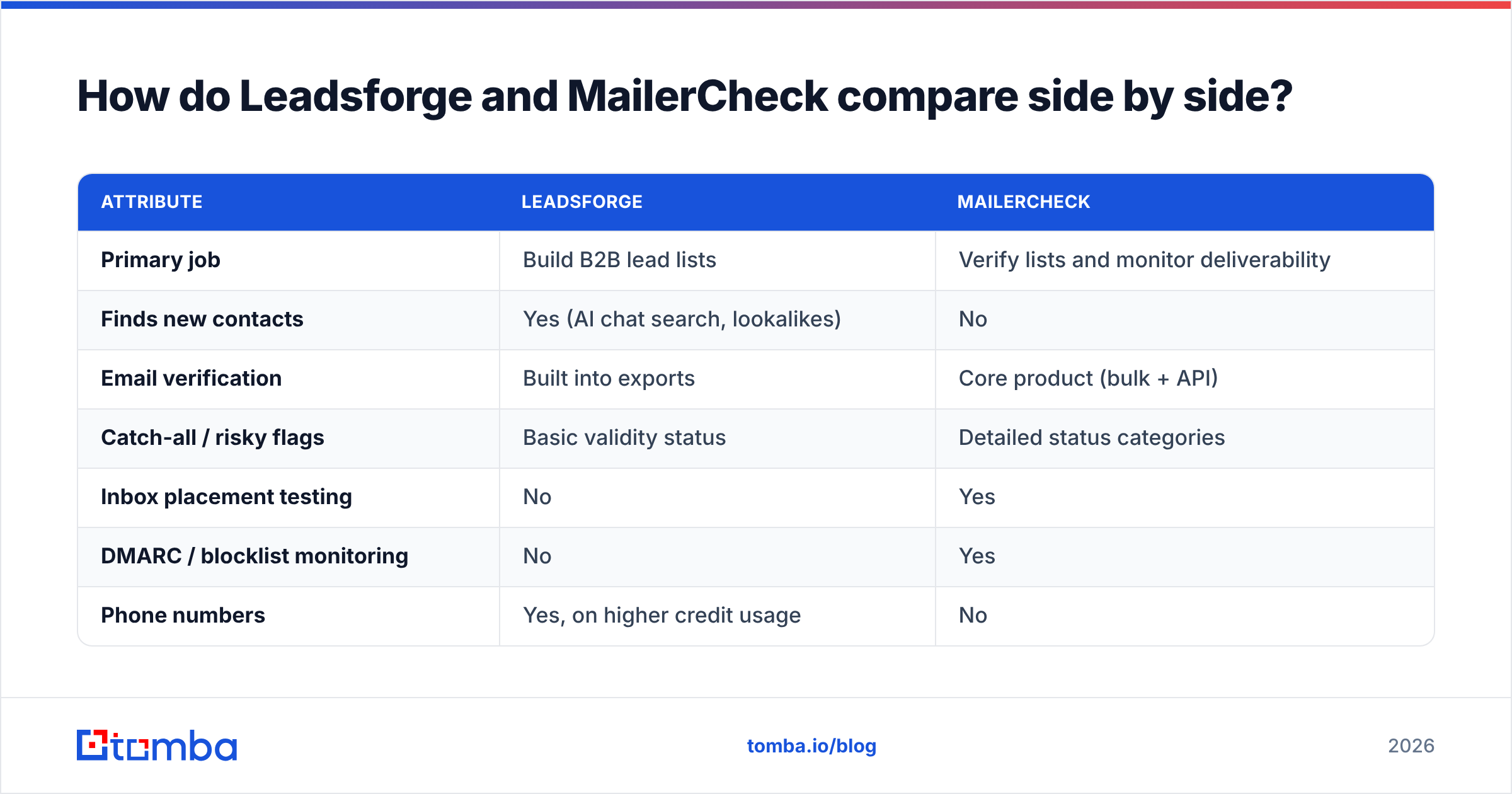
How do Leadsforge and MailerCheck compare side by side?#
| Attribute | Leadsforge | MailerCheck |
|---|---|---|
| Primary job | Build B2B lead lists | Verify lists and monitor deliverability |
| Finds new contacts | Yes (AI chat search, lookalikes) | No |
| Email verification | Built into exports | Core product (bulk + API) |
| Catch-all / risky flags | Basic validity status | Detailed status categories |
| Inbox placement testing | No | Yes |
| DMARC / blocklist monitoring | No | Yes |
| Phone numbers | Yes, on higher credit usage | No |
| Pricing model | Monthly plans with contact credits | Pay-as-you-go or subscription credits; deliverability plans separate |
| Free option | Limited trial credits | Free credits on sign-up |
| Best for | Founders, SDRs, agencies needing lists fast | Marketers, RevOps, senders protecting domains |
| Native ecosystem | Salesforge / Forge stack | MailerLite / MailerSend stack |
The table makes the overlap clear: the only shared ground is email verification. Leadsforge verifies as a side feature so the lists it sells are usable. For MailerCheck, verification plus deliverability is the product.
Which stage of outbound does each tool cover?#
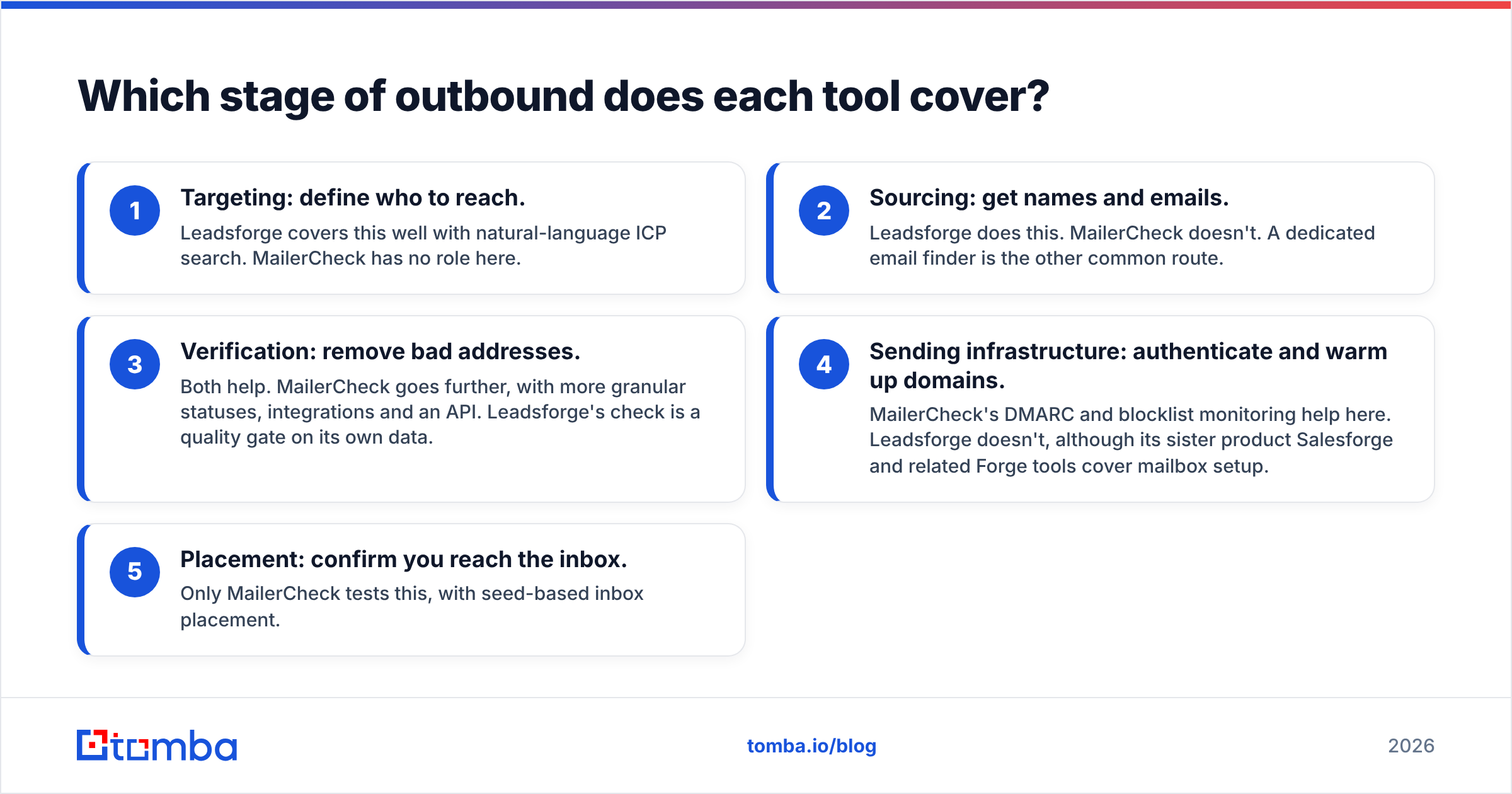
Most outbound problems trace back to one of five stages. Here is where each tool helps:
- Targeting: define who to reach. Leadsforge covers this well with natural-language ICP search. MailerCheck has no role here.
- Sourcing: get names and emails. Leadsforge does this. MailerCheck doesn't. A dedicated email finder is the other common route.
- Verification: remove bad addresses. Both help. MailerCheck goes further, with more granular statuses, integrations and an API. Leadsforge's check is a quality gate on its own data.
- Sending infrastructure: authenticate and warm up domains. MailerCheck's DMARC and blocklist monitoring help here. Leadsforge doesn't, although its sister product Salesforge and related Forge tools cover mailbox setup.
- Placement: confirm you reach the inbox. Only MailerCheck tests this, with seed-based inbox placement.
If your pipeline fails at stages 1–2, Leadsforge is the relevant tool. If it fails at stages 3–5, look at MailerCheck.
Is Leadsforge better than MailerCheck for cold email?#
It depends on where your cold email is failing.
Pick Leadsforge if:
- You're starting outbound from zero and have no list.
- You want to test several ICPs quickly without paying for a heavy enterprise database.
- You already use Salesforge, or plan to, and want a native handoff.
- Speed of list building matters more to you than fine-grained filters.
Pick MailerCheck if:
- You already have contacts from a CRM, events, inbound or another data provider.
- Your bounce rate is creeping above 2% and you need to clean up before a campaign.
- Open and reply rates dropped suddenly and you suspect spam placement.
- You send newsletters or product email alongside outbound and need monitoring across all of it.
Teams often assume Leadsforge's built-in validation makes a separate verifier unnecessary. For fresh exports that's mostly true. Lists decay, though. People change jobs and companies migrate mail servers, so B2B data goes stale quickly. A list exported three months ago should be re-verified before you send to it, whichever tool produced it. Data-quality research from Gartner keeps showing that bad data carries real revenue costs, and in email those costs show up as bounces and damaged domains.
How does pricing compare in practice?#
Leadsforge and MailerCheck charge for different things, so comparing sticker prices directly is misleading. Compare them by cost per usable, deliverable contact instead.
A realistic scenario: you want 1,000 verified prospects per month.
- Leadsforge alone: you pay credits for 1,000 contacts, and validation is included on export. You get no inbox placement or domain monitoring.
- MailerCheck alone: 1,000 verifications costs roughly the price of a coffee, but you still have to get the 1,000 contacts from somewhere.
- Leadsforge + MailerCheck: two subscriptions and two logins. You get full coverage from sourcing through placement.
- A combined finder and verifier: one bill covers sourcing and verification. For inbox placement testing you'd still want a deliverability tool.
Recheck both vendors' current pricing pages before committing, and read recent user reviews on G2 for complaints about credit burn or accuracy.
What do users like and dislike about each tool?#
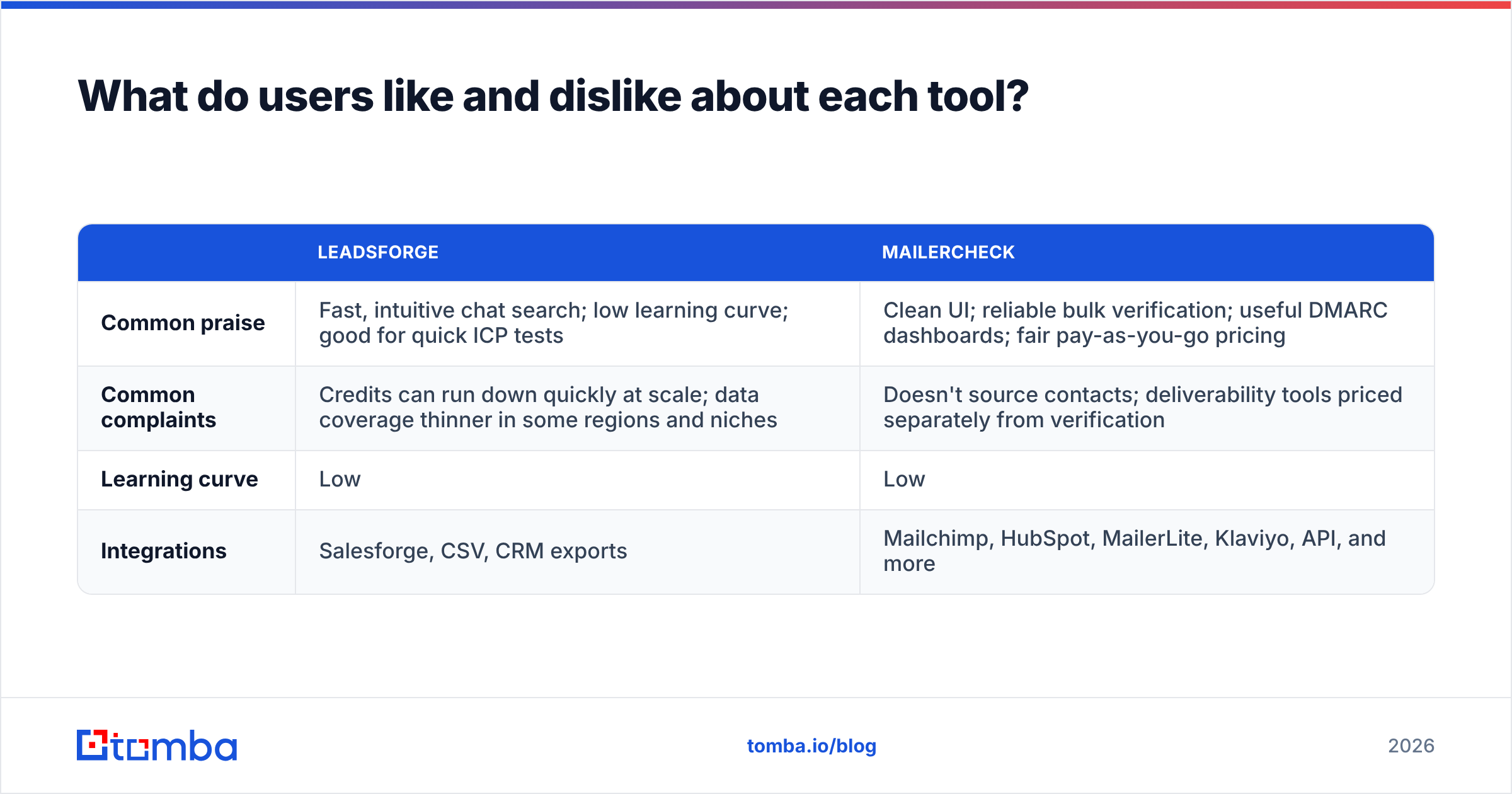
| Leadsforge | MailerCheck | |
|---|---|---|
| Common praise | Fast, intuitive chat search; low learning curve; good for quick ICP tests | Clean UI; reliable bulk verification; useful DMARC dashboards; fair pay-as-you-go pricing |
| Common complaints | Credits can run down quickly at scale; data coverage thinner in some regions and niches | Doesn't source contacts; deliverability tools priced separately from verification |
| Learning curve | Low | Low |
| Integrations | Salesforge, CSV, CRM exports | Mailchimp, HubSpot, MailerLite, Klaviyo, API, and more |
Both are well built for what they set out to do. Neither is a weak product. They are simply narrow.
Do you need both, or is there a simpler stack?#
It depends on how much of the pipeline you want one vendor to own.
Here's a common progression for outbound teams as they mature:

- Stage one: buy or scrape a raw list and send. Bounces pile up and the domain suffers.
- Stage two: add a verifier like MailerCheck. Bounces drop.
- Stage three: add inbox placement and DMARC monitoring. You find the spam problems you couldn't see before.
- Stage four: collapse sourcing and verification into one tool, and keep a deliverability monitor only if you send at real volume.
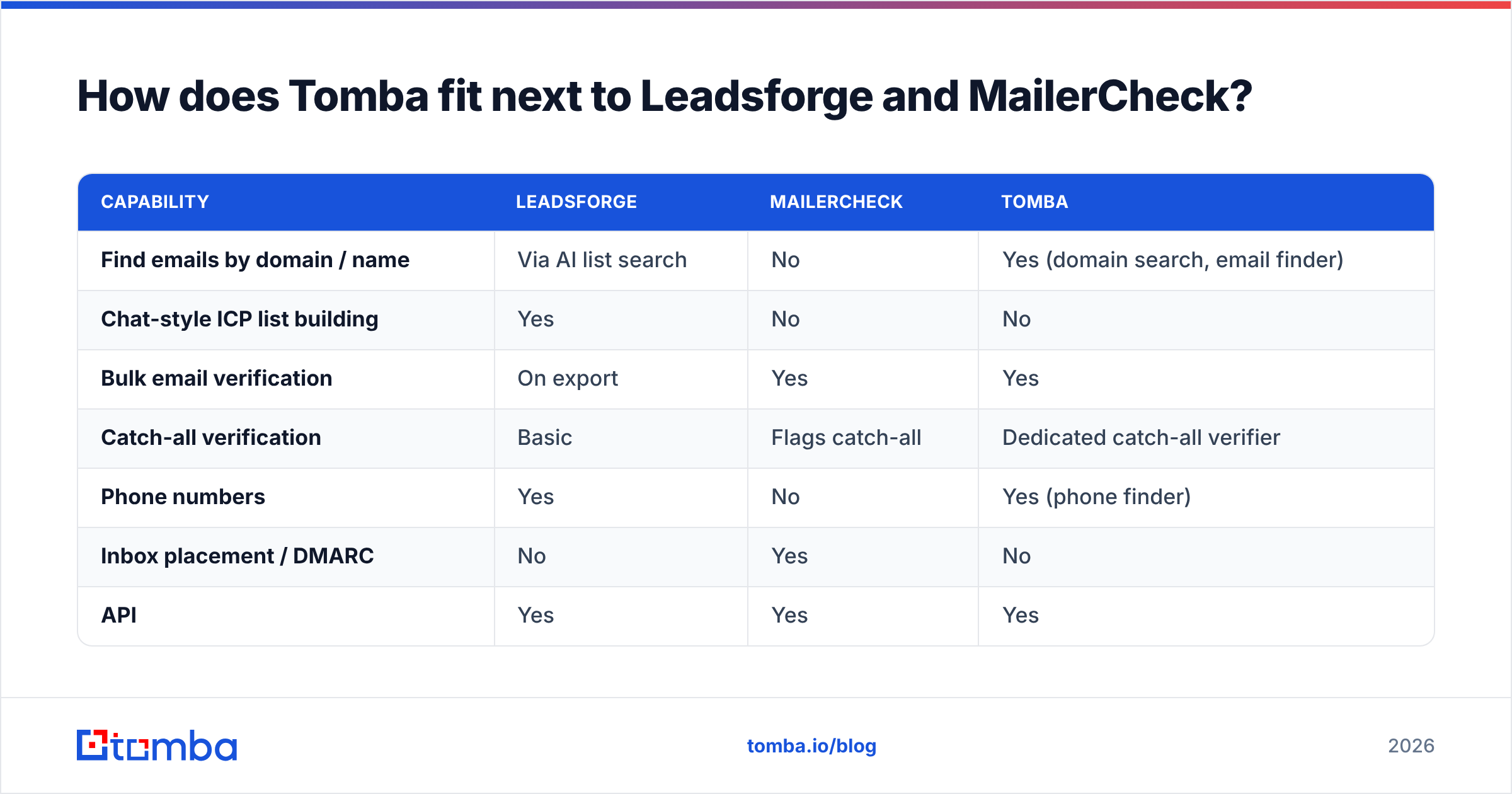
That fourth stage is where Tomba fits. Tomba's core product is the email finder: you search by domain, by name plus company, or through the Chrome extension on LinkedIn. It also includes an email verifier and a catch-all verifier in the same account. Every address you find can be verified in the same workflow, with no CSV round-trip between two vendors.
Tomba doesn't replace MailerCheck's inbox placement tests or DMARC dashboards. If deliverability monitoring is your pain point, a dedicated tool is the right choice. For most small outbound teams, though, the costly problem is bad contact data, and a single finder plus verifier fixes that.
How does Tomba fit next to Leadsforge and MailerCheck?#
| Capability | Leadsforge | MailerCheck | Tomba |
|---|---|---|---|
| Find emails by domain / name | Via AI list search | No | Yes (domain search, email finder) |
| Chat-style ICP list building | Yes | No | No |
| Bulk email verification | On export | Yes | Yes |
| Catch-all verification | Basic | Flags catch-all | Dedicated catch-all verifier |
| Phone numbers | Yes | No | Yes (phone finder) |
| Inbox placement / DMARC | No | Yes | No |
| API | Yes | Yes | Yes |
| Free tier | Trial credits | Free credits on sign-up | 25 searches/mo |
| Paid entry point | Credit-based plans | Pay-as-you-go from ~$10/1K | Starter $49/mo |
A practical way to read this table:
- If you want AI to design your ICP for you, Leadsforge is the most distinctive option.
- If you need deliverability visibility, MailerCheck is the specialist.
- If you know who you're targeting and need accurate, verified emails at predictable cost, a finder plus verifier like Tomba covers the most ground with one bill. Tiers are listed on the Tomba pricing page.
What's the final verdict on Leadsforge vs MailerCheck?#
Neither tool wins outright, because they don't do the same job.
- Leadsforge wins on sourcing. It's one of the quickest ways to turn a rough ICP idea into a list you can export.
- MailerCheck wins on hygiene and deliverability. It's a mature, fairly priced way to verify lists and see how your domain is performing.
- You need both only if you want AI-driven list building and inbox placement monitoring. Most teams sending fewer than a few thousand emails a week don't need that much tooling.
- You need neither if your problem is specifically finding and verifying known contacts. A combined email finder and verifier does that more cheaply.
Before you buy, check where your last campaign actually broke down. If you had nobody to email, start with sourcing. If you had plenty of contacts but replies flatlined, check verification and placement first.
Ready to find and verify emails in one place?#
If your outbound runs on accurate contact data, and not on AI-generated ICP guesses or spam-folder forensics, start with Tomba Email Finder. You can find professional emails by domain, name or company, verify them in the same account, and export clean lists to your sequencer. The free tier includes 25 searches a month, and paid plans start at $49/mo when you're ready to scale.
Related guides#
// get started
Find, verify and enrich your first contacts today
Start on the free plan with 25 searches a month, then scale when your team is ready.
Free plan · No credit card required · GDPR & CCPA
// about the author