Leadsforge vs Mailshunt: Pricing, Data Quality and Our 2026 Pick
Leadsforge builds lead lists from a plain-English prompt. Mailshunt is a lightweight free email finder. We compare pricing, data, reliability and workflow fit so you can pick the right one, or skip both.
TL;DR
- Leadsforge is an AI lead-search tool from the Salesforge team. You describe your ideal customer in plain English and it builds a list. It costs $49/month for 2,000 credits, and credits roll over.
- Mailshunt is a small email finder and verifier with domain search and name-plus-domain lookup. It markets itself as free, but it has no clear public pricing, and its site was unreliable when we checked in September 2026.
- They solve different problems. Leadsforge helps you find who to contact. Mailshunt only finds the email of someone you already picked.
- For a production outbound team in 2026, Leadsforge is the safer pick of the two. If you need precise single-contact lookups, verification and bulk enrichment in one place, a dedicated email finder is a better fit.
What are Leadsforge and Mailshunt, really?#
Most people searching "Leadsforge vs Mailshunt" assume both are email finders. That's only half right, and the difference changes how you should judge them.
Leadsforge (leadsforge.ai) is part of the Salesforge product family. Its main feature is a chat-style search. You type something like "Series A SaaS companies in Germany with 50 to 200 employees, VP Sales or Head of Growth," and it returns a list of matching contacts. You then spend credits to export emails (and optionally phone numbers). Think of it as a list builder that also returns contact data.
Mailshunt is a much simpler tool. It follows the classic Hunter-style model with two core features:
- Domain search: enter a company domain and get the email addresses found for it.
- Email finder: enter a first name, last name and domain, and it guesses and checks the most likely address.
It also includes basic email verification and a Chrome extension listing. Mailshunt says it filters results from a pool of "more than 20 million email addresses." That is small next to established B2B databases, but it can be enough for occasional lookups.
To use an analogy: Leadsforge is a recruiter who builds you a shortlist of candidates. Mailshunt is a phone book you check once you already know the name.
How do Leadsforge and Mailshunt compare side by side?#
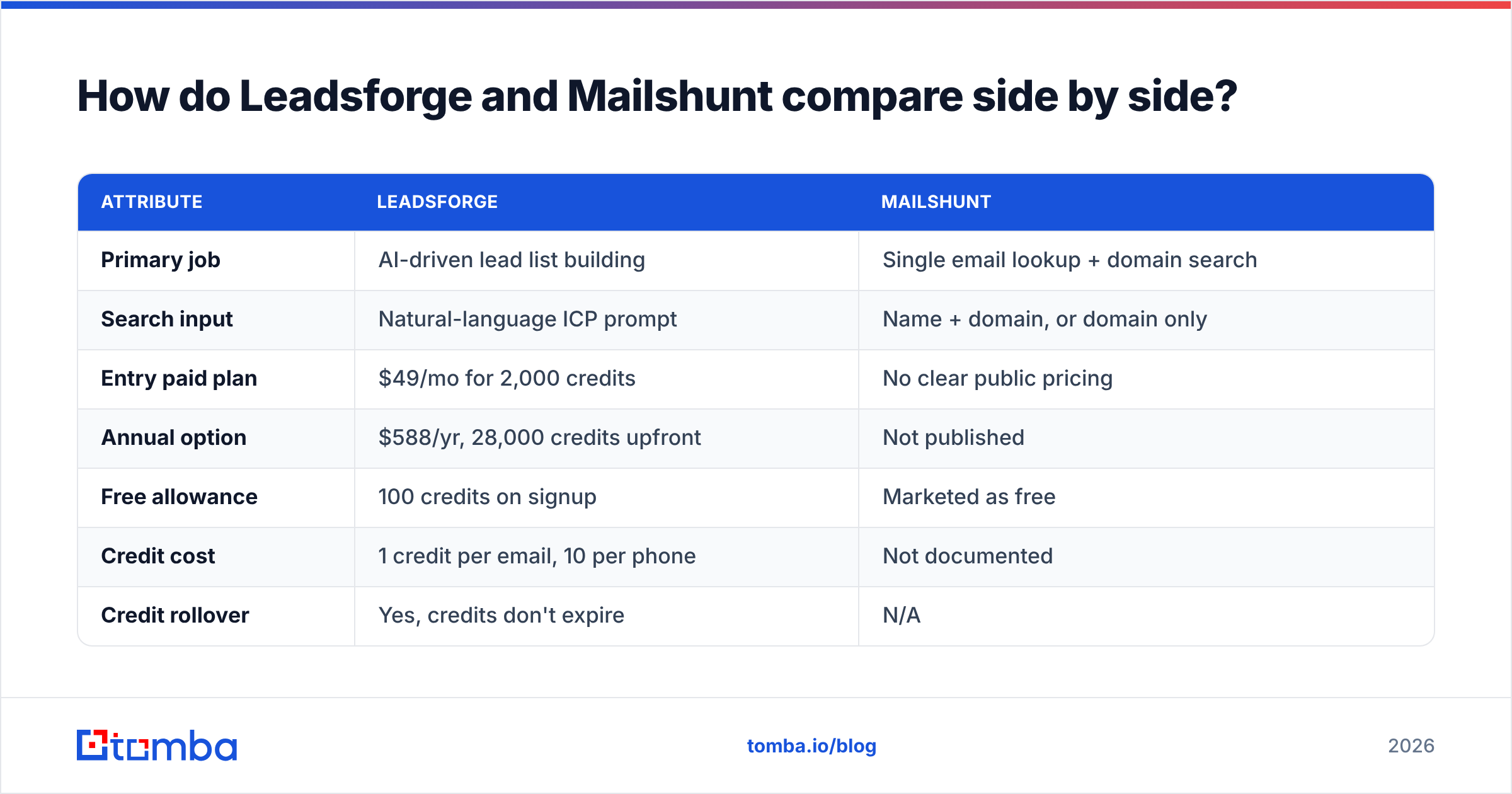
Here is the direct comparison, based on what each vendor publishes and what we could confirm at the time of writing (September 2026).
| Attribute | Leadsforge | Mailshunt |
|---|---|---|
| Primary job | AI-driven lead list building | Single email lookup + domain search |
| Search input | Natural-language ICP prompt | Name + domain, or domain only |
| Entry paid plan | $49/mo for 2,000 credits | No clear public pricing |
| Annual option | $588/yr, 28,000 credits upfront | Not published |
| Free allowance | 100 credits on signup | Marketed as free |
| Credit cost | 1 credit per email, 10 per phone | Not documented |
| Credit rollover | Yes, credits don't expire | N/A |
| Phone numbers | Yes | No |
| Email verification | Verified emails on export | Basic verifier |
| Seat pricing | No per-seat charge | N/A |
| Ecosystem | Salesforge sequencing, Warmforge, Mailforge | Standalone + Chrome extension |
| Reliability (Sept 2026) | Stable, actively marketed | Pricing page returned a "Deployment Paused" notice |

The last row matters more than any feature. When we loaded Mailshunt's pricing page for this review, it returned an HTTP 402 "Deployment Paused" message from its hosting provider. That may be temporary. Still, if a tool's own pricing page can go offline, you shouldn't build a prospecting workflow on it without a backup.
How does Leadsforge pricing work?#
Leadsforge uses credits with no seat fees, which is a real advantage if several reps share one account.
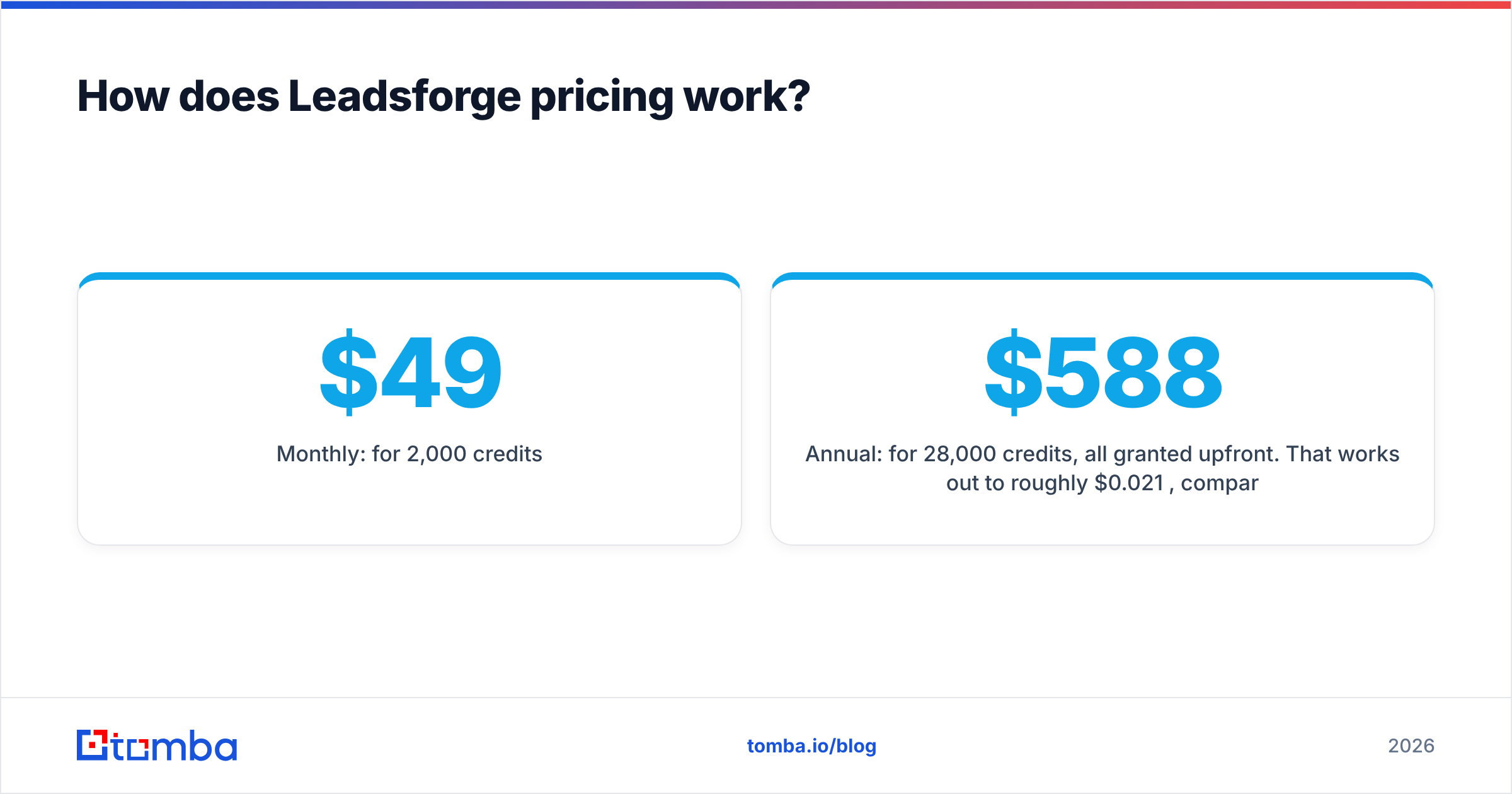
- Monthly: $49 for 2,000 credits.
- Annual: $588 for 28,000 credits, all granted upfront. That works out to roughly $0.021 per credit, compared with about $0.0245 on monthly billing.
- Credit burn: each email costs 1 credit and each phone number costs 10.
- Rollover: unused credits stay in your account.
Two things to watch:
- Phone numbers use credits quickly. If you export email and phone for every contact, 2,000 credits covers about 180 contacts, not 2,000. Budget with that in mind.
- List size is shown before export. Leadsforge estimates the credit cost before you pull a list, so check it before you click. A broad prompt can return thousands of rows.
If you only need emails, the monthly plan gives you about 2,000 contacts. That's enough for a small SDR team running a few campaigns a month.
How does Mailshunt pricing work?#
This is the weak spot. Mailshunt presents itself as a free leads finder and email verifier, and third-party directories repeat that. We could not confirm a current, published breakdown of paid tiers, limits or credit costs, because the pricing page was paused when we checked.
In practice, that means:
- You can't forecast cost per contact.
- You can't tell whether "free" means unlimited, rate-limited or a trial.
- You have no documented SLA or support path if lookups fail during a campaign.
For a freelancer who finds a handful of emails a week, that may be fine. For a team with pipeline targets, unpredictable access is a real cost, even when the sticker price is zero.

Which tool has better data quality?#
Neither vendor publishes an independent accuracy benchmark. Here is what we can reasonably say about each.

Leadsforge draws on a large aggregated B2B dataset and verifies emails when you export them. Because the search is AI-driven, quality depends on two things: how well your prompt maps to firmographic filters, and how fresh the underlying records are. In practice, the AI step is strongest on company targeting (industry, headcount, location) and weaker on narrow, recently changed job titles. Always spot-check the first 20 rows of a new list before you load it into a sequence.
Mailshunt uses the pattern-plus-verification approach. It infers the company's email format and checks the address. This works well at companies with a consistent format such as first.last@company.com, and less well on:
- Catch-all domains, where the server accepts every address, so SMTP checks can't confirm the mailbox. You need a dedicated catch-all verifier for these.
- Small companies with irregular formats or founder-only inboxes.
- Recent hires, who aren't yet in a 20-million-address pool.
Whichever tool you use, run a separate verification pass before a large send. A bounce rate above 2% hurts sender reputation faster than most teams expect, and neither tool's built-in check replaces a proper email verifier.
Which workflows suit each tool?#
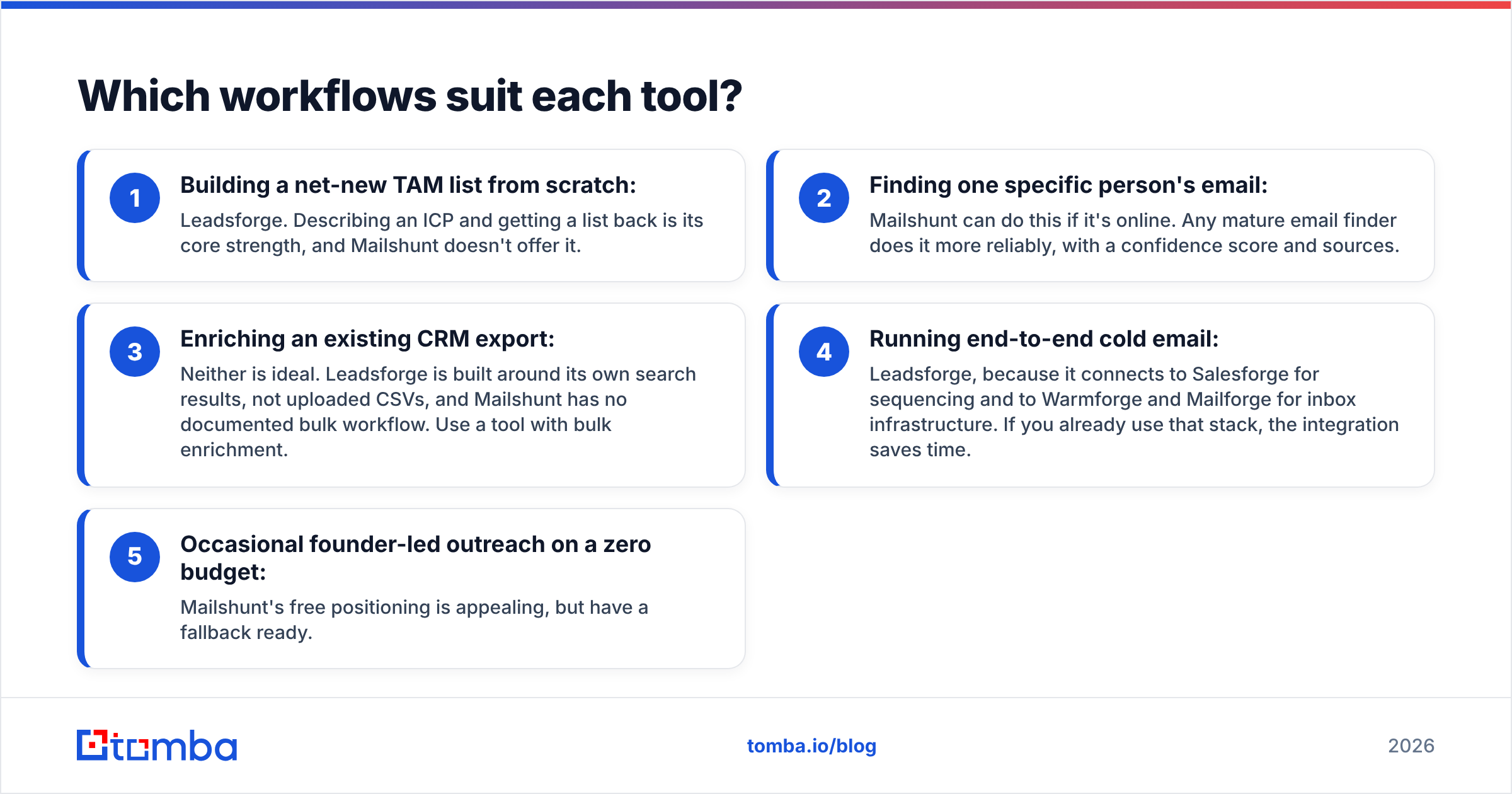
The best way to choose is to match the tool to how your team actually prospects.
- Building a net-new TAM list from scratch: Leadsforge. Describing an ICP and getting a list back is its core strength, and Mailshunt doesn't offer it.
- Finding one specific person's email: Mailshunt can do this if it's online. Any mature email finder does it more reliably, with a confidence score and sources.
- Enriching an existing CRM export: Neither is ideal. Leadsforge is built around its own search results, not uploaded CSVs, and Mailshunt has no documented bulk workflow. Use a tool with bulk enrichment.
- Running end-to-end cold email: Leadsforge, because it connects to Salesforge for sequencing and to Warmforge and Mailforge for inbox infrastructure. If you already use that stack, the integration saves time.
- Occasional founder-led outreach on a zero budget: Mailshunt's free positioning is appealing, but have a fallback ready.
What are the pros and cons of each?#
Leadsforge pros
- Natural-language search is fast and easy to learn.
- No seat fees, so shared team accounts are cheaper.
- Credits roll over, so unused budget isn't lost.
- Connects with the Salesforge outbound suite.
- Includes phone numbers.
Leadsforge cons
- Phone lookups at 10 credits each drain small plans quickly.
- The AI search can be vague on niche job titles, so you need to review results.
- Not designed for single-contact lookups or CSV enrichment.
- Most useful inside the Salesforge ecosystem, less so on its own.
Mailshunt pros
- Simple interface with a familiar domain-search and name-lookup flow.
- Marketed as free.
- Chrome extension for in-browser lookups.
Mailshunt cons
- No clear public pricing or limits.
- Pricing page was paused when we checked in September 2026.
- Relatively small email pool (20M+).
- No phone data, no documented bulk workflow and no CRM integrations.
- Little independent review coverage on sites like G2, so there is less social proof to go on.
Is Leadsforge better than Mailshunt?#
For most B2B teams, yes. The reason isn't that Leadsforge's data is clearly better. It's that Leadsforge is a maintained commercial product with clear pricing, a support path and an ecosystem behind it. Mailshunt may suit a solo user, but its uncertain availability rules it out as a core part of a revenue workflow.
That said, choosing Leadsforge doesn't mean you're finished. Leadsforge answers "who should I target?" Most teams still need a precise tool for everything else: looking up a specific decision-maker a rep found on LinkedIn, enriching an old CRM segment, verifying a purchased list, or checking catch-all domains before a big send.

Where does a dedicated email finder fit?#
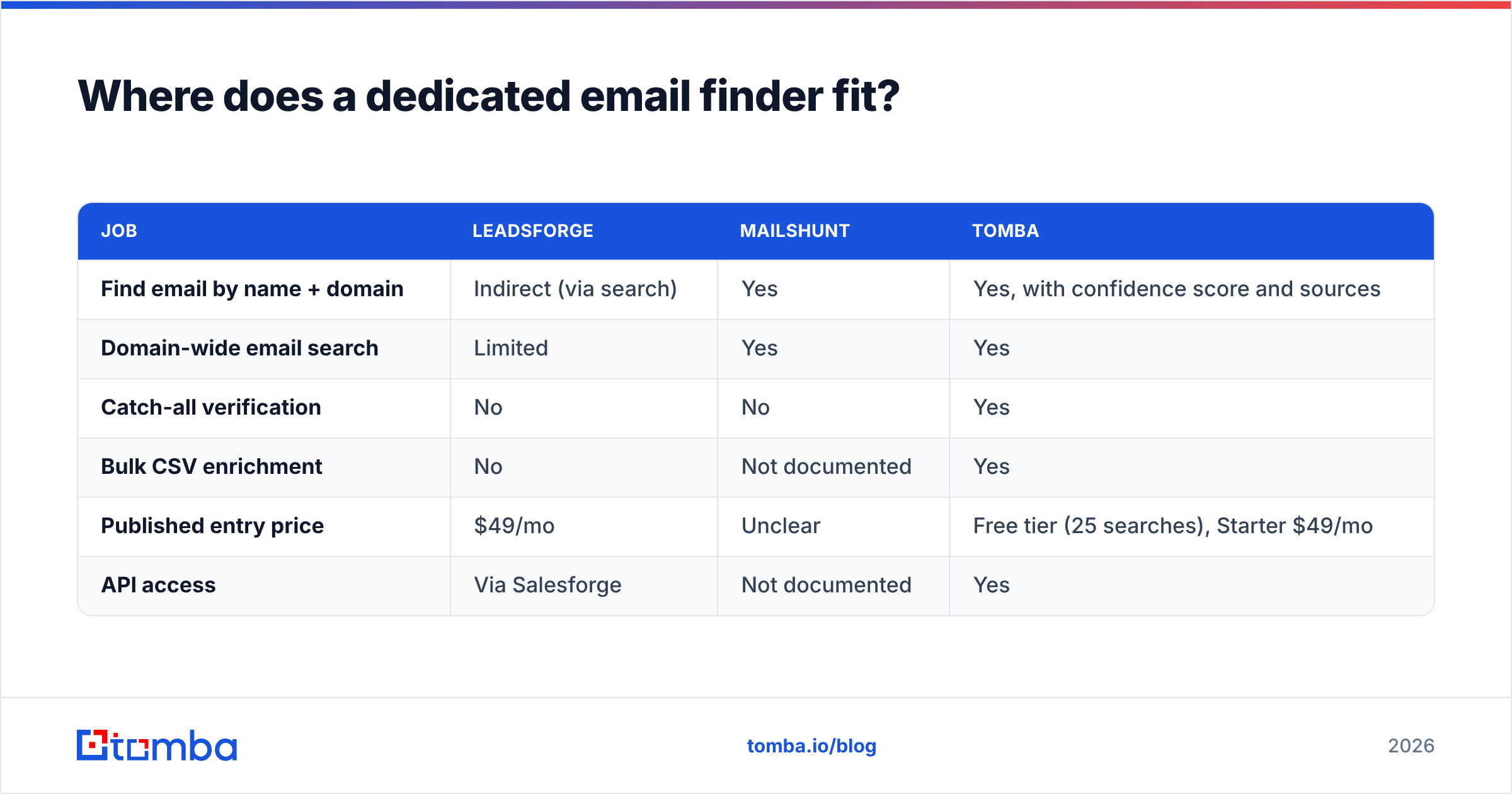
This is where a focused email-finding platform complements Leadsforge, or replaces Mailshunt if you liked its simplicity but need it to be reliable. Here is how the three options compare on the jobs Mailshunt was meant to handle:
| Job | Leadsforge | Mailshunt | Tomba |
|---|---|---|---|
| Find email by name + domain | Indirect (via search) | Yes | Yes, with confidence score and sources |
| Domain-wide email search | Limited | Yes | Yes |
| Catch-all verification | No | No | Yes |
| Bulk CSV enrichment | No | Not documented | Yes |
| Published entry price | $49/mo | Unclear | Free tier (25 searches), Starter $49/mo |
| API access | Via Salesforge | Not documented | Yes |
Tomba's plans start with a free tier of 25 searches a month, then Starter at $49, Growth at $99 and Pro at $249, with custom Enterprise pricing. You can see the full breakdown on Tomba pricing. The practical difference from Mailshunt is that you get documented limits, a domain search with source URLs for each address, and verification tools built for catch-all and bulk jobs.
One common setup for 2026 outbound teams:
- Leadsforge to build the target account and persona list.
- A dedicated email finder to fill in missing emails, look up one-off contacts and enrich CRM records.
- A standalone verifier as the final check before any send over a few hundred contacts.
How should you decide in five minutes?#
Answer these questions honestly:
- Do you already know who you want to contact? If yes, you need an email finder, not Leadsforge.
- Do you need phone numbers? If yes, Leadsforge is the only option of these two. Budget 10 credits per number.
- Are you on Salesforge already? If yes, Leadsforge is the obvious add-on.
- Is uptime important to you? If yes, drop Mailshunt until it publishes stable pricing and a working site.
- Do you need bulk verification or catch-all handling? Neither tool covers this well. Add a dedicated verifier.
Our verdict on Leadsforge vs Mailshunt#
Pick Leadsforge if you're building lists from scratch and want an easy AI search with rollover credits and no seat fees. At $49/month, it's a reasonable entry point, especially inside the Salesforge suite.
Pick Mailshunt only if you're a solo user making occasional lookups, cost is your only concern, and you can switch tools at short notice.
Skip both for precise lookups if your main need is accurate email finding for known contacts, CRM enrichment or verification. Use a purpose-built finder for that job.
If you need that last category, try the Tomba Email Finder. Enter a name and a company domain and you get the most likely professional address, a confidence score and the public sources behind it. It sits on the same platform as domain search, email verification, catch-all checks and bulk enrichment. You can start on the free tier with 25 searches a month and test it on your own target accounts before paying anything.
Related guides#
// get started
Find, verify and enrich your first contacts today
Start on the free plan with 25 searches a month, then scale when your team is ready.
Free plan · No credit card required · GDPR & CCPA
// about the author