Leadsforge vs Mailsso: Lead Builder or Email Verifier in 2026?
Leadsforge builds lead lists from a plain-English prompt. Mailsso checks whether the emails on a list will bounce. Here's which one to buy first, how the pricing works, and when you need both.
TL;DR
- Leadsforge and Mailsso aren't really rivals. Leadsforge is an AI lead-list builder: you describe your ICP and it returns contacts. Mailsso (mails.so) is an email validator: you give it addresses and it tells you which ones will bounce.
- Leadsforge costs $49/mo for 2,000 credits. Credits don't expire, you get 100 free credits to start, and there's no per-seat fee. Mailsso gives you 50 free credits, and every paid plan includes API access and bulk list validation.
- If you have no contacts yet, buy Leadsforge. If you already have a list from a CRM, an event, a scrape or an old export, buy Mailsso.
- Plenty of teams end up paying for both, one tool to find contacts and one to check them. A single platform that does both (Tomba, for example) cuts that to one bill and one workflow.
- Check any list before you send, even one labeled "verified." A one-hour check costs a lot less than a bounce spike on a new sending domain.
What is the real difference between Leadsforge and Mailsso?#
People search "Leadsforge vs Mailsso" because both tools promise better outbound data. They work on opposite ends of the pipeline, though.
Think of a restaurant. Leadsforge is the supplier that delivers the ingredients. Mailsso is the kitchen inspector who checks nothing has gone off before it reaches the plate. You need both jobs done, but hiring a second supplier won't get the inspection done.
Leadsforge comes from the Forge family of products, the same company behind Salesforge. You don't set filters. You type something like "Series A fintech companies in the UK with 50–200 employees, heads of finance" and Leadsforge turns it into a lead list, adds enrichment, and lets you export or send it on to a sequencer.
Mailsso (branded as mails.so) is a verification tool. You upload a CSV, connect an integration, or call the API, and it sorts each address by deliverability. Its job is to remove invalid, fake and dead addresses before they hurt your sender reputation.
So the useful question is "which problem do I have right now?", not "which tool is better?"
How do the two tools compare feature by feature?#
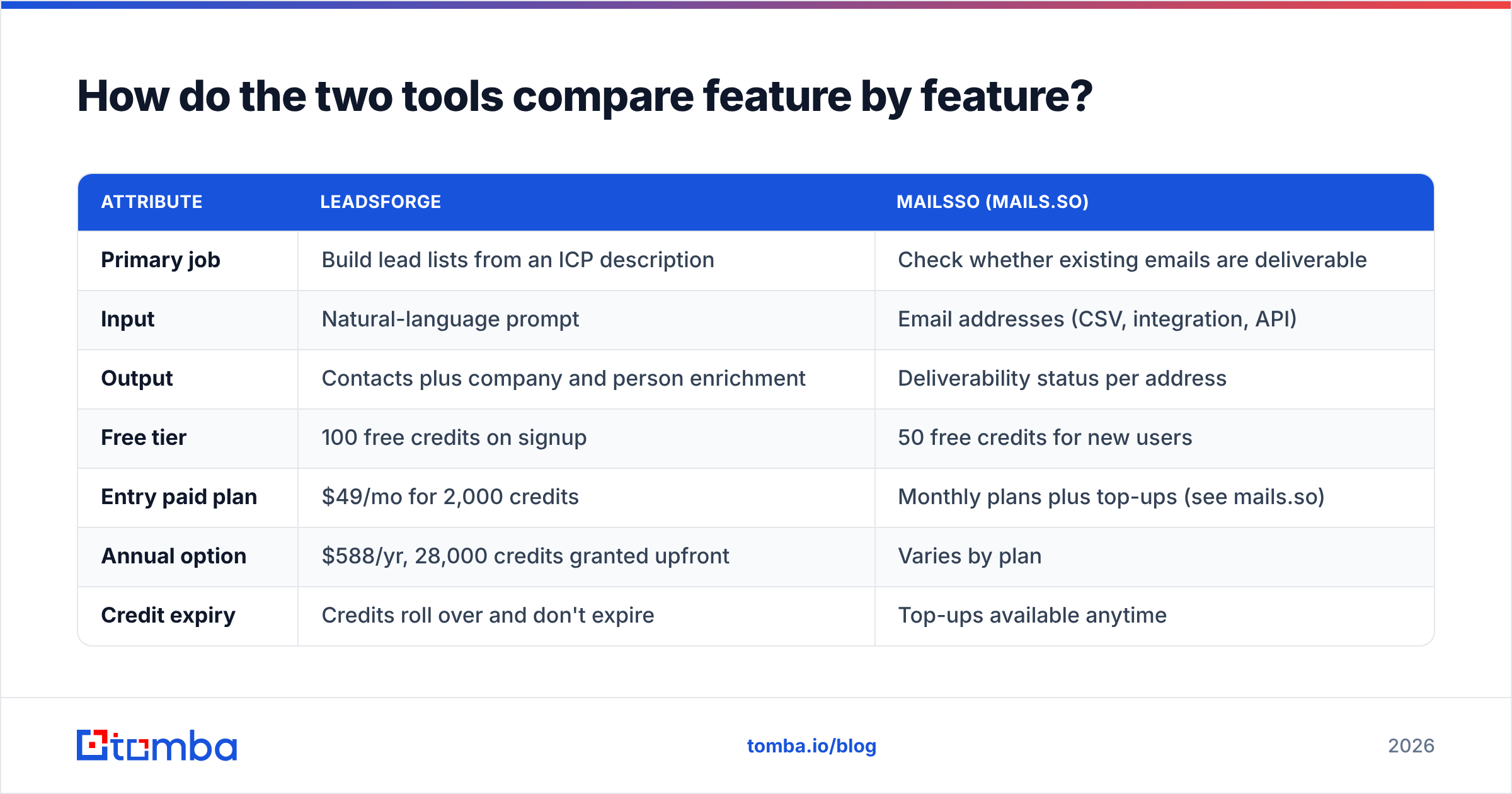
Here's the side-by-side. For Mailsso's paid tiers, prices change often and differ by volume, so check the live pricing page before you commit.
| Attribute | Leadsforge | Mailsso (mails.so) |
|---|---|---|
| Primary job | Build lead lists from an ICP description | Check whether existing emails are deliverable |
| Input | Natural-language prompt | Email addresses (CSV, integration, API) |
| Output | Contacts plus company and person enrichment | Deliverability status per address |
| Free tier | 100 free credits on signup | 50 free credits for new users |
| Entry paid plan | $49/mo for 2,000 credits | Monthly plans plus top-ups (see mails.so) |
| Annual option | $588/yr, 28,000 credits granted upfront | Varies by plan |
| Credit expiry | Credits roll over and don't expire | Top-ups available anytime |
| Seat pricing | No seat charge | Plan-based |
| API access | Mainly an app workflow, ecosystem export | Included in all paid plans |
| Non-profit discount | Not advertised | 50% off for non-profits |
| Best fit | Outbound teams starting from zero contacts | Teams with lists of uncertain quality |
Two rows matter most. Input and Output show that these tools feed each other rather than compete. And credit expiry is a real advantage for Leadsforge: if you prospect in bursts (a big push each quarter, then quiet), unused credits don't disappear at the end of the month.
Which problem are you actually trying to solve?#
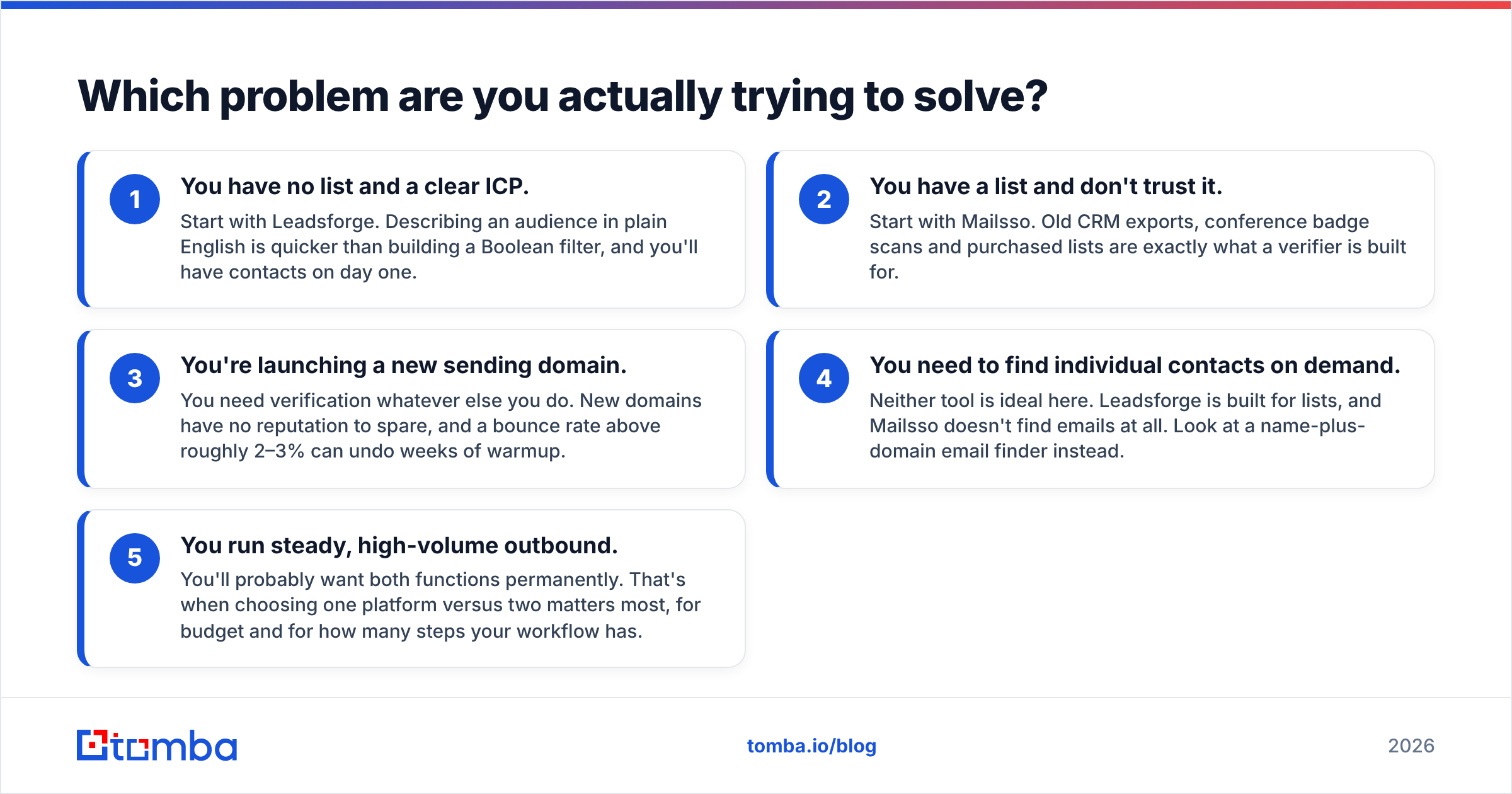
Before comparing prices, work out which of these situations you're in. Each one points to a different purchase:
- You have no list and a clear ICP. Start with Leadsforge. Describing an audience in plain English is quicker than building a Boolean filter, and you'll have contacts on day one.
- You have a list and don't trust it. Start with Mailsso. Old CRM exports, conference badge scans and purchased lists are exactly what a verifier is built for.
- You're launching a new sending domain. You need verification whatever else you do. New domains have no reputation to spare, and a bounce rate above roughly 2–3% can undo weeks of warmup.
- You need to find individual contacts on demand. Neither tool is ideal here. Leadsforge is built for lists, and Mailsso doesn't find emails at all. Look at a name-plus-domain email finder instead.
- You run steady, high-volume outbound. You'll probably want both functions permanently. That's when choosing one platform versus two matters most, for budget and for how many steps your workflow has.
Most teams are in situation 1 or 2 when they start looking and move into situation 5 within a quarter.

How does Leadsforge work in practice?#
Leadsforge's main selling point is the interface. Most prospecting databases give you a wall of filters: industry, headcount, seniority, geography, technology. That works, but it's slow, and it quietly penalizes people who don't already know the right filter combination.
With Leadsforge you describe the buyer. The AI turns your description into a search, shows you the matching contacts, and tells you how many credits the export will cost before you commit. That pre-export estimate is easy to overlook and matters more than it sounds. Some databases only show the cost after you've spent it.
The number of credits an export uses depends on how many leads are in it and how much enrichment you ask for. A bare list of names and emails costs less than one with firmographics and extra data points.
Where Leadsforge is strong:
- Fast from idea to list, especially for founders and small teams without a RevOps person
- Credits don't expire, which suits irregular prospecting
- No per-seat pricing, so adding a teammate doesn't raise the bill
- Works naturally with Salesforge if you already use that sequencer
Where you should be careful:
- An AI-interpreted query is only as precise as your prompt. Vague prompts give vague lists. Read the first 20 rows before you export 2,000.
- "Verified" at export time doesn't mean verified on the day you send. People change jobs all the time, and a list that sits for six weeks goes stale.
- If you need a single contact (one VP at one account), a list builder is the wrong tool. Credit accounting is designed around lists.
How does Mailsso work in practice?#
Mailsso has a narrower job. It takes addresses you already have and tells you which ones will accept mail. Validation usually runs through several layers: syntax, domain and MX records, disposable-domain detection, and an SMTP-level check against the receiving server.
Each address then gets a verdict, typically along the lines of valid, invalid, risky or unknown. You delete the invalids, decide what to do with the risky ones, and send to the rest.
Where Mailsso is strong:
- Simple UX. You can upload a list and have results without reading any documentation.
- API access on every paid plan, so you can validate signup forms or CRM entries in real time
- Top-ups when you run out mid-month, with no contract
- A 50% non-profit discount, which not many verifiers offer
Where you should be careful:
- It doesn't find anyone. If your list has gaps or old contacts, Mailsso can tell you who's gone but can't find who replaced them.
- Pay close attention to catch-all domains. These servers accept every address at the SMTP level, so no standard verifier can confirm a single mailbox with certainty. Check how Mailsso labels them, and decide in advance whether you'll send to "risky" addresses. For accounts that matter, a dedicated catch-all verifier can settle many of the addresses a standard check leaves marked "unknown."
- As with any SaaS subscription, read the plan terms and cancellation steps before you upgrade, and keep an eye on your first invoice.
Which is more accurate: Leadsforge or Mailsso?#
This comes up a lot, and it's partly the wrong question, because the two tools measure accuracy differently.
Leadsforge accuracy is about data coverage and freshness. Does the database contain the right people, and is each email still their current one? Every list-building database faces the same decay problem. B2B contact data goes out of date at a meaningful rate every year as people change roles, companies rebrand, and domains move.
Mailsso accuracy is about classification. When it says "valid," does the email get delivered? When it says "invalid," is the mailbox really gone? What matters most is how well it handles the grey zone: catch-alls, greylisting servers, and mailboxes that time out.
In practice, a verifier's accuracy puts a ceiling on how clean any list builder's output can be when you send. That's why experienced outbound teams run every list through verification right before a campaign, including lists that were verified at export. Bounces are the most direct deliverability signal mailbox providers see (see how bounce messages work), and you only get so many before inbox placement starts to suffer.
What does it cost to run both together?#
Here's a realistic mid-size month: you prospect about 2,000 new contacts and re-verify an older CRM segment of similar size.
- Leadsforge: $49/mo covers 2,000 credits, depending on how much enrichment you pull per lead. With the annual plan ($588) you get 28,000 credits upfront, which works out to a much lower effective rate if you prospect in bursts.
- Mailsso: you'll need a paid plan or top-ups large enough for about 4,000 validations a month (new list plus CRM segment). Price it on mails.so for your exact volume.
- Hidden cost: the time spent moving between them. Export a CSV from Leadsforge, upload it to Mailsso, download the results, clean the file, import it into your sequencer. That's four file handoffs per campaign, and each one is a chance to pick the wrong file or lose a column mapping.
Neither tool is overpriced for what it does. The cost comes from the gap between them. If you're comparing categories more broadly, review sites like G2 are useful for checking how verification and prospecting tools score on real-user reviews of accuracy and support.
Is there a single-tool alternative to using both?#
Yes. This is the honest reason to look at platforms that combine finding and verifying.
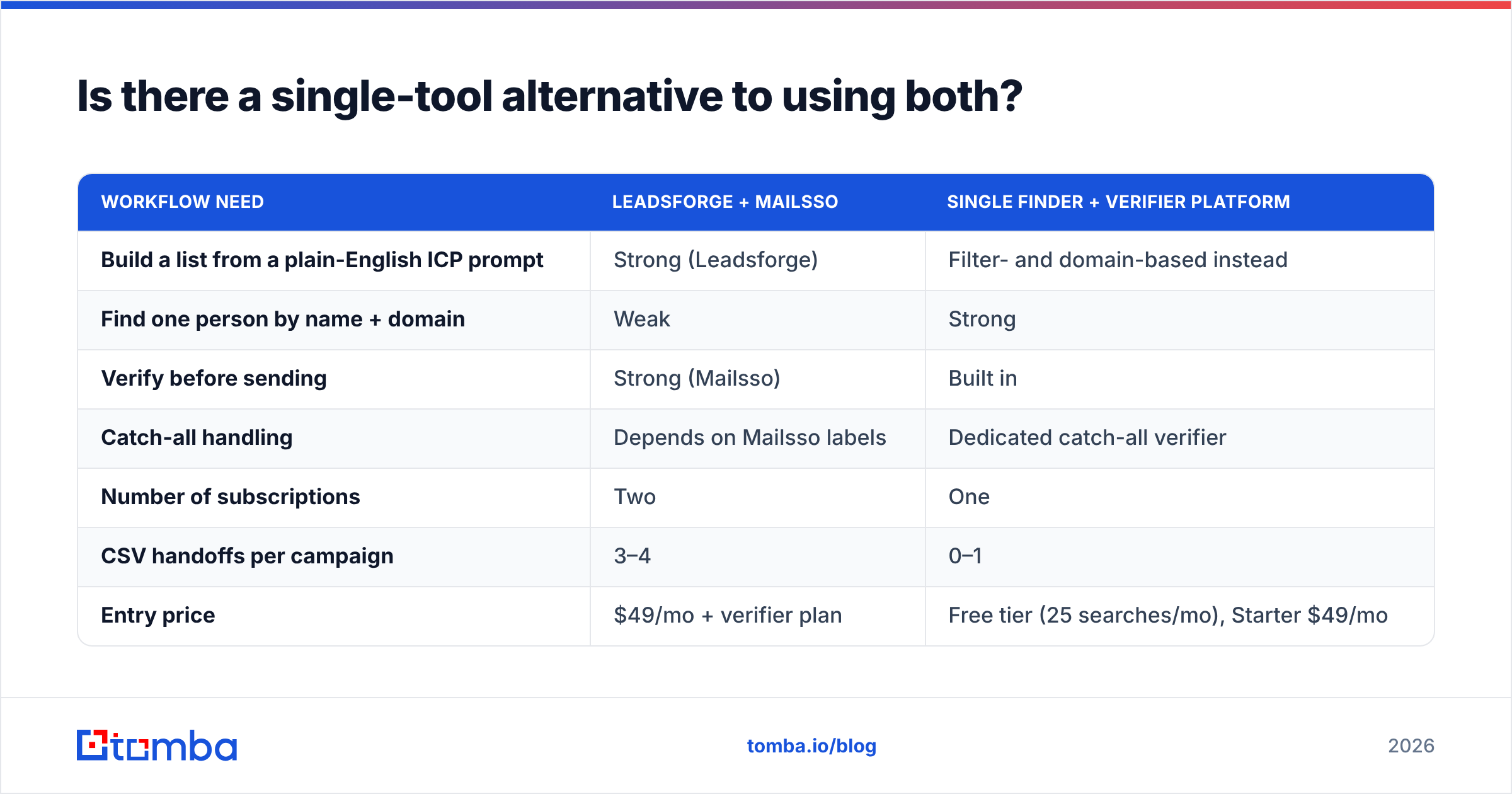
Tomba, for example, has its email finder and email verifier in the same account, with domain search, a catch-all verifier and enrichment alongside them. You find a contact and verify it without exporting anything. Here's how that compares with the two-tool approach:
| Workflow need | Leadsforge + Mailsso | Single finder + verifier platform |
|---|---|---|
| Build a list from a plain-English ICP prompt | Strong (Leadsforge) | Filter- and domain-based instead |
| Find one person by name + domain | Weak | Strong |
| Verify before sending | Strong (Mailsso) | Built in |
| Catch-all handling | Depends on Mailsso labels | Dedicated catch-all verifier |
| Number of subscriptions | Two | One |
| CSV handoffs per campaign | 3–4 | 0–1 |
| Entry price | $49/mo + verifier plan | Free tier (25 searches/mo), Starter $49/mo |
To be fair: if a plain-English ICP prompt is the main thing you want, Leadsforge does it very well, and a filter-based tool will feel slower when you're first exploring a market. But if most of your work is "find this person, check this address, next," one platform saves time on every campaign.

Who should pick Leadsforge?#
Choose Leadsforge if:
- You're a founder, SDR or small agency starting outbound with no existing list
- You prefer describing your buyer to setting up filters
- You prospect in bursts and want credits that don't expire
- You already use Salesforge or another Forge product and want a native handoff
Even then, run the export through a verifier before your first send.
Who should pick Mailsso?#
Choose Mailsso if:
- You already have contacts (CRM, events, inbound signups, partner lists) and the problem is quality, not volume
- You want a verification API to validate emails at the point of capture
- You're a non-profit and can use the 50% discount
- You like a verifier that stays simple and does one job
If you later need to find new contacts too, you'll be adding a second tool.
So, Leadsforge vs Mailsso: what's the verdict?#
Leadsforge wins if you need contacts. Mailsso wins if you need clean contacts from a list you already have. Comparing them directly is a bit like comparing a fishing boat with a fish inspector.
In practice:
- Day one of outbound: Leadsforge first, then verify the export before sending.
- Inherited or aging database: Mailsso first, then fill the gaps with a finder.
- Ongoing outbound at volume: decide on purpose between two specialist tools and one combined platform. Don't drift into three subscriptions and a folder of CSVs.
Whichever you choose, keep one rule: no list goes into a sequence without being checked that week.
Ready to find and verify in one place?#
If your week is mostly "find this contact, confirm the address, send," the Tomba Email Finder covers both steps in one workflow. Search by name and domain or by company, and verification is built in so you're not exporting files between tools. It also connects to catch-all verification, domain search and enrichment when you need more. Start on the free tier with 25 searches a month, then compare Tomba pricing (Starter $49/mo, Growth $99/mo, Pro $249/mo) against what you'd pay for a list builder plus a separate verifier.
Related guides#
// get started
Find, verify and enrich your first contacts today
Start on the free plan with 25 searches a month, then scale when your team is ready.
Free plan · No credit card required · GDPR & CCPA
// about the author