Leadsforge vs Mattermark: AI Lead Lists or Startup Intelligence?
Leadsforge builds AI-generated prospect lists from a chat prompt. Mattermark tracked startup growth signals for investors. They solve different problems, and only one is still actively developed. Here's which one fits your pipeline in 2026.
TL;DR
- Leadsforge is an AI lead-generation tool. You describe your ideal customer in plain English and it returns a contact list with emails you can export to a sequencer.
- Mattermark was a company-intelligence platform that tracked startup growth signals (headcount, funding, web traffic) for VCs and startup-focused sales teams. FullContact acquired it in 2017, and the product has seen little visible development since then.
- If you need people to email this quarter, Leadsforge is the more relevant tool. If you need to research which private companies are growing, Mattermark's approach made sense, but in 2026 you'll probably get that data from a more actively maintained platform.
- Neither tool replaces a dedicated email finder plus a verifier. Whichever list you start with, verify it before you send.
What is the real difference between Leadsforge and Mattermark?#
The easiest way to think about it: Mattermark tells you which companies are worth watching, and Leadsforge tells you who to email at those companies.
The two tools sit at different points in the funnel, and a lot of "Leadsforge vs Mattermark" confusion comes from treating them as substitutes. They aren't. One is a company-level research product. The other is a contact-level list builder.
Leadsforge comes from the Forge ecosystem, the same group behind Salesforge and related outbound tools. Its main feature is a chat-style search. You type something like "Heads of RevOps at Series B SaaS companies in Germany with 50-200 employees," and it returns matching leads with names, titles, companies, LinkedIn URLs and work emails. It's designed to feed straight into a cold email sequence.
Mattermark started in 2013 as a data platform for investors. It scored private companies on "growth signals" such as employee growth, web traffic, mobile downloads and funding rounds, which let a VC or a startup-focused sales team spot fast-growing companies early. It was acquired by FullContact in 2017. After that, most of the attention and investment went to FullContact's identity-resolution business rather than to Mattermark as a standalone product.
That history matters. You're comparing a tool built for 2025-era AI outbound with one whose core design dates from the 2015 startup-data era.
How do Leadsforge and Mattermark compare feature by feature?#
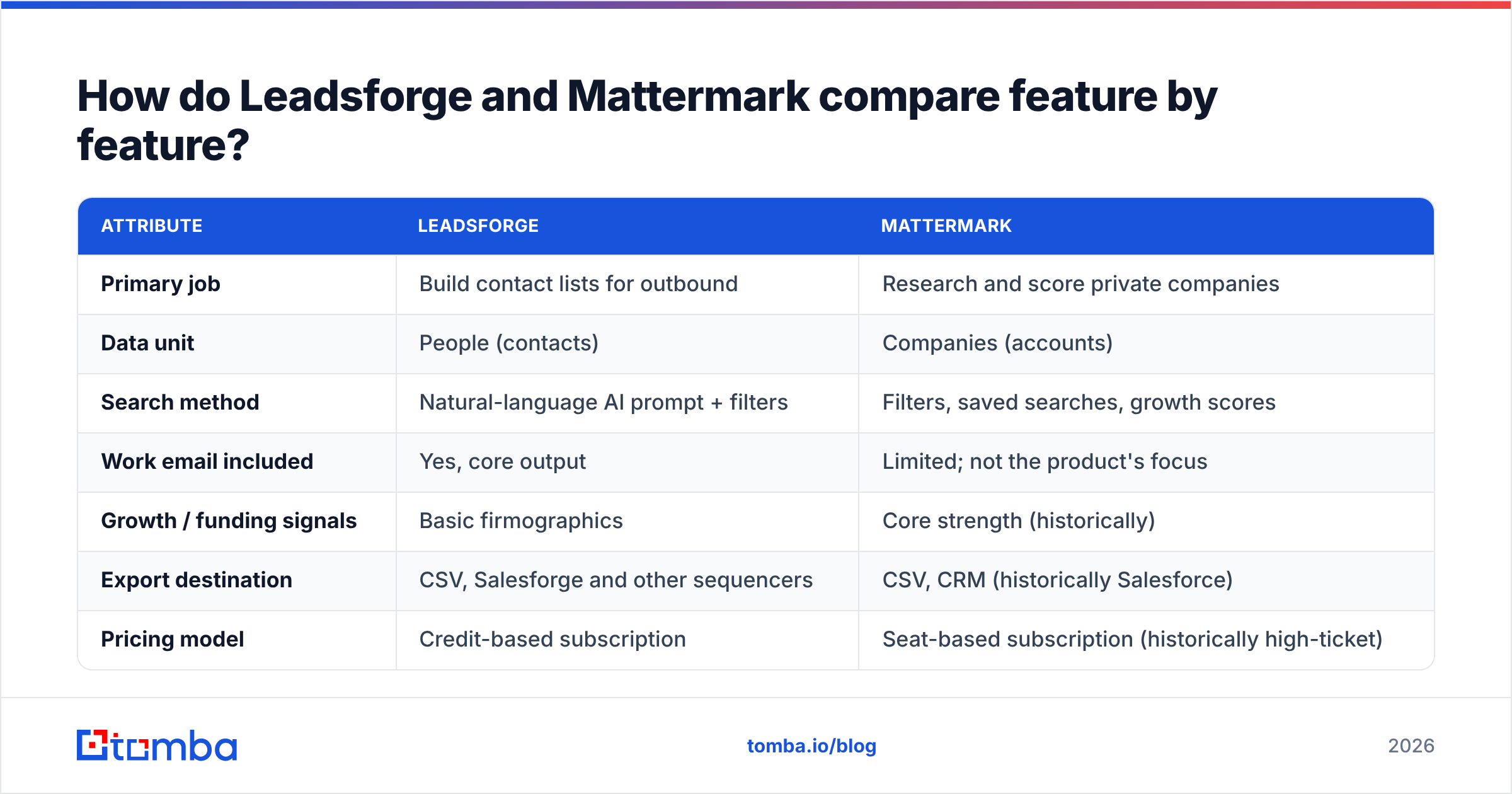
Here's the side-by-side on the attributes that matter for a B2B team choosing a data source in 2026.
| Attribute | Leadsforge | Mattermark |
|---|---|---|
| Primary job | Build contact lists for outbound | Research and score private companies |
| Data unit | People (contacts) | Companies (accounts) |
| Search method | Natural-language AI prompt + filters | Filters, saved searches, growth scores |
| Work email included | Yes, core output | Limited; not the product's focus |
| Growth / funding signals | Basic firmographics | Core strength (historically) |
| Export destination | CSV, Salesforge and other sequencers | CSV, CRM (historically Salesforce) |
| Pricing model | Credit-based subscription | Seat-based subscription (historically high-ticket) |
| Active development in 2026 | Yes, part of the Forge product suite | Minimal since 2017 FullContact acquisition |
| Best for | SDRs, agencies, founders doing outbound | VCs, analysts, startup-focused account research |
A caveat on the pricing row: both vendors have changed plans over the years. Leadsforge's entry tier sits roughly in the ~$50/month range for a bundle of credits at the time of writing. Mattermark historically charged several hundred dollars per seat per month for its pro tiers. Check each vendor's current page before you budget, because list prices in this category change often.
What does Leadsforge actually do well?#
Leadsforge is built for speed from ICP to inbox. If your problem is "I need 500 relevant people to email by Friday," it is close to the shortest path available.
The prompt-based search removes filter fatigue#
Classic B2B databases make you work through dozens of dropdowns: industry, sub-industry, headcount band, seniority, department, geography, technology. Leadsforge lets you write the ICP the way you'd explain it to a new SDR. For founders and small agencies without a RevOps person tuning Boolean filters, that removes real friction.
It's wired into an outbound stack#
Because Leadsforge sits next to Salesforge (sequencing), Warmforge (warmup) and related tools, the path from list to sending campaign is short. You don't have to build a CSV-cleaning workflow every time.
Where it's weaker#
- Coverage outside core markets. AI search can only return what's in the underlying data. Niche verticals, SMBs without much web presence, and non-English markets tend to have thinner results.
- Email quality varies. Like most list builders, it returns a mix of verified and "likely" addresses. Catch-all domains are a common weak point. Run exports through an email verifier before sending, especially on a fresh domain.
- Account research depth. You get firmographics, but you won't get the deep growth-trend view an analyst would want.
What was Mattermark good at, and is it still usable?#
Mattermark's lasting idea was the growth score, a single number summarizing how fast a private company was scaling. For investors sourcing deals, and for sales teams that sold to hypergrowth startups, that was valuable. You could sort thousands of companies by momentum rather than by static size.

The problem in 2026: freshness and momentum#
Growth signals are only useful if they're current. A headcount trend from last year says little about a company that just did layoffs or closed a new round. Since the 2017 acquisition, Mattermark hasn't shipped the kind of visible product updates you'd expect from an actively developed data platform. Public reviews on sites like G2 have also slowed to a trickle compared with active competitors.
That doesn't make the concept obsolete. Company-level growth intelligence is still useful. It means you should:
- Confirm access before planning around it. Ask FullContact directly whether Mattermark data is still sold as a standalone product, and on what terms.
- Spot-check freshness. Pull 20 companies you know well and compare Mattermark's headcount and funding data against their LinkedIn pages and recent press.
- Plan for the contact layer separately. Mattermark was never mainly an email source. Even at its peak, you'd pair it with a separate tool to find email addresses for the decision-makers.
If you're already evaluating FullContact's identity products, our FullContact alternative breakdown covers how the parent company's current offering compares for contact-level work.
Is Leadsforge better than Mattermark?#
For outbound prospecting, yes, clearly. For startup and investor research, not directly, because Leadsforge doesn't try to do that job.
Match the tool to the question you're asking:
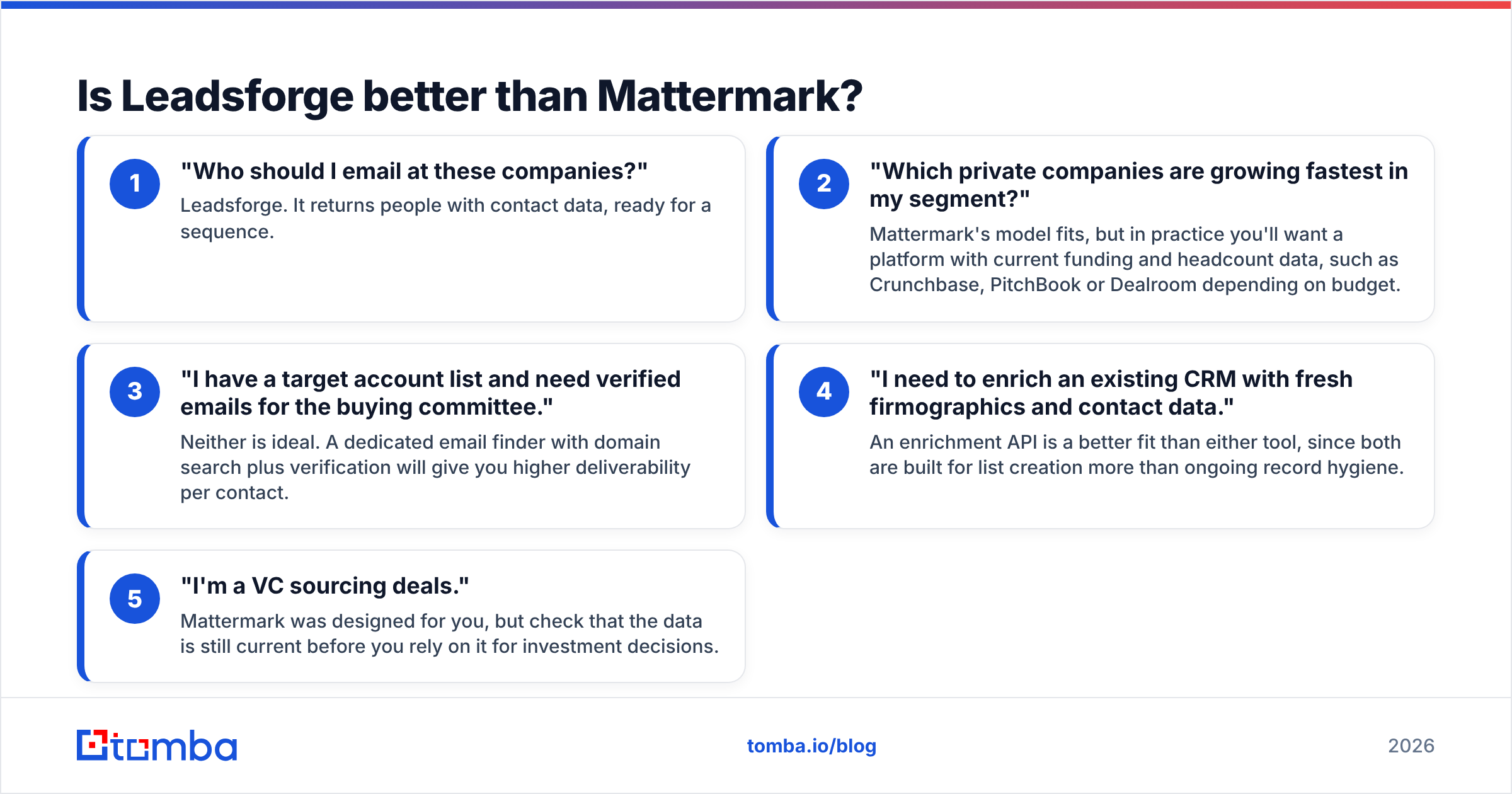
- "Who should I email at these companies?" Leadsforge. It returns people with contact data, ready for a sequence.
- "Which private companies are growing fastest in my segment?" Mattermark's model fits, but in practice you'll want a platform with current funding and headcount data, such as Crunchbase, PitchBook or Dealroom depending on budget.
- "I have a target account list and need verified emails for the buying committee." Neither is ideal. A dedicated email finder with domain search plus verification will give you higher deliverability per contact.
- "I need to enrich an existing CRM with fresh firmographics and contact data." An enrichment API is a better fit than either tool, since both are built for list creation more than ongoing record hygiene.
- "I'm a VC sourcing deals." Mattermark was designed for you, but check that the data is still current before you rely on it for investment decisions.
Which one gives you better email deliverability?#
Neither tool is a verifier, and treating either one's export as send-ready is the most common mistake we see.
Here's the usual failure mode. You pull 2,000 contacts from a list builder, load them into a sequencer, and send from a domain that is three weeks old. Sixteen percent bounce. Your sender reputation drops, and your next campaign lands in spam even though the list is clean.

With Leadsforge the risk is unverified or catch-all addresses slipping through. With Mattermark the risk is simpler: in many cases there's no personal work email at all, just a company record and maybe a generic inbox. Either way, a verification pass is required.
A defensible workflow looks like this:
- Build the account list with whatever research source fits (Mattermark-style growth data, Crunchbase, your own CRM).
- Find the contacts with an AI list builder like Leadsforge or a domain-based email finder.
- Verify everything, including catch-all handling, before the list reaches your sequencer.
- Deduplicate against your CRM so you don't re-email existing customers or open opportunities.
Google and Yahoo's bulk sender requirements, which took effect in 2024, made this non-negotiable. Keep spam complaints under 0.3% and bounces low, or your whole domain pays for it.
How does pricing compare in practice?#
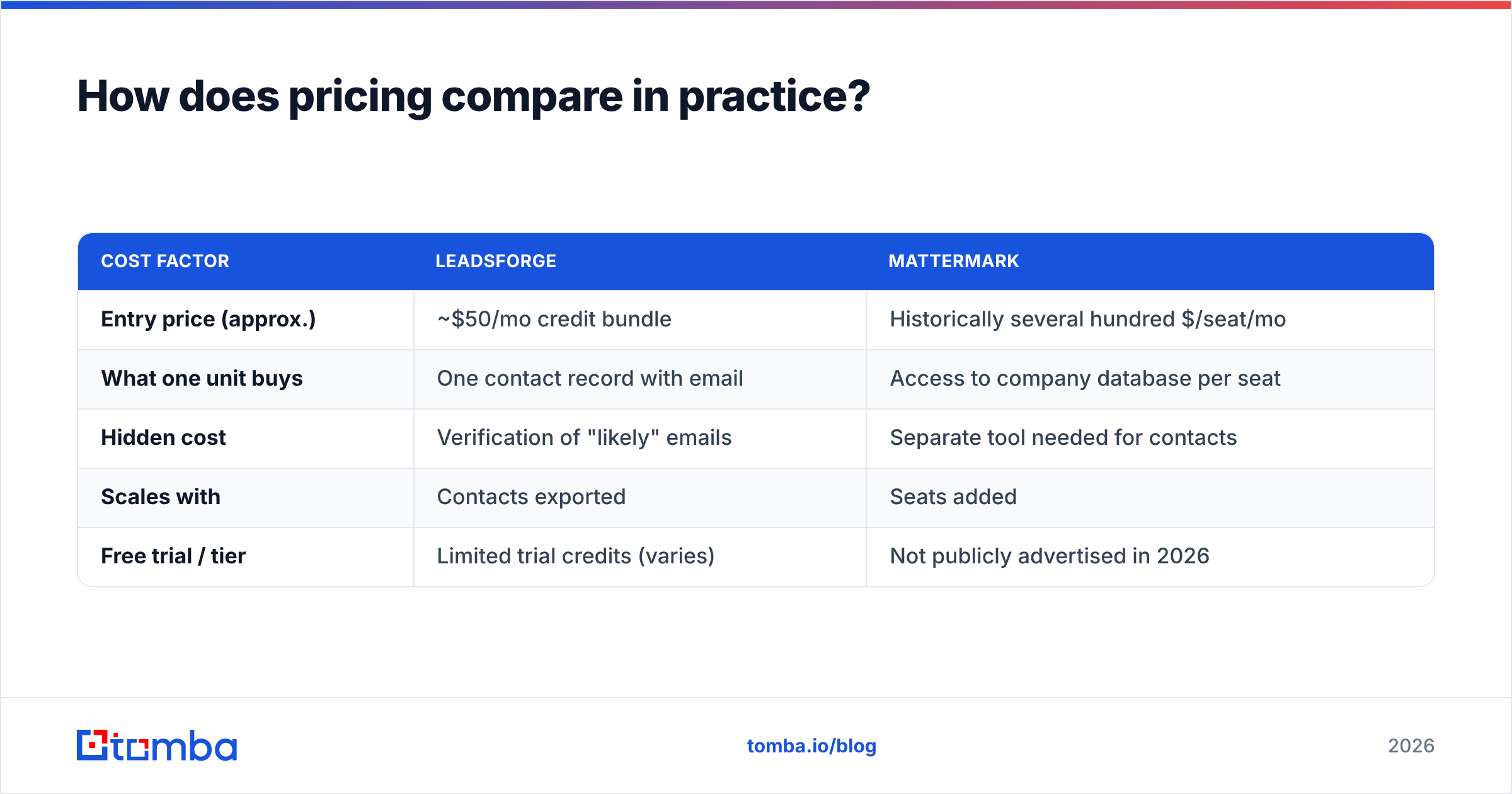
List prices tell you less than cost per usable contact. That's the number that matters.
| Cost factor | Leadsforge | Mattermark |
|---|---|---|
| Entry price (approx.) | ~$50/mo credit bundle | Historically several hundred $/seat/mo |
| What one unit buys | One contact record with email | Access to company database per seat |
| Hidden cost | Verification of "likely" emails | Separate tool needed for contacts |
| Scales with | Contacts exported | Seats added |
| Free trial / tier | Limited trial credits (varies) | Not publicly advertised in 2026 |
For a two-person outbound team exporting 1,500 contacts a month, Leadsforge's credit model is usually cheaper and more predictable. For a five-analyst investment team, seat-based company intelligence can make sense, but only if the data is current.
To estimate cost per usable contact, add your verification spend and divide by the contacts that actually pass. A cheaper list with a 25% invalid rate often costs more than a pricier, cleaner one.
What should you use instead if neither fits?#
Many teams reading a "Leadsforge vs Mattermark" comparison actually need a mix of the two: company targeting plus reliable contact data, without paying for a big all-in-one suite.
That's where a focused email-finding platform fits. With Tomba, for example, you can:
- Run a domain search on each target account to see every public professional email and the company's email pattern.
- Use the email finder when you already know the person's name and company.
- Verify each address, including catch-all detection, before export.
- Push results to HubSpot, Salesforce, Pipedrive or Google Sheets, or call the API from your own workflow.
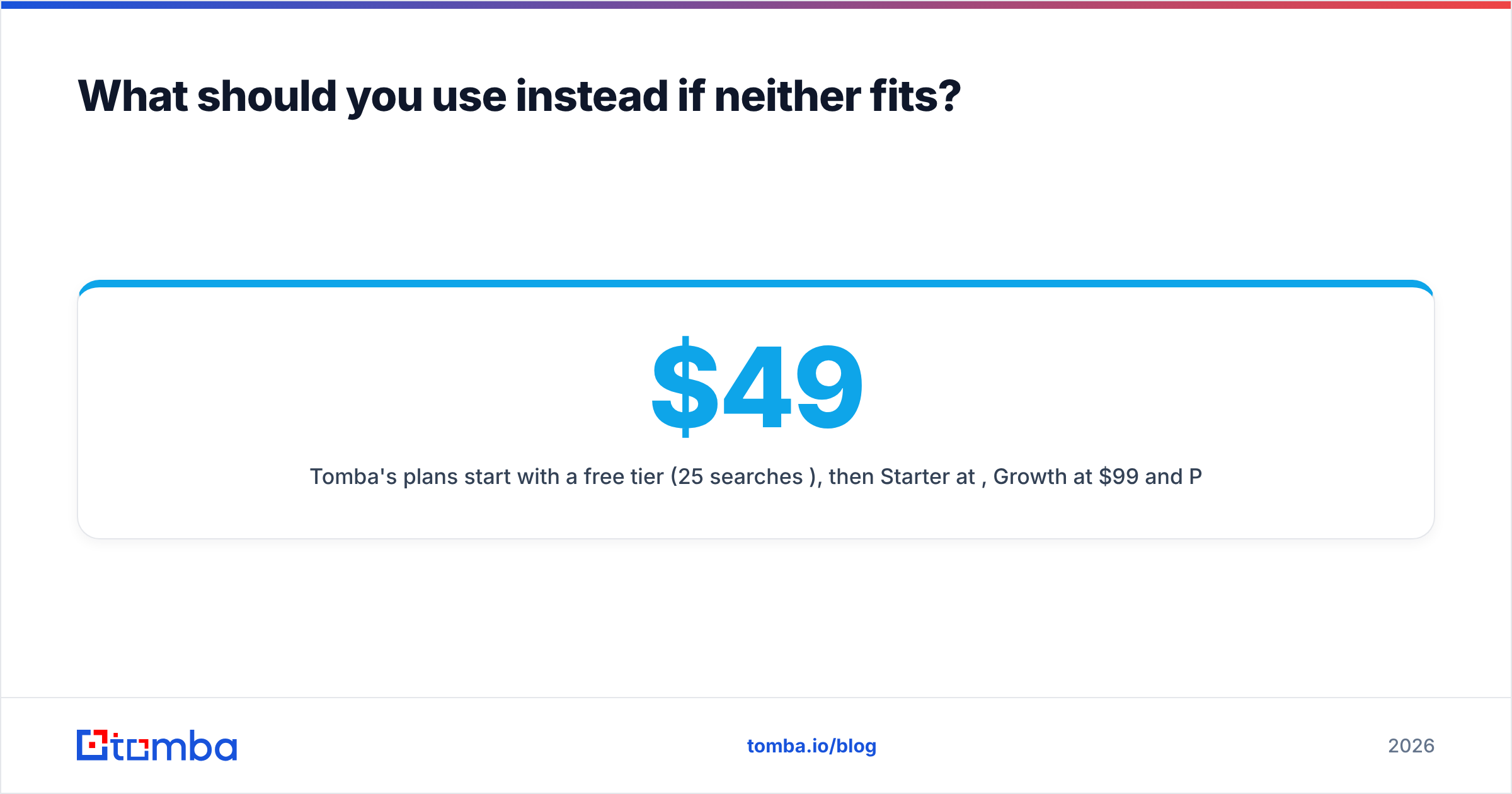
Tomba's plans start with a free tier (25 searches/month), then Starter at $49/mo, Growth at $99/mo and Pro at $249/mo, with custom Enterprise pricing. The full breakdown is on the Tomba pricing page. It won't replace Mattermark's growth scoring or Leadsforge's AI prompt search, and it isn't meant to. It covers the step both tools leave to you: getting a verified email for the right person.
Leadsforge vs Mattermark: what's the final verdict?#
Choose Leadsforge if you run outbound and want to go from "here's my ICP" to "here's a sequence-ready list" as quickly as possible. It's actively developed, fits a modern cold email stack, and its credit pricing works for small teams. Budget for a verification pass on every export.
Choose Mattermark only if you've confirmed current access and freshness with FullContact, and your job is company-level research on private, high-growth startups rather than contact outreach. For most teams in 2026, a more actively maintained startup-data platform will do that job better.
Choose neither on its own if what you need is dependable, verified contacts at accounts you've already picked. In that case, pair your account research with a dedicated email finder and verifier.
If that last scenario sounds like your team, try Tomba Email Finder. Enter a domain or a name plus company, get professional email addresses with confidence scores and source URLs, and verify them in the same workflow before they reach your sequencer. The free tier gives you 25 searches a month to test it against your current data source, so you can compare bounce rates on your own accounts.
Related guides#
// get started
Find, verify and enrich your first contacts today
Start on the free plan with 25 searches a month, then scale when your team is ready.
Free plan · No credit card required · GDPR & CCPA
// about the author