Leadsforge vs Minelead: AI Lead Lists or Domain Email Finder?
Leadsforge builds AI lead lists from a plain-English ICP. Minelead finds emails behind the domains you already have. Here's which one fits your outbound workflow in 2026, and when a third option is the better buy.
TL;DR
- Leadsforge is an AI list builder. You describe your ideal customer in plain English and it gives you a list of prospects with contact data. It works best when you don't have a target list yet.
- Minelead is a classic email finder. You give it a domain or a name plus a company, and it returns email addresses and patterns. It works best when you already know which accounts you want.
- Leadsforge is part of the Forge ecosystem (Salesforge, Mailforge, Infraforge), so it suits teams that run their sending there. Minelead is lighter and sits next to any stack through its API and browser extension.
- Neither tool removes the need to verify before you send. Test both on the same 100 contacts before you commit to a plan.
- If you need domain search, name-based finding, verification and enrichment on one credit balance, Tomba is a third option worth benchmarking against both.
What is Leadsforge?#
Leadsforge is an AI lead-generation tool built by the team behind Salesforge. It replaces the usual filter-heavy database UI with a chat-style prompt. You type something like "Heads of RevOps at Series B SaaS companies in the US with 50–200 employees", and Leadsforge turns that into search criteria, shows you matching companies and people, and lets you refine the results before you spend credits.
A few things set it apart:
- Natural-language ICP search instead of dozens of dropdown filters.
- Lookalike companies. Give it a customer you like and it finds similar accounts.
- Contact data included in the list, so you don't need a separate email-finding step for most records.
- A direct handoff to Salesforge for sequencing, plus CSV export for any other tool.
Leadsforge is a top-of-funnel tool. It answers "who should I contact?" before it answers "what's their email?"
What is Minelead?#
Minelead is an email-finding and verification platform that has been around longer and works the traditional way. Its core features are:
- Domain search: enter a company website and get the public-facing and pattern-derived emails tied to it.
- Email finder: enter a first name, last name and domain to get the most likely address.
- Email verifier for single addresses or lists.
- Lead generator: search for companies by keyword or industry, then pull their emails.
- A browser extension and an API for pulling data into your own workflows.
Minelead assumes you already know roughly who you're targeting. It fills in the contact layer. It doesn't try to be your ICP brain.

How do Leadsforge and Minelead differ in how they find leads?#
The main difference is where each tool starts in your workflow. Here's how that plays out:
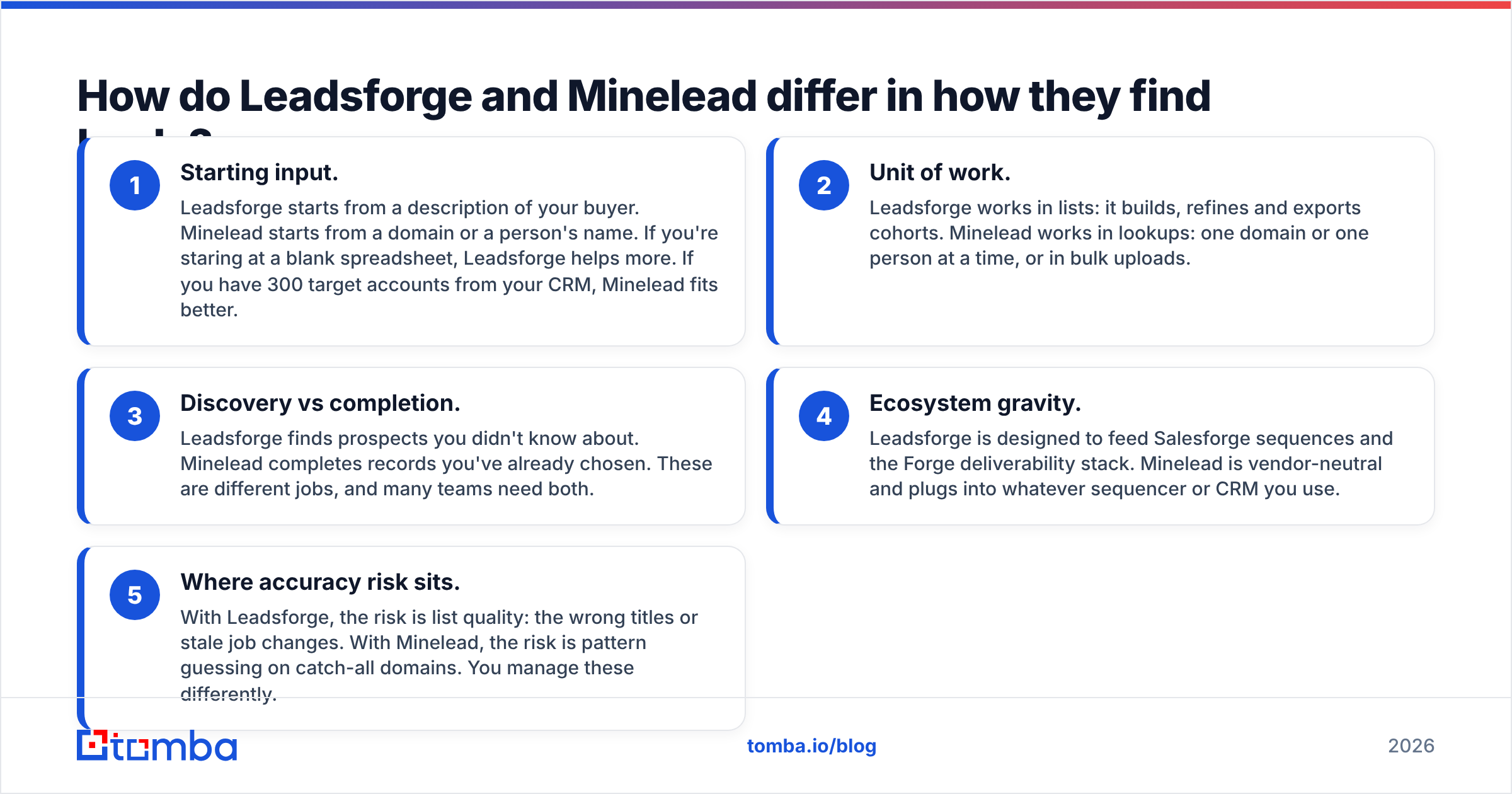
- Starting input. Leadsforge starts from a description of your buyer. Minelead starts from a domain or a person's name. If you're staring at a blank spreadsheet, Leadsforge helps more. If you have 300 target accounts from your CRM, Minelead fits better.
- Unit of work. Leadsforge works in lists: it builds, refines and exports cohorts. Minelead works in lookups: one domain or one person at a time, or in bulk uploads.
- Discovery vs completion. Leadsforge finds prospects you didn't know about. Minelead completes records you've already chosen. These are different jobs, and many teams need both.
- Ecosystem gravity. Leadsforge is designed to feed Salesforge sequences and the Forge deliverability stack. Minelead is vendor-neutral and plugs into whatever sequencer or CRM you use.
- Where accuracy risk sits. With Leadsforge, the risk is list quality: the wrong titles or stale job changes. With Minelead, the risk is pattern guessing on catch-all domains. You manage these differently.
If you remember one thing from this post, make it point 3. Most "which is better" debates are really a "which job am I hiring for" question.
How do Leadsforge and Minelead compare feature by feature?#
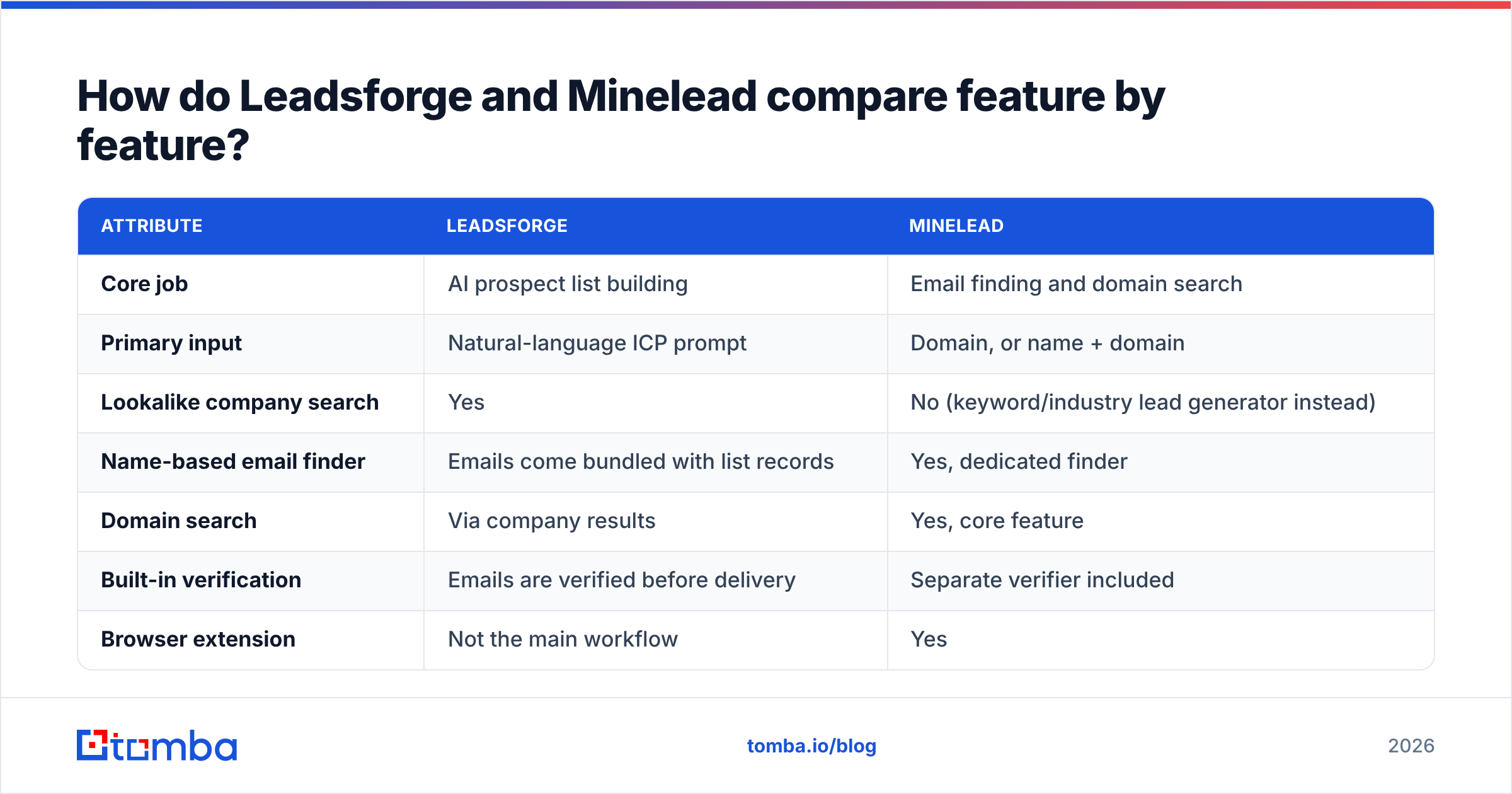
The table below reflects each vendor's public positioning in 2026. Feature sets change often, so check the vendor pages before you decide based on a single line.
| Attribute | Leadsforge | Minelead |
|---|---|---|
| Core job | AI prospect list building | Email finding and domain search |
| Primary input | Natural-language ICP prompt | Domain, or name + domain |
| Lookalike company search | Yes | No (keyword/industry lead generator instead) |
| Name-based email finder | Emails come bundled with list records | Yes, dedicated finder |
| Domain search | Via company results | Yes, core feature |
| Built-in verification | Emails are verified before delivery | Separate verifier included |
| Browser extension | Not the main workflow | Yes |
| API access | Limited; the product is built around the UI | Yes |
| Native sequencer handoff | Salesforge | None; export or API to any tool |
| Free access | Trial credits | Small free tier |
| Pricing model | Credits per contact | Monthly search/verification quotas |
| Best for | Teams with no list who need volume fast | Teams with a target account list who need emails |
Pros and cons at a glance#
| Leadsforge | Minelead | |
|---|---|---|
| Biggest strength | Turns a vague ICP into a usable list in minutes | Simple, predictable domain and name lookups |
| Biggest weakness | Less control over exact filter logic; tied to the Forge ecosystem for the smoothest flow | No real discovery layer; you bring the targets |
| Learning curve | Very low; you just type | Low; familiar email-finder UI |
| Scales best with | Salesforge users running high-volume outbound | Lean teams, agencies, developers using the API |
Which tool gives more accurate email data?#
This is the question everyone asks, and the honest answer is that it depends on your segment. No public, independent benchmark tests Leadsforge and Minelead against each other on the same contact set, and anyone who claims one is "95% accurate" across the board is quoting marketing copy.

What you can reason about:
- Leadsforge's accuracy is list accuracy plus email accuracy. A valid email for someone who left the company three months ago is still a wasted send. AI title matching also means you'll sometimes get "Revenue Operations Analyst" when you asked for "Head of RevOps". Spot-check titles before you export.
- Minelead's accuracy depends on how the domain is set up. On domains with a clean, consistent pattern (firstname.lastname@), pattern-based finders do well. On catch-all domains, where the mail server accepts every address, any finder can only say "probably". That's where bounces pile up.
- Region and company size matter more than vendor. US mid-market SaaS is well covered by almost every tool. DACH manufacturing, LATAM SMBs and public-sector domains are where coverage gaps show up.
The practical fix is the same for both: run every list through a dedicated email verifier before it reaches a sequencer, and treat catch-all results as a separate, lower-volume segment.
How much do Leadsforge and Minelead cost?#
Both vendors change their plans and credit bundles often, so treat this as a framework rather than a quote. Check the current pricing pages before you buy.
- Leadsforge uses credits, roughly one per contact delivered. That makes cost predictable per lead, but volume adds up quickly: at 2,000 contacts a month you're paying for 2,000 contacts whether or not they reply. The best value comes when you already use Salesforge and avoid paying for a separate list tool plus a separate sequencer data sync.
- Minelead uses monthly quotas for searches and verifications, plus a small free tier for testing. The entry price is lower, which suits freelancers, small agencies and founders doing their own outbound. Watch whether a domain search that returns 20 emails costs one credit or 20. That detail changes the real cost per contact a lot.
Here's a rough way to compare them. Work out your monthly volume of net-new, verified, sendable contacts. Divide each plan's price by that number, not by the headline credit count. A tool that looks cheaper per credit can end up more expensive per contact that doesn't bounce.
Is Leadsforge better than Minelead for outbound campaigns?#
For volume outbound from a standing start, Leadsforge usually wins. The time it takes to go from "we sell to mid-market fintech CFOs" to 500 contacts ready for a sequence is hard to match with a lookup-based tool. Paired with Salesforge, the whole path from list to warmed mailbox to sequence stays inside one vendor, which cuts integration work.
For account-based outbound, Minelead is usually the better fit. When sales and marketing have already agreed on 150 named accounts, you don't want an AI suggesting lookalikes. You want every relevant email at those 150 domains, cleanly. That's a domain-search job.
A useful rule of thumb:
- More than 1,000 new contacts a month and no fixed account list: start with Leadsforge.
- Fewer than 500 contacts a month against a named account list: start with Minelead.
- Somewhere in between, or mixing both motions: you'll probably end up using a list builder and a finder together, or one platform that does both.
When should you pick Minelead over Leadsforge?#
Pick Minelead when:
- You already own the account list. It comes from your CRM, intent data, a conference attendee list or a partner.
- You need API access for your own tooling. Minelead's API-first options suit developers building enrichment into internal apps.
- You don't use Salesforge and don't plan to. Much of Leadsforge's convenience comes from the native handoff.
- Budget is tight and you're sending low volume. A small plan plus the free tier covers a lot of founder-led outbound.
- You want to see how the email was derived. Domain search results that show the company's email pattern make it easier to judge confidence manually.
Pick Leadsforge when you're short on list-building time rather than short on emails, and when "good enough ICP match at speed" beats "perfect match slowly".

Where does Tomba fit in a Leadsforge vs Minelead decision?#
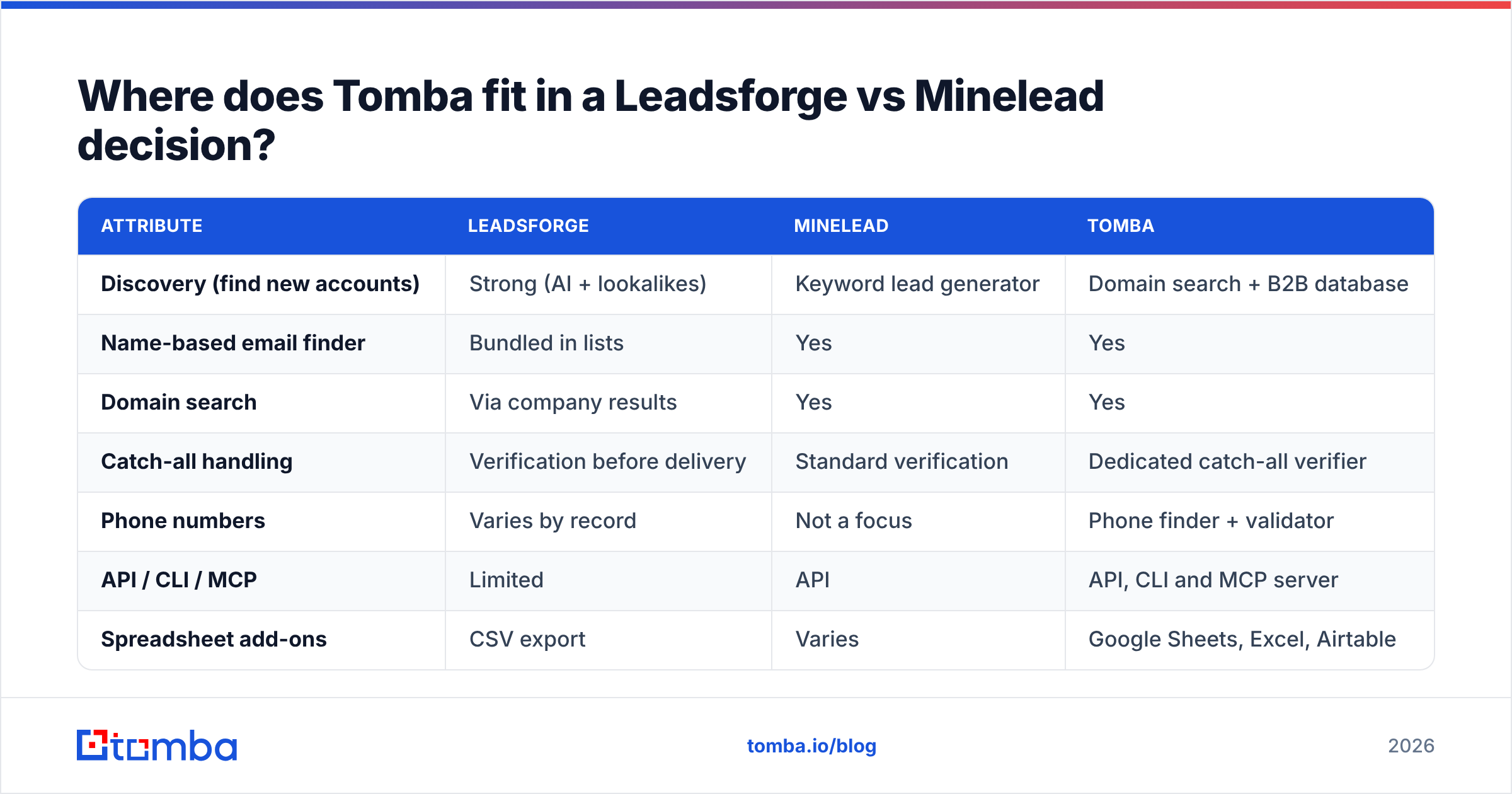
If you're reading this, you're probably not choosing a whole stack. You're filling one gap. Here's how the three options compare for the email layer specifically:

| Attribute | Leadsforge | Minelead | Tomba |
|---|---|---|---|
| Discovery (find new accounts) | Strong (AI + lookalikes) | Keyword lead generator | Domain search + B2B database |
| Name-based email finder | Bundled in lists | Yes | Yes |
| Domain search | Via company results | Yes | Yes |
| Catch-all handling | Verification before delivery | Standard verification | Dedicated catch-all verifier |
| Phone numbers | Varies by record | Not a focus | Phone finder + validator |
| API / CLI / MCP | Limited | API | API, CLI and MCP server |
| Spreadsheet add-ons | CSV export | Varies | Google Sheets, Excel, Airtable |
| Free tier | Trial credits | Small free tier | 25 searches/mo |
| Entry paid plan | Credit bundles | Low-cost monthly plan | $49/mo Starter |
Tomba isn't trying to replace Leadsforge's chat-style ICP builder. If that discovery experience is what you want, Leadsforge does it well. Where Tomba fits is the completion and verification layer: find emails by domain, look up a named contact, verify catch-all addresses separately, and push results into your sequencer or CRM. Plans run from a free tier (25 searches a month) through Starter at $49/mo, Growth at $99/mo and Pro at $249/mo. The full breakdown is on the Tomba pricing page.
A common hybrid setup in 2026 is to build the list with an AI tool like Leadsforge, fill the gaps and re-verify with a dedicated email finder, then sequence. Each tool does the job it's best at.
How should you test Leadsforge and Minelead before buying?#
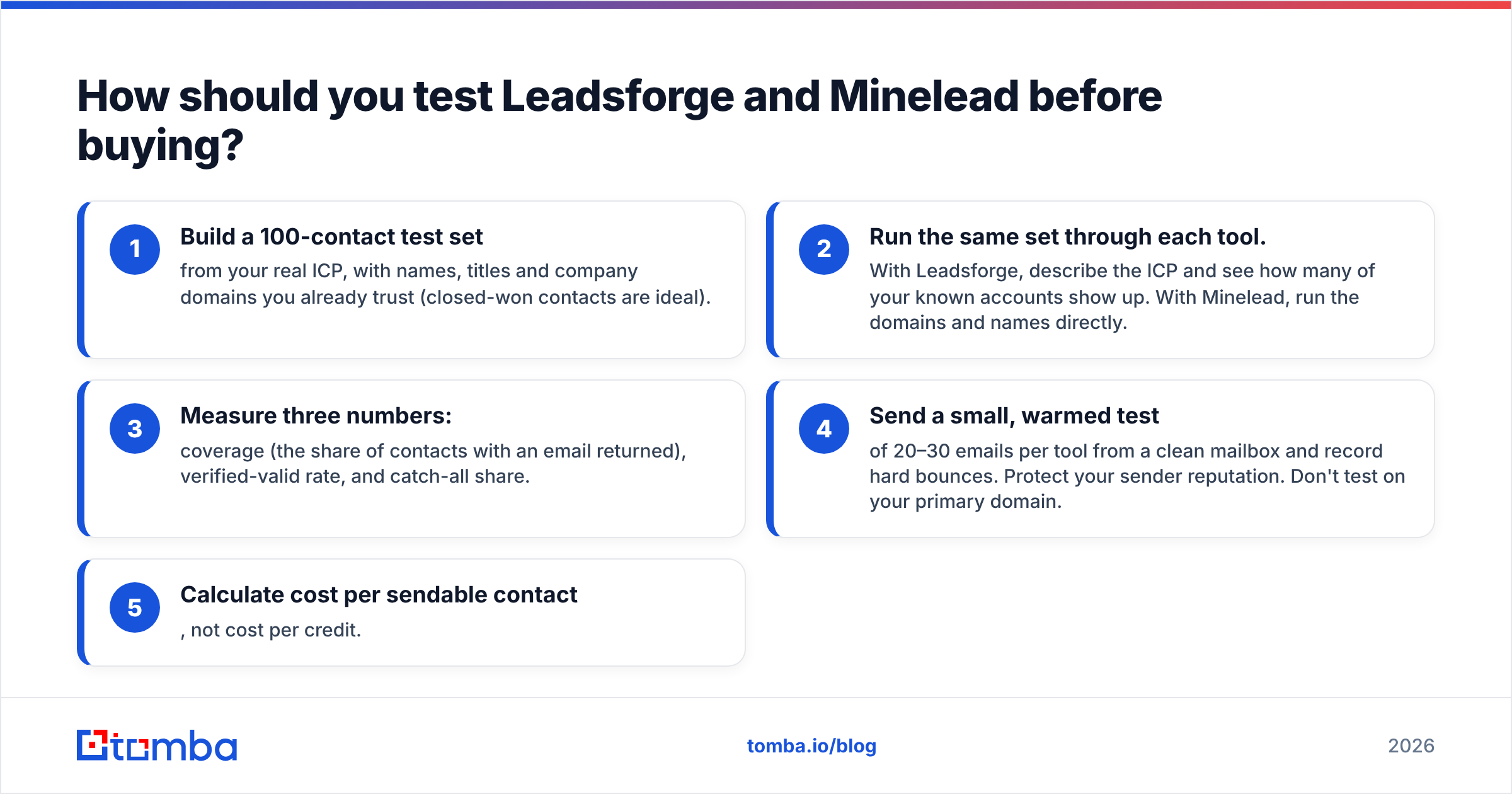
Don't pick based on a feature grid, including the ones above. Run a controlled test:
- Build a 100-contact test set from your real ICP, with names, titles and company domains you already trust (closed-won contacts are ideal).
- Run the same set through each tool. With Leadsforge, describe the ICP and see how many of your known accounts show up. With Minelead, run the domains and names directly.
- Measure three numbers: coverage (the share of contacts with an email returned), verified-valid rate, and catch-all share.
- Send a small, warmed test of 20–30 emails per tool from a clean mailbox and record hard bounces. Protect your sender reputation. Don't test on your primary domain.
- Calculate cost per sendable contact, not cost per credit.
User reviews on G2 are useful for spotting support and billing issues, but your own 100-contact test will tell you more about data quality in your segment than any review aggregator.
Frequently asked questions#
Is Leadsforge an email finder?#
Partly. It's a lead-list builder that includes email data with each prospect. It doesn't offer a standalone "enter a name and domain" lookup the way Minelead or a dedicated finder does.
Does Minelead have AI prospecting like Leadsforge?#
Not in the same sense. Minelead's lead generator lets you search companies by keyword or industry, but it doesn't turn a natural-language ICP into a scored list or suggest lookalike companies.
Can I use Leadsforge without Salesforge?#
Yes. You can export lists as CSV and import them into any sequencer. The native Salesforge handoff is a convenience, not a requirement.
Which is cheaper, Leadsforge or Minelead?#
For low volumes, Minelead usually has the lower entry cost. At higher volumes the gap shrinks, and what matters is cost per verified, sendable contact, which depends on your segment.
Do I still need an email verifier with either tool?#
Yes. Both tools verify to some degree, but data decays every month. A final verification pass right before sending, especially on catch-all domains, is the cheapest bounce insurance you can buy.
Which should you choose?#
Choose Leadsforge if you're short on prospects and want an AI to turn your ICP into lists quickly, especially if you already send through Salesforge. Choose Minelead if you already know your target accounts and want a lightweight, affordable way to get the emails behind them.
If what you really need is a reliable email layer that works with either tool, or replaces the lookup half of your stack, try Tomba Email Finder. You can search by domain, name or company, verify catch-all addresses separately, and send results to your CRM, Google Sheets or the API. It starts at 25 free searches a month, so you can run the 100-contact test above before paying anything.
Related guides#
// get started
Find, verify and enrich your first contacts today
Start on the free plan with 25 searches a month, then scale when your team is ready.
Free plan · No credit card required · GDPR & CCPA
// about the author