Leadsforge vs Noparam: Lead Finder or Email Verifier in 2026?
Leadsforge builds lead lists. Noparam checks whether emails are real. Here is how they differ on pricing, data, and accuracy, and which one your outbound stack actually needs.
TL;DR
- Leadsforge and Noparam do different jobs. Leadsforge is an AI lead search engine that builds contact lists. Noparam is an email validation API that checks whether an address you already have will accept mail.
- Leadsforge costs $49/month for 2,000 credits (1 credit per email, 10 per phone number), and unused credits roll over. It fits best if you already send through Salesforge.
- Noparam has a free plan with 100 validations a month and paid volume tiers above it. It's built for real-time form checks, bulk list cleaning, and WordPress, Mailchimp, and HubSpot integrations.
- Our pick: if you have no contacts yet, choose Leadsforge. If you already have a list and your bounce rate is climbing, choose Noparam. If you want finding and verification under one login, look at a combined tool such as Tomba.
- Many teams use both: one to source leads and one as a second check before a send.
People search "Leadsforge vs Noparam" because both tools come up when someone asks how to get more valid emails into a sequence. But they sit at opposite ends of the pipeline. One finds people. The other screens addresses. Pick the wrong one and you'll pay for a tool that fixes a problem you don't have.
This guide compares them on what each tool does, what it costs, where each one falls short, and which kind of team should buy which.
What is Leadsforge?#
Leadsforge (leadsforge.ai) is an AI lead generation tool from the Forge family, the same group behind Salesforge, Mailforge, and Warmforge. Instead of stacking filters in a classic database UI, you describe your ideal customer in plain English. For example: "Heads of RevOps at US SaaS companies with 50–200 employees that use HubSpot." Leadsforge turns that description into a lead list.
The main parts are:
- Chat-style ICP search. You type the prompt, it returns matching contacts, and you refine the list by talking to it.
- Lookalike search. You give it a company you like, and it finds similar ones.
- Verified emails and optional phone numbers attached to each contact.
- Enrichment fields such as title, company size, industry, and location.
- Native export to Salesforge, plus CSV export for other sequencers.
Pricing is credit-based. According to the Leadsforge pricing page, the entry plan is $49/month for 2,000 credits, or $588/year with 28,000 credits granted upfront. There's no per-seat charge. An email costs 1 credit and a phone number costs 10. Unused credits don't expire. New accounts get 100 free credits to test with.
If you picture Leadsforge on your home screen: it's the list builder. You start there when you have a market in mind but no names.
What is Noparam?#
Noparam (noparam.com) is an email validation API. It doesn't find anyone. You give it an email address, and it tells you whether that address is valid, risky, disposable, role-based, or mistyped.
The main parts are:
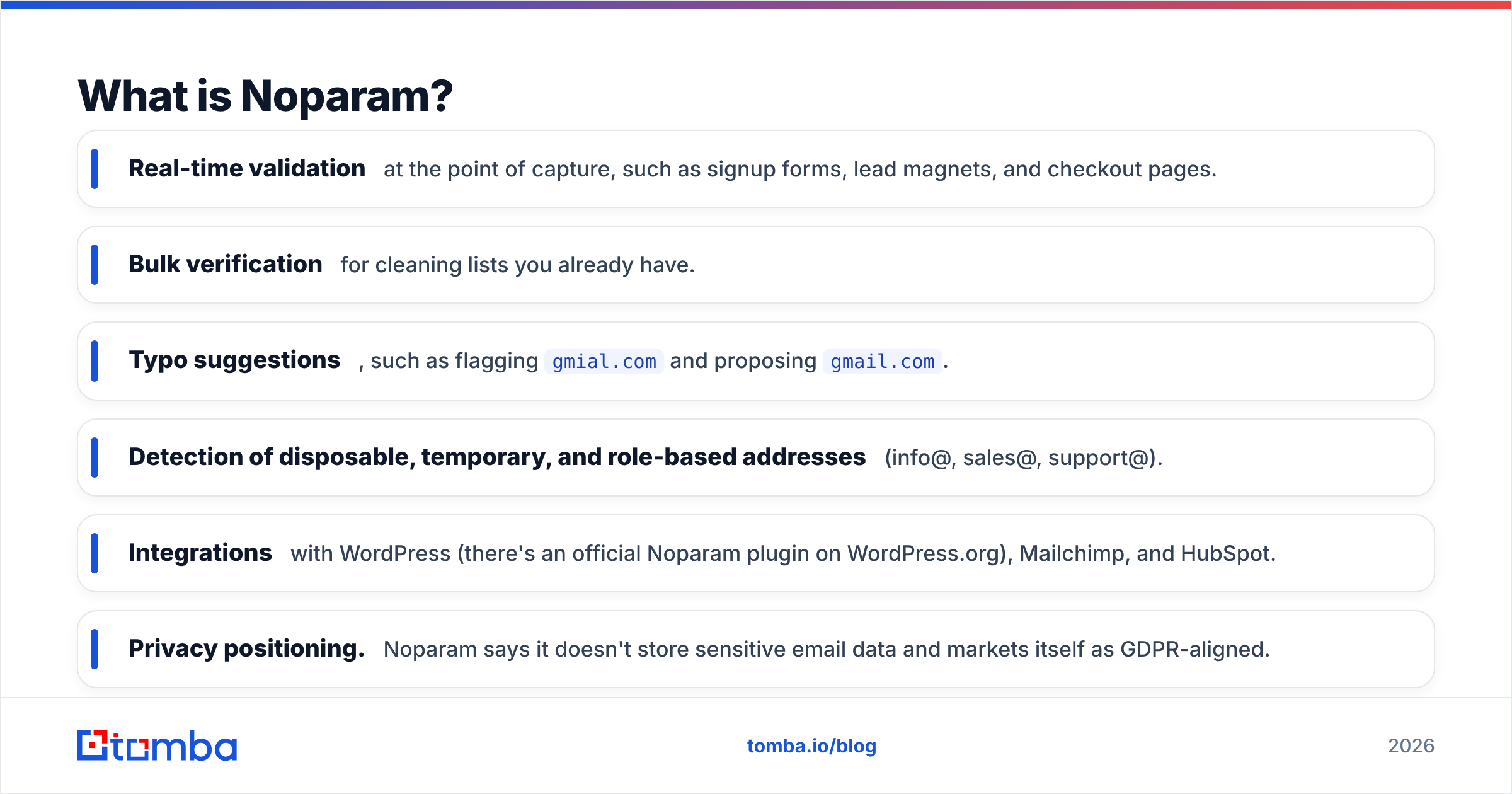
- Real-time validation at the point of capture, such as signup forms, lead magnets, and checkout pages.
- Bulk verification for cleaning lists you already have.
- Typo suggestions, such as flagging
gmial.comand proposinggmail.com. - Detection of disposable, temporary, and role-based addresses (info@, sales@, support@).
- Integrations with WordPress (there's an official Noparam plugin on WordPress.org), Mailchimp, and HubSpot.
- Privacy positioning. Noparam says it doesn't store sensitive email data and markets itself as GDPR-aligned.
The free plan covers up to 100 validations a month. Paid plans raise that limit, and an Enterprise tier adds custom quotas, priority processing, and dedicated support. Noparam's public tiers change fairly often, so check its pricing page for current per-validation rates before you budget.
In that same home-screen picture: Noparam is the screen at the door. It doesn't bring people in. It stops bad addresses from getting into your CRM or your send queue.
How do Leadsforge and Noparam compare side by side?#
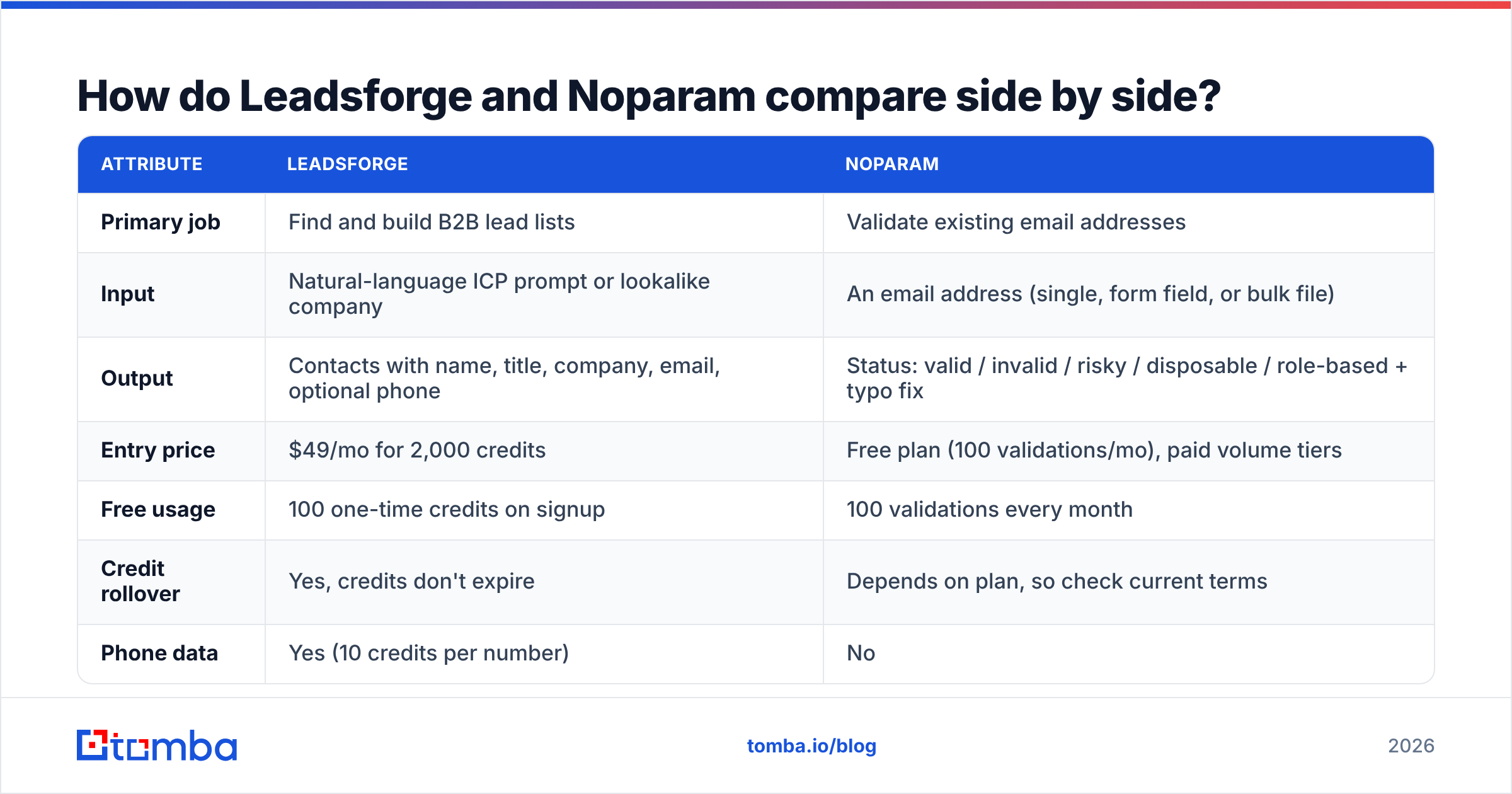
This is the core comparison. The two tools barely overlap, and the table makes that clear.
| Attribute | Leadsforge | Noparam |
|---|---|---|
| Primary job | Find and build B2B lead lists | Validate existing email addresses |
| Input | Natural-language ICP prompt or lookalike company | An email address (single, form field, or bulk file) |
| Output | Contacts with name, title, company, email, optional phone | Status: valid / invalid / risky / disposable / role-based + typo fix |
| Entry price | $49/mo for 2,000 credits | Free plan (100 validations/mo), paid volume tiers |
| Free usage | 100 one-time credits on signup | 100 validations every month |
| Credit rollover | Yes, credits don't expire | Depends on plan, so check current terms |
| Phone data | Yes (10 credits per number) | No |
| Real-time form validation | No | Yes, a core use case |
| Native integrations | Salesforge (deep), CSV export | WordPress, Mailchimp, HubSpot, REST API |
| Best for | Outbound teams starting from zero contacts | Marketing and ops teams protecting list quality |
| Main weakness | Data quality depends on the underlying database, and it's tied to the Forge ecosystem | Doesn't generate a single new lead |
The practical takeaway: you're not choosing between equivalent products. You're choosing which bottleneck to fix first.
Which tool gives you better data accuracy?#
This question means something different for each tool.
For Leadsforge, accuracy means "is this person still in this role, and is this email deliverable?" Leadsforge says the emails it returns are verified, but any database-driven finder loses accuracy as people change jobs. In B2B, a meaningful share of contacts change roles every year. The number that matters for you is the bounce rate on your first real campaign, not the vendor's marketing claim. Run a 200-contact test in your own niche before you commit to an annual plan.
For Noparam, accuracy means "did the verdict match what actually happened when you sent?" Verifiers are usually reliable on clearly valid and clearly invalid addresses. Where they differ is catch-all domains, meaning servers that accept every address at the SMTP stage and bounce later. Many verifiers mark these as "risky" or "unknown," which leaves the decision to you. If your target accounts are mid-market and enterprise companies, a large share of your list may sit on catch-all domains, so ask any verifier, Noparam included, how it handles them.
A few things hold for both tools:
- Verify close to send time. Verification results go stale within weeks, not months.
- Test on your own data. Vendor benchmarks use lists that suit the vendor.
- Treat "risky" as a separate lane. Send those addresses at a lower volume or from a secondary domain instead of mixing them into your main campaign.
If catch-all addresses are a large share of your list, a dedicated catch-all verifier is worth adding to whichever stack you pick.
How much do Leadsforge and Noparam really cost?#
The prices on each tool's page don't show the whole picture.
Leadsforge: $49 buys 2,000 email credits. That's about $0.025 per email contact, which is competitive. The cost goes up quickly if you need phone numbers. At 10 credits each, 2,000 credits buys only 200 direct dials. Because credits roll over, you can buy a plan, pause sending for a month, and keep what you paid for. Many subscription databases don't let you do that.
Noparam: The free 100 validations a month suit a small WordPress site or a low-traffic signup form. They don't come close for outbound. One cleaned cold list is often 2,000–10,000 addresses. Once you're sending at volume, you'll be on a paid tier, and your actual cost depends on how many addresses you validate each month.
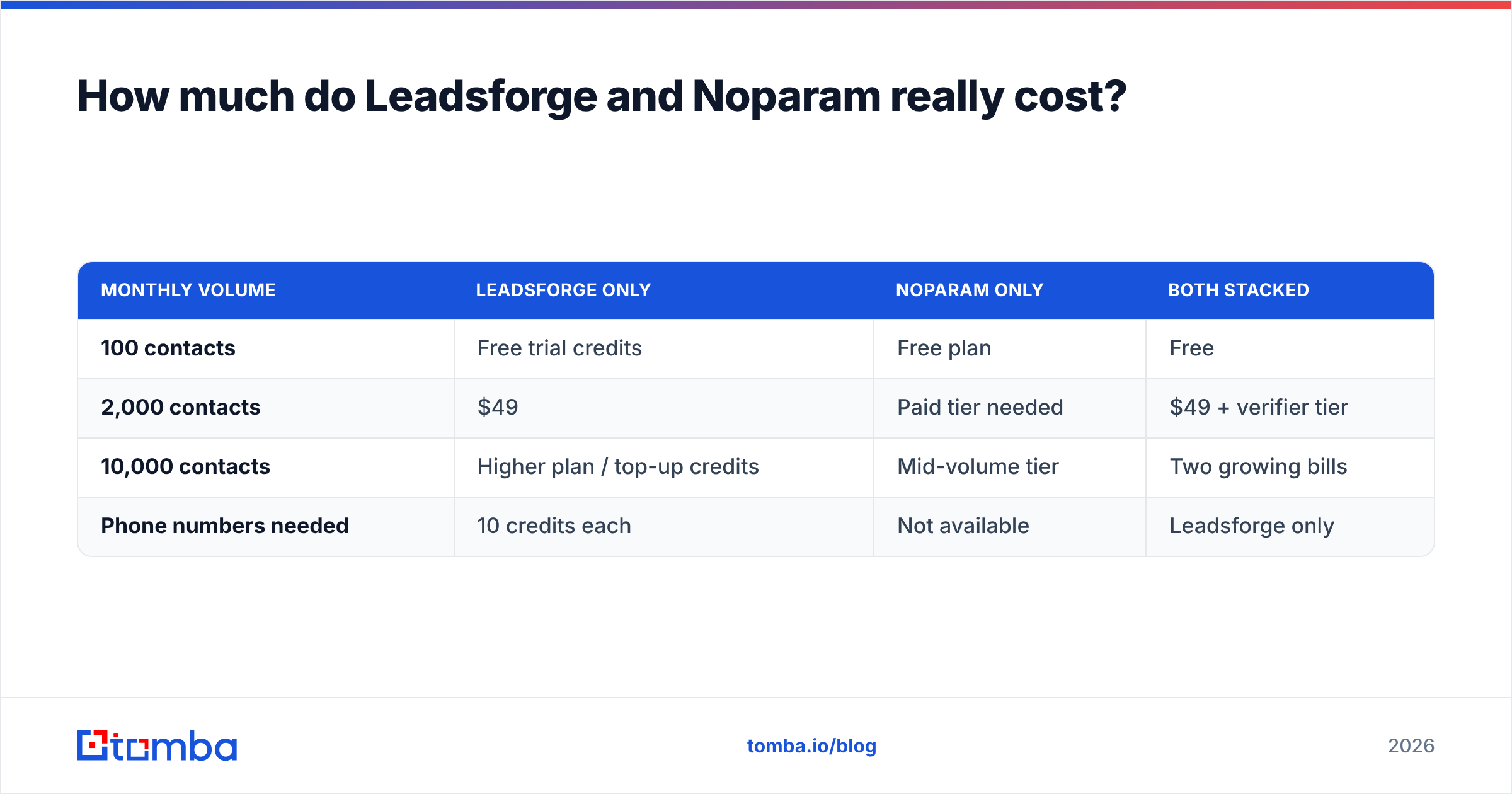
The cost of running both: if you source with Leadsforge and re-verify with Noparam, you pay twice for every contact you use: once to find it and once to check it. At small volumes that's fine. At 20,000+ contacts a month, it's worth comparing against tools that include verification in the finder credit.
| Monthly volume | Leadsforge only | Noparam only | Both stacked |
|---|---|---|---|
| 100 contacts | Free trial credits | Free plan | Free |
| 2,000 contacts | $49 | Paid tier needed | $49 + verifier tier |
| 10,000 contacts | Higher plan / top-up credits | Mid-volume tier | Two growing bills |
| Phone numbers needed | 10 credits each | Not available | Leadsforge only |

Who should choose Leadsforge?#
Choose Leadsforge if most of these apply to you:
- You have a clear ICP but no list. The natural-language search is faster than learning a filter-heavy database.
- You already send from Salesforge, or you plan to. Moving leads straight into sequences removes a CSV step and a common source of mistakes.
- You need some phone numbers, not thousands. The 10-credit cost works for a short list of high-value accounts.
- Your send volume is uneven. Rollover credits mean a quiet month doesn't waste money.
Skip it if you already have a strong CRM full of contacts and your problem is bounces, not lead volume.
Who should choose Noparam?#
Choose Noparam if most of these apply to you:
- Fake or mistyped signups are getting into your forms. Real-time validation with typo correction solves that directly.
- You run inbound on WordPress, Mailchimp, or HubSpot and want validation built in instead of added by hand.
- Your team has an old list from events, past campaigns, or an acquired database, and you need to clean it before a re-engagement send.
- Data minimisation matters to your legal team. Noparam's no-storage stance is a reasonable procurement point.
Skip it if your pipeline problem is "we don't know who to email." A verifier can't help with that.
Is there a setup that replaces both?#
For most outbound teams, the real question isn't "Leadsforge vs Noparam." It's "how many tools do I need between identifying an account and sending an email?"
Here are three common setups:
- Leadsforge + Noparam. This covers sourcing plus independent verification, and a second opinion catches some bad addresses a single tool would miss. The downside is two bills, two dashboards, and CSV handoffs between them.
- Leadsforge alone. You rely on its built-in verification. This is the simplest option if you're all-in on the Forge stack.
- A combined finder and verifier. Tools like Tomba put an email finder, an email verifier, domain search, and catch-all checks on one account. You find the address, verify it, and export it without switching tools.
For the third setup, the numbers look like this: Tomba has a free tier with 25 searches a month, and paid plans start at $49/month (Starter), then $99 (Growth) and $249 (Pro), with Enterprise priced on request. The full breakdown is on the Tomba pricing page. It isn't a natural-language ICP chat like Leadsforge, and it isn't a WordPress form plugin like Noparam. Its strength is working from a domain or a name and returning a verified professional email in one step.
A useful outside reference as you weigh these options is HubSpot's guidance on email bounce rates. The benchmark you're trying to protect is the same whichever tool you choose.
So, Leadsforge vs Noparam: which one wins?#
Neither wins across the board, because they aren't competing for the same job.
- Leadsforge wins on lead generation. If your calendar is empty because your list is empty, it gets you from an ICP description to a sequence-ready list quickly, at a fair price per email.
- Noparam wins on list hygiene. If you're losing sender reputation to bounces, fake signups, and role addresses, it's a lightweight, privacy-conscious filter that fits into the tools you already use.
To choose, write down your one biggest pipeline problem this quarter. If it's "not enough contacts," buy Leadsforge. If it's "too many bad contacts," buy Noparam. If it's both, which is common for a lean outbound team, compare the cost of two stacked tools against one tool that finds and verifies.
Ready to find and verify emails in one step?#
If you'd rather not manage one tool for sourcing and another for checking, try Tomba Email Finder. Enter a name and company domain, and you get a professional email address that has already been verified. You can do it in bulk, from the Chrome extension, or through the API. Start on the free plan with 25 searches a month, run it against 25 of your real target accounts, and compare the bounce rate with your current setup before you pay for anything.
Related guides#
// get started
Find, verify and enrich your first contacts today
Start on the free plan with 25 searches a month, then scale when your team is ready.
Free plan · No credit card required · GDPR & CCPA
// about the author