Leadsforge vs Onemorelead (2026): Pricing, Data Quality and Our Pick
Leadsforge costs about 2.5 cents per email. Onemorelead costs 20 to 40 cents per credit. We compare search, data, pricing and trust signals so you can decide which list builder gets your budget.
TL;DR
- Leadsforge wins on price. $49/mo buys 2,000 credits, which works out to about $0.025 per email. Onemorelead starts at $99/mo for 250 credits, which is $0.40 per credit.
- Leadsforge is an AI-first list builder. You describe your ICP in plain language. Onemorelead is a classic filter-based B2B database with direct dials, technology filters, and an enrichment API on its higher tiers.
- Onemorelead has almost no public review footprint. Coverage in 2026 notes that it has few or no reviews on G2, Capterra, or Reddit. Treat its accuracy claims as unproven until you test them.
- Both tools should sit in front of an independent verification step. Neither list goes straight into a sequencer without one.
- Our pick: Leadsforge for most outbound teams, especially if you already use the Salesforge stack. Consider Onemorelead only if phone-heavy prospecting and old-style filters matter more to you than cost per contact.
What are Leadsforge and Onemorelead?#
These two tools sell the same outcome, a list of B2B contacts you can email or call. They get there in different ways.
Leadsforge is the lead-data product in the "Forge" family, alongside Salesforge (sequencing), Warmforge (warmup), and Infraforge (mailbox infrastructure). It calls itself a search engine for leads. You describe the buyer you want in natural language, Leadsforge builds a list, and you spend credits to export verified contact data. It aims to be the top of a pipeline that ends in Salesforge, though you can export to CSV and use any sequencer.
Onemorelead is a more traditional B2B contact database. It advertises 55M+ verified B2B prospects, 27M+ companies, and 170M employee records. You search with filters such as industry, company size, job title, and location. Higher tiers add technology filters, email pattern intel, data enrichment, and API access. Credits cover both emails and phone numbers, and every plan includes direct dials.
Think of it this way. Leadsforge is a research assistant you brief in a sentence. Onemorelead is a library catalog you query field by field. Both can get you to the same shelf, but the time and the per-book cost differ a lot.
How do Leadsforge and Onemorelead differ at a glance?#
These five dimensions cover most of the decision:
- Search model: Leadsforge uses a natural-language ICP prompt. Onemorelead uses classic faceted filters (industry, headcount, title, tech stack).
- Pricing unit: Leadsforge charges 1 credit per email and 10 credits per phone number. Onemorelead uses one shared credit pool for "email & phone" on every tier.
- Credit behavior: Leadsforge credits don't expire and carry over between billing periods. Onemorelead sells monthly plans with no contract.
- Ecosystem: Leadsforge connects directly into Salesforge, Warmforge, and Infraforge. Onemorelead is a standalone database with an enrichment API on the Startup plan and full API access on Business.
- Trust signals: Leadsforge has third-party coverage and a visible parent company. Onemorelead has published pricing but very little independent review data.
How much do Leadsforge and Onemorelead cost?#
Pricing is where the gap is widest. The figures below are list prices at the time of writing, so check each vendor's pricing page before you buy.
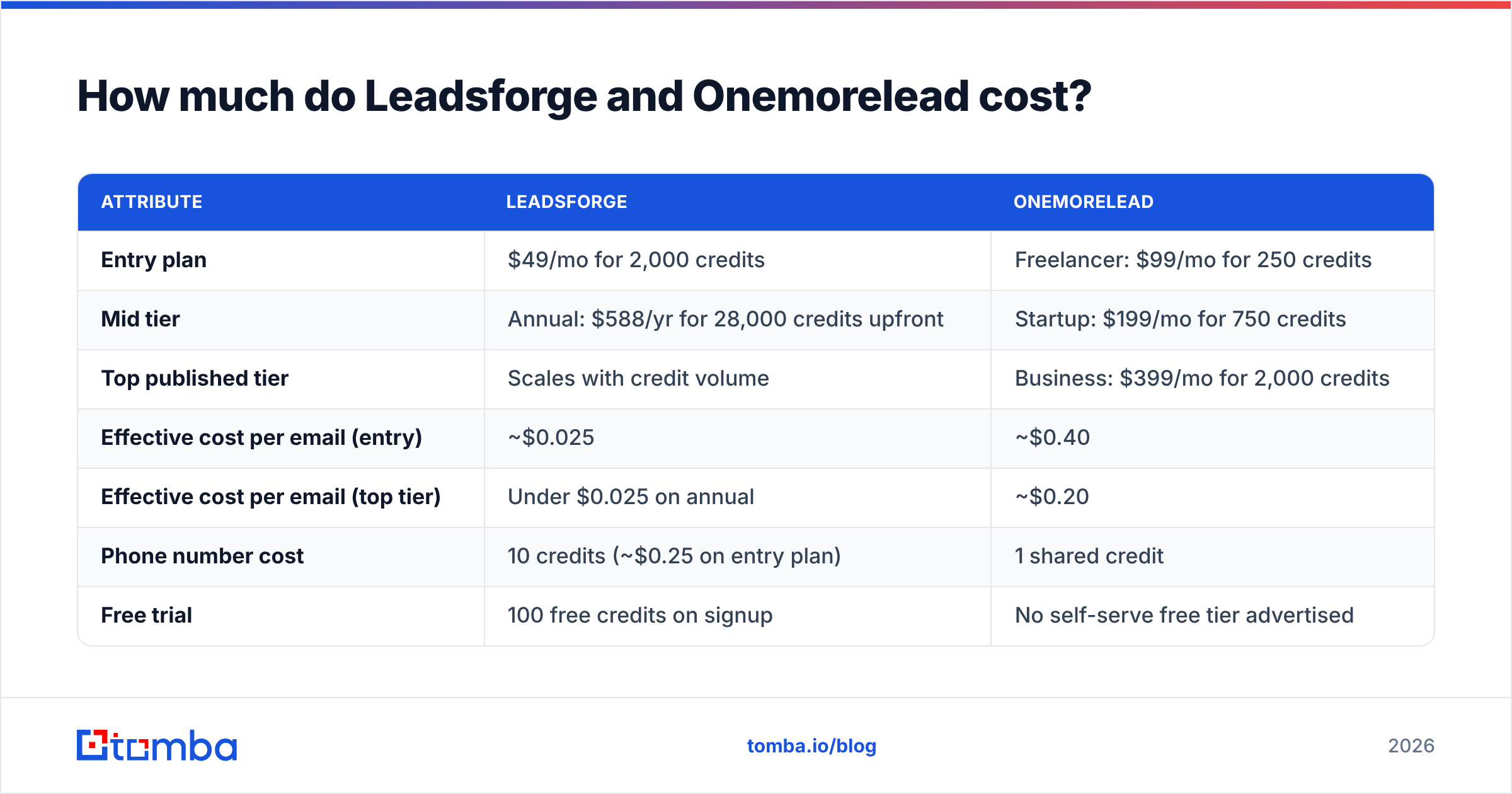
| Attribute | Leadsforge | Onemorelead |
|---|---|---|
| Entry plan | $49/mo for 2,000 credits | Freelancer: $99/mo for 250 credits |
| Mid tier | Annual: $588/yr for 28,000 credits upfront | Startup: $199/mo for 750 credits |
| Top published tier | Scales with credit volume | Business: $399/mo for 2,000 credits |
| Effective cost per email (entry) | ~$0.025 | ~$0.40 |
| Effective cost per email (top tier) | Under $0.025 on annual | ~$0.20 |
| Phone number cost | 10 credits (~$0.25 on entry plan) | 1 shared credit |
| Free trial | 100 free credits on signup | No self-serve free tier advertised |
| Seat pricing | No seat charge | Single user on Freelancer, 2 included on Business (up to 10) |
| Credit rollover | Yes, credits don't expire | Monthly plans |
| Search style | Natural-language ICP prompt | Faceted filters |
| Enrichment API | Via Forge ecosystem | Startup plan and above |
| Technology filter | Not a headline feature | Startup plan and above |
| Public reviews | Some third-party coverage | Very few as of 2026 |
The per-email numbers are stark. On Onemorelead's Business plan you pay $399 for 2,000 credits. On Leadsforge's entry plan you pay $49 for the same 2,000 credits. That's roughly an 8x difference at matching volume, before Leadsforge's annual discount.
Phone numbers narrow the gap. Leadsforge charges 10 credits per phone lookup, so a list heavy on direct dials burns credits fast. With 2,000 Leadsforge credits you could pull 200 phone numbers and nothing else, at about $0.245 each. Onemorelead's Business tier gives you 2,000 phone-or-email credits at $0.20 each. If your motion is mostly cold calling, the math moves toward Onemorelead.

Which tool has the better search experience?#
It depends on how well you already know your ICP.
Leadsforge is faster when your ICP is fuzzy or you're still exploring. You can type something like "Series A fintech companies in the UK with 20-100 employees, heads of RevOps and VP Sales," and it returns a list. That suits founders, SDRs testing new segments, and agencies spinning up campaigns for several clients each week. The trade-off is less precise control. When a prompt is misread, you revise the prompt instead of flipping one filter.
Onemorelead is better when your ICP is already a spreadsheet of rules. Faceted filters are predictable. If you know you want "Director or above, Marketing, 200-1,000 employees, uses HubSpot, US East Coast," a filter UI lets you build that deterministically and save it. The technology filter on the Startup plan and above matters for teams that sell into a specific tech stack.
Our view is that natural-language search has become the better default for most outbound teams in 2026, because the hardest part of list building is finding segments, not typing filters. Deterministic filters still win for ABM teams working from a fixed target account list.
How accurate is the data from each tool?#
This is where you should be most skeptical, of both tools.
Leadsforge says it returns verified emails, and it charges for results rather than seats. It also sits inside an ecosystem whose other products (Warmforge, Infraforge) depend on bounce rates staying low. That's a structural reason for it to care about accuracy. Still, "verified at export" is not the same as "deliverable when you send." B2B data decays constantly because people change jobs, companies rebrand, and domains switch to catch-all configurations.
Onemorelead advertises 55M+ verified prospects, but independent evidence is thin. Third-party reviewers in 2026 point out that it has published pricing and almost no public reviews on G2, Capterra, or Reddit. That doesn't make the data bad. It means you can't lean on crowd evidence, so you should run your own test.
Here's a practical accuracy test you can run on either tool in an afternoon:
- Pull a 200-contact sample from your real ICP, not a vanity segment.
- Run every address through an independent email verifier and record valid, invalid, catch-all, and unknown rates.
- Spot-check 20 contacts manually against LinkedIn for current title and employer.
- Send a small warmed-up batch of 50 to 100 and measure hard bounces.
- Compare cost per deliverable contact, not cost per credit.
Step 5 is where tools really win or lose. A contact that costs $0.025 and bounces is worth less than one that costs $0.20 and lands. In most tests we've seen across lead databases, invalid rates of 5-15% are common. Catch-all domains can account for another large slice that no database can fully confirm.
Which tool fits which team?#
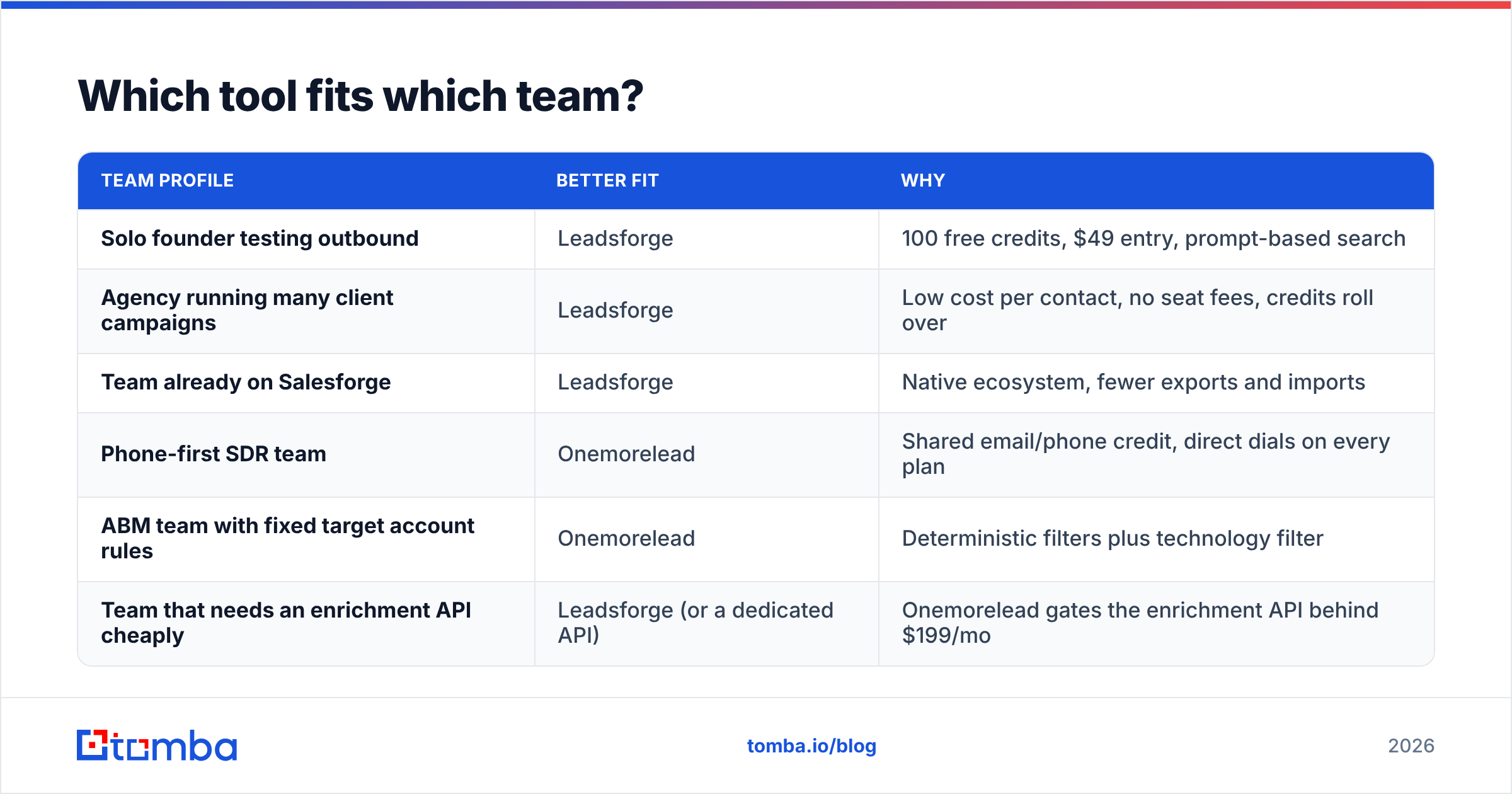
| Team profile | Better fit | Why |
|---|---|---|
| Solo founder testing outbound | Leadsforge | 100 free credits, $49 entry, prompt-based search |
| Agency running many client campaigns | Leadsforge | Low cost per contact, no seat fees, credits roll over |
| Team already on Salesforge | Leadsforge | Native ecosystem, fewer exports and imports |
| Phone-first SDR team | Onemorelead | Shared email/phone credit, direct dials on every plan |
| ABM team with fixed target account rules | Onemorelead | Deterministic filters plus technology filter |
| Team that needs an enrichment API cheaply | Leadsforge (or a dedicated API) | Onemorelead gates the enrichment API behind $199/mo |
If you're between the two and email is your main channel, Leadsforge gives you more room to experiment for the same budget. Onemorelead makes sense in a narrower case: a team that values filter precision and phone data and has tested a sample first.
What are the pros and cons of each?#
Leadsforge pros
- Very low cost per email contact.
- Natural-language search makes it quick to explore new segments.
- Credits don't expire and there are no seat fees.
- Works tightly with Salesforge, Warmforge, and Infraforge.
- 100 free credits to test real data before you pay.
Leadsforge cons
- Phone numbers cost 10 credits each, so calling-heavy teams pay much more.
- Prompt-based search can be less predictable than filters for strict ABM criteria.
- The best experience depends on buying into the Forge ecosystem.
Onemorelead pros
- Direct dials and phone numbers on every plan, with one shared credit pool.
- Familiar faceted filters, plus a technology filter on Startup and above.
- Email pattern intel and an enrichment API on mid and upper tiers.
- No contract on monthly plans.
Onemorelead cons
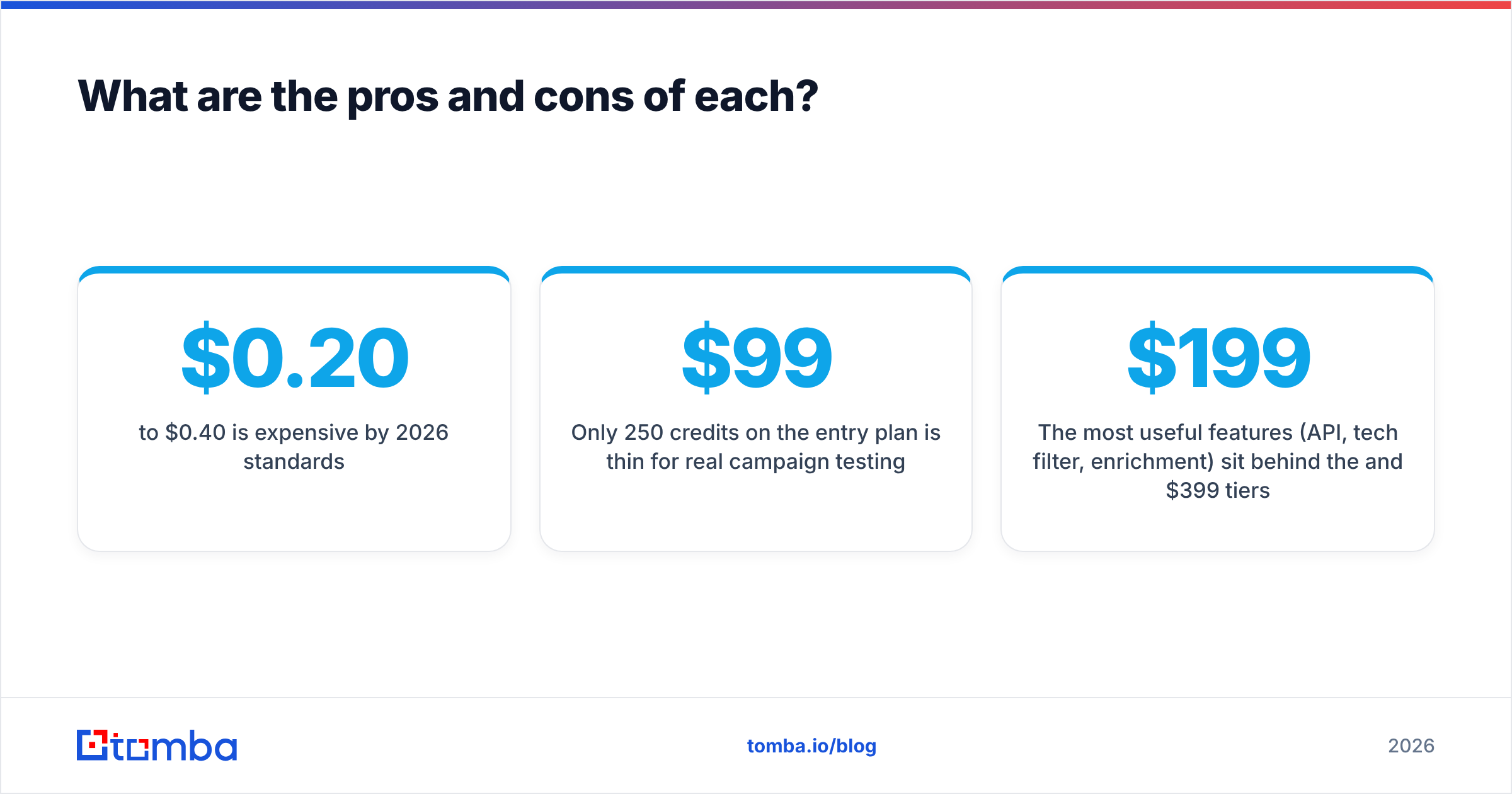
- $0.20 to $0.40 per credit is expensive by 2026 standards.
- Only 250 credits on the $99 entry plan is thin for real campaign testing.
- Very little public review data to confirm accuracy claims.
- The most useful features (API, tech filter, enrichment) sit behind the $199 and $399 tiers.
For broader context on where both fit in the wider market, browse the lead-generation categories on G2 and read the vendor-neutral view of the Forge stack on Salesforge's pricing page.
Is Leadsforge better than Onemorelead?#
For most outbound teams, yes. Leadsforge offers far more contacts per dollar, a faster way to build lists, and credits that don't expire. Onemorelead's main advantages are phone-first pricing and a filter-driven workflow, and those only matter to a specific type of team.
The bigger point is this: whichever database you choose, it's one input, not a finished list. Prospecting teams with consistently low bounce rates don't trust any single vendor's "verified" label. They run a second check before sending.

How do you build a reliable workflow around either tool?#
A layered workflow protects your domain whichever list builder you pick.
Step 1: Build the segment. Use Leadsforge's prompt search or Onemorelead's filters to define the account and persona list.
Step 2: Fill the gaps. Neither database will cover every contact at every account. For target accounts where the database returns nobody, run a domain search to see which public emails exist at that company and what format it uses.
Step 3: Find the specific person. When you know the name and company but the database has no email, a dedicated email finder can often resolve it from the company's email pattern plus public sources.
Step 4: Verify everything before sending. Run the whole merged list through verification. Remove invalids, quarantine catch-alls into a separate low-volume sequence, and only send full volume to confirmed-valid addresses.
Step 5: Re-verify anything older than 60-90 days. B2B data decays. A list that was clean in Q1 won't still be clean in Q3.
This workflow also changes the pricing comparison. If you already rely on a separate finder-and-verifier layer, you don't need your database to be perfect. You need it to be cheap and good at finding segments, and that favors Leadsforge again.
What should you choose in 2026?#
- Choose Leadsforge if email is your main outbound channel, you want the lowest cost per contact, you like prompt-based segment discovery, or you already run Salesforge.
- Choose Onemorelead if cold calling is central to your motion, you need strict filter-based ABM lists with technology targeting, and a sample test confirms its data quality for your ICP.
- Test either one before you commit. Pull 200 contacts, verify them independently, and compare cost per deliverable contact rather than headline credit counts.
Where does Tomba fit alongside these tools?#
Leadsforge and Onemorelead build lists. You still need something to fill the gaps and confirm addresses before you hit send. Tomba Email Finder finds professional email addresses by name, domain, or company. Use it to recover contacts your database missed and to double-check the ones it returned before they touch your sending domain. It works in the browser, in Google Sheets, and through the API, and plans start with a free tier of 25 searches a month, then $49/mo on Starter. See Tomba pricing for the Growth, Pro, and Enterprise tiers. Build your segment in the list builder you prefer, then run it through Tomba so the emails you send actually land.
Related guides#
// get started
Find, verify and enrich your first contacts today
Start on the free plan with 25 searches a month, then scale when your team is ready.
Free plan · No credit card required · GDPR & CCPA
// about the author