Leadsforge vs Pipileads: Features, Pricing, and Which to Pick in 2026
Leadsforge lets you describe your ICP in plain English. Pipileads sells cheap pay-as-you-go credits with classic filters. We compare data, workflow, and the real cost per verified email to show which one fits your outbound motion.
- Leadsforge is an AI-first lead database from the Forge ecosystem (Salesforge, Warmforge). You describe your ideal customer in plain English and it builds the list. The Essential plan starts around $49/mo for 2,000 credits.
- Pipileads is a filter-based B2B email finder with a Chrome extension for LinkedIn. It has a free tier with 50 credits, and paid plans run from about $9.95/mo for 250 credits up to $99.95/mo for 7,500 credits.
- At low volume Pipileads is cheaper to start. At mid volume Leadsforge usually costs less per email. At high volume Pipileads' larger tiers come out ahead.
- Pick Leadsforge if you already run outbound in Salesforge and want AI to handle ICP discovery. Pick Pipileads if you want simple, cheap credits and don't mind building your own filters.
- Neither tool removes the need to verify before you send. Always run exports through a separate verifier, especially for catch-all domains.
What are Leadsforge and Pipileads, and why compare them?#
Both tools answer the same question: "Who should I email, and what is their address?" They answer it in very different ways.
Leadsforge belongs to the Forge product family, next to Salesforge (sequencing), Warmforge (warmup), and Infraforge (sending infrastructure). Its main feature is a chat-style search. You type something like "Series A fintech companies in the UK with a Head of RevOps," and it turns that into filters, suggests lookalike companies, and returns contacts you can export or push straight into a Salesforge sequence.
Pipileads works like a classic list builder. You choose job titles, industries, locations, and company sizes, then spend credits to reveal verified emails. It also has a Chrome extension that pulls emails from LinkedIn profiles and a built-in email verifier. Its pricing is aimed at freelancers, agencies, and small teams who want to pay for leads without signing an enterprise contract.
People compare the two because they compete for the same budget: the $10–$100/month that a solo founder or small SDR team spends on contact data. After that, they split on workflow, cost per email, and how well they fit the rest of your stack.
How do Leadsforge and Pipileads work differently?#
Here is how each tool approaches the core job, step by step:
- Search input. In Leadsforge you describe your ICP in natural language and the AI turns it into filters. In Pipileads you set the filters yourself (title, industry, geography, headcount).
- Account discovery. Leadsforge can suggest lookalike companies based on accounts you already like. Pipileads depends on the filters you choose, so discovery is only as good as your filter logic.
- Contact reveal. Both charge credits to reveal an email. Leadsforge charges more for phone numbers (about 10 credits each at the time of writing). Pipileads' larger plans include phone data.
- Verification. Both say exported emails are verified. Leadsforge can charge extra credits for validation. Pipileads bundles an email verifier with the product.
- Activation. Leadsforge sends lists straight to Salesforge for sequencing. Pipileads is mostly CSV export plus the LinkedIn extension, so you bring your own sending tool.
A short way to put it: Leadsforge saves you time on figuring out who to target, and Pipileads saves you money on getting the addresses.

How does Leadsforge vs Pipileads compare feature by feature?#
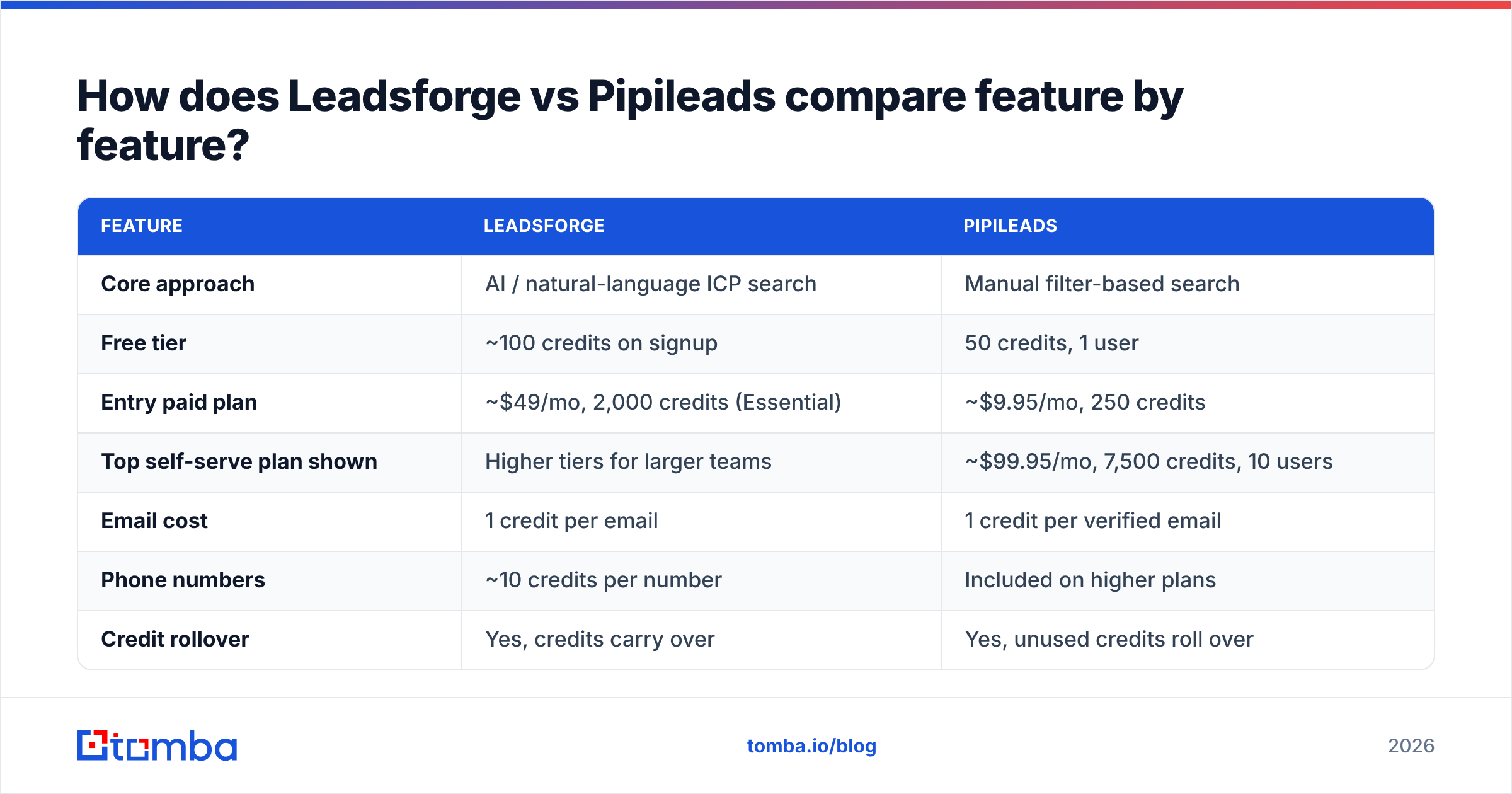
| Feature | Leadsforge | Pipileads |
|---|---|---|
| Core approach | AI / natural-language ICP search | Manual filter-based search |
| Free tier | ~100 credits on signup | 50 credits, 1 user |
| Entry paid plan | ~$49/mo, 2,000 credits (Essential) | ~$9.95/mo, 250 credits |
| Top self-serve plan shown | Higher tiers for larger teams | ~$99.95/mo, 7,500 credits, 10 users |
| Email cost | 1 credit per email | 1 credit per verified email |
| Phone numbers | ~10 credits per number | Included on higher plans |
| Credit rollover | Yes, credits carry over | Yes, unused credits roll over |
| Pay-as-you-go option | Subscription-based | Yes, no-subscription credit packs |
| Lookalike company search | Yes | No |
| LinkedIn Chrome extension | Not the main workflow | Yes |
| Built-in verifier | Validation costs extra credits | Yes, included |
| Native sequencing | Salesforge (same ecosystem) | No, export to your own tool |
| Best fit | Forge users, AI-assisted ICP discovery | Budget-first freelancers and agencies |
Pricing comes from each vendor's public pages and third-party reviews at the time of writing. Check the Pipileads pricing page and Leadsforge's site before you buy, because credit bundles change often.
Which is cheaper per verified email?#
"Starting at $X" doesn't tell you much. What matters is the cost per usable email at the volume you actually need.
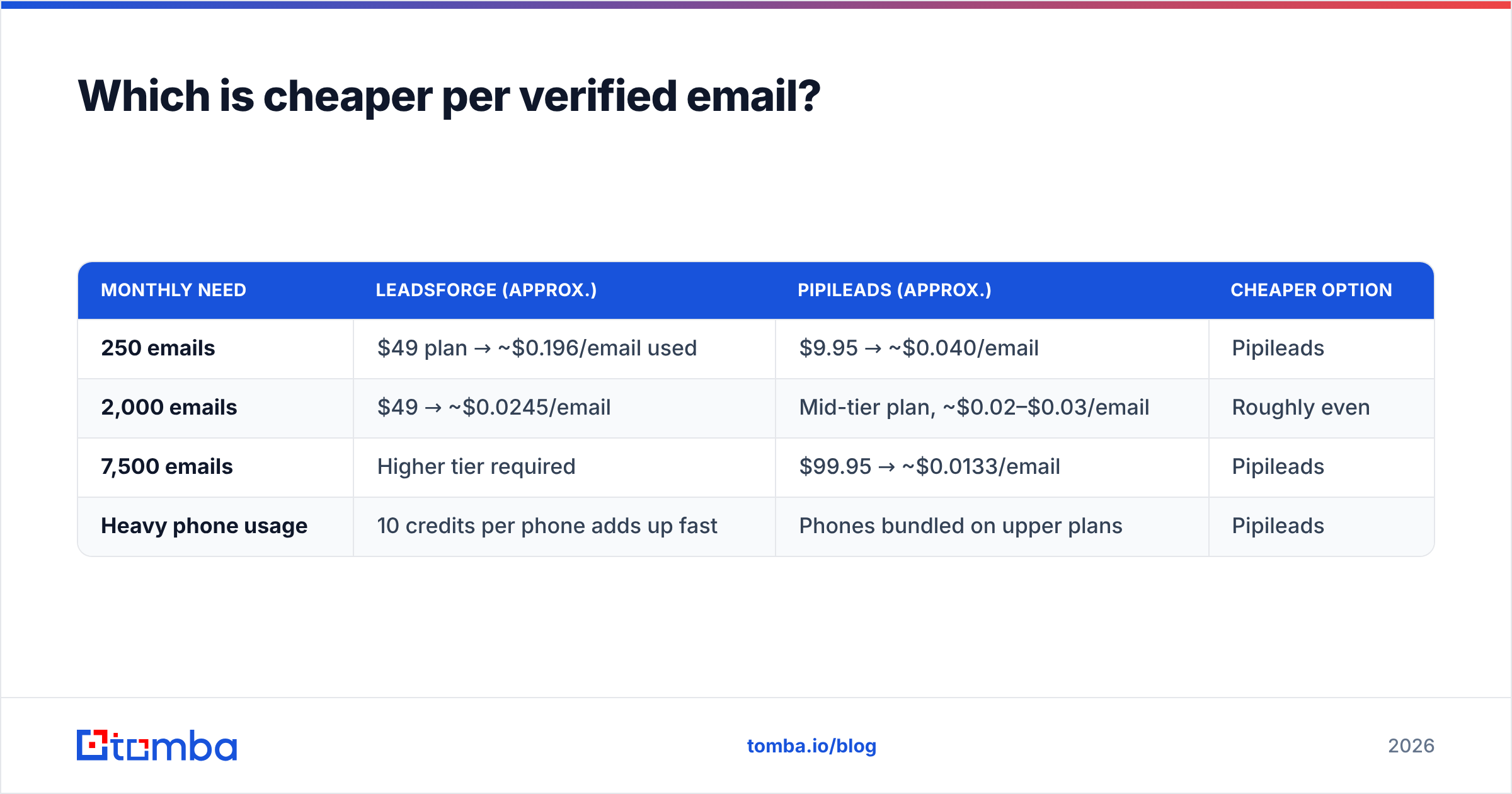
| Monthly need | Leadsforge (approx.) | Pipileads (approx.) | Cheaper option |
|---|---|---|---|
| 250 emails | $49 plan → ~$0.196/email used | $9.95 → ~$0.040/email | Pipileads |
| 2,000 emails | $49 → ~$0.0245/email | Mid-tier plan, ~$0.02–$0.03/email | Roughly even |
| 7,500 emails | Higher tier required | $99.95 → ~$0.0133/email | Pipileads |
| Heavy phone usage | 10 credits per phone adds up fast | Phones bundled on upper plans | Pipileads |
Three things change the math:
- Validation credits. If Leadsforge charges extra to validate emails you've already exported, the real cost per sendable email is higher than $0.0245.
- Rollover. Both tools let unused credits roll over, so paying for more than you need in one month costs you less than it would with use-it-or-lose-it plans.
- Your time. Leadsforge's AI search can save an SDR hours of filter adjustments. At $40–$60 per loaded hour, one saved afternoon covers a month of credits.
If you're a solo founder sending 200–500 emails a month, Pipileads is hard to beat on raw price. If you're a small team running 2,000+ contacts a month through Salesforge, the Leadsforge premium buys workflow speed.
How accurate is the data from each tool?#
Both vendors say their emails are verified. In practice, accuracy with any database depends on three things: how recently the record was refreshed, how the vendor handles catch-all domains, and whether "verified" means an SMTP check or just a pattern guess.

What users tend to report:
- Leadsforge gets good marks for relevance. The AI search and lookalikes return accounts that actually match the ICP. Deliverability depends on segment, and some reviewers recommend extra validation before large sends, which fits with Leadsforge offering validation as a separate paid step.
- Pipileads gets good marks for price and quick LinkedIn extraction. As with most budget databases, results vary more in niche industries and outside North America and Western Europe.
Catch-all domains cause the biggest hidden bounce risk. A catch-all server accepts every address during an SMTP check, so a simple verifier marks a made-up address as "valid." Neither tool fully solves this. Run exports through a dedicated email verifier, and send anything flagged catch-all through a catch-all verifier before it goes into a sequence.
For independent user sentiment on either vendor, G2 is a good place to cross-check reviews.
Which workflow fits your team: Leadsforge or Pipileads?#
When does Leadsforge make more sense?#
- You already use Salesforge or Warmforge. Keeping data, sequencing, and warmup with one vendor means fewer CSV exports and fewer mismatched fields.
- Your ICP is fuzzy or new. If you're testing a new vertical, writing "mid-market logistics companies hiring SDRs" is faster than guessing 14 filter combinations.
- Account discovery matters more than raw volume. Lookalike search helps you find the next 50 good-fit accounts, not the next 5,000 random ones.
- You run an ABM-lite motion with fewer, better-researched accounts per rep.
When does Pipileads make more sense?#
- Budget is the limiting factor. A $9.95 entry point and a free 50-credit tier make it one of the cheapest ways to test outbound.
- You live on LinkedIn. The Chrome extension turns profile browsing into list building without switching tabs.
- You're an agency with many small clients. Pay-as-you-go packs and multi-user plans work well for spiky, client-by-client demand.
- You already have a sequencer (Instantly, Lemlist, Smartlead, and so on) and only need clean CSVs.
What are the pros and cons of each?#
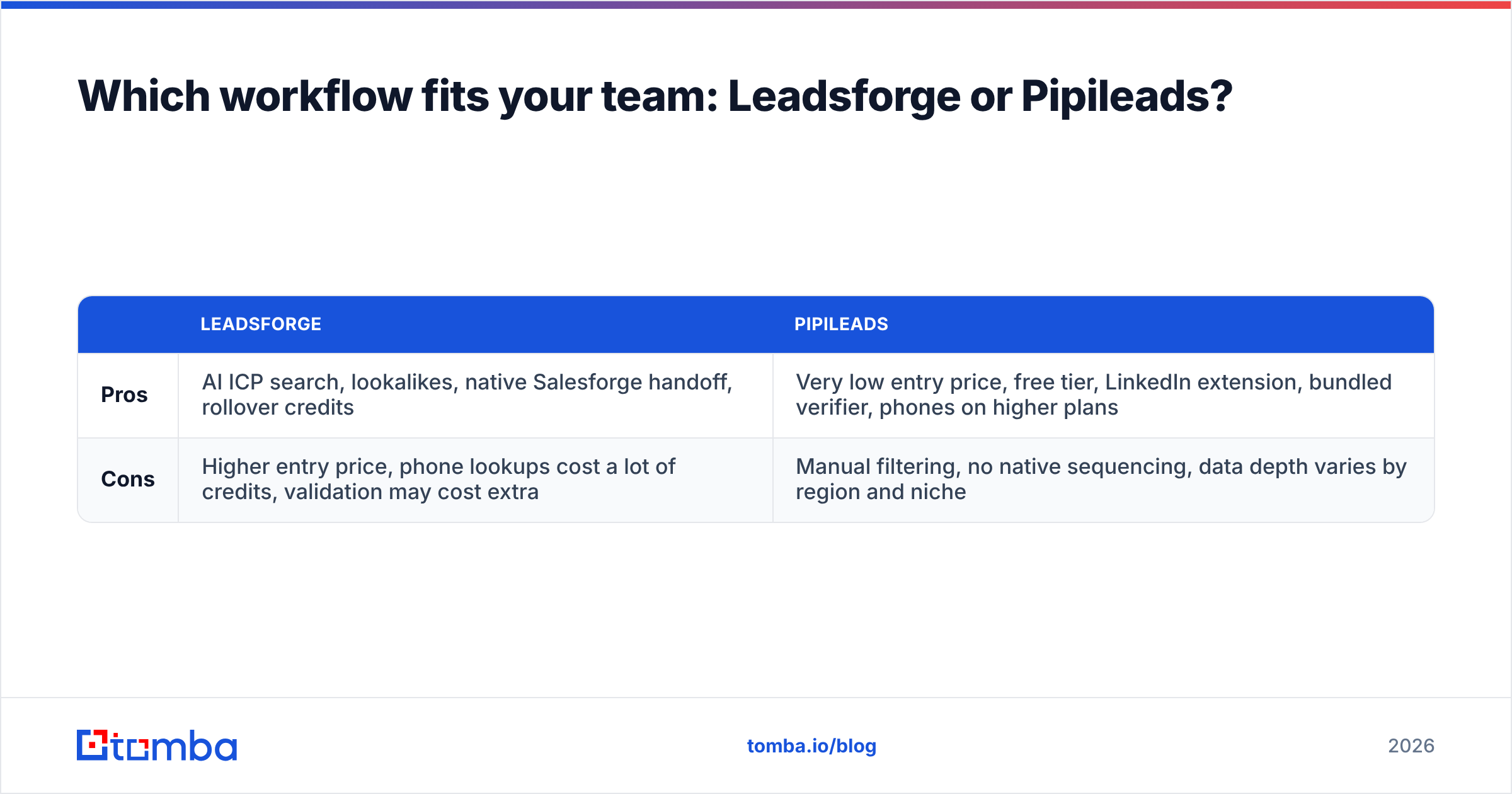
| Leadsforge | Pipileads | |
|---|---|---|
| Pros | AI ICP search, lookalikes, native Salesforge handoff, rollover credits | Very low entry price, free tier, LinkedIn extension, bundled verifier, phones on higher plans |
| Cons | Higher entry price, phone lookups cost a lot of credits, validation may cost extra | Manual filtering, no native sequencing, data depth varies by region and niche |
What should you check before committing to either tool?#

Whichever tool you choose, run the same five-step test before you pay for a year:
- Pull a 100-contact sample from your real ICP, not the vendor's demo segment.
- Verify the sample independently. Don't rely on the vendor's own "verified" label. Count valid, invalid, and catch-all results separately.
- Check title and company accuracy against LinkedIn for 20 random rows. Stale job titles cost you as much as bounces do.
- Calculate cost per sendable email, not cost per credit. Divide the plan price by the emails that pass verification.
- Test the handoff. Push the list into your CRM or sequencer and confirm the custom fields map cleanly.
This takes about an hour and prevents the most common mistake in list building: choosing on headline price and then losing a sending domain to a 9% bounce rate.
Is there an alternative worth considering?#
If you're comparing Leadsforge and Pipileads, you probably care about two things: cost per contact and whether the emails will actually deliver. It's worth benchmarking a dedicated email-finding platform against both, especially if you already know which companies you want to reach and just need the right people and addresses.

Tomba takes a different approach from both. Instead of starting from a prospect database, it starts from the domain or the person. You enter a company domain or a name plus company, and the email finder returns the address with a confidence score and the public sources it was found on. Verification and catch-all checks are built in. Plans start with a free tier of 25 searches per month, then Starter at $49/mo, Growth at $99/mo, and Pro at $249/mo. Full pricing details are public.
This works well alongside either tool. Use Leadsforge or Pipileads for account discovery, then use Tomba to fill gaps and re-verify contacts the database missed or marked as catch-all.
So, Leadsforge vs Pipileads: which should you pick?#
There isn't one winner here. The right choice depends on the kind of problem you have.
- You have an ICP problem (you're unsure who to target, or you're opening a new segment): Leadsforge. The AI search and lookalikes are worth the higher entry price, especially if you already sequence in Salesforge.
- You have a budget problem (you know who to target and need the most emails per dollar): Pipileads. The free tier, the $9.95 starter, and cheap high-volume credits make it the budget pick.
- You have a deliverability problem (bounces are hurting your domain no matter where the data comes from): neither tool is enough by itself. Add an independent verification step.
Most small outbound teams end up running two tools: one for discovery and one for finding and verifying emails. Choose the discovery tool that fits your workflow, and don't skip verification.
Ready to find emails you can trust?#
If you already know which companies you're after and want addresses that won't bounce, try the Tomba Email Finder. Enter a domain or a name, get a verified professional email with its sources and a confidence score, and export straight to your CRM or sequencer. The free plan includes 25 searches a month, so you can test it on your own ICP before paying anything.
Related guides#
// get started
Find, verify and enrich your first contacts today
Start on the free plan with 25 searches a month, then scale when your team is ready.
Free plan · No credit card required · GDPR & CCPA
// about the author