Leadsforge vs PlusVibe (2026): Lead Data or Cold Email Sending?
Leadsforge builds lead lists and PlusVibe sends the cold emails, so most comparisons set them up as rivals when they do different jobs. Here's how they overlap, what each costs, and which one to buy first.
- Leadsforge is an AI lead-generation and data tool. You describe your ideal customer in plain language, and it builds a contact list with emails and phone numbers.
- PlusVibe is a cold email sending platform. It handles warmup, inbox rotation, sequences and a unified inbox, and adds some enrichment credits on top.
- They solve different problems. Leadsforge answers "who should I email?" and PlusVibe answers "how do I send to them without landing in spam?"
- Pricing: Leadsforge starts at $49/mo for 2,000 credits that roll over. PlusVibe starts at $37/mo (Personal), and its advanced warmup pool starts on the $77/mo Business plan.
- Our pick: if you have mailboxes but no list, start with Leadsforge. If you have a list but no sending setup, start with PlusVibe. Most serious outbound teams end up paying for both, or pairing one with a separate email finder and verifier.
What is the real difference between Leadsforge and PlusVibe?#
People who search "Leadsforge vs PlusVibe" are usually trying to trim their outbound stack and assume the two tools compete head to head. They mostly don't. The overlap is small, and it sits at the edges.
Think of outbound as a kitchen. Leadsforge is the grocery run: it gets the ingredients (contacts). PlusVibe is the stove: it turns those ingredients into sent emails and booked replies. You can buy groceries without a stove and you can own a stove with nothing to cook, but you can't serve dinner without both.
Here's what each one actually does:
- Leadsforge (leadsforge.ai) comes from the Forge product family, alongside Salesforge and Warmforge. Its main feature is a chat-style search: you type something like "Heads of RevOps at Series B SaaS companies in the US with 50-200 employees", and it returns a list of matching contacts. Each email lookup costs 1 credit and each phone lookup costs 10.
- PlusVibe (plusvibe.ai) is a cold email automation platform. You connect sending mailboxes, warm them up, write multi-step sequences, rotate sends across inboxes and handle replies in one place. Every plan also includes an allowance of enrichment credits, which is where it starts to overlap with Leadsforge.
So the comparison isn't really "which tool is better." It's "which gap in your stack costs you more right now?"
How do Leadsforge and PlusVibe compare feature by feature?#
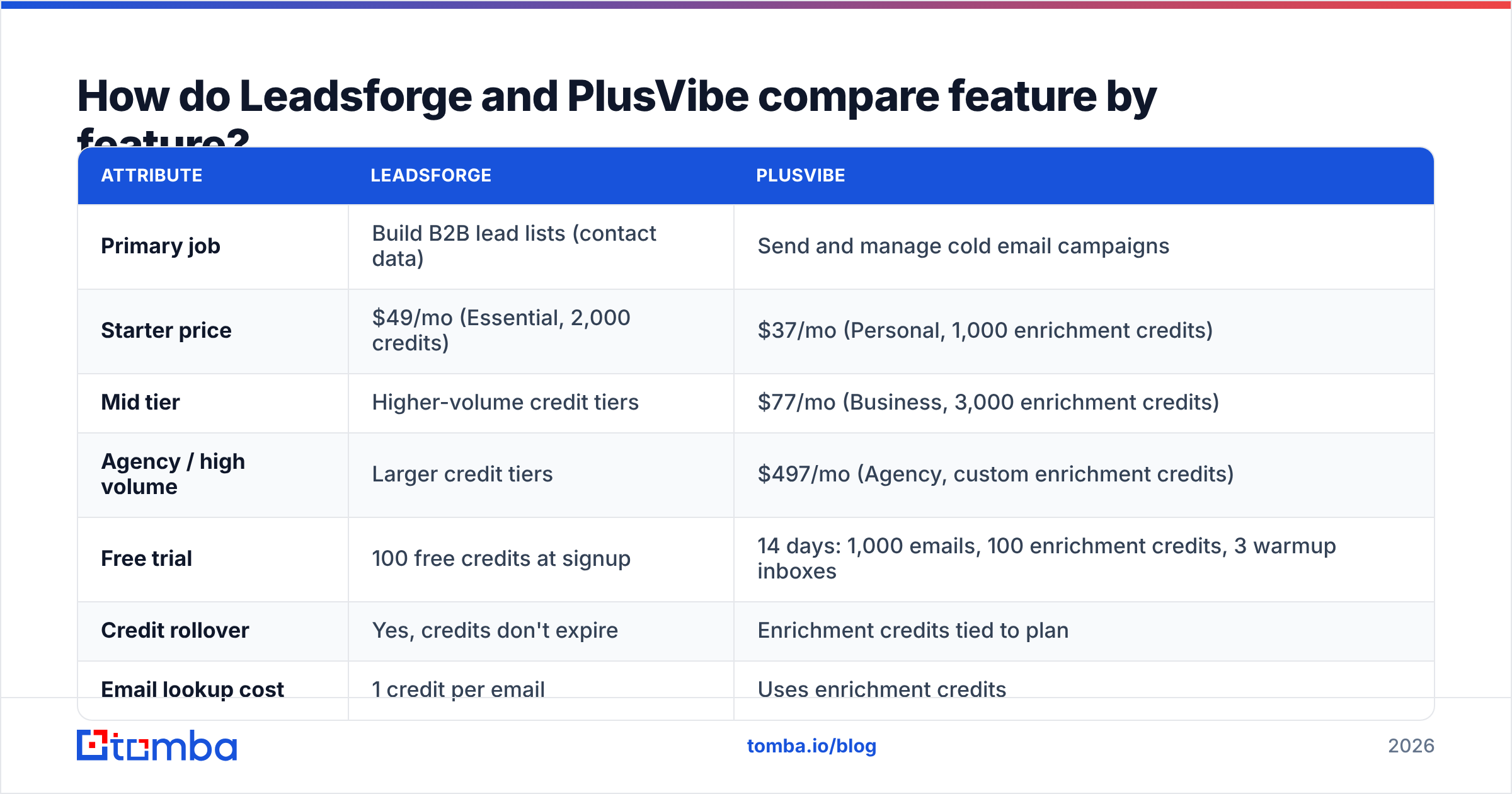
The table below lines up the attributes that matter most when you're deciding between them. Pricing reflects publicly listed plans as of 2026. Both vendors change tiers regularly, so check their pricing pages before you commit.
| Attribute | Leadsforge | PlusVibe |
|---|---|---|
| Primary job | Build B2B lead lists (contact data) | Send and manage cold email campaigns |
| Starter price | $49/mo (Essential, 2,000 credits) | $37/mo (Personal, 1,000 enrichment credits) |
| Mid tier | Higher-volume credit tiers | $77/mo (Business, 3,000 enrichment credits) |
| Agency / high volume | Larger credit tiers | $497/mo (Agency, custom enrichment credits) |
| Free trial | 100 free credits at signup | 14 days: 1,000 emails, 100 enrichment credits, 3 warmup inboxes |
| Credit rollover | Yes, credits don't expire | Enrichment credits tied to plan |
| Email lookup cost | 1 credit per email | Uses enrichment credits |
| Phone numbers | Yes, 10 credits per phone | Not a core focus |
| Email warmup | No (handled by sister product Warmforge) | Yes (advanced pool on Business and above) |
| Sequences / sending | No (exports to Salesforge and other senders) | Yes, core feature |
| Inbox rotation | No | Yes |
| Unified reply inbox | No | Yes |
| Email verification | Emails returned as verified | Built-in verification |
| Best for | Teams that lack targeted lists | Teams that lack sending infrastructure |
Reading the table, you can see where each tool is strong. Leadsforge owns the top of the funnel: finding the right people and their contact details. PlusVibe owns the middle: getting messages delivered, following up, and catching replies.
How does each tool fit into an outbound workflow?#
Here's a typical five-stage outbound motion, with each tool placed where it belongs:
- Define the ICP. You pick the industries, company sizes, titles and geographies you want to reach. Leadsforge's natural-language search is built for this step, and PlusVibe doesn't really try to do it.
- Source contacts. You pull names, companies and emails. Leadsforge does this natively. PlusVibe's enrichment credits can fill in missing details on a list you already have, but it isn't a discovery engine.
- Verify and clean. Before anything is sent, you remove invalid addresses and flag risky ones. Both tools touch this step. Many teams still run a dedicated email verifier over the file, especially for catch-all domains.
- Warm up and send. You warm up mailboxes, rotate sends across them and run multi-touch sequences. This is PlusVibe's core job, and Leadsforge leaves it to other tools.
- Handle replies. You triage positives, objections and out-of-office replies. PlusVibe's unified inbox covers this.
If your pain sits in steps 1 and 2, Leadsforge is the better fit. If it sits in steps 4 and 5, PlusVibe is. Step 3 is shared, and it's also where most campaigns quietly break.

Is Leadsforge worth it for lead generation?#
Leadsforge is worth a look if list building is your bottleneck and you'd rather describe a market than click through dozens of filters.
Where it's strong:
- Natural-language search. Typing your ICP as a sentence is faster than setting up filter trees in a classic database UI, especially for founders and small teams who don't prospect every day.
- Credits that roll over. Leadsforge credits don't expire. That matters if your outbound is lumpy, for example heavy one month and quiet the next. The Essential plan is $49/mo for 2,000 credits, which works out to about $0.0245 per credit on monthly billing, and annual billing brings it lower.
- Phone data included. Phone lookups cost 10 credits each. That's expensive compared with email lookups, but convenient if you run a mixed email-and-call motion.
- Works with the Forge stack. If you already use Salesforge for sending, the export path is short.
Where to be careful:
- Phone lookups use credits fast. At 10 credits per number, a 200-contact phone list uses the same credits as 2,000 emails.
- No sending layer. You still need a separate sending tool, whether that's PlusVibe, Salesforge, Instantly or something else.
- Data coverage varies by market. Like every B2B database, coverage is strongest in North American and Western European tech and weaker in niche verticals and emerging markets. Pull a sample in your specific niche before you buy a large credit pack.
Is PlusVibe worth it for cold email?#
PlusVibe is worth a look if you already know who you're emailing and your problem is sending at volume without damaging your domains.
Where it's strong:
- Deliverability tooling in one place. Warmup, inbox rotation, sequencing and a shared reply inbox all live in one dashboard, so you don't need to wire three separate tools together.
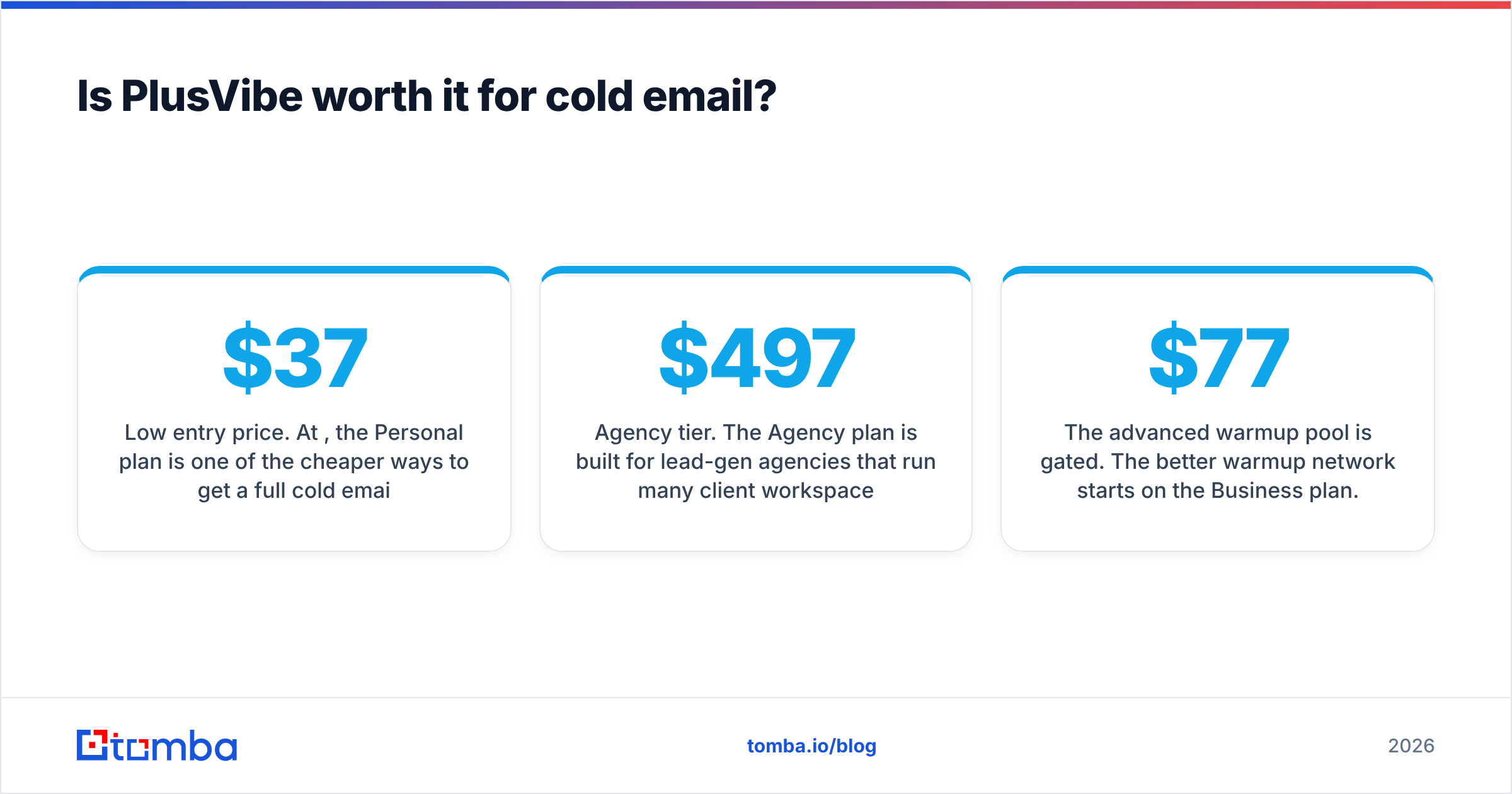
- Low entry price. At $37/mo, the Personal plan is one of the cheaper ways to get a full cold email stack running for one sender.
- Enrichment included. Every plan comes with enrichment credits (1,000 on Personal, 3,000 on Business), so you can fill gaps in an existing list without a second vendor.
- Agency tier. The $497/mo Agency plan is built for lead-gen agencies that run many client workspaces.
Where to be careful:
- The advanced warmup pool is gated. The better warmup network starts on the $77/mo Business plan. The Personal plan gets basic warmup only. If deliverability is the reason you're buying, plan on Business.
- Enrichment isn't discovery. Enrichment credits improve records you already have. They won't build a new ICP-targeted list from scratch the way Leadsforge does.
- It can't fix bad data. Warmup and rotation protect your sender reputation, but only up to a point. If you load a list with a high bounce rate, the damage happens regardless of how many inboxes you rotate across.
For third-party user reviews of both, G2 is the most useful place to cross-check real-world deliverability and data-quality complaints before you buy.
Which is cheaper: Leadsforge or PlusVibe?#
On sticker price, PlusVibe's entry plan ($37/mo) is cheaper than Leadsforge's ($49/mo). That comparison is misleading, though, because the two plans buy different things.
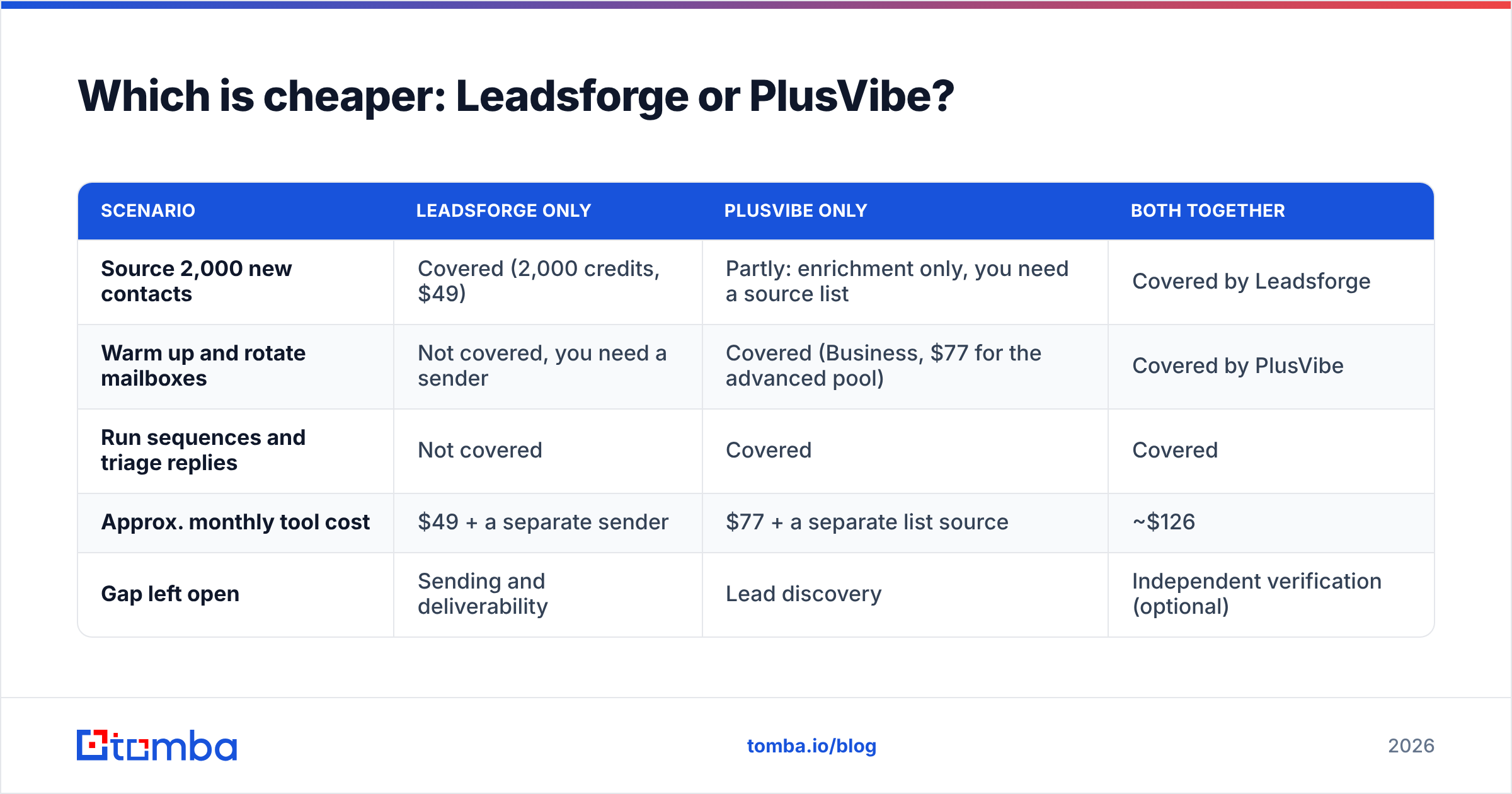
A more useful approach is to model a real month. Say you're a two-person team emailing 2,000 new prospects a month:
| Scenario | Leadsforge only | PlusVibe only | Both together |
|---|---|---|---|
| Source 2,000 new contacts | Covered (2,000 credits, $49) | Partly: enrichment only, you need a source list | Covered by Leadsforge |
| Warm up and rotate mailboxes | Not covered, you need a sender | Covered (Business, $77 for the advanced pool) | Covered by PlusVibe |
| Run sequences and triage replies | Not covered | Covered | Covered |
| Approx. monthly tool cost | $49 + a separate sender | $77 + a separate list source | ~$126 |
| Gap left open | Sending and deliverability | Lead discovery | Independent verification (optional) |
The honest answer is that neither tool alone covers a full outbound motion. Once you add the missing piece, the "cheaper" option often ends up costing more than simply running both.
Can PlusVibe replace Leadsforge, or vice versa?#
Partly, and only at the edges.
- PlusVibe can replace Leadsforge if you already get your lists from somewhere else, such as a CRM export, event attendees, inbound signups, or a list built by hand from LinkedIn. In that case, PlusVibe's enrichment credits may cover the gaps and you don't need a separate data tool.
- Leadsforge can replace PlusVibe only if you already have a sending tool you like, such as Salesforge, Instantly or Smartlead. Leadsforge doesn't send email itself, so it can't take PlusVibe's place on its own.
If you're forced to pick one today, pick the one that fixes your most expensive failure. If reps spend hours building lists by hand, buy Leadsforge. If your domains keep getting flagged and replies land in the wrong inbox, buy PlusVibe.
Where does data quality fit in this decision?#
This is the part most "vs" comparisons skip, and it's where campaigns actually succeed or fail.
Both tools state that the emails they return or process are verified. That's useful, but verification standards differ between vendors, and B2B data decays constantly as people change jobs, companies rebrand and domains move to catch-all configurations. According to HubSpot's research on email list decay, B2B lists lose a meaningful share of valid addresses every year.
In practice, that means:
- Catch-all domains return "accept" for every address, so a basic check can't tell whether a specific inbox really exists.
- Stale records in any database will bounce, and bounces feed straight into your domain's reputation score with Gmail and Microsoft.
- Stacked tools double-count errors. If your list source and your sender each run a light check, you can still ship a 5-8% bounce rate that neither tool flags as a problem.
The fix is simple. Run an independent verification pass before any list goes into your sender, and when a record is missing, look it up through a second source rather than guessing a pattern. A standalone email finder and verifier combination gives you a check that doesn't depend on the list vendor grading its own work.

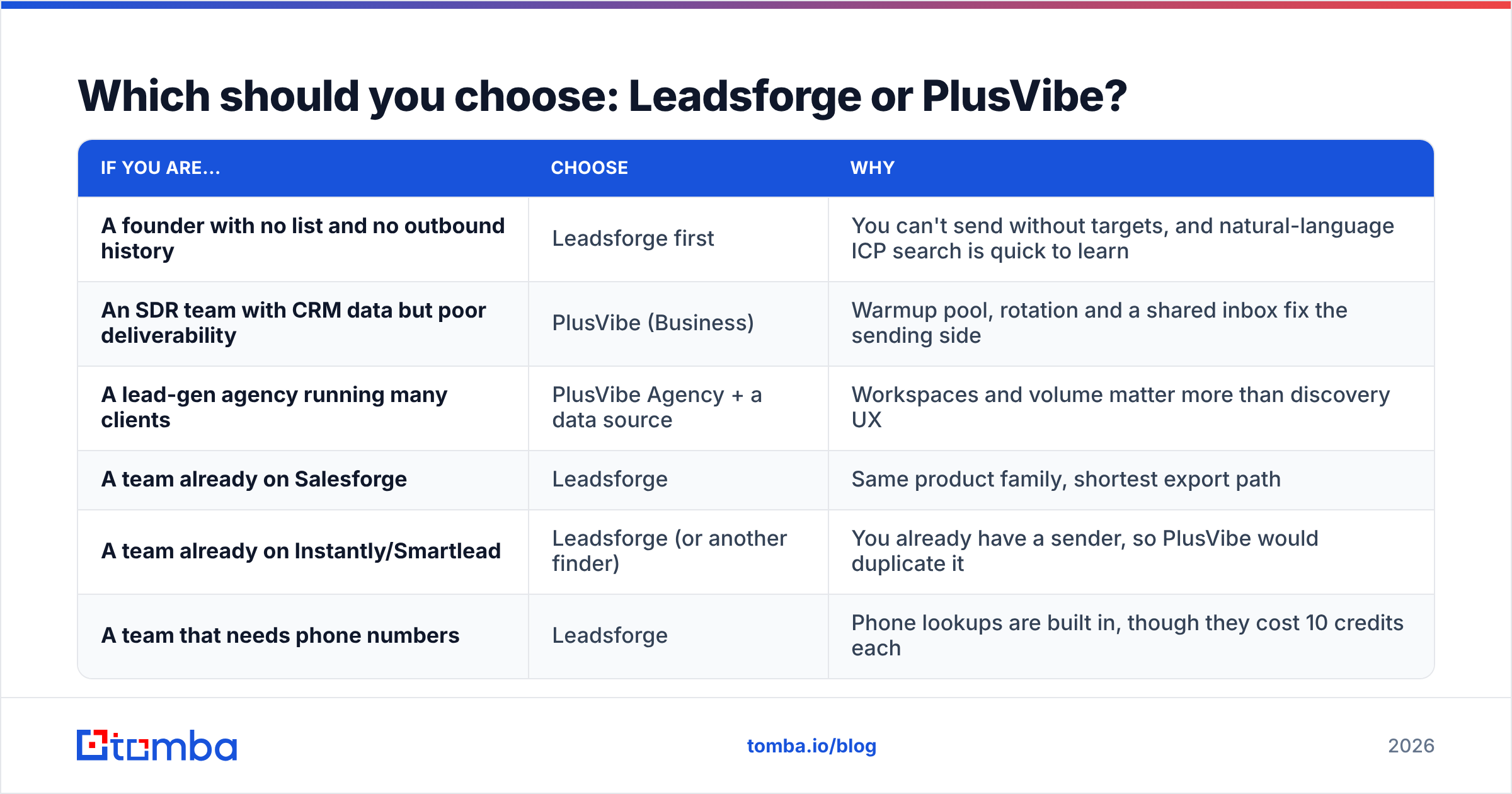
Which should you choose: Leadsforge or PlusVibe?#
Here's the short decision guide:
| If you are... | Choose | Why |
|---|---|---|
| A founder with no list and no outbound history | Leadsforge first | You can't send without targets, and natural-language ICP search is quick to learn |
| An SDR team with CRM data but poor deliverability | PlusVibe (Business) | Warmup pool, rotation and a shared inbox fix the sending side |
| A lead-gen agency running many clients | PlusVibe Agency + a data source | Workspaces and volume matter more than discovery UX |
| A team already on Salesforge | Leadsforge | Same product family, shortest export path |
| A team already on Instantly/Smartlead | Leadsforge (or another finder) | You already have a sender, so PlusVibe would duplicate it |
| A team that needs phone numbers | Leadsforge | Phone lookups are built in, though they cost 10 credits each |
Our verdict: in the "Leadsforge vs PlusVibe" matchup, Leadsforge wins for building lists and PlusVibe wins for sending cold email. Neither beats the other overall because they aren't really competing. Decide based on the gap in your stack, and budget for a verification step between the two no matter which you choose.
Frequently asked questions#
Does Leadsforge send cold emails? No. Leadsforge finds and exports contacts. To send, you connect a separate tool. The Forge family's own sender is Salesforge, but any sequencer that accepts CSV imports will work.
Does PlusVibe have a lead database? PlusVibe includes enrichment credits for filling in contact details, but it isn't built as an ICP discovery database the way Leadsforge is.
Do Leadsforge credits expire? No. Leadsforge credits roll over month to month, and you get 100 free credits at signup to test it.
Which PlusVibe plan do I need for good deliverability? The advanced warmup pool starts on the Business plan ($77/mo). The Personal plan ($37/mo) includes basic warmup only.
Can I use both tools together? Yes, and many teams do. Build and export the list in Leadsforge, verify it, then import it into PlusVibe for warmup, sequencing and reply handling.
How can Tomba help alongside either tool?#
Whichever side of this comparison you land on, your campaign still depends on the quality of the addresses you load. The Tomba Email Finder finds professional email addresses by name, company or domain. It pairs with Tomba's verifier and catch-all checks, so you can confirm contacts independently before they reach Leadsforge exports or PlusVibe sequences. Start on the free tier (25 searches/mo) to test it against your own niche, then move to Starter at $49/mo when you're ready to scale. See the full Tomba pricing for Growth, Pro and Enterprise options.
Related guides#
// get started
Find, verify and enrich your first contacts today
Start on the free plan with 25 searches a month, then scale when your team is ready.
Free plan · No credit card required · GDPR & CCPA
// about the author