Leadsforge vs Power Almanac: Which Lead Database Fits You in 2026?
Leadsforge builds AI-generated B2B lead lists from a chat prompt. Power Almanac maps US local-government officials. These two tools rarely compete directly, so here is how to tell which one fits your pipeline.
TL;DR
- Leadsforge is an AI lead-list builder. You describe your ideal customer in plain language and it returns contacts with emails. It works best for private-sector B2B outbound, especially if you already send through Salesforge.
- Power Almanac is a US local-government database covering city, county and township officials, so it's built for teams that sell to the public sector.
- For most readers these tools aren't substitutes. Your market decides the winner: companies go to Leadsforge, municipalities go to Power Almanac.
- Neither tool removes the need to verify addresses before you send. Government mail servers and small-business domains both catch sloppy lists.
- Our pick: choose Leadsforge for general B2B prospecting and Power Almanac for SLED (state, local and education) sales. Add a separate finder and verifier layer to either one.
What is the real difference between Leadsforge and Power Almanac?#
The two tools solve different problems, which is why a straight feature comparison can mislead you.
Leadsforge (leadsforge.ai) belongs to the Forge product family alongside Salesforge, Mailforge and Warmforge. Its main idea is conversational list building. You don't click through 30 filters. You type something like "Series A SaaS companies in Germany with 50-200 employees, targeting heads of RevOps," and the tool turns that into a search, returns matching companies and people, and attaches contact data you can export or push straight into a sequence.
Power Almanac (poweralmanac.com) is a narrower product. It is a directory of US local-government organizations and the people who run them: mayors, city managers, clerks, finance directors, police and fire chiefs, public works directors, IT directors and similar roles. It adds municipal attributes such as population and government type, so you can segment by the kind of jurisdiction you actually sell to.
So the question behind "Leadsforge vs Power Almanac" is usually this: are your buyers in companies or in city halls? Once you've answered that, most of the decision is made.
How do the two tools compare feature by feature?#
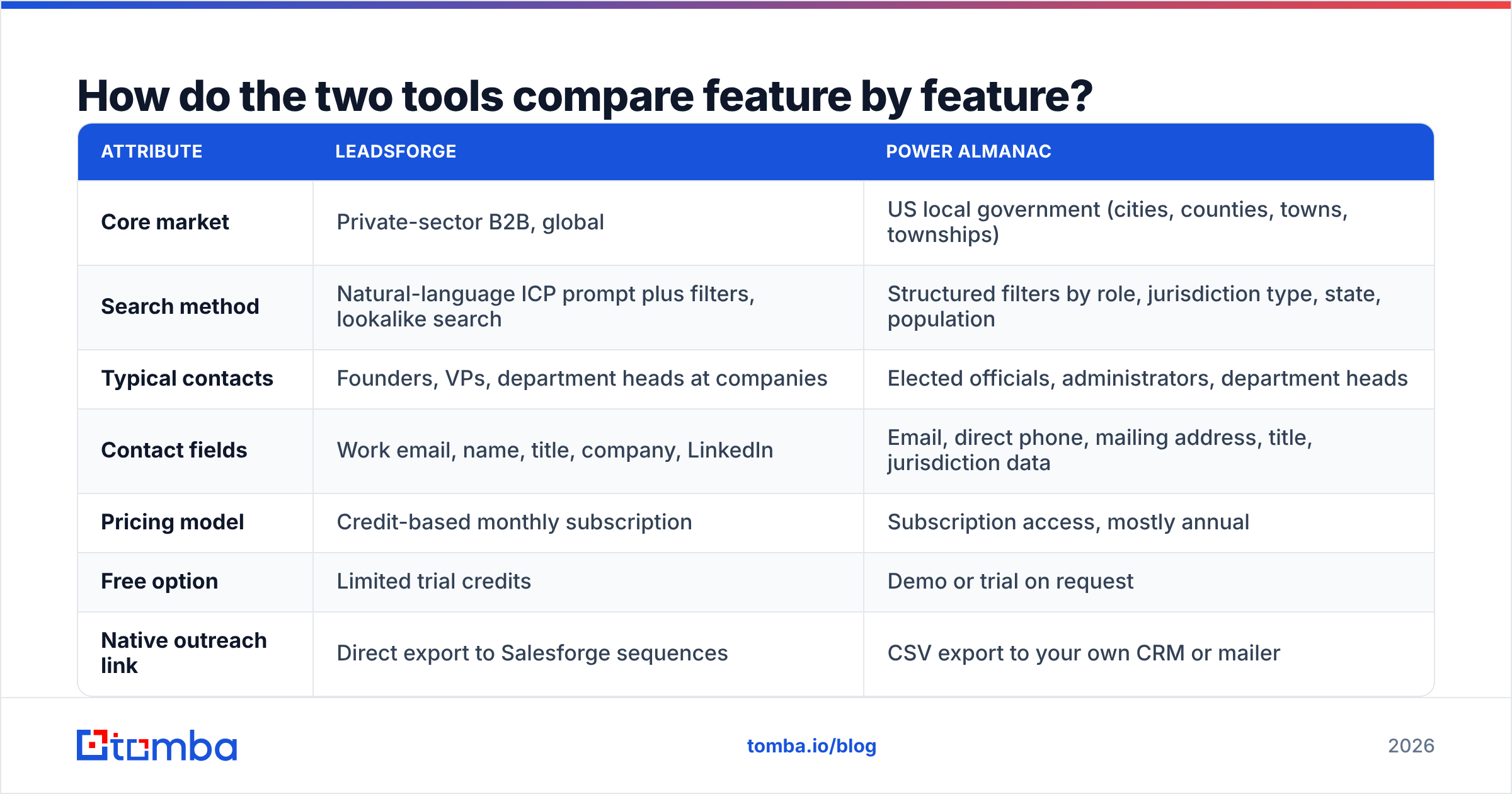
The table below lines up the attributes that matter when you're choosing a prospecting data source. Pricing on both sides changes often, so check each vendor's current plan page before you budget.
| Attribute | Leadsforge | Power Almanac |
|---|---|---|
| Core market | Private-sector B2B, global | US local government (cities, counties, towns, townships) |
| Search method | Natural-language ICP prompt plus filters, lookalike search | Structured filters by role, jurisdiction type, state, population |
| Typical contacts | Founders, VPs, department heads at companies | Elected officials, administrators, department heads |
| Contact fields | Work email, name, title, company, LinkedIn | Email, direct phone, mailing address, title, jurisdiction data |
| Pricing model | Credit-based monthly subscription | Subscription access, mostly annual |
| Free option | Limited trial credits | Demo or trial on request |
| Native outreach link | Direct export to Salesforge sequences | CSV export to your own CRM or mailer |
| Best fit | SDR teams and agencies running cold email | GovTech, public-sector consultants, municipal vendors |
| Main limitation | Coverage is thinner outside tech-heavy segments | Useless outside US local government |
Two things stand out. First, Leadsforge optimizes for speed to list: going from an idea to a sendable CSV in minutes. Power Almanac optimizes for coverage depth in one vertical, where generic B2B databases are known to be weak. Second, each has a hard boundary. Leadsforge won't reliably tell you who the finance director of a 9,000-person township is. Power Almanac won't help you find a VP of Sales at a fintech startup.
How should you decide which one your team needs?#
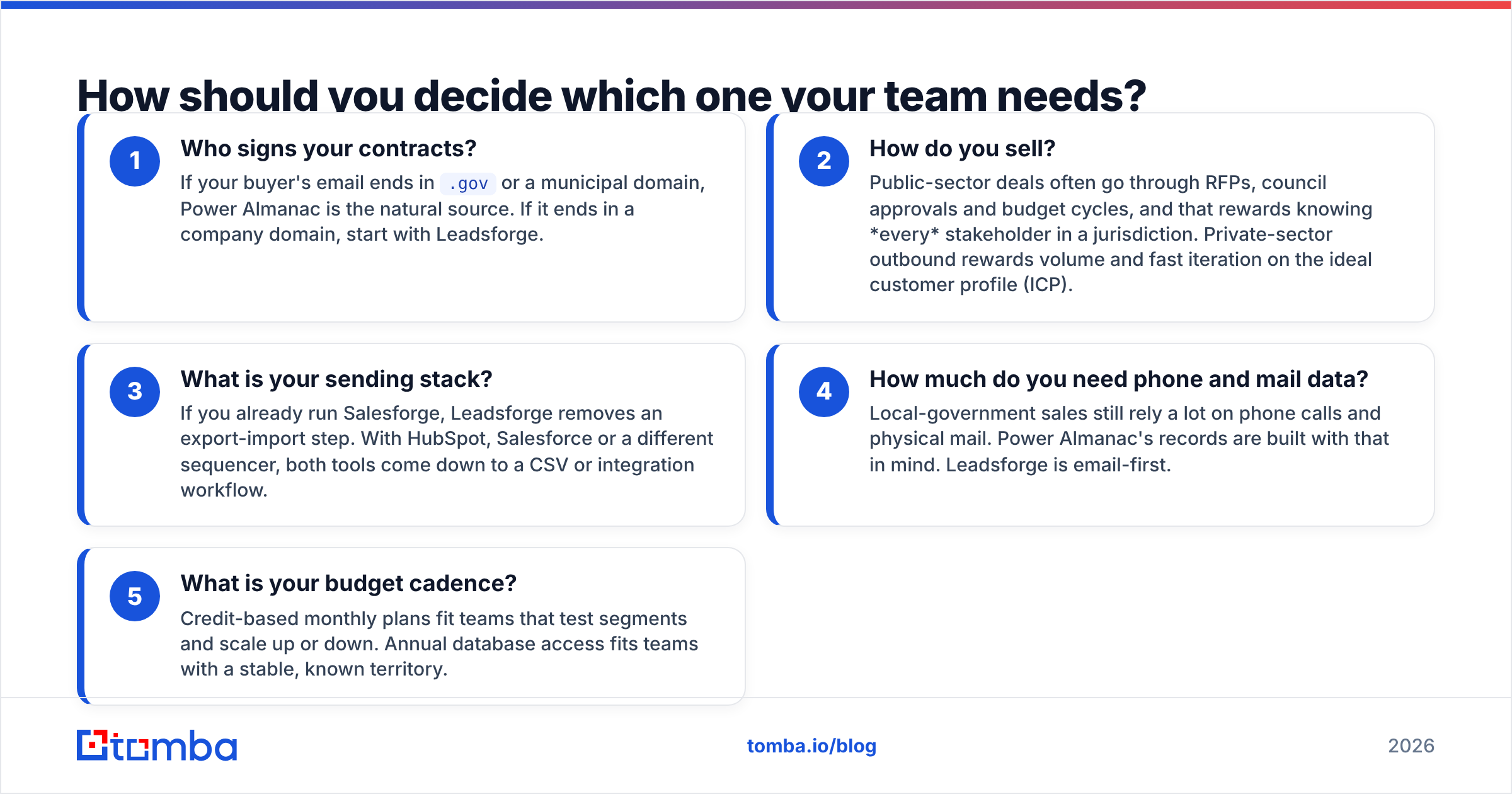
Work through these five questions in order. The first "no" usually settles it.
- Who signs your contracts? If your buyer's email ends in
.govor a municipal domain, Power Almanac is the natural source. If it ends in a company domain, start with Leadsforge. - How do you sell? Public-sector deals often go through RFPs, council approvals and budget cycles, and that rewards knowing every stakeholder in a jurisdiction. Private-sector outbound rewards volume and fast iteration on the ideal customer profile (ICP).
- What is your sending stack? If you already run Salesforge, Leadsforge removes an export-import step. With HubSpot, Salesforce or a different sequencer, both tools come down to a CSV or integration workflow.
- How much do you need phone and mail data? Local-government sales still rely a lot on phone calls and physical mail. Power Almanac's records are built with that in mind. Leadsforge is email-first.
- What is your budget cadence? Credit-based monthly plans fit teams that test segments and scale up or down. Annual database access fits teams with a stable, known territory.
If you answered "companies" to question 1, you can mostly stop there. Power Almanac isn't a weaker Leadsforge. It's a different product.
Is Leadsforge good for B2B cold email?#
Yes, with the usual caveats that apply to any AI-assisted list builder.
Where it's strong:
- Prompt-to-list speed. Describing your ICP in a sentence is faster than building a boolean filter stack, especially for agencies spinning up lists for many clients.
- Lookalike discovery. Give it a few of your best customers and it surfaces similar companies. This is useful when your ICP is easier to show than to describe.
- Tight Forge integration. Leads can go into Salesforge sequences, and the rest of the Forge stack covers mailboxes and warmup. If you're consolidating vendors, that matters.
Where to be careful:
- Interpretation drift. A natural-language prompt is only as precise as the model's reading of it. Always sample the first 50 rows before you export 5,000. "Heads of RevOps" can quietly become "anyone with Operations in their title."
- Segment coverage. Like most AI-first databases, coverage is deepest in tech, SaaS and venture-backed companies. In traditional industries (manufacturing, logistics, trades) you'll see more gaps and more generic role addresses.
- Verification is not a guarantee. Leadsforge verifies emails, but catch-all domains are still a gray zone for every provider. Treat "accept-all" results as risky until you confirm them some other way.
Community reviews on G2 are a reasonable way to check these points against current user experience before you commit.
Is Power Almanac worth it for public-sector sales?#
If local government is your market, Power Almanac covers ground that general-purpose B2B databases mostly skip.
Why it earns its place:
- Role depth inside small jurisdictions. Generic databases are weighted toward LinkedIn-active professionals. A small-town clerk or public works director often has no LinkedIn presence at all, and that's exactly where a purpose-built government directory helps.
- Jurisdiction-level segmentation. Filtering by population band, government type and state lets you build territories that match how public-sector budgets and procurement actually work.
- Multi-channel contact data. Direct phones and mailing addresses matter in a market where many buyers still respond better to a call or a letter than to a cold email.
What to watch:
- Turnover after elections. Elected and appointed officials change on election cycles, so any government contact list decays in bursts. Re-pull or re-verify your segment after local election periods.
- Shared and generic inboxes. Many small municipalities route mail through
clerk@,info@oradmin@addresses. They're legitimate and often monitored, but they behave differently from a named inbox and can hurt your reply-rate math. - US-only scope. If you also sell to Canadian or UK councils, you'll need another source.
- Strict mail servers. Government mail infrastructure often uses aggressive filtering. A small share of bad addresses in one send can hurt your sender reputation with that whole category of domains.
Which one is cheaper?#
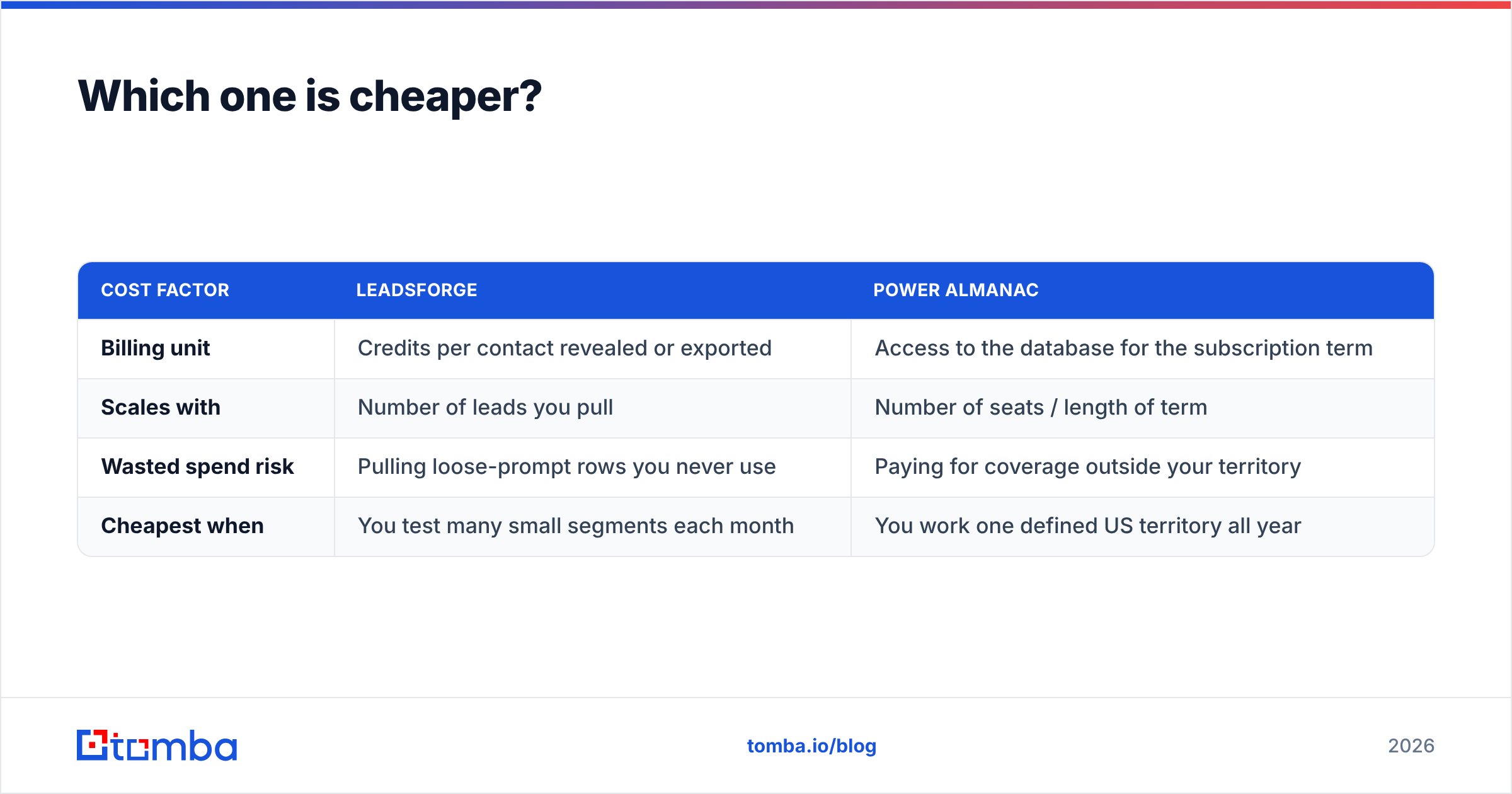
Neither is cheap or expensive in the abstract. The real comparison is cost per usable contact in your segment.
| Cost factor | Leadsforge | Power Almanac |
|---|---|---|
| Billing unit | Credits per contact revealed or exported | Access to the database for the subscription term |
| Scales with | Number of leads you pull | Number of seats / length of term |
| Wasted spend risk | Pulling loose-prompt rows you never use | Paying for coverage outside your territory |
| Cheapest when | You test many small segments each month | You work one defined US territory all year |
Here's a practical rule. If you pull fewer than a few hundred government contacts a year, a large annual database may be more than you need. If government is your whole market, per-credit pricing on a general tool will cost more and still miss people. The reverse holds for Leadsforge: in private-sector outbound, credit pricing keeps you from paying for data you'll never touch.
Where do both tools fall short?#
This is the part most comparison pages skip. Both tools hand you a list, and neither one can promise that every row lands in an inbox on send day.
Three gaps show up whichever tool you choose:
- Missing people. Every database has holes. A new city manager hired last month or a VP who joined last quarter won't be in either tool yet. You need a way to find one specific address on demand, usually by name plus domain.
- Stale addresses. People leave jobs and elections change officeholders. A list that was 95% deliverable at export can drop noticeably within a quarter.
- Catch-all ambiguity. Many municipal and mid-market company domains accept all mail at the SMTP level, so a standard check can't confirm whether a mailbox exists.
The fix is the same in both cases: add a finder and verifier layer between your database and your sequencer. Use domain search to see who is publicly reachable at a given city or company domain and which email pattern it uses. Then run the final list through an email verifier right before sending, not at export time. For Leadsforge users this protects your warmed Salesforge mailboxes. For Power Almanac users it protects your standing with strict government mail servers.
Leadsforge vs Power Almanac: which should you pick?#
Here's our recommendation, by team type:
- SDR team or agency doing private-sector cold email: Leadsforge. The prompt-driven workflow and Salesforge handoff get lists live faster, and credit pricing fits segment testing.
- GovTech, municipal software or public-sector consulting firm: Power Almanac. General B2B databases don't match its depth on small-jurisdiction officials, phones and jurisdiction metadata.
- Company selling to both: Use both, split by market. Don't force either tool into the other's territory. Run one shared verification step so your bounce rate stays consistent across segments.
- Early-stage team not yet sure of its ICP: Hold off on annual database commitments. Start with pay-as-you-go finding and verification, confirm which segment responds, then buy depth.
As a neutral reviewer, we don't think either tool "wins" outright. They're good at different jobs. The mistake to avoid is buying a vertical database for a horizontal problem, or the other way around.
How does Tomba fit alongside either tool?#
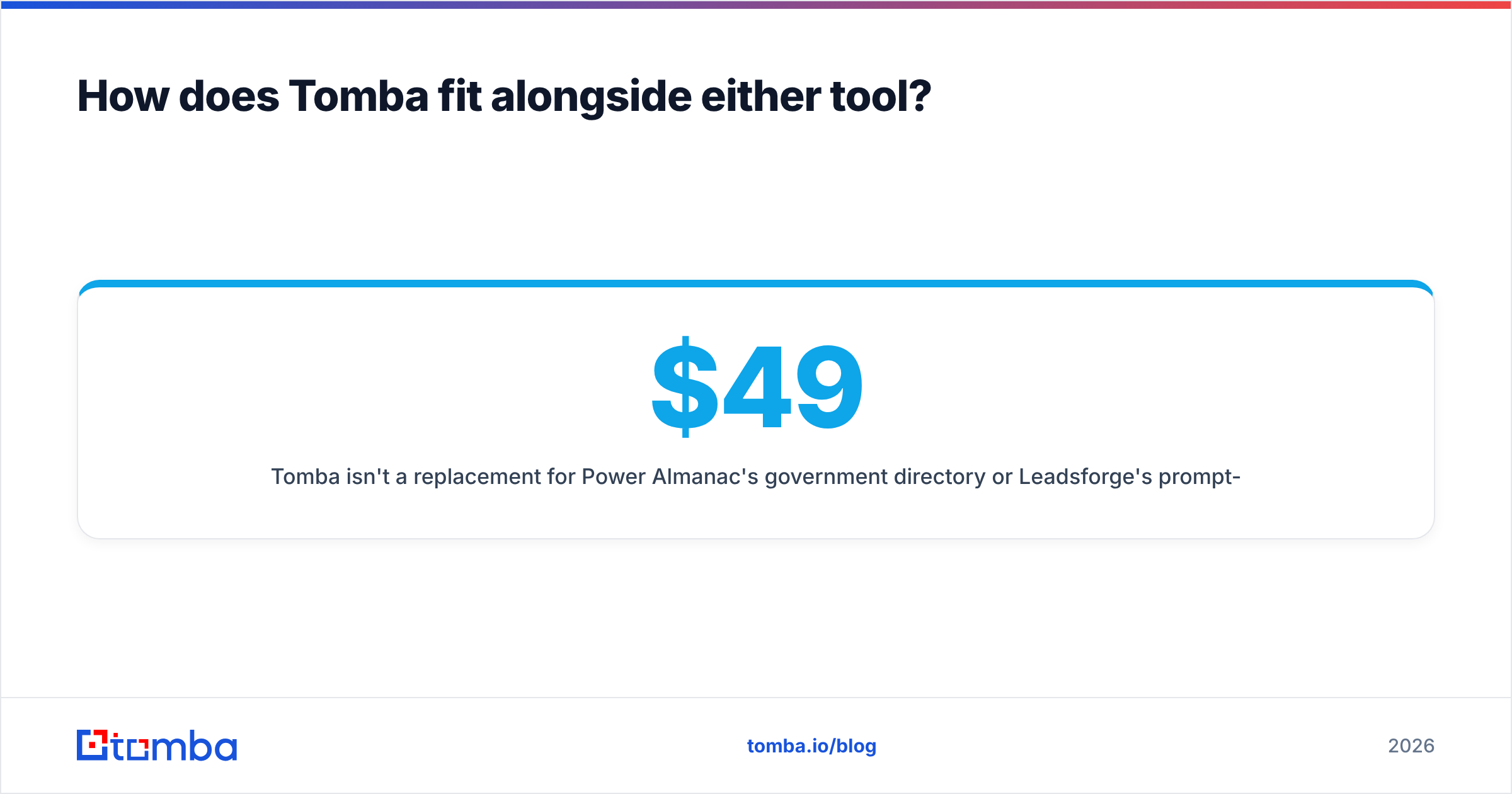
Tomba isn't a replacement for Power Almanac's government directory or Leadsforge's prompt-based list building. It's the layer that fills their gaps. When your database is missing the new county IT director or the VP of Sales who changed jobs last month, the Tomba Email Finder returns a professional address from a name and domain. Verification then comes from the same account before you hit send. The free tier includes 25 searches a month, and paid plans start at $49/mo for Starter, with Growth at $99/mo and Pro at $249/mo (full pricing details). If you're about to load a Leadsforge export or a Power Almanac segment into a sequence, run the missing and risky rows through Tomba first. Finding one correct address costs far less than losing a warmed domain to bounces.
Related guides#
// get started
Find, verify and enrich your first contacts today
Start on the free plan with 25 searches a month, then scale when your team is ready.
Free plan · No credit card required · GDPR & CCPA
// about the author