Leadsforge vs QuickEnrich: Pricing, Data & Which to Pick in 2026
Leadsforge builds lead lists from a chat prompt. QuickEnrich fills in emails and mobile numbers for lists you already have. Here is how they compare on pricing, credits, and workflow fit, and which one belongs in your stack.
TL;DR
- Leadsforge is a list builder. You describe your ideal customer in plain English and it returns a lead list with contact data. It works best if you already send through Salesforge or another sequencer.
- QuickEnrich is an enrichment layer. You give it names, domains, or LinkedIn URLs, and it returns verified emails and mobile numbers. It's API-first and works well as the first pass in a waterfall.
- Pricing models differ. Leadsforge charges 1 credit per email and 10 per phone number, starting at $49/mo for 2,000 credits. QuickEnrich charges per contact and starts in the mid-$20s per month.
- How to choose: pick Leadsforge if you don't have a list yet. Pick QuickEnrich if you have a list but it's missing contact data. If you need to find and verify emails in one place, a dedicated email finder like Tomba may cover both jobs.
What is Leadsforge?#
Leadsforge (leadsforge.ai) is an AI lead generation tool in the "Forge" product family, alongside Salesforge (sequencing), Mailforge and Infraforge (sending infrastructure), and Warmforge (warmup). The pitch is simple: skip filter menus. You type something like "Series A SaaS companies in Germany with 50-200 employees, VP of Sales or Head of Revenue," and the AI turns that into a search, returns matching leads, and lets you export them with contact details.
In practice, Leadsforge replaces the part of your week you'd spend building an ICP list in a traditional database. The chat interface is quicker than stacking 12 filters in a legacy tool, and you can refine the list by talking to it ("remove agencies," "only companies hiring SDRs").
Here's how the credit system works, based on Leadsforge's published pricing:
- Essential plan: $49/mo for 2,000 export credits
- Email export: 1 credit per contact
- Phone number: 10 credits per contact
- Free trial: 100 credits on signup
- Rollover: unused credits carry over to the next month
- Annual billing: lowers the effective per-credit cost
One detail to watch: third-party reviews note that email validation can cost credits on top of the base export. If phone numbers matter to you, your cost per lead can rise quickly.
What is QuickEnrich?#
QuickEnrich (quickenrich.io) comes at the problem from the opposite direction. It doesn't help you decide who to target. It assumes you already have the list, whether from Sales Navigator, a CRM export, a Clay table, or a scraped event attendee list, and fills in the missing contact fields.
The company reports a database of 130M+ contacts and positions itself as API-first, built to plug into Clay, custom scripts, and AI agents. Two claims are central to its pitch:
- Double-verified emails. QuickEnrich says its emails are verified before they're returned, so you shouldn't need a separate verifier for most records.
- Mobile numbers included. QuickEnrich includes mobile numbers where it has them, instead of charging a premium phone credit the way many competitors do.
QuickEnrich's entry plans sit in the roughly $24–$29/mo range depending on billing cycle and the snapshot you look at. High-volume API plans run into the low-to-mid hundreds of dollars per month for flat-rate access. Per-contact costs work out to fractions of a cent at scale. Pricing pages change often, so check QuickEnrich's pricing page before you commit.
Most practitioners use QuickEnrich as a first pass. You run the whole list through it, keep the hits, and send only the misses to a more expensive provider. That's the reason it shows up in so many waterfall setups.

How do Leadsforge and QuickEnrich compare side by side?#
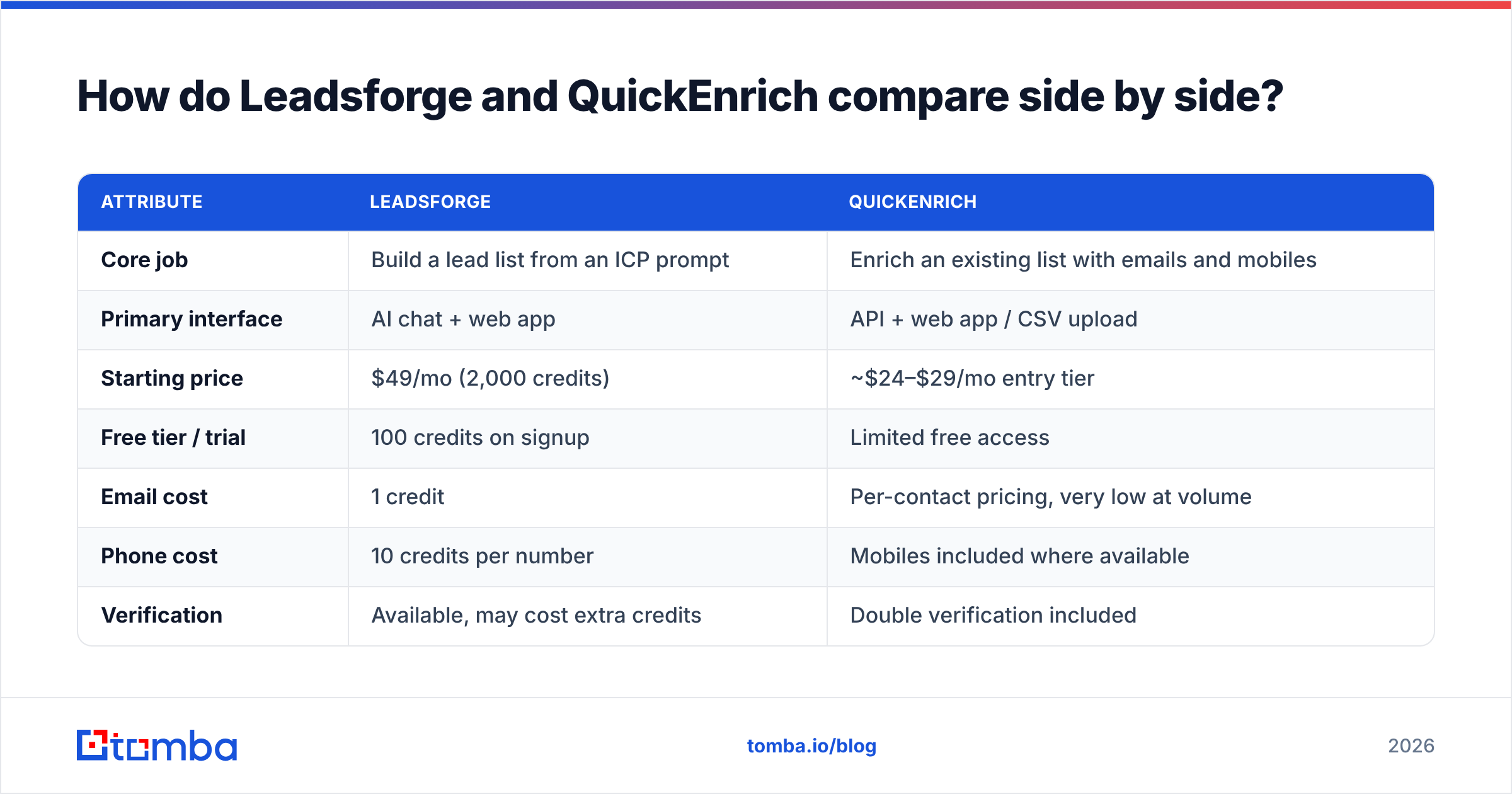
Here's the head-to-head on the attributes that affect your cost and your bounce rate:
| Attribute | Leadsforge | QuickEnrich |
|---|---|---|
| Core job | Build a lead list from an ICP prompt | Enrich an existing list with emails and mobiles |
| Primary interface | AI chat + web app | API + web app / CSV upload |
| Starting price | $49/mo (2,000 credits) | ~$24–$29/mo entry tier |
| Free tier / trial | 100 credits on signup | Limited free access |
| Email cost | 1 credit | Per-contact pricing, very low at volume |
| Phone cost | 10 credits per number | Mobiles included where available |
| Verification | Available, may cost extra credits | Double verification included |
| Credit rollover | Yes | Check current plan terms |
| Best-fit workflow | Salesforge / Forge stack users | Clay tables, API pipelines, waterfalls |
| Weak spot | Phone-heavy use gets expensive | Doesn't build the list for you |

The table shows these aren't really substitutes. Leadsforge handles who to contact. QuickEnrich handles how to reach them. Comparing them directly is a bit like comparing a map to a phone book. Both help you reach someone, but at different stages.
Which tool has better data accuracy?#
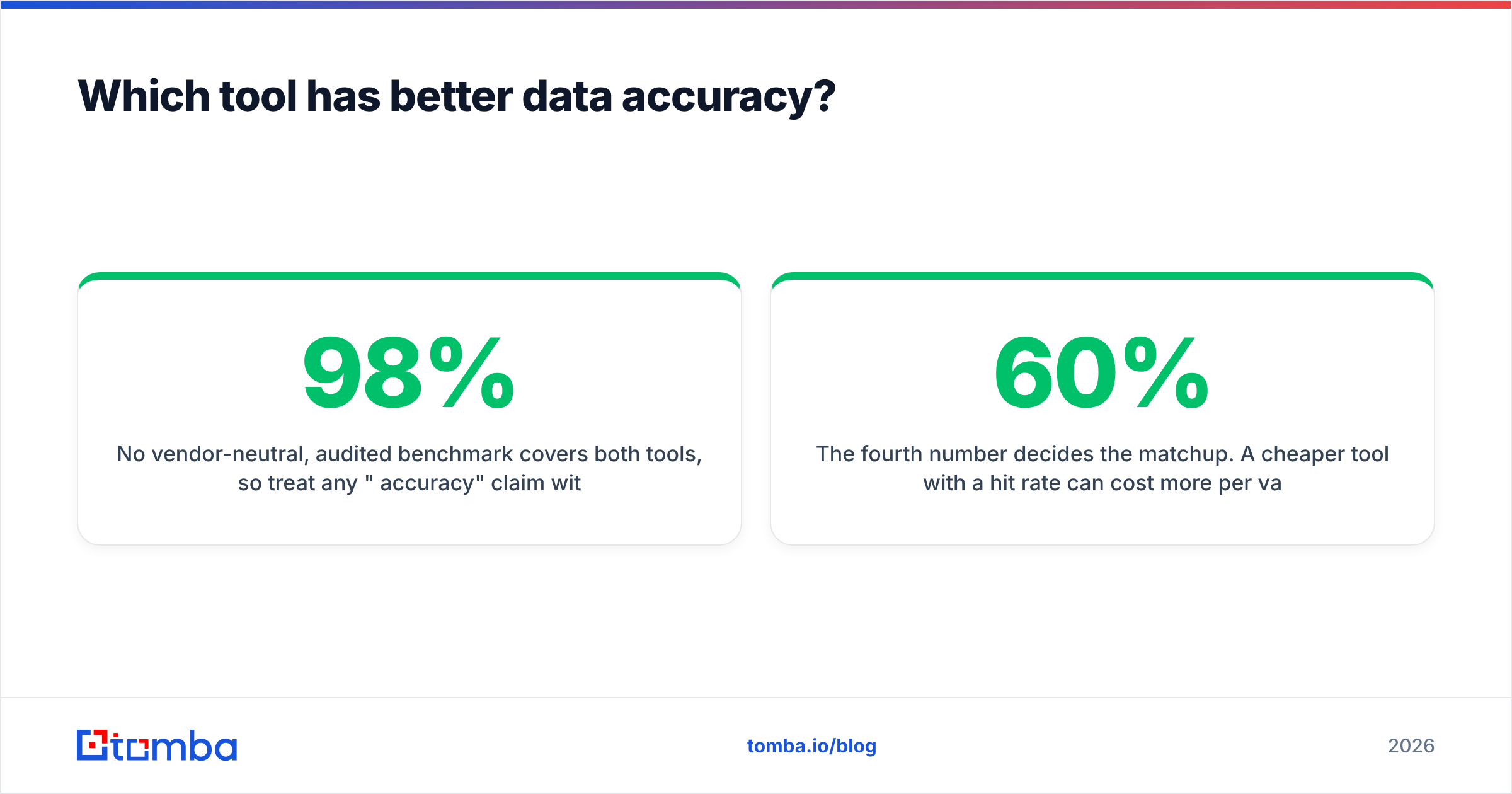
No vendor-neutral, audited benchmark covers both tools, so treat any "98% accuracy" claim with some skepticism, including claims on vendors' own sites. What you can say with confidence:
- QuickEnrich's model is built around accuracy on each lookup. It verifies before returning a result and is designed to sit in a waterfall, where every provider gets judged on hit rate and bounce rate. Tools that survive in Clay waterfalls tend to be the ones that hold up.
- Leadsforge's accuracy depends on its underlying database and whether you pay for validation. If you export without validating, you take on the bounce risk. If you validate, the cost per lead goes up.

The practical move is to run your own test. Take 200 contacts you already know are valid, such as current customers or closed-won deals from the last 12 months. Remove the emails, run the list through both tools, and compare:
- Hit rate: what share of contacts came back with an email?
- Match accuracy: of those, what share match the known-good address?
- Catch-all rate: how many results sit on catch-all domains the tool marked "risky" or "unknown"?
- Cost per valid email: total credits spent divided by correct emails returned.
The fourth number decides the matchup. A cheaper tool with a 60% hit rate can cost more per valid email than a pricier tool with an 85% hit rate.
Whichever tool you choose, run exports through an independent email verifier before they go into a sequence. It's the cheapest protection your sending domain has. G2's email verification category is a reasonable place to compare verifier reviews if you're shopping.
Is Leadsforge better than QuickEnrich for building lead lists?#
Yes, clearly, because QuickEnrich doesn't build lists at all. If your bottleneck is "I don't know which 500 companies to go after this quarter," Leadsforge is the relevant tool of the two.
Leadsforge fits best when:
- You're a founder or small team without a RevOps person to set up complex database filters.
- You already send through Salesforge and want list building and sending in one ecosystem.
- Your ICP is easy to describe in words but hard to express as filter combinations. "B2B fintechs that recently raised and are hiring their first AE" is a good example.
- You need mostly emails, not phones, so the 1-credit export keeps costs predictable.
Where it's weaker:
- Phone-heavy teams. At 10 credits per number, 200 mobile numbers use the same credits as 2,000 emails.
- Teams with an existing data source. If you already pay for Sales Navigator or another database, you're partly paying twice for targeting.
Is QuickEnrich better than Leadsforge for enrichment?#
For pure enrichment, usually yes. It's built for it, it's priced for volume, and the included mobile numbers make a real difference for teams that call as well as email.
QuickEnrich fits best when:
- You build lists in Sales Navigator, Clay, or your CRM and just need contact fields filled.
- You run a waterfall and want a low-cost first provider so you send fewer lookups to expensive ones.
- You have developers or a GTM engineer who will call the API directly instead of using a UI.
- You need mobiles and don't want to pay $0.20+ per phone lookup.
Where it's weaker:
- No targeting. You still need a way to decide who's on the list.
- Less of a guided UI. Non-technical reps may find a chat-driven tool like Leadsforge more approachable.
What does each tool actually cost per 1,000 leads?#
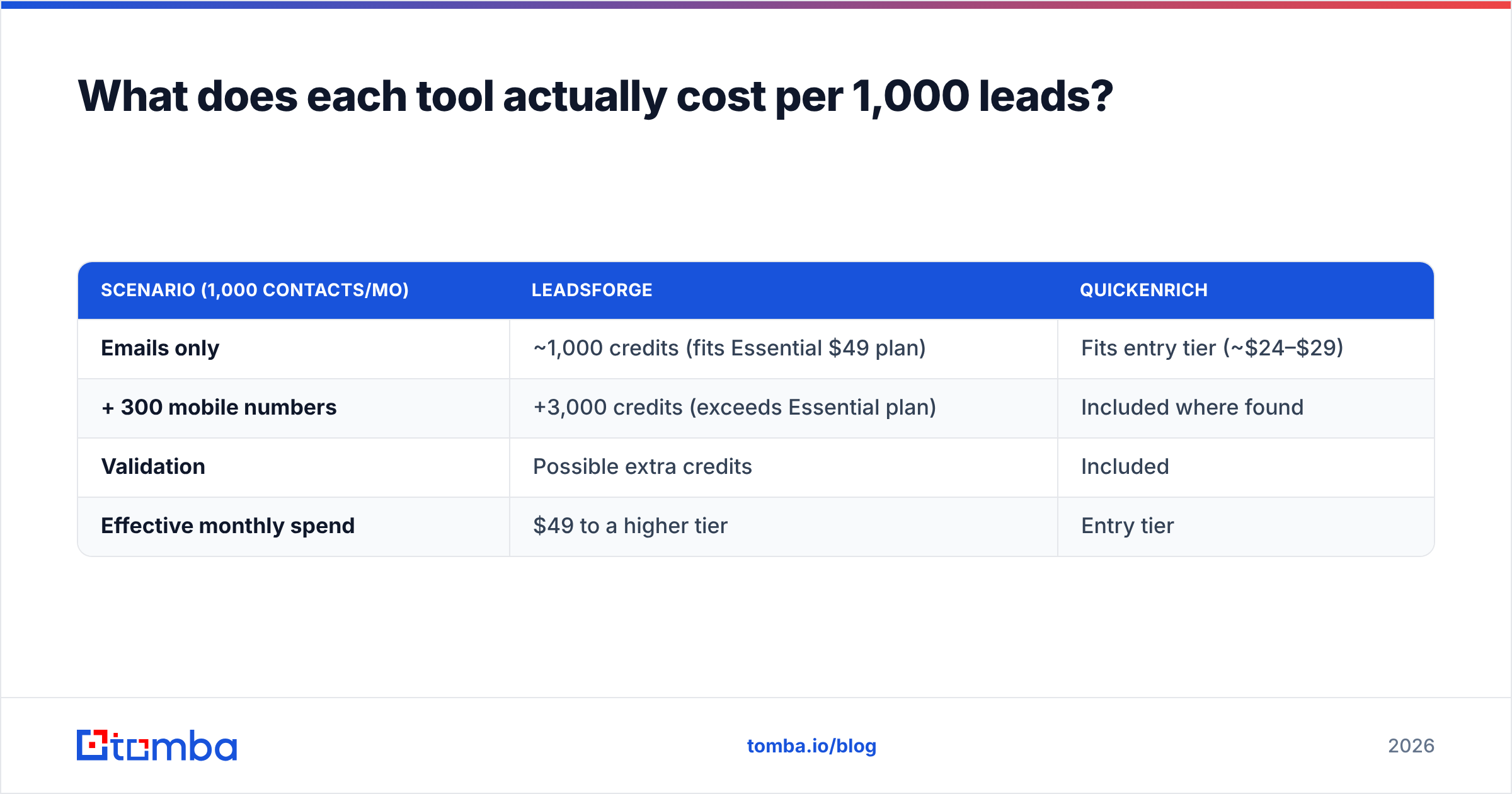
Here's a realistic scenario: 1,000 contacts a month, where you want emails for all of them and mobile numbers for 30%.
| Scenario (1,000 contacts/mo) | Leadsforge | QuickEnrich |
|---|---|---|
| Emails only | ~1,000 credits (fits Essential $49 plan) | Fits entry tier (~$24–$29) |
| + 300 mobile numbers | +3,000 credits (exceeds Essential plan) | Included where found |
| Validation | Possible extra credits | Included |
| Effective monthly spend | $49 to a higher tier | Entry tier |
These are directional estimates based on published pricing, not quotes. Your actual cost depends on hit rate, because some tools only charge on a successful find, and on billing cycle. The pattern is still clear: Leadsforge's cost goes up with phone numbers, and QuickEnrich's stays flat. If you don't need phones, the gap shrinks and Leadsforge's list-building feature is effectively bundled into the price.
Can you use Leadsforge and QuickEnrich together?#
Yes, and for many teams this is the most sensible setup:
- Build the list in Leadsforge. Use the chat prompt to define your ICP and export company and contact records.
- Enrich the gaps with QuickEnrich. Any contact that came back without an email or mobile goes through QuickEnrich's API.
- Verify everything. Run the combined list through a single verifier so one standard decides what's "valid," not two vendors with different definitions.
- Sequence. Push the clean list into Salesforge, your CRM, or whichever sequencer you use.
The catch is overhead. You now have two contracts, two credit balances, and two places to debug when a record looks wrong. For teams sending under a few thousand emails a month, that complexity is often not worth it. A single tool that handles both finding and verification is simpler to run.
Where does Tomba fit in this comparison?#
If you've read this far and thought "I just need accurate work emails for specific people and companies," you may not need either tool's main strength. Tomba is a dedicated email finder, so it does the thing both tools depend on, with verification, domain search, and enrichment in the same account:
- Find by name + domain, or pull every public address for a company with domain search.
- Built-in verification, including catch-all handling, so you don't need a separate verifier subscription.
- Chrome extension, Google Sheets add-on, and API for bulk jobs and pipelines.
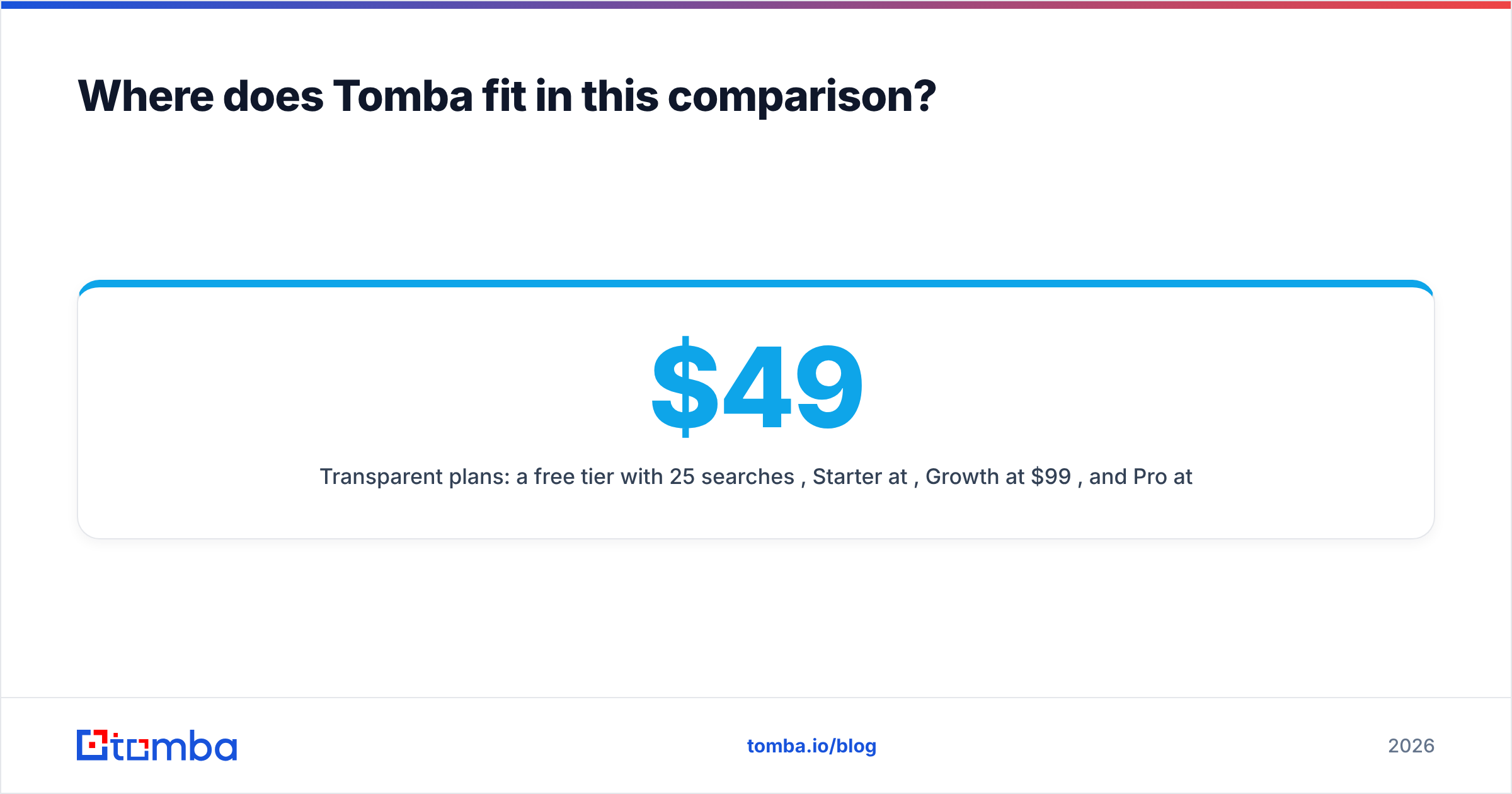
- Transparent plans: a free tier with 25 searches/mo, Starter at $49/mo, Growth at $99/mo, and Pro at $249/mo. See the full Tomba pricing breakdown.
To be fair: Tomba won't write your ICP for you the way Leadsforge's chat does, and for a pure API waterfall QuickEnrich's per-contact pricing at extreme volume is hard to beat. Tomba fits the middle ground. It suits teams that know who they want to reach and want reliable, verified emails without juggling several vendors. For large lists, the bulk email finder handles CSV uploads in one pass.
Which should you choose: Leadsforge or QuickEnrich?#
Use this decision shortcut:
- You have no list and a clear ICP → Leadsforge.
- You have a list and need contact data, especially mobiles → QuickEnrich.
- You run a Clay waterfall or API pipeline → QuickEnrich as the first provider.
- You're already on Salesforge → Leadsforge, for the ecosystem fit.
- You know your targets and want verified emails from one tool → a dedicated email finder like Tomba.
Neither tool is universally better. They solve adjacent problems. Leadsforge is stronger at targeting. QuickEnrich is stronger at cost per enriched contact, and it wins outright on phone numbers. Before you commit to either, run the 200-contact test above. An hour of testing tells you more than any review, including this one.
If your real bottleneck is getting a correct, verified work email for the people already on your list, try the Tomba Email Finder. Start with the free 25 searches, test it against contacts you already know are valid, and only upgrade to Starter at $49/mo once the hit rate proves itself on your own data.
Related guides#
// get started
Find, verify and enrich your first contacts today
Start on the free plan with 25 searches a month, then scale when your team is ready.
Free plan · No credit card required · GDPR & CCPA
// about the author