Leadsforge vs RampedUp: Which Lead Data Tool Fits Your Team in 2026?
Leadsforge builds lead lists from a plain-English prompt. RampedUp looks up contacts and cleans CRM records. They solve different problems, and picking the wrong one costs you credits and bounces.
TL;DR
- Leadsforge is an AI list builder. You describe your ideal customer in plain English and it returns a list of companies and contacts. It fits best inside the Salesforge outbound stack.
- RampedUp is a contact data and CRM enrichment tool. It works best when you already know who you want to reach and need their email, phone, or a cleaner CRM record.
- Pick Leadsforge if your bottleneck is who to target. Pick RampedUp if your bottleneck is how to reach and maintain the people already on your list.
- Neither tool removes the need to verify addresses before a campaign goes out. Budget for a verification pass whichever one you choose.
- Pricing on both changes often and depends on credits. Check the current plan pages before you commit to an annual contract.
What are Leadsforge and RampedUp, in one sentence each?#
Leadsforge is a chat-driven lead generation tool from the team behind Salesforge. It turns a natural-language description of your ICP into a filtered, exportable prospect list. RampedUp is a B2B contact intelligence platform. It focuses on person-level lookups, a browser extension, and keeping records in Salesforce and HubSpot enriched and current.
That difference in starting point shapes everything else in this comparison. Leadsforge starts from a blank page and asks, "Who should I sell to?" RampedUp starts from a name, a company, or a CRM record and asks, "How do I reach this person, and is my data still accurate?"
Here's an analogy. Leadsforge works like a real-estate agent who hears "three bedrooms, near a good school, under budget" and brings back a shortlist. RampedUp works like the county records office: you walk in with an address and walk out with the owner's details and a note on what has changed since you last checked.
You can review each product on its own site at leadsforge.ai and rampedup.io.
How do Leadsforge and RampedUp compare side by side?#
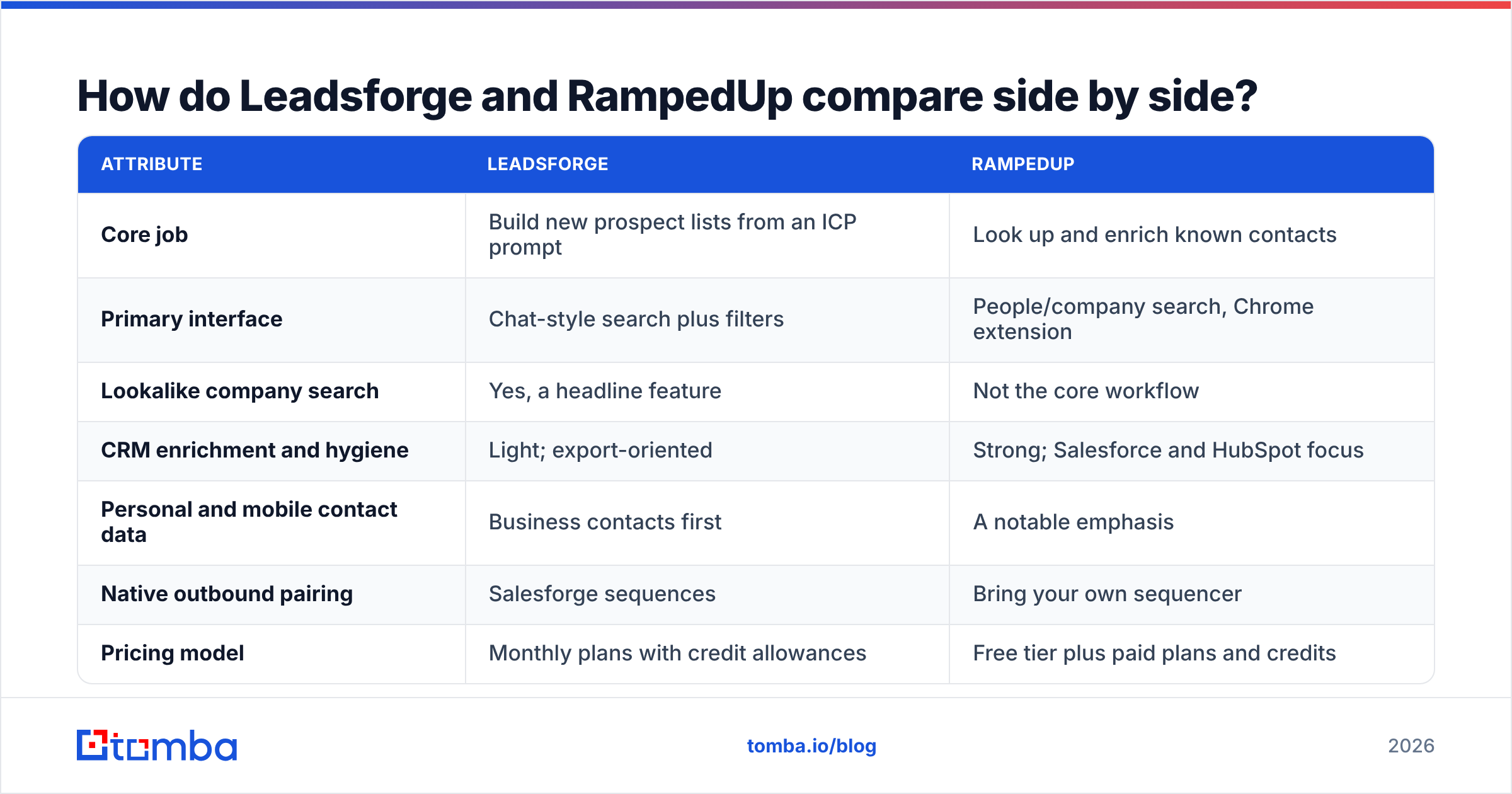
The table below covers the attributes that usually decide a purchase. Pricing is shown as a model rather than a fixed dollar figure. Both vendors adjust credit bundles often, so confirm current numbers on their pricing pages.
| Attribute | Leadsforge | RampedUp |
|---|---|---|
| Core job | Build new prospect lists from an ICP prompt | Look up and enrich known contacts |
| Primary interface | Chat-style search plus filters | People/company search, Chrome extension |
| Lookalike company search | Yes, a headline feature | Not the core workflow |
| CRM enrichment and hygiene | Light; export-oriented | Strong; Salesforce and HubSpot focus |
| Personal and mobile contact data | Business contacts first | A notable emphasis |
| Native outbound pairing | Salesforge sequences | Bring your own sequencer |
| Pricing model | Monthly plans with credit allowances | Free tier plus paid plans and credits |
| Best for | Founders and SDR teams building net-new pipeline | RevOps and AEs working existing accounts |
| Main trade-off | Only as good as the prompt and the underlying data | Less help deciding who to target |
Scores on review sites like G2 shift from quarter to quarter and reflect very different buyer types. Use them to spot recurring complaints, such as bounce rates, credit burn, or support response time. Don't treat them as a verdict.
How does each tool actually work day to day?#
The fastest way to understand the gap is to walk through a typical week with each tool.
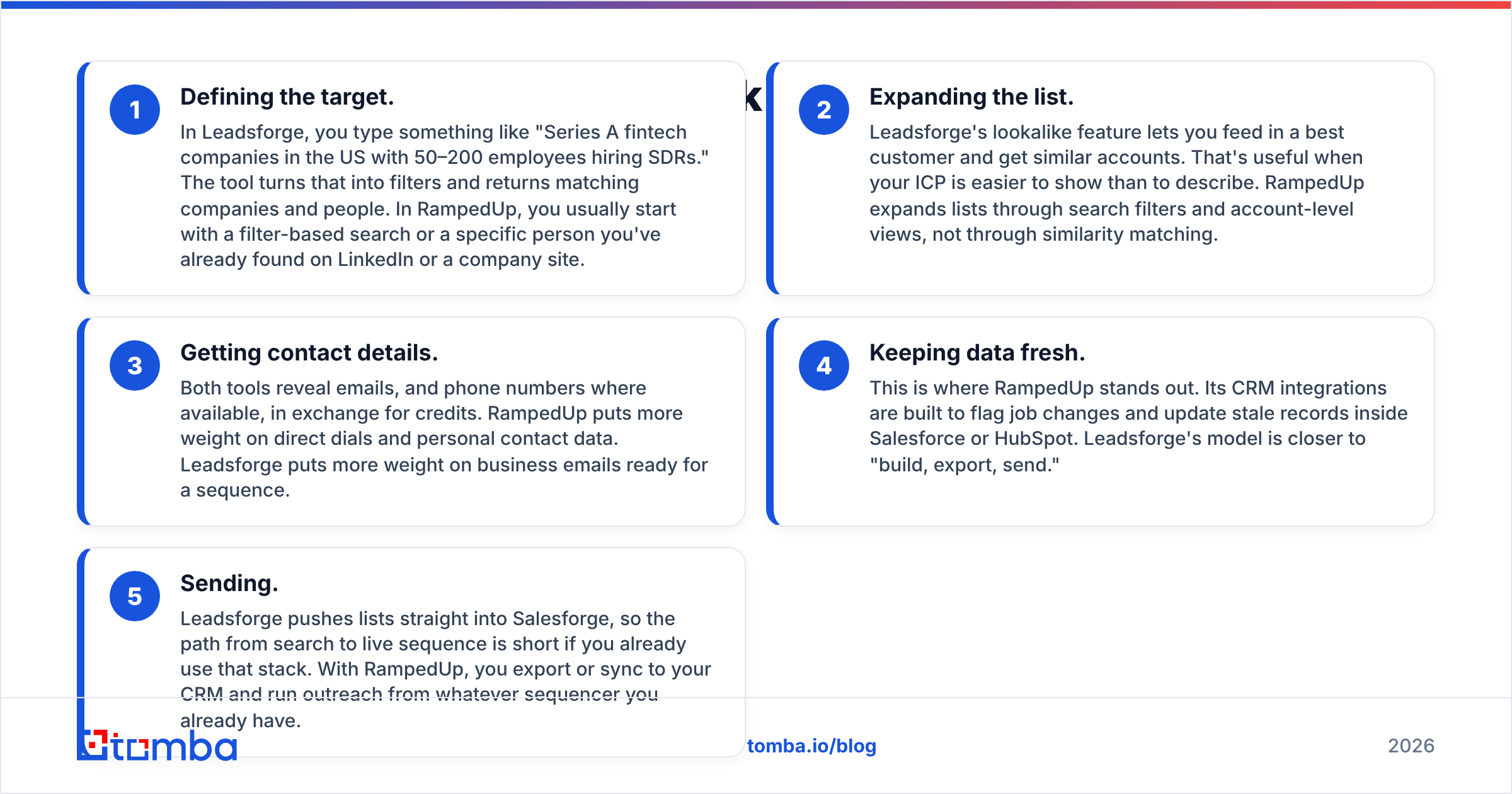
- Defining the target. In Leadsforge, you type something like "Series A fintech companies in the US with 50–200 employees hiring SDRs." The tool turns that into filters and returns matching companies and people. In RampedUp, you usually start with a filter-based search or a specific person you've already found on LinkedIn or a company site.
- Expanding the list. Leadsforge's lookalike feature lets you feed in a best customer and get similar accounts. That's useful when your ICP is easier to show than to describe. RampedUp expands lists through search filters and account-level views, not through similarity matching.
- Getting contact details. Both tools reveal emails, and phone numbers where available, in exchange for credits. RampedUp puts more weight on direct dials and personal contact data. Leadsforge puts more weight on business emails ready for a sequence.
- Keeping data fresh. This is where RampedUp stands out. Its CRM integrations are built to flag job changes and update stale records inside Salesforce or HubSpot. Leadsforge's model is closer to "build, export, send."
- Sending. Leadsforge pushes lists straight into Salesforge, so the path from search to live sequence is short if you already use that stack. With RampedUp, you export or sync to your CRM and run outreach from whatever sequencer you already have.

That last step is where many teams get burned. A fast path from search to send is only an advantage if the addresses are good. If 8% of a list bounces, your sending domain pays the price for months. Run every export through an email verifier before it reaches a sequence, whichever tool produced it.
Is Leadsforge better than RampedUp for building new pipeline?#
For net-new pipeline, Leadsforge usually has the edge, as long as your ICP can be described clearly.
The chat interface removes most of the friction of classic filter-based databases. You don't need to know which of 40 filters maps to "companies that just raised and are scaling sales." You write the sentence and let the tool translate it. For founders and small teams without a dedicated RevOps person, that's a real time saver.
Lookalike search is the other strong argument. If your top three customers share traits that are hard to name, like a particular tech stack, a growth pattern, or a type of hiring, pointing the tool at them can surface accounts you would never have found with filters.
Where Leadsforge is weaker:
- Prompt quality drives output quality. Vague prompts return vague lists. You'll get better results if you treat the prompt like a spec: industry, headcount band, geography, role, seniority, and a trigger.
- It assumes you'll send through Salesforge. The tool works standalone, but most of the workflow advantage comes from that integration. If you run Outreach, Salesloft, or Instantly, you lose part of the benefit.
- Data freshness varies by segment. Like every database-backed tool, coverage is strongest in well-documented markets (US tech, SaaS, agencies) and thinner in niche verticals or smaller regions.
RampedUp can build new lists too. It just makes you do more of the targeting thinking yourself.
Is RampedUp better than Leadsforge for account-based work and CRM hygiene?#
Yes. If your team works a defined account list, or your CRM is decaying faster than you can maintain it, RampedUp is the more natural fit.
B2B contact data goes stale constantly. People change jobs, companies rebrand, and domains move. A CRM that was clean a year ago is probably full of dead emails and outdated titles today. RampedUp's pitch is that it catches those changes and writes them back into the systems your team already uses. That matters most to RevOps, and to AEs who own long-cycle accounts, more than to SDRs blasting sequences.
The browser extension also fits an account-based workflow well. An AE researching a buying committee on LinkedIn or a company site can pull contact details without switching tabs. RampedUp's focus on direct dials and mobile numbers helps teams that rely on phone outreach as much as email.
Where RampedUp is weaker:
- Less guidance on targeting. If you don't already know who you want, you have to build the logic yourself with filters.
- Personal contact data needs care. Personal emails and mobile numbers can lift connect rates, but they carry more compliance weight in some regions. Check your GDPR and local telemarketing obligations before using them in outbound.
- No built-in sequencer. You'll need a separate engagement tool, which adds cost and one more integration to maintain.
How do Leadsforge and RampedUp pricing models differ?#
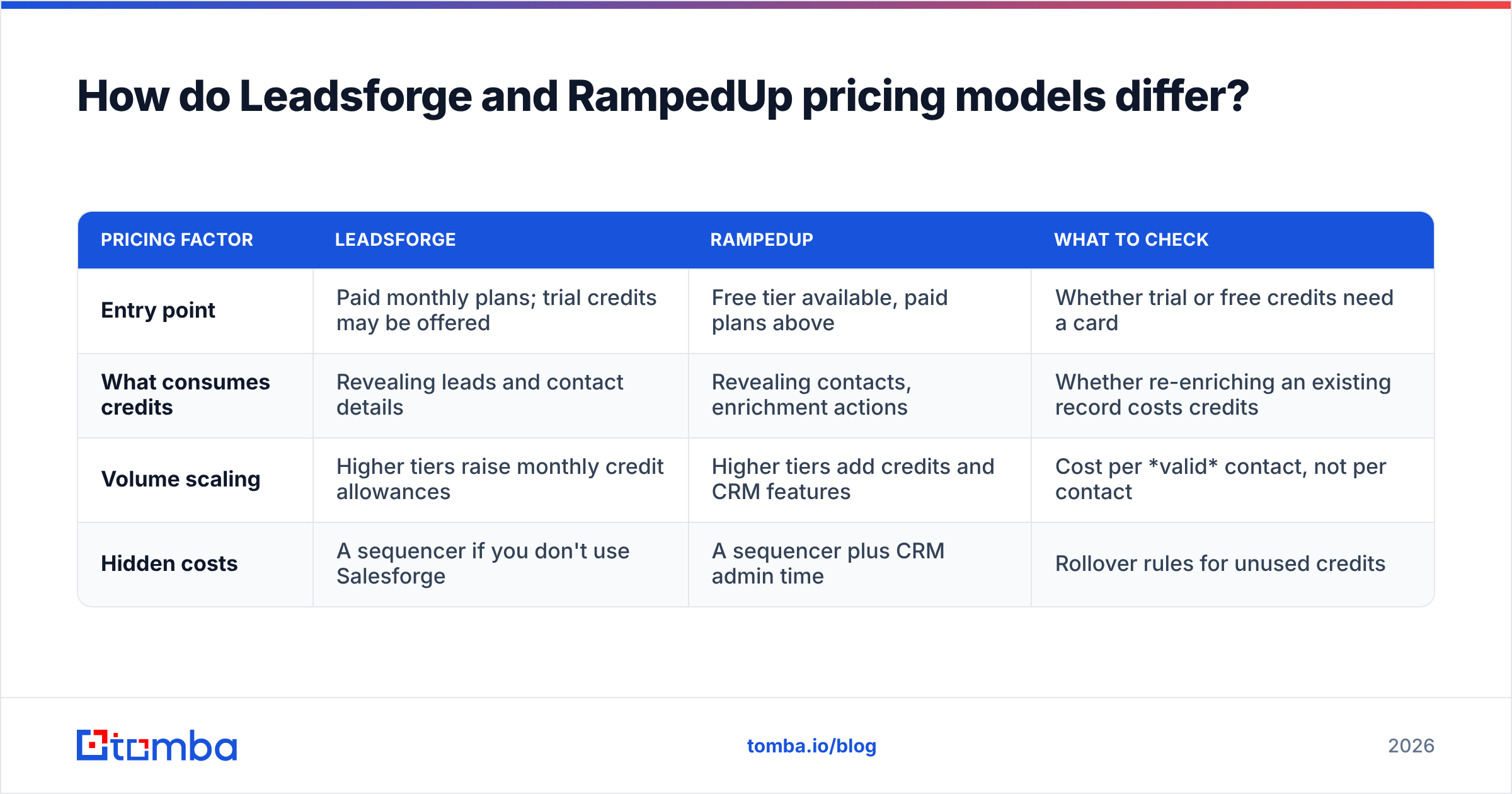
Both tools run on credits, but they charge for different behaviour.
| Pricing factor | Leadsforge | RampedUp | What to check |
|---|---|---|---|
| Entry point | Paid monthly plans; trial credits may be offered | Free tier available, paid plans above | Whether trial or free credits need a card |
| What consumes credits | Revealing leads and contact details | Revealing contacts, enrichment actions | Whether re-enriching an existing record costs credits |
| Volume scaling | Higher tiers raise monthly credit allowances | Higher tiers add credits and CRM features | Cost per valid contact, not per contact |
| Hidden costs | A sequencer if you don't use Salesforge | A sequencer plus CRM admin time | Rollover rules for unused credits |
The metric that matters is cost per deliverable contact, not cost per credit. Suppose tool A charges less per credit but 15% of its emails bounce, while tool B charges 30% more per credit with 3% bounces. Tool B can easily work out cheaper once you count the domain damage and the wasted sends.
For reference, standalone email finding is priced far more simply. Tomba pricing starts with a free tier of 25 searches a month, then Starter at $49/mo, Growth at $99/mo, and Pro at $249/mo, with custom Enterprise plans. Many teams pair one of these list-building tools with a dedicated finder and verifier to fill gaps and double-check output.
What problems will you hit with either tool?#
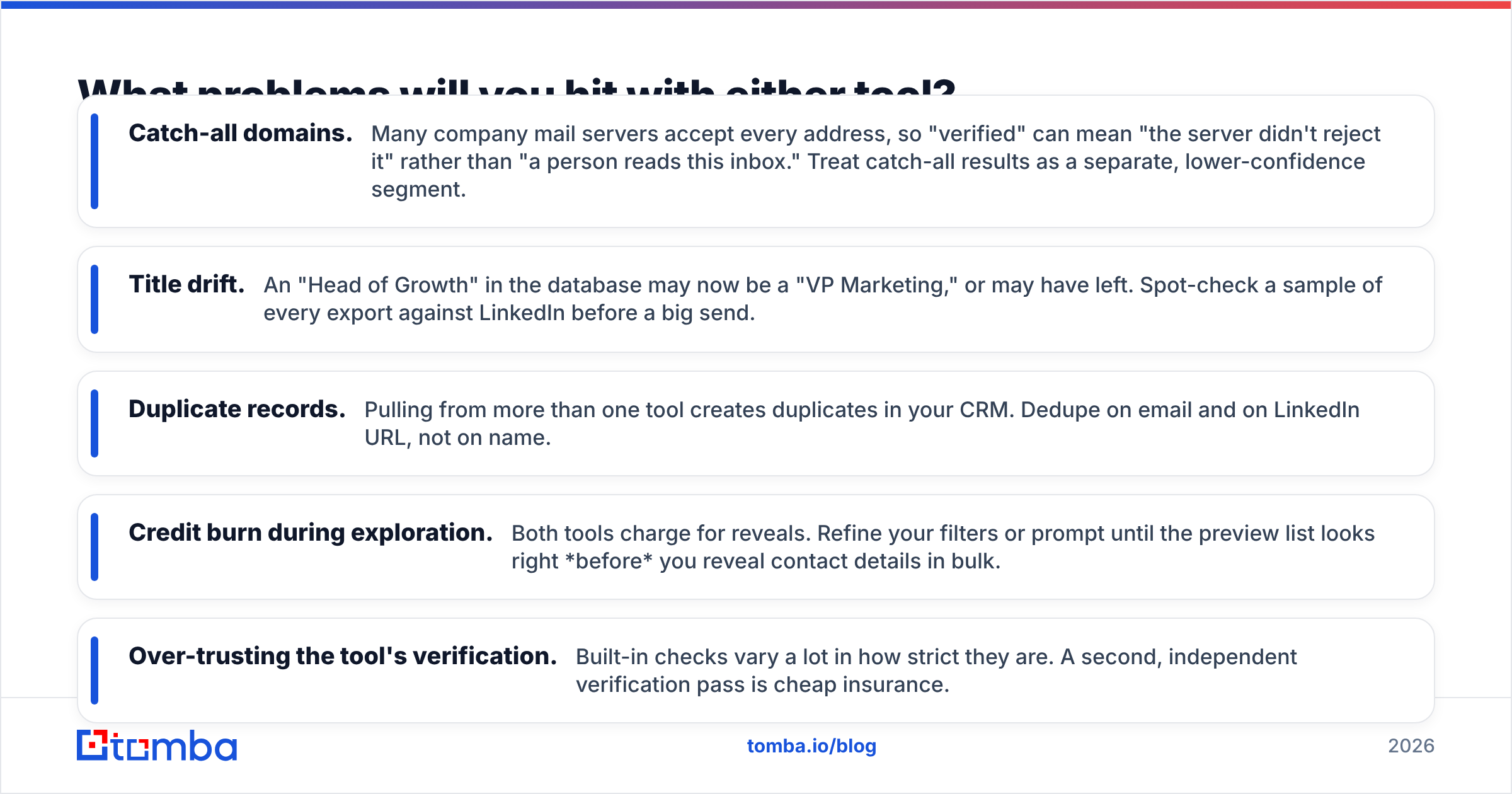
Knowing where each tool tends to fall short saves you a painful first campaign. These are the issues most likely to come up:
- Catch-all domains. Many company mail servers accept every address, so "verified" can mean "the server didn't reject it" rather than "a person reads this inbox." Treat catch-all results as a separate, lower-confidence segment.
- Title drift. An "Head of Growth" in the database may now be a "VP Marketing," or may have left. Spot-check a sample of every export against LinkedIn before a big send.
- Duplicate records. Pulling from more than one tool creates duplicates in your CRM. Dedupe on email and on LinkedIn URL, not on name.
- Credit burn during exploration. Both tools charge for reveals. Refine your filters or prompt until the preview list looks right before you reveal contact details in bulk.
- Over-trusting the tool's verification. Built-in checks vary a lot in how strict they are. A second, independent verification pass is cheap insurance.

The pattern repeats: the tool that finds the lead gets the credit, but the quality of the email address decides whether the campaign works. If you need to fill in missing fields such as company size, role, or social profiles on the leads you already have, a dedicated data enrichment layer can sit alongside either tool without replacing it.
Which should you choose: Leadsforge or RampedUp?#
Use this decision guide. It's based on the problem you're trying to solve, not on which tool has more features.
Choose Leadsforge if:
- You're a founder, agency, or early SDR team building pipeline from scratch.
- Your ICP is clear enough to describe in a sentence or two, or you have strong customers you can use as lookalike seeds.
- You already use, or are open to, Salesforge for sequencing.
- Speed from idea to live campaign matters more than deep CRM hygiene.
Choose RampedUp if:
- You work a named account list and need contact details for specific people.
- Your Salesforce or HubSpot data is decaying and someone owns fixing it.
- Phone outreach and direct dials are a meaningful part of your motion.
- You already have a sequencer and don't want to change it.
Consider using both (or neither) if:
- You run separate new-logo and expansion motions. Leadsforge can feed the top of the funnel while RampedUp keeps the installed base clean.
- Your main gap is simply finding and verifying emails for people you've already identified. In that case, a focused email finder and verifier is cheaper and simpler than either platform.
Frequently asked questions#
Is Leadsforge a replacement for RampedUp?#
Not directly. Leadsforge is designed to generate new lead lists. RampedUp is designed to look up and maintain contact data. Their features overlap at the edges, but the core jobs are different.
Does either tool guarantee email deliverability?#
No. Both reveal contact data with some level of built-in checking, but deliverability also depends on your domain setup, warmup, sending volume, and list quality. Always verify exports independently before a large send.
Which tool is better for small teams?#
Small teams building pipeline from zero usually get more out of Leadsforge's prompt-based search. Small teams with an established CRM and a known account list may get more from RampedUp, especially if they can start on its free tier.
Can I use Tomba alongside Leadsforge or RampedUp?#
Yes. A common setup is to build or enrich lists in one of these tools, then use Tomba to find emails for contacts the tool missed and to verify the whole list before it enters a sequence.
Where does Tomba fit in your stack?#
Leadsforge and RampedUp both do more than find email addresses, and that's why you'd buy them. But if you already know who you want to reach and just need a reliable professional address, you don't need an AI list builder or a CRM hygiene platform. Enter a name and company domain, or search a whole domain, and get addresses with confidence scores and source data. The Tomba Email Finder does exactly that. It starts free at 25 searches a month and scales from $49/mo, so it's an inexpensive way to fill gaps in lists from any tool and cut bounces before they hurt your sender reputation.
Related guides#
// get started
Find, verify and enrich your first contacts today
Start on the free plan with 25 searches a month, then scale when your team is ready.
Free plan · No credit card required · GDPR & CCPA
// about the author