Leadsforge vs RemoveBounce: Lead Finder or Email Verifier in 2026?
Leadsforge builds lead lists from a chat prompt. RemoveBounce cleans the lists you already have. Here's which one your outbound stack needs, when you need both, and when one tool can do both jobs.
TL;DR
- Leadsforge is a lead generation tool. You describe your ideal customer in plain English and it builds a contact list with emails. It is part of the Salesforge "Forge" ecosystem.
- RemoveBounce is an email verification service. It doesn't find new leads. It cleans lists you already have by flagging invalid, risky, disposable, and catch-all addresses.
- They mostly aren't competitors. The real question is whether you need to source leads, clean leads, or both.
- If you need both, you can pair them. You can also use one platform that finds and verifies in the same workflow, such as Tomba, and skip moving CSVs between tools.
- Pricing on both tools is credit-based. Check each vendor's current pricing page before you commit, because plans and credit ratios change often.
People who search "Leadsforge vs RemoveBounce" usually have one of two problems. Either your bounce rate is climbing and you're not sure whether the fix is better data or better cleaning, or you're building an outbound stack from scratch and trying to work out which tools are essential.
This guide covers what each tool does, where each one fits in an outbound workflow, how their pricing models differ, and which one to buy first.
What is Leadsforge?#
Leadsforge is an AI-assisted lead generation platform from the same team behind Salesforge, Warmforge, Mailforge, and Infraforge. Its main feature is a chat-style search. Instead of stacking filters, you type something like "Heads of RevOps at Series B SaaS companies in the US with 50 to 200 employees," and Leadsforge turns that into a list.
The main things Leadsforge does:
- Natural-language ICP search. You describe the buyer and the tool handles the filtering.
- Lookalike discovery. You give it a company you've already closed and it finds similar ones.
- Contact data with emails. Lists come back with work emails attached. Leadsforge says those emails are verified before you export.
- Native handoff to Salesforge. If you already send through Salesforge, lists go straight into sequences with no CSV step.
Leadsforge is built for founders, SDR teams, and agencies who want a list today without learning a complex filter UI. Its advantage is speed from idea to list. What you give up is direct control over the verification step, because you rely on Leadsforge's built-in checks.
What is RemoveBounce?#
RemoveBounce is an email list cleaning and verification service. You upload a list, or call its API in real time, and it tells you which addresses are safe to send to.
Its core checks include:
- Syntax and domain validation. It catches typos, dead domains, and missing MX records.
- SMTP mailbox checks. It confirms whether the mailbox exists, without sending an email.
- Catch-all detection. It flags domains that accept all mail, where a mailbox can't be confirmed either way.
- Disposable and role-based flags. It catches temporary inboxes and addresses like
info@orsales@. - Risk flags. It marks addresses likely to hurt your sender reputation, such as known complainers or suspected spam traps.
RemoveBounce is for anyone who already has a list: email marketers with ageing newsletter databases, ecommerce teams, and outbound teams who bought or scraped data and don't fully trust it. It won't find you a single new contact. Its job is to stop the contacts you already have from damaging your domain.

How do Leadsforge and RemoveBounce compare side by side?#
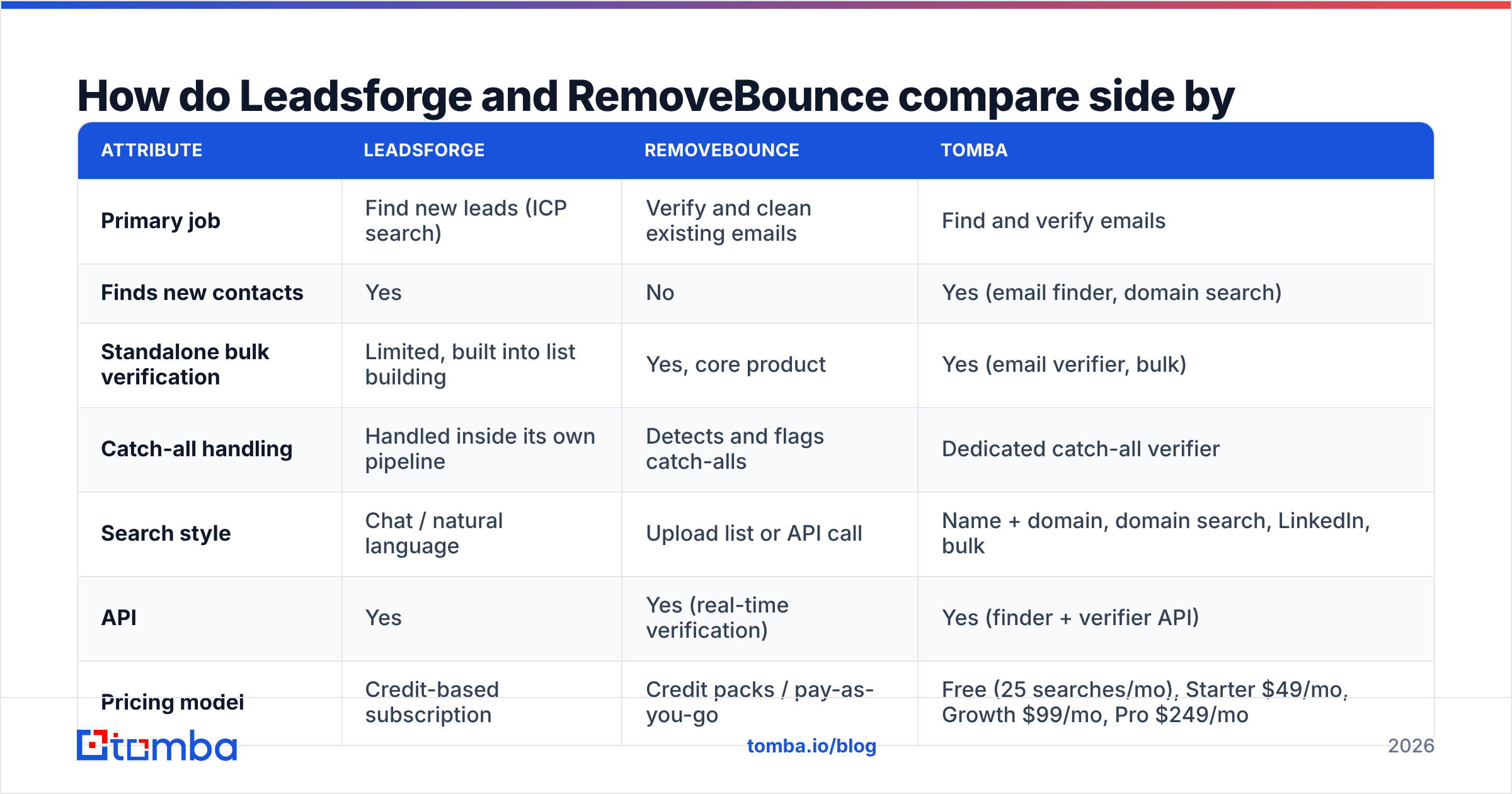
The table below includes Tomba as a third column, because many teams comparing these two are really deciding between a two-tool stack and a single platform.
| Attribute | Leadsforge | RemoveBounce | Tomba |
|---|---|---|---|
| Primary job | Find new leads (ICP search) | Verify and clean existing emails | Find and verify emails |
| Finds new contacts | Yes | No | Yes (email finder, domain search) |
| Standalone bulk verification | Limited, built into list building | Yes, core product | Yes (email verifier, bulk) |
| Catch-all handling | Handled inside its own pipeline | Detects and flags catch-alls | Dedicated catch-all verifier |
| Search style | Chat / natural language | Upload list or API call | Name + domain, domain search, LinkedIn, bulk |
| API | Yes | Yes (real-time verification) | Yes (finder + verifier API) |
| Pricing model | Credit-based subscription | Credit packs / pay-as-you-go | Free (25 searches/mo), Starter $49/mo, Growth $99/mo, Pro $249/mo |
| Best for | Fast list building for outbound | Cleaning large existing lists | Teams that want sourcing and verification in one tool |
| Ecosystem fit | Salesforge sequencer | Works with ESPs and CRMs via integrations | CRM, Sheets, Zapier, and browser integrations |
The pattern in that table: Leadsforge and RemoveBounce cover different stages of the pipeline. Comparing them head to head is like comparing a fishing net with a fish scale. You may end up using both, but they do different jobs.
Where does each tool sit in your outbound workflow?#
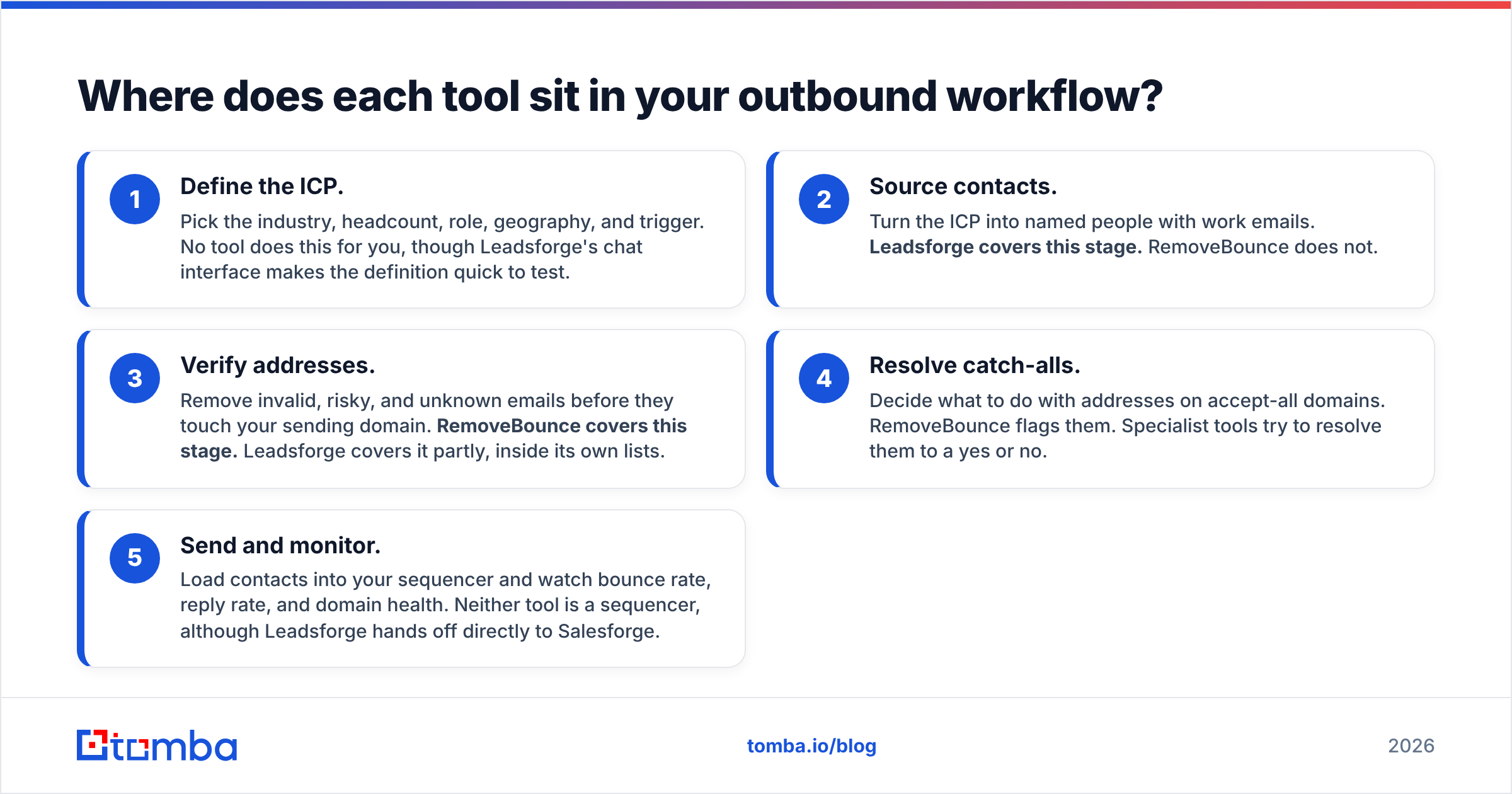
Every outbound motion goes through the same five stages. Map your gaps to these stages before you buy anything:
- Define the ICP. Pick the industry, headcount, role, geography, and trigger. No tool does this for you, though Leadsforge's chat interface makes the definition quick to test.
- Source contacts. Turn the ICP into named people with work emails. Leadsforge covers this stage. RemoveBounce does not.
- Verify addresses. Remove invalid, risky, and unknown emails before they touch your sending domain. RemoveBounce covers this stage. Leadsforge covers it partly, inside its own lists.
- Resolve catch-alls. Decide what to do with addresses on accept-all domains. RemoveBounce flags them. Specialist tools try to resolve them to a yes or no.
- Send and monitor. Load contacts into your sequencer and watch bounce rate, reply rate, and domain health. Neither tool is a sequencer, although Leadsforge hands off directly to Salesforge.
If your gap is at stage 2, Leadsforge is the relevant tool. If it's at stage 3 or 4, RemoveBounce is. If both are gaps, read the section on combining them below.
Is Leadsforge better than RemoveBounce for building lead lists?#
Yes, because RemoveBounce doesn't build lead lists at all.
The more useful question is whether Leadsforge is good at list building. Its strengths:
- Low learning curve. Typing a sentence is faster than learning a 40-filter search UI, especially for founders doing their own outbound.
- Lookalike search. Starting from your best customers is one of the most reliable ways to find more buyers like them.
- Stack continuity. Teams already using Salesforge, Warmforge, and Mailforge keep everything under one vendor and one login.
Where it may not suit you:
- Less transparency on verification. You rely on Leadsforge's internal checks. If your domains are fragile, you may still want an independent verification pass before large sends.
- Coverage varies by segment. Like every B2B database, coverage is stronger in some markets and roles than others. Run a test search on your real ICP before committing to a plan.
- Ecosystem pull. The biggest workflow gains come if you also use Salesforge. If you send through Instantly, Smartlead, or HubSpot sequences, the integration benefit is smaller.
Is RemoveBounce better than Leadsforge for email verification?#
For standalone verification, yes. That is what RemoveBounce is built for, and Leadsforge isn't built to clean lists it didn't produce.
RemoveBounce is the right choice when:
- You have legacy data. A 50,000-contact newsletter list from 2023 will have decayed. B2B contact data goes stale quickly as people change jobs.
- You're merging sources. You combined webinar signups, a purchased list, and old CRM exports, and you need one consistent verdict per address.
- You need real-time checks. Its API can validate signups at the form level so bad addresses never reach your database.
Its limits:
- No sourcing. It can't replace a bounced contact with a working one. It only tells you the address is dead.
- Catch-alls stay ambiguous. Like most verifiers, it flags catch-all addresses rather than confirming them. On B2B lists, catch-alls can be a large share of your data, so a big "unknown" bucket is a real cost.
You can check user sentiment for both tools on G2 before you buy. Read the three-star reviews, not only the five-star ones, because that's where accuracy complaints show up.
How does pricing compare between Leadsforge and RemoveBounce?#
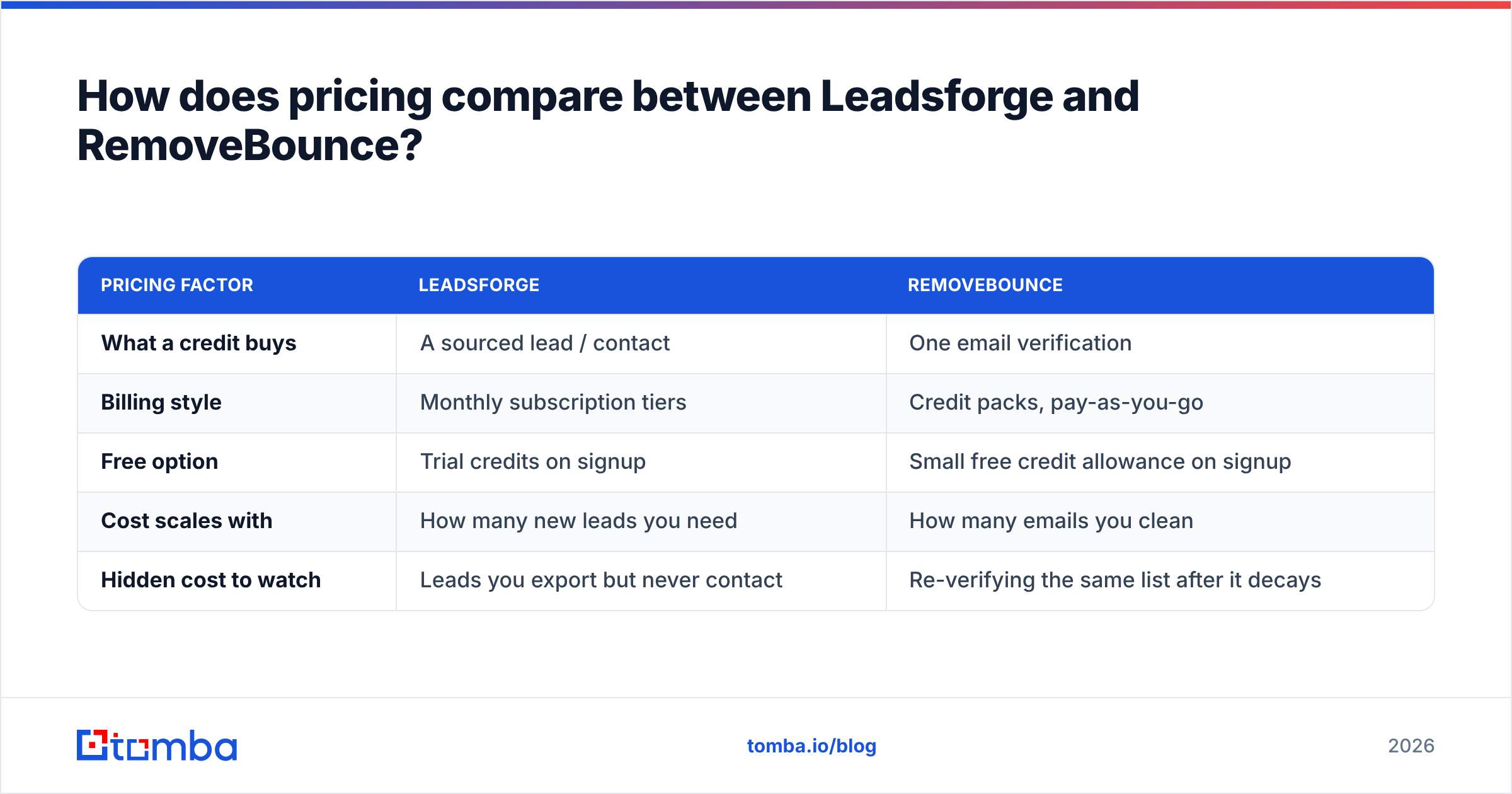
Both use credits, but the credits buy different things.
| Pricing factor | Leadsforge | RemoveBounce |
|---|---|---|
| What a credit buys | A sourced lead / contact | One email verification |
| Billing style | Monthly subscription tiers | Credit packs, pay-as-you-go |
| Free option | Trial credits on signup | Small free credit allowance on signup |
| Cost scales with | How many new leads you need | How many emails you clean |
| Hidden cost to watch | Leads you export but never contact | Re-verifying the same list after it decays |
Exact prices change often, so this post doesn't quote them. Check the Leadsforge and RemoveBounce pricing pages on the day you buy. For budgeting, keep one rule in mind: a verification credit is almost always cheaper than a sourcing credit, because verifying an address costs far less compute and data than finding it.
That leads to a common mistake. Teams pay sourcing prices for leads, skip a cheap verification step, and then spend weeks recovering a burned domain.

Should you use Leadsforge and RemoveBounce together?#
You can, and some teams do. The workflow:
- Build the list in Leadsforge.
- Export to CSV.
- Upload the CSV to RemoveBounce for a second verification pass.
- Filter out invalid and risky rows. Decide what to do with catch-alls.
- Import the cleaned list into your sequencer.
When this stack makes sense:
- You send at high volume across many inboxes, and a 2% bounce rate versus a 5% bounce rate is the difference between a healthy domain and a blocklisted one.
- You combine sources. Leadsforge is one of several inputs, and you want a single verifier as the final gate for everything.
- Compliance wants independence. Some teams prefer that the tool verifying the data isn't the tool that sold it.
When it's overkill:
- Low-volume founder outbound. At 30 to 50 emails a day to a tight ICP, a second verification pass rarely justifies the extra tool, the extra login, and the extra CSV step.
- You already use a platform that finds and verifies. Then the second tool adds cost without adding much protection.
The hidden cost of any two-tool stack is operational: two subscriptions, two credit balances, and one more export and re-import every time you build a list. That's fine for a RevOps team. For a solo SDR it adds a lot of friction.
Where does Tomba fit as an alternative to both?#
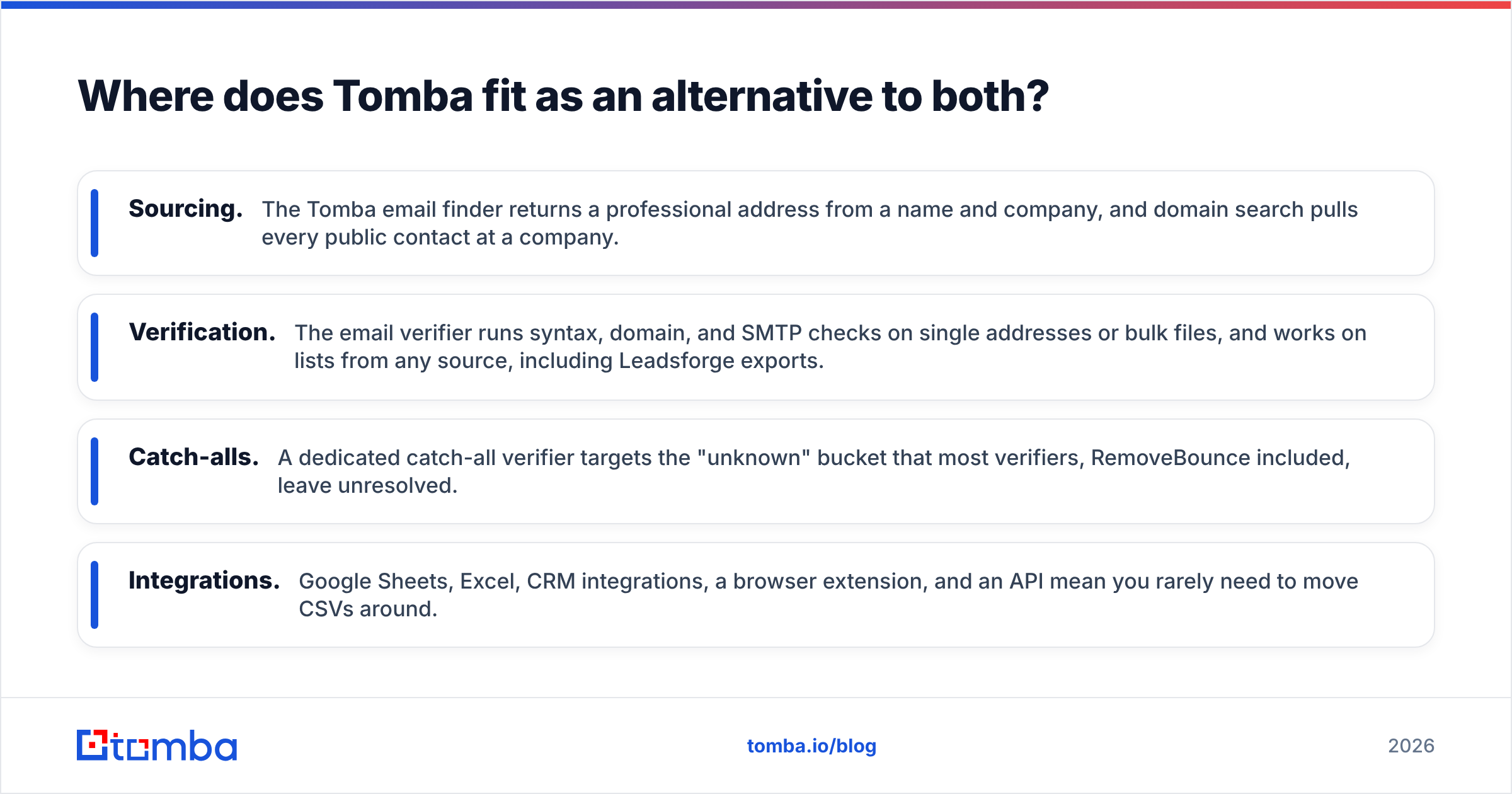
Tomba sits between the two. It isn't a chat-first ICP builder like Leadsforge, and it isn't only a list cleaner like RemoveBounce. It combines both stages you'd otherwise buy separately:
- Sourcing. The Tomba email finder returns a professional address from a name and company, and domain search pulls every public contact at a company.
- Verification. The email verifier runs syntax, domain, and SMTP checks on single addresses or bulk files, and works on lists from any source, including Leadsforge exports.
- Catch-alls. A dedicated catch-all verifier targets the "unknown" bucket that most verifiers, RemoveBounce included, leave unresolved.
- Integrations. Google Sheets, Excel, CRM integrations, a browser extension, and an API mean you rarely need to move CSVs around.
Honest limits: if you want to describe an ICP in a sentence and get 500 accounts back, Leadsforge's chat interface is faster for that discovery step. If your only need is cleaning a large legacy newsletter list at the lowest cost per check, a dedicated verifier like RemoveBounce is a good fit. Tomba is strongest when you already know which companies or people you want and need accurate, verified emails for them. Plans and credit allowances are on the Tomba pricing page.
Which tool should you choose?#
Use this decision table:
| Your situation | Best pick |
|---|---|
| "I don't have a list yet and want one fast" | Leadsforge |
| "I have 40,000 old contacts and my bounce rate is 8%" | RemoveBounce |
| "I send through Salesforge and want one vendor" | Leadsforge |
| "I need to validate signups on a web form in real time" | RemoveBounce (API) |
| "I know my target accounts and need verified emails for specific people" | Tomba |
| "Catch-alls are a third of my list" | A catch-all resolver (e.g. Tomba) on top of any verifier |
| "High-volume outbound from multiple data sources" | A sourcing tool plus an independent verifier |
Our verdict: in Leadsforge vs RemoveBounce, neither tool wins outright, because they answer different questions. Leadsforge answers "who should I email?" RemoveBounce answers "is this address safe to email?" Buy the one that closes your current gap. If you have both gaps and don't want two tools, pick a platform that covers sourcing and verification together.
Frequently asked questions#
Is Leadsforge an email verifier?#
Not as a standalone product. Leadsforge verifies the emails it gives you as part of list building, but it isn't designed for uploading and cleaning outside lists. Use a dedicated verifier for that.
Can RemoveBounce find email addresses?#
No. RemoveBounce only verifies addresses you already have. To find new contacts, you need a lead database or an email finder.
Do I need to verify emails from Leadsforge again?#
Usually not for small, fresh sends. For high-volume campaigns, lists older than a few weeks, or fragile sending domains, a second independent pass is cheap insurance.
What bounce rate should I aim for?#
Most deliverability practitioners aim to keep hard bounces under 2% per campaign. Anything consistently above that is a sign your data source or verification step needs work.
Which is cheaper, Leadsforge or RemoveBounce?#
Per credit, verification is almost always cheaper than sourcing, so RemoveBounce will cost less per unit. But the credits buy different things, so compare total cost for your workflow, not price per credit.
Ready to find and verify in one step?#
If you're comparing Leadsforge and RemoveBounce because you want accurate emails without running two tools, try Tomba Email Finder. Enter a name and company domain, get a professional email with a verification status attached, and push the results to Sheets, your CRM, or your sequencer. The free plan includes 25 searches a month, so you can test it on your own ICP before you pay, and paid plans start at $49/mo when you're ready to scale.
Related guides#
// get started
Find, verify and enrich your first contacts today
Start on the free plan with 25 searches a month, then scale when your team is ready.
Free plan · No credit card required · GDPR & CCPA
// about the author