Leadsforge vs SalesQL: AI Lead Lists or LinkedIn Email Finder?
Leadsforge builds lead lists from a chat prompt. SalesQL pulls emails and phone numbers straight off LinkedIn profiles. Here's which one fits your outbound workflow, what each costs, and where each falls short.
- Leadsforge is an AI list builder. You describe your ideal customer in plain language and it returns a list of companies and contacts with verified emails. It works best for teams that start outbound from a target account profile.
- SalesQL is a LinkedIn-first contact finder. A Chrome extension reveals emails and phone numbers on LinkedIn, Sales Navigator, and Recruiter profiles. It works best for SDRs and recruiters who already know which people they want.
- The real split is discovery vs. extraction. Leadsforge tells you who to contact. SalesQL gets contact details for people you've already found.
- Both use credits, and both have limits worth knowing about before you buy: Leadsforge's chat filters can be too loose for niche ICPs, and SalesQL depends on LinkedIn access.
- If you want a domain- and name-based email finder with verification built in and no LinkedIn dependency, Tomba's email finder is a third option to test next to either one.
What is the core difference between Leadsforge and SalesQL?#
These two tools solve different steps of the same outbound workflow, so they rarely compete head to head.
Leadsforge comes from the team behind Salesforge, the cold email sending platform. The product is built around a chat interface. You type something like "Series A SaaS companies in the US with 50 to 200 employees, selling to HR teams, contact the VP of People," and it turns that into filters, returns matching companies and people, and attaches verified work emails. It also has lookalike search: give it a customer's domain and it finds similar companies. You can see the current positioning on the Leadsforge homepage.
SalesQL does something much narrower, and it does it well. You open a LinkedIn profile or a Sales Navigator search, click the extension, and it shows the person's work email, personal email, and often a direct phone number. You can save contacts to lists, bulk-enrich a whole Sales Navigator results page, and push records to your CRM or ATS. Recruiters use it heavily, which tells you it is designed for speed on a known individual, not for list discovery. Details are on the SalesQL site.
Put simply: with Leadsforge, you're asking "who should I email?", and with SalesQL, "what's this person's email?"
How do Leadsforge and SalesQL compare feature by feature?#
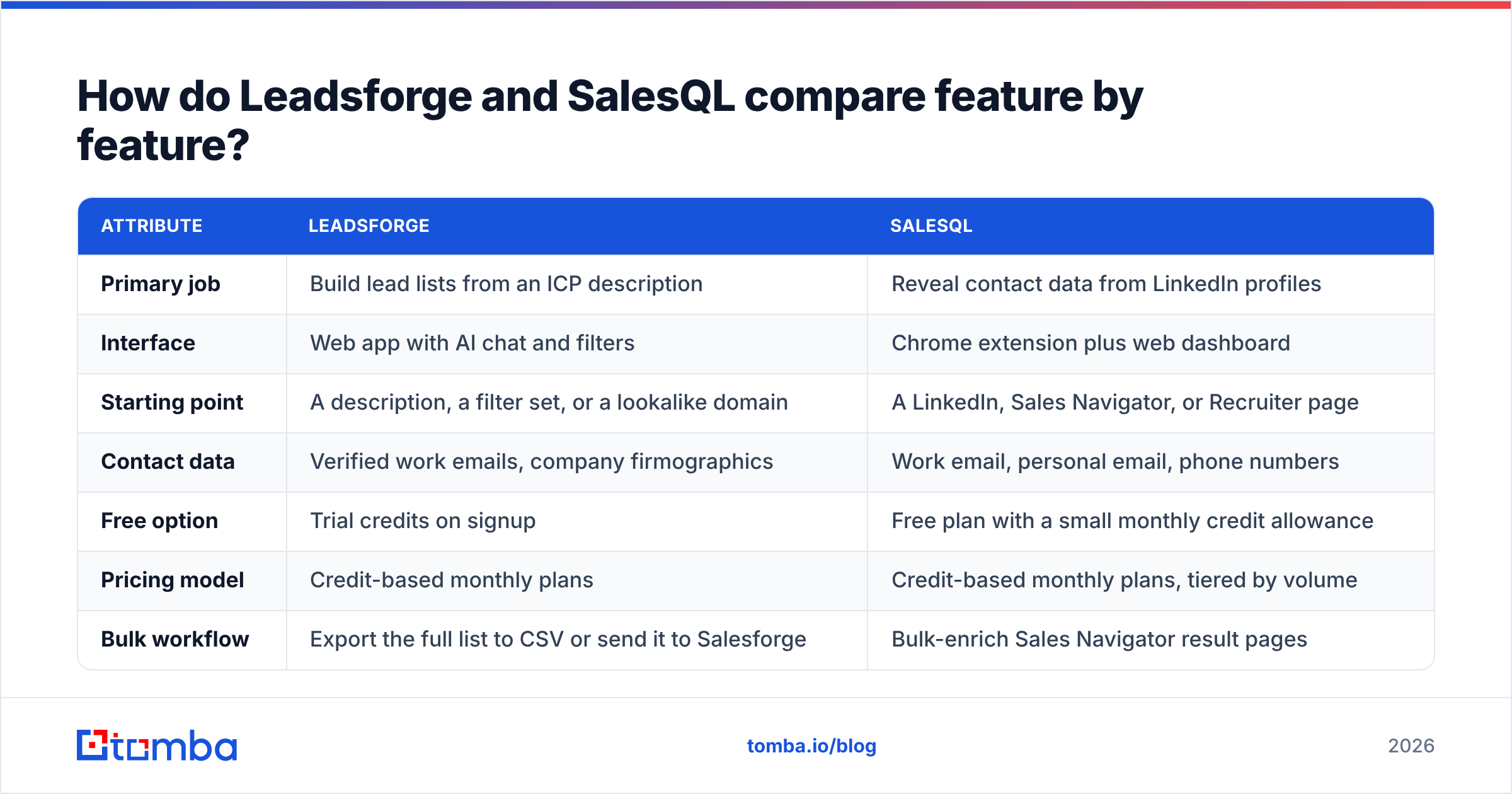
Here is the side-by-side on the attributes that matter when you're choosing a tool for an outbound or recruiting team. Pricing moves often in this category, so confirm current numbers on each vendor's pricing page before you commit.
| Attribute | Leadsforge | SalesQL |
|---|---|---|
| Primary job | Build lead lists from an ICP description | Reveal contact data from LinkedIn profiles |
| Interface | Web app with AI chat and filters | Chrome extension plus web dashboard |
| Starting point | A description, a filter set, or a lookalike domain | A LinkedIn, Sales Navigator, or Recruiter page |
| Contact data | Verified work emails, company firmographics | Work email, personal email, phone numbers |
| Free option | Trial credits on signup | Free plan with a small monthly credit allowance |
| Pricing model | Credit-based monthly plans | Credit-based monthly plans, tiered by volume |
| Bulk workflow | Export the full list to CSV or send it to Salesforge | Bulk-enrich Sales Navigator result pages |
| Integrations | Salesforge native, CSV, CRM via export | HubSpot, Salesforce, and other CRM/ATS connectors |
| LinkedIn account needed | No | Effectively yes |
| Best for | Founders, agencies, outbound teams building TAM lists | SDRs and recruiters working named prospects |
| Main weakness | Loose matching on niche ICPs, needs manual QA | Tied to LinkedIn access and its usage limits |

Which tool gives you more accurate email data?#
It depends on how you measure accuracy, and neither vendor publishes an independent audit you can verify yourself.
Leadsforge verifies emails before delivering them, so its hard bounce rate on standard corporate domains is usually low. The weak spot is catch-all domains. These are servers that accept mail for any address, so an SMTP check can't confirm whether a particular mailbox exists. Every tool in this category struggles with them. On Leadsforge the risk is sharper because the list is generated in bulk, and you may not notice a pile of risky addresses until your first campaign bounces.
SalesQL's accuracy comes from matching a LinkedIn identity to known contact records. When it finds a match, the person is usually right because you started from their actual profile. The issues tend to be staleness: someone changed jobs three months ago, updated LinkedIn, and SalesQL returns the old company email. Personal emails are useful for recruiting but a poor channel for B2B cold outreach, and in some jurisdictions they carry compliance risk.

Whichever tool you pick, run the export through a separate email verifier before it goes into a sequencer. The step costs very little and protects your domain from a problem that is expensive to fix.
How does the Leadsforge workflow actually feel day to day?#
Picture a strategist who turns a brief into a shortlist. You describe the target, Leadsforge proposes filters (industry, headcount, location, tech stack, job titles), and you refine them in conversation. "Remove agencies." "Only companies hiring for SDRs." "Swap VP Sales for Head of Revenue."
That's where it shines:
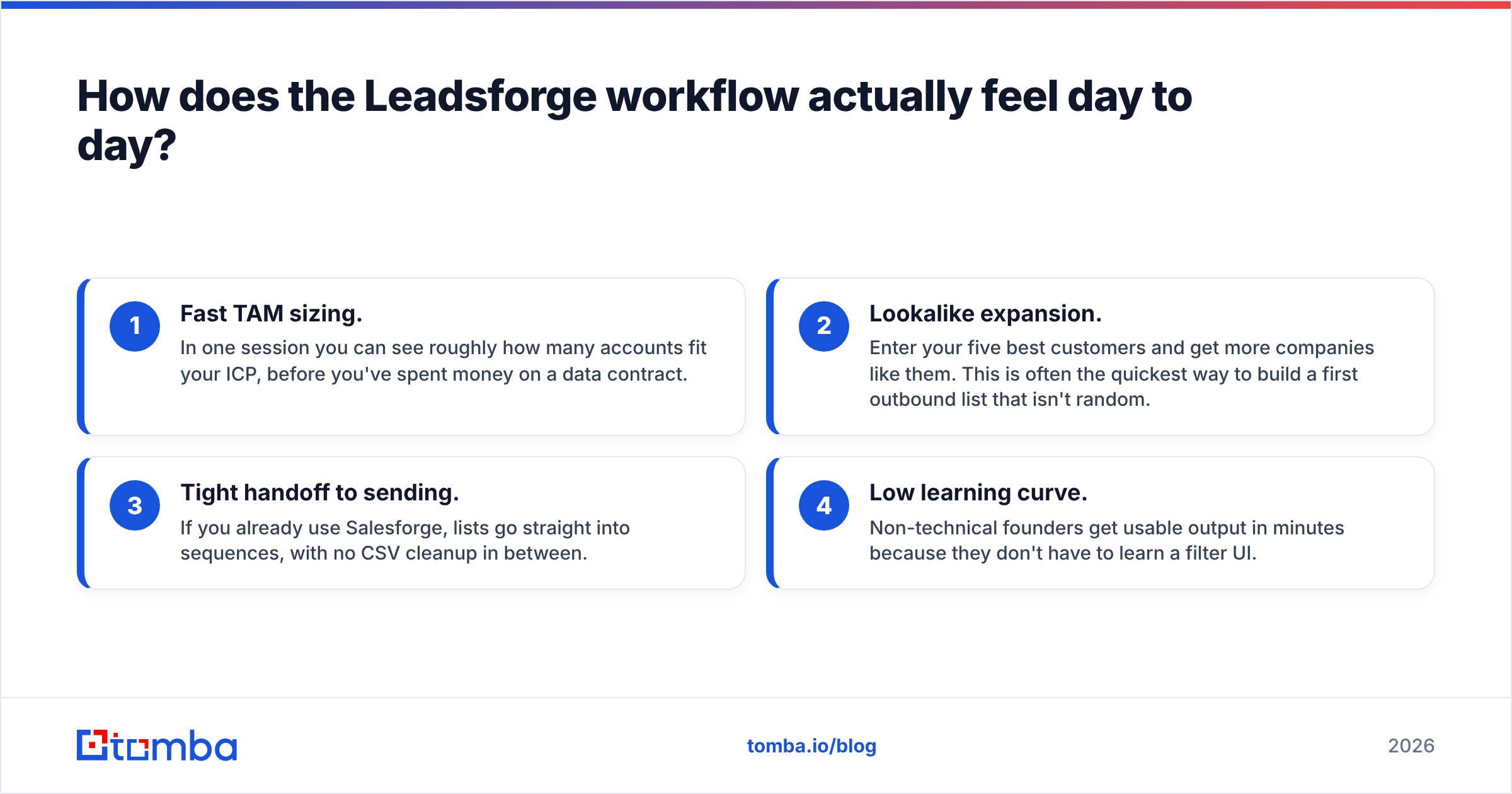
- Fast TAM sizing. In one session you can see roughly how many accounts fit your ICP, before you've spent money on a data contract.
- Lookalike expansion. Enter your five best customers and get more companies like them. This is often the quickest way to build a first outbound list that isn't random.
- Tight handoff to sending. If you already use Salesforge, lists go straight into sequences, with no CSV cleanup in between.
- Low learning curve. Non-technical founders get usable output in minutes because they don't have to learn a filter UI.
Where it gets harder:
- Niche ICPs. Natural-language filters work well for broad segments. For "companies using Snowflake that raised in the last 90 days and have fewer than three data engineers," you'll probably still need to QA rows by hand.
- Credit burn during exploration. Refining a search and exporting several iterations uses credits faster than you'd expect. Plan your filters first, then export.
- Phone data. If your motion depends on cold calling, check phone coverage for your segment before buying. Leadsforge is built for email first.
How does the SalesQL workflow feel day to day?#
SalesQL feels like a fast lookup tool bolted onto LinkedIn. You're on a profile, you click, and within a second or two you have the details. You're not building strategy here. You're executing on prospects you picked yourself.
That's where it shines:
- Speed on named prospects. For account-based work, where you've mapped the buying committee by hand, nothing is quicker than reading the details off the profile you're already on.
- Sales Navigator bulk enrichment. Run a Sales Navigator search and enrich the results page in one go. For many SDR teams, that alone justifies the subscription.
- Phone numbers. SalesQL puts a lot of weight on direct dials and mobile numbers, which suits recruiting and phone-heavy sales.
- CRM and ATS sync. Contacts go to HubSpot, Salesforce, or recruiting systems without manual entry.
Where it gets harder:
- LinkedIn dependency. Your throughput is limited by how much LinkedIn browsing you can do without hitting commercial-use limits or account restrictions.
- No discovery layer. SalesQL won't tell you who fits your ICP. You need Sales Navigator, or your own research, to do that first.
- Personal email temptation. Personal addresses boost "contact found" rates, but using them for cold B2B outreach can hurt response rates and create GDPR exposure in the EU.
Is Leadsforge better than SalesQL?#
Neither one wins outright. The better tool is the one that matches where your pipeline gets stuck.
Choose Leadsforge if:
- You don't have a target account list yet, or yours is stale.
- You send cold email at volume and want list building and sending connected.
- You're a founder or small team without a Sales Navigator seat.
- You care more about the shape of the list (right companies, right titles) than about reaching one specific person.
Choose SalesQL if:
- Your reps already work from Sales Navigator every day.
- You run account-based outbound where each contact is picked by hand.
- You need phone numbers as much as emails.
- You're a recruiter. The product was clearly built with you in mind.
Some teams use both: Leadsforge to define and size the account universe, then SalesQL to fill contact gaps on high-priority accounts that reps research on LinkedIn. That works, but you're now paying for two credit pools and reconciling two exports. Before you add a second tool, check whether the gap is real.
What does each tool really cost once you're using it?#
Sticker price is only part of the cost. When you compare the two, model these four things:
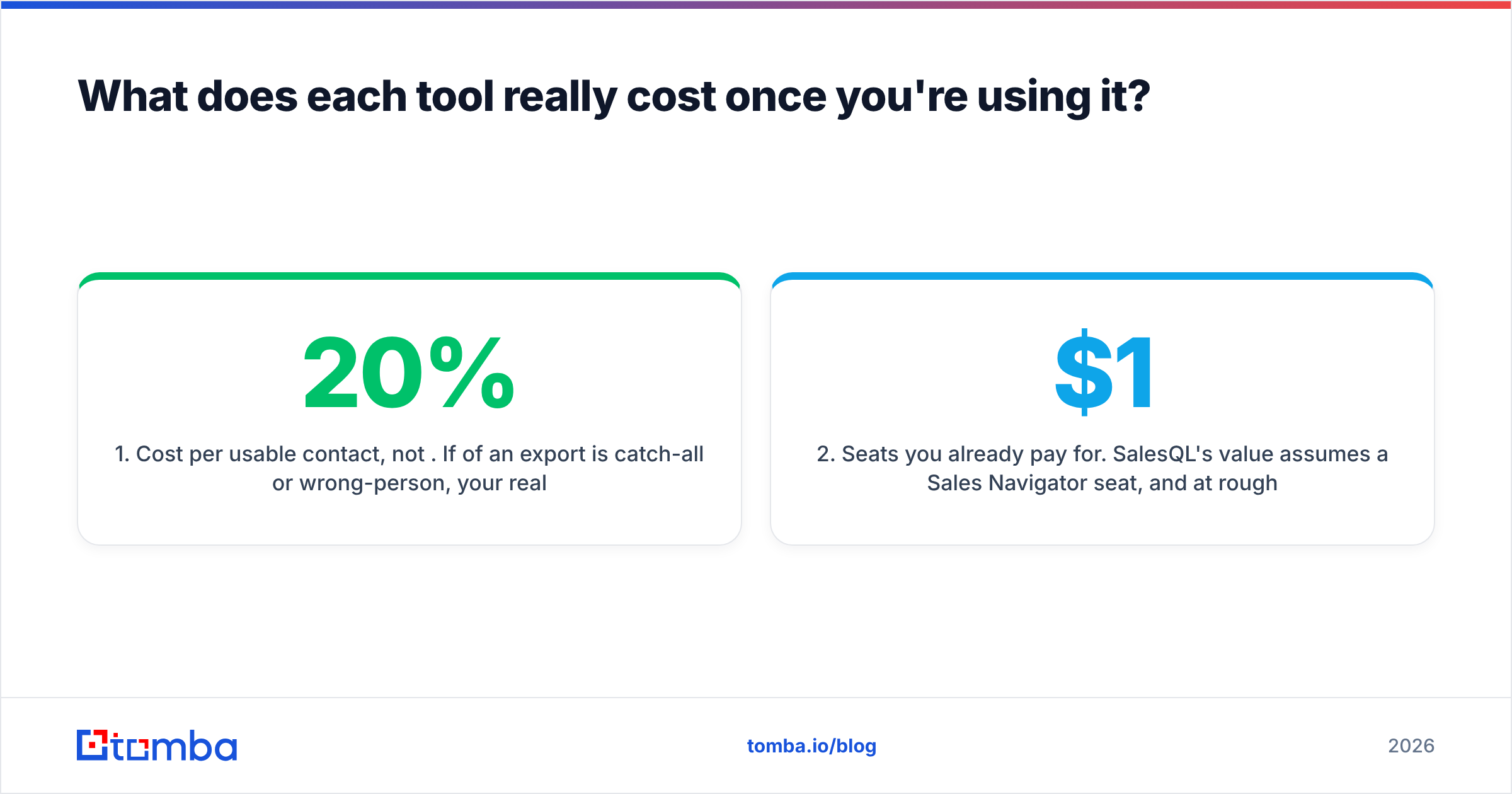
- Cost per usable contact, not per credit. If 20% of an export is catch-all or wrong-person, your real cost per contact is 25% higher than the pricing page implies.
- Seats you already pay for. SalesQL's value assumes a Sales Navigator seat, and at roughly $1,000+ per rep per year, that's a large hidden line item. Leadsforge doesn't need one.
- Exploration waste. Leadsforge's chat workflow encourages iteration. Budget some credits for searches you end up discarding.
- Verification and cleanup. Add the cost of a verification pass and the time a rep spends fixing bad rows. Across a quarter this adds up to hours.
Look at reviews on G2 for both products too. Pay attention to complaints about billing, credit rollover, and data freshness in your specific region, since coverage varies a lot between North America, Europe, and APAC.
Where does Tomba fit in the Leadsforge vs SalesQL decision?#
If neither tool fits cleanly, it's usually for one of two reasons. Either you don't want your data workflow tied to LinkedIn, or you want finding and verification in one product instead of stitching them together.
Tomba approaches the problem differently. Its starting points are a company domain, a person's name plus company, or a LinkedIn URL, and email verification plus catch-all handling are built in. Three workflows cover most of what teams use Leadsforge or SalesQL for:
- Named prospect lookup: enter first name, last name, and domain, and get the most likely address with a confidence score. This is the SalesQL use case without depending on LinkedIn browsing.
- Account mapping: domain search returns known emails at a company, so you can map a buying committee from a target account list.
- Bulk enrichment: upload a CSV of names and domains, then find and verify them in one pass.
Plans start with a free tier of 25 searches a month, then Starter at $49/mo, Growth at $99/mo, and Pro at $249/mo. Full breakdown on the Tomba pricing page. It isn't an AI ICP chat builder like Leadsforge, and it doesn't live on LinkedIn the way SalesQL does. If your bottleneck is getting a verified email for a person you've already identified, though, it covers that with less setup.
What questions should you ask before you buy either tool?#
Run a small pilot before any annual commitment. Take 100 contacts you already know are good (current customers, recent closed-won deals) and run them through each tool. Then answer these:
- Match rate: what share returned an email at all?
- Correctness: what share matched the address you know is right?
- Catch-all share: how many were flagged as risky or unverifiable?
- Freshness: did any come back with a previous employer's domain?
- Time to export: how long did it take from a blank screen to a sequencer-ready CSV?
A 100-row test takes an afternoon and beats any vendor benchmark, including the ones in this post. Your ICP, region, and seniority mix will shift the results more than any marketing claim.
FAQ#
Is SalesQL free? SalesQL has a free plan with a small monthly credit allowance, enough to evaluate data quality on your own prospects. Paid tiers add more credits, bulk enrichment, and integrations.
Does Leadsforge require LinkedIn? No. Leadsforge builds lists from its own database using your ICP description or lookalike domains, so you don't need a LinkedIn or Sales Navigator account.
Can I use Leadsforge and SalesQL together? Yes. A common pattern is Leadsforge for account discovery and SalesQL to fill contact gaps on priority accounts that reps research on LinkedIn. Deduplicate before you import into your CRM.
Which is better for recruiters? SalesQL. Its Recruiter integration, phone data, and ATS connectors are built for sourcing workflows. Leadsforge is aimed at sales outbound.
So which should you pick?#
Pick Leadsforge if your problem is who to target and you want list building connected to cold email sending. Pick SalesQL if your reps live in Sales Navigator and need contact details for people they've already chosen. If what you really need is a verified work email from a name and a domain, without LinkedIn dependency or a second verification tool, try the Tomba Email Finder. The free tier gives you 25 searches a month, enough to run the 100-contact pilot above over a few months, or upgrade to Starter at $49/mo to test it at full speed against whichever tool you're considering.
Related guides#
// get started
Find, verify and enrich your first contacts today
Start on the free plan with 25 searches a month, then scale when your team is ready.
Free plan · No credit card required · GDPR & CCPA
// about the author