Leadsforge vs Scrubby: Lead Sourcing or Catch-All Verification?
Leadsforge builds prospect lists from a plain-English ICP. Scrubby checks the catch-all emails most verifiers can't. They do different jobs, so here's how to tell which one your outbound stack is missing.
TL;DR
- Leadsforge and Scrubby do different jobs. Leadsforge is an AI lead-generation tool that builds prospect lists from a plain-English description of your ideal customer. Scrubby is a verification service built for catch-all and "unknown" emails that normal verifiers can't settle.
- Pick Leadsforge if you don't have a list yet and want contacts with emails ready to load into a sequencer.
- Pick Scrubby if you already have a list and a big share of it comes back "catch-all" or "risky" from your current verifier.
- Many teams need both jobs done. You can buy two tools, or use one platform that covers finding, verifying and catch-all checks.
- Check both vendors' live pricing pages before you buy. Both sell credits, and plans change often.
What is the real difference between Leadsforge and Scrubby?#
People search "Leadsforge vs Scrubby" as if the two are rivals. They aren't. They sit at opposite ends of the outbound data pipeline.
Leadsforge is at the top of the funnel. You describe who you want to reach, for example "VP of Sales at US B2B SaaS companies with 50–200 employees that recently raised a Series A." It returns a list of matching contacts with work emails attached. It belongs to the Forge product family (Salesforge, Mailforge, Warmforge and others), so it's designed to feed contacts straight into cold email sequences.
Scrubby is at the quality-control end. It doesn't find anyone. You give it emails you already have, usually the ones a standard verifier labelled "catch-all," "accept-all" or "unknown," and it tells you which ones are likely to deliver. That's a narrow job, but it's the one that decides whether a third of your list is usable or has to be thrown away.
Think of a kitchen. Leadsforge is the supplier delivering the ingredients. Scrubby is the inspector who checks the produce your usual inspector couldn't judge. You need both functions, but they aren't the same purchase.
How do Leadsforge and Scrubby compare side by side?#
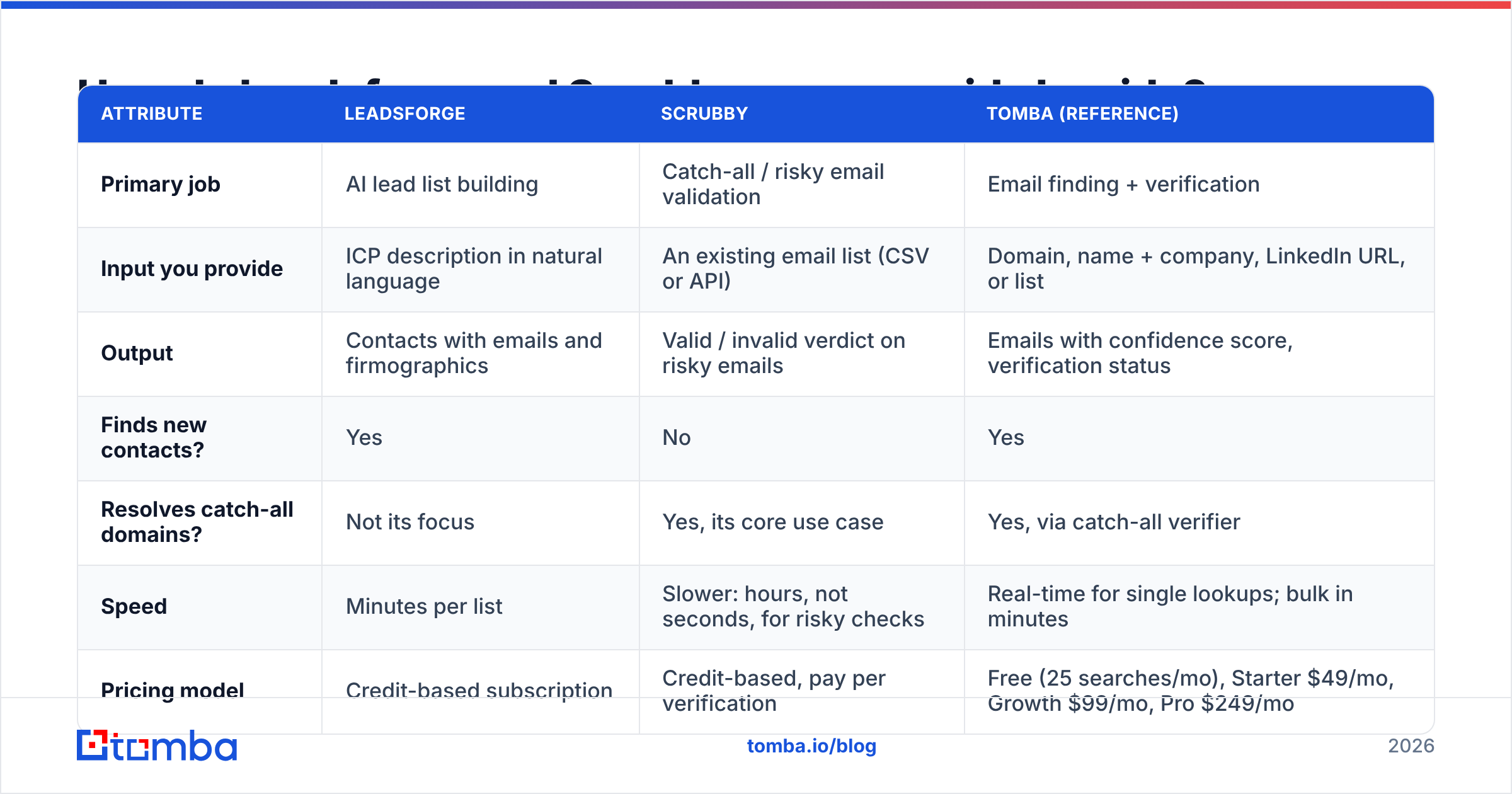
Here's the comparison at a glance. Tomba is included as a reference point because it covers both jobs in one account.
| Attribute | Leadsforge | Scrubby | Tomba (reference) |
|---|---|---|---|
| Primary job | AI lead list building | Catch-all / risky email validation | Email finding + verification |
| Input you provide | ICP description in natural language | An existing email list (CSV or API) | Domain, name + company, LinkedIn URL, or list |
| Output | Contacts with emails and firmographics | Valid / invalid verdict on risky emails | Emails with confidence score, verification status |
| Finds new contacts? | Yes | No | Yes |
| Resolves catch-all domains? | Not its focus | Yes, its core use case | Yes, via catch-all verifier |
| Speed | Minutes per list | Slower: hours, not seconds, for risky checks | Real-time for single lookups; bulk in minutes |
| Pricing model | Credit-based subscription | Credit-based, pay per verification | Free (25 searches/mo), Starter $49/mo, Growth $99/mo, Pro $249/mo |
| Best fit | Teams starting from zero with a clear ICP | Teams with lists stuck in "unknown" limbo | Teams wanting one tool across find + verify |
| Native ecosystem | Salesforge / Forge stack | Standalone, works after any verifier | API, Sheets, CRM integrations |
Two things matter in this table. First, there's almost no overlap in the "Finds new contacts?" and "Resolves catch-all?" rows, which is why this is a "which job do I need done" question more than a head-to-head. Second, the speed row is a real tradeoff. Catch-all validation is slow because it can't rely on a quick SMTP handshake, which we explain below.
How does Leadsforge actually build a lead list?#
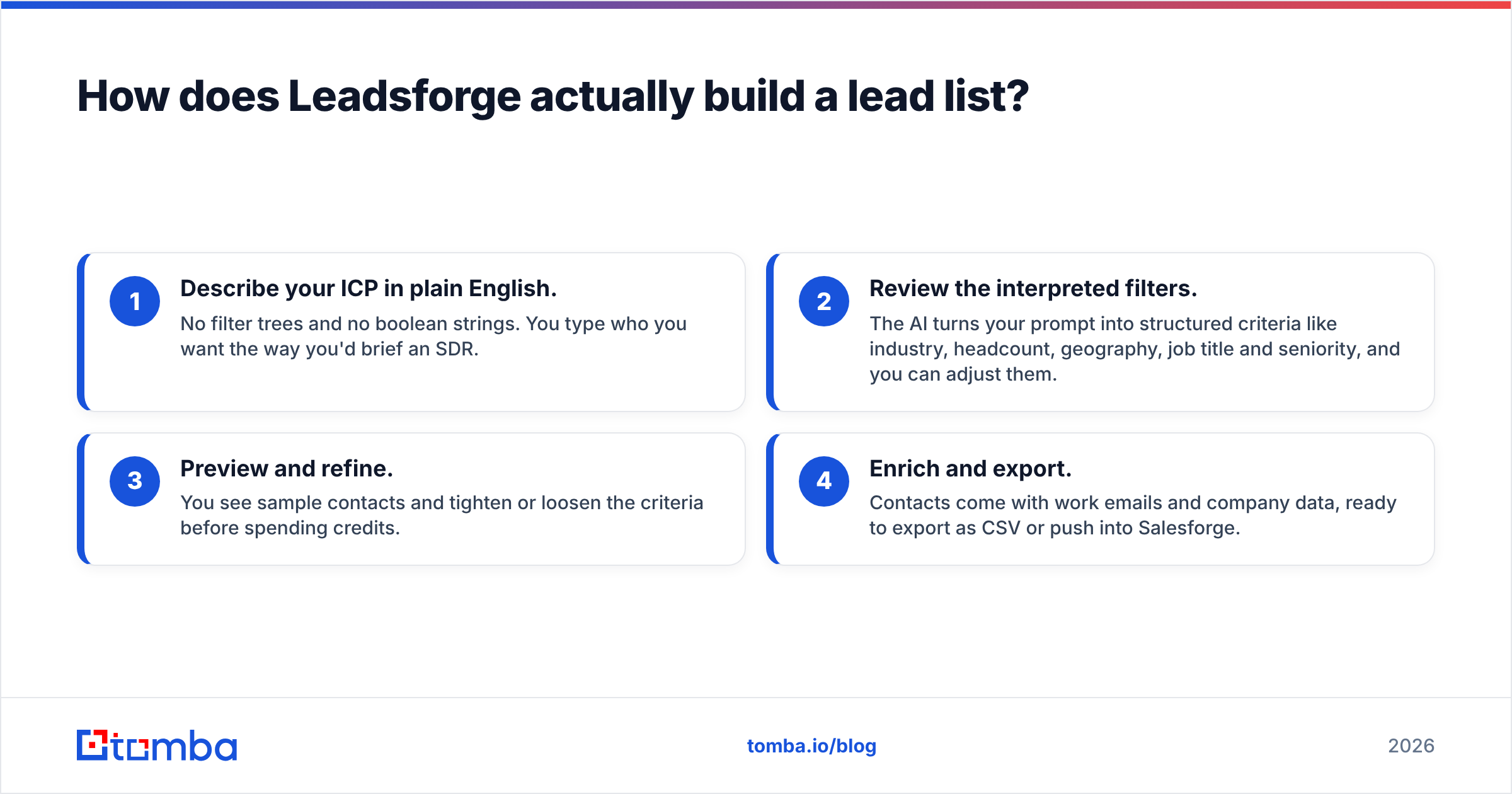
Leadsforge works like a chat interface on top of a B2B contact database. The workflow goes like this:
- Describe your ICP in plain English. No filter trees and no boolean strings. You type who you want the way you'd brief an SDR.
- Review the interpreted filters. The AI turns your prompt into structured criteria like industry, headcount, geography, job title and seniority, and you can adjust them.
- Preview and refine. You see sample contacts and tighten or loosen the criteria before spending credits.
- Enrich and export. Contacts come with work emails and company data, ready to export as CSV or push into Salesforge.
The strength here is speed to first list. If you're a founder doing your own outbound, or an agency spinning up campaigns for several clients, getting from "I think our buyer is X" to 500 contacts in a few minutes is valuable. Lookalike-style searching also helps: you point it at your best customers and ask for more like them.
The limits are the usual ones for any database-driven tool:
- Coverage varies by region and niche. North American tech contacts tend to be dense. Industrial mid-market in Southern Europe tends to be thin.
- Emails still need a quality check. Any list pulled from a database carries some decay, because people change jobs every month. Leadsforge applies verification, but catch-all domains are still a gray area for almost every vendor.
- The ecosystem pulls you toward Forge. That's fine if you already run Salesforge. It's less smooth if your sequencer is Instantly, Apollo or HubSpot and you're doing CSV round-trips.
How does Scrubby validate catch-all emails?#
To see why Scrubby exists, you need to know what a catch-all domain is.
A standard email verifier connects to the recipient's mail server and asks, in effect, "Does jane@company.com exist?" Most servers answer honestly. Catch-all servers accept everything. They say yes to jane@, janee@ and asdfgh@ alike. So the verifier can't tell a real mailbox from a fake one and returns "catch-all," "accept-all" or "unknown."
On B2B lists this is a big deal. Many mid-size and enterprise companies, especially those on Microsoft 365 or behind security gateways, run catch-all configurations. It's common for a large share of a B2B list to land in that bucket. You then have two bad options: send and risk bounces, or discard and lose good prospects.
Scrubby's pitch is a third option. It runs a slower, more involved validation process on those risky addresses and returns a clearer valid/invalid verdict. That's why turnaround is measured in hours rather than seconds. It trades speed for certainty on exactly the addresses where certainty is hardest to get.
Where Scrubby fits best:
- After your primary verifier. Run the full list through a fast verifier first, then send only the catch-all/unknown slice to Scrubby. You pay for the hard cases, not the easy ones.
- High-value account lists. If you're targeting 300 named enterprise accounts, losing 40% of them to "unknown" hurts. Recovering even half of that bucket is worth the wait.
- Protecting sender reputation. Fewer bounces keeps your sender reputation intact, which protects inbox placement for every future campaign.
Where it doesn't fit: real-time workflows. If a rep needs to verify one address before a call in the next five minutes, a multi-hour queue is the wrong tool.
Which tool should you choose for your situation?#
Here's a decision guide by starting point. Find the line that matches where you are today.
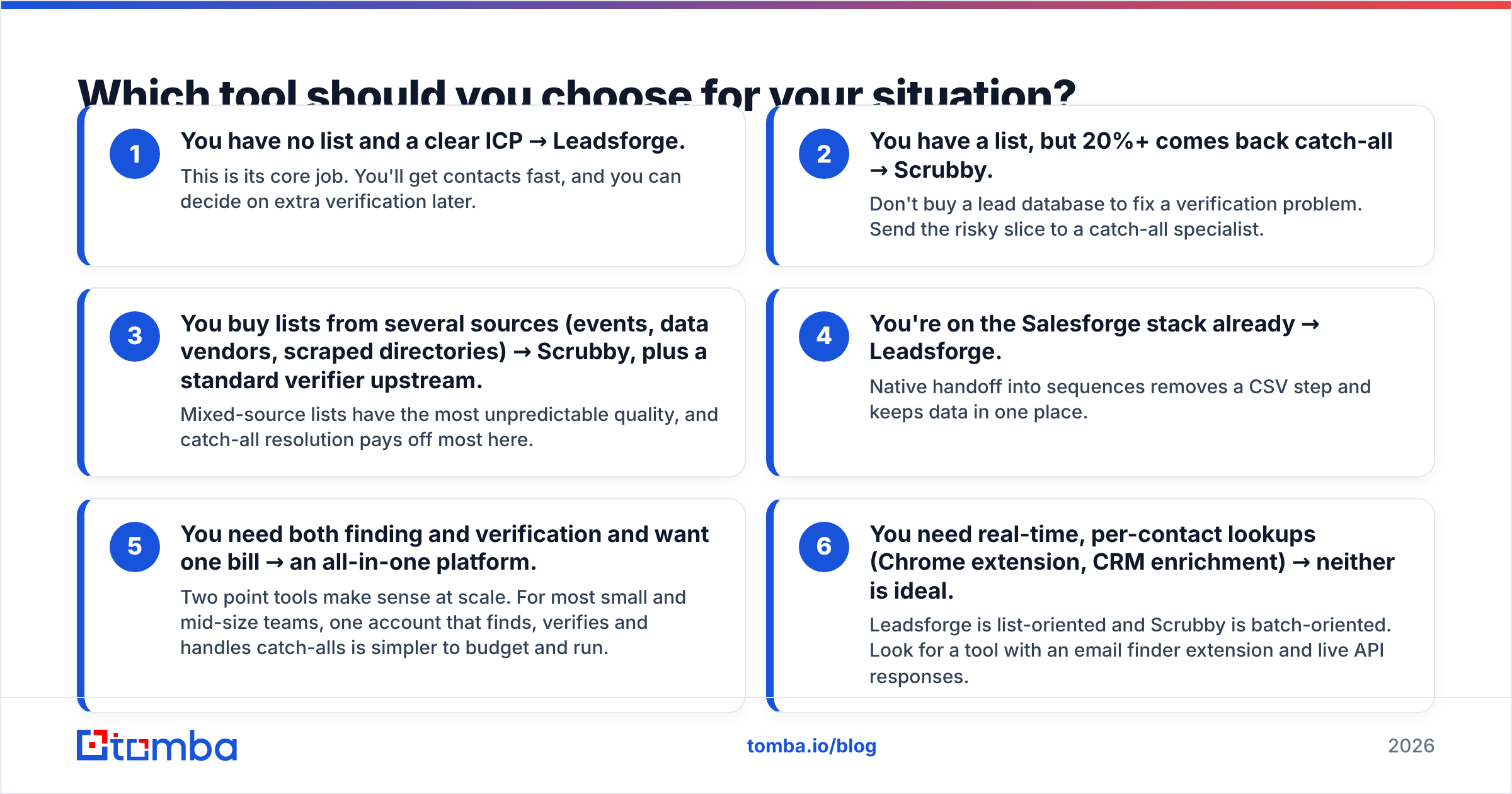
- You have no list and a clear ICP → Leadsforge. This is its core job. You'll get contacts fast, and you can decide on extra verification later.
- You have a list, but 20%+ comes back catch-all → Scrubby. Don't buy a lead database to fix a verification problem. Send the risky slice to a catch-all specialist.
- You buy lists from several sources (events, data vendors, scraped directories) → Scrubby, plus a standard verifier upstream. Mixed-source lists have the most unpredictable quality, and catch-all resolution pays off most here.
- You're on the Salesforge stack already → Leadsforge. Native handoff into sequences removes a CSV step and keeps data in one place.
- You need both finding and verification and want one bill → an all-in-one platform. Two point tools make sense at scale. For most small and mid-size teams, one account that finds, verifies and handles catch-alls is simpler to budget and run.
- You need real-time, per-contact lookups (Chrome extension, CRM enrichment) → neither is ideal. Leadsforge is list-oriented and Scrubby is batch-oriented. Look for a tool with an email finder extension and live API responses.
What do Leadsforge and Scrubby cost in practice?#
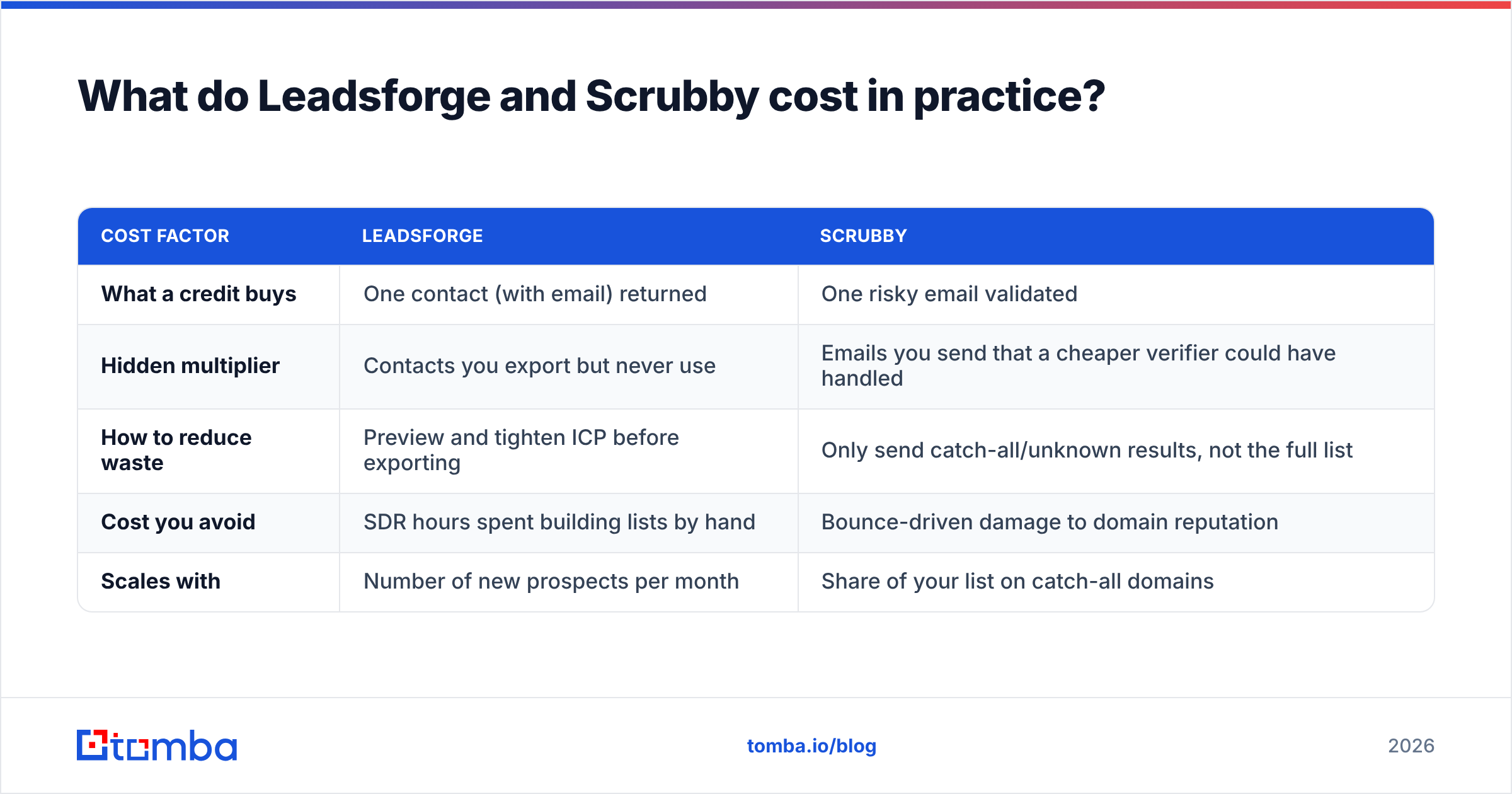
Both vendors use credit-based pricing and adjust plans regularly, so we won't quote numbers that may be stale by the time you read this. Check each vendor's live pricing page. What we can do is show you how to compare them fairly, because the sticker price hides the real cost.
| Cost factor | Leadsforge | Scrubby |
|---|---|---|
| What a credit buys | One contact (with email) returned | One risky email validated |
| Hidden multiplier | Contacts you export but never use | Emails you send that a cheaper verifier could have handled |
| How to reduce waste | Preview and tighten ICP before exporting | Only send catch-all/unknown results, not the full list |
| Cost you avoid | SDR hours spent building lists by hand | Bounce-driven damage to domain reputation |
| Scales with | Number of new prospects per month | Share of your list on catch-all domains |
The key metric for either tool is cost per deliverable, reachable contact, not cost per credit. A cheap list with a 12% bounce rate costs more once you count a burned sending domain. An expensive catch-all check that recovers 150 enterprise contacts can be the best-value line item in your stack.
For a real-world benchmark, compare against an all-in-one price. Tomba plans start with a free tier of 25 searches per month, then Starter at $49/mo, Growth at $99/mo and Pro at $249/mo. Finding, verification and catch-all checks all live in the same account, which gives you a baseline for what "both jobs" costs under one roof.

What do users say about each tool?#
Third-party review sites like G2 are useful for spotting patterns. Here's what tends to come up for each category.
Leadsforge-style AI list builders get praise for:
- Fast list creation without learning complex filter UIs
- A natural-language interface that non-technical founders pick up quickly
- Tight integration into the Forge sequencing stack
Common criticisms:
- Data depth varies by vertical and geography
- Some contacts still need extra verification before high-volume sends
Scrubby-style catch-all validators get praise for:
- Recovering usable contacts from lists other verifiers wrote off
- Measurably lower bounce rates on enterprise-heavy lists
- Doing one job well rather than bundling features you won't use
Common criticisms:
- Slow turnaround compared with instant verifiers
- Adds another tool, login and bill to the stack
Neither set of criticisms is a dealbreaker. Both come from the tools being specialized. Specialization is great when your problem matches the tool exactly, and awkward when it only partly matches.
Can you use Leadsforge and Scrubby together?#
Yes, and for some teams it's the most rigorous setup. A combined workflow looks like this:
- Build the list in Leadsforge from your ICP prompt.
- Export and run it through a fast standard verifier to clear the obvious valid and invalid results.
- Send only the catch-all/unknown slice to Scrubby.
- Merge the results, suppress anything invalid and load the clean list into your sequencer.
- Watch bounce rates per campaign, and if a source keeps underperforming, fix it at step 1.
The downside is operational overhead: three tools, three billing cycles and CSV handoffs between them. For an agency sending hundreds of thousands of emails a month, that overhead is small next to the deliverability gains. For a two-person sales team, it's often more machinery than the volume justifies.
If you want the same pipeline with fewer moving parts, the pattern is simpler: find the contact, verify it and resolve catch-alls all in one place, then push directly to your CRM or sequencer. That's where consolidated platforms fit.
Is there a simpler alternative that covers both jobs?#
The honest answer is "it depends on scale." But if you're weighing Leadsforge vs Scrubby because you need both sourcing and verification, look at whether one platform does enough of each.
Tomba is built around that combination:
- Finding: search by domain, by name + company, or from a LinkedIn profile. The domain search returns every public work email tied to a company, with sources.
- Verifying: every found email comes back with a verification status, and you can bulk-verify lists you bring from elsewhere.
- Catch-all handling: a dedicated catch-all verifier works on the same addresses that send most teams to a specialist tool.
- Workflow fit: Chrome extension, Google Sheets, API and CRM integrations, so reps can look up and verify in real time instead of waiting on a batch queue.
It isn't a natural-language ICP chatbot like Leadsforge, and a dedicated catch-all specialist may squeeze out extra recovery on the hardest enterprise domains. For most teams, though, one tool that does 90% of both jobs beats two tools that each do 100% of half the job.
Which should you pick: Leadsforge or Scrubby?#
Here's the verdict:
- Choose Leadsforge if your bottleneck is getting prospects. You know your ICP, you don't have a list and you want to be sending this week, especially if you already use Salesforge.
- Choose Scrubby if your bottleneck is trusting your prospects. You have lists, but catch-all domains are forcing you to either risk bounces or throw away good contacts.
- Choose a consolidated platform if you need both and want to keep your stack and budget lean.
Don't let the "vs" framing push you into buying a tool for a problem you don't have. Figure out where your pipeline actually leaks, at the top (no contacts) or the middle (unverifiable contacts), and put money there.
If you'd rather cover finding and verification in one place, start with the Tomba Email Finder. Look up professional emails by domain, name or company, get a verification status on every result and run catch-all checks without a second tool. The free tier includes 25 searches a month, so you can test it on your own target accounts before committing, and paid plans start at $49/mo when you're ready to scale.
Related guides#
// get started
Find, verify and enrich your first contacts today
Start on the free plan with 25 searches a month, then scale when your team is ready.
Free plan · No credit card required · GDPR & CCPA
// about the author