Leadsforge vs Skrapp (2026): AI Lead Lists or LinkedIn Emails?
Leadsforge builds lead lists from a plain-English prompt. Skrapp finds emails for people you already picked on LinkedIn. Here's which one fits your outbound workflow, where each falls short, and when a third option is the better buy.
TL;DR
- Leadsforge builds lead lists for you. You describe your ideal customer in plain English and it returns matching contacts. It works best for teams already running cold email in the Forge stack (Salesforge, Mailforge, Warmforge).
- Skrapp finds emails for people you already chose. It pulls addresses from LinkedIn and Sales Navigator profiles and from company domains, then verifies them. It suits SDRs who build lists by hand.
- The question isn't which tool has better data. It's where your list-building starts: an ICP description (Leadsforge) or a named prospect (Skrapp).
- Neither one replaces a separate verification step before you send. Bounce rates decide whether your domain survives the quarter.
- If you mostly need accurate emails by name, domain, or LinkedIn URL, with an API and predictable pricing, a dedicated email finder like Tomba belongs on your shortlist too.
What is Leadsforge?#
Leadsforge is an AI lead generation tool from the Forge ecosystem, the same group behind Salesforge (sequencing), Mailforge and Infraforge (sending infrastructure), and Warmforge (warmup). It works like a chat interface on top of a B2B contact database. Instead of setting up a dozen filters, you type something like "Heads of RevOps at US SaaS companies with 50–200 employees that are hiring SDRs," and Leadsforge turns that into a search.
Here's what it's good at:
- Speed from idea to list. You skip the filter-building learning curve most databases have.
- Iteration. You refine the prompt ("exclude agencies," "only Series A–B") instead of rebuilding a saved search.
- Downstream handoff. Lists move directly into Salesforge sequences, which matters if you already pay for that stack.
The trade-off is control. You have less visibility into why a contact matched than you would with explicit filters. And like any database-first product, coverage is uneven: dense in North American tech, thinner in niche verticals and non-English markets.
What is Skrapp?#
Skrapp is an older, more traditional email finder. Its core is a Chrome extension that runs on LinkedIn and Sales Navigator: you open a profile or a search results page and Skrapp returns a professional email for each person it can resolve. It also includes domain search (all known emails at a company), a bulk email finder for CSV uploads, an email verifier, and a lead database with filters.
Here's what it's good at:
- Precision on known targets. When you already know who you want, Skrapp is fast and simple.
- Sales Navigator workflows. Reps who live in Sales Nav can capture emails without switching tabs.
- Predictable credit model. One credit per found email makes budgeting simple.
Its weakness is the reverse of Leadsforge's. Skrapp won't help much with deciding who to target. It assumes you've already done that work somewhere else.

How do Leadsforge and Skrapp compare feature by feature?#
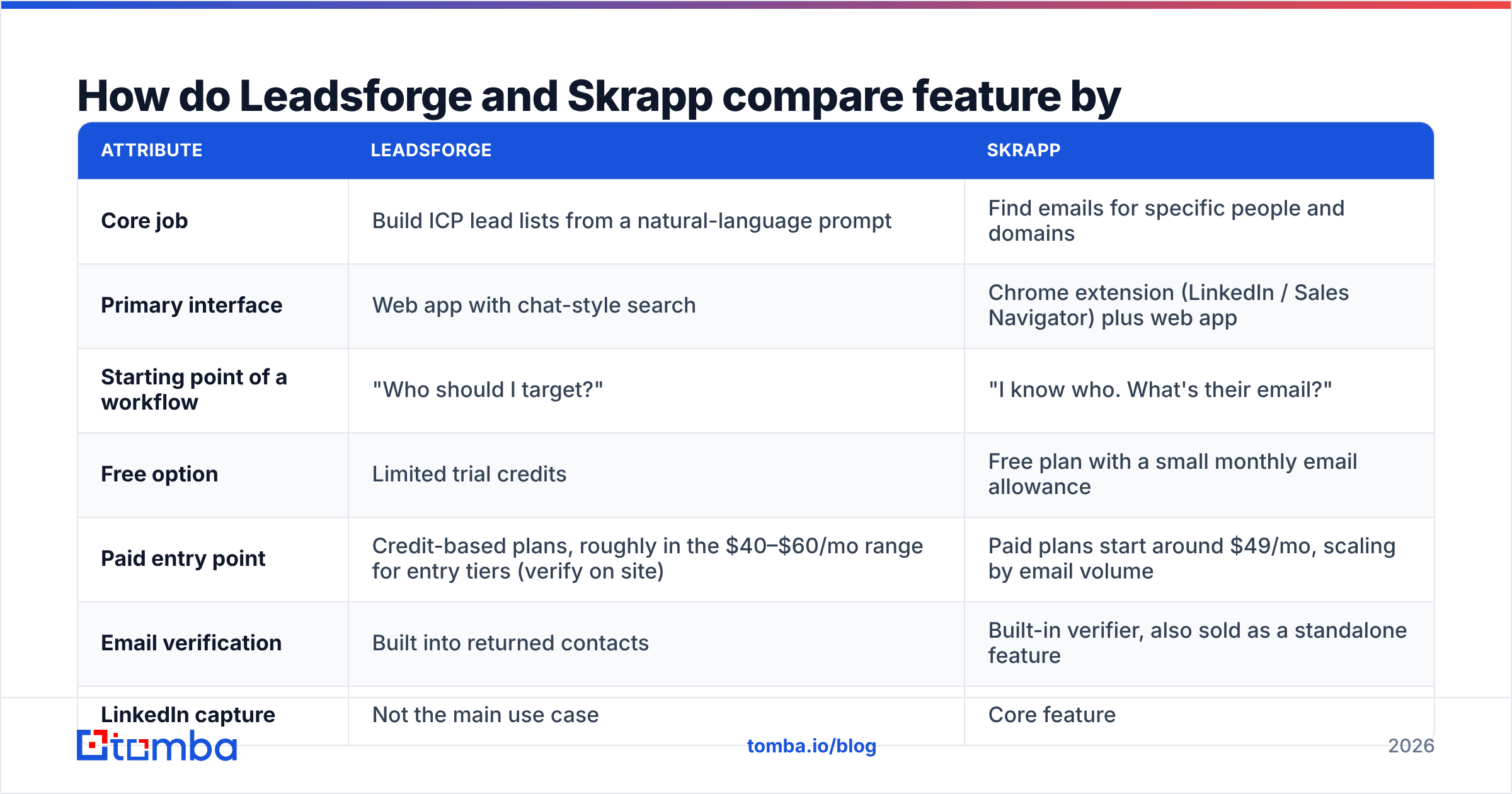
This table puts the two side by side on the attributes that matter in a buying decision. Pricing changes often, so treat the figures as a guide and check each vendor's pricing page before you buy.
| Attribute | Leadsforge | Skrapp |
|---|---|---|
| Core job | Build ICP lead lists from a natural-language prompt | Find emails for specific people and domains |
| Primary interface | Web app with chat-style search | Chrome extension (LinkedIn / Sales Navigator) plus web app |
| Starting point of a workflow | "Who should I target?" | "I know who. What's their email?" |
| Free option | Limited trial credits | Free plan with a small monthly email allowance |
| Paid entry point | Credit-based plans, roughly in the $40–$60/mo range for entry tiers (verify on site) | Paid plans start around $49/mo, scaling by email volume |
| Email verification | Built into returned contacts | Built-in verifier, also sold as a standalone feature |
| LinkedIn capture | Not the main use case | Core feature |
| Bulk / CSV enrichment | Export-oriented | Yes, with a bulk email finder |
| Ecosystem fit | Salesforge, Mailforge, Warmforge | CRM integrations such as HubSpot and Pipedrive |
| API access | Available through the Forge platform | Available on higher tiers |
| Best for | Founders and lean outbound teams in the Forge stack | SDRs doing account-based, hand-picked prospecting |
In short, Leadsforge tries to replace the list-building step. Skrapp tries to finish the list-building step you already started.
Which tool finds more accurate emails?#
Accuracy is where most comparison posts get vague, so here's the most concrete answer we can give.
Both tools use the same basic method: they match a person to a company domain, predict or retrieve an address, then check it with SMTP-level verification. Where they differ is what happens on catch-all domains and with stale records.
- Skrapp is strongest when a public profile gives it a precise name-plus-company pair. On unusual name formats, recent job changes, and catch-all domains, results drop off, as they do for every finder.
- Leadsforge returns contacts from a database, so accuracy depends on how recently each record was refreshed. Fast-moving roles like SDRs, AEs, and early-stage founders go stale fastest.

The benchmark above covers the wider email-finder market, and it shows how much hit rates and verified-valid rates vary between tools. The takeaway for this comparison: no finder's "verified" label is enough on its own for a cold campaign. Run exports through a separate email verifier before sequencing, especially for catch-all domains. That's where both tools tend to mark risky addresses as "accept-all" instead of confirmed.
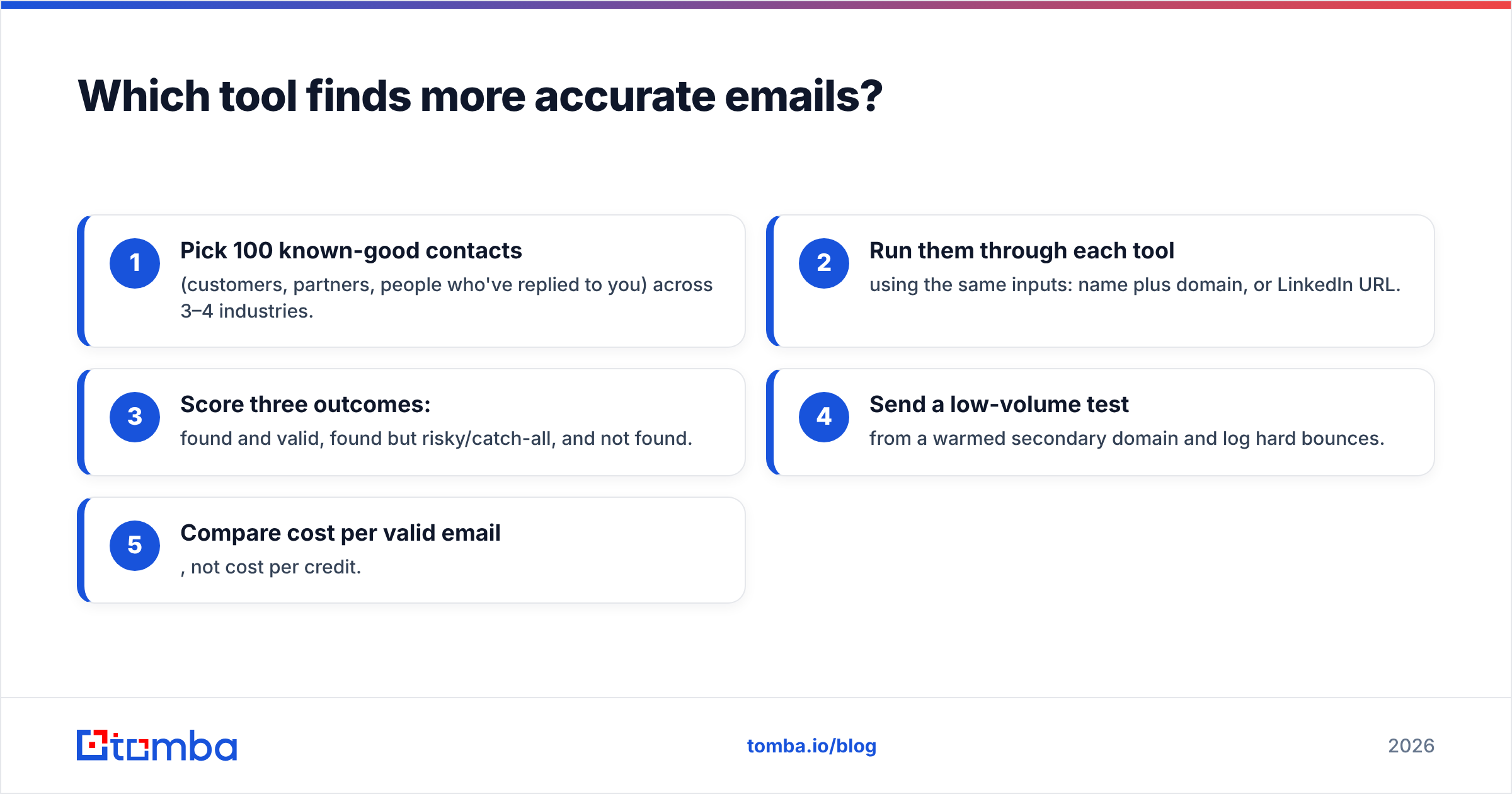
Our testing approach, which you can reproduce:
- Pick 100 known-good contacts (customers, partners, people who've replied to you) across 3–4 industries.
- Run them through each tool using the same inputs: name plus domain, or LinkedIn URL.
- Score three outcomes: found and valid, found but risky/catch-all, and not found.
- Send a low-volume test from a warmed secondary domain and log hard bounces.
- Compare cost per valid email, not cost per credit.
Step 5 is the one most teams skip, and it's the only number your CFO will care about.
How much do Leadsforge and Skrapp really cost?#
Headline plan prices are misleading for both, because the real cost is cost per deliverable email.
- Skrapp charges roughly one credit per found email. Your effective cost goes up when the tool returns "found" addresses that later bounce, or when you pay again to verify them.
- Leadsforge charges credits per contact revealed. You pay for records whether or not they turn out to fit your campaign after review, so a loose prompt burns credits fast.
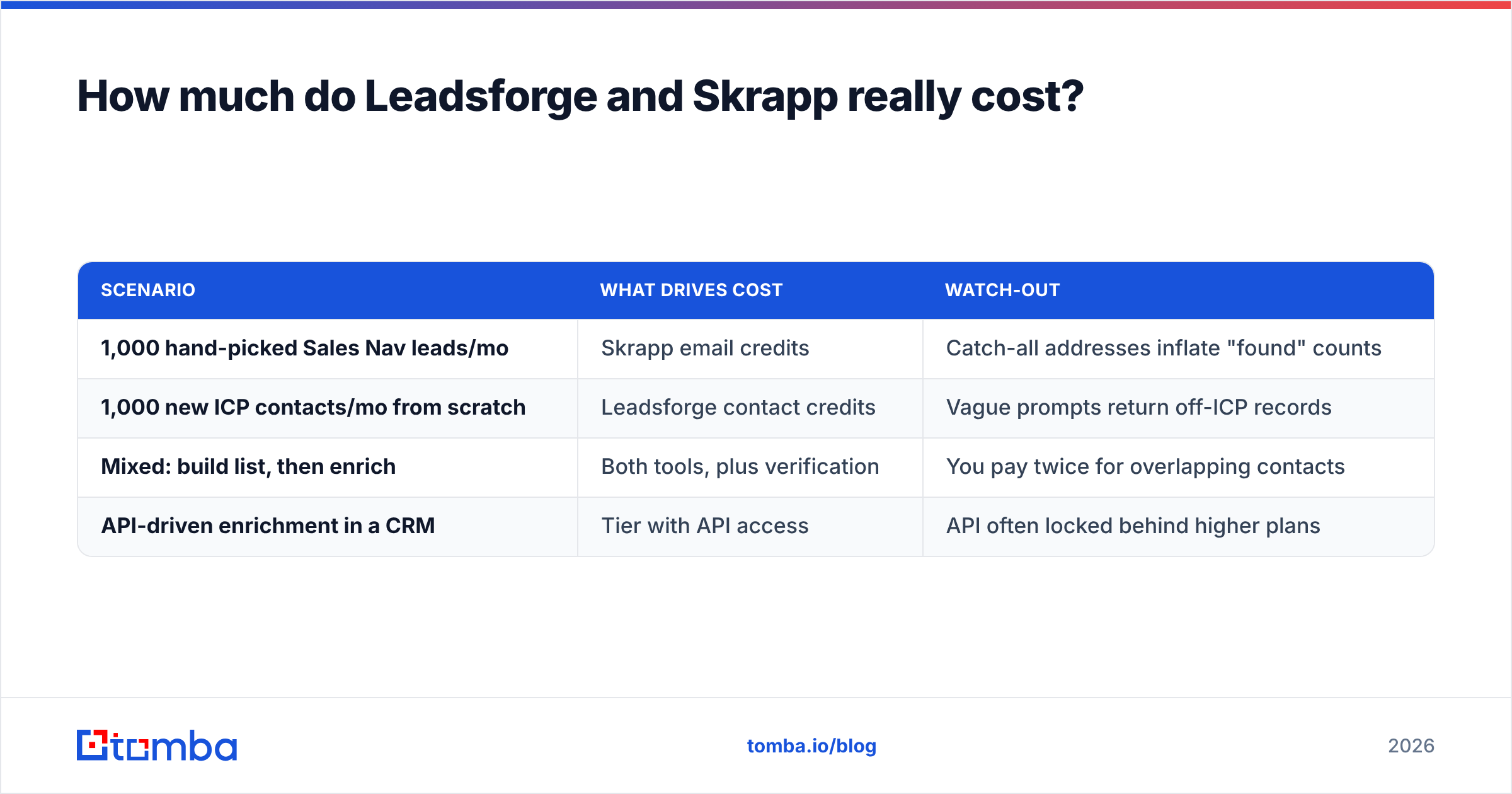
A quick way to model it:
| Scenario | What drives cost | Watch-out |
|---|---|---|
| 1,000 hand-picked Sales Nav leads/mo | Skrapp email credits | Catch-all addresses inflate "found" counts |
| 1,000 new ICP contacts/mo from scratch | Leadsforge contact credits | Vague prompts return off-ICP records |
| Mixed: build list, then enrich | Both tools, plus verification | You pay twice for overlapping contacts |
| API-driven enrichment in a CRM | Tier with API access | API often locked behind higher plans |
If you're comparing against a dedicated finder, Tomba pricing is a useful reference point: a free tier with 25 searches a month, then Starter at $49/mo, Growth at $99/mo, and Pro at $249/mo, with email finding, verification, and domain search all included. That's not a claim that Tomba is always cheaper. It's a reminder to compare the same unit (verified emails) across all three.
Is Leadsforge better than Skrapp for cold email?#
It depends on where the bottleneck is in your outbound process.
Pick Leadsforge if:
- You're a founder or a one- or two-person team without a researcher, and building lists is where you get stuck.
- You already use Salesforge for sequences and want a native list source.
- Your ICP is broad enough that a database can fill it (for example, "B2B SaaS, 20–500 employees, North America").
- You'd rather write a paragraph than manage 15 saved filters.
Pick Skrapp if:
- Your reps prospect account by account in LinkedIn Sales Navigator.
- You run ABM against a fixed target list and need the right person at each account, not just a person.
- You want a browser-first tool that SDRs can use with almost no training.
- You care more about knowing exactly why each contact is on the list than about how fast the list gets built.
Consider neither as your only tool if:
- You need programmatic enrichment inside a CRM, spreadsheet, or data pipeline.
- A large share of your targets sit on catch-all domains.
- You need phone numbers alongside emails at a similar hit rate.
Where do both tools fall short?#
Even at their best, Leadsforge and Skrapp leave gaps you'll have to fill yourself.
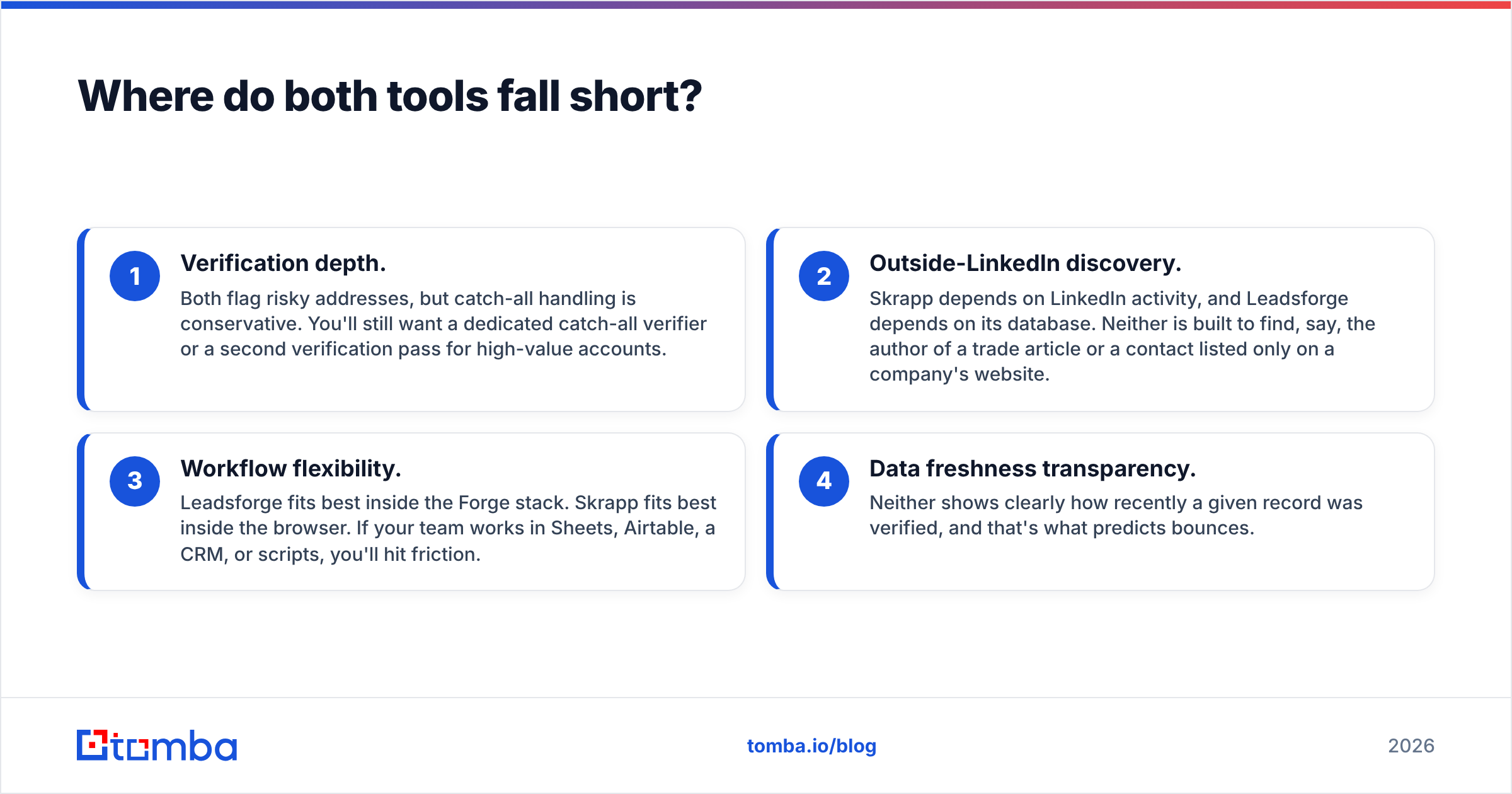
- Verification depth. Both flag risky addresses, but catch-all handling is conservative. You'll still want a dedicated catch-all verifier or a second verification pass for high-value accounts.
- Outside-LinkedIn discovery. Skrapp depends on LinkedIn activity, and Leadsforge depends on its database. Neither is built to find, say, the author of a trade article or a contact listed only on a company's website.
- Workflow flexibility. Leadsforge fits best inside the Forge stack. Skrapp fits best inside the browser. If your team works in Sheets, Airtable, a CRM, or scripts, you'll hit friction.
- Data freshness transparency. Neither shows clearly how recently a given record was verified, and that's what predicts bounces.
That last point matters more each year. Mailbox providers have tightened bulk-sender requirements (Google's sender guidelines are the reference most teams follow), and a list with a 5% bounce rate can hurt a domain that took months to warm up.

How does Tomba fit into a Leadsforge or Skrapp workflow?#
To be fair to both tools: Tomba doesn't replace Leadsforge's prompt-based list building, and it isn't a LinkedIn-first capture tool the way Skrapp is. What it does is the step both tools share, turning a person and a company into a deliverable email, and it offers more ways to do it:
- By name and domain, through the email finder
- By company, through domain search, to see known addresses and the company's email pattern
- By LinkedIn URL, through the browser extension and LinkedIn finder
- In bulk, through CSV upload, Google Sheets, Excel, Airtable, or the API
- With verification and catch-all checks on the same account

Here's a practical hybrid many teams use:
- Build the list in whatever tool understands your ICP best, whether that's Leadsforge, Sales Navigator, or your CRM.
- Resolve and verify emails with a dedicated finder and verifier so that deliverability standards stay consistent no matter where the list came from.
- Sequence from a warmed domain with bounce monitoring turned on.
This separation also lets you swap tools later without rebuilding your QA process. For a broader look at the options, independent review sites like G2 are worth checking for recent user feedback on all three.
Leadsforge vs Skrapp: what's the final verdict?#
| If your situation is... | Choose |
|---|---|
| "I don't know who to target yet." | Leadsforge |
| "I know exactly who. I need their email." | Skrapp |
| "I'm all-in on Salesforge." | Leadsforge |
| "My team lives in Sales Navigator." | Skrapp |
| "I need API/CRM enrichment and consistent verification." | A dedicated finder like Tomba |
Our pick: Skrapp is the safer choice for most SDR teams doing targeted outbound, because the workflow is transparent and it's easy to check where each email came from. Leadsforge is the better choice for lean founder-led teams that already run Salesforge and mainly need help deciding who to target. Whichever you pick, budget for independent verification, and compare cost per deliverable email, not cost per credit.
If what you actually need is accurate professional emails by name, domain, company, or LinkedIn profile, with built-in verification, a free tier to test with, and an API for your stack, try Tomba Email Finder. Run your 100-contact test through it next to Leadsforge and Skrapp, and choose based on your own bounce rate.
Related guides#
// get started
Find, verify and enrich your first contacts today
Start on the free plan with 25 searches a month, then scale when your team is ready.
Free plan · No credit card required · GDPR & CCPA
// about the author