Leadsforge vs Startup Tracker: Which Lead Source Wins in 2026?
Leadsforge builds AI-generated outbound lead lists. Startup Tracker maps the startup ecosystem for investors and innovation teams. Here is which one fits your pipeline, and where each one falls short.
TL;DR
- Leadsforge is an AI lead-list builder. You describe your ideal customer in plain language and it returns companies and contacts, with emails included, ready to push into outbound sequences.
- Startup Tracker is a startup intelligence platform. It helps you discover, monitor, and qualify early-stage companies using growth and funding signals. It is built for deal flow and market mapping, not for pulling contact lists.
- If your job is booking meetings, Leadsforge is the closer fit. If your job is finding and tracking startups, whether to invest in them, partner with them, or sell to them early, Startup Tracker is the closer fit.
- Many teams use a startup discovery tool alongside a dedicated email finder. Startup Tracker tells you which companies to go after. A tool like Tomba tells you how to reach the people inside them.
- Neither tool replaces email verification. Verify every list before you send, whichever source it came from.
What is the real difference between Leadsforge and Startup Tracker?#
People compare these two tools because both put a list of companies in front of you. They are built for different jobs, though, and that matters more than any feature checklist.
Leadsforge belongs to the Forge ecosystem, alongside Salesforge (sequencing), Warmforge (warmup), and Infraforge (sending infrastructure). You tell it what you want in a chat-style prompt, for example "Series A fintech companies in Germany with 20–100 employees, heads of finance." It builds a list of companies and contacts that you can export or send straight into a sequence. It is designed for outbound sales.
Startup Tracker is a discovery and monitoring platform focused on startups. It indexes young companies and surfaces signals such as web and social traction, team growth, and funding activity. You use it to build watchlists, follow sectors, and spot breakout companies before everyone else does. VCs, corporate venture arms, accelerators, and innovation teams are its core users. Sales teams that sell into early-stage companies use it as a targeting layer.
Put simply: Leadsforge answers "who should I email this week?" Startup Tracker answers "which startups in this space are worth our attention?"
How do the two tools work, step by step?#
The workflows look nothing alike. Here is the core contrast:
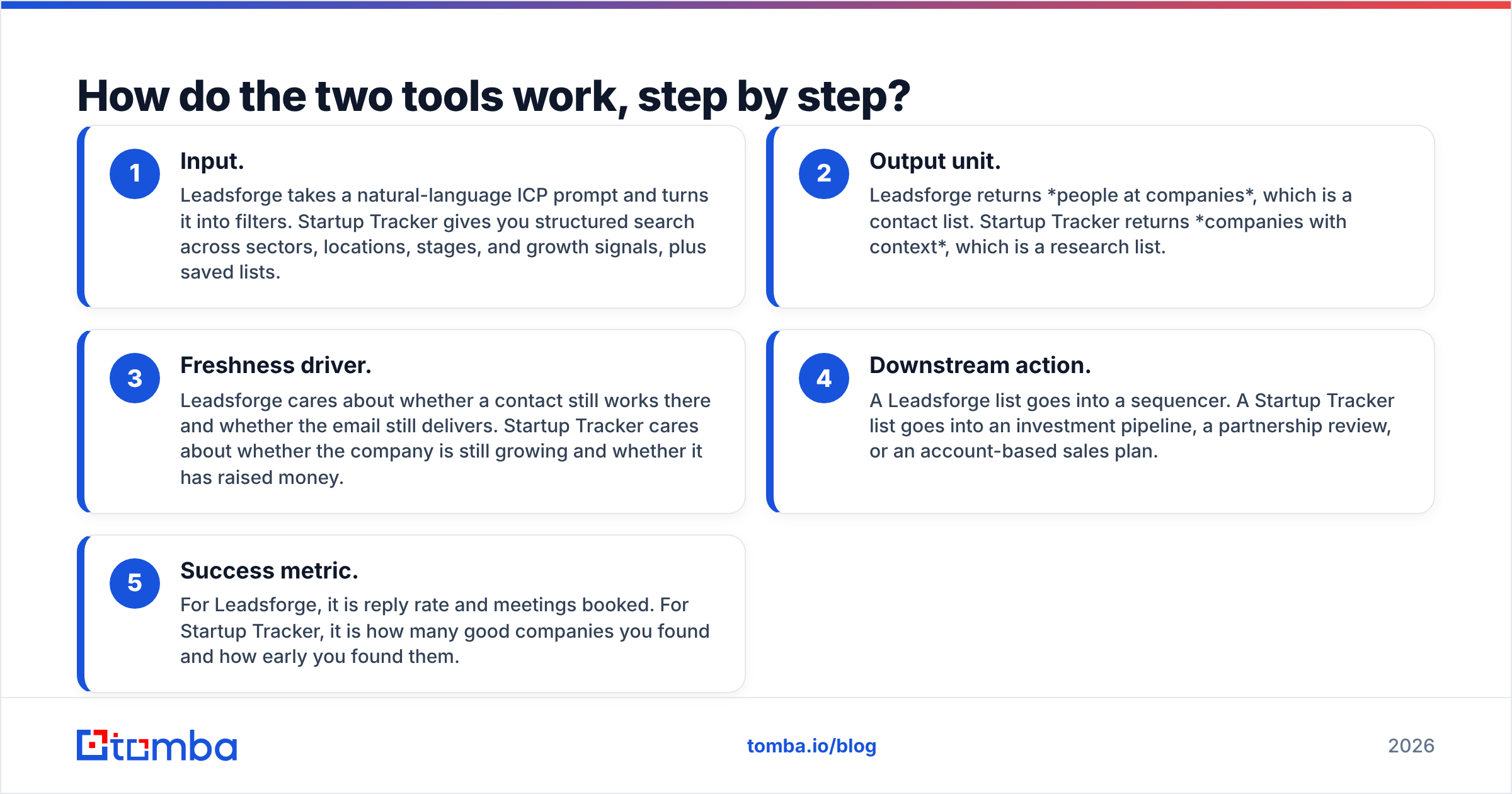
- Input. Leadsforge takes a natural-language ICP prompt and turns it into filters. Startup Tracker gives you structured search across sectors, locations, stages, and growth signals, plus saved lists.
- Output unit. Leadsforge returns people at companies, which is a contact list. Startup Tracker returns companies with context, which is a research list.
- Freshness driver. Leadsforge cares about whether a contact still works there and whether the email still delivers. Startup Tracker cares about whether the company is still growing and whether it has raised money.
- Downstream action. A Leadsforge list goes into a sequencer. A Startup Tracker list goes into an investment pipeline, a partnership review, or an account-based sales plan.
- Success metric. For Leadsforge, it is reply rate and meetings booked. For Startup Tracker, it is how many good companies you found and how early you found them.
If you read that list and thought "I need both halves," you are right. That is the gap most teams end up filling with a separate email finder.
Leadsforge vs Startup Tracker: how do they compare side by side?#
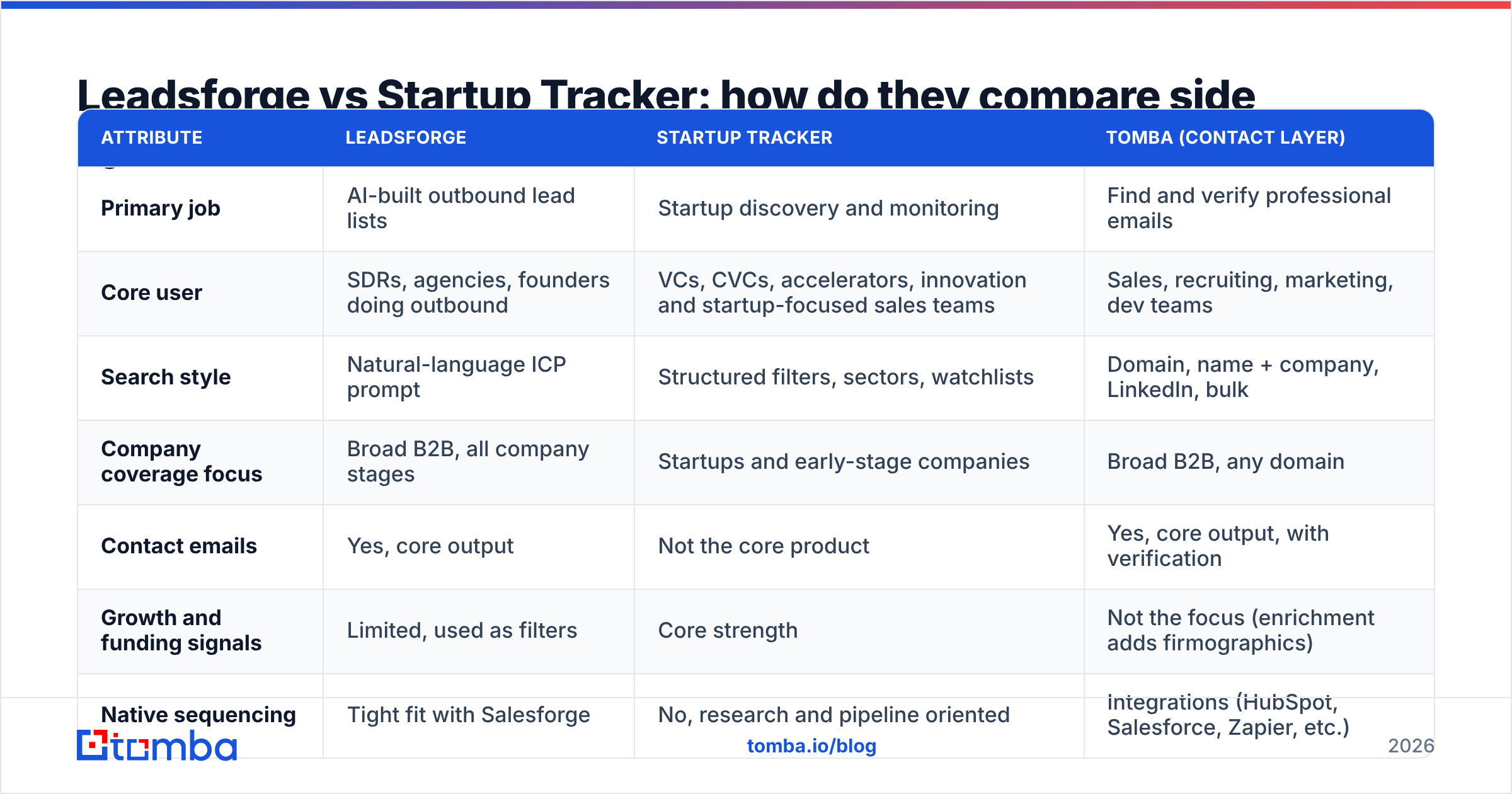
The table covers the attributes that usually decide the purchase. Vendor pricing changes often, so check the live pricing pages for Leadsforge and Startup Tracker before you budget. Tomba's figures are its current published plans.
| Attribute | Leadsforge | Startup Tracker | Tomba (contact layer) |
|---|---|---|---|
| Primary job | AI-built outbound lead lists | Startup discovery and monitoring | Find and verify professional emails |
| Core user | SDRs, agencies, founders doing outbound | VCs, CVCs, accelerators, innovation and startup-focused sales teams | Sales, recruiting, marketing, dev teams |
| Search style | Natural-language ICP prompt | Structured filters, sectors, watchlists | Domain, name + company, LinkedIn, bulk |
| Company coverage focus | Broad B2B, all company stages | Startups and early-stage companies | Broad B2B, any domain |
| Contact emails | Yes, core output | Not the core product | Yes, core output, with verification |
| Growth and funding signals | Limited, used as filters | Core strength | Not the focus (enrichment adds firmographics) |
| Native sequencing | Tight fit with Salesforge | No, research and pipeline oriented | Integrations (HubSpot, Salesforce, Zapier, etc.) |
| Pricing model | Credit-based subscription | Subscription, tiered by use case | Free (25 searches/mo), Starter $49/mo, Growth $99/mo, Pro $249/mo |
| Best for | "Give me 500 prospects I can email Monday" | "Show me the 50 climate-tech startups growing fastest" | "Get me the right email for this person at this company" |
The table shows that the two tools overlap only partly. Leadsforge is closer to Apollo-style list building with an AI front end. Startup Tracker is closer to a lightweight Crunchbase/Dealroom-style intelligence tool with a startup focus.

Which tool has better data for outbound sales?#
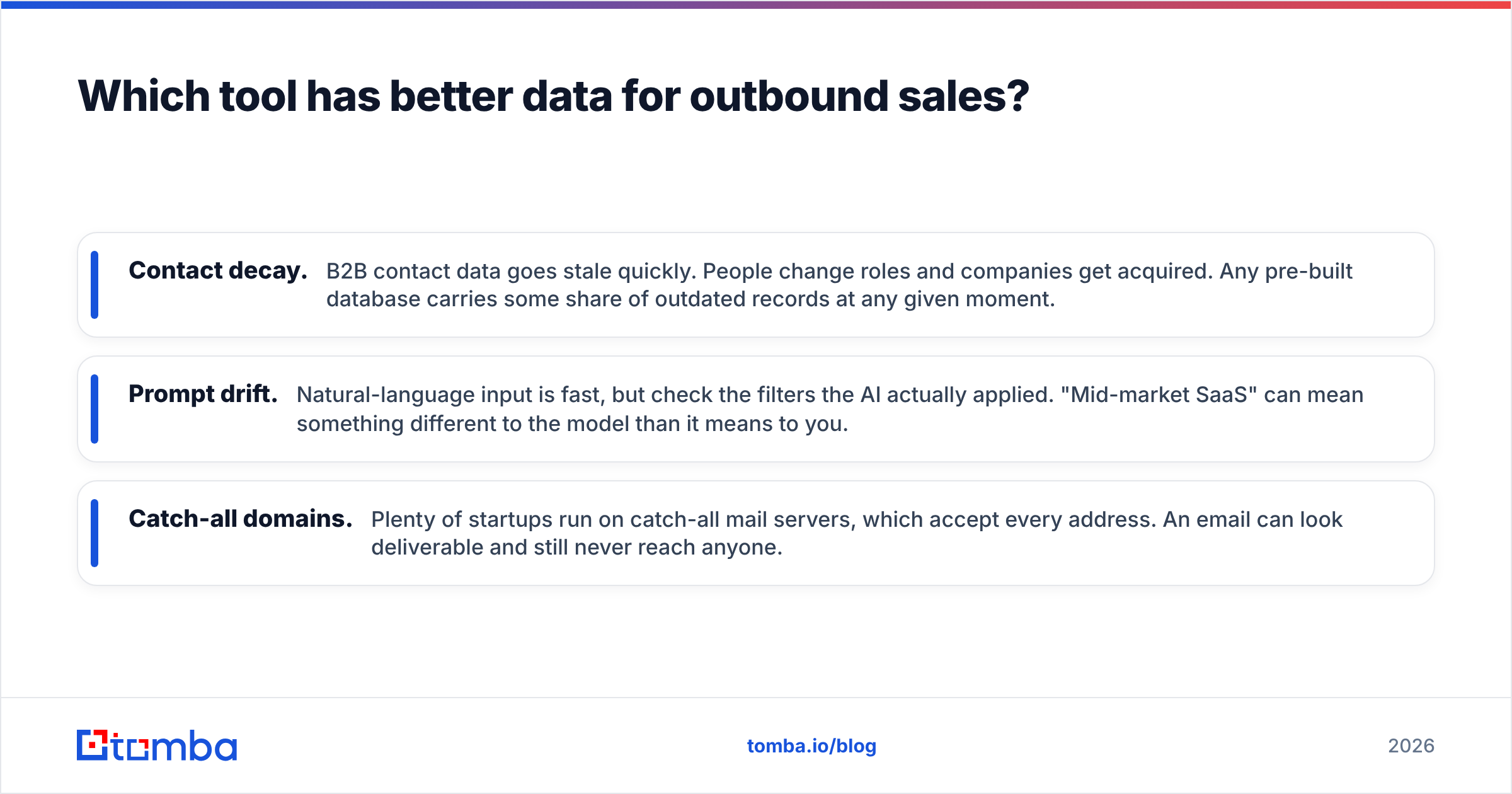
For pure outbound volume, Leadsforge is the stronger fit, because it was built for that. You get contacts with emails in the same step as the company list. The AI prompt also saves real time compared with clicking through a dozen filter dropdowns. The trade-offs are the same ones every list builder has:
- Contact decay. B2B contact data goes stale quickly. People change roles and companies get acquired. Any pre-built database carries some share of outdated records at any given moment.
- Prompt drift. Natural-language input is fast, but check the filters the AI actually applied. "Mid-market SaaS" can mean something different to the model than it means to you.
- Catch-all domains. Plenty of startups run on catch-all mail servers, which accept every address. An email can look deliverable and still never reach anyone.
Startup Tracker's data strength is company intelligence: which startups exist in a niche, how quickly they are growing, and what is happening with their team and funding. That is useful targeting context. If you sell dev tools, an HR platform, or financial services to early-stage companies, a startup that just raised and is hiring fast is a much better account than one picked at random from a generic list.
What Startup Tracker is not built to do is hand you a verified inbox for a specific VP. After you shortlist companies there, you still need a contact step. The usual pattern is to take each shortlisted startup's domain, run a domain search to see who works there and what email pattern they use, and then verify the addresses before you sequence them.
How do Leadsforge and Startup Tracker compare on pricing?#
The pricing models reflect what each tool sells.
Leadsforge uses credits. You pay for the contacts you pull and the enrichment you run. Credit models reward precision: a tight ICP prompt costs less than a broad one that you prune afterwards. If you already use Salesforge, the bundling can also save you tool sprawl and CSV shuffling.
Startup Tracker prices around platform access, meaning seats, search depth, and monitoring features, rather than per-contact exports. That suits investors and innovation teams whose value comes from continuous tracking, not one-off pulls.
Plan your budget like this:
- If your cost driver is "contacts per month," a credit-based list builder plus a verifier is the right mental model.
- If your cost driver is "markets I need to watch," a subscription intelligence platform is the right model. Budget separately for contact data.
- If you already have target accounts (from Startup Tracker, a CRM, or a conference list), you may not need a list builder at all. A per-search email finder is often the cheapest way to add contacts. See Tomba pricing for a baseline: 25 free searches a month, then $49/mo on Starter.
Independent review sites such as G2 are useful for checking current user sentiment on pricing and data quality for both vendors. Read the recent reviews, because data quality reputations change quickly.
Which one should you choose for your use case?#
Match the tool to your job instead of to the feature list.
Choose Leadsforge if:
- You run cold outbound and measure success in meetings booked.
- You want to go from ICP to sendable list in minutes, without building filters by hand.
- You already use (or plan to use) Salesforge, Warmforge, or Infraforge and want one connected stack.
- Your target market goes well beyond startups, for example SMB, mid-market, or agencies.
Choose Startup Tracker if:
- You are an investor, scout, accelerator, or corporate innovation team sourcing deal flow.
- You sell specifically to early-stage companies and timing matters, for example reaching them right after a raise or during a hiring surge.
- You need ongoing monitoring of sectors and watchlists, not one-time exports.
- Context about a company's growth matters more to you than contact volume.
Use both (or Startup Tracker plus an email finder) if:
- You do account-based selling into startups. Startup Tracker picks the accounts, and a contact tool reaches the people.
- Your outbound list quality is weak and you want signal-driven targeting instead of broad firmographic filters.
Is funding data actually a good buying signal?#
Here is the uncomfortable part. Plenty of teams treat "just raised a round" as a full ICP, and it isn't one.
A fresh round tells you a company has budget. It does not tell you they have your problem, or that the person you are emailing owns it. Every other vendor in your category is watching the same funding announcements, so inboxes at newly funded startups get hit hard in the weeks after a raise. Your "timely" email lands in a crowded inbox.

Better signal stacks combine:
- Fit: industry, size, tech stack, business model
- Timing: funding, hiring for relevant roles, leadership changes
- Pain evidence: job posts that mention your problem space, product launches that create a need for what you sell
Startup Tracker is good for the timing and growth layer. Leadsforge is good for turning a fit definition into contacts. Neither one decides your ICP for you. That is still a sales-strategy call.
Where does email verification fit into this stack?#
Whichever tool builds the list, the list has to be verified before it touches your sending domain. Bounces damage sender reputation, and a damaged reputation lowers your reply rates across every campaign, including the good ones.
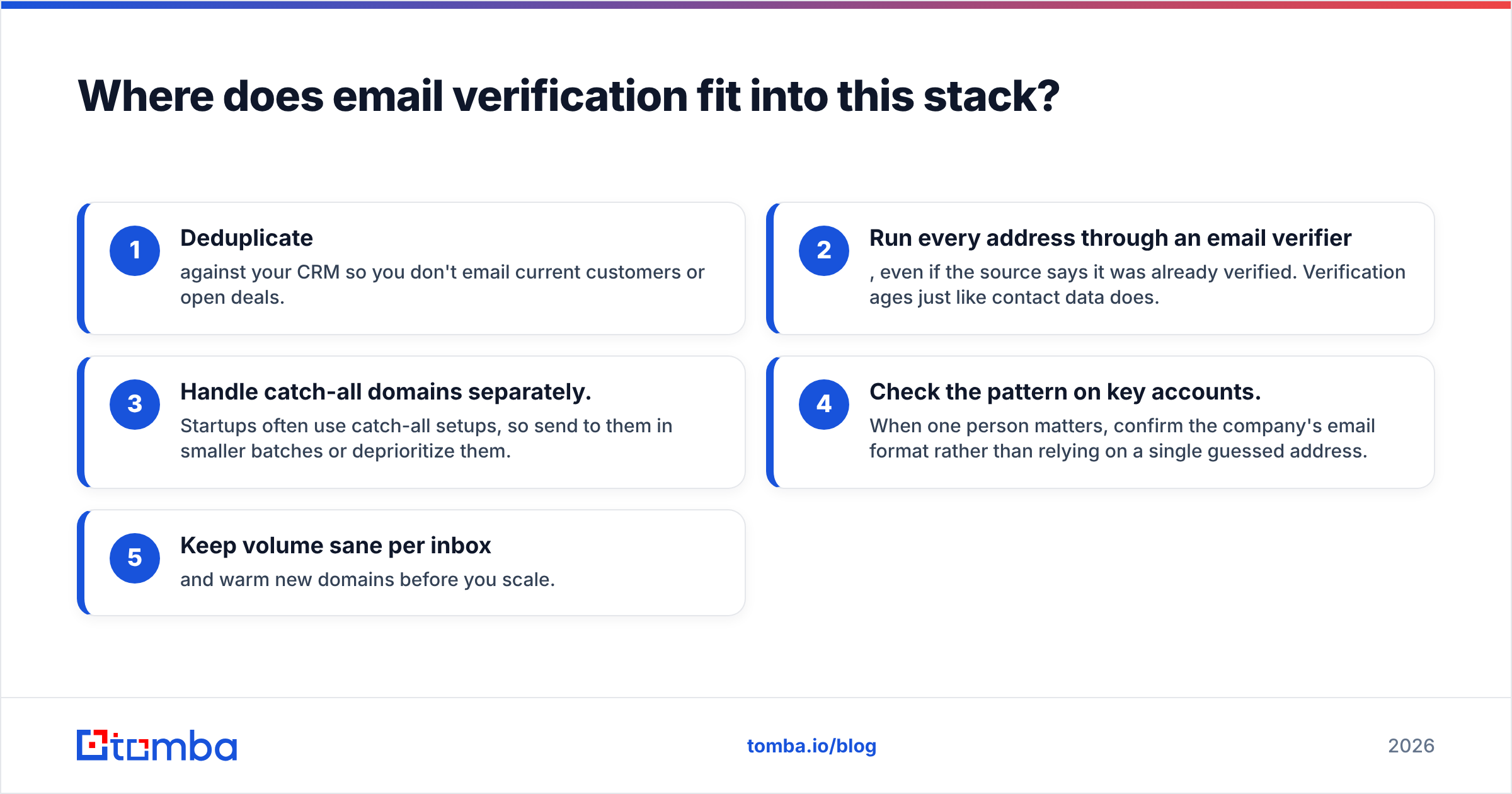
A practical pre-send checklist:
- Deduplicate against your CRM so you don't email current customers or open deals.
- Run every address through an email verifier, even if the source says it was already verified. Verification ages just like contact data does.
- Handle catch-all domains separately. Startups often use catch-all setups, so send to them in smaller batches or deprioritize them.
- Check the pattern on key accounts. When one person matters, confirm the company's email format rather than relying on a single guessed address.
- Keep volume sane per inbox and warm new domains before you scale.
This step costs very little compared with the domain damage it prevents. It is also where the Leadsforge-vs-Startup-Tracker question stops mattering, because both lists need the same hygiene.
What are the pros and cons of each tool?#
Leadsforge: pros
- A fast, conversational way to build lists; low learning curve
- Contacts and emails come in the same step as companies
- Tight integration with the wider Forge outbound stack
- Credit model scales with actual usage
Leadsforge: cons
- AI-interpreted filters need a human sanity check
- Like any database, it carries some stale records, so it still needs verification
- Less depth on startup-specific growth context
Startup Tracker: pros
- Strong focus on startup discovery and early signals
- Monitoring and watchlists suit ongoing deal flow and market mapping
- Useful for timing outreach to young, fast-moving companies
- Research context that generic list builders rarely go deep on
Startup Tracker: cons
- Not built as a bulk contact-export tool
- Needs a separate email-finding step for outbound
- Narrower focus if your market is mostly established companies
Frequently asked questions#
Is Leadsforge an alternative to Startup Tracker? Only partly. Both help you decide which companies to target. Leadsforge ends in a contact list for outbound. Startup Tracker ends in a researched, monitored list of startups. If your deliverable is meetings, Leadsforge is the more direct substitute. If your deliverable is deal flow or market maps, it isn't.
Can I get emails from Startup Tracker? Contact data is not Startup Tracker's core product. Most teams export target company domains and run them through an email finder and verifier to reach decision-makers.
Does Leadsforge verify emails? Leadsforge includes email validation in its list building. Best practice is still to re-verify immediately before sending, especially for older exports or catch-all domains.
Which is better for selling to startups? Use Startup Tracker to pick which startups to target and when. Then use a list builder or email finder to reach the right people. The combination usually beats either tool used alone.
What is the cheapest way to add contacts to an existing account list? If you already know your target companies, a per-search email finder is usually cheaper than a full list-building subscription. Tomba's free tier covers 25 searches a month, and Starter is $49/mo.
So, Leadsforge or Startup Tracker?#
Pick Leadsforge if you need outbound-ready contact lists quickly and want them connected to a sequencing stack. Pick Startup Tracker if your edge comes from spotting and tracking the right startups early. If you are an outbound team targeting startups, the strongest setup is usually signal-driven account selection plus a reliable contact layer, followed by strict verification.
That contact layer is where Tomba fits. Take the domains you shortlisted in Startup Tracker, or the accounts in your CRM, and use Tomba Email Finder to find the right decision-maker by name, company, or domain. Then verify each address before it reaches your sequencer. You can start with 25 free searches a month and move to Starter at $49/mo once the workflow proves itself.
Related guides#
// get started
Find, verify and enrich your first contacts today
Start on the free plan with 25 searches a month, then scale when your team is ready.
Free plan · No credit card required · GDPR & CCPA
// about the author