Leadsforge vs Truelist (2026): Lead Finder or Email Verifier?
Leadsforge builds lead lists from a chat prompt. Truelist verifies email lists at a flat monthly price. Here's what each one does well, where each falls short, and when you need both.
TL;DR
- Leadsforge and Truelist do different jobs. Leadsforge is an AI lead-generation tool that builds contact lists from a plain-English description of your ideal customer. Truelist is an email verifier that checks lists you already have.
- Pricing works differently too. Leadsforge sells credits. The Essential plan is about $49/mo for 2,000 export credits, and unused credits roll over. Truelist sells flat-rate unlimited verification, with paid plans starting under $40/mo.
- Choose Leadsforge if your problem is "I don't have enough leads." Choose Truelist if your problem is "my bounce rate is hurting deliverability."
- Most outbound teams need both jobs covered, either with two tools or with one platform that finds and verifies in the same workflow.
- Check prices on each vendor's site before you buy. Both companies change plan details often.
What is the real difference between Leadsforge and Truelist?#
The two tools sit at different stages of the outbound pipeline, so the "Leadsforge vs Truelist" question isn't a straight feature fight.
Leadsforge is part of the Forge ecosystem, which also includes Salesforge (sequencing) and Warmforge (warmup). You describe your ICP in a chat box, for example "Series A SaaS companies in Germany with 50–200 employees, VP of Sales", and it returns a list of matching contacts with emails and optional phone numbers. You then export them to CSV or send them straight into a Salesforge sequence. It solves the supply side: getting contacts to email.
Truelist is a dedicated email validation platform. You upload a list, or call its API, and it tells you which addresses are valid, invalid, risky, or catch-all. The main selling point is that paid plans come with unlimited validations at a fixed monthly price, instead of the per-email credits most verifiers charge. It solves the quality side: making sure the addresses you mail won't bounce.
Here's an analogy. Leadsforge is the fishing boat, and Truelist is the person at the dock who checks every fish before it goes to market. You can run a boat without an inspector, but some of what you sell will come back.
How do Leadsforge and Truelist compare feature by feature?#
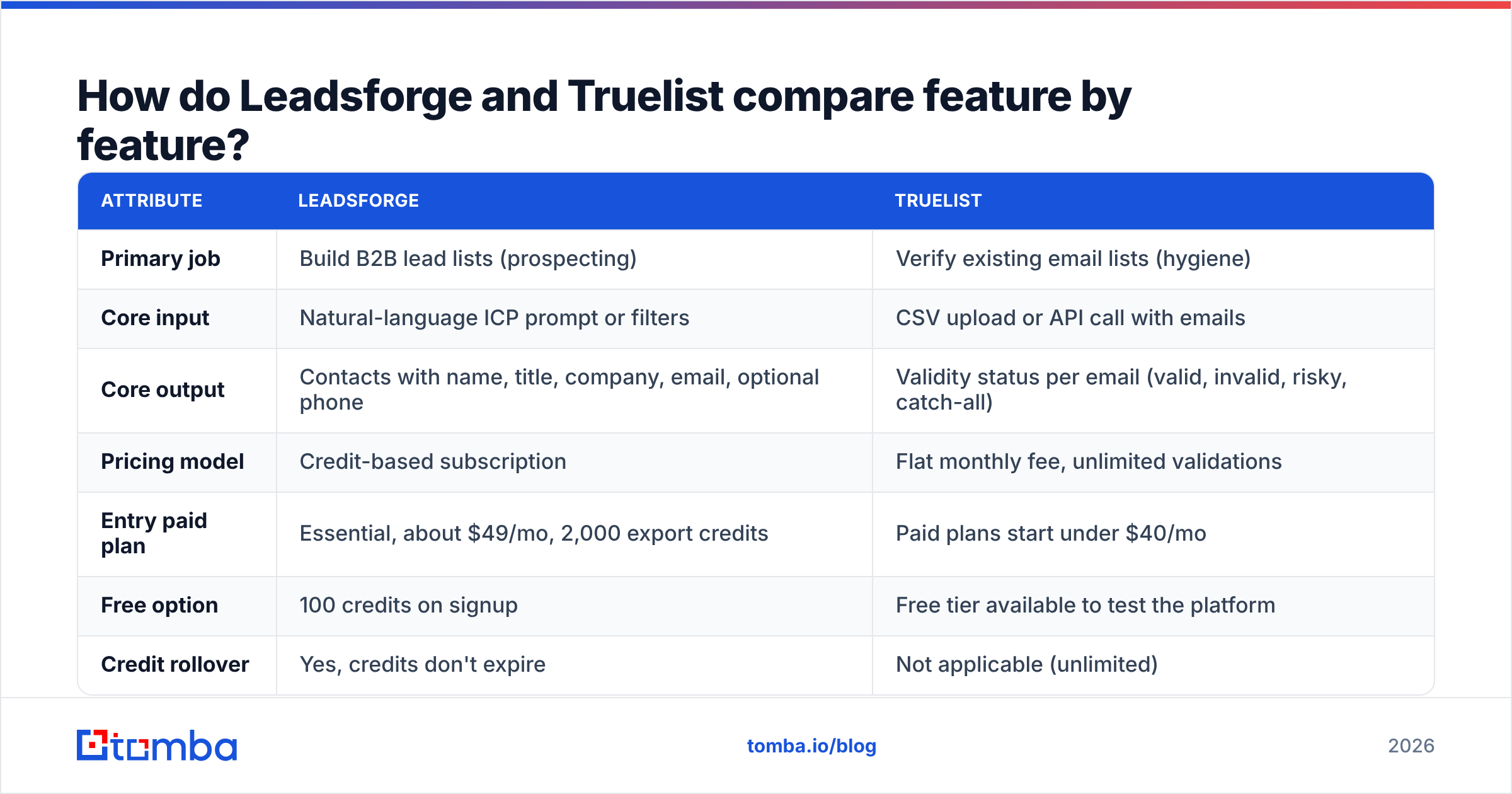
| Attribute | Leadsforge | Truelist |
|---|---|---|
| Primary job | Build B2B lead lists (prospecting) | Verify existing email lists (hygiene) |
| Core input | Natural-language ICP prompt or filters | CSV upload or API call with emails |
| Core output | Contacts with name, title, company, email, optional phone | Validity status per email (valid, invalid, risky, catch-all) |
| Pricing model | Credit-based subscription | Flat monthly fee, unlimited validations |
| Entry paid plan | Essential, about $49/mo, 2,000 export credits | Paid plans start under $40/mo |
| Free option | 100 credits on signup | Free tier available to test the platform |
| Credit rollover | Yes, credits don't expire | Not applicable (unlimited) |
| Phone numbers | Yes, 10 credits per phone lookup | No |
| Catch-all handling | Depends on the export's verification status | Enhanced mode adds catch-all detection |
| Native sequencing | Pushes directly into Salesforge | None, since it's a verifier only |
| Best for | Teams that need fresh leads every week | Teams with large or aging lists to clean |
The rows that matter most are the first three. If you pick based on the pricing rows alone, you can end up with a tool that doesn't do the job you actually have.

How does Leadsforge work in practice?#
A typical Leadsforge session has four steps:
- Describe your ICP in chat. You type who you want to reach. The AI turns that into filters for industry, headcount, geography, and seniority.
- Refine with filters or lookalikes. You can narrow the results or seed the search with a company you already sell to and ask for similar ones.
- Review and select. You check the preview, deselect poor fits, and decide whether you also want phone numbers. Phone numbers cost a lot more credits.
- Export. Contacts go out as a CSV or straight into Salesforge. Export is the step that uses credits.
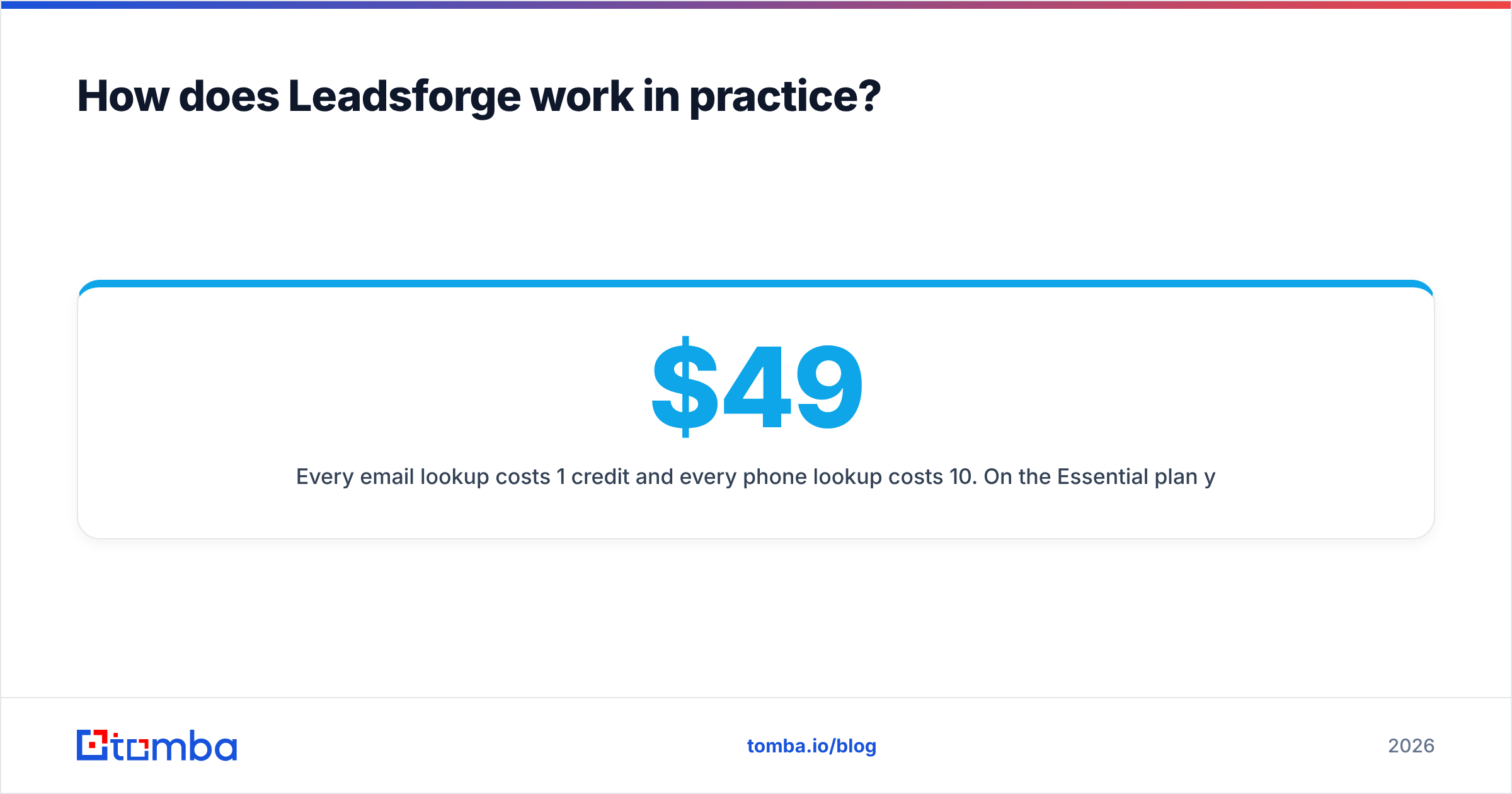
Every email lookup costs 1 credit and every phone lookup costs 10. On the $49 Essential plan you can pull roughly 2,000 emails a month, or about 200 contacts if you want a phone for each one. Higher tiers come as annual bundles (about 12,000 to 48,000 credits per year), with overage rates around $0.02–$0.04 per credit. Credits don't expire, which helps teams whose outbound volume varies from month to month.
Where Leadsforge is strong:
- Speed to first list. You skip boolean-filter trial and error. For founders and small teams without a dedicated SDR ops person, this is the main reason to buy it.
- Integration with the Forge ecosystem. If you already run Salesforge and Warmforge, leads flow into sequences without a CSV round-trip.
- Rollover credits. A slow quarter doesn't cost you anything you paid for.
Where to be careful:
- Coverage outside core markets. Like every database-backed tool, results are best for well-covered regions and industries. Test your specific niche with the free credits before you commit.
- Phone credit burn. At 10 credits per number, adding phones to every contact makes a 2,000-credit plan much smaller.
- Verification is only one step. Leadsforge's exports are meant to be send-ready. Still, any database has a decay window, and a list pulled today and mailed next month will have some dead addresses. Teams sending at volume usually add another verification pass before a big send.
How does Truelist work in practice?#
Truelist is simpler because it does one thing. You upload a list or connect through the API, choose a validation depth, and get back a status for each address.
Truelist offers three validation strategies:
- Quick, which checks syntax and DNS. It's fast and cheap to run, and it catches typos and dead domains.
- Standard, which adds an SMTP check. It asks the receiving mail server whether the mailbox exists without sending a message.
- Enhanced, which adds catch-all detection. It flags domains that accept every address, so a "valid" SMTP response on those domains tells you nothing.
The flat pricing is the main difference from most competitors. Per-email verifiers like ZeroBounce or NeverBounce charge more as your list grows. Truelist's cost stays the same whether you verify 10,000 or 500,000 addresses a month. For agencies that clean client lists or teams re-verifying a large CRM every quarter, that predictability is the reason to choose it. Reviews on G2 mostly praise its value for money and ease of use.
Where Truelist is strong:
- Cost at high volume. The more you verify, the better the deal.
- Clear validation tiers. You choose the tradeoff between speed and thoroughness.
- Low learning curve. You upload, wait, and download.
Where to be careful:
- It doesn't find anyone. If your list is thin, Truelist can't add to it.
- Catch-all results are still uncertain. Detecting a catch-all domain is different from confirming a specific mailbox on it. You'll still need to decide whether to mail those "risky" rows. A dedicated catch-all verifier can reduce that uncertainty further.
- "Unlimited" has fair-use terms. Read the plan's terms on truelist.io if you plan to verify millions of rows a month.
Which is cheaper: Leadsforge or Truelist?#
They charge for different things, so a direct price comparison doesn't tell you much. Compare the cost of each outcome instead.
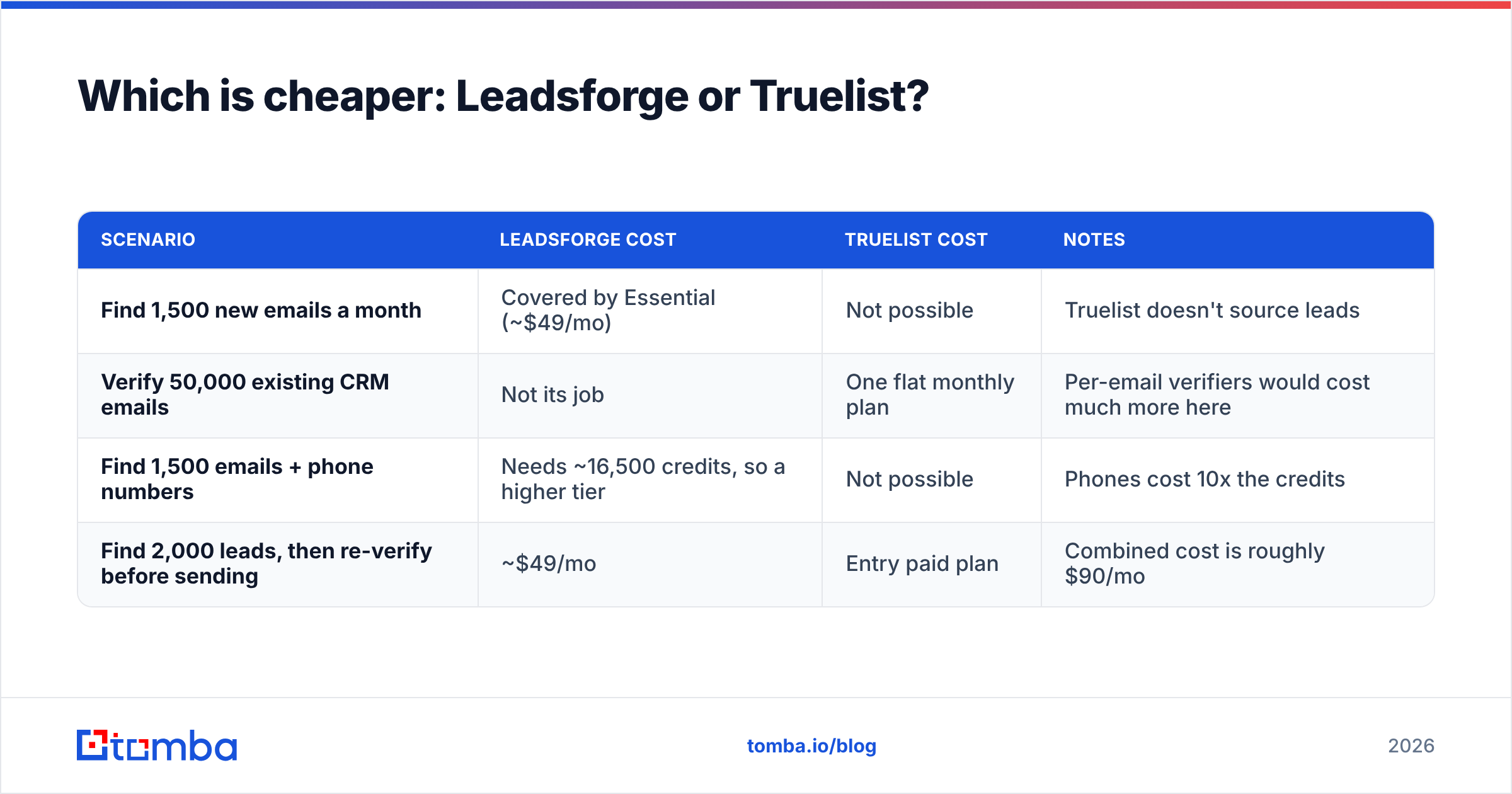
| Scenario | Leadsforge cost | Truelist cost | Notes |
|---|---|---|---|
| Find 1,500 new emails a month | Covered by Essential (~$49/mo) | Not possible | Truelist doesn't source leads |
| Verify 50,000 existing CRM emails | Not its job | One flat monthly plan | Per-email verifiers would cost much more here |
| Find 1,500 emails + phone numbers | Needs ~16,500 credits, so a higher tier | Not possible | Phones cost 10x the credits |
| Find 2,000 leads, then re-verify before sending | ~$49/mo | Entry paid plan | Combined cost is roughly $90/mo |
The last row describes most working outbound teams: source, then verify, then send. That's where the real decision is. You can run two tools and connect them yourself, or use one platform that does both.
When should you pick Leadsforge?#
Pick Leadsforge when:
- Your pipeline is short on contacts. You have messaging and infrastructure ready, but not enough people to email.
- You already use Salesforge. The native handoff saves time on every campaign.
- You don't have an ops person to build lists. The chat-based ICP search replaces a lot of manual filtering.
- Your volume varies. Rollover credits mean you aren't paying for capacity you don't use.
Skip it if you already have a strong list source, such as event leads, inbound signups, or a mature CRM, and your actual problem is list quality.
When should you pick Truelist?#
Pick Truelist when:
- You have a large or aging list. CRM exports, webinar registrants, and purchased or inherited data all need cleaning before you mail them.
- Your bounce rate is climbing. Most mailbox providers become suspicious once hard bounces go above about 2%. Google's sender guidelines make list hygiene effectively required for bulk senders.
- You're an agency or run high volume. Flat pricing turns a variable cost into a fixed one.
- You already have a lead source. You only need the quality layer.
Skip it if you don't have a list yet. A verifier with nothing to verify doesn't help you.
Do you need both, or one tool that does both?#
Most teams sending more than a few hundred cold emails a week end up covering both jobs. That leaves three setups:
- Leadsforge + Truelist. Leadsforge finds, you export, Truelist verifies, and you import into your sender. This works well, but you're managing two subscriptions, two dashboards, and a CSV handoff that someone will eventually forget.
- Leadsforge alone. This works if you mail lists quickly after pulling them and your volume is moderate. It gets riskier as lists age.
- One platform that finds and verifies. Tools like Tomba combine an email finder and an email verifier on one account and one credit pool. Addresses are checked as they're found, so no CSV sits between the two steps.
None of these is right for everyone. If you're committed to the Forge stack, option 1 is reasonable, and Truelist's flat pricing keeps the verification step cheap. If you want fewer tools, option 3 cuts out a step and a bill.
For reference, Tomba's pricing starts with a free tier of 25 searches a month, then Starter at $49/mo, Growth at $99/mo, Pro at $249/mo, and custom Enterprise plans. Tomba also includes domain search, catch-all verification, phone finding, and enrichment. Tomba doesn't offer Leadsforge's chat-style ICP builder or Truelist's unlimited verification. It's built for teams that want finding and checking in one place.
How do they compare on accuracy and deliverability risk?#
No vendor's accuracy figure means much until you test it on your own market. Treat "95%+ accurate" claims the same way you'd treat a car's fuel-economy sticker: it's a best case under lab conditions.
A simple test you can run this week:
- Pull a sample. Take 200 contacts from Leadsforge using its free credits, targeted at your real ICP.
- Verify them independently. Run the same 200 through Truelist, using its free tier, on Enhanced mode.
- Compare the statuses. Count how many Leadsforge "valid" addresses Truelist marks invalid or catch-all.
- Send a small batch. Mail 50 of the addresses both tools marked valid from a warmed inbox, and track hard bounces.
- Calculate your real cost per deliverable contact. Divide total spend by the number of addresses that didn't bounce.
This gives you a real number for your market instead of a marketing claim, and it takes about an hour.
What's the verdict on Leadsforge vs Truelist?#
Leadsforge wins if you need leads. Its chat-based ICP search, rollover credits, and Salesforge integration make it one of the faster ways to go from "we need pipeline" to a list you can send to. It's especially good for founder-led and small sales teams.
Truelist wins if you need clean lists. Flat-rate unlimited verification is uncommon, and for teams re-verifying large or aging lists it will almost always cost less than per-email alternatives.
Most teams need both jobs covered. Decide whether you'd rather connect two specialist tools or run one platform that handles both.
If you want finding and verification in one workflow, try the Tomba Email Finder. Search by name, domain, or company, and each address comes back with its verification status in the same step, so you don't export, re-upload, or cross-check between two tools. Start with the free 25 searches a month, run the 200-contact test above on your own ICP, and upgrade to Starter at $49/mo if the numbers work for you.
Related guides#
// get started
Find, verify and enrich your first contacts today
Start on the free plan with 25 searches a month, then scale when your team is ready.
Free plan · No credit card required · GDPR & CCPA
// about the author