Leadsforge vs Unwrapemail: Lead Finder or Email Verifier in 2026?
Leadsforge builds prospect lists from a plain-English prompt. Unwrapemail screens email addresses through an API. These tools solve different problems, so here is how to tell which one your stack is missing.
TL;DR
- These two tools do different jobs. Leadsforge is an AI lead-generation tool that finds contacts. Unwrapemail (unwrap.email) is an API that checks whether an email address is real, disposable, or risky.
- Leadsforge costs $49/month for 2,000 credits. An email costs 1 credit, a phone number costs 10, and unused credits roll over. It fits outbound teams who need new prospects.
- Unwrapemail gives you 1,000 free validations each month. After that you pay a flat fee plus a per-validation cost. It fits product and data teams who want to stop fake signups and bad CRM imports.
- Cold outbound teams usually need both jobs done: first find the email, then verify it. You can buy two tools, or you can use one platform that does both.
- If your pipeline is mostly outbound, a combined finder and verifier such as Tomba is usually cheaper than paying for two tools and keeping them in sync.
What is the real difference between Leadsforge and Unwrapemail?#
Most "X vs Y" searches compare two products in the same category. This one doesn't, and that's the most useful thing to know before you look at pricing.
Leadsforge is a prospecting tool. You describe your ideal customer in plain English, something like "VP of Sales at US B2B SaaS companies with 50–200 employees that use HubSpot." It returns a list of matching contacts with emails and, if you want them, phone numbers. It belongs to the Forge product family (Salesforge, Warmforge, Infraforge), and it's built to feed contacts straight into outbound sequences.
Unwrapemail is a validation API. You send it an email address and it returns signals about that address: whether it's a disposable or throwaway address, whether the domain has working MX records, and domain-level details from DNS and registry data. Its main uses are signup forms, CRM imports, and data pipelines where you want bad records blocked before they enter your systems.
In short, Leadsforge answers "who should I email?" and Unwrapemail answers "should I trust this address?"
That's why you can't pick a single winner. The right choice depends on which problem is costing you money right now.
How do Leadsforge and Unwrapemail compare feature by feature?#
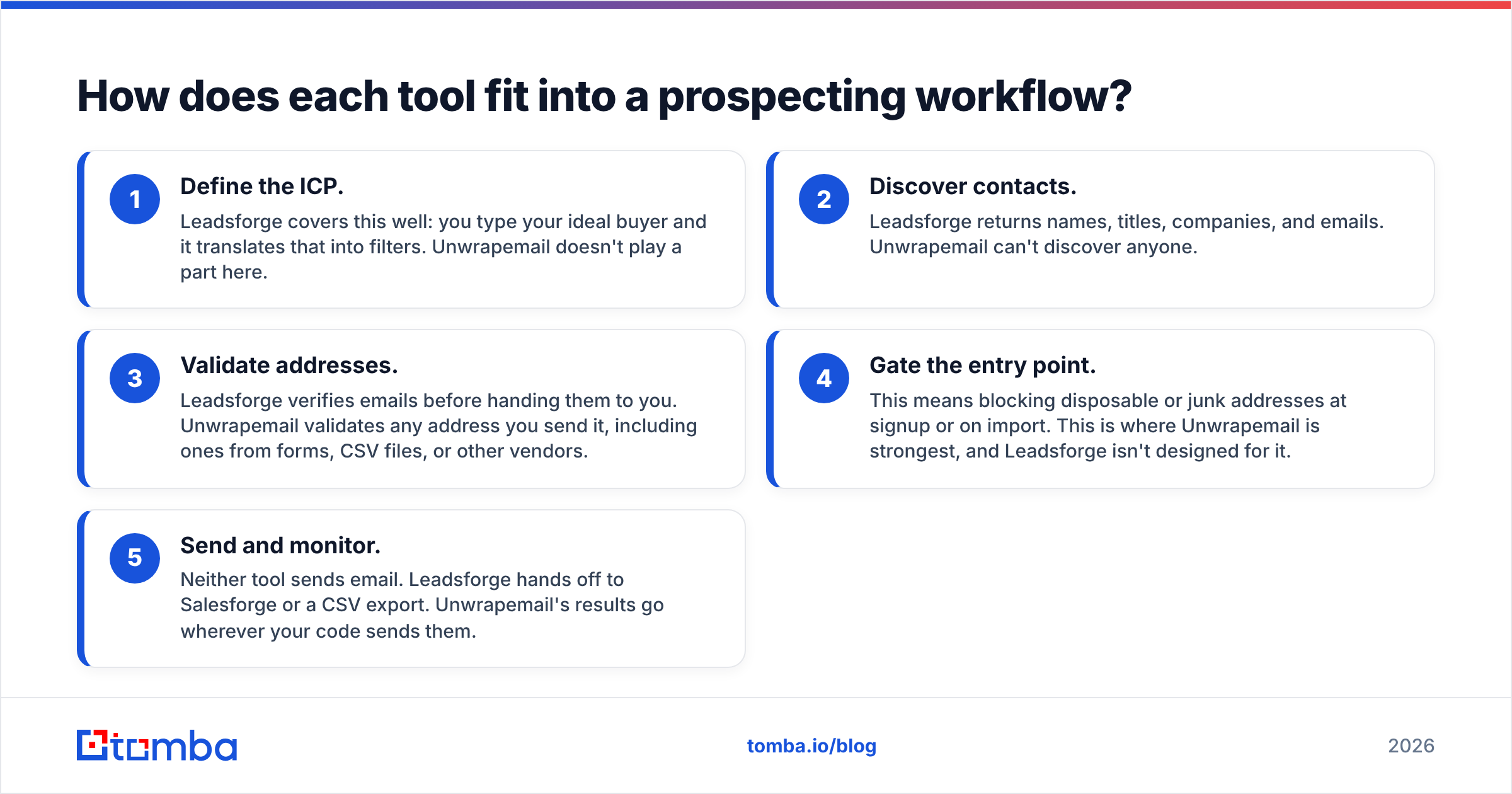
Here's how they line up on the attributes buyers usually ask about. Pricing reflects each vendor's public information at the time of writing. Check their pricing pages before you buy, because credit bundles change often.
| Attribute | Leadsforge | Unwrapemail |
|---|---|---|
| Core job | Find new B2B leads (emails + phones) | Validate / screen existing email addresses |
| Primary user | SDRs, founders, agencies running outbound | Developers, growth/product teams, RevOps |
| Interface | Web app with natural-language ICP search | REST API (built for real-time checks) |
| Entry price | $49/mo for 2,000 credits | First 1,000 validations free every month |
| Paid model | Credit-based, no seat fees; credits roll over | Flat monthly fee plus per-validation cost at higher volume |
| Free trial | 100 free credits on signup | 1,000 free validations/month |
| Email lookup cost | 1 credit | 1 validation |
| Phone numbers | Yes (10 credits each) | No |
| Disposable-email detection | Not its focus | Core feature |
| MX / domain health checks | Emails are verified before delivery | Core feature, returned in the API response |
| Lead discovery / search | Core feature (ICP prompts, lookalikes) | None |
| Best fit | Building outbound lists from scratch | Cleaning signups and imports at the point of entry |
Don't compare prices across these two columns. A Leadsforge credit buys you a new contact. An Unwrapemail validation buys you a judgment on a contact you already have.
How does each tool fit into a prospecting workflow?#
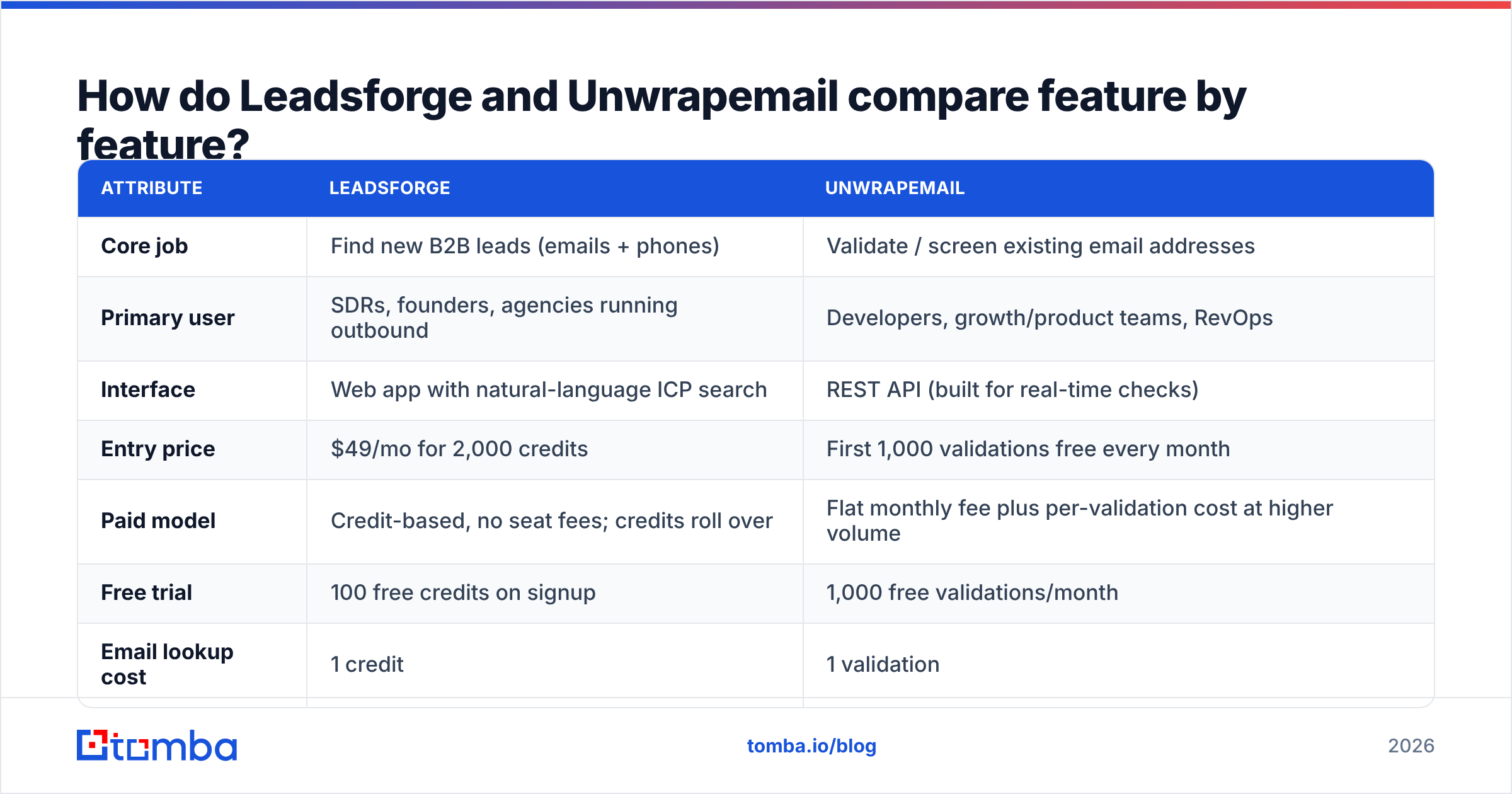
Think of any outbound or lead-capture pipeline as having five stages. Each tool covers a different part of it:
- Define the ICP. Leadsforge covers this well: you type your ideal buyer and it translates that into filters. Unwrapemail doesn't play a part here.
- Discover contacts. Leadsforge returns names, titles, companies, and emails. Unwrapemail can't discover anyone.
- Validate addresses. Leadsforge verifies emails before handing them to you. Unwrapemail validates any address you send it, including ones from forms, CSV files, or other vendors.
- Gate the entry point. This means blocking disposable or junk addresses at signup or on import. This is where Unwrapemail is strongest, and Leadsforge isn't designed for it.
- Send and monitor. Neither tool sends email. Leadsforge hands off to Salesforge or a CSV export. Unwrapemail's results go wherever your code sends them.
If you run outbound and never collect inbound signups, stage 4 hardly applies to you, and Leadsforge (or another finder) covers most of what you need. If you run a PLG product with a free trial, stage 4 is where fake accounts cost you, and Unwrapemail is aimed right at that.

What does Leadsforge do well, and where does it fall short?#
Where it's strong:
- Fast list building. Describing your ICP in plain English is quicker than setting up a dozen filter dropdowns, especially for founders who don't prospect every day.
- Pricing that tracks usage. $49 buys 2,000 credits, there are no seat fees, and unused credits carry over. That suits irregular prospecting better than a fixed-seat contract.
- Built-in sending path. If you already use Salesforge for sequences, lists move over with no CSV work.
- Phone numbers are available. At 10 credits each they cost more than emails, but you can get them without a second vendor.
Where it's weaker:
- Phones use up credits fast. If you pull a phone for every contact, 2,000 credits covers about 180 fully enriched leads, not 2,000.
- Your targeting is only as good as your prompt. A vague ICP prompt returns a vague list, and you'll often need a few rounds of refinement before the list is usable.
- It doesn't protect your inbound side. It won't stop a trial signup from a mailinator address, because that isn't its job.
- It fits best inside the Forge ecosystem. If your sequencer is Outreach, Salesloft, or Instantly, the handoff is a CSV export instead of a native sync.
What does Unwrapemail do well, and where does it fall short?#
Where it's strong:
- Disposable detection at the point of entry. It's built to stop throwaway addresses before they reach your database, trial counts, or lifecycle emails.
- Several signals in one call. Disposable status, MX records, and domain intelligence come back together, so developers don't need to combine three services.
- A generous free tier. 1,000 validations a month for free is enough to test it on live signup traffic, or to run it permanently on a low-volume form.
- Designed for real-time use. The API is positioned as fast, which matters when a check runs inline while a user submits a form.
Where it's weaker:
- It doesn't find anyone. If your pipeline is empty, Unwrapemail doesn't help.
- You need a developer. It's API-first, so a sales rep can't just upload a CSV and get a cleaned list back unless someone builds that workflow.
- Check the verification depth before you rely on it for cold email. Its positioning focuses on disposable and domain-level checks. Before using it as your only protection for cold outbound, confirm whether the plan you need includes mailbox-level checks and handling for catch-all domains. A domain can have valid MX records while the specific mailbox doesn't exist.
That last point matters. Cold outbound bounces usually come from dead mailboxes at real companies, not from mailinator addresses. So when you judge any validator for outbound, look at how it handles mailbox existence and catch-all domains, not only disposable detection.
Which is cheaper, Leadsforge or Unwrapemail?#
Because the two tools buy different things, the honest way to compare cost is by scenario:
- You need 1,000 new prospects a month for cold email. Leadsforge's $49 plan covers this with credits left over. Unwrapemail can't do it at any price.
- You get 800 trial signups a month and want to block junk. Unwrapemail's free tier covers this completely. Leadsforge isn't built for this.
- You buy lists from different vendors and want to screen them before import. Unwrapemail is closer to the job. Still, a verifier with bulk upload and catch-all handling may suit non-technical teams better.
- You need to find and then verify. You're paying for two tools, or looking at one that does both.
The fourth scenario is the most common one for B2B outbound teams. A finder that verifies its own output reduces the need for a separate check. But any list older than a few weeks should be re-verified before you send to it, because contacts change jobs all the time.
Should you use Leadsforge and Unwrapemail together?#
You can, and for some teams it makes sense: a SaaS company with both a free-trial funnel and an outbound SDR team really does have two separate problems. Leadsforge feeds the SDRs and Unwrapemail protects the signup form. The two tools don't overlap much, so you're not paying twice for the same thing.
For a team whose revenue comes mainly from outbound, though, running two tools creates some friction:
- Two bills and two ways of counting usage.
- Two sets of results that can disagree. Leadsforge may call an address verified while a later check calls it risky, and someone has to decide which one to trust.
- Integration work. Unwrapemail needs code. Leadsforge needs an export or the Salesforge sync.
That's where a single platform that combines an email finder with an email verifier is worth a look. It isn't automatically better. The benefit is that finding and verifying happen in one place and use the same credits.

How does Tomba compare to Leadsforge and Unwrapemail?#
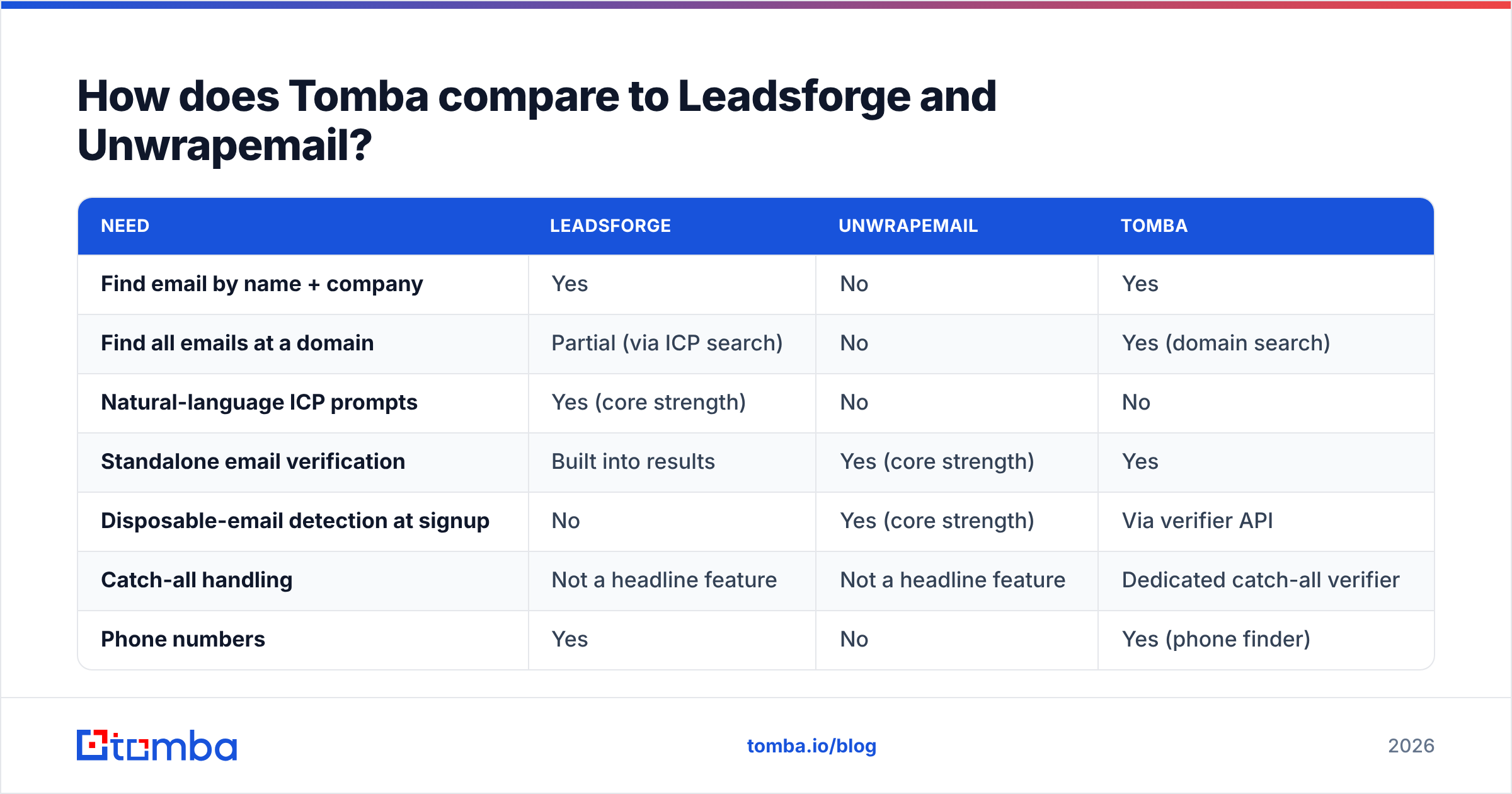
Tomba sits in between. Like Leadsforge, it finds emails. Like Unwrapemail, it validates addresses. It doesn't try to match every specialty feature of either one.
| Need | Leadsforge | Unwrapemail | Tomba |
|---|---|---|---|
| Find email by name + company | Yes | No | Yes |
| Find all emails at a domain | Partial (via ICP search) | No | Yes (domain search) |
| Natural-language ICP prompts | Yes (core strength) | No | No |
| Standalone email verification | Built into results | Yes (core strength) | Yes |
| Disposable-email detection at signup | No | Yes (core strength) | Via verifier API |
| Catch-all handling | Not a headline feature | Not a headline feature | Dedicated catch-all verifier |
| Phone numbers | Yes | No | Yes (phone finder) |
| API access | Limited | Yes (API-first) | Yes |
| Free tier | 100 credits once | 1,000 validations/mo | 25 searches/mo |
| Paid entry | $49/mo | Flat fee + usage | $49/mo Starter |
Here's where each one comes out ahead:
- Pick Leadsforge if typing "find me heads of RevOps at Series B fintechs" and getting a list back is the feature you care about most, and you're already using or considering Salesforge.
- Pick Unwrapemail if your problem is inbound quality (fake signups, disposable addresses, bad imports) and you have a developer to wire up the API.
- Pick a combined platform if you already know who you want to reach (by name, company, or domain) and need to find and verify their emails without managing two tools. Tomba's plans run from a free tier (25 searches/month) through Starter at $49/month, Growth at $99/month, and Pro at $249/month. Tomba pricing has the full breakdown.
What should you check before buying either tool?#
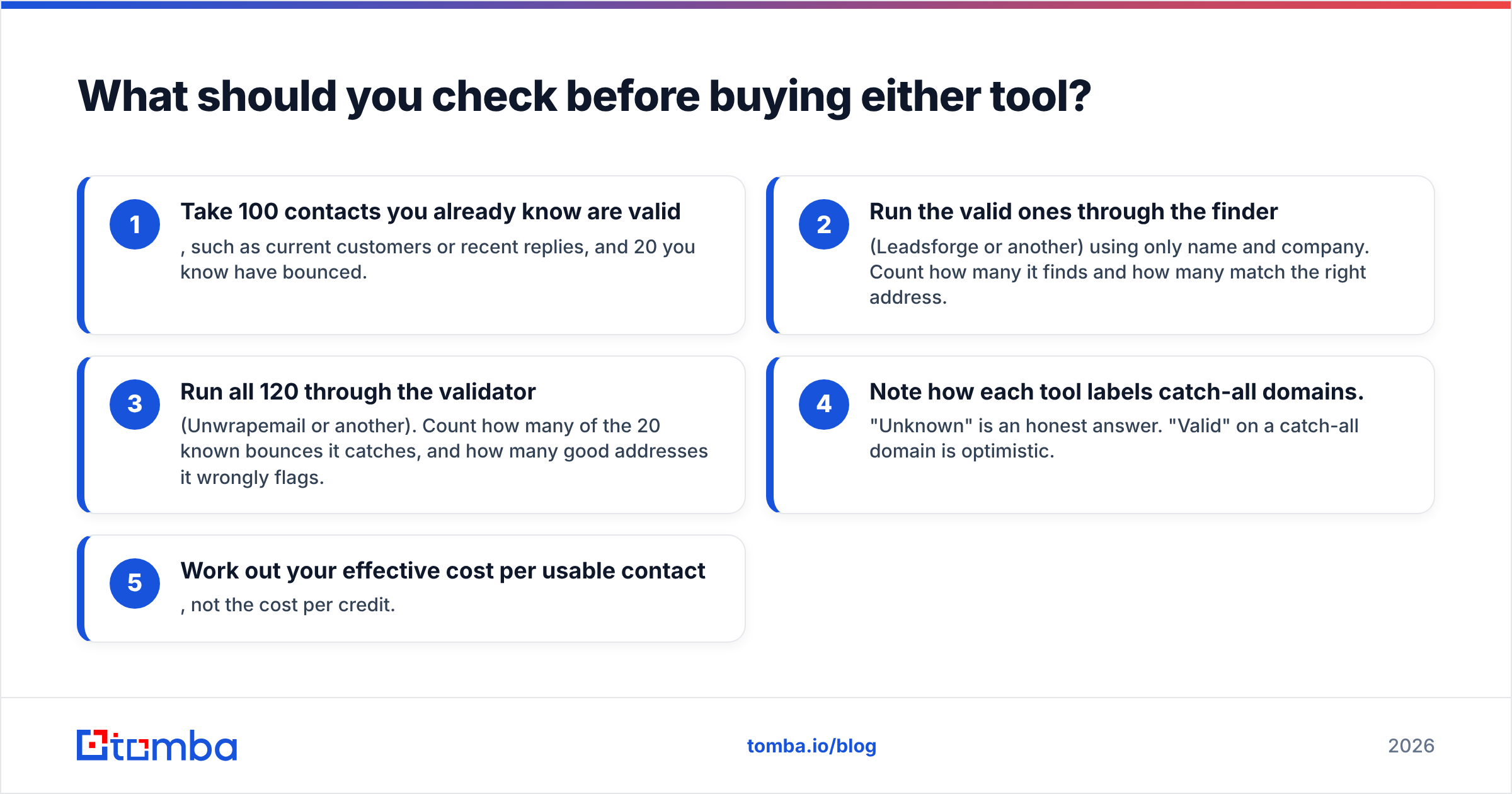
Run the same small test on whatever you're considering:
- Take 100 contacts you already know are valid, such as current customers or recent replies, and 20 you know have bounced.
- Run the valid ones through the finder (Leadsforge or another) using only name and company. Count how many it finds and how many match the right address.
- Run all 120 through the validator (Unwrapemail or another). Count how many of the 20 known bounces it catches, and how many good addresses it wrongly flags.
- Note how each tool labels catch-all domains. "Unknown" is an honest answer. "Valid" on a catch-all domain is optimistic.
- Work out your effective cost per usable contact, not the cost per credit.
This takes about an hour and tells you more than any comparison article, this one included. You can also check user reviews on G2 for complaints about data freshness and credit burn over time.
So, Leadsforge vs Unwrapemail: which should you choose?#
Choose based on the problem you actually have:
- Empty pipeline, outbound-led: Leadsforge.
- Messy signups, product-led: Unwrapemail.
- Both problems, with budget and engineering time: use both. They barely overlap.
- Outbound-led, and you want finding and verification in one place: use a combined finder and verifier.
Neither tool is wrong. They're just aimed at different problems, and buying the one built for the other problem is the mistake to avoid.
If your main job is reaching the right person at the right company, and you want every address checked before it goes into a sequence, try the Tomba Email Finder. You can look up professional emails by name, company, or domain, verify them in the same workflow, and test it on your own contacts with the free tier before you pay for the $49 Starter plan.
Related guides#
// get started
Find, verify and enrich your first contacts today
Start on the free plan with 25 searches a month, then scale when your team is ready.
Free plan · No credit card required · GDPR & CCPA
// about the author