Leadsforge vs Vitamail: Lead Database or All-in-One Cold Email?
Leadsforge builds lead lists. Vitamail finds, verifies, writes, and sends. Both start at $49/mo, but what you get for that $49 is very different. Here's the credit math and our pick.
TL;DR
- Leadsforge is a lead search engine. You describe your ideal customer in plain English and it builds a contact list with emails. It doesn't send anything. It's built to feed Salesforge and other sequencers.
- Vitamail (by Vitanur) is an all-in-one cold email tool. It handles lead sourcing, email validation, AI copywriting, domain health checks and sending from connected Gmail or Outlook inboxes.
- Both paid plans start at $49/month, but the credits are priced very differently. Leadsforge's $49 buys 2,000 export credits at 1 credit per email. Vitamail's $49 buys 1,000 credits, and sourcing costs 25 credits per lead.
- Our pick: choose Leadsforge if you already have a sending stack and need volume. Choose Vitamail if you're a solo founder or small team who wants one login from list to inbox and sends modest volumes.
- Whichever you pick, verify the list before the first send. Catch-all domains and stale records hurt both tools' output.
What is the real difference between Leadsforge and Vitamail?#
These two tools often show up in the same "AI outbound" roundups, but they solve different problems.
Leadsforge covers the top of the funnel. It's part of the Forge family (Salesforge, Warmforge, Mailforge, Infraforge), and it does one job: turning a description like "Series A fintech companies in the UK with a Head of Sales hired in the last six months" into an exportable list of contacts. You get names, titles, company data and emails. Phone numbers cost extra. Then you take that list somewhere else to send.
Vitamail started as an email validation product and grew into a cold email platform. Its pricing page describes one credit balance that pays for lead sourcing, email verification, AI-written subject lines and bodies, campaign strategy generation, domain health checks and "domain doctor" fixes. On paid plans you connect your own inboxes, get warm-up, and run sequences from inside the app.
So the "vs" really comes down to one question: do you need a better list, or do you need a whole outbound system?
How do Leadsforge and Vitamail compare feature by feature?#
Here's the side-by-side, based on each vendor's public pricing and product pages at the time of writing. Credit rules change often, so check the source before you buy.
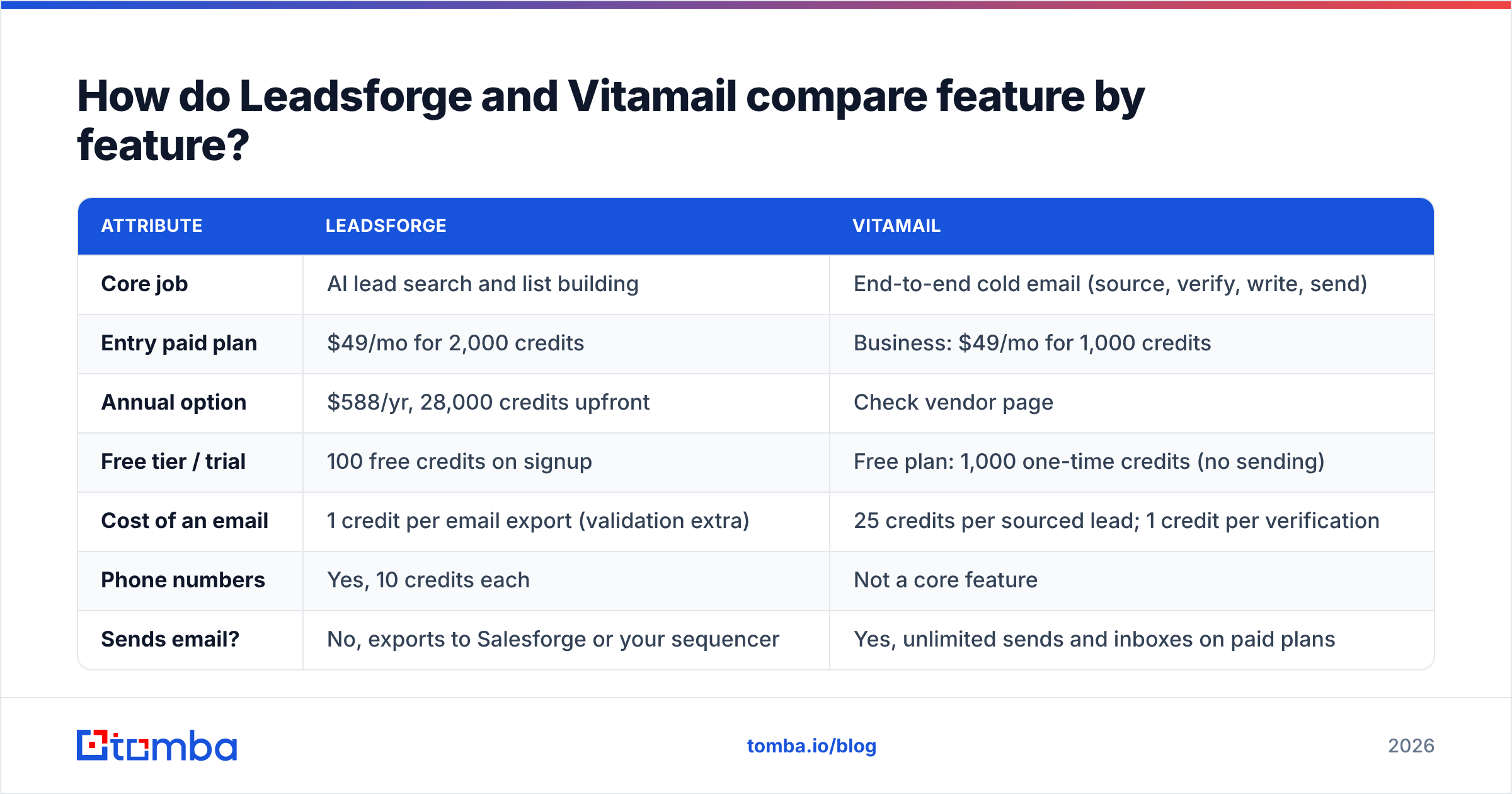
| Attribute | Leadsforge | Vitamail |
|---|---|---|
| Core job | AI lead search and list building | End-to-end cold email (source, verify, write, send) |
| Entry paid plan | $49/mo for 2,000 credits | Business: $49/mo for 1,000 credits |
| Annual option | $588/yr, 28,000 credits upfront | Check vendor page |
| Free tier / trial | 100 free credits on signup | Free plan: 1,000 one-time credits (no sending) |
| Cost of an email | 1 credit per email export (validation extra) | 25 credits per sourced lead; 1 credit per verification |
| Phone numbers | Yes, 10 credits each | Not a core feature |
| Sends email? | No, exports to Salesforge or your sequencer | Yes, unlimited sends and inboxes on paid plans |
| AI copywriting | No (Salesforge handles that) | Yes, subject lines and bodies at 25 credits each |
| Deliverability tooling | Via sister products (Warmforge, Mailforge) | Built-in warm-up, domain health checker, domain doctor |
| Seats | No seat charge | 3 seats on Business |
| Plan limits | Credits only | 30 active lists, 3 active campaigns/mo, 5 monitored domains (Business) |
| Credit rollover | Credits don't expire | Monthly credits on Business |
| Best for | Agencies, SDR teams, anyone with an existing sender | Solo founders, small teams, early-stage outbound |
The biggest takeaway from the table: matching prices hide very different unit costs. That gets its own section below.
What do you actually get for $49/month?#
Price per contact is the number that decides most of these purchases, and it's where the two tools differ most.
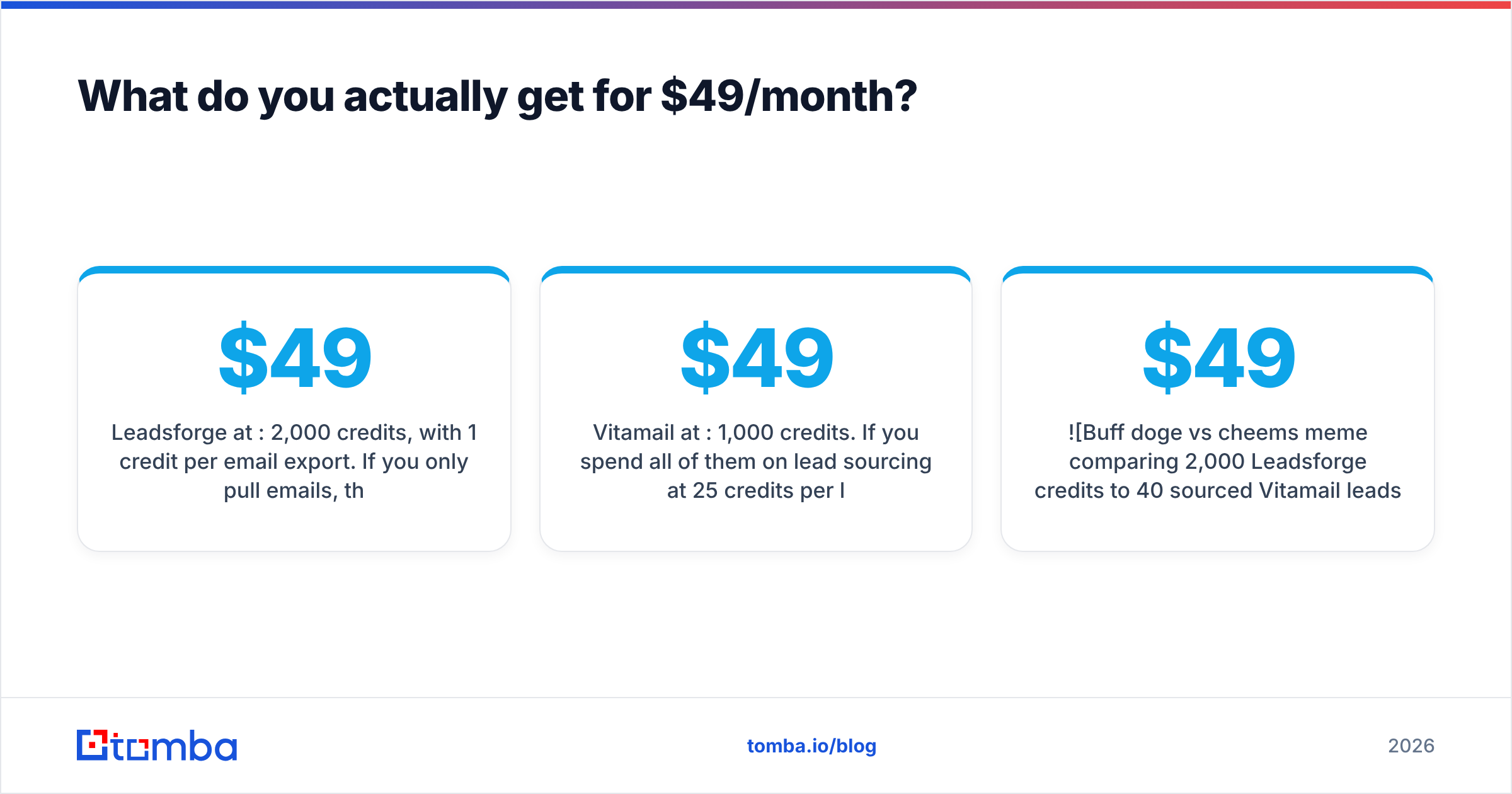
Leadsforge at $49/mo: 2,000 credits, with 1 credit per email export. If you only pull emails, that's roughly 2,000 contacts, about $0.025 each, before any extra validation credits. Credits don't expire, so a slow month doesn't waste your spend.
Vitamail at $49/mo: 1,000 credits. If you spend all of them on lead sourcing at 25 credits per lead, you get about 40 leads, or roughly $1.23 each. That comparison is a little unfair to Vitamail, though. The same $49 also unlocks unlimited sending, unlimited connected inboxes, warm-up, domain monitoring and three seats. If you bring your own list and only use credits for verification (1 credit each), 1,000 credits verifies 1,000 addresses.
Here's an analogy. Leadsforge is a wholesale grocer: cheap per unit, but you cook at home. Vitamail is a meal kit: each ingredient costs more, but the recipe, the pans and the oven come with it.

Which one is cheaper depends on where you already spend money:
- You already pay for a sequencer (Instantly, Smartlead, Salesforge, Lemlist). Leadsforge is far cheaper per usable contact, and Vitamail's sending features would duplicate what you already have.
- You pay for nothing yet. Vitamail's bundle can cost less than a separate list tool, verifier, warm-up tool and sender added together, as long as your volume stays low.
- You need hundreds of new leads a week. At 25 credits per sourced lead, Vitamail's Business plan runs out fast. You'll either upgrade to Enterprise or bring leads in from outside.
- You need phone numbers for a call cadence. Only Leadsforge offers them, at 10 credits each.
How does Leadsforge's AI search work in practice?#
Leadsforge's main selling point is the interface. You don't build a filter stack of industry, headcount, geography, title and seniority by hand. You type a prompt, and it turns the prompt into filters and returns matching companies and people. You can refine in conversation ("remove agencies", "only companies using HubSpot"), run lookalike searches from a seed company, and layer on signals such as hiring or funding where they're available.
What works well:
- Fast list iteration. Going from an ICP hypothesis to a testable list takes minutes instead of an afternoon of filter work.
- Credit transparency. Leadsforge shows the export cost before you commit, based on list size and enrichment depth.
- Forge ecosystem fit. If you run Salesforge, the export-to-sequence handoff is nearly frictionless.
Where to be careful:
- Validation costs extra. Budget for it, or run exports through a separate email verifier before they reach your sender.
- Catch-all domains. Like every database tool, Leadsforge returns addresses on accept-all domains that neither it nor anyone else can fully confirm through SMTP alone. Treat them as a separate, lower-confidence segment.
- No native sending. For some teams that's a plus (no lock-in). For others it's another tool to buy.
How does Vitamail's all-in-one workflow hold up?#
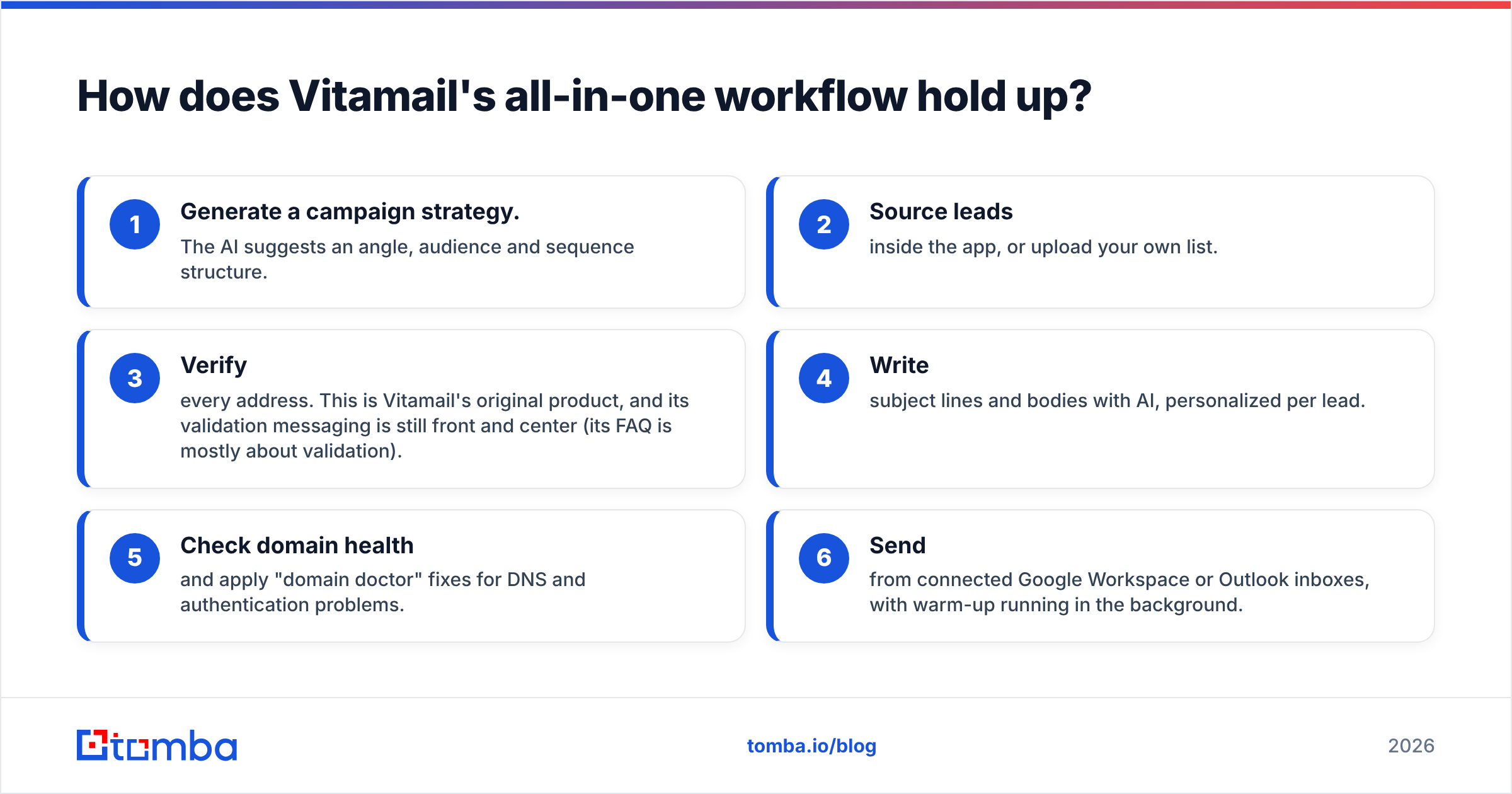
Vitamail makes the opposite trade-off. Instead of being the best at one step, it tries to remove the handoffs between steps. A typical flow looks like this:
- Generate a campaign strategy. The AI suggests an angle, audience and sequence structure.
- Source leads inside the app, or upload your own list.
- Verify every address. This is Vitamail's original product, and its validation messaging is still front and center (its FAQ is mostly about validation).
- Write subject lines and bodies with AI, personalized per lead.
- Check domain health and apply "domain doctor" fixes for DNS and authentication problems.
- Send from connected Google Workspace or Outlook inboxes, with warm-up running in the background.
What works well:
- One login, one credit balance. For a founder doing outbound alongside everything else, that simplicity has real value.
- Deliverability is built in, not bolted on. Domain health and warm-up in the same place as sending means fewer "why is everything in spam?" surprises.
- Useful free plan for testing. You can try the campaign generator, AI writing, sourcing and verification without connecting an inbox. You can't send on Free, though.
Where to be careful:
- Sourcing is expensive in credits. At 25 credits per lead, don't plan on Vitamail as your main list source at scale.
- AI copy uses the same credits. Writing a subject line and body for one lead costs 50 credits. If you personalize 200 emails, that's 10,000 credits, which is ten months of the Business allowance. Use templates and personalize only your top-tier accounts.
- Campaign caps. Three active campaigns per month on Business is fine for one person and tight for a team running several ICP tests at once.
Which tool gives you better deliverability?#
Neither tool can make a bad list land in the inbox, so start with list quality.
Vitamail has the stronger built-in deliverability story: validation, warm-up, domain monitoring and fixes all live in one app. Leadsforge relies on its sister products. Warmforge handles warm-up, Mailforge and Infraforge handle infrastructure, and Salesforge handles sending. That stack is capable, but it's a stack you have to assemble.
Before you trust either one, check three things:
- Bounce rate on the first 200 sends. Keep it under 2%. Above that, stop and re-verify.
- Catch-all share of the list. If 30% or more of your contacts sit on accept-all domains, split them into a separate, slower campaign, or run them through a catch-all verifier that looks at more than the SMTP handshake.
- Authentication. Confirm SPF, DKIM and DMARC are aligned on every sending domain. Google's sender guidelines spell out what bulk senders need.

Is Leadsforge better than Vitamail?#
It depends on the job. Match the tool to the step of your funnel that's actually broken.
Choose Leadsforge if:
- You already run a sequencer and your bottleneck is finding enough of the right people.
- You're an agency building lists for several clients and need cheap, non-expiring credits.
- You want phone numbers alongside emails.
- You're on Salesforge and want a native handoff.
Choose Vitamail if:
- You're starting outbound from scratch and want one tool from strategy to send.
- Your volume is modest (dozens to low hundreds of new leads a month) and you can bring some of your own contacts.
- You care more about deliverability guardrails than about the lowest cost per lead.
- You want a free plan that lets you test the workflow before connecting an inbox.
Use both if: you want Leadsforge's cheap list volume and Vitamail's sending and validation. Source in Leadsforge, upload to Vitamail, verify at 1 credit per email, and send. You pay 1 credit per lead to source and 1 to verify, instead of 25 to source. That's the most cost-efficient setup on paper, at the price of two subscriptions.
Where does an email finder like Tomba fit in this stack?#
Both tools assume you're starting from an ICP and want a list. A lot of real prospecting starts from a specific account: a target list from sales leadership, a closed-lost opportunity, a company that just visited your pricing page. In those cases you already know the company. What you need is the right person's email, verified, right now.
That's where a dedicated email finder fits alongside either tool. Tomba finds addresses by name and domain, lists everyone public at a company through domain search, and verifies in the same step, so named-account work doesn't burn database credits meant for broad list building. You can call it from the Chrome extension, Google Sheets or the API, which means it slots in before a Leadsforge export or before a Vitamail upload.
For comparison, Tomba pricing starts with a free tier of 25 searches a month, then Starter at $49/mo, Growth at $99/mo and Pro at $249/mo. Most teams use it next to a list builder, not instead of one.
What should you test before committing?#
Don't decide from feature pages alone. Run this 30-minute test on both free options:
- Write one ICP prompt and use it in both tools, for example "VP Marketing at 50–200 person B2B SaaS companies in Germany."
- Pull 50 contacts from each.
- Spot-check 10 contacts by hand on LinkedIn. Are they still in the role? Is the company a real fit?
- Run all 100 emails through one independent verifier. Compare valid, invalid and catch-all rates.
- Work out the cost per verified, on-ICP contact at your expected monthly volume. The winner is usually obvious by this point.
Reviews on G2 and Capterra are worth a quick look for support quality and billing experiences. Your own 50-contact test will tell you more than any review about data fit for your market.
The bottom line on Leadsforge vs Vitamail#
Leadsforge is a fast, cheap list builder that expects you to own the rest of the stack. Vitamail is a compact outbound platform that trades per-lead cost for convenience and built-in deliverability. At the same $49 price, you're choosing between volume and completeness, and the right choice depends on what you already pay for.
Whichever you choose, the contacts that matter most usually aren't in an ICP search result. They're the specific decision-makers at the accounts you already know you want. For those, use the Tomba Email Finder. Enter a name and a company domain, get a verified professional email in seconds, and send it to Leadsforge-built sequences or Vitamail campaigns without wasting credits. Start with 25 free searches a month and upgrade only once it earns its place in your stack.
Related guides#
// get started
Find, verify and enrich your first contacts today
Start on the free plan with 25 searches a month, then scale when your team is ready.
Free plan · No credit card required · GDPR & CCPA
// about the author