Leadsforge vs Webbula (2026): Lead Building vs Data Hygiene Compared
Leadsforge helps you build lead lists. Webbula checks and enriches the data you already have. Here is how they differ on features, pricing and fit, and when you need both, one, or neither.
TL;DR
- Leadsforge and Webbula do different jobs. Leadsforge is an AI lead-generation tool that builds prospect lists from a plain-English description of your ideal customer. Webbula is a data-quality company that verifies, cleans and enriches data you already own.
- Pick Leadsforge if you're a startup or agency running cold outbound and your problem is "we don't have enough leads."
- Pick Webbula if you're a marketing or data team sitting on a large, aging list, and your problem is "our data is dirty, risky or incomplete."
- Pricing models differ. Leadsforge sells self-serve monthly credit plans. Webbula leans on volume-based and quote-based enterprise deals, so check each vendor's current pricing page before you budget.
- If you just need accurate B2B emails with verification built in, a single tool that finds and verifies in one step (like Tomba) can replace a two-vendor stack.
Most "Leadsforge vs Webbula" searches start from a false assumption: that the two tools compete for the same budget line. They mostly don't. One helps you find people to email. The other makes sure the addresses you already have are safe to email. Treating them as substitutes is how teams end up with a list builder and nothing to clean the list, or a hygiene platform and no pipeline to feed it.
This guide covers what each tool actually does, where they overlap, how the pricing models compare, and which one fits your situation.
What is Leadsforge?#
Leadsforge is an AI-driven lead generation platform from the team behind the Forge outbound suite (Salesforge, Warmforge, Infraforge). You don't use it by stacking dozens of filters. You describe your ideal customer profile in a chat box, something like "Series A fintech companies in the UK with 50-200 employees, heads of finance." Leadsforge turns that into a search and returns a list of matching contacts.
Its core features:
- Conversational ICP search. Natural-language prompts replace filter-heavy search UIs.
- Lookalike discovery. Give it a company you've already closed and it finds similar accounts.
- Contact data with verification. Emails are verified before export, and phone data is available on some records.
- Native hand-off to Salesforge. Lists move straight into sequences without a CSV round trip. CSV export is available too.
- Self-serve credit plans. You sign up, pick a plan and start searching without talking to sales.
It's built for founders, SDR teams and outbound agencies who want a usable list in minutes. It isn't designed to audit a 2-million-row marketing database.
What is Webbula?#
Webbula has been around much longer and comes at data from the opposite direction. It's a data-quality and data-enhancement vendor. Its flagship service is email hygiene: it takes your existing list and flags invalid addresses, along with the risky ones basic verifiers tend to miss, such as spam traps, honeypots, known complainers, bots and disposable domains.
Beyond hygiene, Webbula offers:
- Data enhancement. It appends demographic, firmographic and contact attributes to records you already hold.
- Audience solutions. It builds and onboards addressable audiences for advertising and programmatic campaigns.
- Enterprise integrations. It connects to ESPs, CDPs and marketing platforms for recurring or real-time hygiene.
Webbula's typical buyer is an email marketing or data operations team at a mid-market or enterprise company, often B2C or mixed B2B/B2C, with large first-party lists and real exposure to deliverability and compliance risk.
How do Leadsforge and Webbula compare side by side?#
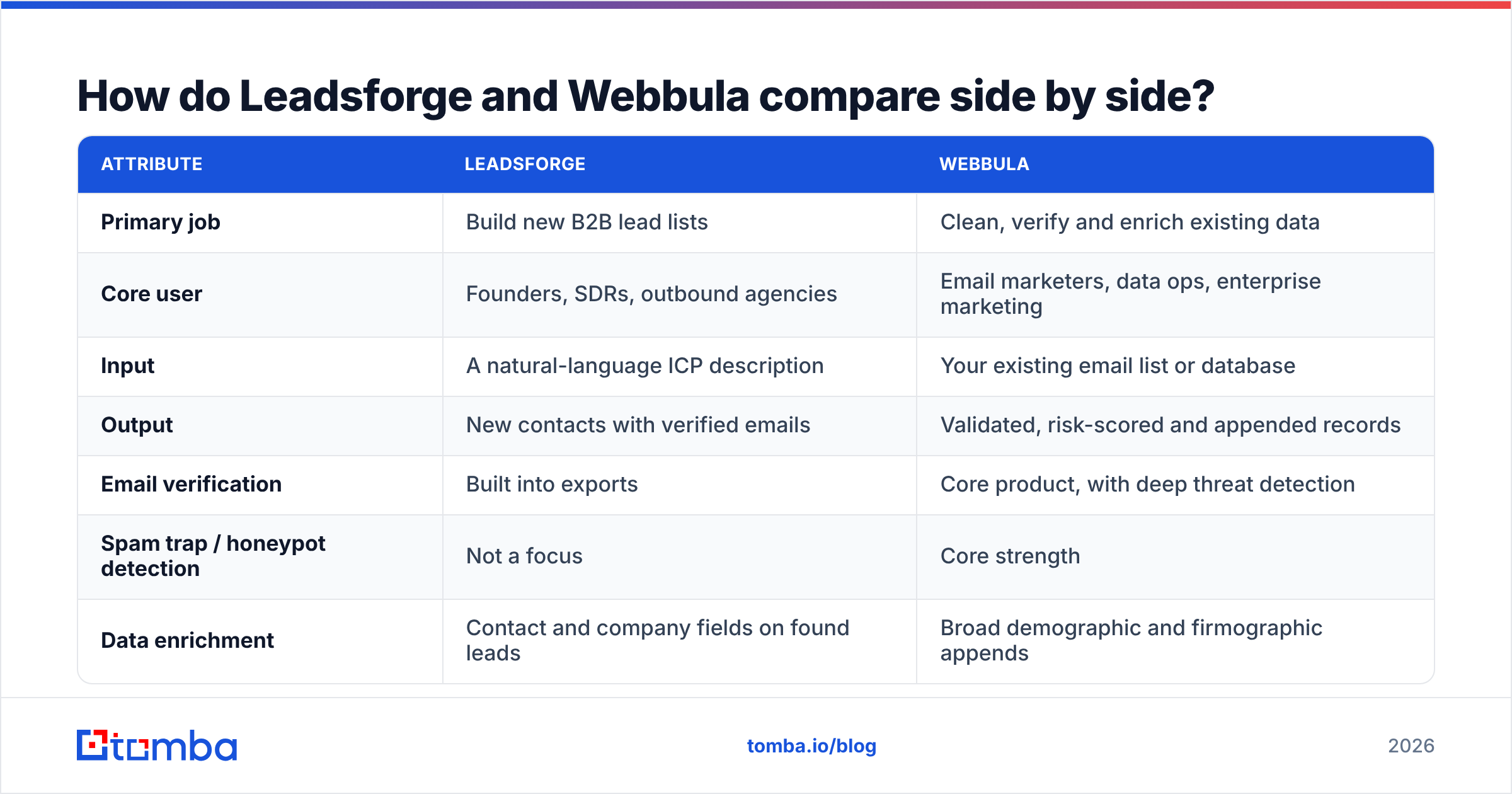
Here's the comparison across the attributes that usually decide a purchase. Pricing details change often, so treat the pricing rows as a description of each vendor's model and confirm current numbers on their sites.
| Attribute | Leadsforge | Webbula |
|---|---|---|
| Primary job | Build new B2B lead lists | Clean, verify and enrich existing data |
| Core user | Founders, SDRs, outbound agencies | Email marketers, data ops, enterprise marketing |
| Input | A natural-language ICP description | Your existing email list or database |
| Output | New contacts with verified emails | Validated, risk-scored and appended records |
| Email verification | Built into exports | Core product, with deep threat detection |
| Spam trap / honeypot detection | Not a focus | Core strength |
| Data enrichment | Contact and company fields on found leads | Broad demographic and firmographic appends |
| Advertising audiences | No | Yes |
| Pricing model | Self-serve monthly credit plans | Volume-based verification, custom enterprise quotes |
| Free trial | Trial credits available | Limited; typically a sales-led evaluation |
| Time to first result | Minutes | Minutes for one-off hygiene, longer for enterprise onboarding |
| Best fit | Cold outbound from zero | Protecting deliverability on large lists |
The table shows the main point clearly. Leadsforge's input is an idea and Webbula's input is a file. That one difference decides most buying situations.
Which problem are you actually trying to solve?#
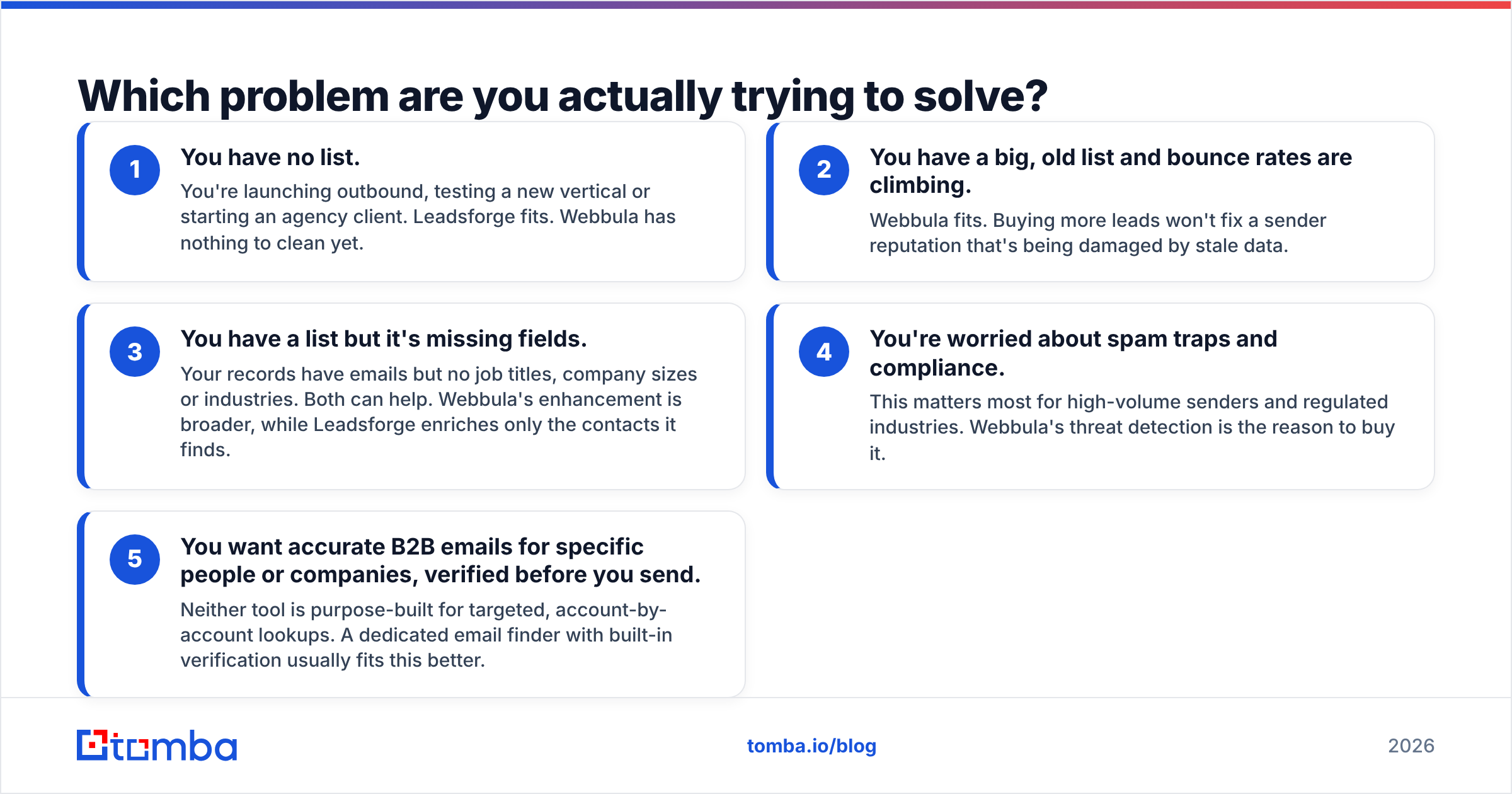
Before you compare features, name the bottleneck. Most teams asking "Leadsforge or Webbula?" fall into one of five situations:
- You have no list. You're launching outbound, testing a new vertical or starting an agency client. Leadsforge fits. Webbula has nothing to clean yet.
- You have a big, old list and bounce rates are climbing. Webbula fits. Buying more leads won't fix a sender reputation that's being damaged by stale data.
- You have a list but it's missing fields. Your records have emails but no job titles, company sizes or industries. Both can help. Webbula's enhancement is broader, while Leadsforge enriches only the contacts it finds.
- You're worried about spam traps and compliance. This matters most for high-volume senders and regulated industries. Webbula's threat detection is the reason to buy it.
- You want accurate B2B emails for specific people or companies, verified before you send. Neither tool is purpose-built for targeted, account-by-account lookups. A dedicated email finder with built-in verification usually fits this better.
If you're in situation 1, 2 or 4, the choice is clear. Situations 3 and 5 are where teams tend to overbuy.
Is Leadsforge's data accurate enough for cold outbound?#
For its intended use, generally yes. Leadsforge verifies emails before export, which cuts the hard bounces that damage new sending domains. The Forge ecosystem is also built with deliverability in mind, since Warmforge and Infraforge exist because the same team deals with inbox placement every day.
There are some caveats:
- Coverage varies by market. US and Western European tech companies are usually well covered. Niche verticals, small local businesses and some non-English markets are thinner.
- AI search is only as precise as your prompt. A vague ICP gets you a vague list. Write it the way you'd brief a human researcher: industry, headcount, geography, title and a disqualifier or two.
- Catch-all domains still need a policy. When a company's mail server accepts every address, no verifier can fully confirm a mailbox. Decide whether you send to "accept-all" results, and at what volume.
Recent user reviews on G2 are worth checking for up-to-date sentiment on list quality in your specific segment.
Is Webbula's email hygiene worth it compared to a standard verifier?#
Webbula's argument is that a standard SMTP check isn't enough. A basic verifier answers "does this mailbox exist?" Webbula also tries to answer "is this address dangerous to send to?", which means flagging:
- Spam traps, pristine and recycled addresses that mailbox providers and blocklist operators use to catch bad senders
- Known complainers and litigators, people with a history of marking mail as spam or filing complaints
- Bots and disposable addresses from form fills and sign-up abuse
- Toxic domains tied to abuse
If you send hundreds of thousands of emails a month to lists built partly from web forms, events or older acquisitions, this goes beyond hygiene and starts protecting revenue. One spam trap hit on a major blocklist can reduce inbox placement across your whole program. HubSpot's guide to email deliverability explains why list quality matters more than content tweaks.
If you're a 3-person outbound team sending 200 cold emails a day to freshly sourced B2B contacts, the calculation is different. Your main risk is invalid addresses and catch-alls, not recycled spam traps. A standard email verifier covers most of that risk at a fraction of the cost and effort.

How does pricing compare between Leadsforge and Webbula?#
The two vendors sell in completely different ways, and that affects your buying process as much as your budget.
Leadsforge uses a SaaS model: monthly plans that come with a set number of credits, where one credit roughly equals one exported lead. You can sign up with a card, try it on trial credits and upgrade when you need more volume. That suits teams who want to test a vertical this week without a procurement cycle. Check the Leadsforge site for current plan tiers, because Forge products have changed their bundles several times.
Webbula is mostly sales-led. Email hygiene is usually priced by volume, so cost per record drops as list size grows. Enhancement and audience products are typically custom-quoted. For a large enterprise that's normal and even useful, since you can negotiate. For a small team that just wants to clean 5,000 contacts this afternoon, a discovery call is slow.
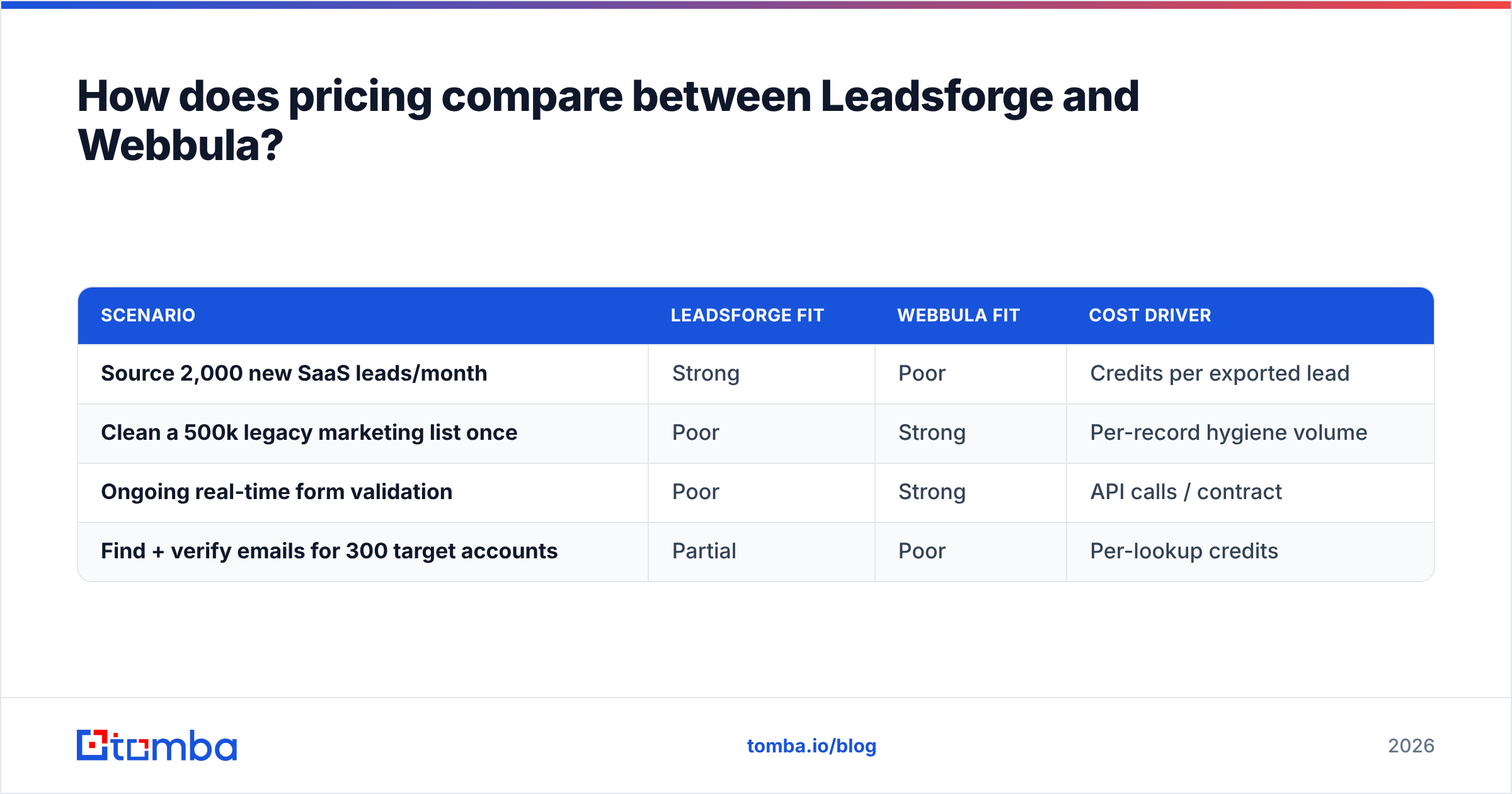
Here's a practical way to think about cost:
| Scenario | Leadsforge fit | Webbula fit | Cost driver |
|---|---|---|---|
| Source 2,000 new SaaS leads/month | Strong | Poor | Credits per exported lead |
| Clean a 500k legacy marketing list once | Poor | Strong | Per-record hygiene volume |
| Ongoing real-time form validation | Poor | Strong | API calls / contract |
| Find + verify emails for 300 target accounts | Partial | Poor | Per-lookup credits |
Hidden costs are worth modelling too. With Leadsforge, the risk is buying credits for leads you never contact. With Webbula, it's paying enterprise rates for threat detection your sending volume doesn't need.
Can you use Leadsforge and Webbula together?#
Yes, but most teams shouldn't. The combined workflow looks like this:
- Build a list in Leadsforge.
- Export it.
- Run it through Webbula for extra threat screening.
- Load the cleaned list into your sequencer.
That's reasonable if you're an agency sending at scale for clients in sensitive industries, or if your leads end up in a shared marketing database that Webbula already protects. For everyone else, it means two vendors, two contracts and an extra export step for a small gain. Leadsforge already verifies before export, and fresh B2B contacts are rarely spam traps.
A leaner setup is one tool that finds and verifies contacts in the same step, with an optional separate verification pass for older lists. That's the gap tools like Tomba are built to fill.
Where does Tomba fit in a Leadsforge vs Webbula decision?#
Tomba isn't a like-for-like replacement for either tool, so here's where it overlaps and where it doesn't.
- Versus Leadsforge: Tomba doesn't use a chat-style ICP prompt. It finds emails by name, company or domain. Domain search returns known addresses and the company's email pattern, and the email finder resolves specific people. If you already know which accounts you want, this is often more precise than an AI-generated list.
- Versus Webbula: Tomba's verifier and catch-all verifier cover validity checks, catch-all detection and deliverability status for B2B lists. It doesn't provide advertising audiences or consumer-grade demographic appends, which are Webbula's strengths.
- On pricing: Tomba is self-serve with a free tier of 25 searches a month, then Starter at $49/mo, Growth at $99/mo, Pro at $249/mo and custom Enterprise plans. See Tomba pricing for credit breakdowns.
Here's a straightforward summary:
- Choose Leadsforge when you want AI to decide who to target.
- Choose Webbula when you need enterprise-grade protection for large existing lists.
- Choose Tomba when you know who to target and need verified B2B emails fast, from a browser extension, Google Sheets, CRM integration or API.
Which should you choose: Leadsforge or Webbula?#
Match the tool to your constraint:
- Early-stage startup, first outbound motion: Leadsforge. Speed to a first list matters most, and self-serve pricing keeps it low-risk.
- Outbound agency running many ICPs: Leadsforge for sourcing, plus a standalone verifier for re-checking lists before each campaign.
- Mid-market or enterprise marketing team with a large database: Webbula. Spam trap and complainer detection pays off at your volume.
- B2C or mixed brand running paid media alongside email: Webbula. Audience onboarding is something Leadsforge doesn't do.
- Account-based sales team with a named target list: Neither is ideal. Use an email finder with verification built in.
The most common mistake is buying for the problem you expect to have in two years instead of the one you have now. A 10-person startup doesn't need an enterprise hygiene contract, and a 2-million-subscriber brand won't fix deliverability by adding more leads.
Frequently asked questions#
Is Leadsforge a Webbula alternative?#
Not really. Leadsforge generates new leads and Webbula cleans and enriches existing data. They overlap only on basic email verification.
Does Webbula find new email addresses?#
Webbula's focus is validating and enhancing data you provide, plus audience products for advertising. It isn't a prospecting tool for finding new B2B contacts by ICP.
Does Leadsforge detect spam traps?#
Leadsforge verifies emails before export to reduce bounces, but deep spam trap and complainer detection is Webbula's specialty rather than Leadsforge's.
What's the cheapest way to get verified B2B emails?#
For small to mid volumes, a self-serve email finder with built-in verification is usually cheaper than combining a lead-gen tool with an enterprise hygiene vendor. Tomba's free tier gives you 25 searches a month to test accuracy on your own target accounts.
Ready to skip the two-vendor stack?#
If the Leadsforge vs Webbula debate has shown that your real need is simpler, meaning accurate, verified emails for the companies and people you already want to reach, try the Tomba Email Finder. Search by domain, name or company, get deliverability status on every result, and push contacts to your CRM or sequencer without a separate cleaning step. You can start on the free plan and test it against a list you already know before you commit to anything.
Related guides#
// get started
Find, verify and enrich your first contacts today
Start on the free plan with 25 searches a month, then scale when your team is ready.
Free plan · No credit card required · GDPR & CCPA
// about the author