LeadSquared Pricing Reviews Pros and Cons: 2026 Buyer's Guide
LeadSquared can cost $25 per seat or more than $2,500 a month, depending on the modules you buy. Here are the real costs, what reviewers praise and complain about, and when a lighter stack is the better choice.
This guide to LeadSquared pricing reviews pros and cons covers real plan costs, what users say, and when a lighter stack is the better buy.
- LeadSquared is sold as separate modules. Sales CRM is priced per user. Marketing Automation is a flat monthly fee. Service CRM and industry editions are quoted.
- List prices look modest. Real contracts cost more. Sales CRM tiers have run about $25, $50 and $100 per user per month, billed yearly. Marketing Automation runs from about $400 to over $2,500 a month. Onboarding and add-ons cost extra.
- Reviewers like lead routing, the mobile field-sales app, workflow automation and fast support. They dislike the learning curve, the dated interface, weak reporting on low tiers and annual-only billing.
- It fits best for high-volume inbound teams in education, lending, insurance and healthcare. Small outbound B2B teams often don't need it.
- Before you sign, price the full stack and compare it with a simple CRM plus an email finder and verifier.
What is LeadSquared, and who is it built for?#
LeadSquared is a sales execution and marketing automation platform based in India. Its customers are mostly high-velocity businesses that handle thousands of inbound leads a week. Think of an edtech admissions team, a lending company processing loan applications, or a hospital network booking consultations. Those teams need to capture leads from many sources, route them to the right rep within minutes, and track every call, visit and document along the way.
That focus explains most of the pricing structure. LeadSquared isn't one product with one price tag. It's a group of modules:
- Sales CRM: lead management, pipelines, routing, telephony, and a mobile app for field reps.
- Marketing Automation: landing pages, email campaigns, lead scoring, and nurture journeys.
- Service CRM: ticketing and customer support workflows.
- Industry editions: preconfigured setups for education, BFSI (banking, financial services and insurance), healthcare, real estate and others.
When you compare LeadSquared pricing reviews pros and cons, keep this structure in mind. Two companies can both say "we use LeadSquared" and pay bills that differ by 10x.
How much does LeadSquared cost in 2026?#
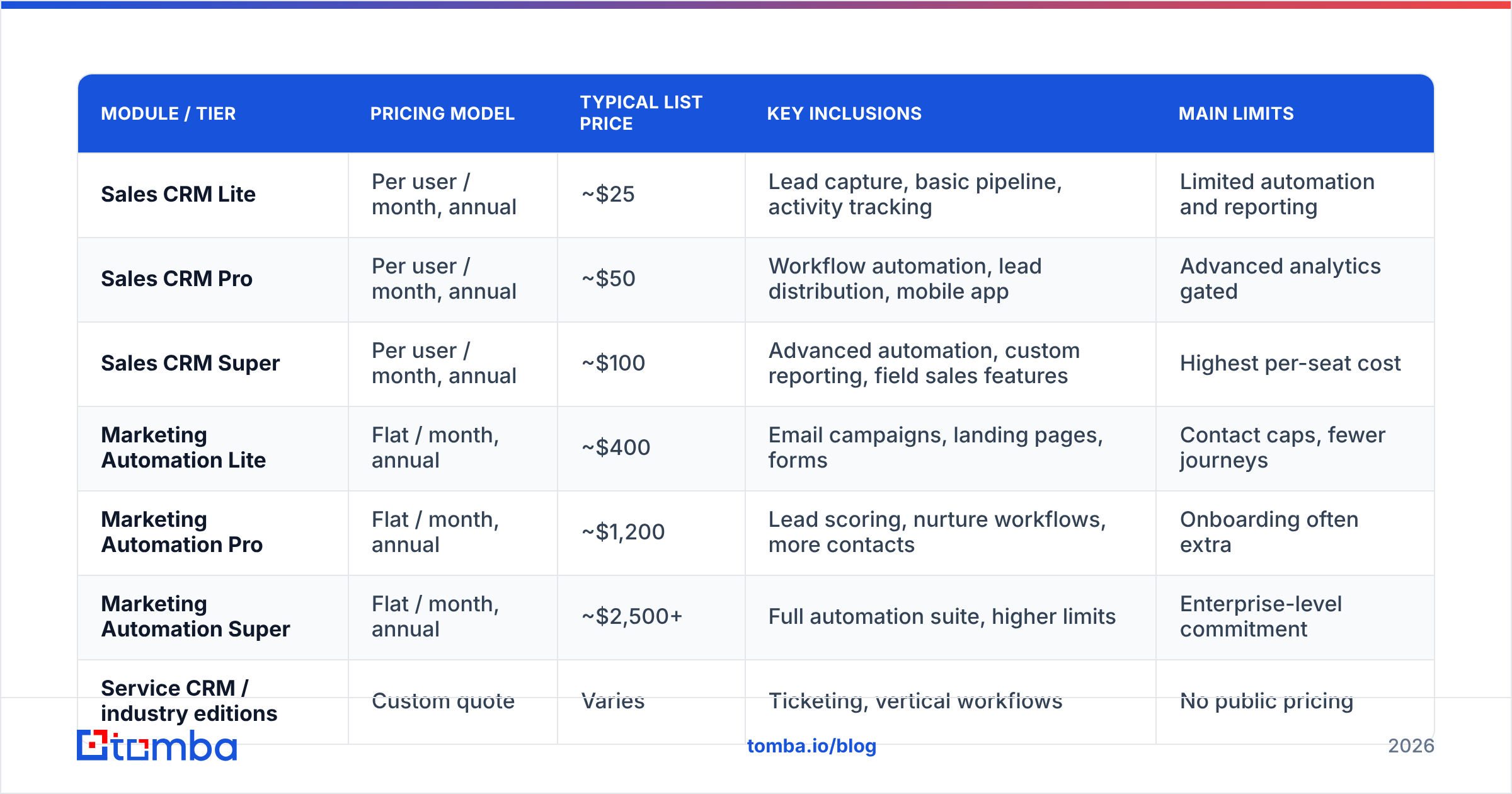
LeadSquared publishes starting prices for some modules and moves larger or vertical deals to custom quotes. The figures below reflect list prices LeadSquared has published on its official pricing page. They're billed annually and exclude taxes. Prices and packaging change, so treat them as a baseline for negotiation and not a final quote.
| Module / tier | Pricing model | Typical list price | Key inclusions | Main limits |
|---|---|---|---|---|
| Sales CRM Lite | Per user / month, annual | ~$25 | Lead capture, basic pipeline, activity tracking | Limited automation and reporting |
| Sales CRM Pro | Per user / month, annual | ~$50 | Workflow automation, lead distribution, mobile app | Advanced analytics gated |
| Sales CRM Super | Per user / month, annual | ~$100 | Advanced automation, custom reporting, field sales features | Highest per-seat cost |
| Marketing Automation Lite | Flat / month, annual | ~$400 | Email campaigns, landing pages, forms | Contact caps, fewer journeys |
| Marketing Automation Pro | Flat / month, annual | ~$1,200 | Lead scoring, nurture workflows, more contacts | Onboarding often extra |
| Marketing Automation Super | Flat / month, annual | ~$2,500+ | Full automation suite, higher limits | Enterprise-level commitment |
| Service CRM / industry editions | Custom quote | Varies | Ticketing, vertical workflows | No public pricing |
| Free trial | Time-limited | 15 days (historically) | Product access for evaluation | No permanent free plan |
What does a realistic LeadSquared bill look like?#
Here's a simple example. Take a 15-rep inside sales team on Sales CRM Pro that adds Marketing Automation Pro for inbound nurture:
- Sales CRM Pro: 15 × $50 × 12 = $9,000/year
- Marketing Automation Pro: $1,200 × 12 = $14,400/year
- Combined list price: about $23,400/year, before onboarding, extra contact volume, telephony minutes or premium support.
For a 100-seat enterprise on Super tiers, list prices go well past six figures a year. That's the level where vendors negotiate hard, and you should too.
What hidden costs should you plan for?#
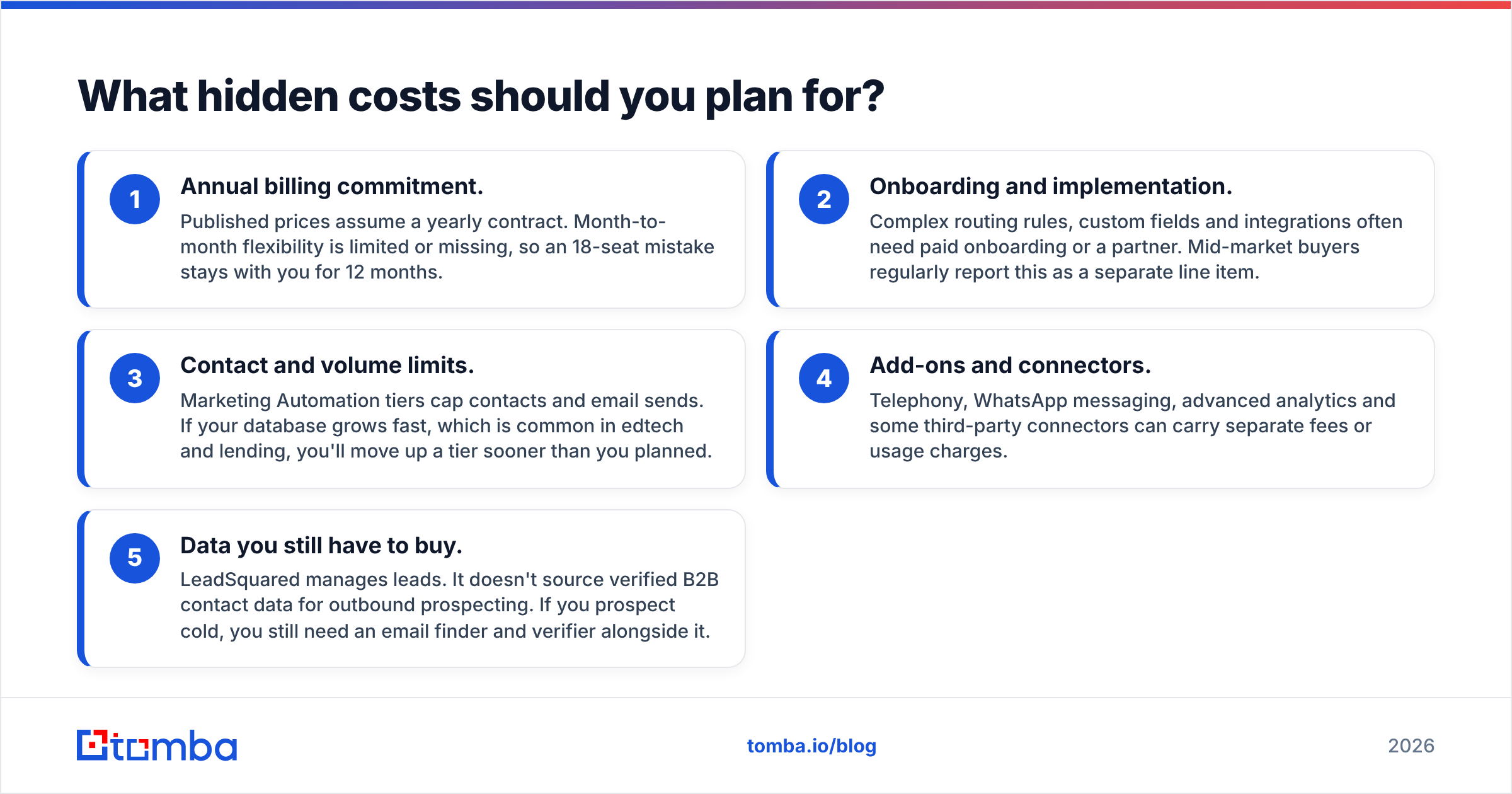
Most complaints about LeadSquared's price in reviews aren't about the seat price. They're about everything around it. Plan for these five cost drivers before you get a quote:
- Annual billing commitment. Published prices assume a yearly contract. Month-to-month flexibility is limited or missing, so an 18-seat mistake stays with you for 12 months.
- Onboarding and implementation. Complex routing rules, custom fields and integrations often need paid onboarding or a partner. Mid-market buyers regularly report this as a separate line item.
- Contact and volume limits. Marketing Automation tiers cap contacts and email sends. If your database grows fast, which is common in edtech and lending, you'll move up a tier sooner than you planned.
- Add-ons and connectors. Telephony, WhatsApp messaging, advanced analytics and some third-party connectors can carry separate fees or usage charges.
- Data you still have to buy. LeadSquared manages leads. It doesn't source verified B2B contact data for outbound prospecting. If you prospect cold, you still need an email finder and verifier alongside it.
That last point is the one teams miss most often. A CRM is a filing cabinet, not a phone book. You still have to fill it with accurate contacts.
What do LeadSquared reviews say?#
On review sites like G2's LeadSquared reviews page and Capterra, LeadSquared generally scores well. Ratings sit in the mid-4s out of 5, and the feedback is consistent enough to summarise.
What do reviewers praise?#
- Lead capture and distribution. Users often point to how quickly leads from ads, forms, portals and calls land in the CRM and get routed by geography, product or rep capacity.
- Workflow automation. Rule-based automations for follow-ups, stage changes and task assignment save managers a lot of manual work.
- Mobile app for field sales. Check-ins, route planning and offline access get frequent praise from teams that sell in person, especially in lending and insurance.
- Customer support. Many reviews mention responsive account managers and support staff, particularly in the Indian and Southeast Asian markets.
- Industry fit. The vertical editions give edtech and BFSI companies a head start that generic CRMs don't.
What do reviewers complain about?#
- Learning curve. Admins describe setup as powerful but complex. New users need training before they're productive.
- Interface. Several reviewers call the UI functional but dated next to newer CRMs.
- Reporting on lower tiers. Custom dashboards and deeper analytics are often locked to higher plans, which pushes teams to upgrade.
- Price-to-value for small teams. Small teams feel the annual commitment and module-by-module pricing much more than enterprises do.
- Occasional performance lag on large data sets or heavy custom configurations.
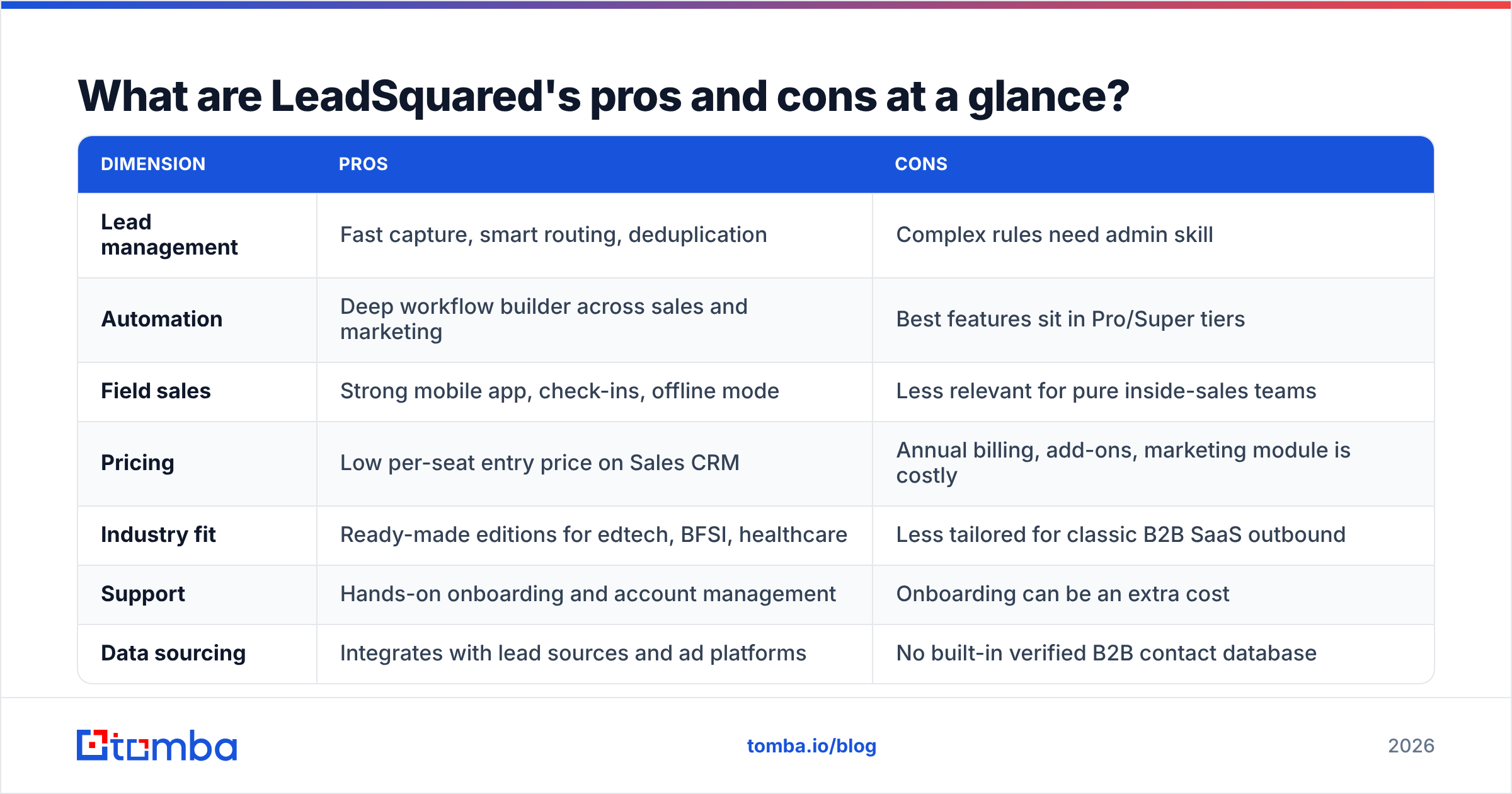
LeadSquared pricing reviews pros and cons at a glance#
| Dimension | Pros | Cons |
|---|---|---|
| Lead management | Fast capture, smart routing, deduplication | Complex rules need admin skill |
| Automation | Deep workflow builder across sales and marketing | Best features sit in Pro/Super tiers |
| Field sales | Strong mobile app, check-ins, offline mode | Less relevant for pure inside-sales teams |
| Pricing | Low per-seat entry price on Sales CRM | Annual billing, add-ons, marketing module is costly |
| Industry fit | Ready-made editions for edtech, BFSI, healthcare | Less tailored for classic B2B SaaS outbound |
| Support | Hands-on onboarding and account management | Onboarding can be an extra cost |
| Data sourcing | Integrates with lead sources and ad platforms | No built-in verified B2B contact database |
Is LeadSquared worth the money?#
It depends on how your leads arrive.
LeadSquared is usually worth it if:
- You process large volumes of inbound leads every day and response speed directly affects revenue.
- You run field sales or hybrid teams that need location-aware tools and mobile workflows.
- You operate in a vertical where LeadSquared has a prebuilt edition, which saves you months of configuration.
- You have a RevOps or admin person who can own the setup.
It's probably not worth it if:
- You're a 3–10 person B2B team doing mostly outbound prospecting.
- Your main bottleneck is finding the right contacts, not routing leads that already came in.
- You can't commit to annual billing or don't have admin capacity.
- You only need basic pipeline tracking, which lighter CRMs do for less.
Gartner and Forrester analyses of the CRM market make the same general point. The most expensive failure is buying a platform built for a different sales motion from yours. LeadSquared is excellent at high-velocity inbound. It isn't built to be an outbound data engine.

How does LeadSquared compare with lighter alternatives?#
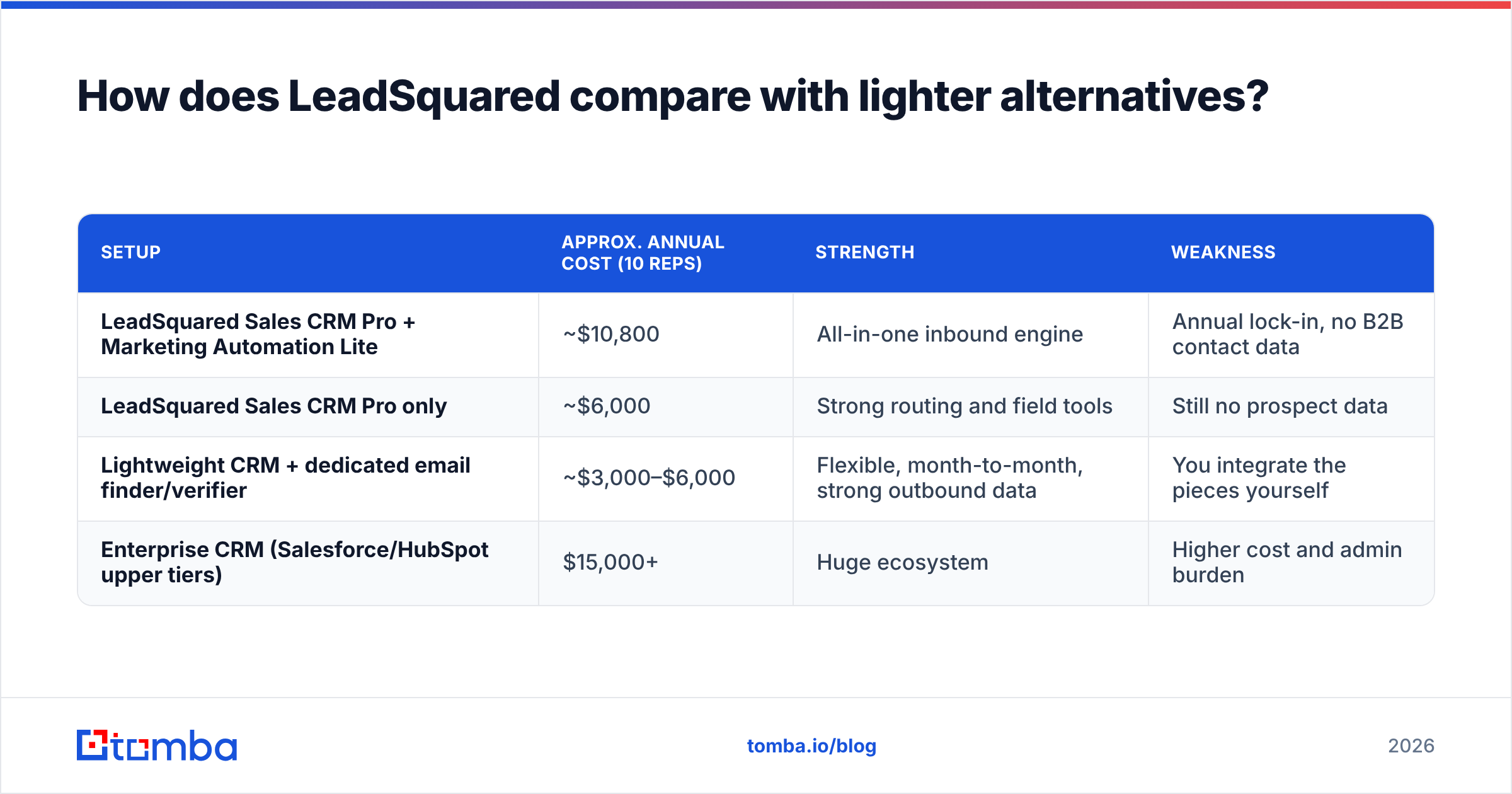
A lot of teams researching LeadSquared pricing reviews pros and cons are really asking a different question: "Do I need a full platform, or a leaner stack?" Here's how the options compare for a typical 10-rep B2B team:
| Setup | Approx. annual cost (10 reps) | Strength | Weakness |
|---|---|---|---|
| LeadSquared Sales CRM Pro + Marketing Automation Lite | ~$10,800 | All-in-one inbound engine | Annual lock-in, no B2B contact data |
| LeadSquared Sales CRM Pro only | ~$6,000 | Strong routing and field tools | Still no prospect data |
| Lightweight CRM + dedicated email finder/verifier | ~$3,000–$6,000 | Flexible, month-to-month, strong outbound data | You integrate the pieces yourself |
| Enterprise CRM (Salesforce/HubSpot upper tiers) | $15,000+ | Huge ecosystem | Higher cost and admin burden |
The lean stack isn't automatically better. It trades LeadSquared's built-in routing and vertical workflows for flexibility and lower commitment. What matters is that you choose that trade-off on purpose.
How do you get the best price from LeadSquared?#
If LeadSquared fits your motion, negotiate the same way you would for any enterprise SaaS contract:
- Start with the seats you need today. Contracts are easier to grow than to shrink. Buy for current headcount and add seats at renewal.
- Ask for onboarding to be bundled. Implementation fees are often negotiable, especially on multi-module deals.
- Lock in contact tiers. Get price protection on Marketing Automation contact limits for at least the first renewal.
- Time your purchase. Quarter-end and year-end are when sales teams have the most room to discount.
- Run a real trial. Use the trial period with live lead sources and at least one actual routing rule, not just a demo account.
- Price the data layer separately. Budget for contact sourcing and email verification outside LeadSquared, so bad data doesn't hurt your deliverability once your team starts sending.
What should your stack look like if you choose LeadSquared?#
If you go with LeadSquared, treat it as the system of record and plug a data layer into it:
- Contact sourcing: use an email finder to get verified professional emails by name, company or domain before leads go into the CRM.
- Verification: run lists through a verifier before import to keep bounce rates low and protect your sending domain.
- Enrichment: add firmographic and role data with data enrichment so LeadSquared's routing rules have clean fields to work with. That includes company size, industry and seniority.
- Sync: push enriched records into LeadSquared through its API or a middleware tool like Zapier or Make.
This split keeps LeadSquared doing what reviewers say it does well (routing, automation, field execution) and lets specialist tools handle the data.
Frequently asked questions#
Does LeadSquared have a free plan?#
No. LeadSquared has historically offered a time-limited free trial (around 15 days) but no permanent free tier. Check the current trial terms on the official pricing page.
Is LeadSquared billed monthly or annually?#
Published prices assume annual billing. Monthly options, where they exist, usually cost more per seat and have to be negotiated with sales.
Is LeadSquared good for small businesses?#
It can be, if the small business is inbound-heavy and in one of LeadSquared's core verticals. Small outbound B2B teams often find the platform and its price more than they need.
Does LeadSquared include B2B contact data?#
No. LeadSquared manages and routes leads you already have. It isn't a B2B contact database, so outbound teams pair it with a separate email finder and verifier.
What is the biggest complaint in LeadSquared reviews?#
The most common complaints are the learning curve and the cost of higher tiers once you add Marketing Automation, onboarding and add-ons.
The bottom line on LeadSquared pricing#
LeadSquared is a strong, well-reviewed platform for high-velocity inbound and field sales teams. It shines in edtech, lending, insurance and healthcare. The per-seat entry price looks cheap. The real cost comes from combining modules, annual billing, onboarding and higher tiers. If your team lives on inbound volume, it's worth a serious trial. If you grow through outbound prospecting, you'll still need a reliable data layer, and you may not need the full platform.
You need verified contacts whichever CRM you pick. Tomba Email Finder finds professional email addresses by name, company or domain. It plugs into LeadSquared or any other CRM through its API and integrations. It starts with 25 free searches a month, and paid plans begin at $49/month (see Tomba pricing). That lets you fill your pipeline without signing a five-figure platform contract first.
Related guides#
// get started
Find, verify and enrich your first contacts today
Start on the free plan with 25 searches a month, then scale when your team is ready.
Free plan · No credit card required · GDPR & CCPA
// about the author