LeadSquared vs Salesforce (2026): Which CRM Fits Your Sales Team?
LeadSquared gets high-volume sales teams live in weeks. Salesforce scales to almost anything, but costs more and takes longer to set up. Here's how to decide which CRM your team actually needs in 2026.
TL;DR
- LeadSquared is built for high-volume, fast-moving sales teams: lead capture, automatic lead distribution, field sales, and telephony. It's popular in education, healthcare, financial services, and real estate, and most teams can get it running in weeks.
- Salesforce (Sales Cloud) is the enterprise standard. It offers almost unlimited customization, the largest app ecosystem in CRM (AppExchange), and Agentforce AI. You pay for that in license cost, admin headcount, and a longer setup.
- Price gap: LeadSquared's sales CRM tiers are listed at roughly $25–$100 per user per month. Salesforce Sales Cloud starts around $25 for Starter but runs to $175+ per user per month at the Enterprise tier, where most mid-market companies end up.
- Our pick: Choose LeadSquared if speed-to-lead and simple operations matter most. Choose Salesforce if you have complex, multi-team processes, a RevOps function, and budget for admins.
- Both fail the same way when the contact data inside them is bad. Budget for enrichment and verification whichever you pick.
What is the real difference between LeadSquared and Salesforce?#
LeadSquared is an opinionated CRM for working through large numbers of leads quickly. Salesforce is a platform you can shape into almost any CRM you want.
LeadSquared was founded in Bengaluru in 2011. It grew by serving businesses where hundreds or thousands of inbound inquiries land every day and each one needs a call within minutes: admissions teams, loan desks, clinic networks, insurance brokers. Its main strengths are lead capture, automatic routing, call logging, and mobile apps for field reps. Many of those features work with little setup.
Salesforce is a general-purpose CRM platform. Sales Cloud is one product in a stack that also covers Service Cloud, Marketing Cloud, Data Cloud, Slack, Tableau, and MuleSoft. Almost anything can be customized: objects, fields, page layouts, approval flows, permission models, and AI agents. That flexibility is why large enterprises standardize on it. It's also why a Salesforce rollout usually involves consultants.
So the question in a LeadSquared vs Salesforce decision isn't which CRM is "better." It's whether you need a ready-made system or a platform you can build on.
How do LeadSquared and Salesforce compare feature by feature?#
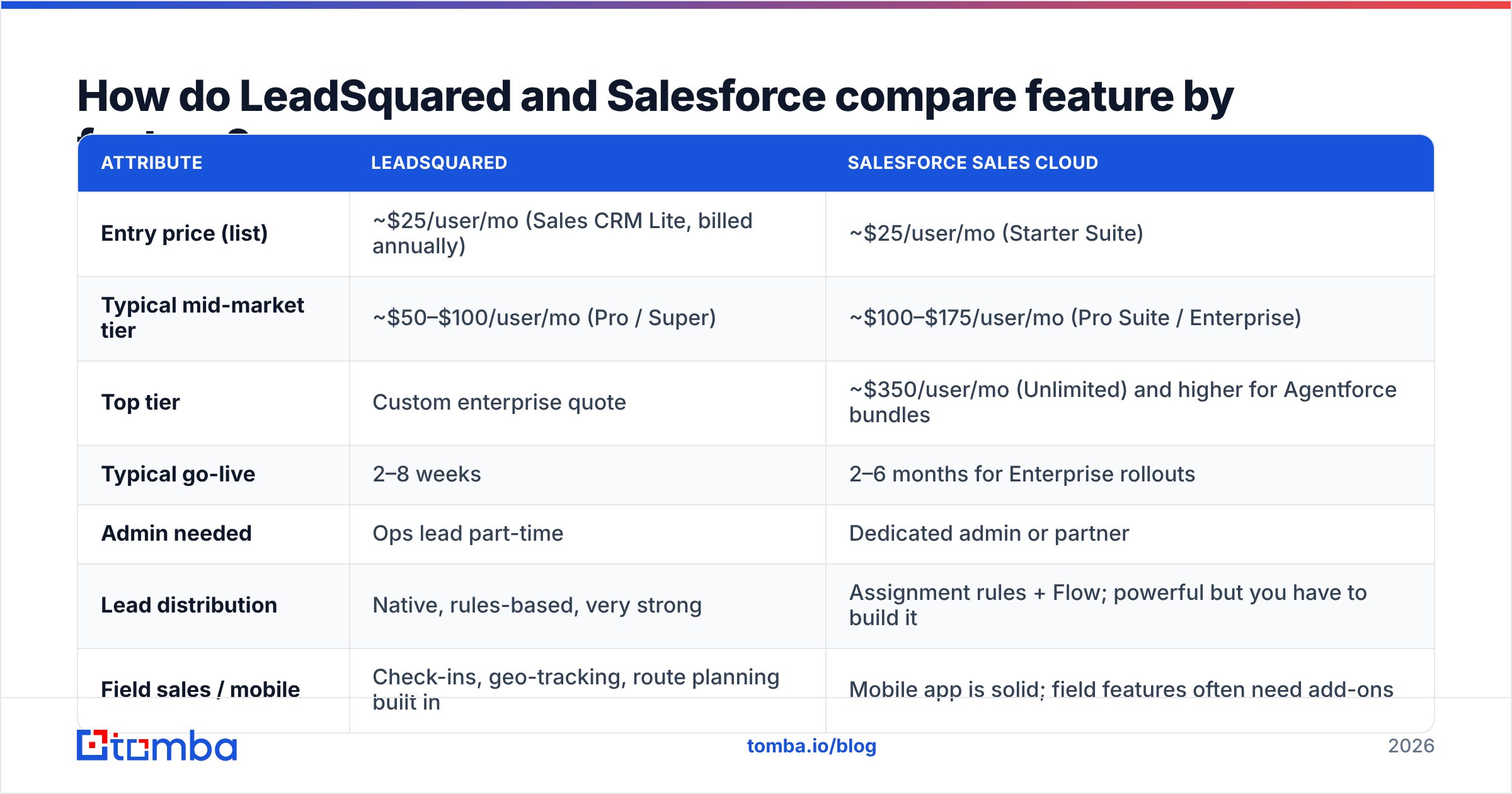
The table below covers the attributes buyers ask about most. Pricing is based on each vendor's published list prices at the time of writing. Check the Salesforce pricing page and LeadSquared's site before you sign anything, because both vendors change their packaging often.
| Attribute | LeadSquared | Salesforce Sales Cloud |
|---|---|---|
| Entry price (list) | ~$25/user/mo (Sales CRM Lite, billed annually) | ~$25/user/mo (Starter Suite) |
| Typical mid-market tier | ~$50–$100/user/mo (Pro / Super) | ~$100–$175/user/mo (Pro Suite / Enterprise) |
| Top tier | Custom enterprise quote | ~$350/user/mo (Unlimited) and higher for Agentforce bundles |
| Typical go-live | 2–8 weeks | 2–6 months for Enterprise rollouts |
| Admin needed | Ops lead part-time | Dedicated admin or partner |
| Lead distribution | Native, rules-based, very strong | Assignment rules + Flow; powerful but you have to build it |
| Field sales / mobile | Check-ins, geo-tracking, route planning built in | Mobile app is solid; field features often need add-ons |
| Telephony & WhatsApp | Native integrations with regional telephony and WhatsApp | Via AppExchange apps or Service Cloud Voice |
| AI | Built-in lead scoring and AI assistants | Einstein + Agentforce, the deepest AI roadmap in CRM |
| Ecosystem | Moderate marketplace, strong APIs | AppExchange, the largest in the category |
| Reporting | Good operational dashboards | Very flexible reports, plus Tableau/CRM Analytics |
| Best-fit industries | Education, BFSI, healthcare, real estate, D2C | Tech, manufacturing, financial services, enterprise B2B |
Two points stand out. First, the two vendors' entry prices are similar. The real gap shows up at the tier most growing teams actually need. Second, license price is only part of the cost. Admin time, consultants, and paid add-ons usually decide the total.
Which CRM fits which sales motion?#
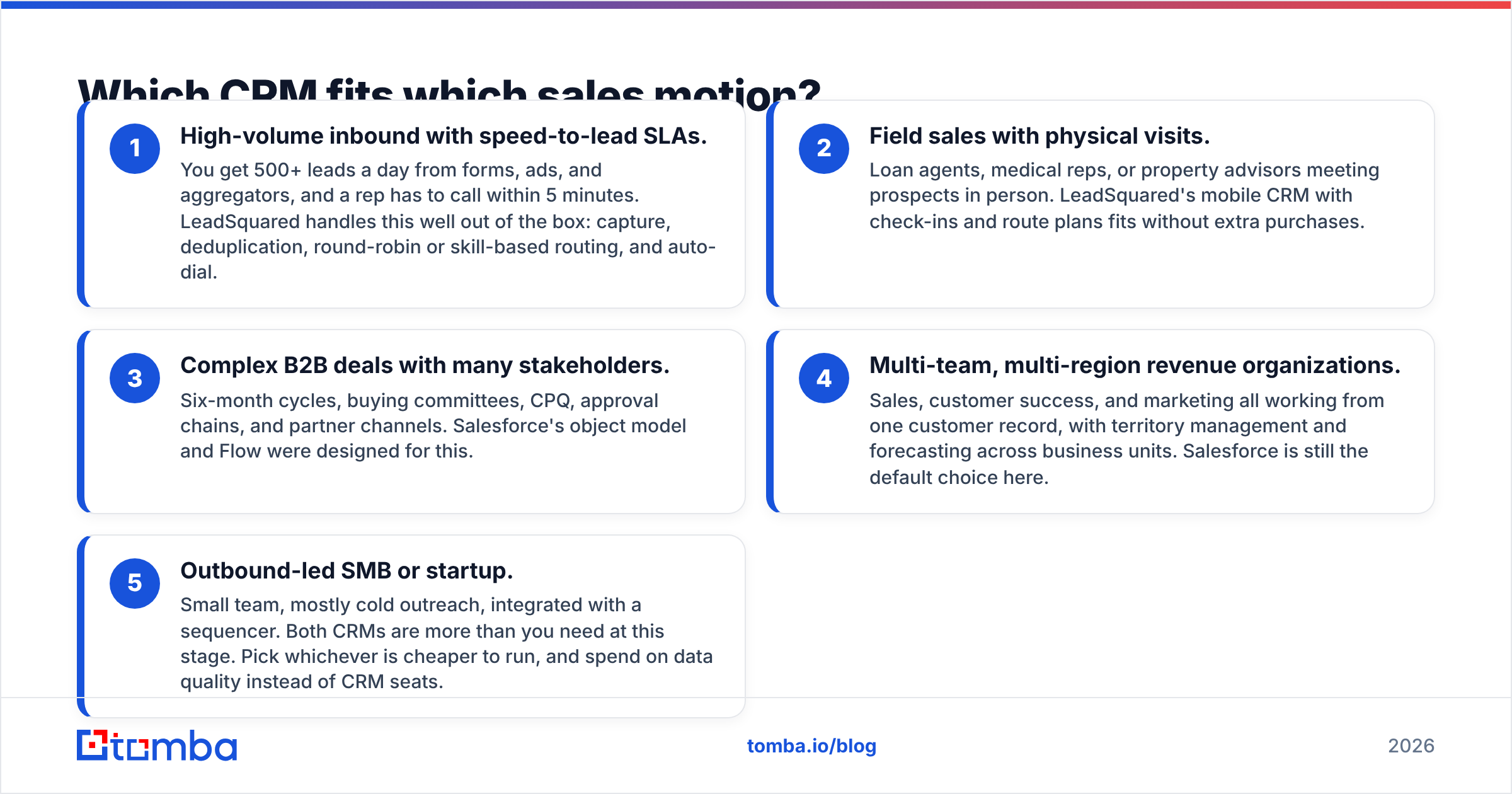
The easiest way to decide is to describe your sales motion and see which tool was built for it. These five patterns come up in almost every evaluation:
- High-volume inbound with speed-to-lead SLAs. You get 500+ leads a day from forms, ads, and aggregators, and a rep has to call within 5 minutes. LeadSquared handles this well out of the box: capture, deduplication, round-robin or skill-based routing, and auto-dial.
- Field sales with physical visits. Loan agents, medical reps, or property advisors meeting prospects in person. LeadSquared's mobile CRM with check-ins and route plans fits without extra purchases.
- Complex B2B deals with many stakeholders. Six-month cycles, buying committees, CPQ, approval chains, and partner channels. Salesforce's object model and Flow were designed for this.
- Multi-team, multi-region revenue organizations. Sales, customer success, and marketing all working from one customer record, with territory management and forecasting across business units. Salesforce is still the default choice here.
- Outbound-led SMB or startup. Small team, mostly cold outreach, integrated with a sequencer. Both CRMs are more than you need at this stage. Pick whichever is cheaper to run, and spend on data quality instead of CRM seats.
If most of your answers fall under 1 and 2, go with LeadSquared. If they fall under 3 and 4, go with Salesforce. If you're in 5, the CRM choice matters much less than what you put into it.
How much does each CRM really cost?#
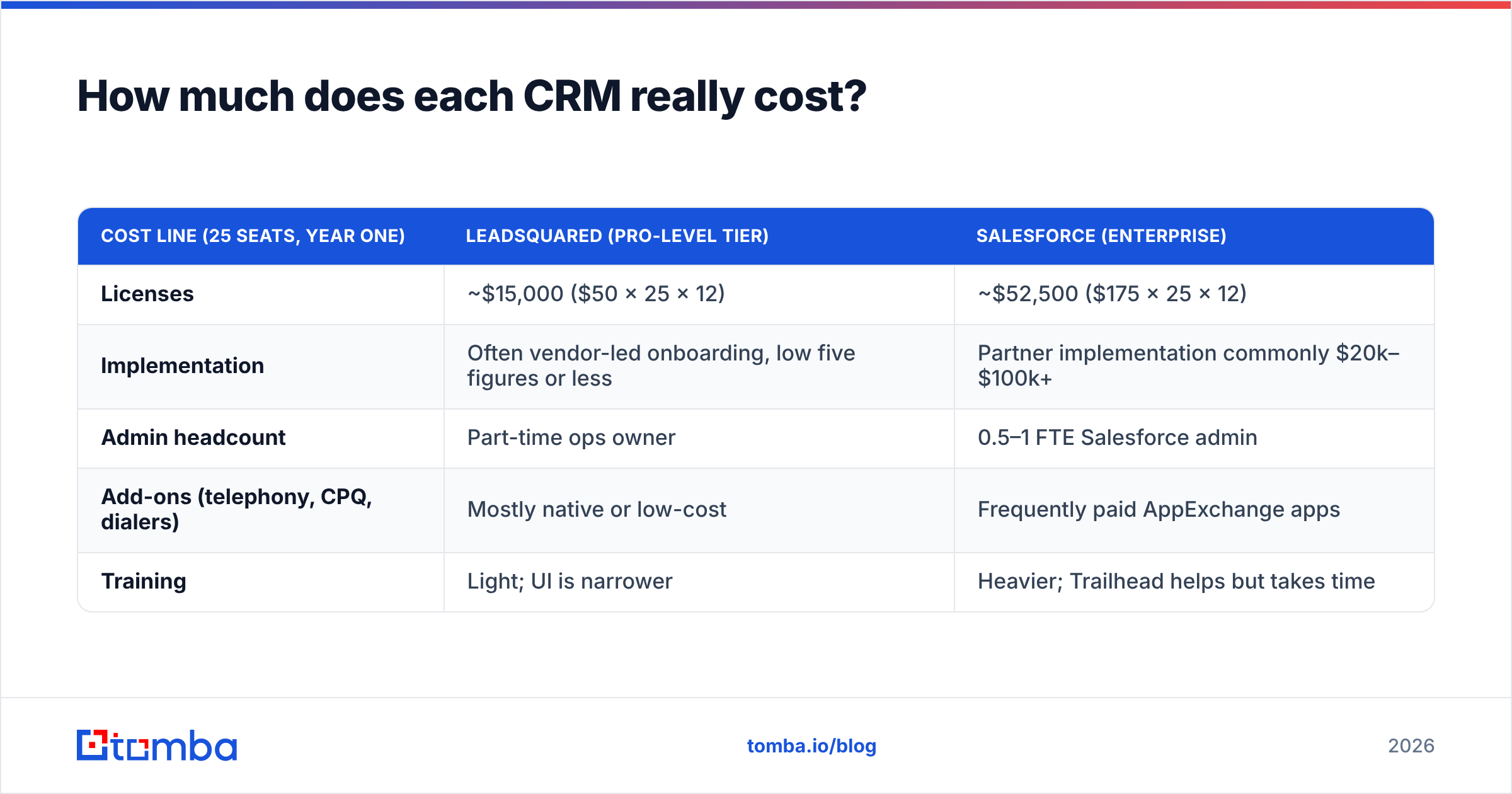
License cost is where most comparisons stop, and it's usually the smaller part of the bill. Here's a rough first-year total for a 25-seat team. It uses list prices and typical implementation ranges; your quote will differ.
| Cost line (25 seats, year one) | LeadSquared (Pro-level tier) | Salesforce (Enterprise) |
|---|---|---|
| Licenses | ~$15,000 ($50 × 25 × 12) | ~$52,500 ($175 × 25 × 12) |
| Implementation | Often vendor-led onboarding, low five figures or less | Partner implementation commonly $20k–$100k+ |
| Admin headcount | Part-time ops owner | 0.5–1 FTE Salesforce admin |
| Add-ons (telephony, CPQ, dialers) | Mostly native or low-cost | Frequently paid AppExchange apps |
| Training | Light; UI is narrower | Heavier; Trailhead helps but takes time |
For a 25-person team, LeadSquared's first-year cost can easily come in at a third or less of Salesforce's. By year three, the gap narrows if you've grown into Salesforce's flexibility and would otherwise have to rebuild on a smaller system. It widens if you never use the features you're paying for.
Also watch for price changes. Salesforce raised list prices on several Sales Cloud editions in 2025 and has been moving AI features into higher-priced bundles. LeadSquared also adjusts its packaging by region. Get multi-year price locks from either vendor in writing.
Is Salesforce better than LeadSquared for B2B sales?#
For enterprise B2B with long sales cycles, usually yes. For transactional or consumer-facing B2B sales, often no.
Salesforce's advantage in B2B comes from three things:
- Data model depth. Accounts, contacts, opportunities, products, price books, quotes, contracts, and custom objects all relate to each other cleanly. When a deal involves eight stakeholders and three subsidiaries, you need that structure.
- Ecosystem. Nearly every sales tool, including sequencers, conversation intelligence, enrichment, and CPQ, ships a Salesforce integration first. Analysts like Gartner have placed Salesforce at or near the top of their CRM evaluations for years, and the size of its ecosystem is a big part of the reason.
- AI and automation. Agentforce and Flow let RevOps teams automate qualification, research, and follow-up at scale, provided the underlying data is clean.
LeadSquared makes sense for B2B teams that sell a fairly standardized product to many buyers quickly. Examples include SaaS for SMBs, B2B lending, or logistics services with short cycles. Here, Salesforce's depth adds overhead, while LeadSquared's routing and telephony directly shorten response time.
Is LeadSquared easier to use than Salesforce?#
Yes, for most frontline reps. LeadSquared's interface focuses on the rep's daily work: the next lead to call, tasks due today, and the activity timeline. There are fewer screens, fewer objects, and fewer ways to get lost. That's a big reason it's popular with teams that have high rep turnover, such as admissions counselors or tele-sales.
Salesforce's Lightning UI is polished, but it shows whatever complexity your admins have built. A well-configured org feels simple. A neglected org with 400 custom fields and layered validation rules feels hostile. Salesforce usability depends much more on your admin than on the product itself.
For managers and ops teams it's closer. Salesforce's report builder and dashboards are more flexible, and LeadSquared's are quicker to set up. Review sites such as G2 consistently rate LeadSquared well on ease of setup and Salesforce well on depth and ecosystem, which fits this pattern.
What about integrations and data quality?#
Both CRMs depend on the contact data you put into them. This is where many rollouts quietly fail, whichever vendor you choose.
Common problems:
- Bounced emails. Imported lists with 15–25% invalid addresses damage your sender reputation before the first sequence even runs.
- Duplicate records. The same person arrives from a webinar, an ad form, and a purchased list, and three reps work the same lead.
- Thin records. A lead with only a first name and a Gmail address can't be routed by company size, industry, or territory, so your carefully built assignment rules have nothing to work with.
Salesforce has native duplicate rules and a large marketplace of enrichment apps. You can also connect providers directly. Tomba, for example, has a Salesforce integration that pushes found and verified emails into records. LeadSquared has deduplication at capture and solid APIs, so enrichment usually runs through a webhook, Zapier, or a direct API call.
Whichever CRM you use, the fix is the same: enrich and verify before records reach a rep. A data enrichment step that adds company, role, and a verified work email turns "a name from a form" into a lead your routing rules can act on.
Which should you choose in 2026?#
Use this checklist. Count the answers that apply to you.
Choose LeadSquared if:
- You handle hundreds of inbound leads per day and speed-to-lead drives revenue.
- You run field sales or tele-sales teams with high turnover.
- You're in education, lending, insurance, healthcare, or real estate, especially in India, Southeast Asia, or the Middle East, where LeadSquared has strong regional telephony and WhatsApp support.
- You don't have (and don't want) a dedicated CRM admin.
- You need to go live this quarter, not next year.
Choose Salesforce if:
- Your deals involve multiple stakeholders, custom quoting, or approval workflows.
- Sales, service, and marketing need one shared customer record across regions.
- You have or plan to hire a RevOps function and at least one admin.
- Your tech stack is already built around Salesforce integrations.
- You want Agentforce-level AI automation and can fund the data work it needs.
Consider neither (yet) if:
- You're a sub-10-person outbound team. A lighter CRM plus a sequencer and a good data source will get you further for less money.
If your answers are split, run a paid pilot of both with one team for 30 days. Track two metrics: median time-to-first-touch on new leads and the percentage of reps logging activity daily. The CRM your reps actually use wins.
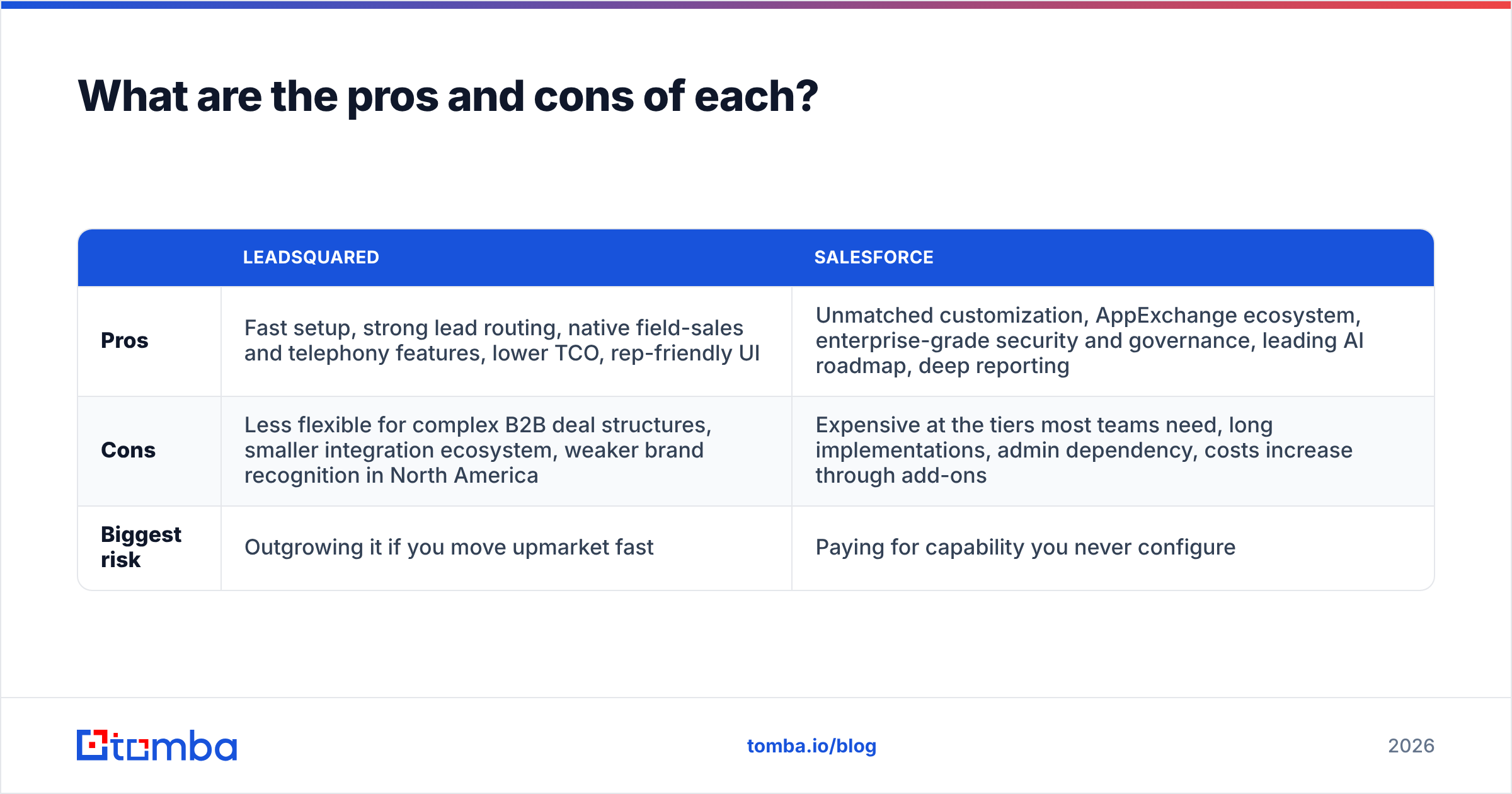
What are the pros and cons of each?#
| LeadSquared | Salesforce | |
|---|---|---|
| Pros | Fast setup, strong lead routing, native field-sales and telephony features, lower TCO, rep-friendly UI | Unmatched customization, AppExchange ecosystem, enterprise-grade security and governance, leading AI roadmap, deep reporting |
| Cons | Less flexible for complex B2B deal structures, smaller integration ecosystem, weaker brand recognition in North America | Expensive at the tiers most teams need, long implementations, admin dependency, costs increase through add-ons |
| Biggest risk | Outgrowing it if you move upmarket fast | Paying for capability you never configure |
How do you migrate without losing pipeline?#
If you're moving from one to the other (it happens in both directions), the playbook is the same:
- Audit before you export. Remove duplicates and dead records first. Moving bad data just gives you bad data in a more expensive system.
- Verify every email. Run your contact list through an email verifier so the new CRM starts with a clean baseline and your first sequences don't bounce.
- Map objects, not fields. Decide how LeadSquared's lead-and-opportunity model maps to Salesforce's lead/contact/account/opportunity structure (or the reverse) before anyone touches a CSV.
- Freeze automation during cutover. Turn off routing and sequences for 24–48 hours so records don't get assigned twice.
- Re-enrich after go-live. Fill gaps in company size, title, and email on the records your routing rules depend on.
Final verdict: LeadSquared or Salesforce?#
LeadSquared fits teams whose revenue depends on how fast they respond to large volumes of leads. It's faster to deploy, cheaper to run, and designed around the rep's day.
Salesforce fits companies whose revenue depends on managing complex relationships across teams and regions. It costs more and takes more work to set up, but no other CRM goes as deep.
Neither one fixes a pipeline built on unverified contacts. A CRM organizes whatever data you give it, so the quality of the data you feed it matters more than which logo you picked.
Whichever CRM you choose, start with good data. Tomba Email Finder finds and verifies professional email addresses by name, domain, or company, and syncs them into Salesforce or any CRM through integrations and the API. That means your routing rules, sequences, and AI agents work with real contacts instead of bounces. Start on the free tier with 25 searches a month, or see Tomba pricing for team plans from $49/mo.
Related guides#
// get started
Find, verify and enrich your first contacts today
Start on the free plan with 25 searches a month, then scale when your team is ready.
Free plan · No credit card required · GDPR & CCPA
// about the author