LeadSync Alternatives 2026: 7 Lead Ad Sync Tools Compared
LeadSync pushes Facebook, LinkedIn, and TikTok lead ads into your CRM for under $20/mo. If you need more destinations, more logic, or cleaner data, here are seven alternatives and what each one is best for.
TL;DR
- LeadSync is a narrow tool that does one job well: it sends lead ad submissions from Facebook, Instagram, Google, LinkedIn, and TikTok to your CRM or email platform in real time, for a flat monthly price.
- Most people look for LeadSync alternatives because they want more destinations and logic (Zapier, Make, Pabbly Connect), enterprise-grade ad integrations (LeadsBridge), or no extra tool at all (native CRM connectors like HubSpot's).
- None of these sync tools checks whether the email someone typed into a lead form is real. For that you need a verification or enrichment step after the sync.
- Our picks: LeadsBridge for agencies running a lot of ad spend, Make for complex routing on a small budget, native HubSpot for teams already on HubSpot, and Zapier if you want the widest range of apps.
What is LeadSync, and why do teams look for alternatives?#
LeadSync is a lead-ad sync tool. When someone submits a Facebook or Instagram Lead Ad form (and, on newer plans, Google, LinkedIn, or TikTok lead forms), LeadSync sends that contact to your CRM, autoresponder, or SMS tool within seconds. It's built so a marketer can set it up in about a minute without touching an API.
Its pricing is its main selling point. Entry plans start under $20/month, you pay a flat fee instead of per-task charges, and the $49 Marketer plan covers up to 50,000 leads a month with unlimited field mapping. There's a 7-day free trial with no card required. Reviews on G2 and Capterra mostly praise the simple setup and responsive support.
So why switch? The reasons we hear most often:
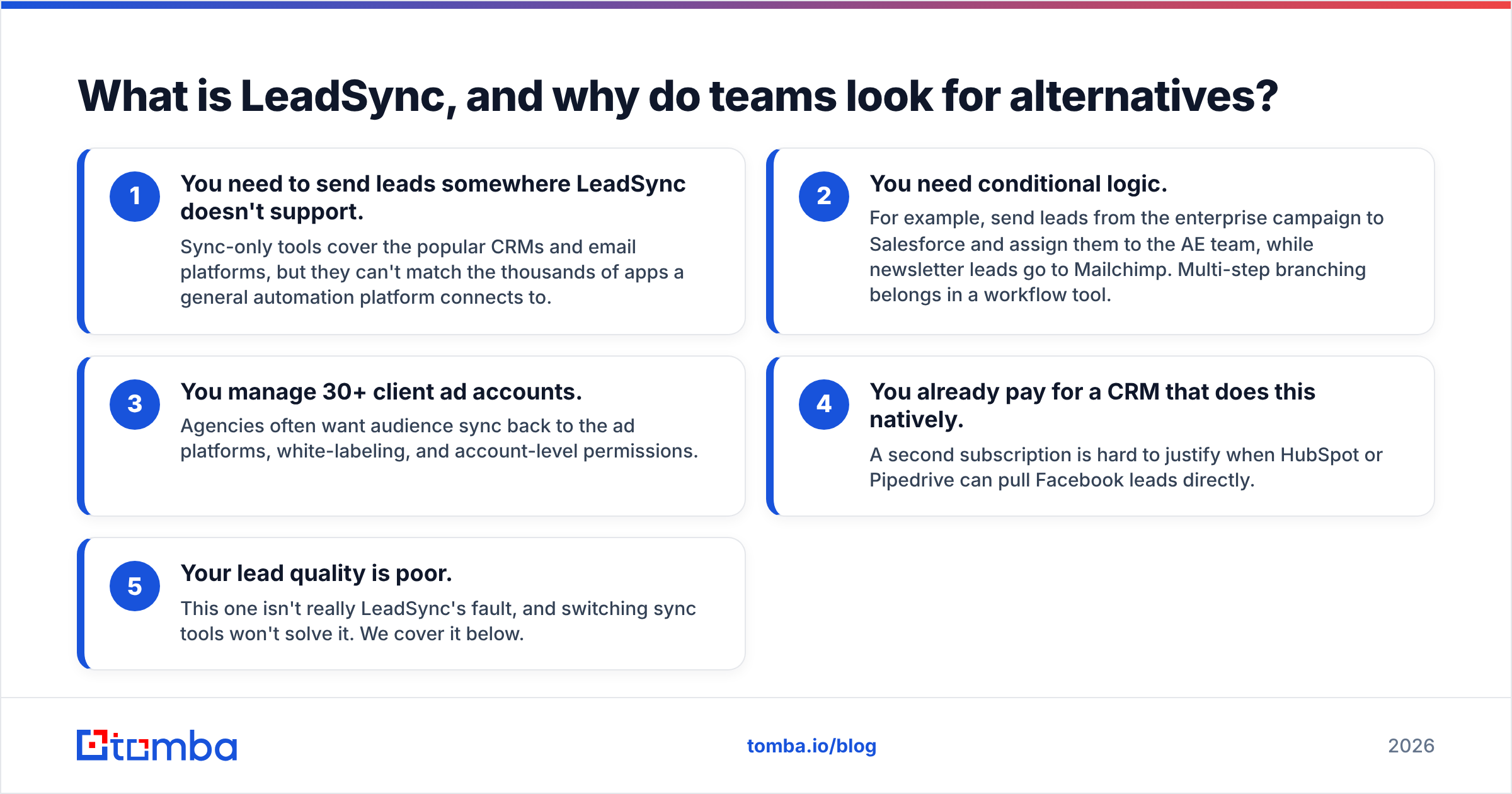
- You need to send leads somewhere LeadSync doesn't support. Sync-only tools cover the popular CRMs and email platforms, but they can't match the thousands of apps a general automation platform connects to.
- You need conditional logic. For example, send leads from the enterprise campaign to Salesforce and assign them to the AE team, while newsletter leads go to Mailchimp. Multi-step branching belongs in a workflow tool.
- You manage 30+ client ad accounts. Agencies often want audience sync back to the ad platforms, white-labeling, and account-level permissions.
- You already pay for a CRM that does this natively. A second subscription is hard to justify when HubSpot or Pipedrive can pull Facebook leads directly.
- Your lead quality is poor. This one isn't really LeadSync's fault, and switching sync tools won't solve it. We cover it below.
How do the top LeadSync alternatives compare?#
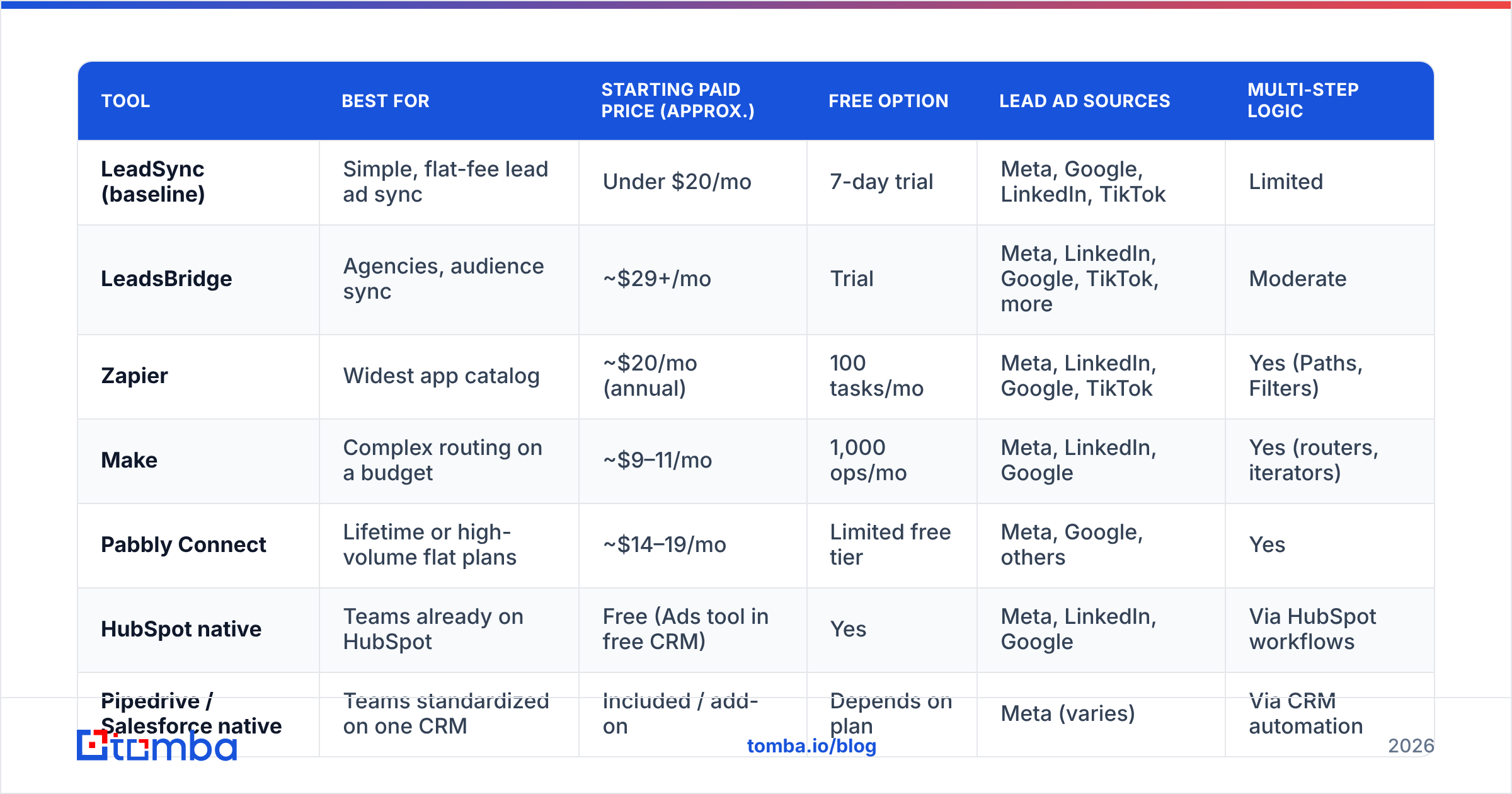
Here's the overview. Prices are approximate public list prices at the time of writing. Automation vendors change plan limits often, so check the vendor site before you buy.
| Tool | Best for | Starting paid price (approx.) | Free option | Lead ad sources | Multi-step logic |
|---|---|---|---|---|---|
| LeadSync (baseline) | Simple, flat-fee lead ad sync | Under $20/mo | 7-day trial | Meta, Google, LinkedIn, TikTok | Limited |
| LeadsBridge | Agencies, audience sync | ~$29+/mo | Trial | Meta, LinkedIn, Google, TikTok, more | Moderate |
| Zapier | Widest app catalog | ~$20/mo (annual) | 100 tasks/mo | Meta, LinkedIn, Google, TikTok | Yes (Paths, Filters) |
| Make | Complex routing on a budget | ~$9–11/mo | 1,000 ops/mo | Meta, LinkedIn, Google | Yes (routers, iterators) |
| Pabbly Connect | Lifetime or high-volume flat plans | ~$14–19/mo | Limited free tier | Meta, Google, others | Yes |
| HubSpot native | Teams already on HubSpot | Free (Ads tool in free CRM) | Yes | Meta, LinkedIn, Google | Via HubSpot workflows |
| Pipedrive / Salesforce native | Teams standardized on one CRM | Included / add-on | Depends on plan | Meta (varies) | Via CRM automation |
If you only take one thing from this table: flat-fee sync tools win on cost at high lead volume, and task-based automation platforms win on flexibility. LeadSync sits in the first group. Most alternatives sit in the second.
Which LeadSync alternatives are worth considering in 2026?#
1. LeadsBridge: best for agencies and ad-heavy teams#
LeadsBridge is the most direct competitor. It covers the same ground (lead ads to CRM) and adds audience sync, which pushes CRM segments back to Facebook, Google, and LinkedIn as custom audiences for retargeting and lookalikes. That round trip matters if you're spending five figures a month on paid social.
- Pros: Large integration library aimed at advertising, audience sync, conversion API support, and a dedicated onboarding team on higher tiers.
- Cons: Costs more than LeadSync for the same basic sync, and the pricing ladder gets steep once you add bridges and audiences.
- Choose it if: you run an agency or growth team where ad-platform integrations matter as much as CRM delivery.
2. Zapier: best for connecting to almost anything#
Zapier connects to thousands of apps, so if your destination is an obscure CRM, a Slack channel, a Google Sheet, and an SMS tool all at once, Zapier can handle it. Filters and Paths let you route leads by campaign, form, or answer.
- Pros: The largest app catalog, mature Facebook Lead Ads triggers, and templates for most CRM combinations.
- Cons: You pay per task. A single lead running through a five-step Zap uses five tasks, so at thousands of leads a month the bill can overtake a flat-fee tool quickly.
- Choose it if: your lead volume is modest and your stack is unusual.
3. Make: best for complex routing on a small budget#
Make (formerly Integromat) shows automations on a visual canvas with routers, filters, and data transformation. Operations cost far less than Zapier tasks, which is why cost-conscious ops teams often pick it.
- Pros: Cheap per operation, strong branching logic, and good error handling with retries.
- Cons: Harder to learn. A marketer who liked LeadSync's 60-second setup may find the canvas intimidating at first.
- Choose it if: you have someone technical on the team and you want scoring, deduplication, and enrichment in one scenario.
4. Pabbly Connect: best for predictable high-volume pricing#
Pabbly Connect competes on price. It has generous task allowances, doesn't count internal steps (filters, formatters) as tasks, and has historically offered lifetime deals.
- Pros: Low cost per task, with multi-step workflows included on entry plans.
- Cons: Its UI and documentation are less polished than Zapier's, and the integration catalog is smaller.
- Choose it if: you want workflow flexibility at a price close to LeadSync's.
5. HubSpot native lead ads sync: best if you're already on HubSpot#
HubSpot's Ads tool, available on its free CRM, connects Facebook, Instagram, LinkedIn, and Google ad accounts and creates contacts from lead form submissions automatically. There's no middleware to maintain or pay for.
- Pros: Free, native attribution reporting, and leads can enter HubSpot workflows immediately.
- Cons: It only works with HubSpot. Some sync options and ad-spend reporting limits depend on your Marketing Hub tier.
- Choose it if: HubSpot is your system of record. Pair it with the HubSpot integration from an enrichment tool if you want richer contact records.
6. Pipedrive, Salesforce, and other native connectors#
Most major CRMs now offer some form of Facebook Lead Ads connector, either built in or through their marketplace. How good it is varies: some sync in near real time, some poll every few minutes, and some only map standard fields.
- Pros: One less vendor, and data lands straight in your pipeline.
- Cons: Limited field mapping and usually only one ad network.
- Choose it if: you run one ad channel into one CRM and don't need anything fancy.
7. A custom webhook + API setup#
Engineering-led teams sometimes skip middleware entirely. They subscribe to Meta's leadgen webhook, receive the payload, and write it to the CRM through its API.
- Pros: Full control, no per-task costs, and you can add verification or enrichment calls inline.
- Cons: You own the maintenance, including token refreshes, Graph API version upgrades, and retry logic.
- Choose it if: you have developers and lead volume high enough to justify the effort.
Is LeadSync still the right choice for some teams?#
Yes. We're neutral here, and LeadSync has a real place in the market. If you run Facebook or Instagram Lead Ads into a mainstream CRM or email tool, want a flat bill, and don't need branching logic, LeadSync is simpler and often cheaper than any alternative above. Its flat per-month pricing becomes especially good value compared with task-based tools once you pass a few thousand leads a month.
Here's a quick decision guide:
- Under 500 leads/month, simple stack: HubSpot native (free) or Zapier's free and starter tiers.
- 500–50,000 leads/month, one destination: LeadSync or Pabbly Connect.
- Complex routing, dedupe, or scoring: Make or Zapier with Paths.
- Agency with many ad accounts and retargeting needs: LeadsBridge.
- Engineering team, very high volume: Custom webhook.
What problem do none of these LeadSync alternatives solve?#
Every tool in this post solves delivery: getting the lead from the ad platform to your CRM quickly. None of them solves data quality.
Lead ad forms are prefilled from the user's Facebook or LinkedIn profile. That's convenient for conversions but bad for data. The email on a Facebook profile is often a personal address created ten years ago, a disposable inbox, or an address the person no longer checks. People also overwrite fields with junk like "test@test.com" to get at the gated asset without being contacted.

When you send those contacts straight into an email sequence, three things happen:
- Your bounce rate climbs. Hard bounces damage your sender reputation. Google and Yahoo's bulk-sender rules treat sustained bounce and complaint rates as signs of a problem sender.
- Sales wastes time. SDRs chase personal Gmail addresses that never convert into a buying-committee conversation.
- Your ad optimization learns the wrong signals. If you send "lead" events back to Meta without filtering junk, the algorithm finds you more junk.
This is why many teams add a verification or enrichment step after the sync and before any sequence starts.
How do you add verification and enrichment to a lead ad workflow?#
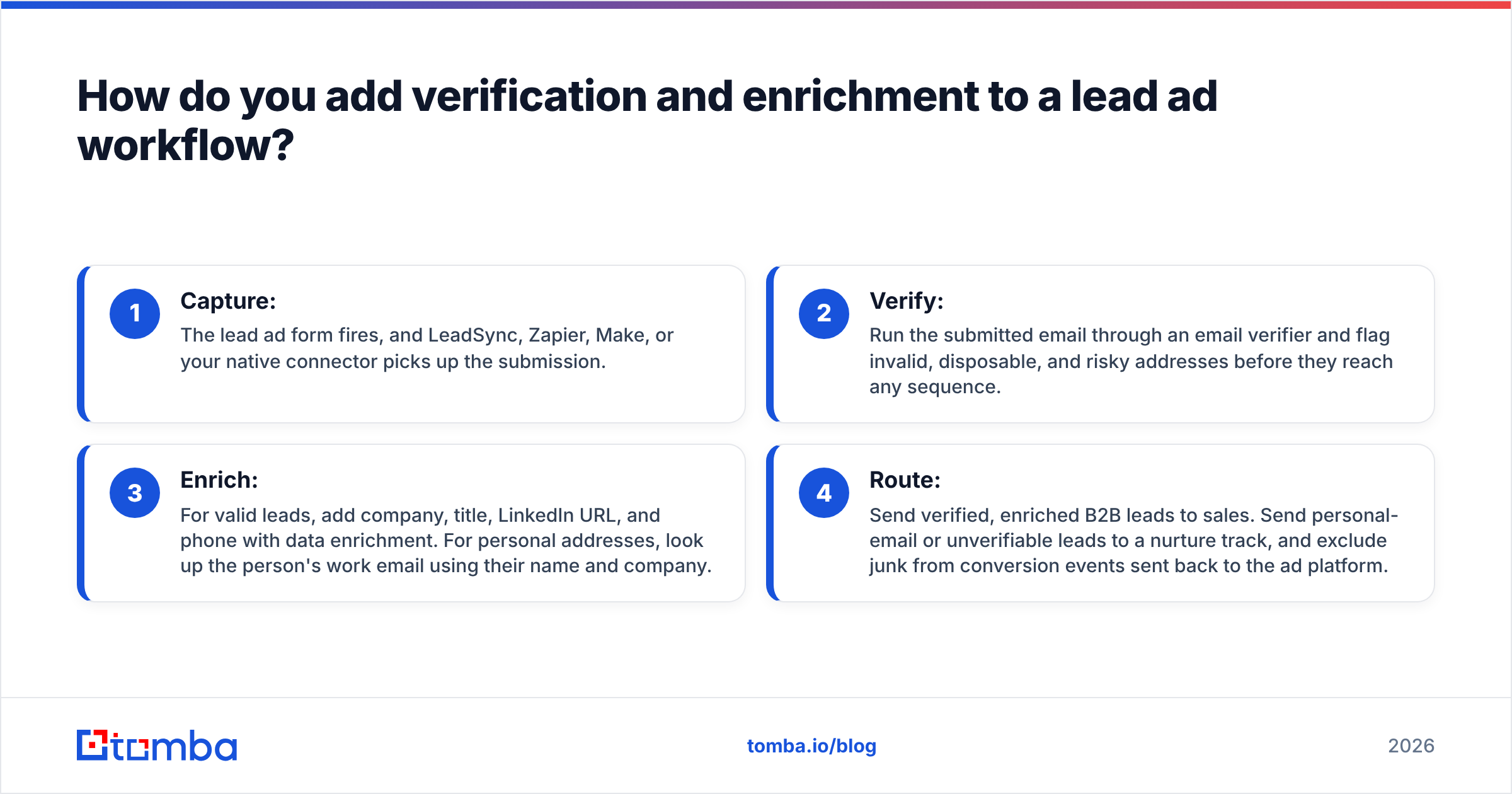
The workflow is the same whether you stay on LeadSync or switch to one of the alternatives. Think of it as four stages:
- Capture: The lead ad form fires, and LeadSync, Zapier, Make, or your native connector picks up the submission.
- Verify: Run the submitted email through an email verifier and flag invalid, disposable, and risky addresses before they reach any sequence.
- Enrich: For valid leads, add company, title, LinkedIn URL, and phone with data enrichment. For personal addresses, look up the person's work email using their name and company.
- Route: Send verified, enriched B2B leads to sales. Send personal-email or unverifiable leads to a nurture track, and exclude junk from conversion events sent back to the ad platform.
On Zapier or Make, steps 2 and 3 are just extra modules that call an API. On LeadSync or a native connector, the usual pattern is to sync into the CRM first and then run a CRM-side workflow or scheduled bulk job to verify and enrich new contacts.
What should you check before switching away from LeadSync?#
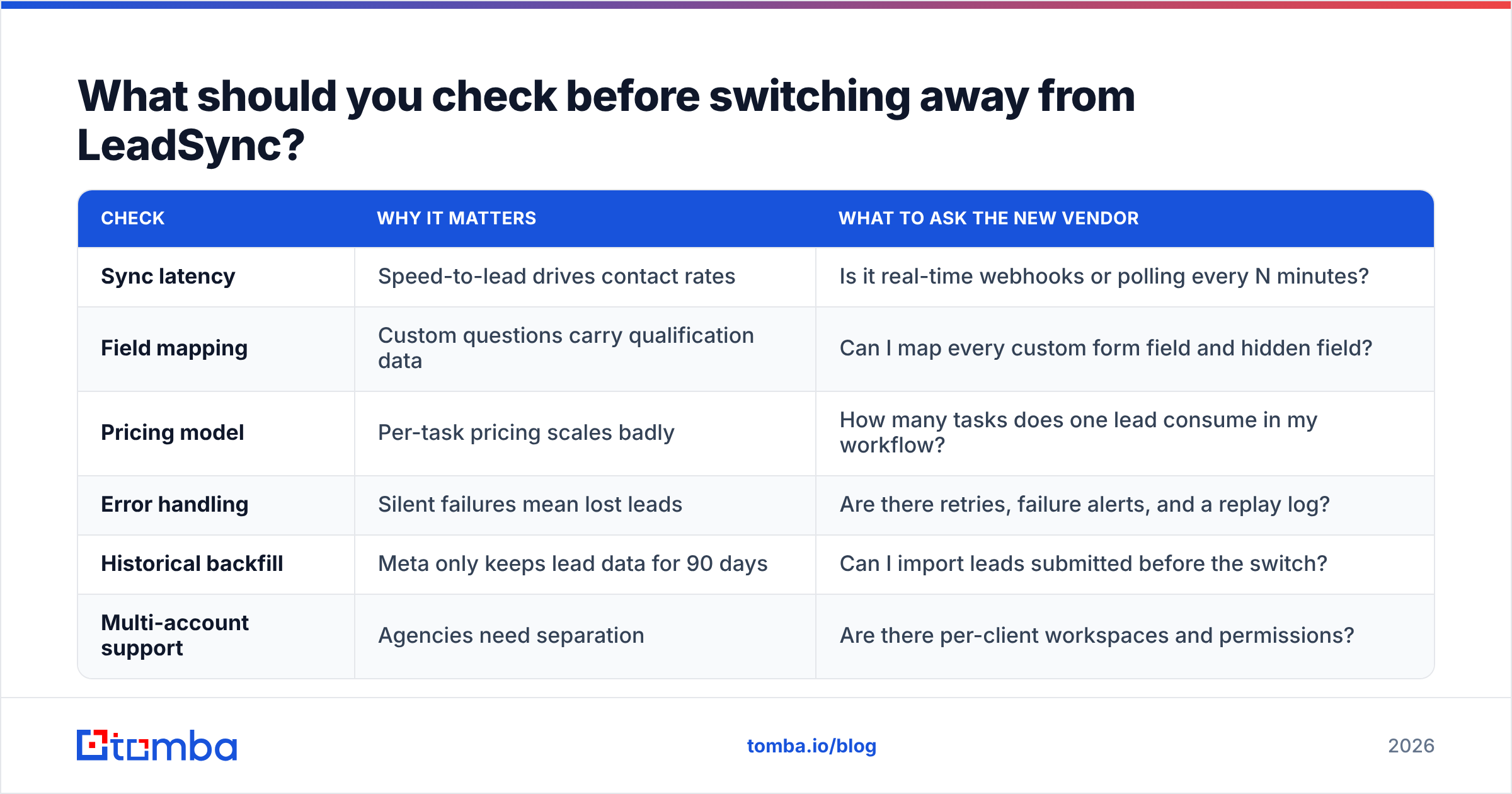
Before you migrate, walk through this checklist:
| Check | Why it matters | What to ask the new vendor |
|---|---|---|
| Sync latency | Speed-to-lead drives contact rates | Is it real-time webhooks or polling every N minutes? |
| Field mapping | Custom questions carry qualification data | Can I map every custom form field and hidden field? |
| Pricing model | Per-task pricing scales badly | How many tasks does one lead consume in my workflow? |
| Error handling | Silent failures mean lost leads | Are there retries, failure alerts, and a replay log? |
| Historical backfill | Meta only keeps lead data for 90 days | Can I import leads submitted before the switch? |
| Multi-account support | Agencies need separation | Are there per-client workspaces and permissions? |
Run both tools side by side for a week on the same form. Compare lead counts in the CRM against the Meta Leads Center before you turn off the old tool. Missing even a small share of leads during a migration costs more than a year of any of these subscriptions.
Final verdict: which LeadSync alternative should you pick?#
- Stay on LeadSync if simple, flat-fee lead delivery is all you need. It's good at that.
- Pick LeadsBridge for agency-scale ad operations and audience sync.
- Pick Zapier if you need the widest range of destination apps.
- Pick Make if you need serious routing logic on a lean budget.
- Pick HubSpot's native sync if HubSpot is already your CRM.
Whichever tool you choose, the sync is only half the job. The other half is making sure the email that arrives is real, reachable, and belongs to someone who can buy.
Ready to turn raw lead ad submissions into reachable B2B contacts?#
When a lead ad hands you a personal Gmail address and a company name, the Tomba Email Finder can find that person's professional address from their name and company domain. Pair it with Tomba's verifier to filter out bounces before your first sequence step. It works with LeadSync-fed CRMs, Zapier, Make, or a direct API call. You can start on the free tier with 25 searches a month and move to Starter at $49/mo once the workflow proves itself. See Tomba pricing for the full plan breakdown.
Related guides#
// get started
Find, verify and enrich your first contacts today
Start on the free plan with 25 searches a month, then scale when your team is ready.
Free plan · No credit card required · GDPR & CCPA
// about the author