LeadSync Pricing, Reviews, Pros and Cons: 2026 Honest Breakdown
LeadSync costs $19 to $99 a month and gets strong reviews for speed and simplicity. The real question is how many lead sources you run, and what happens to your leads after they sync.
TL;DR
- LeadSync is a lead-routing tool. It is not a lead database. It pushes Facebook, Instagram, TikTok, LinkedIn and Google lead-form submissions to your email, SMS, Slack or CRM, usually in under 60 seconds.
- Pricing runs from about $19/mo (2 lead sources) to $49/mo (Marketer, 10 sources, 50,000 leads/mo) to $99/mo (Agency, unlimited). There is a 7-day free trial with no card and a 30-day money-back guarantee.
- Reviews are strong. It scores about 4.7/5 on Capterra, and users keep praising setup speed, reliability and support.
- The main limits are the lead-source caps on the lower tiers and the fact that it moves only the data the prospect typed in. It won't verify, enrich or find anyone.
- It's a good buy for paid-social teams and agencies. B2B teams usually pair it with a verification and enrichment layer.
What is LeadSync, and what problem does it solve?#
LeadSync takes leads from ad-platform lead forms and delivers them where your team works. Someone fills in a Facebook Lead Ad, and within seconds the lead lands in your inbox, a text message, a Slack channel or your CRM. You don't have to download a CSV from Meta Business Suite, and the lead doesn't sit untouched for 48 hours.
That speed matters more than it sounds. Lead-form submissions go cold fast because the prospect gave you their details on impulse while scrolling. Calling within five minutes and calling the next morning are two different conversations.
According to LeadSync's own site, the product covers:
- Meta (Facebook and Instagram) lead ads, plus TikTok, LinkedIn and Google lead forms
- 30+ destinations, including major CRMs, email, SMS and Slack
- Real-time webhook delivery (the vendor claims under 60 seconds)
- Email autoresponders so the prospect hears back right away
- Unlimited lead forms per connected source
Keep one thing in mind while you evaluate it: LeadSync moves data but doesn't improve it. If a prospect types jon@gmial.com into a form, that is exactly what reaches your CRM.
How much does LeadSync cost in 2026?#
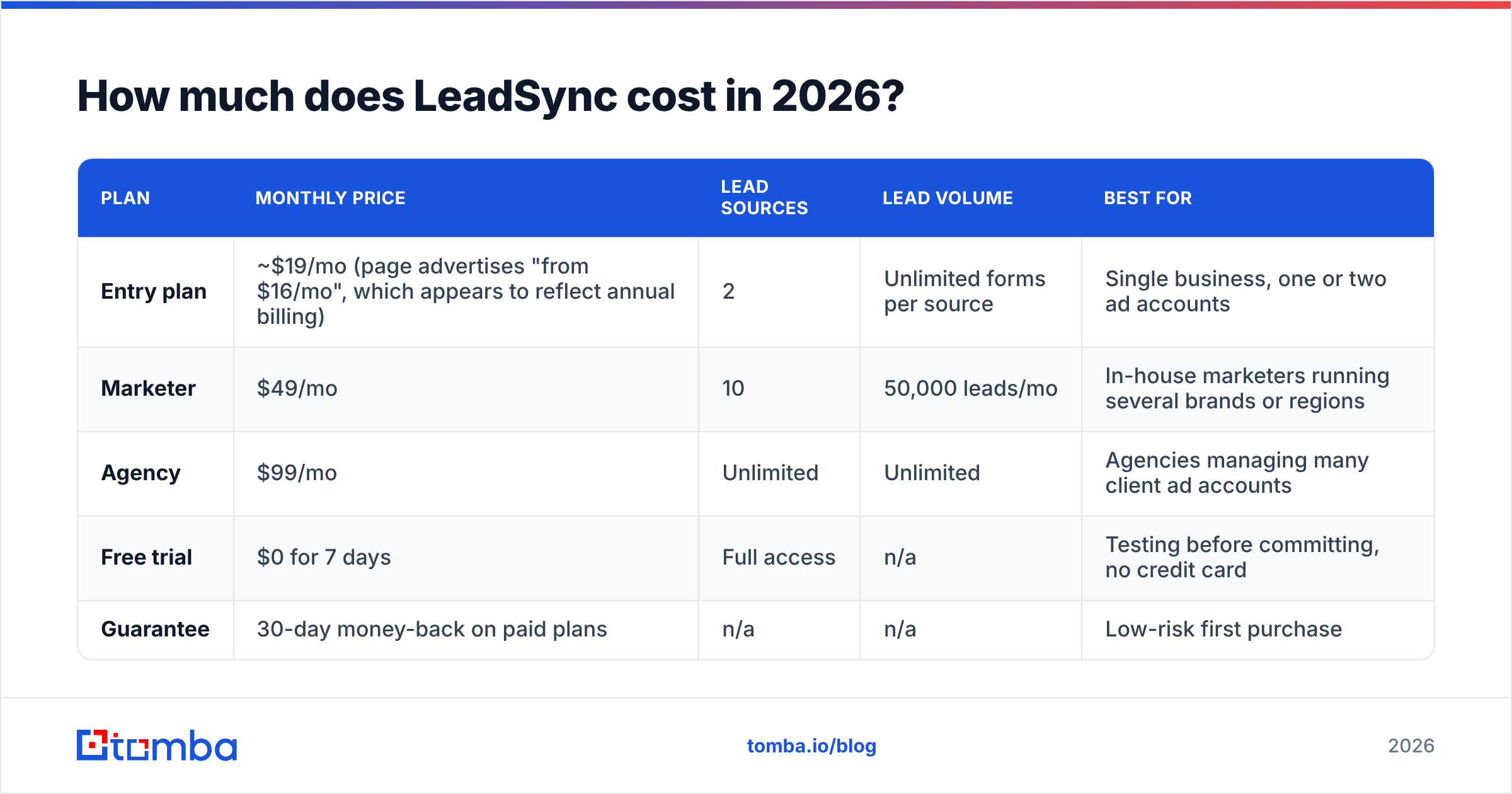
LeadSync uses a simple tiered model. The main variable is the number of lead sources, meaning connected ad accounts or pages. Lead volume barely factors in. Here are the tiers as currently listed on the LeadSync pricing page. Check that page before you buy, because SaaS pricing changes.
| Plan | Monthly price | Lead sources | Lead volume | Best for |
|---|---|---|---|---|
| Entry plan | ~$19/mo (page advertises "from $16/mo", which appears to reflect annual billing) | 2 | Unlimited forms per source | Single business, one or two ad accounts |
| Marketer | $49/mo | 10 | 50,000 leads/mo | In-house marketers running several brands or regions |
| Agency | $99/mo | Unlimited | Unlimited | Agencies managing many client ad accounts |
| Free trial | $0 for 7 days | Full access | n/a | Testing before committing, no credit card |
| Guarantee | 30-day money-back on paid plans | n/a | n/a | Low-risk first purchase |
Every plan includes all ad networks, all 30+ integrations and real-time syncing, so features aren't gated by tier. You pay for scale (sources) and the multi-client dashboard, not for basic functionality.
Are there hidden costs?#
The subscription itself is transparent. The costs people miss usually sit next to it:
- Lead-source creep. Two sources sounds like plenty until you add a second brand, a separate Instagram account or a client test. The jump from ~$19 to $49 comes from source count, not usage.
- Downstream tool costs. LeadSync delivers to your CRM or SMS provider. If the CRM charges per contact, or your SMS gateway charges per message, those bills grow with your lead volume.
- Bad-data cost. Nobody invoices you for this, but it's real. Mistyped emails bounce, fake form fills clutter your pipeline, and reps waste dials. Routing tools make bad leads arrive faster.
- Annual vs monthly. The lowest advertised price usually assumes annual billing. Budget on the monthly rate if you're still testing.
What do LeadSync reviews actually say?#
Across review sites, LeadSync gets consistently positive feedback. On Capterra it holds roughly a 4.7/5 rating, and the same themes come up again and again:
- Setup is fast. Most reviewers say they connected an ad account and a destination in minutes, with no developer involved.
- It is reliable. Leads arrive quickly and don't silently drop. Silent drops are the most common complaint about DIY Zapier setups.
- Support is responsive. Several long-term users (two-plus years) specifically mention quick, helpful replies.
- It costs less than the enterprise options. Reviewers comparing it with heavier sync platforms often call it better value.
- Autoresponders are a bonus. Automated first-touch emails come up as an unexpected win.
The negative reviews are thin. One Capterra reviewer, asked for downsides, said "not a lot" and only wished for a PDF they could share with stakeholders to show the value. That's a good sign, but read it in context. Small, focused tools with a narrow job tend to review well because they rarely overpromise.
What are LeadSync's pros and cons?#
Here is the balanced view, pulled from the feature set, the pricing model and the review patterns above.
| Pros | Cons |
|---|---|
| Very fast setup, no technical skills needed | Lower tiers cap you at 2 or 10 lead sources |
| Near-real-time delivery (under 60 seconds claimed) | Moves raw form data only, with no verification or enrichment |
| All features on every plan, no feature gating | Covers only ad-platform lead forms, not website forms or outbound |
| Multi-network coverage: Meta, TikTok, LinkedIn, Google | Agency tier ($99/mo) is the only way to get unlimited sources |
| Built-in email autoresponders | You still pay separately for CRM seats, SMS and so on |
| 7-day trial plus 30-day money-back | Not a prospecting tool, so it can't grow your list by itself |
| Strong support reputation | Less flexible than a general automation platform for multi-step logic |
The cons column mostly describes scope. They are limits of what the product is meant to do, and very few are quality complaints. That distinction matters when you decide whether it fits your stack.
Is LeadSync better than Zapier or other alternatives?#
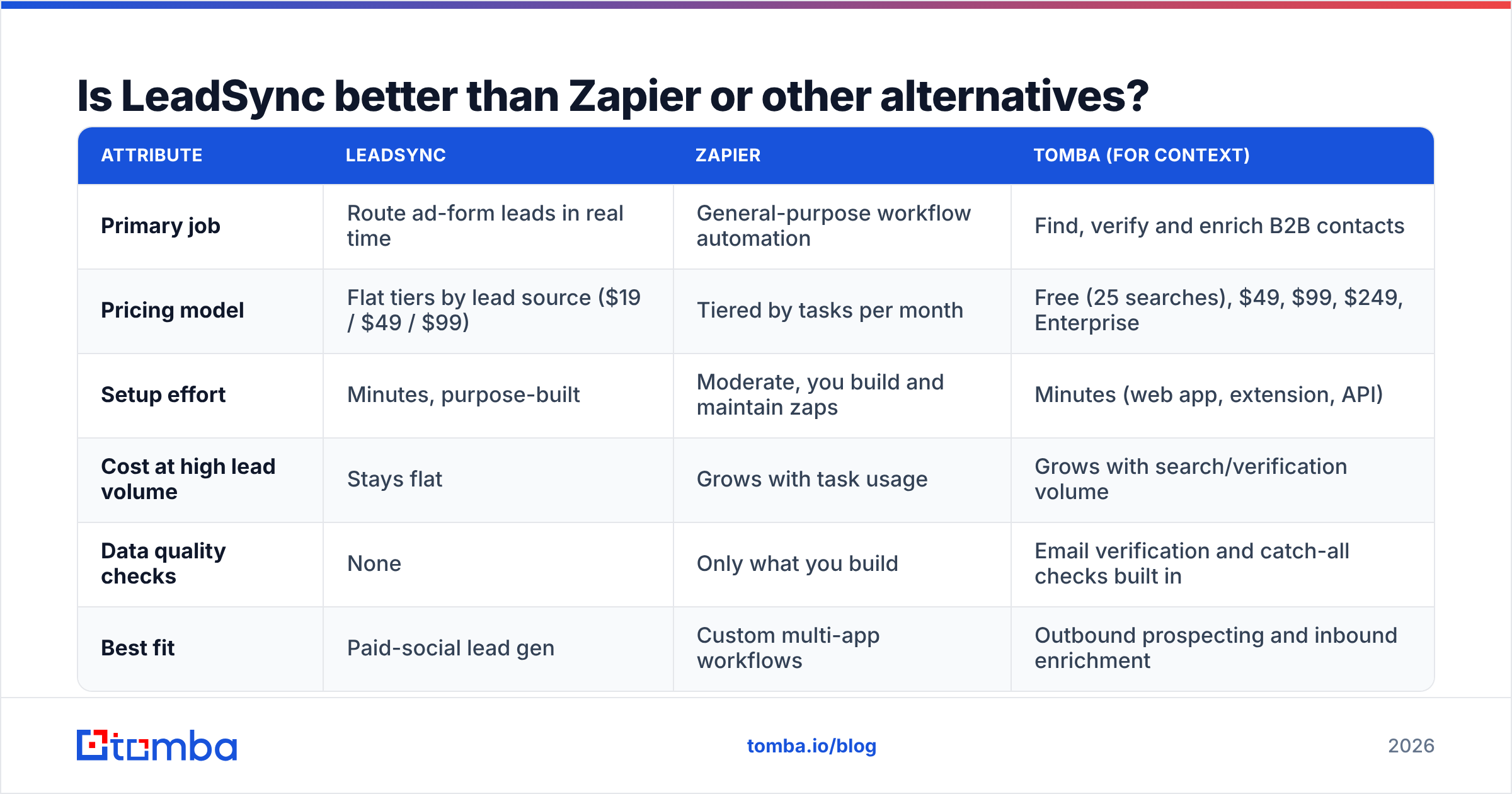
The comparison buyers run most often is LeadSync against Zapier. Zapier can technically do the same job with a "Facebook Lead Ads → CRM" zap. The trade-offs look like this:
| Attribute | LeadSync | Zapier | Tomba (for context) |
|---|---|---|---|
| Primary job | Route ad-form leads in real time | General-purpose workflow automation | Find, verify and enrich B2B contacts |
| Pricing model | Flat tiers by lead source ($19 / $49 / $99) | Tiered by tasks per month | Free (25 searches), $49, $99, $249, Enterprise |
| Setup effort | Minutes, purpose-built | Moderate, you build and maintain zaps | Minutes (web app, extension, API) |
| Cost at high lead volume | Stays flat | Grows with task usage | Grows with search/verification volume |
| Data quality checks | None | Only what you build | Email verification and catch-all checks built in |
| Best fit | Paid-social lead gen | Custom multi-app workflows | Outbound prospecting and inbound enrichment |
The pattern is simple. If ad-form routing is your whole use case, LeadSync is usually cheaper and less fragile than Zapier, because flat pricing doesn't punish volume and there's no zap to break when Meta changes something. If you need branching logic across ten apps, Zapier's flexibility wins.
LeadSync also runs head-to-head against LeadsBridge-style sync platforms. Those typically cover more ad-audience syncing features and cost more. For most small teams and agencies that only need leads delivered fast, LeadSync's narrower scope is an advantage.
Who should buy LeadSync, and who should skip it?#
Map your situation against these profiles before you start the trial.
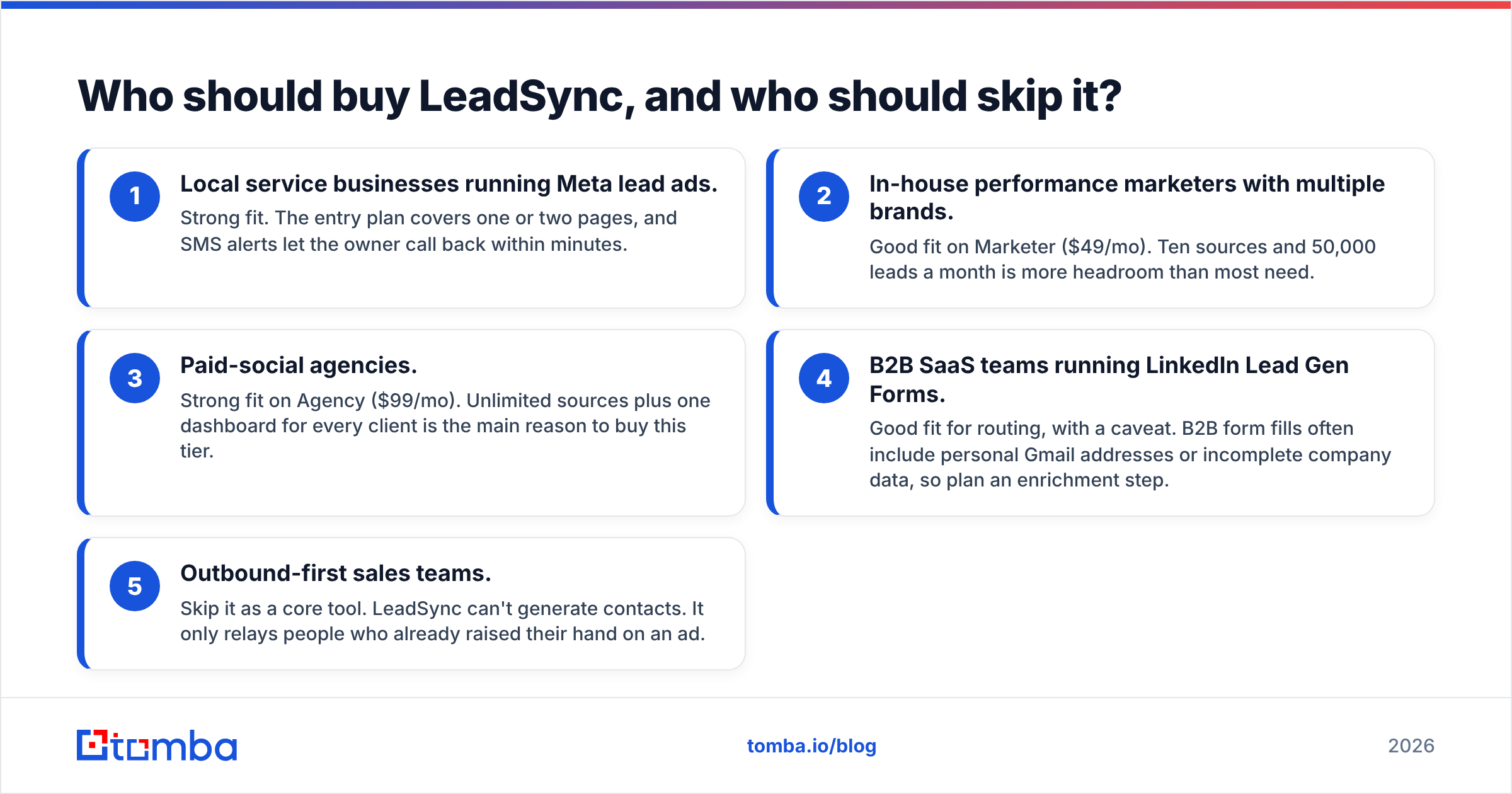
- Local service businesses running Meta lead ads. Strong fit. The entry plan covers one or two pages, and SMS alerts let the owner call back within minutes.
- In-house performance marketers with multiple brands. Good fit on Marketer ($49/mo). Ten sources and 50,000 leads a month is more headroom than most need.
- Paid-social agencies. Strong fit on Agency ($99/mo). Unlimited sources plus one dashboard for every client is the main reason to buy this tier.
- B2B SaaS teams running LinkedIn Lead Gen Forms. Good fit for routing, with a caveat. B2B form fills often include personal Gmail addresses or incomplete company data, so plan an enrichment step.
- Outbound-first sales teams. Skip it as a core tool. LeadSync can't generate contacts. It only relays people who already raised their hand on an ad.
What happens to your leads after LeadSync delivers them?#
This is where most stacks fall short. LeadSync solves the speed-to-lead problem well, but a lead that arrives in 30 seconds with a typo in the email is still a dead lead.
A practical B2B setup looks like this:
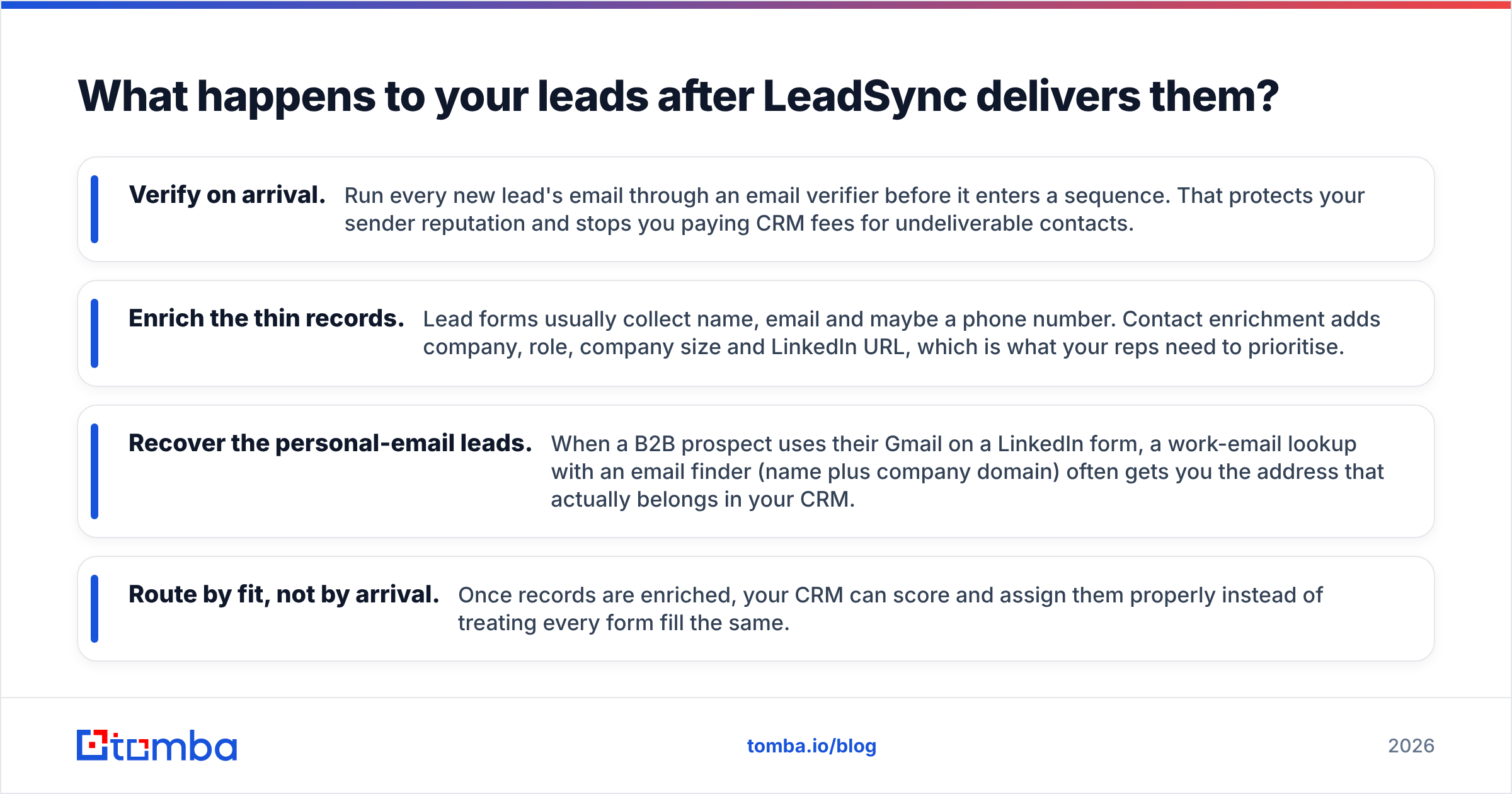
- Verify on arrival. Run every new lead's email through an email verifier before it enters a sequence. That protects your sender reputation and stops you paying CRM fees for undeliverable contacts.
- Enrich the thin records. Lead forms usually collect name, email and maybe a phone number. Contact enrichment adds company, role, company size and LinkedIn URL, which is what your reps need to prioritise.
- Recover the personal-email leads. When a B2B prospect uses their Gmail on a LinkedIn form, a work-email lookup with an email finder (name plus company domain) often gets you the address that actually belongs in your CRM.
- Route by fit, not by arrival. Once records are enriched, your CRM can score and assign them properly instead of treating every form fill the same.
Most of this can be automated in the same CRM or automation layer LeadSync already writes to. Tomba, for example, connects through its API and common integrations, so enrichment runs as soon as the record lands.

Is LeadSync worth the money in 2026?#
For its intended job, yes. At ~$19 to $99 a month, LeadSync is one of the cheaper ways to fix a real revenue leak: ad leads that sit in Meta for hours before anyone sees them. The reviews back up the core promise. It is fast, easy to set up and reliable, with support people actually praise.
Before you buy, check these three things:
- Count your lead sources honestly, including the ones you'll add in six months. That number picks your tier.
- Price the downstream tools. Your CRM, SMS provider and any enrichment layer are part of the true cost per lead.
- Plan for data quality separately. LeadSync delivers what the prospect typed, and B2B teams in particular need verification and enrichment after the sync.
If you're choosing between LeadSync and a DIY Zapier setup for ad-form routing alone, LeadSync is usually the lower-maintenance and more predictable-cost choice. If you're choosing between LeadSync and a prospecting tool, you're comparing two different categories, and most growing teams end up running both.
Frequently asked questions about LeadSync pricing#
Does LeadSync have a free plan? No. There is a 7-day free trial with no credit card required, and every paid plan has a 30-day money-back guarantee.
What is the cheapest LeadSync plan? The entry plan is about $19/mo on monthly billing and covers 2 lead sources. The pricing page advertises "from $16/mo", which appears to reflect annual billing.
Does LeadSync limit the number of leads? The Marketer plan lists 50,000 leads a month, and the Agency plan is unlimited. For most businesses the lead-source cap matters more than the lead-volume cap.
Can LeadSync find or verify email addresses? No. It routes form submissions as submitted. You need a separate tool for verification, enrichment or prospecting.
Want better data on the leads LeadSync delivers?#
LeadSync gets your ad leads to you in seconds. Tomba Email Finder makes sure those leads are worth calling. Turn a Gmail form fill into a verified work email, find the other decision-makers at the same company, and fill in your CRM records before a rep ever dials. You can start with the free tier (25 searches a month) and scale through the Tomba plans once enrichment becomes part of your standard lead flow.
Related guides#
// get started
Find, verify and enrich your first contacts today
Start on the free plan with 25 searches a month, then scale when your team is ready.
Free plan · No credit card required · GDPR & CCPA
// about the author