Leadzen.ai Reviews 2026: Features, Pricing, Pros and Cons
Leadzen.ai promises real-time B2B leads with emails and phone numbers, but there are only a handful of public reviews and pricing is quote-based. Here is what that means for your buying decision.
TL;DR
- Leadzen.ai is an AI-assisted B2B lead generation platform. It returns emails, phone numbers and company details, and it has bulk search, a geo-locator and a LinkedIn/Chrome extension.
- There are very few public Leadzen.ai reviews. G2 shows no scored reviews, and Capterra lists only a couple. That small sample is the biggest risk when you buy.
- Pricing depends on who you ask. Leadzen's own site asks you to request a quote, and third-party directories list prices that disagree with each other. Get the price in writing before you commit.
- Users praise lead relevance. The most common complaints are bugs in the browser extension and a geo-locator that doesn't always work.
- If you mainly need verified work emails at a fixed monthly price, a dedicated email finder with public pricing is easier to budget for and easier to test.
What is Leadzen.ai?#
Leadzen.ai is a B2B lead generation and contact data platform aimed at salespeople, marketers, recruiters and founders. You describe your ideal customer with filters such as industry, location, job title and company size. Leadzen then returns matching people and companies with contact details attached.
Its main features, as the vendor and the major software directories describe them:
- Bulk search: upload or build a list and enrich it in one pass instead of looking people up one at a time.
- Geo-locator: find businesses and contacts within a geographic area. Local and field sales teams will care most about this.
- Multi-filter search: combine firmographic and role filters to narrow your target list.
- Contact reveal: get emails, phone numbers and company information for each record.
- LinkedIn and Chrome extensions: pull contact details while you browse profiles, so you don't have to copy and paste into a separate app.
Leadzen calls its data "real-time," which suggests it looks records up when you request them rather than serving only a static, pre-built database. That approach can give you fresher results. The trade-off is that match rates and verification quality become harder to predict until you test the tool on your own market.
What do real Leadzen.ai reviews actually say?#
Review volume is low. At the time of writing, Leadzen's G2 seller profile doesn't have enough reviews to generate buyer insights, and the Capterra listing shows only a handful. You will also find Leadzen.ai reviews on SourceForge, Slashdot, Software Advice and GetApp. Many of those listings share the same small pool of reviews, so they are not independent sources.
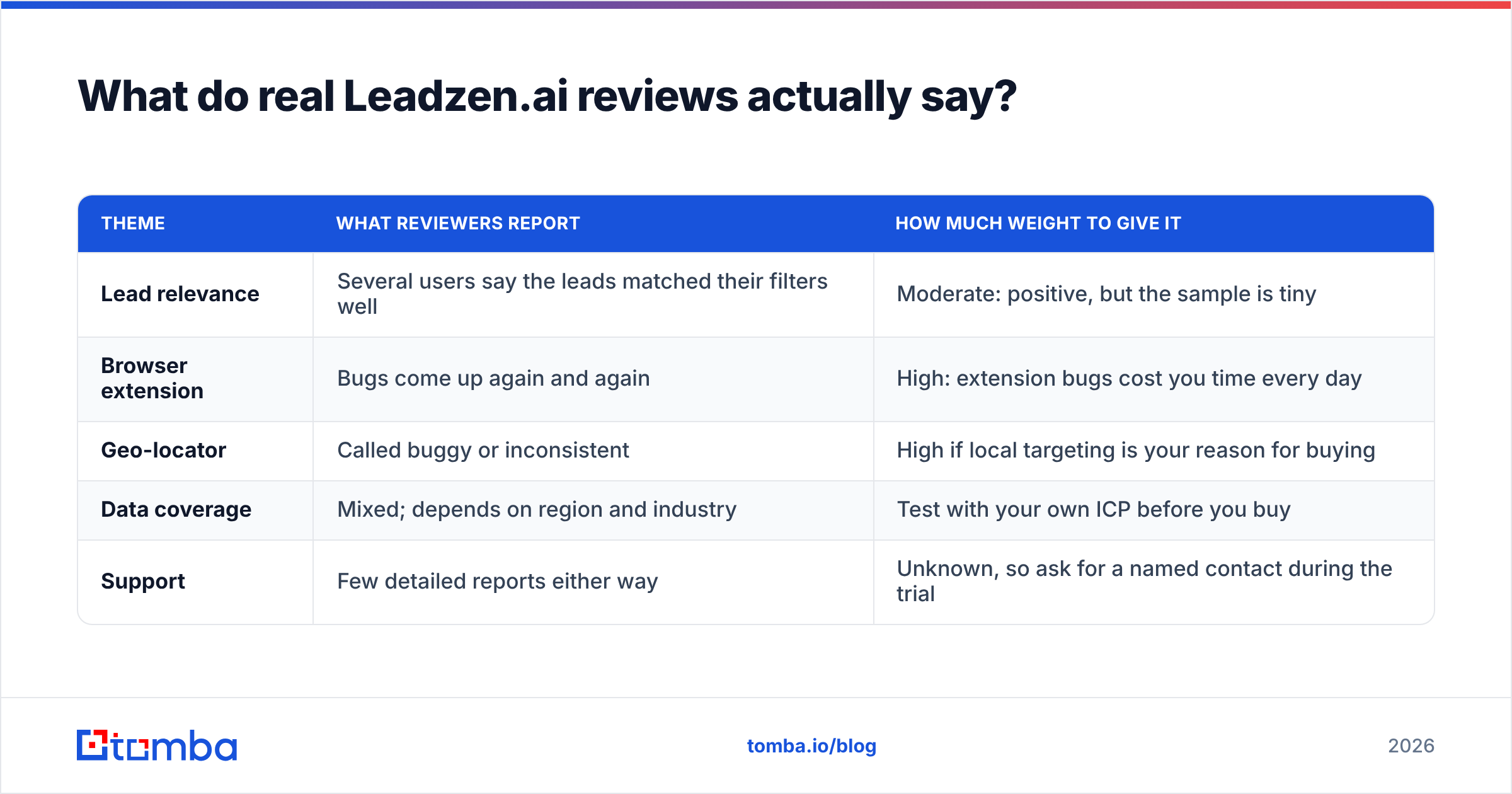
The feedback that does exist falls into a clear pattern:
| Theme | What reviewers report | How much weight to give it |
|---|---|---|
| Lead relevance | Several users say the leads matched their filters well | Moderate: positive, but the sample is tiny |
| Browser extension | Bugs come up again and again | High: extension bugs cost you time every day |
| Geo-locator | Called buggy or inconsistent | High if local targeting is your reason for buying |
| Data coverage | Mixed; depends on region and industry | Test with your own ICP before you buy |
| Support | Few detailed reports either way | Unknown, so ask for a named contact during the trial |
The practical takeaway: a platform with 2 reviews and a 4.5 average tells you much less than one with 500 reviews and a 4.2 average. The numbers don't give you a verdict. You have to run your own trial and measure the results.

How much does Leadzen.ai cost?#
You probably won't find one clear price. Leadzen's website sends most buyers to a quote or a free trial (no credit card required, according to multiple directories). Third-party listings disagree with each other:
- One directory lists four plans from about $133 to $800.
- Another shows editions from roughly $1,120 to $6,720 per month, which reads more like team or enterprise contracts.
- Others simply say "contact vendor."
The gap between those ranges is too large to be rounding. It probably reflects different plan generations, currencies or seat counts. Before you sign anything, get these four things in writing:
- The credit unit: is one credit one email, one phone number, or one full profile?
- Rollover rules: do unused credits carry over, or expire at the end of the month?
- Bounce handling: are credits refunded when an email bounces?
- Contract term: monthly, annual, or a minimum commitment?
If the sales rep can't answer these clearly, treat that as part of your review.
How does Leadzen.ai compare to a dedicated email finder?#
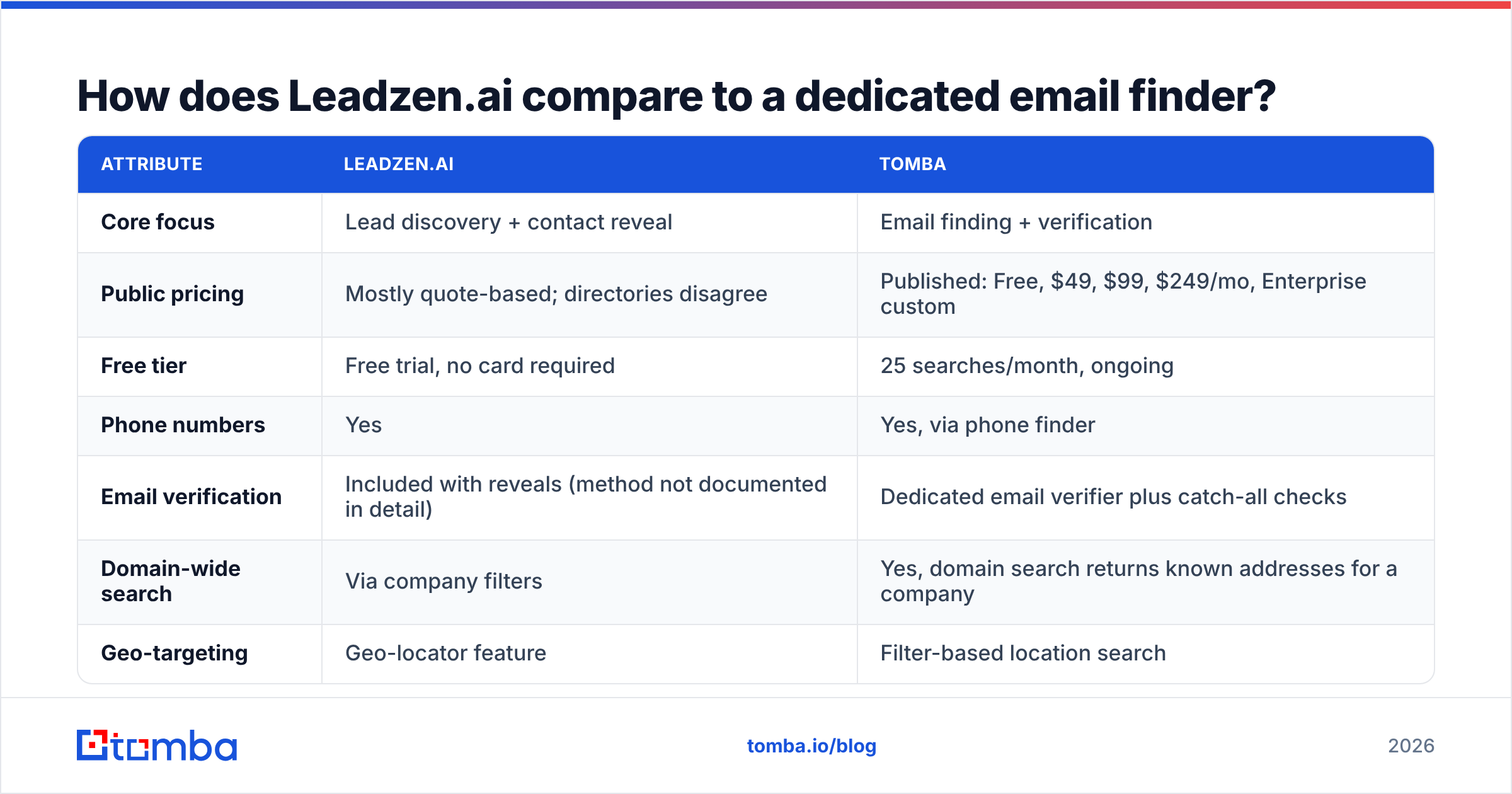
Leadzen is a broad prospecting platform. An email finder like Tomba does a narrower job: it finds and verifies professional email addresses by name, domain or company. Which one fits depends on the gap in your current stack.
| Attribute | Leadzen.ai | Tomba |
|---|---|---|
| Core focus | Lead discovery + contact reveal | Email finding + verification |
| Public pricing | Mostly quote-based; directories disagree | Published: Free, $49, $99, $249/mo, Enterprise custom |
| Free tier | Free trial, no card required | 25 searches/month, ongoing |
| Phone numbers | Yes | Yes, via phone finder |
| Email verification | Included with reveals (method not documented in detail) | Dedicated email verifier plus catch-all checks |
| Domain-wide search | Via company filters | Yes, domain search returns known addresses for a company |
| Geo-targeting | Geo-locator feature | Filter-based location search |
| Browser extension | Yes (reviews mention bugs) | Yes, Chrome extension |
| API access | Ask during the trial | Public API documented at tomba.io/api |
| Public review volume | Very low | Larger footprint on major directories |
Use this table for fit, not for picking a winner. If you want one tool that finds the companies and the people in them, a platform like Leadzen does more. If you already know which accounts you're targeting and just need reliable addresses, a focused finder will usually cost less and be easier to predict. You can compare the published Tomba pricing against whatever quote Leadzen gives you.
What are the pros and cons of Leadzen.ai?#
Pros
- Many channels in one place. Emails, phone numbers and company data all come from the same workflow.
- Geo-based prospecting. Few email-first tools offer this. It's useful for regional sales, franchises and field teams.
- Bulk search. Save hours on list building compared with manual lookups.
- Low-risk trial. You can test the data before paying, which matters given how few reviews exist.
- Aimed at more than sales. Recruiters and founders get value from the same search.
Cons
- Few public reviews. You have little independent evidence of data quality at scale.
- Unclear pricing. Conflicting published prices make budgeting and procurement slow.
- Extension reliability. Reviewers report recurring bugs, and you'll feel that every day if LinkedIn is your main workflow.
- Geo-locator inconsistency. The most distinctive feature is also one of the most criticised.
- Verification is a black box. The vendor doesn't clearly document how it verifies emails, so plan to double-check addresses before sending.
How should you test Leadzen.ai during a free trial?#
A trial only tells you something if you measure the same things for every tool you test. Follow these steps:
- Build a 50-contact benchmark list. Pick real prospects from your ICP whose correct emails you already know, for example past customers or closed-lost deals.
- Run the list through Leadzen. Record how many contacts it found (the match rate), how many were correct (accuracy) and how many came back empty.
- Verify every returned address independently. Run the results through a separate verifier and log valid, invalid, catch-all and unknown.
- Test the extension for a full day of real prospecting. Bugs that don't show up in a 10-minute demo tend to appear after 40 profile views.
- Test the geo-locator on your actual territory. Don't use the demo city. Use the region your reps actually cover.
- Calculate cost per verified contact. Divide the quoted monthly price by the number of verified, correct contacts you expect each month. That is the number to compare across vendors.
Run the same 50 contacts through at least one alternative. A match rate means little on its own. It tells you something only when you compare it with another tool on the same list.
Why does email verification matter so much here?#
When a tool doesn't document its verification method, you carry the deliverability risk. Sending to invalid addresses raises your bounce rate. Mailbox providers read a high bounce rate as a sign of a poor sender, and your reputation drops across the whole domain, not just for that one campaign.
Two scenarios catch teams out most often:
- Catch-all domains. The mail server accepts every address, so a basic SMTP check reports "valid" even for addresses that don't exist. You need a verifier that labels catch-all results separately so you can decide how much risk to take.
- Stale records. People change jobs. Records updated at the moment you look them up help here. Even so, a verification pass just before sending should be standard practice for any list, whatever the source.
Regardless of which prospecting tool you choose, add verification as a separate step before contacts go into your sequencer.

Who should use Leadzen.ai, and who should skip it?#
Leadzen.ai is a reasonable fit if:
- You prospect by geography: local services, regional distributors, field sales.
- You want emails and phone numbers from one interface and you're willing to verify separately.
- Your team works on small or mid-sized lists and can live with the occasional extension bug.
- You can run a proper trial and negotiate the contract terms yourself.
You should probably look elsewhere if:
- Procurement needs published, fixed pricing before a trial.
- Your reps live in a LinkedIn extension all day and need it to work every time.
- You need documented verification methods and bounce guarantees for compliance or deliverability SLAs.
- You mostly need email addresses for accounts you already know, which a focused finder handles more cheaply.
What are the best alternatives to Leadzen.ai?#
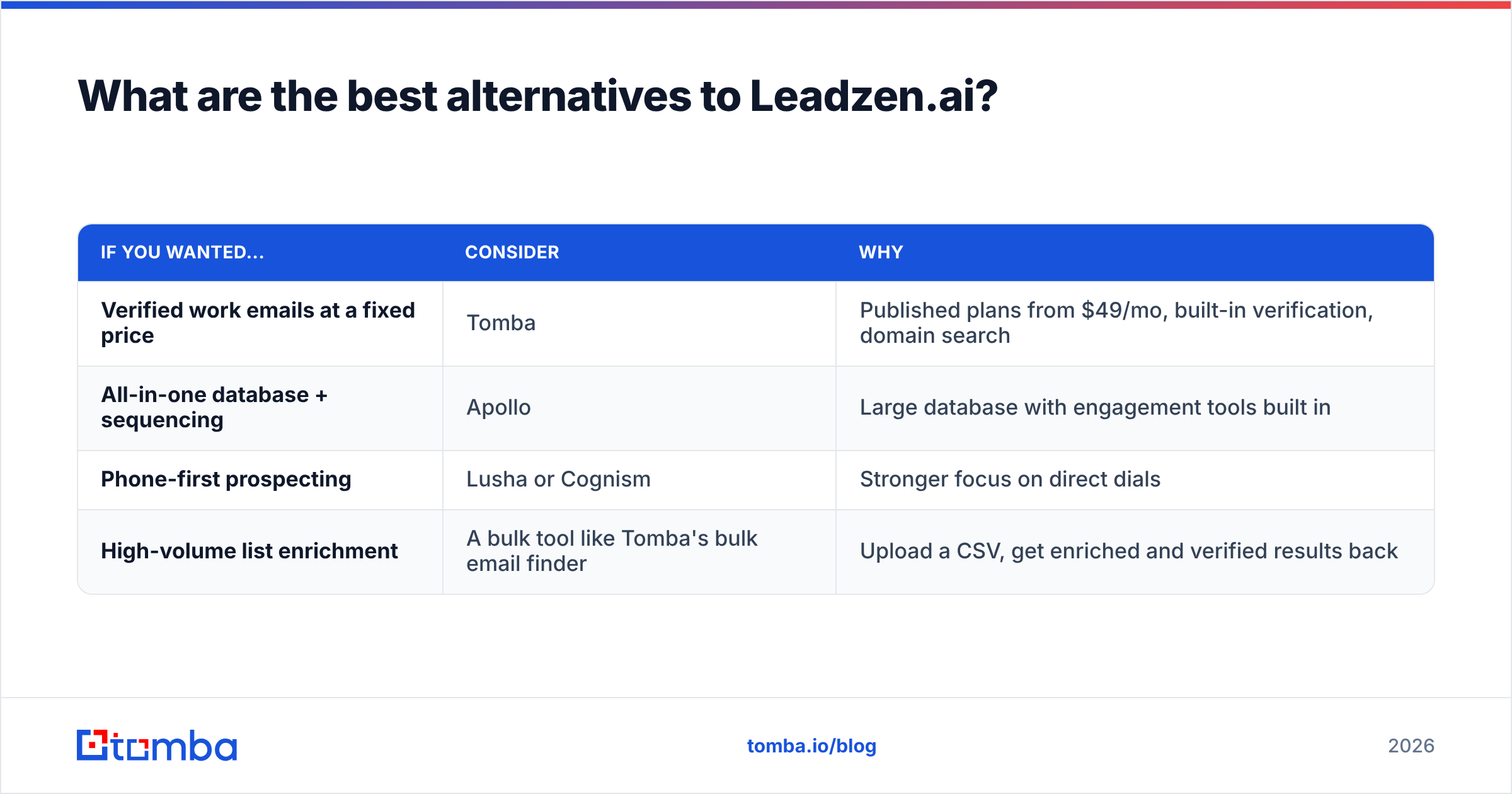
Which alternative makes sense depends on why you were looking at Leadzen:
| If you wanted... | Consider | Why |
|---|---|---|
| Verified work emails at a fixed price | Tomba | Published plans from $49/mo, built-in verification, domain search |
| All-in-one database + sequencing | Apollo | Large database with engagement tools built in |
| Phone-first prospecting | Lusha or Cognism | Stronger focus on direct dials |
| High-volume list enrichment | A bulk tool like Tomba's bulk email finder | Upload a CSV, get enriched and verified results back |
For any of these, run the same 50-contact benchmark described above. Vendor claims about accuracy are marketing. Your own match-and-verify test gives you data you can actually rely on.
Is Leadzen.ai worth it in 2026?#
It could be, but you'll have to prove it with your own trial, because the public record is too thin to settle it. The features are legitimately useful, especially the geo-locator and bulk search, and the free trial makes testing cheap. On the other hand, the small number of reviews, conflicting pricing and repeated extension complaints mean you should treat any purchase as provisional. Get the contract terms in writing, measure cost per verified contact, and keep a separate verification step no matter what.
If your real bottleneck is getting accurate professional email addresses for accounts you've already chosen, you probably don't need a full prospecting platform. Tomba Email Finder finds work emails by name, domain or company, verifies them before you send, and publishes its pricing: a free tier with 25 searches a month, then $49, $99 and $249 plans. Start with the free tier, run your 50-contact benchmark against Leadzen's trial results, and choose based on the numbers.
Related guides#
// get started
Find, verify and enrich your first contacts today
Start on the free plan with 25 searches a month, then scale when your team is ready.
Free plan · No credit card required · GDPR & CCPA
// about the author