LeadzenAI vs Pipileads: Honest 2026 Comparison for B2B Teams
One is an AI prospecting suite built for India-focused sales teams, the other is a $9.95/mo LinkedIn email finder. Here's how LeadzenAI and Pipileads compare on data, pricing, and workflow, and which one fits your team.
TL;DR
- LeadzenAI is a full AI prospecting platform. It has natural-language lead search, a LinkedIn Chrome extension, emails and phone numbers, and multichannel outreach that includes WhatsApp. It's built mainly for Indian SMB and mid-market sales teams.
- Pipileads is a lightweight LinkedIn email finder and verifier. It works on top of Sales Navigator and Recruiter and has transparent pricing from a free 50-credit plan up to $99.95/mo.
- Choose LeadzenAI if you want search, contact data, and outreach in one tool and you sell into India or APAC.
- Choose Pipileads if you already live in Sales Navigator and just need cheap, fast email lookups on the profiles you've found.
- If neither fits, for example because you need domain-based search, strong verification, or an API, a general email finder like Tomba covers the gaps. Its plans start at $49/mo.
What are LeadzenAI and Pipileads, and why compare them?#
These two tools show up in the same searches, but they solve different problems. The label "lead generation tool" hides that.
LeadzenAI calls itself an AI-driven B2B lead generation platform. You get a web console where you describe your ideal buyer in plain language or with filters. You also get a Chrome extension that shows emails, phone numbers, and AI-generated buyer notes directly on LinkedIn profiles. On top of that sits an outreach layer covering email, LinkedIn messages, WhatsApp, and calling. It is clearly built for Indian sales teams, where WhatsApp and mobile numbers often matter more than email.
Pipileads is much narrower. It's an email finder and verifier that sits on top of LinkedIn, including Sales Navigator and Recruiter. You find people in LinkedIn, and Pipileads returns their professional email addresses, plus phone data on higher plans. It doesn't try to be your search engine or your sequencer.
So the real question isn't which one has better data. It's whether you want a platform or a utility. The rest of this post helps you answer that.
How do LeadzenAI and Pipileads work day to day?#
Here's the core difference in practice. These are the five workflow steps where the tools behave differently:
- Finding prospects. In LeadzenAI you search its database from the web console, with filters or a natural-language prompt like "Heads of Sales at Bangalore fintechs with 50–200 employees". Pipileads has no search of its own. You build the list in LinkedIn or Sales Navigator first.
- Getting contact data. LeadzenAI shows emails and phone numbers in its console and through its Chrome extension. Pipileads adds an email lookup to LinkedIn profiles and search results, and you spend a credit for each contact you reveal.
- Verification. Both say they verify, but they go about it differently. Pipileads treats verification as a core feature next to finding. LeadzenAI treats it as one part of a broader data pipeline. Run your own checks either way (more on this below).
- Outreach. LeadzenAI includes multichannel outreach (email, LinkedIn, WhatsApp, calling). Pipileads expects you to export to your own sequencer, such as Instantly, Lemlist, or your CRM.
- Team scale. Pipileads' top listed plan covers 10 users. LeadzenAI pricing depends on edition and usage, and it's aimed at SDR teams rather than solo users.
If you picture a restaurant, LeadzenAI is the set menu: sourcing, prep, and service included. Pipileads is the specialist knife you bring into your own kitchen. The set menu is easier, and the knife is cheaper and more flexible.
How do LeadzenAI and Pipileads compare feature by feature?#
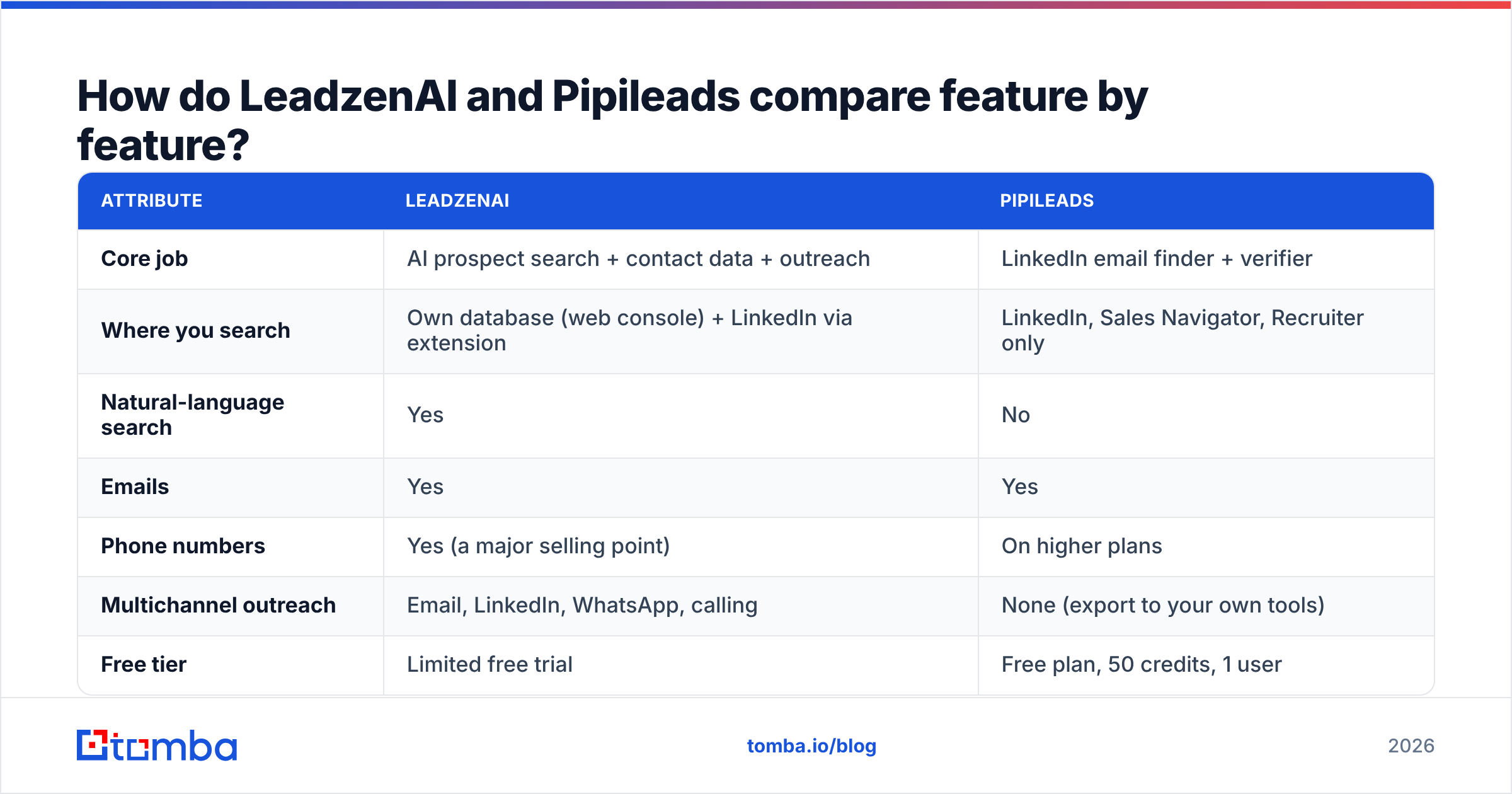
| Attribute | LeadzenAI | Pipileads |
|---|---|---|
| Core job | AI prospect search + contact data + outreach | LinkedIn email finder + verifier |
| Where you search | Own database (web console) + LinkedIn via extension | LinkedIn, Sales Navigator, Recruiter only |
| Natural-language search | Yes | No |
| Emails | Yes | Yes |
| Phone numbers | Yes (a major selling point) | On higher plans |
| Multichannel outreach | Email, LinkedIn, WhatsApp, calling | None (export to your own tools) |
| Free tier | Limited free trial | Free plan, 50 credits, 1 user |
| Entry paid price | Quote-based. Third-party listings start around $133/mo | $9.95/mo for 250 credits |
| Top listed price | Enterprise editions reported in the thousands per month | $99.95/mo for 7,500 credits, 10 users |
| Pricing transparency | Low. Figures vary widely by source | High. Published tiers |
| Geographic strength | India / APAC | Global, but only as good as LinkedIn coverage |
| Best for | SDR teams wanting one platform, India-focused sales | Solo reps and small teams already on Sales Navigator |

The table makes the tradeoff obvious. LeadzenAI does more jobs, and Pipileads does one job cheaply. Most buyers regret choosing on price alone when they actually needed the platform, or paying for a platform when they only needed lookups.
Which one is cheaper: LeadzenAI or Pipileads?#
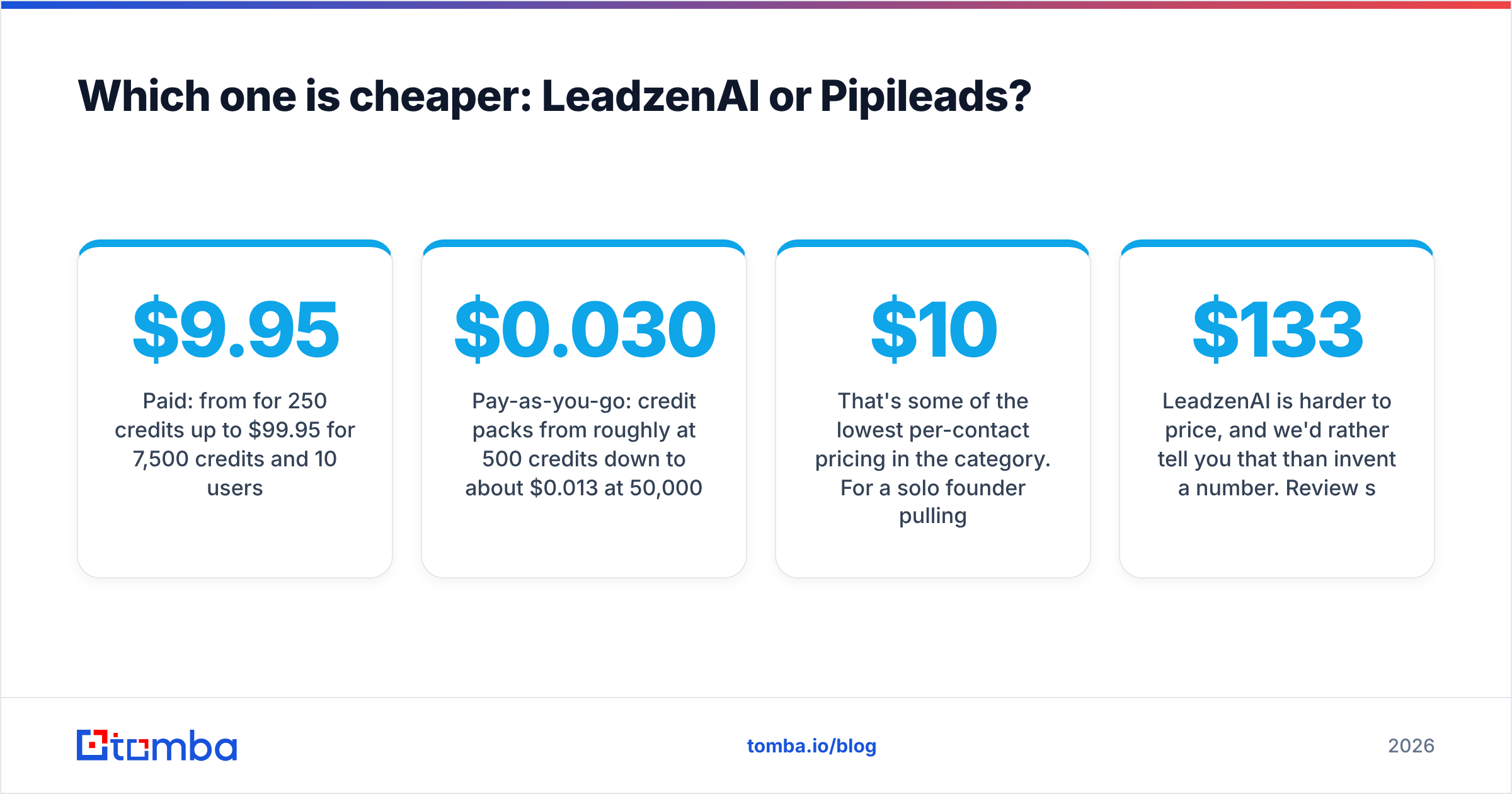
On list price, Pipileads wins easily. Per third-party listings and its pricing page, you get:
- Free: 50 credits, 1 user
- Paid: from $9.95/mo for 250 credits up to $99.95/mo for 7,500 credits and 10 users
- Pay-as-you-go: credit packs from roughly $0.030 per credit at 500 credits down to about $0.013 per credit at 50,000
That's some of the lowest per-contact pricing in the category. For a solo founder pulling 200–300 contacts a month from Sales Navigator, the whole bill can come in under $10.
LeadzenAI is harder to price, and we'd rather tell you that than invent a number. Review sites report figures from about $133/mo to several thousand dollars a month depending on edition. The vendor also offers custom pricing based on usage and business size. Some sources mention models tied to qualified meetings delivered. Get a written quote that spells out credits, seats, phone-number reveals, and outreach limits before you compare.
The fair comparison is total cost, not list price. If you'd otherwise pay for Pipileads plus Sales Navigator plus a sequencer plus a WhatsApp or calling tool, LeadzenAI's bundled price can look much better. If you already pay for all of those, Pipileads is close to free on top.

Which has better data accuracy?#
There's no independent, head-to-head benchmark of LeadzenAI vs Pipileads that we'd trust. Anyone who gives you a precise accuracy percentage for either tool is guessing or repeating marketing copy. What we can do is explain where each tool's accuracy is likely to be strong or weak.

Where LeadzenAI is likely strong: Indian and APAC mid-market companies, mobile numbers, and records it enriches for its core market. That regional focus is a real advantage. Many Western tools have thin coverage of Indian SMBs, and phone numbers often get better replies than email there.
Where LeadzenAI may be weaker: North American and European mid-market contacts, where Western data providers have spent a decade building coverage.
Where Pipileads is likely strong: anyone with an active, up-to-date LinkedIn profile at a company with a clear email pattern. Because you start from a live LinkedIn profile, the name, title, and company are usually current.
Where Pipileads may be weaker: catch-all domains, small companies with unusual email formats, and people whose LinkedIn profiles are stale. An email finder that works from a profile is only as good as the profile.
In practice, whichever tool you choose, run exported contacts through an independent email verifier before your first send. A bounce rate above 2–3% on a new domain can damage your sender reputation faster than a better tool can fix it. Treat catch-all results as "unknown", not "valid".
Is LeadzenAI or Pipileads better for LinkedIn prospecting?#
Both run on LinkedIn, but they relate to it differently.
Pipileads is LinkedIn-native. If your team's prospecting motion is "build a Sales Navigator search, save the list, pull emails", Pipileads fits right into that loop. You add almost nothing to the stack, and there's almost nothing new to learn.
LeadzenAI treats LinkedIn as one surface among several. Its Chrome extension works on profiles, but the product's center of gravity is its own search console and outreach layer. If your reps are happiest in Sales Navigator, they may barely touch the console. You'd then be paying for a platform and using it as an extension.
One caveat applies to both. Tools that pull data from LinkedIn pages sit in a gray zone under LinkedIn's user agreement. Use reasonable daily volumes, don't automate aggressively from your main account, and check each vendor's compliance documentation, especially if you sell into the EU under GDPR.
If LinkedIn lookups are all you need, also compare dedicated options like Tomba's LinkedIn finder. It returns professional emails from a profile URL and pairs them with domain search and verification in the same account.
Which one fits which team?#
Pick LeadzenAI if:
- You sell mostly into India or APAC, and WhatsApp and phone outreach drive your pipeline.
- You have a small SDR team and want one login for search, data, and outreach.
- You don't already pay for Sales Navigator and would rather not.
- You're comfortable with a sales-led buying process and a custom quote.
Pick Pipileads if:
- You already have Sales Navigator and you're happy with how you build lists.
- You need a few hundred to a few thousand emails a month at the lowest possible cost per contact.
- You already have a sequencer and CRM, and you don't want another outreach tool.
- You want to start free (50 credits) and scale month to month with no contract.
Consider neither if:
- You prospect by company domain rather than by LinkedIn profile, for example from a list of target accounts, website visitors, or event attendees. Neither tool is built around domain-first search.
- You need an API to enrich records automatically inside your CRM or data warehouse.
- You need real bulk processing of CSVs with tens of thousands of rows, with verification built in.

What are the pros and cons of each?#
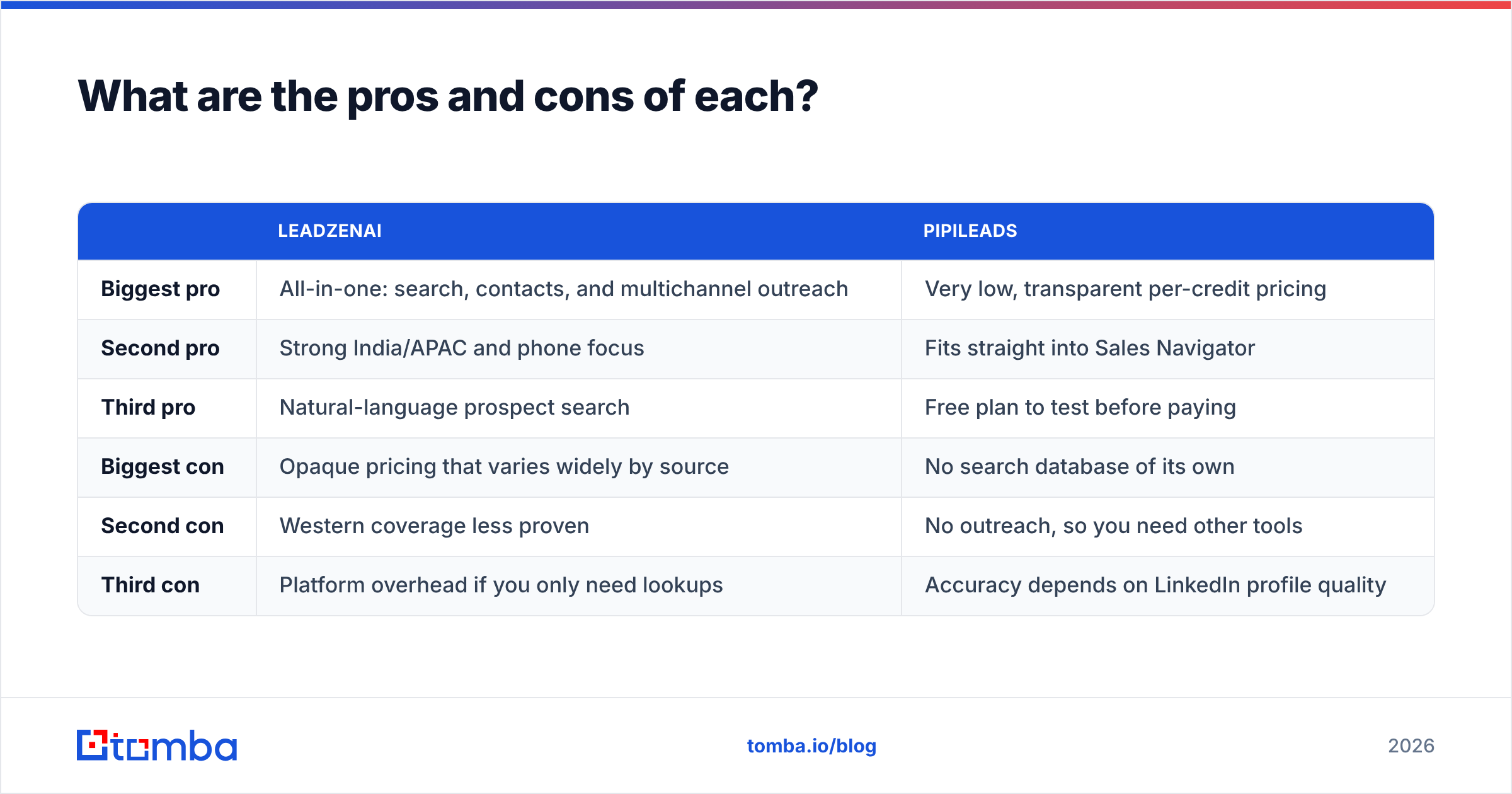
| LeadzenAI | Pipileads | |
|---|---|---|
| Biggest pro | All-in-one: search, contacts, and multichannel outreach | Very low, transparent per-credit pricing |
| Second pro | Strong India/APAC and phone focus | Fits straight into Sales Navigator |
| Third pro | Natural-language prospect search | Free plan to test before paying |
| Biggest con | Opaque pricing that varies widely by source | No search database of its own |
| Second con | Western coverage less proven | No outreach, so you need other tools |
| Third con | Platform overhead if you only need lookups | Accuracy depends on LinkedIn profile quality |
How should you test LeadzenAI vs Pipileads before buying?#
Don't pick based on a demo. Run a 30-minute bake-off with your own data:
- Build a test list of 50 contacts you already know are valid, such as recent customers or people who replied to you before. That gives you ground truth.
- Run all 50 through both tools. Record found / not found, email returned, and phone returned.
- Compare against known emails. Count exact matches, wrong addresses, and "valid" results that are really catch-all guesses.
- Run a second list of 50 fresh prospects from your real ICP and verify every result independently.
- Calculate cost per verified contact, not cost per credit. A $0.013 credit that returns 60% usable emails can cost more than a pricier credit that returns 85%.
- Time the workflow. How many clicks does it take to get from "I found a prospect" to "they're in my sequence"? Rep time is usually the biggest hidden cost.
This test will tell you more than any review, including this one.
So, LeadzenAI or Pipileads: which should you choose?#
For India-focused teams that want one platform, choose LeadzenAI. The regional data, phone coverage, WhatsApp outreach, and natural-language search are real advantages, and competitors built for Western markets don't match them well. Negotiate the quote carefully and confirm what's included.
For Sales Navigator users on a budget, choose Pipileads. It's cheap, simple, and stays out of your way. It won't help you find prospects, but if LinkedIn already does that for you, you don't need that help.
For many B2B teams, especially those outside India who prospect by account and domain rather than by LinkedIn profile, the better answer is a dedicated email finder with verification built in. Compare Tomba plans against both before you commit.
Need emails from domains, names, and LinkedIn in one place?#
If your prospecting starts from a list of target companies rather than a Sales Navigator search, try the Tomba Email Finder. Enter a domain, a name and company, or a LinkedIn URL and get professional email addresses with verification status attached. You can also run the same lookups in bulk from a CSV or through the API. It works alongside Sales Navigator and your existing sequencer, so you don't have to change tools. You can start on the free tier with 25 searches a month and move to Starter at $49/mo once it proves itself on your own test list.
Related guides#
// get started
Find, verify and enrich your first contacts today
Start on the free plan with 25 searches a month, then scale when your team is ready.
Free plan · No credit card required · GDPR & CCPA
// about the author