LeadzenAI vs Snappy Leads (2026): Features, Pricing, Accuracy
LeadzenAI sells AI-filtered prospect lists and buying signals. Snappy Leads sells unlimited lookups for £10 a month. We compare data depth, pricing, verification and workflow fit so you can pick the one that suits how you prospect.
TL;DR
- LeadzenAI is a prospecting platform. It gives you AI-assisted search filters, bulk list building, a Chrome extension, and "trending leads" signals such as recently funded companies. Third-party listings put paid plans at roughly $133/month and up, and there is a freemium tier.
- Snappy Leads is a lightweight contact-lookup tool from the UK. It offers unlimited email and phone lookups plus a built-in verifier for a flat £10/month.
- Choose LeadzenAI if you need to discover who to target. Choose Snappy Leads if you already know who you want and only need their contact details cheaply.
- Neither tool publishes independent accuracy benchmarks. Verify every list before you send, whichever one you buy.
- If you want transparent credit pricing, verification, and API access in one place, a dedicated email finder such as Tomba (Starter at $49/month) sits between the two on price and depth.
What are LeadzenAI and Snappy Leads?#
Both tools sell B2B contact data, but they solve different problems. An analogy helps here. LeadzenAI works like a real estate agent who helps you decide which neighborhoods and houses are worth looking at. Snappy Leads works like a phone directory: you already know the address, and you want the number.
LeadzenAI (leadzen.ai) calls itself an AI lead generation platform for startups and small to mid-sized businesses. Its main workflow is search-first. You set filters for industry, location, company size, role and similar attributes, bulk-search for matching prospects, and export contacts with emails, phone numbers and company details. It adds a "trending leads" section that surfaces signals like recently funded companies and active angel investors, and a Chrome extension that captures contact data from LinkedIn and company websites. Listings on review sites such as GetApp describe its typical users as sales teams in tech, fintech, marketing agencies, financial services and consulting.
Snappy Leads (snappyleads.co.uk) is narrower and more aggressively priced. For £10/month it promises unlimited lookups of business and personal emails, phone numbers and social profiles, with no lookup caps. It also has an email verification page, CSV export for pushing results into your CRM or sequencer, and a trial cold-outreach email generator. The database size in its marketing varies by page and listing, from "200M+" to "1B+" contacts, so read those numbers as marketing claims, not audited figures.
How do LeadzenAI and Snappy Leads compare feature by feature?#
The table below uses public product pages and third-party software directories as of 2026. Pricing changes often, so check each vendor's pricing page before you commit.
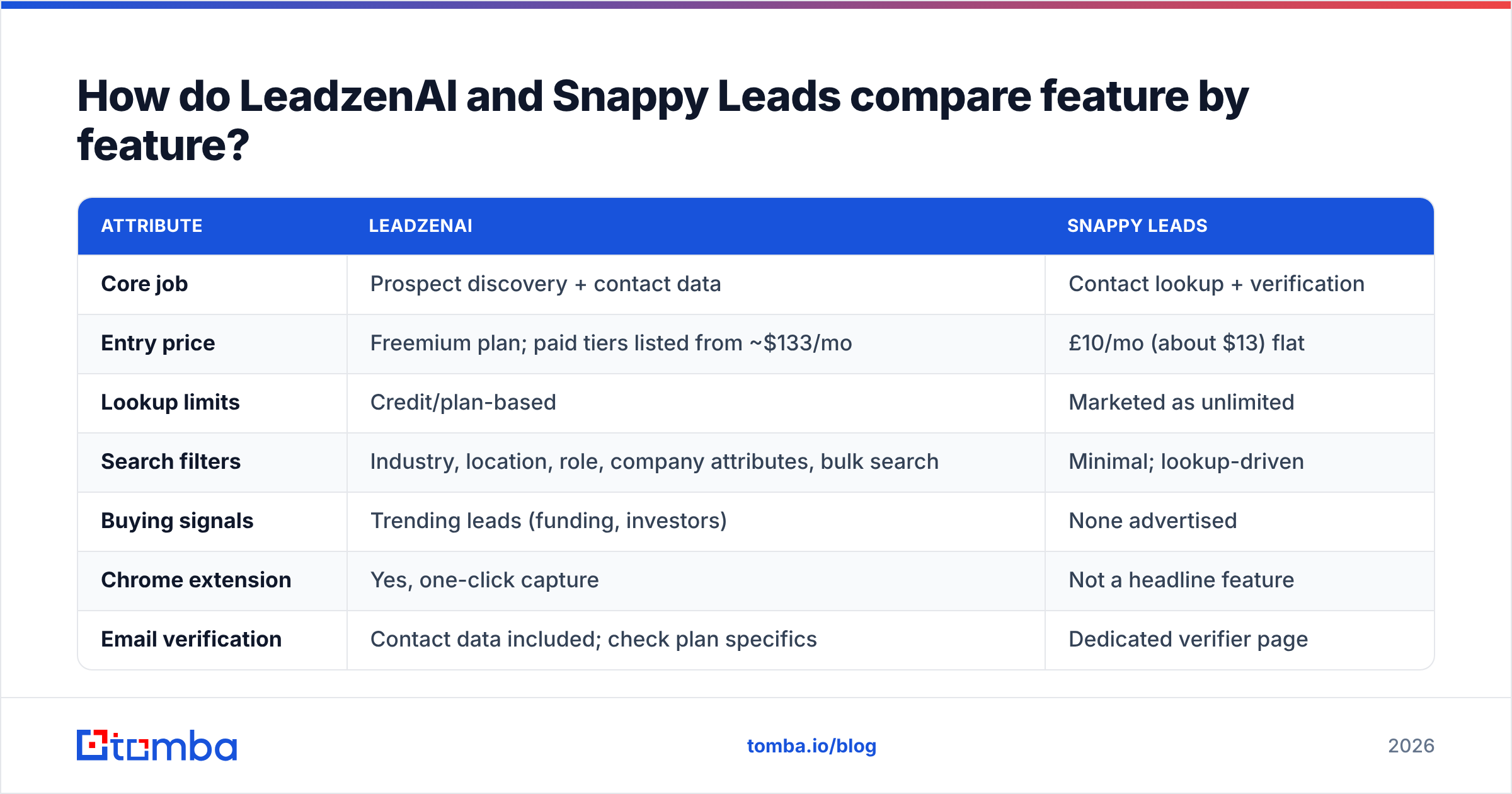
| Attribute | LeadzenAI | Snappy Leads |
|---|---|---|
| Core job | Prospect discovery + contact data | Contact lookup + verification |
| Entry price | Freemium plan; paid tiers listed from ~$133/mo | £10/mo (about $13) flat |
| Lookup limits | Credit/plan-based | Marketed as unlimited |
| Search filters | Industry, location, role, company attributes, bulk search | Minimal; lookup-driven |
| Buying signals | Trending leads (funding, investors) | None advertised |
| Chrome extension | Yes, one-click capture | Not a headline feature |
| Email verification | Contact data included; check plan specifics | Dedicated verifier page |
| Phone numbers | Yes | Yes |
| Export | Platform export / CSV | CSV |
| Public API | Not a primary selling point | Not advertised |
| Independent reviews | Listed on GetApp, TrustRadius, Software Advice | Sparse third-party coverage |
| Best for | SMB sales teams building lists from scratch | Solo founders and freelancers on tight budgets |
The pattern is clear. LeadzenAI charges more because it does more of the thinking for you, including the "who should I even target?" step. Snappy Leads removes nearly all the cost friction, but you bring your own targeting logic and do your own quality checks.

What should you actually evaluate before choosing?#
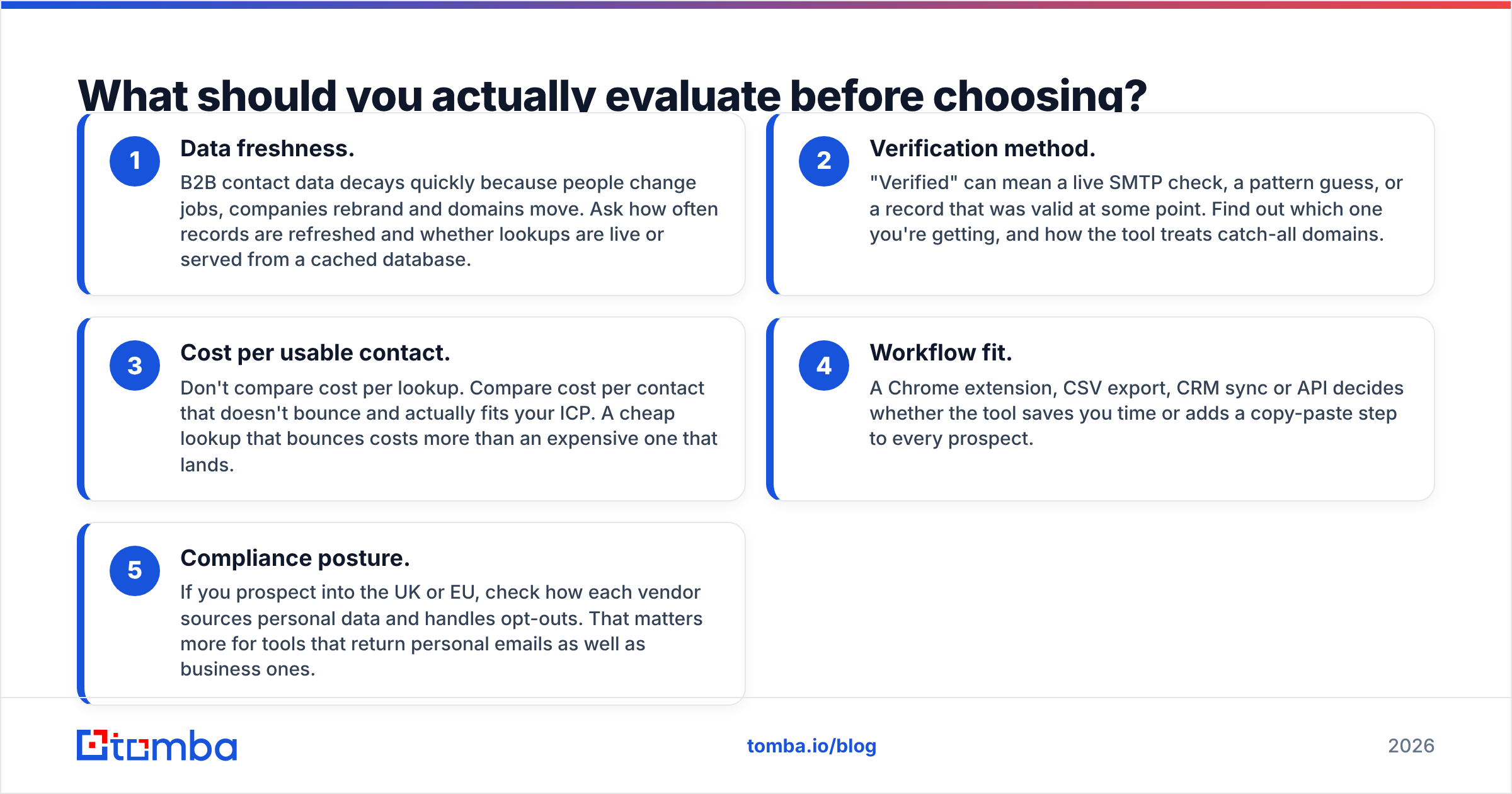
Feature lists can mislead. Two tools with the same checkboxes can deliver very different bounce rates. Before you pick either one, score it on these five criteria:
- Data freshness. B2B contact data decays quickly because people change jobs, companies rebrand and domains move. Ask how often records are refreshed and whether lookups are live or served from a cached database.
- Verification method. "Verified" can mean a live SMTP check, a pattern guess, or a record that was valid at some point. Find out which one you're getting, and how the tool treats catch-all domains.
- Cost per usable contact. Don't compare cost per lookup. Compare cost per contact that doesn't bounce and actually fits your ICP. A cheap lookup that bounces costs more than an expensive one that lands.
- Workflow fit. A Chrome extension, CSV export, CRM sync or API decides whether the tool saves you time or adds a copy-paste step to every prospect.
- Compliance posture. If you prospect into the UK or EU, check how each vendor sources personal data and handles opt-outs. That matters more for tools that return personal emails as well as business ones.
LeadzenAI tends to do better on criteria 4 and on the discovery side of criterion 3. Snappy Leads wins on raw price. Neither publishes enough detail on criteria 1 and 2 for you to skip your own testing.

Is Snappy Leads' unlimited £10 plan too good to be true?#
Not necessarily, but you should know what "unlimited" usually means in this category.
Every contact-data vendor pays to acquire, refresh and verify records. SMTP verification costs infrastructure, and so does phone validation. A flat £10/month with no caps generally means one or more of the following:
- Most lookups hit a pre-built database, not live verification.
- Refresh cycles are longer than they are at premium vendors.
- Fair-use limits or rate limits exist even without a hard credit count.
- The business counts on most subscribers using it lightly.
None of these is a dealbreaker. For a freelancer who needs 50 contacts a week, an older record that you verify yourself can still be a great deal. It becomes a problem when you pull 5,000 contacts, skip verification, and send from your main domain. A bounce rate above 2–3% can hurt sender reputation fast, and fixing a burned domain costs far more than £10.
The practical fix is simple. Treat Snappy Leads output as candidates, not confirmed contacts. Run every export through an independent email verifier before it reaches your sequencer, and pay special attention to catch-all domains, where a standard check can't confirm the mailbox exists.
Is LeadzenAI worth roughly 10x the price?#
It depends on whether you have a targeting problem or a contact problem.
If your team spends hours each week deciding which companies to target, researching funding news, filtering by headcount and building lists by hand, LeadzenAI's filters and trending-leads feed can replace a lot of manual work. A single SDR hour is often worth more than the monthly price difference, so the math can work well.
If you already have a target account list from your CRM, a conference attendee list or a partner referral, most of what LeadzenAI charges for goes unused. You're paying for a discovery engine when you only need a lookup.
A few things to check before you sign up:
- Pricing clarity. Third-party listings show a wide range for LeadzenAI plans, from about $133/month at the Standard tier to much higher enterprise figures. Confirm the current numbers and credit allowances on LeadzenAI's pricing page instead of relying on directory snapshots.
- Regional coverage. Test with a sample of prospects from your markets. Coverage in B2B databases is rarely even across regions, and a tool that's strong in one geography can be thin in another.
- Credit consumption. Find out whether revealing an email and a phone number costs one credit or two, and whether failed lookups consume credits.
How accurate are LeadzenAI and Snappy Leads?#
Neither vendor publishes an independent, reproducible accuracy benchmark. That's common in this category and not specific to these two, but it means you have to test yourself.

Here's a 30-minute test you can run on any contact tool, including these two:
- Pick 100 prospects from your real ICP, with names and company domains you know are current.
- Run them through each tool and record the find rate: how many returned an email at all.
- Run every returned email through a separate verifier and record valid, invalid, catch-all and unknown.
- Calculate usable contacts ÷ total cost for a month of your expected volume.
Tools often look similar on find rate and diverge sharply on step 3. A tool that finds 80 emails with 20 invalid is worse than one that finds 65 with 2 invalid, because the invalid ones damage your domain.
Which tool fits which use case?#
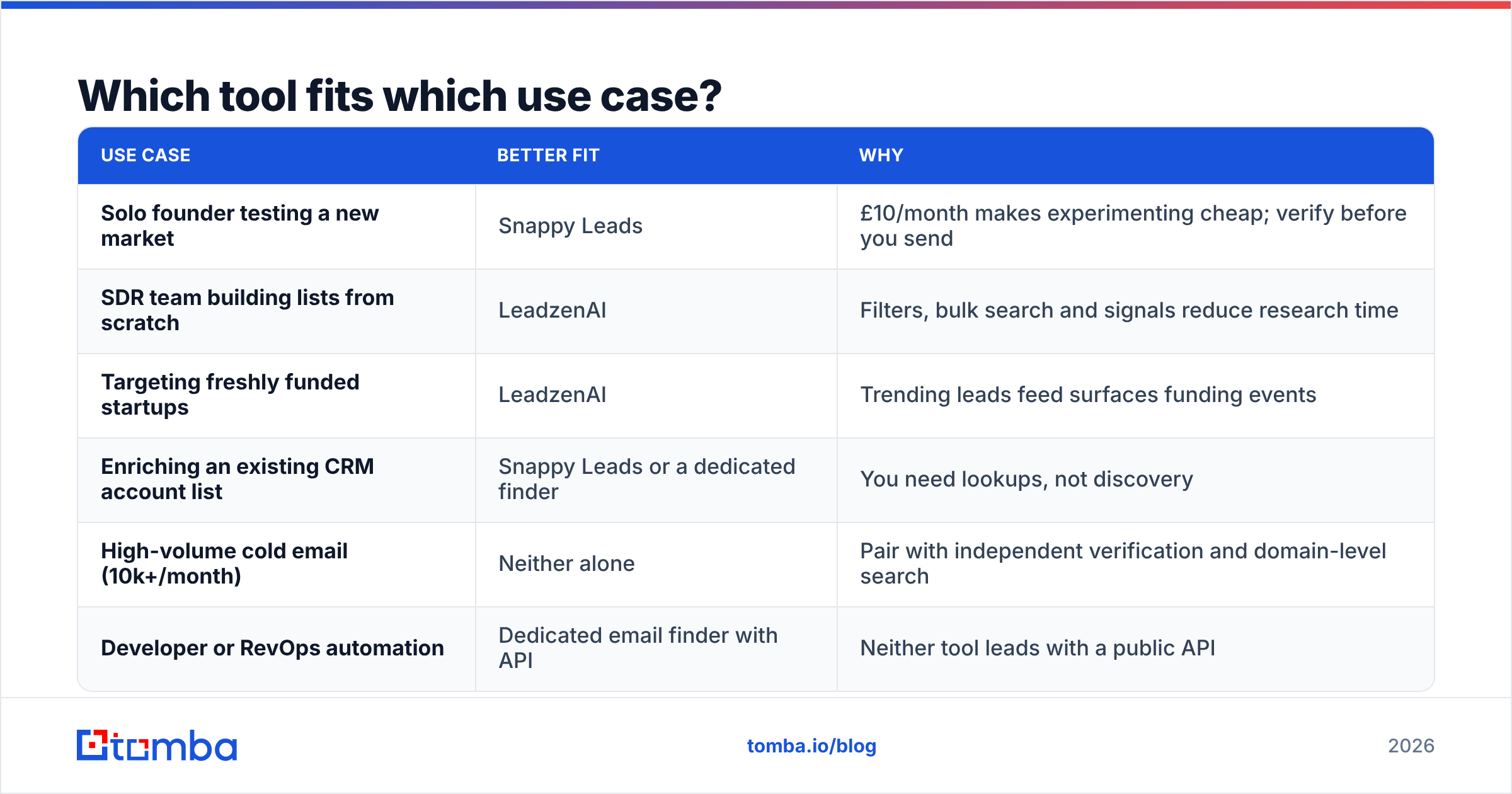
| Use case | Better fit | Why |
|---|---|---|
| Solo founder testing a new market | Snappy Leads | £10/month makes experimenting cheap; verify before you send |
| SDR team building lists from scratch | LeadzenAI | Filters, bulk search and signals reduce research time |
| Targeting freshly funded startups | LeadzenAI | Trending leads feed surfaces funding events |
| Enriching an existing CRM account list | Snappy Leads or a dedicated finder | You need lookups, not discovery |
| High-volume cold email (10k+/month) | Neither alone | Pair with independent verification and domain-level search |
| Developer or RevOps automation | Dedicated email finder with API | Neither tool leads with a public API |
What are the pros and cons of each?#
LeadzenAI pros
- Search-first workflow with useful filters and bulk search
- Buying-intent-style signals (funding, investors) built in
- Chrome extension for capturing contacts while browsing
- Presence on established review directories, so you can read other users' experiences
LeadzenAI cons
- Much higher entry price than lookup-only tools
- Pricing information in third-party listings is inconsistent, so confirm with the vendor
- Overkill if you already know who you want to reach
Snappy Leads pros
- Very low flat price with no credit arithmetic
- Emails, phones and social profiles in one lookup
- Dedicated verification page and CSV export
- Cancel anytime
Snappy Leads cons
- Little independent review coverage to validate its claims
- Database size claims differ across its own pages
- No advertised API or deep CRM integrations
- "Unlimited" pricing makes independent verification essential

Where does a dedicated email finder fit in?#
Many teams find they don't want either extreme. They don't need a full discovery platform, and they don't trust a flat-rate lookup enough to send from their main domain without checks. A dedicated email finder covers that middle ground.
Tomba, for example, focuses on finding and verifying professional emails by name, domain or company. Its verifier and catch-all verifier run in the same account, and a REST API, Chrome extension, Google Sheets add-on and CRM integrations let you plug it into the workflow you already use. Pricing is credit-based and published up front: a free tier with 25 searches a month, Starter at $49/month, Growth at $99/month, Pro at $249/month, and custom Enterprise plans. See the full Tomba pricing for credit allowances.
That doesn't make Tomba the answer for everyone. If you need funding signals and filter-driven list building, LeadzenAI does things a pure email finder doesn't. If your budget really is £10 a month, Snappy Leads is hard to beat on price. But if your main concern is sending to addresses that won't bounce, at a cost you can predict, a verification-first finder is the safer default.
So, LeadzenAI vs Snappy Leads: which should you pick?#
- Pick LeadzenAI if your bottleneck is who to target. The filters, bulk search and trending signals justify the higher price when they replace hours of manual research every week.
- Pick Snappy Leads if your bottleneck is budget, you already know your targets, and you'll run every export through an independent verifier before sending.
- Pick neither on its own for high-volume outbound. At scale, verification quality and workflow automation matter more than lookup price, and you want a tool with published pricing, catch-all handling and an API.
Whichever you choose, run the 100-prospect test above before you commit to an annual plan. Half an hour of testing costs much less than a burned sending domain.
If you already know who you want to reach and you need their professional email with verification included, try the Tomba Email Finder. Search by name and company or by domain, verify results in the same step, and start on the free tier with 25 searches a month before moving to the $49 Starter plan once you've checked the accuracy on your own prospects.
Related guides#
// get started
Find, verify and enrich your first contacts today
Start on the free plan with 25 searches a month, then scale when your team is ready.
Free plan · No credit card required · GDPR & CCPA
// about the author