Leadzenai vs Warpleads (2026): Pricing, Data and Which to Pick
Leadzen.ai sells an AI prospecting suite with outreach built in. WarpLeads sells a cheap, export-friendly contact database. We compare pricing, data, workflow fit and hidden costs so you can pick the right one.
Leadzenai vs WarpLeads is a choice between two very different tools. One is an AI prospecting suite. The other is a cheap contact database. Here is how they compare on price, data and fit.
TL;DR
- Leadzen.ai is an AI-assisted prospecting suite. It combines contact data, smart filters, "trending leads" signals and a multi-channel outreach layer. Public list pricing starts at about $133/mo.
- WarpLeads is a lean B2B contact database with a Chrome extension. It has a free tier of 30 contacts/mo, Essentials at $59/mo and Unlimited at $99/mo per workspace.
- Pick Leadzen.ai if you want signals and outreach in one place and can pay for a bundled suite. Pick WarpLeads if you want high-volume exports on a small budget and already have a sequencer.
- Neither tool removes the need to verify addresses before you send. Budget for verification whichever one you choose.
- If you mainly need accurate professional emails by name or domain, a dedicated email finder with built-in verification may cost less than either option.
What are Leadzen.ai and WarpLeads, in one sentence each?#
Both tools come up on the same "where do I get B2B contacts" shortlists, but they are built around different ideas.
Leadzen.ai calls itself an AI lead generation platform. You search a B2B database with smart filters. You can bulk-search lists of people or companies. A "trending leads" feed shows signals such as new funding rounds and active angel investors. You can reach prospects by email, LinkedIn DM, WhatsApp and dialer without leaving the product. A Chrome extension collects contact data while you browse company sites and social profiles.
WarpLeads is closer to a classic contact database. It says it has 100M+ leads, filters for targeting, de-duplication, and exports you can pull in bulk. Its Chrome extension shows publicly available emails and phone numbers on websites and LinkedIn profiles.
The short version: Leadzen.ai wants to be where prospecting happens. WarpLeads wants to be where contacts come from.
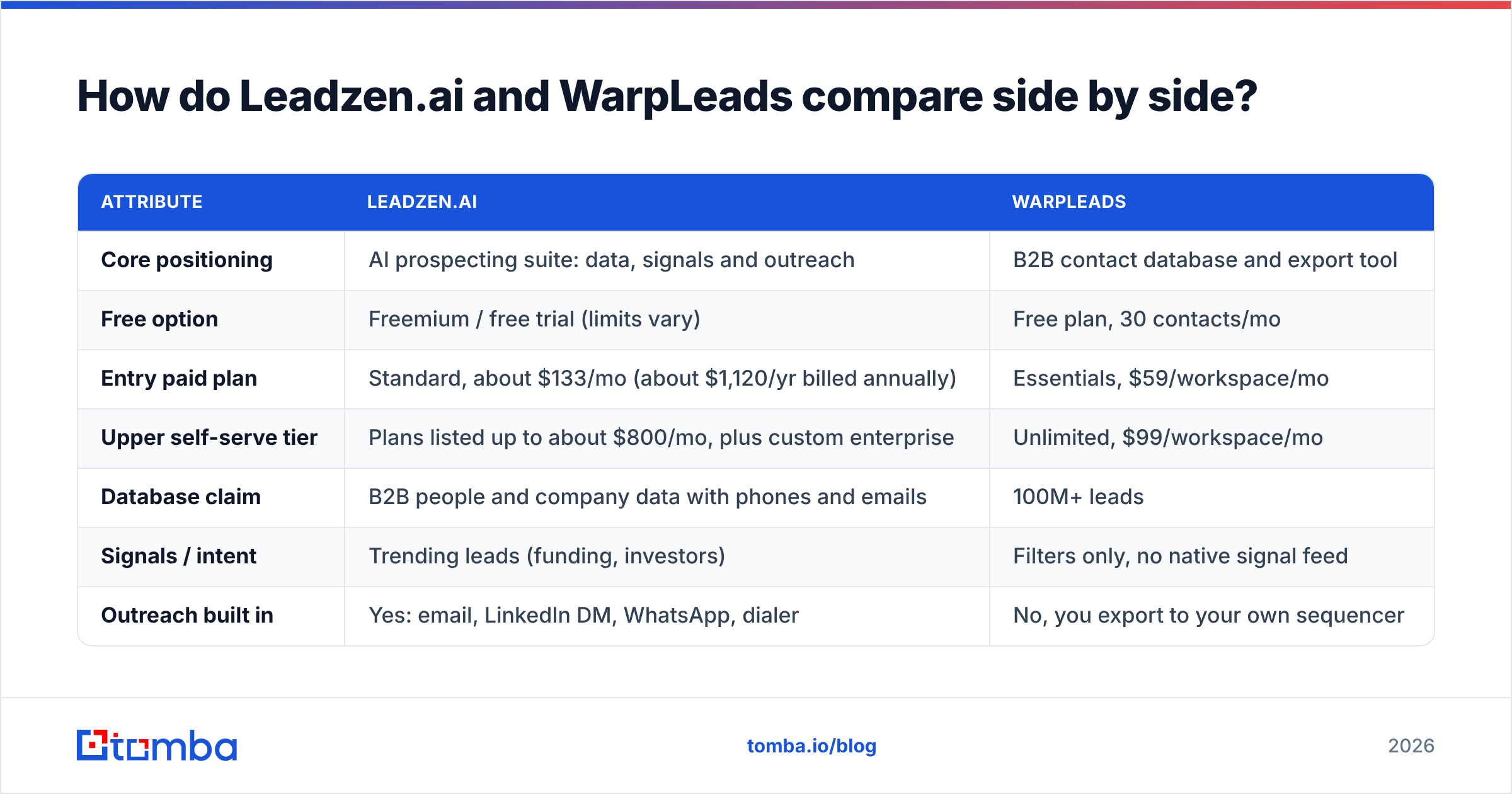
Leadzenai vs WarpLeads: how do they compare side by side?#
The table uses public list prices and positioning at the time of writing. Both vendors change plans often, so check their pricing pages before you buy.
| Attribute | Leadzen.ai | WarpLeads |
|---|---|---|
| Core positioning | AI prospecting suite: data, signals and outreach | B2B contact database and export tool |
| Free option | Freemium / free trial (limits vary) | Free plan, 30 contacts/mo |
| Entry paid plan | Standard, about $133/mo (about $1,120/yr billed annually) | Essentials, $59/workspace/mo |
| Upper self-serve tier | Plans listed up to about $800/mo, plus custom enterprise | Unlimited, $99/workspace/mo |
| Database claim | B2B people and company data with phones and emails | 100M+ leads |
| Signals / intent | Trending leads (funding, investors) | Filters only, no native signal feed |
| Outreach built in | Yes: email, LinkedIn DM, WhatsApp, dialer | No, you export to your own sequencer |
| Chrome extension | Yes, captures data from sites and social profiles | Yes, email and phone reveal on sites and LinkedIn |
| De-duplication | Handled inside the workflow | Called out as a feature |
| Best fit | Teams that want one tool for list building and outreach | Budget-conscious teams and agencies that need volume exports |
| Main trade-off | Higher price for bundled features you may not use | You bring your own outreach and verification stack |

Which evaluation criteria actually matter here?#
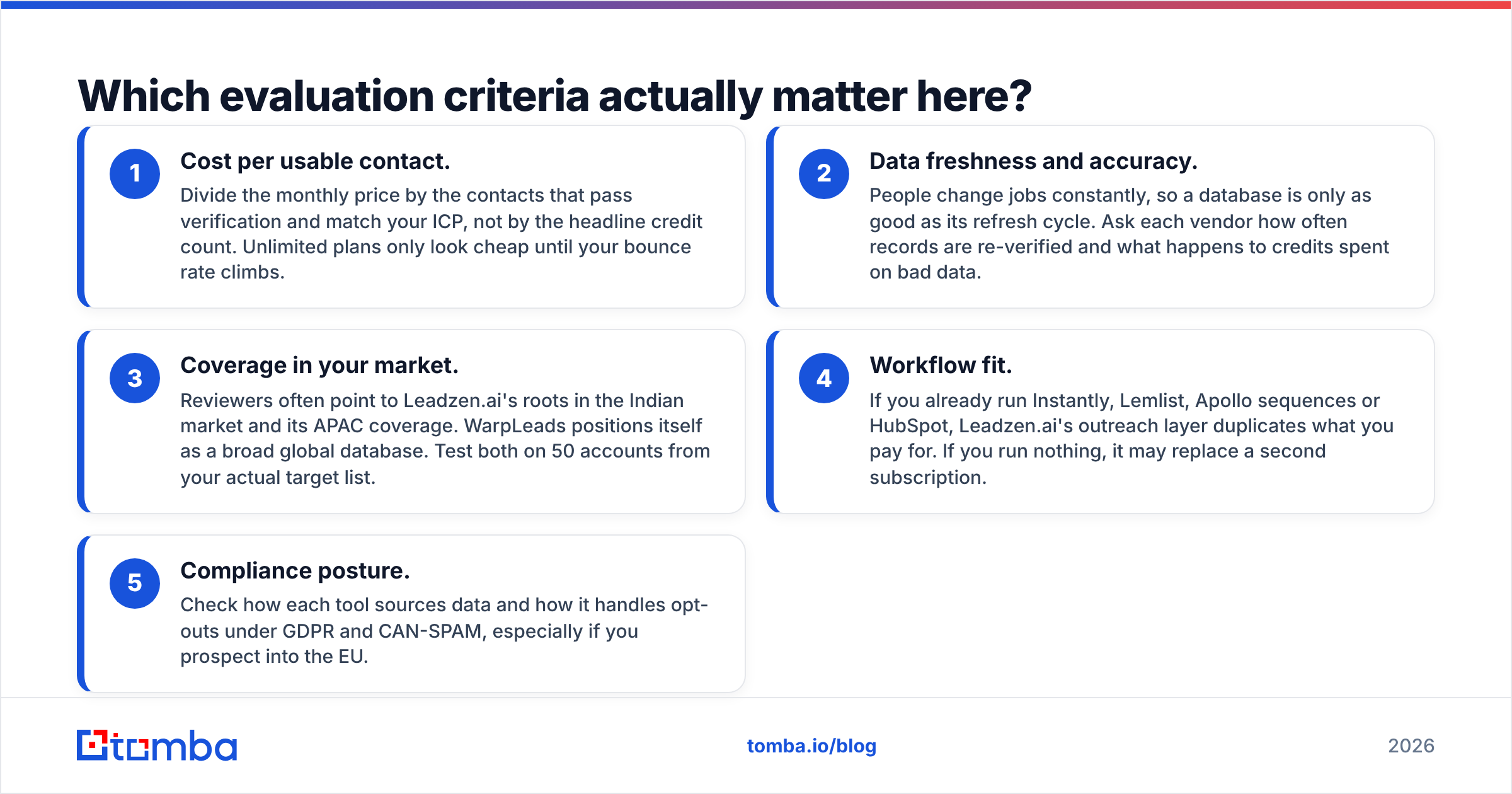
Feature grids make these two look like direct substitutes. They aren't. Score them on the five things that decide whether a lead tool pays for itself:
Cost per usable contact. Divide the monthly price by the contacts that pass verification and fit your ICP. Don't use the headline credit count. Unlimited plans only look cheap until your bounce rate climbs.
Data freshness and accuracy. People change jobs all the time. A database is only as good as its refresh cycle. Ask each vendor how often records are re-checked and what happens to credits spent on bad data.
Coverage in your market. Reviewers often point to Leadzen.ai's roots in India and its APAC coverage. WarpLeads positions itself as a broad global database. Test both on 50 accounts from your real target list.
Workflow fit. If you already run Instantly, Lemlist, Apollo or HubSpot, Leadzen.ai's outreach layer duplicates what you pay for. If you run nothing, it may replace a second subscription.
Compliance posture. Check how each tool sources data and handles opt-outs under GDPR and CAN-SPAM. This matters most if you prospect into the EU.
Score each criterion from 1 to 5 during a trial week and the choice usually becomes obvious.
How accurate is the data from each tool?#
Neither vendor publishes an independent, audited accuracy benchmark, so treat marketing claims as a starting point.

Here is what you can reasonably infer from how each product works:
- Leadzen.ai puts more effort into enrichment and signals. It layers funding events and company activity on top of contact records. That context improves targeting, but it does not guarantee the email itself is deliverable.
- WarpLeads puts more effort into volume and export. That suits a list-building agency, but big exports amplify any accuracy problem. A 10% invalid rate means 100 bounces on a 1,000-row list, and on a fresh domain that is enough to hurt your sender reputation.
Whichever you choose, run every export through an email verifier before it goes into a sequence. It takes minutes and is far cheaper than repairing a burned domain. Watch out for catch-all domains. They accept any address at the SMTP level, so a "valid" result on a catch-all domain can still bounce later or silently drop your mail.

A simple test protocol for your trial:
- Pick 50 known-good contacts, meaning people you have emailed successfully in the last 90 days.
- Look each one up in Leadzen.ai and WarpLeads.
- Record the hit rate (did the tool return an email?) and the match rate (was it the right one?).
- Push the misses through a verifier and log how many were invalid, risky or catch-all.
Fifty rows won't give you statistical certainty. It will show you which tool is guessing.
How does pricing compare in practice?#
On sticker price, WarpLeads is clearly cheaper. $59/mo for Essentials or $99/mo for Unlimited sits well below Leadzen.ai's roughly $133/mo Standard plan. Sticker price hides three things, though.
What's bundled. Leadzen.ai's price covers outreach channels (email, LinkedIn DM, WhatsApp, dialer) and a signal feed. If those replace a $50–$100/mo sequencer, the gap closes fast. If you already pay for a sequencer, you're paying twice.
What "unlimited" means. Unlimited export plans usually come with fair-use caps, rate limits or per-workspace restrictions. Before you commit to WarpLeads Unlimited for an agency with several clients, read the terms and ask about daily limits.
Verification costs. Neither price includes the cost of cleaning your list. Add a verification line to your budget either way.
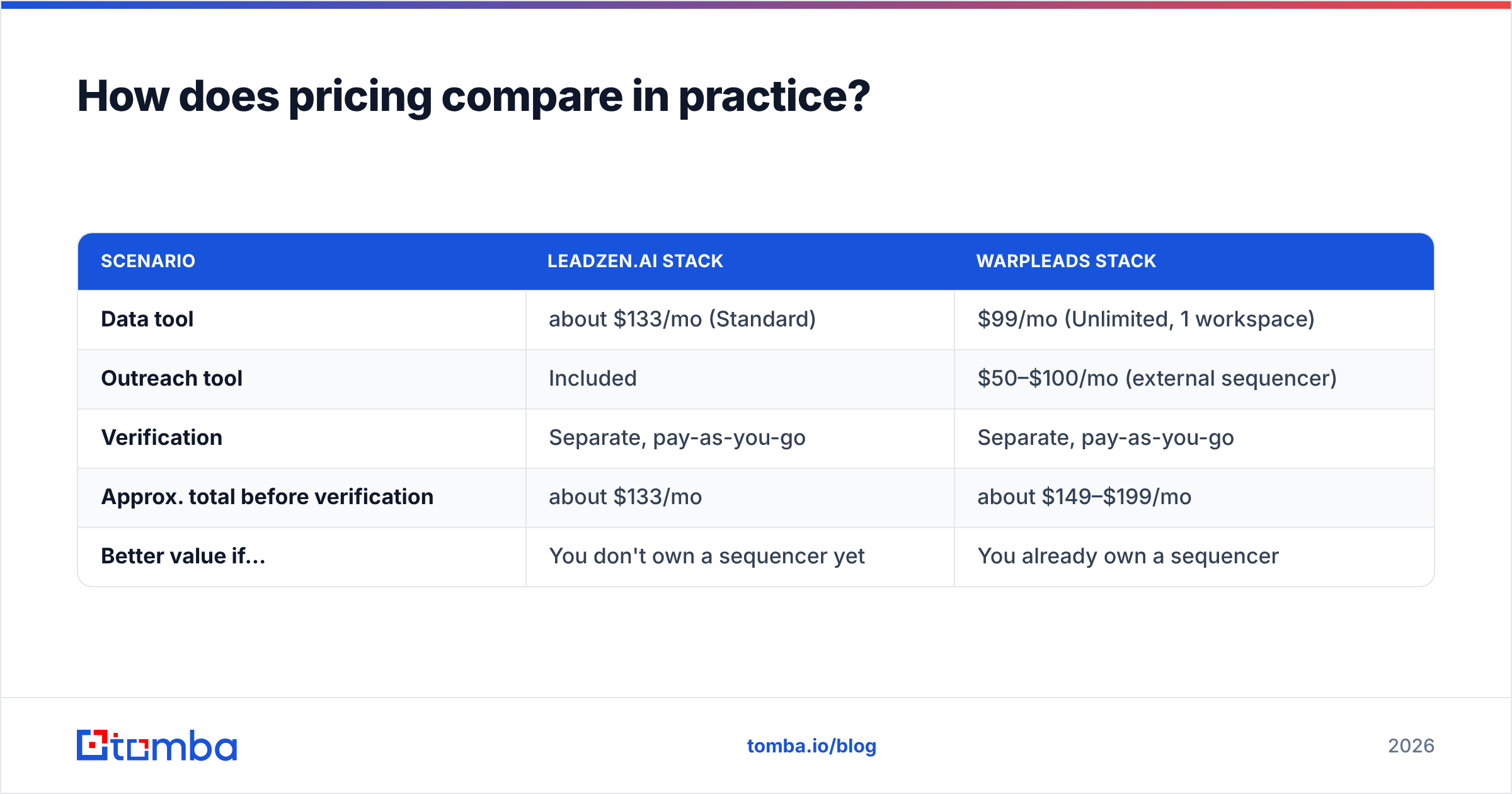
Here is a realistic monthly cost picture for a two-rep outbound team:
| Scenario | Leadzen.ai stack | WarpLeads stack |
|---|---|---|
| Data tool | about $133/mo (Standard) | $99/mo (Unlimited, 1 workspace) |
| Outreach tool | Included | $50–$100/mo (external sequencer) |
| Verification | Separate, pay-as-you-go | Separate, pay-as-you-go |
| Approx. total before verification | about $133/mo | about $149–$199/mo |
| Better value if... | You don't own a sequencer yet | You already own a sequencer |
That flips the usual assumption. For a team starting from zero, Leadzen.ai's bundle can end up cheaper overall. For a team that already has outreach set up, WarpLeads is the leaner add-on.
Is Leadzen.ai better than WarpLeads for outbound teams?#
It depends on where your bottleneck is.
Choose Leadzen.ai if:
- You want account selection driven by triggers such as funding rounds and investor activity, not static filters.
- Your team works WhatsApp and phone as hard as email, which is common in India, the Middle East and parts of APAC.
- You'd rather have one login for search, enrichment and outreach than connect three tools.
- You can justify a higher monthly spend for workflow consolidation.
Choose WarpLeads if:
- You're an agency or lead-gen freelancer who needs large, de-duplicated exports for many campaigns.
- You already run a sequencer and a CRM and only need raw contacts.
- Budget comes first, and the $59–$99/mo range is a hard ceiling.
- You want to test the product for free first (the 30 contacts/mo free plan is enough for a sanity check, not a campaign).
Consider neither if your main job is finding the right professional email for a specific person or company. In that case a focused email-finding tool with verification built in will usually beat a full database on accuracy per dollar.

What are the pros and cons of each?#
Leadzen.ai
- Pros: signal-driven prospecting (trending leads), multi-channel outreach built in, a Chrome extension that captures data as you browse, bulk search, and a good fit for teams outside North America that sell over WhatsApp and phone.
- Cons: a higher entry price, overlap with tools you may already pay for, a bigger learning curve because the suite has more modules, and pricing tiers that jump quickly toward the upper plans.
WarpLeads
- Pros: a low price, a real free plan, a 100M+ record claim, de-duplication, a simple Chrome extension, and export-friendly plans for agencies.
- Cons: no native outreach layer, no built-in signal feed, "unlimited" plans that need a careful read of fair-use terms, and large exports that raise the stakes if the data isn't verified.
How do they fit into a modern outbound stack?#
Think of your stack as three layers: data, hygiene and delivery.
- Data layer. This is where people and companies come from. Both tools live here. Leadzen.ai adds signals on top.
- Hygiene layer. Verification, catch-all handling and de-duplication happen here. WarpLeads covers part of de-duplication. Neither replaces a proper verifier.
- Delivery layer. Sequencing, warmup, inbox rotation and reply handling. Leadzen.ai reaches into this layer. WarpLeads deliberately stays out of it.
Most teams that get burned by a lead tool skipped the hygiene layer. If you pull 5,000 contacts in a week, run them through a bulk email finder and verifier before import. That is the single biggest factor in whether your domain survives the quarter.
For CRM sync, both tools export CSV. Check whether you need native connectors for HubSpot or Salesforce before you sign. Uploading CSVs by hand gets old fast once you're past a few hundred leads a week.
What should you check during a free trial?#
Use the trial or free plan to answer these questions, not to build your first campaign:
- Hit rate on your ICP. Does the tool find emails for your actual target titles and regions?
- Freshness. Pick ten people you know changed jobs in the last six months. Does the tool show their new company?
- Credit rules. Do you pay for a lookup that returns nothing, or for a contact that later bounces?
- Export friction. How many clicks from search to a clean CSV or CRM push?
- Extension behaviour. Does the Chrome extension work on the LinkedIn view you actually use (standard vs. Sales Navigator)?
- Support speed. Send one real question and time the reply.
If a tool fails questions 1 or 3, move on regardless of price.
So which one wins?#
In the Leadzenai vs WarpLeads matchup, neither wins outright. They're built for different buyers.
- Leadzen.ai wins for teams that want an all-in-one prospecting workspace with signals and multi-channel outreach, especially in markets where WhatsApp and phone matter. You pay more and get more.
- WarpLeads wins for agencies and lean teams that need affordable, high-volume contact exports and already own the rest of the stack.
The two things both options share: you still need to verify, and you still need to test on your own ICP before you commit to an annual plan.
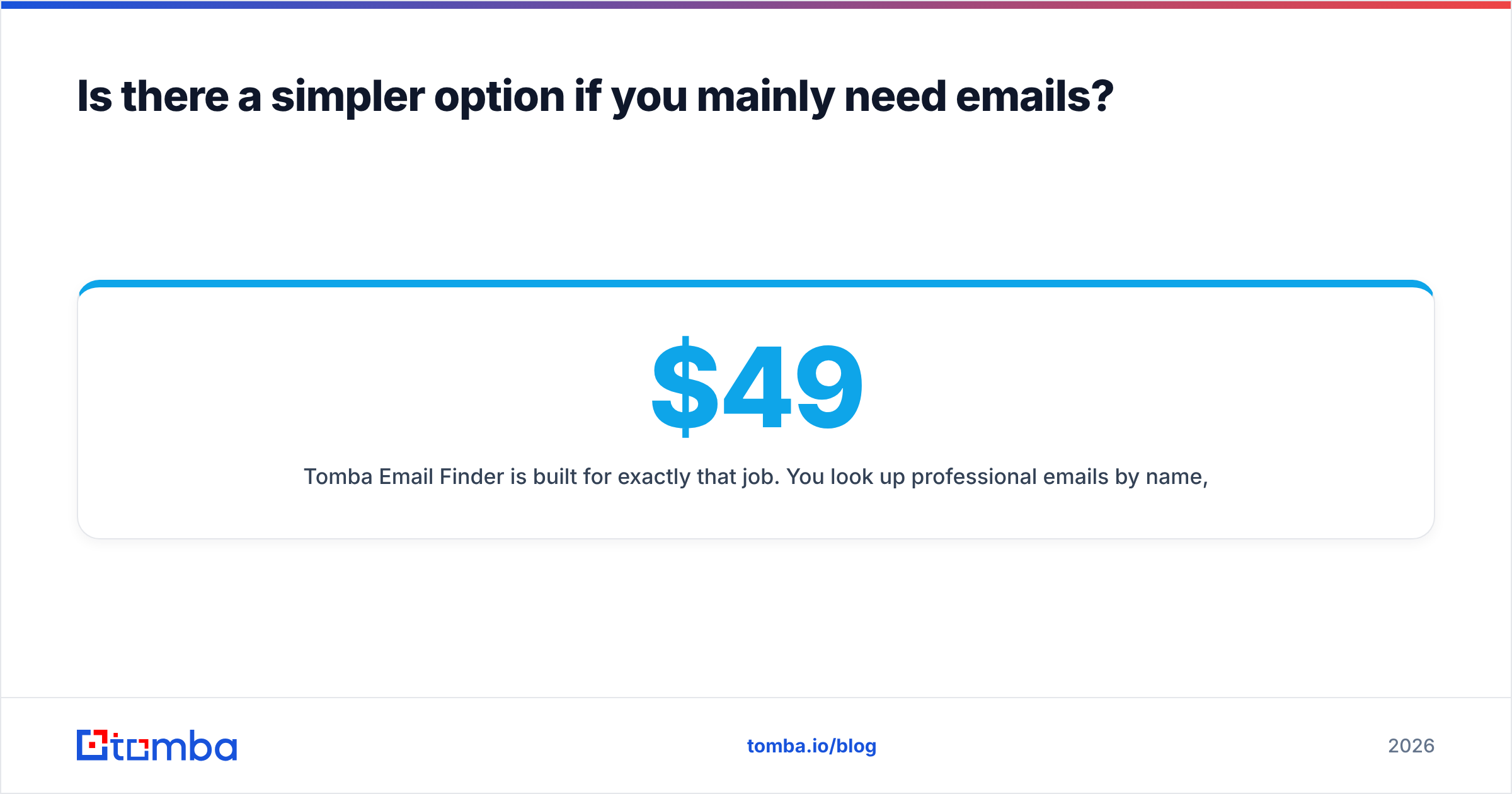
Is there a simpler option if you mainly need emails?#
If what you need is "find the right work email for this person or this company, and know it will land", you may not need a full prospecting suite or a 100M-row database.
Tomba Email Finder is built for exactly that job. You look up work emails by name, domain or company. Verification and catch-all checks sit right next to the finder, so you don't have to stitch tools together.
There's a free tier with 25 searches a month for testing on your own ICP. Paid plans start at $49/mo (Starter) and scale through Growth ($99/mo) and Pro ($249/mo). Compare the tiers on Tomba pricing. Then run your 50-contact accuracy test with the Tomba Email Finder next to Leadzen.ai and WarpLeads. Choose whichever gives you the most verified contacts per dollar.
Related guides#
// get started
Find, verify and enrich your first contacts today
Start on the free plan with 25 searches a month, then scale when your team is ready.
Free plan · No credit card required · GDPR & CCPA
// about the author