Leadzpipe Pricing, Reviews, Pros and Cons: Honest 2026 Review
Leadzpipe starts at $9/mo to sync Facebook and Google lead ads into your CRM, but your price depends on lead volume. Here are the plans, the pros and cons, and who should skip it.
This Leadzpipe pricing guide covers the 2026 plans, what reviews say, and the main pros and cons. Use it to decide if the tool fits your lead-ad stack.
TL;DR
- Leadzpipe is a lead-sync tool, not a prospecting database. It moves leads from Facebook Lead Ads, Google Ads lead forms and website forms into your CRM in real time. It can also send an automatic welcome email.
- On its public pricing page, the lowest lead-volume band (200–1,000 leads) starts at $9/mo for Sync and $29/mo for Engage. Prices go up as your monthly lead volume moves into higher bands.
- Annual billing is advertised at 40% off, and there is a 14-day free trial with no credit card required.
- Pros: cheap entry price, 5 users on Engage, and several lead-ad jobs in one tool. Cons: few public reviews, some "coming soon" features, and conflicting numbers on the pricing page.
- Leadzpipe syncs whatever the lead typed into the form. It doesn't check or enrich that data, so budget for a verification step afterwards.
What is Leadzpipe?#
Leadzpipe is a small SaaS tool that does one job. It gets leads out of ad platforms and into the CRM where sales works them. Its core unit is the "pipe." A pipe connects a lead source to a destination. Sources include a Facebook lead form, a Google Ads lead form extension or a landing-page form. Destinations include HubSpot, Pipedrive, Zoho, Freshsales or Google Sheets.
It helps to be clear about what Leadzpipe is not, because the name causes a lot of confusion in search results:
- It is not Leadpipe (leadpipe.com), which is a separate website-visitor identification product. Review aggregators and AI summaries mix the two up constantly. If a review mentions "identifying anonymous visitors by name," it's about the other product.
- It is not an email finder or B2B database. Leadzpipe never generates a contact. It only transports contacts that people submitted themselves through your ads and forms.
- It is not a full marketing automation platform. The "welcome emailer" is a single triggered message, not a nurture sequence builder.
A simple way to picture it: Leadzpipe is the plumbing between the faucet (your ad spend) and the sink (your CRM). It doesn't change the quality of the water.
How much does Leadzpipe cost in 2026?#
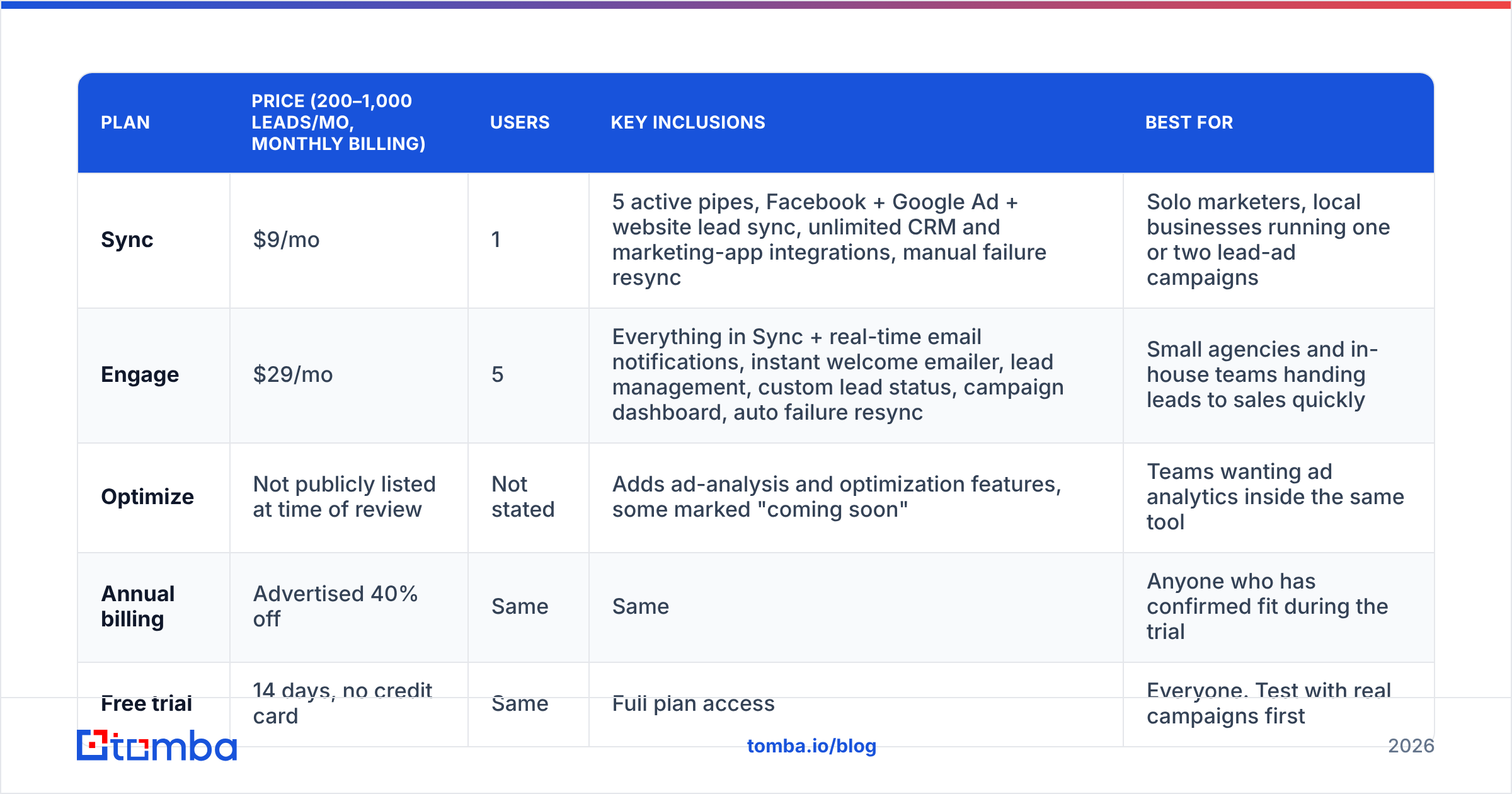
Leadzpipe prices by monthly lead volume first and by feature tier second. When we checked the pricing page in September 2026, the volume selector had five bands: 200–1,000, 1,000–2,000, 2,000–5,000, 5,000–10,000, and "more than 10,000." The dollar figures below are for the entry band. Plan on paying more at each higher band.
| Plan | Price (200–1,000 leads/mo, monthly billing) | Users | Key inclusions | Best for |
|---|---|---|---|---|
| Sync | $9/mo | 1 | 5 active pipes, Facebook + Google Ad + website lead sync, unlimited CRM and marketing-app integrations, manual failure resync | Solo marketers, local businesses running one or two lead-ad campaigns |
| Engage | $29/mo | 5 | Everything in Sync + real-time email notifications, instant welcome emailer, lead management, custom lead status, campaign dashboard, auto failure resync | Small agencies and in-house teams handing leads to sales quickly |
| Optimize | Not publicly listed at time of review | Not stated | Adds ad-analysis and optimization features, some marked "coming soon" | Teams wanting ad analytics inside the same tool |
| Annual billing | Advertised 40% off | Same | Same | Anyone who has confirmed fit during the trial |
| Free trial | 14 days, no credit card | Same | Full plan access | Everyone. Test with real campaigns first |
Before you budget, check these caveats:
- The page contradicts itself. The plan cards show $9 and $29. Further down, a comparison banner says "Leadzpipe $39/month onwards (for your team)" and another says "An unbelievable $29/mo." The hero copy also promises "Start Free for up to 6 Months," but the plan cards say 14 days. Get the exact figure and trial terms in writing before you commit.
- Promotions move the numbers. During our check there was a sale banner advertising "Save up to 90%." Promo pricing is good for you, but confirm what you'll pay at renewal.
- Volume bands are the real cost driver. A $9 plan at 800 leads a month is a very different purchase from the same plan at 6,000. Check which band your ad spend actually produces.
How does Leadzpipe pricing actually work?#
Leadzpipe pricing makes more sense once you split it into the five variables that set your bill:
- Lead volume band. This is the biggest factor. Your monthly lead count decides which price table you're on. Seasonal campaigns can push you up a band during peak months.
- Feature tier (Sync, Engage, Optimize). Sync is pure transport. Engage adds the parts that affect speed-to-lead: notifications, the welcome email and lead status tracking.
- Seats. Sync includes 1 user and Engage includes 5. But the pricing page also says "Unlimited Users," and the FAQ says there are no per-user limits. So the seat caps look like defaults, not hard limits. Check this during the trial.
- Active pipes. Sync caps you at 5 active pipes. An agency running forms for several clients can hit that limit first.
- Billing cycle. Annual billing at 40% off is a large discount. Only take it after the trial shows the tool fits your stack.
What does Leadzpipe replace, and is the savings claim fair?#
Leadzpipe's main sales pitch is consolidation. Its pricing page compares itself to a bundle of separate tools:
- Zapier for integrations, listed at "$61.25/month per user up to 2000 leads"
- Mailchimp for the welcome email, listed at "$19.99/month 3 seats up to 2000 contacts"
- An ad analytics tool at "$149/month up to $25k spends"
- An ad optimization tool at "$199/month up to $25k spends"
The page totals that stack at roughly $420/month.
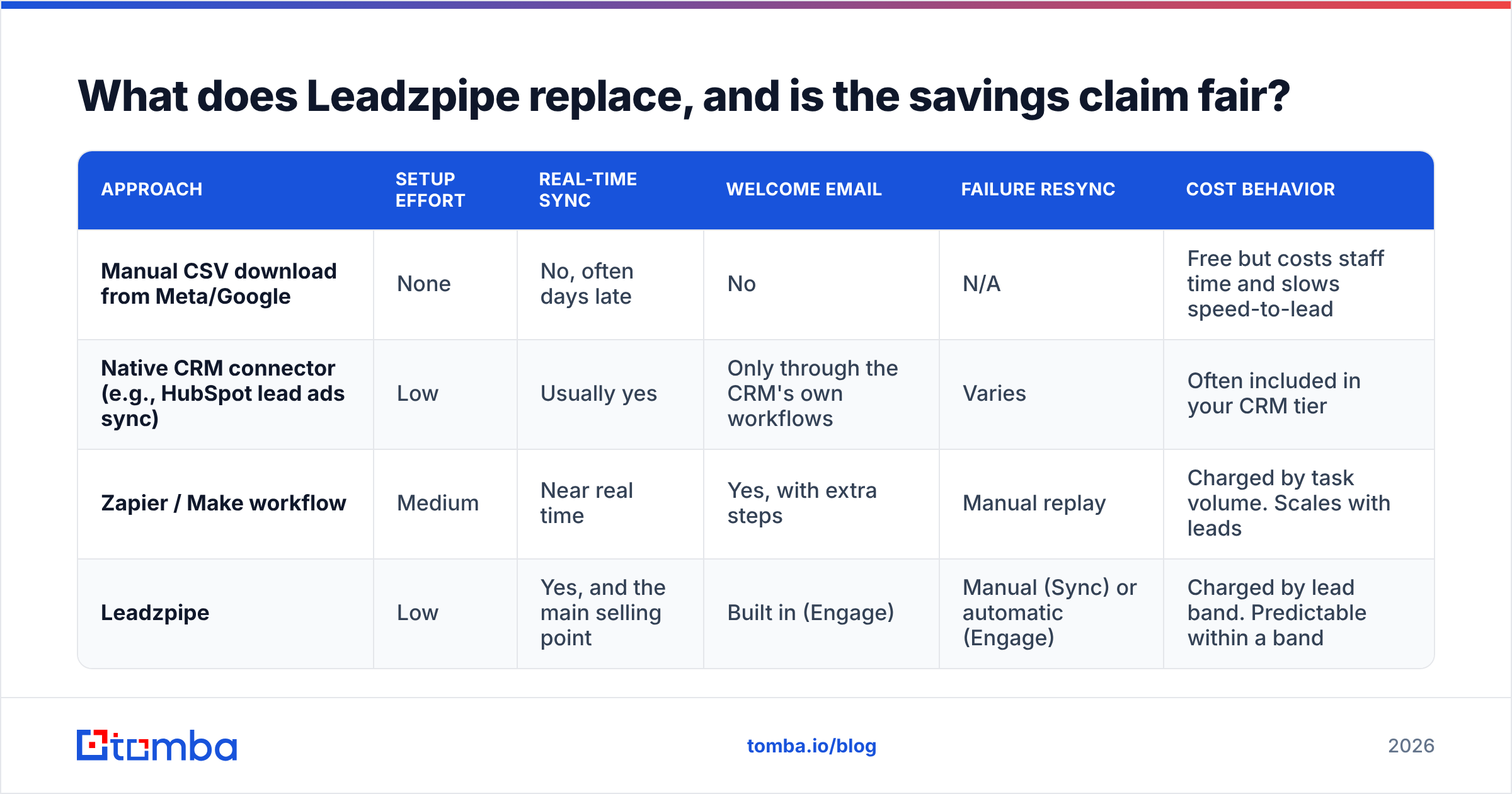
This is a vendor's own comparison, so read it with some skepticism. Most teams don't pay for all four of those tools just to move lead-ad data. A realistic comparison for most buyers is Leadzpipe against the one or two tools they would actually use instead. Those tools' prices change often, so check them on the Zapier pricing page and similar vendor pages rather than relying on screenshots.
| Approach | Setup effort | Real-time sync | Welcome email | Failure resync | Cost behavior |
|---|---|---|---|---|---|
| Manual CSV download from Meta/Google | None | No, often days late | No | N/A | Free but costs staff time and slows speed-to-lead |
| Native CRM connector (e.g., HubSpot lead ads sync) | Low | Usually yes | Only through the CRM's own workflows | Varies | Often included in your CRM tier |
| Zapier / Make workflow | Medium | Near real time | Yes, with extra steps | Manual replay | Charged by task volume. Scales with leads |
| Leadzpipe | Low | Yes, and the main selling point | Built in (Engage) | Manual (Sync) or automatic (Engage) | Charged by lead band. Predictable within a band |
Verdict: if your CRM already has a solid native lead-ads connector and you don't need a welcome email, Leadzpipe is a nice-to-have. If you run many lead forms across several pages and ad accounts, or you're an agency pushing into many different CRMs, the flat, band-based pricing is a better deal than paying per task.
What do real Leadzpipe reviews say?#
There aren't many independent reviews. Leadzpipe has a listing on SourceForge, but third-party review volume is small compared with established tools. Many results that look like "Leadzpipe reviews" on G2 or elsewhere are actually about Leadpipe, the visitor-identification product, so check the product URL before you trust a star rating.
Here is what the available feedback and Leadzpipe's own testimonials suggest:
- Speed is the most praised feature. One testimonial on the pricing page, from a property-services business, says the lead notification arrives "before it shows on my Facebook dashboard." Real-time sync is the core promise, and users seem to feel it delivers.
- Consolidation appeals to small teams. Testimonials repeatedly mention replacing several apps with one fixed price.
- The product is still maturing. The Optimize tier lists features marked "COMING SOON," and the pricing page is inconsistent. Both are signs of a small vendor still building out.
Our reading: the reviews fit a focused tool that does the lead-sync job well for SMBs and agencies, from a vendor without the review footprint of bigger platforms. That doesn't count against it, but it does make your own trial more important.
What are Leadzpipe's pros and cons?#
| Pros | Cons |
|---|---|
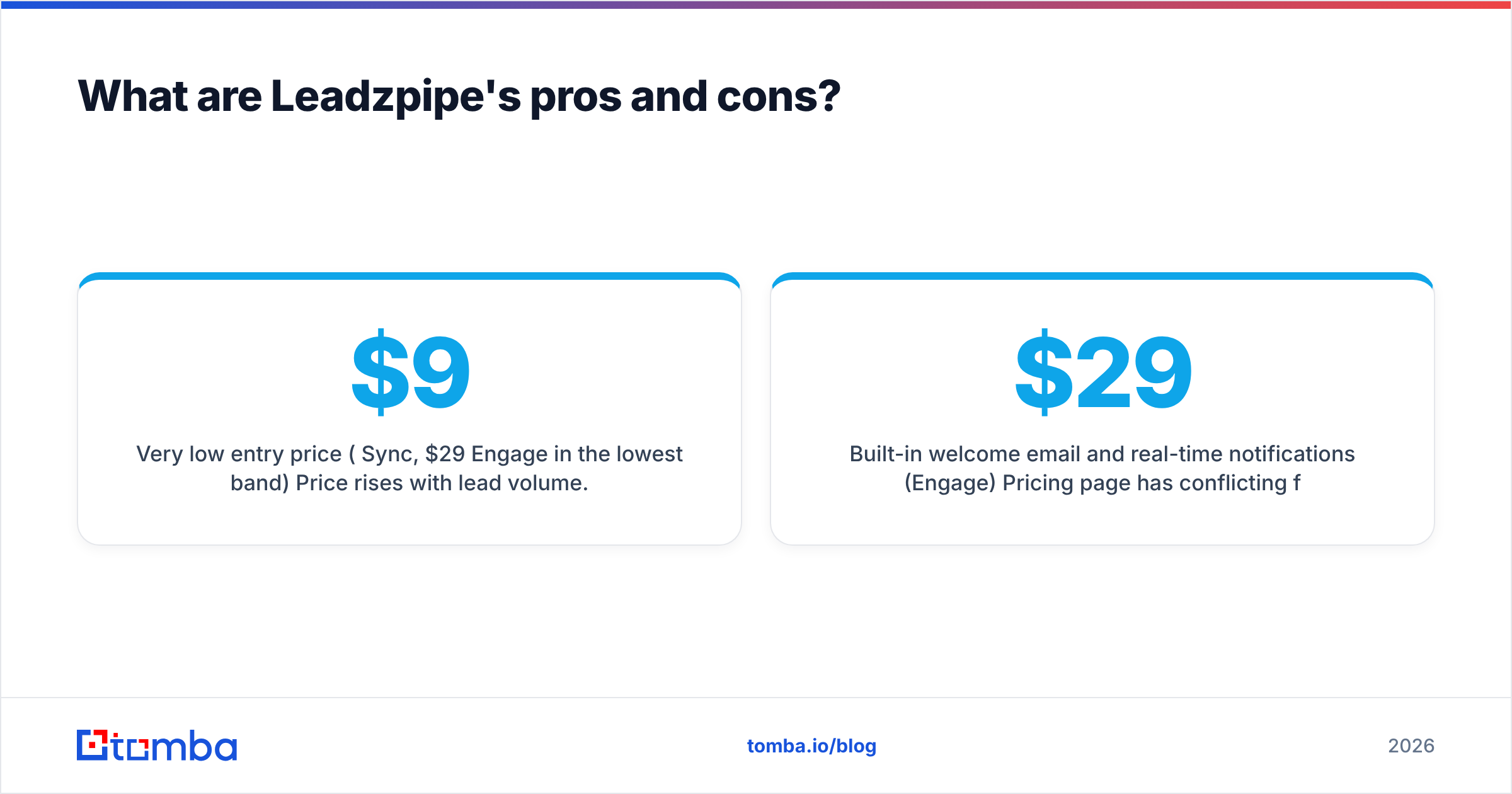
| Very low entry price ($9/mo Sync, $29/mo Engage in the lowest band) | Price rises with lead volume. High-volume advertisers pay significantly more |
| No per-seat pricing model; Engage includes 5 users | Few independent reviews, and frequent name confusion with Leadpipe |
| Covers Facebook, Google Ads and website lead sync in one tool | Some Optimize features still "coming soon" |
| Built-in welcome email and real-time notifications (Engage) | Pricing page has conflicting figures ($29 vs $39, 14-day vs 6-month free) |
| Auto failure resync on Engage protects against silent drops | No data verification or enrichment. Bad emails flow straight into your CRM |
| 14-day free trial with no credit card | Welcome emailer is a single message, not a nurture engine |
The last con matters more than it looks. Lead-ad forms auto-fill from the user's Facebook or Google profile. That's why their conversion rates are good, and it's also why they bring in a lot of personal Gmail addresses, old work emails and typos. Leadzpipe will deliver every one of those to your CRM in real time. If sales starts emailing them straight away, your bounce rate and sender reputation pay the price.
Who should buy Leadzpipe, and who should skip it?#
Buy it if:
- You spend on Facebook or Google lead ads every month and currently download CSVs or rely on a fragile Zapier setup.
- You're an agency connecting many client pages and ad accounts to many different CRMs.
- Speed-to-lead is your key metric (home services, real estate, education, local B2B services) and you want an instant welcome email without building workflows.
Skip it if:
- Your CRM's native lead-ads integration already works reliably. HubSpot, for example, has built-in lead ads syncing documented on HubSpot's knowledge base.
- You're doing outbound prospecting rather than inbound lead ads. Leadzpipe doesn't find contacts.
- You need enterprise procurement features such as SOC 2 documentation, SSO or dedicated account management. Ask Leadzpipe directly before you assume they're there.

How do you fix the data-quality gap after Leadzpipe syncs a lead?#
Leadzpipe fixes the transport problem. What arrives is only as good as what the prospect typed or auto-filled. A clean post-sync workflow looks like this:
- Verify the email as soon as it lands. Run new leads through an email verifier before they enter a sales sequence. This catches typos, dead inboxes and disposable addresses that lead forms let through.
- Swap personal emails for work emails where it matters. For B2B lead ads, a Gmail address plus a company name is enough to look up the person's professional address. Tomba's email finder takes a name plus a company domain and returns the work address with a confidence score.
- Enrich the record. Job title, company size and industry decide routing and scoring. Contact enrichment fills in the firmographic fields a three-field lead form never collects.
- Push it back to the CRM. If you already use HubSpot, the HubSpot integration keeps enriched fields in the same record Leadzpipe created, with no duplicates.
This step is cheaper than it sounds. Tomba's free tier includes 25 searches a month, which is enough to test the workflow on a week of lead-ad volume. Paid plans start at $49/mo (see Tomba pricing for the Growth and Pro tiers).
Is Leadzpipe worth it in 2026?#
For its target buyer, yes, with caveats. With Leadzpipe pricing at $9–$29/mo in the lowest volume band, it is one of the cheapest ways to get real-time lead-ad sync, a welcome email and a basic lead pipeline. You don't have to build your own automation. The Engage tier is the one to pick for most teams. Auto failure resync and instant notifications are where the ROI comes from. And $20/mo over Sync is small next to the cost of a lead that sat in Facebook for two days.
Before you commit, do three things:
- Get the exact quote for your volume band in writing, because the pricing page shows conflicting figures.
- Use the full 14-day trial on live campaigns, not a test form, so you see real sync latency and failure handling.
- Plan a verification and enrichment step, because Leadzpipe moves data without checking it.
Next step: turn synced leads into reachable leads#
Leadzpipe gets leads into your CRM quickly. It can't make them reachable. If your lead-ad forms bring in personal Gmail addresses, half-completed company fields or mistyped emails, sales ends up following up fast on contacts that bounce. Tomba Email Finder closes that gap: give it the lead's name and company, and it returns a verified professional email you can route, score and sequence with confidence. Start on the free plan, run it on a week of Leadzpipe leads, and compare your bounce rate before and after.
Related guides#
// get started
Find, verify and enrich your first contacts today
Start on the free plan with 25 searches a month, then scale when your team is ready.
Free plan · No credit card required · GDPR & CCPA
// about the author