Legitimate Email Checker: How to Verify Any Address in 2026
Most free email checkers only confirm an address looks right. A legitimate email checker tells you if it can actually receive mail. Here's how the checks work, which tools do them properly, and how to read risky results.
TL;DR
- A legitimate email checker confirms that a mailbox exists and can receive mail. Confirming that an address is formatted correctly is only the first of its checks.
- Real verification runs in layers: syntax, domain and MX records, an SMTP handshake, catch-all detection, and risk flags for disposable or role-based addresses.
- Catch-all domains are where most checkers fall short. If a tool can't tell you how confident it is on those, your bounce rate will show it.
- For lists over a few hundred contacts, use a dedicated verifier that works in bulk and returns clear status codes. A free single-address checker works for spot checks but can't carry a campaign.
- Suspicious email in your inbox rather than on your list? That's a separate check covering SPF, DKIM, DMARC and the sender domain, explained below.
What is a legitimate email checker?#
A legitimate email checker tells you whether an email address is real, active and safe to send to. The key word is "legitimate." The address jane.doe@acme-corp.com passes any format check. Whether Jane still works at Acme, whether the mailbox exists, and whether Acme's server accepts every address so it can't be probed are all separate questions.
The term covers two jobs, and people searching for it usually want one of them:
- List hygiene (the B2B case). You have prospect or customer addresses and need to know which ones will bounce before you send. That's what this guide mostly covers.
- Inbound trust (the security case). An email landed in your inbox and you want to know whether the sender is who they claim to be. That's covered further down.
For sales and marketing teams, the first job has direct consequences. A hard-bounce rate above roughly 2% is the level at which mailbox providers start treating you with suspicion. Google's sender guidelines and Microsoft's equivalent rules for bulk senders put authentication and list quality at the center of inbox placement. A checker that only validates syntax doesn't help with that.
How does email verification actually work?#
A verifier is a lot like a courier confirming a delivery address before a shipment goes out. The courier checks that the street exists, that the building is on it, and whether someone signs for packages or the building has a mailroom that accepts everything. Email verification runs through the same stages.
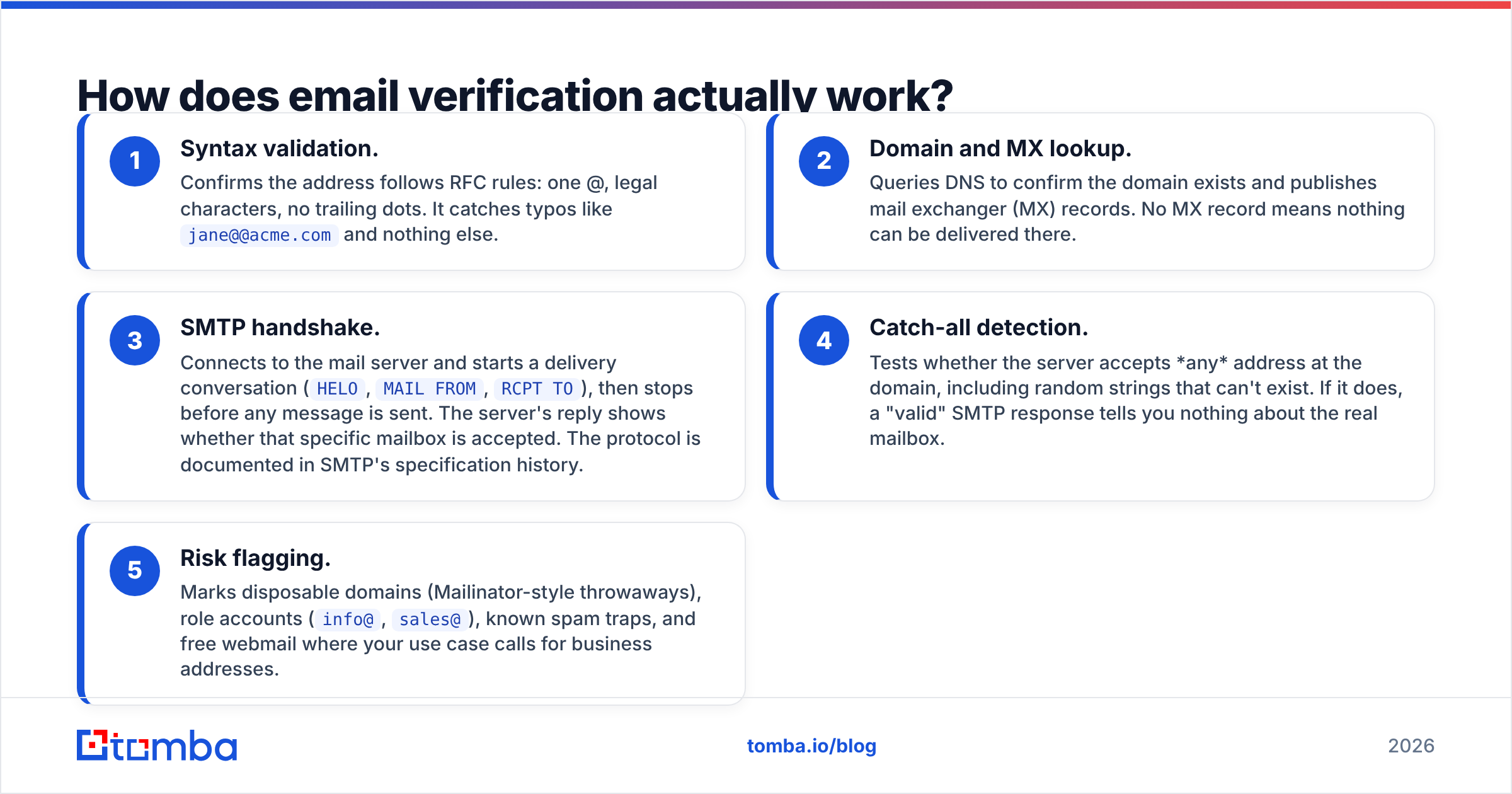
- Syntax validation. Confirms the address follows RFC rules: one @, legal characters, no trailing dots. It catches typos like
jane@@acme.comand nothing else. - Domain and MX lookup. Queries DNS to confirm the domain exists and publishes mail exchanger (MX) records. No MX record means nothing can be delivered there.
- SMTP handshake. Connects to the mail server and starts a delivery conversation (
HELO,MAIL FROM,RCPT TO), then stops before any message is sent. The server's reply shows whether that specific mailbox is accepted. The protocol is documented in SMTP's specification history. - Catch-all detection. Tests whether the server accepts any address at the domain, including random strings that can't exist. If it does, a "valid" SMTP response tells you nothing about the real mailbox.
- Risk flagging. Marks disposable domains (Mailinator-style throwaways), role accounts (
info@,sales@), known spam traps, and free webmail where your use case calls for business addresses.
A tool that skips steps 3 and 4 is really a format checker. That's fine for a signup form. It isn't enough for a cold outreach list.

Which verification statuses should you trust?#
Every serious verifier returns a status for each address. Vendors name them differently, but they map onto roughly the same buckets. Your sending rules should follow those buckets.
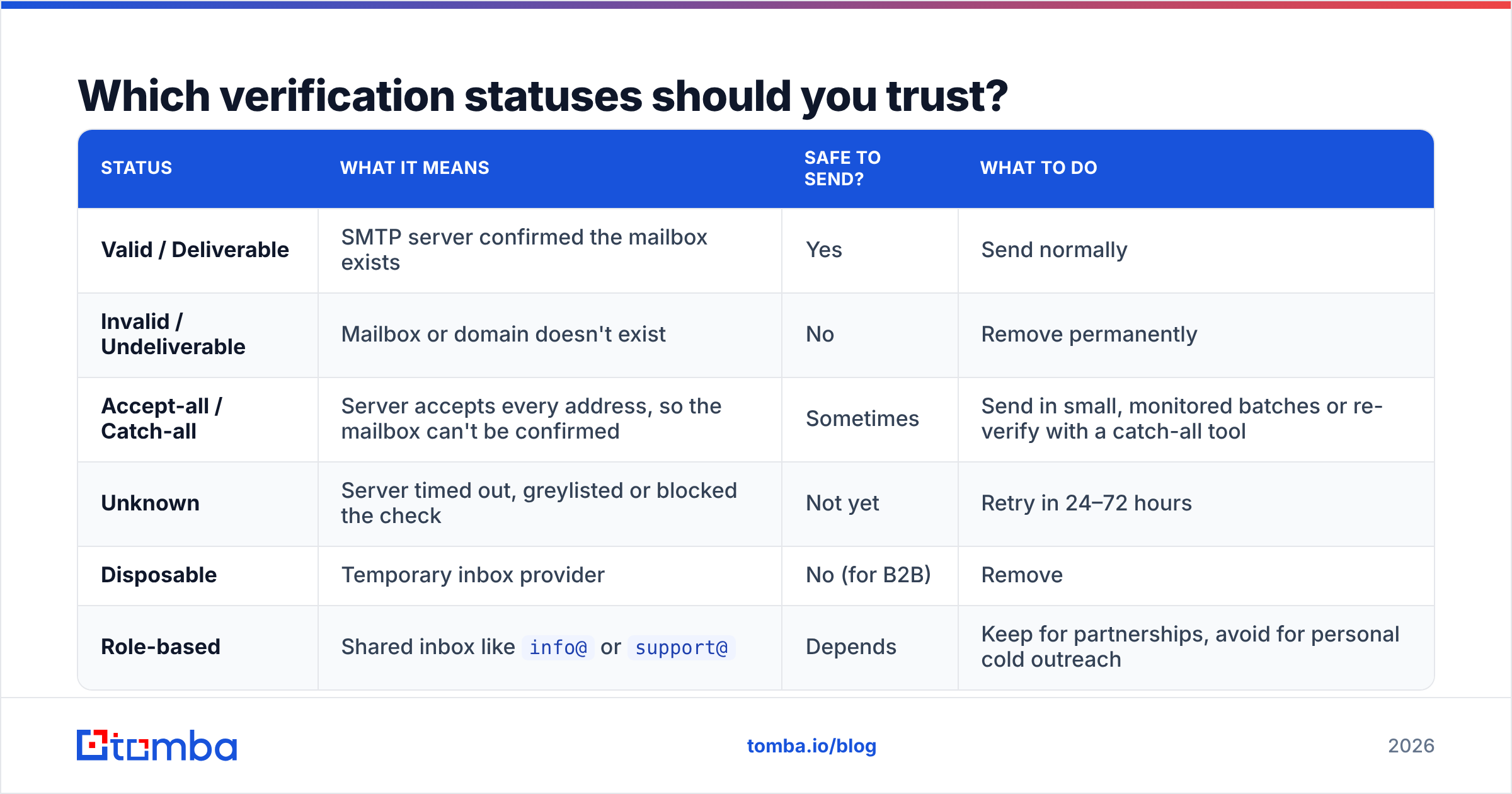
| Status | What it means | Safe to send? | What to do |
|---|---|---|---|
| Valid / Deliverable | SMTP server confirmed the mailbox exists | Yes | Send normally |
| Invalid / Undeliverable | Mailbox or domain doesn't exist | No | Remove permanently |
| Accept-all / Catch-all | Server accepts every address, so the mailbox can't be confirmed | Sometimes | Send in small, monitored batches or re-verify with a catch-all tool |
| Unknown | Server timed out, greylisted or blocked the check | Not yet | Retry in 24–72 hours |
| Disposable | Temporary inbox provider | No (for B2B) | Remove |
| Role-based | Shared inbox like info@ or support@ |
Depends | Keep for partnerships, avoid for personal cold outreach |
The catch-all row accounts for most bounce trouble. In B2B lists, a large share of company domains, especially those behind Microsoft 365 or security gateways, are configured as accept-all. If your checker labels all of them "risky" and stops there, you either throw away good leads or send blind. Better tools go further. The Tomba catch-all verifier, for example, runs additional signals against accept-all domains to separate addresses that are probably real from ones that are probably dead.
What are the best legitimate email checker tools in 2026?#
Most of the well-known verifiers run the same five-step pipeline. They differ in catch-all handling, speed at volume, integrations, and whether verification comes bundled with other tools such as finding. Here is a neutral comparison of six widely used options:
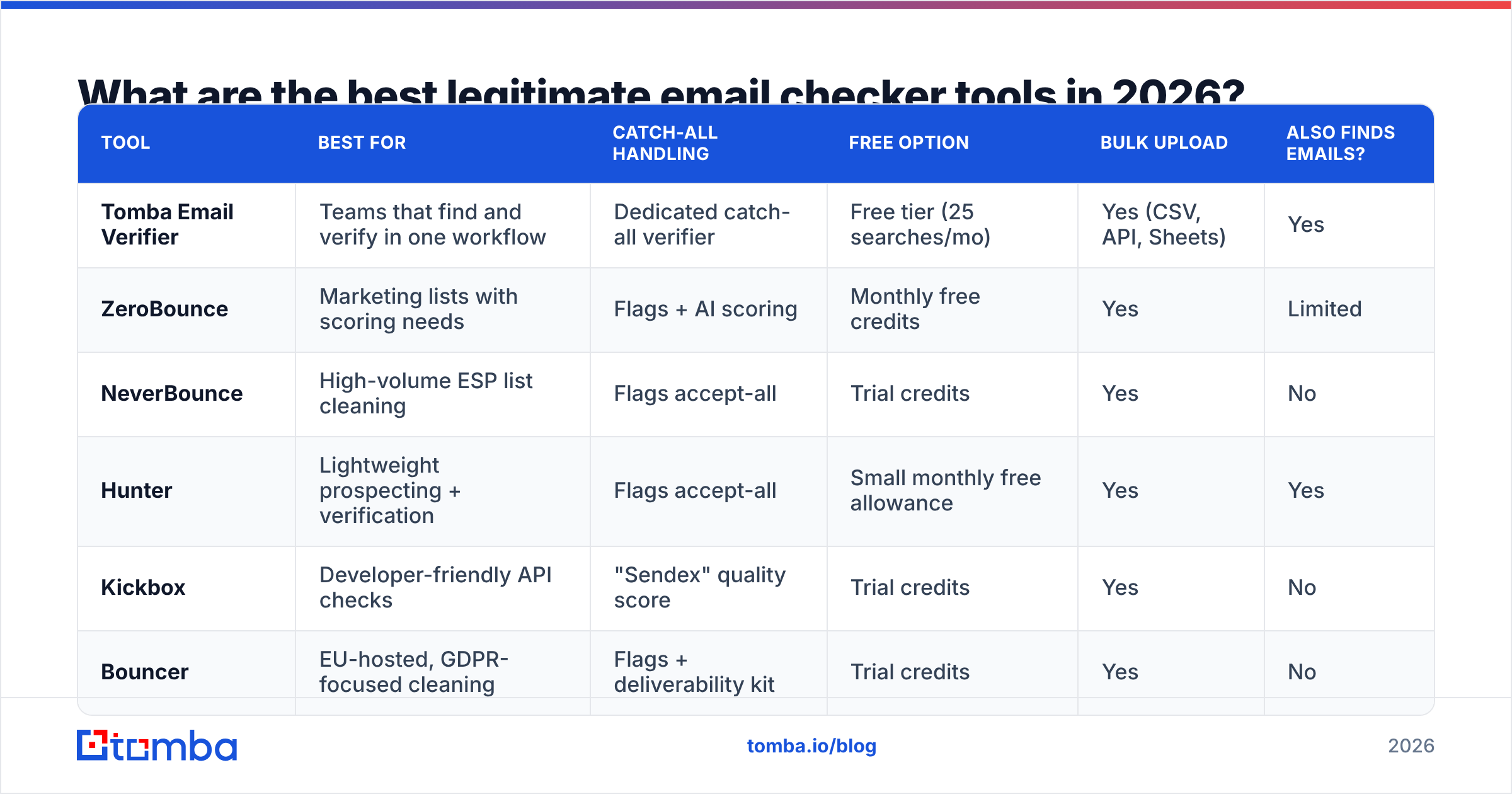
| Tool | Best for | Catch-all handling | Free option | Bulk upload | Also finds emails? |
|---|---|---|---|---|---|
| Tomba Email Verifier | Teams that find and verify in one workflow | Dedicated catch-all verifier | Free tier (25 searches/mo) | Yes (CSV, API, Sheets) | Yes |
| ZeroBounce | Marketing lists with scoring needs | Flags + AI scoring | Monthly free credits | Yes | Limited |
| NeverBounce | High-volume ESP list cleaning | Flags accept-all | Trial credits | Yes | No |
| Hunter | Lightweight prospecting + verification | Flags accept-all | Small monthly free allowance | Yes | Yes |
| Kickbox | Developer-friendly API checks | "Sendex" quality score | Trial credits | Yes | No |
| Bouncer | EU-hosted, GDPR-focused cleaning | Flags + deliverability kit | Trial credits | Yes | No |
A few honest notes on reading this table:
- Verification-only tools (NeverBounce, Kickbox, Bouncer) are good at list cleaning and plug easily into email service providers. Use one when you already have your data and just need to scrub it.
- Scoring layers such as ZeroBounce's AI score or Kickbox's Sendex help when you have to decide whether to send to borderline addresses. They are probabilistic, so treat them as input to your decision, not a guarantee. ZeroBounce's product site documents how its score buckets work.
- Combined finder + verifier tools (Tomba, Hunter) save a step for outbound teams. Finding an address and verifying it at the same time means you never import unverified contacts.
- User reviews on G2's email verification category are useful for checking support quality and real-world accuracy complaints. Vendor accuracy claims are almost always measured on the vendor's own test set.
On pricing, most verifiers sell credit packs or monthly plans. Tomba's paid plans start at $49/mo (Starter), with Growth at $99/mo, Pro at $249/mo, and custom Enterprise pricing. Competitor prices change often and depend on volume, so compare per-1,000-verification costs on each vendor's pricing page at the list size you actually expect.
Is a free email checker good enough?#
For one address, yes. For a list, no.
A free single-address checker such as Tomba's free email checker handles the everyday cases:
- A candidate or vendor sends a contact and you want to confirm it before replying.
- A new signup looks suspicious and you want a quick sanity check.
- A single prospect address came from a conference badge scan and you want to confirm it before a follow-up.
Free tools fall short at volume for three reasons:
- Rate limits. SMTP servers throttle repeated probes from the same IP. Paid verifiers rotate infrastructure and retry greylisted results, which free widgets usually can't do.
- No catch-all resolution. Most free checkers report "accept-all" and stop there.
- No workflow. Pasting 2,000 addresses one at a time isn't practical. You need CSV upload, an API, or a spreadsheet add-on.
The cost comparison is also lopsided. A bounced cold email costs you nothing directly, but a campaign with a 6% bounce rate can push a sending domain into spam folders for weeks. At that point the damage is to sender reputation, which is much harder to rebuild than a verification subscription is to buy.
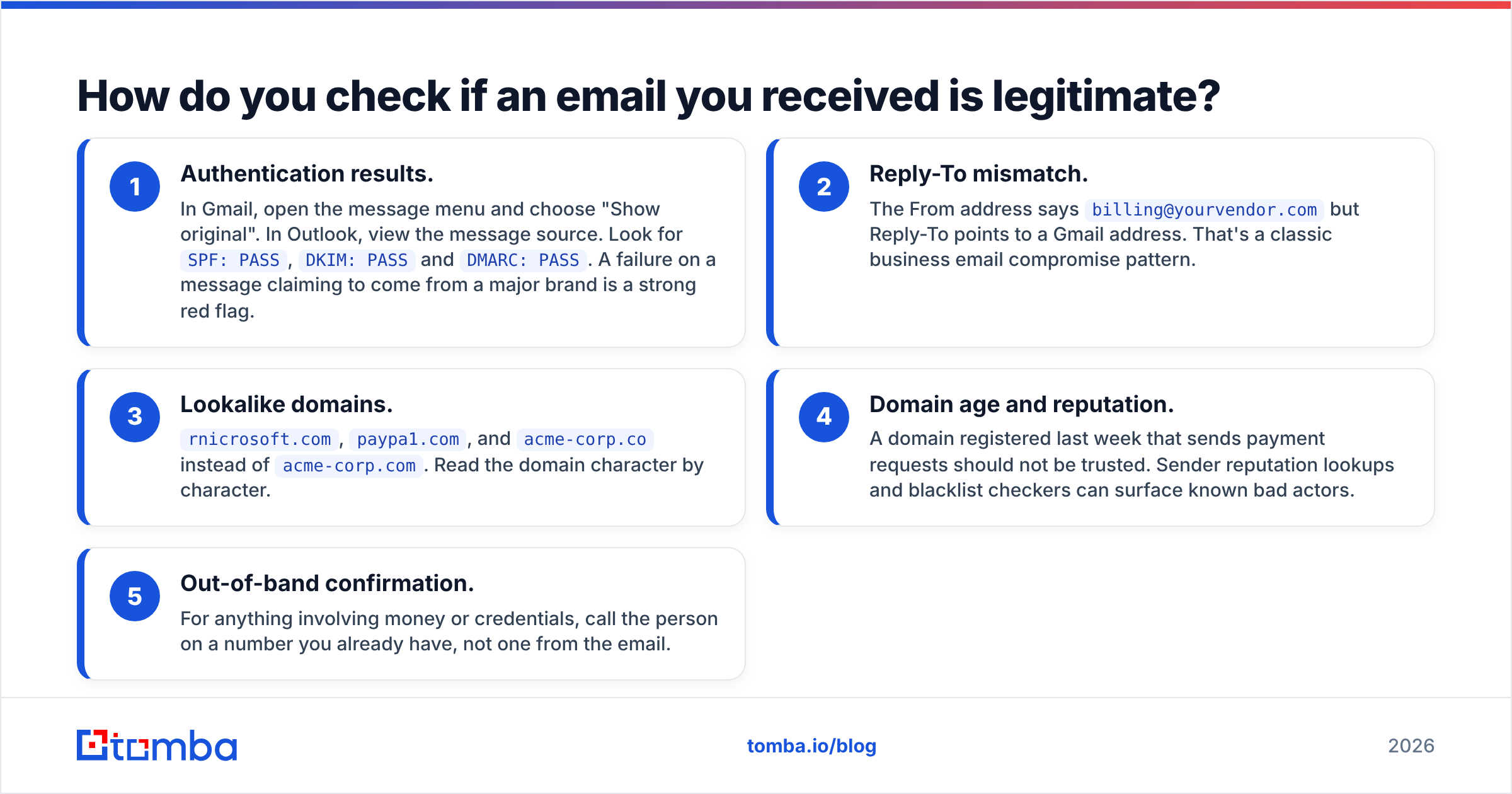
How do you check if an email you received is legitimate?#
If you got here because a message in your inbox looks off, such as an invoice from a vendor you've never used or a "CEO" asking for gift cards, you need a different kind of legitimacy check. Verifying that the sender's address exists proves nothing. Scammers use real mailboxes all the time.
Check these instead:
- Authentication results. In Gmail, open the message menu and choose "Show original". In Outlook, view the message source. Look for
SPF: PASS,DKIM: PASSandDMARC: PASS. A failure on a message claiming to come from a major brand is a strong red flag. - Reply-To mismatch. The From address says
billing@yourvendor.combut Reply-To points to a Gmail address. That's a classic business email compromise pattern. - Lookalike domains.
rnicrosoft.com,paypa1.com, andacme-corp.coinstead ofacme-corp.com. Read the domain character by character. - Domain age and reputation. A domain registered last week that sends payment requests should not be trusted. Sender reputation lookups and blacklist checkers can surface known bad actors.
- Out-of-band confirmation. For anything involving money or credentials, call the person on a number you already have, not one from the email.
A reverse lookup, meaning you take the sender's address and see which person and company it belongs to, can help too. It can't prove intent, though. Treat authentication failures as decisive and everything else as supporting evidence.
How should you build email verification into your workflow?#
Checking a list once before a big send is better than nothing, but the teams with consistently low bounce rates verify at every point where new data enters. A practical setup looks like this:
- Verify at capture. Run real-time API verification on signup forms, demo requests and gated-content forms. This stops typos and disposable addresses at entry.
- Verify at find. When a rep pulls a prospect's email from a finder tool or browser extension, verification should happen in the same step. Tomba's email verifier runs automatically on addresses found through its finder, so reps don't import unchecked contacts into the CRM.
- Re-verify before every campaign. B2B data decays quickly. People change jobs, companies rebrand domains, and mailboxes get deprovisioned. Anything older than about 90 days should be re-checked.
- Route catch-alls deliberately. Don't let accept-all addresses mix into your main sequence. Put them in a separate, lower-volume campaign and watch the bounce rate on that segment on its own.
- Close the loop. Feed hard bounces from your sending tool back into the CRM as invalid, so nobody re-imports them six months later.
What mistakes make email checkers look inaccurate?#
When teams complain that "the verifier said valid but it bounced," the tool is rarely the only cause. The usual culprits:
- Treating catch-all as valid. If you exported "valid + accept-all" as one list, some of those bounces were predictable.
- Stale verification. An address verified in January can be dead by June. The verification result has an expiry date even if the CSV doesn't show one.
- Greylisting timeouts read as invalid. Some servers temporarily reject unknown senders. Good verifiers mark these "unknown" and retry, but a hasty export can drop valid contacts.
- Soft bounces counted as hard bounces. A full mailbox or a temporary server outage is not a verification failure. Check the bounce code before you blame the tool.
- Sending infrastructure problems. If your domain lacks proper SPF, DKIM and DMARC, rejections can look like bounces even when every address was real.
The fix for all of these is the same: understand what each status means, keep verification recent, and segment by confidence level instead of flattening everything into "good" and "bad."
How do you choose the right legitimate email checker?#
Match the tool to where your addresses come from and what you do with them:
- You already have a large marketing list and just need it cleaned: a verification-only specialist (NeverBounce, Bouncer, Kickbox, ZeroBounce) that integrates with your ESP.
- You're building outbound lists from scratch: a combined finder + verifier so every contact is checked the moment it's found. This is where Tomba and Hunter fit.
- Your targets sit on enterprise domains with heavy security gateways: prioritize catch-all resolution over headline accuracy claims, and test on a sample of your own data before committing.
- Developers are wiring verification into a product: look at API latency, rate limits and documentation quality before price.
Whatever you pick, run a pilot. Take 500 addresses you already know the outcome for, including some you know have bounced. Run them through two or three tools and compare the statuses. That tells you more than any vendor benchmark.
Ready to stop sending to addresses that don't exist?#
Checking addresses one at a time only fixes half the problem. The other half is not collecting bad addresses to begin with. Tomba Email Finder finds professional email addresses by name, domain or company and verifies each one in the same step, with catch-all detection built in. You can start on the free tier with 25 searches a month and move to Starter at $49/mo once your pipeline needs more volume.
Related guides#
// get started
Find, verify and enrich your first contacts today
Start on the free plan with 25 searches a month, then scale when your team is ready.
Free plan · No credit card required · GDPR & CCPA
// about the author